












MOBILE, UX &
THE QUEST FOR ROI

Jon Fox
Lead UX, OpenX
@JonFoxUX

Tuesday, October 15, 13
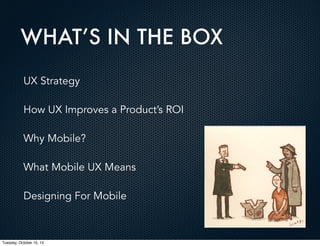
WHAT’S IN THE BOX
UX Strategy
How UX Improves a Product’s ROI
Why Mobile?
What Mobile UX Means
Designing For Mobile

Tuesday, October 15, 13
WHAT IS UX STRATEGY
Defining what kind of experience you want.
• Product
• Interaction
• Engineering
• Visual Design
Focus through user understanding & product market fit.

Tuesday, October 15, 13
BEYOND PRODUCT DESIGN
With products, UX touches all areas where a user
interacts with a brand:
•

Marketing

•

Customer Support

•

Sales

•

The Brand Itself

Tuesday, October 15, 13
EXAMPLE 1: OGC
Just like products, you must test a brand.
You risk not connecting with you audience, or worse...
In 2008, the UK Office of Government Commerce spent $23,000 of taxpayer
dollars on a complete redesign of their logo and branding. They did not test
with the public before a widespread launch, which included letterhead, supplies
and at a large event napkins and other collateral.
At that event people saw the logo turned 90 degrees for the first time.

Tuesday, October 15, 13
EXAMPLE 1: OGC

Tuesday, October 15, 13
WHY INVEST?
Increased Productivity
Reduced Costs
Increased Sales

Tuesday, October 15, 13
ROI and MOBILE
Filter ROI Metrics for Mobile Use Cases:
Speed
Context and Relevancy
Captive Audience
Task Completion
Updates

Tuesday, October 15, 13
ROI METRICS
Hard

Soft

1 Conversion / Acquisition

1 Engagement

2 Lead generations

2 Customer satisfaction

3 Retention

3 Loyalty to brand

4 (Targeted) traffic

4 Utilization and product / service adoption

5 Viral referrals

5 Awareness

6 Channel migration
7 Employee productivity
8 Cost savings

Tuesday, October 15, 13
HOW TO MEASURE UX ROI?
Conversion Rates (Understanding Your Target)

•

Engagement

•

Frequency of Use

•

Task / Activity Completion

•

Sign Ups

•

App Updates

Revenue (Understanding Your Market)

•

Ad Impressions

•

Sales

Support Costs (Understanding Your Systems

Tuesday, October 15, 13
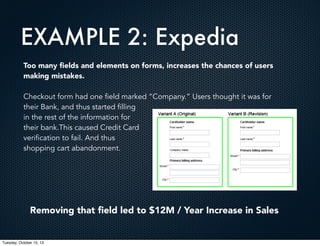
EXAMPLE 2: Expedia
Too many fields and elements on forms, increases the chances of users
making mistakes.
Checkout form had one field marked “Company.” Users thought it was for
their Bank, and thus started filling
in the rest of the information for
their bank.This caused Credit Card
verification to fail. And thus
shopping cart abandonment.

Removing that field led to $12M / Year Increase in Sales

Tuesday, October 15, 13
WHY MOBILE?
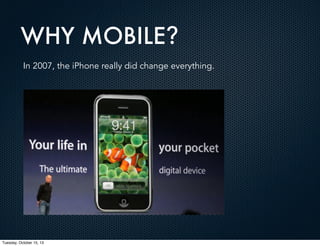
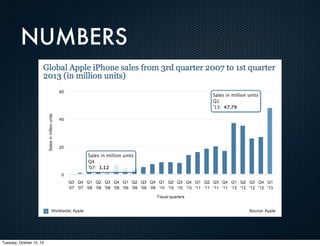
In 2007, the iPhone really did change everything.

Tuesday, October 15, 13
WHY MOBILE?
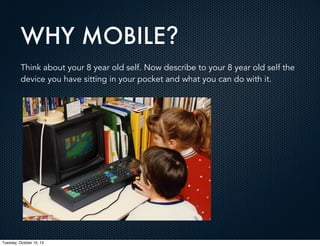
Think about your 8 year old self. Now describe to your 8 year old self the
device you have sitting in your pocket and what you can do with it.

Tuesday, October 15, 13
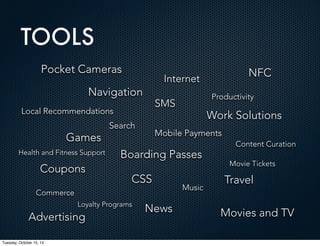
TOOLS
Pocket Cameras

Internet

Navigation

Health and Fitness Support

Coupons

Search

Boarding Passes
CSS

Loyalty Programs

Tuesday, October 15, 13

Work Solutions

Mobile Payments

Commerce

Advertising

Productivity

SMS

Local Recommendations

Games

NFC

News

Music

Content Curation
Movie Tickets

Travel
Movies and TV
TOOLS

Tuesday, October 15, 13
WHY UX?

Tuesday, October 15, 13
WHY MOBILE UX MATTERS
Although consumers are spending 32% of their digital time on
mobile, only 10% of digital commerce is occurring there.

WHY?

Tuesday, October 15, 13
WHY MOBILE UX MATTERS
Google’s “Our Mobile Planet” 2013 study:
1.Cannot trust credit card security on mobile device (40%)
2.Screen size is too small (40%)
3.Cannot see detailed product/service information (27%)
4.Hard to type (25%)
5.Hard to compare prices and options (22%)

THESE ARE ALL UX PROBLEMS AND SOLVABLE
Tuesday, October 15, 13
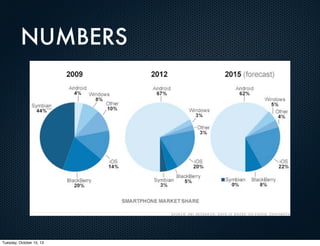
NUMBERS
•

Heavy mobile data users are projected to triple to one billion by 2014. (Morgan Stanley)

•

Among American adults (18-29) who use the Internet on their phones, 45% do most of
their web surfing there. For all age groups, though, preferences are shifting away from
desktops and laptops and toward mobile devices. (6/2012, Nieman Lab)

•

Worldwide, 25% of mobile web users only use mobile web or very rarely use desktop
websites. (techi.com)

•

US consumers are spending 127 minutes per day in mobile apps, up 35% from last
year. Desktop web usage actually declined slightly by 2.4% from 72 to 70 minutes.
Nearly two times more time in mobile apps than on the Web. (12/2012, Techcrunch)

•

More than 39% of people use their smartphone at least once a day while watching TV,
62% say they do this multiple times a week and 84 percent do at least once a month.

(11/2012, Nielsen)

Tuesday, October 15, 13
NUMBERS
Takeaway:
The growing demographic for mobile usage is youth.
Youth spend more money online than any other group.
The experience needs to be better.

Tuesday, October 15, 13
NUMBERS

Tuesday, October 15, 13
NUMBERS

Tuesday, October 15, 13
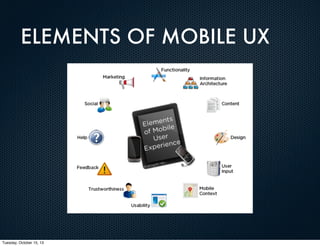
ELEMENTS OF MOBILE UX

Tuesday, October 15, 13
WHY UX FOR MOBILE?
Context:
For the first time there is a context for software
applications beyond sitting at a desk.
Environment:
Mobile users are out in the world, doing other things,
with other people and distracted.

Tuesday, October 15, 13
WHY UX FOR MOBILE?
Speed:
Mobile users need to get information and perform
actions quickly while doing other things.
Filling Time:
In line, waiting for someone or using it for distraction.

Tuesday, October 15, 13
WHY UX FOR MOBILE?
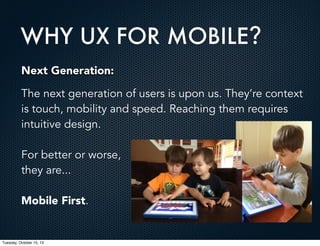
Next Generation:
The next generation of users is upon us. They’re context
is touch, mobility and speed. Reaching them requires
intuitive design.
For better or worse,
they are...
Mobile First.

Tuesday, October 15, 13
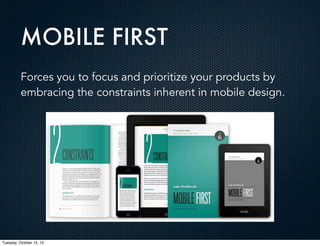
MOBILE FIRST
Forces you to focus and prioritize your products by
embracing the constraints inherent in mobile design.

Tuesday, October 15, 13
MOBILE FIRST
"When a team designs mobile first, the end result is an
experience focused on the key tasks users want to
accomplish without the extraneous detours and
general interface debris that litter today's desktopaccessed Web sites. That's good user experience and
good for business."
- Luke Wroblewski

Tuesday, October 15, 13
MOBILE FIRST:
A Spice Not A Main Course
Like all aspects of product design, Mobile First may or may not
be the right strategy.
Depends on goals of the
product, the needs of the
business and the flexibility
required to deliver
experiences to users.

Tuesday, October 15, 13
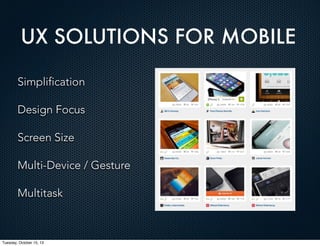
UX SOLUTIONS FOR MOBILE
Simplification
Design Focus
Screen Size
Multi-Device / Gesture
Multitask

Tuesday, October 15, 13
Over Reliance on Features that Few Use =

COMPLEXITY

Tuesday, October 15, 13
DESIGNING FOR MOBILE
Personas aren't static.
Fragmented experience, Users distracted.
Simplicity.
Always on.
Speed.

Tuesday, October 15, 13
DESIGNING FOR MOBILE
PERSONAS:
An individual user may shade through several personas in the course of
a day, each adapted to its context and possessing its own idiom of
words, gestures, interactions, and expectations.
FRAGMENTED:
Build for flow
Build for grace under fire
Must be tested in the world, not in a lab.

Tuesday, October 15, 13
DESIGNING FOR MOBILE
SIMPLICITY:
Products used to be complex to push features first.
Mobile has changed that. It forces simplicity.
Quick, easy to understand and free from distraction.
Big Buttons
Clear Text Labels
Easy, short text
ALWAYS ON:
Mobile demands an "always on" mentality for content portability. It is
an extension of what they were doing at their desk but also what they
want to do right now.
Must be goal oriented, free of distractions and dark patterns.
Focused Experience
Tuesday, October 15, 13
DESIGNING FOR MOBILE
Speed
• 74% of mobile users will leave a site if it takes longer than 5 secs
to load.
• The average size of a web page in 2012 was 1.25MB.
• Assuming this trend continues, average page sizes in 2014 will be
over 2 MB.
• 3G network speeds are 40% slower and 4G/LTE connections are
12% slower on average than desktop connections.
• 86% of responsive designs tested from a sample of 347 sites sent
the same assets/files to all devices.
Tuesday, October 15, 13
BEYOND MOBILE
We need to consider how this impacts the next generation
of interaction design.
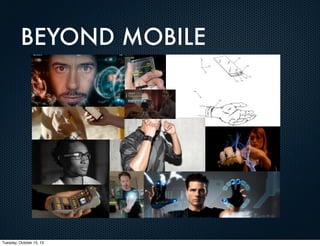
Non-touch based gestures, speech, wearables
and flexible interfaces.
The line between computer and human interaction will continue
to blur and mobile is the first step. By focusing design patterns
on context and simplicity, we can create products that will
continue to change the world.
New opportunities for UX, monetization and product design.
What will you create?
Tuesday, October 15, 13
BEYOND MOBILE

Tuesday, October 15, 13
Q&A

Tuesday, October 15, 13
ACKNOWLEDGEMENTS
• Simple and Usable by Giles Colborne
• Designing for Mobile Superpower
by Joanna Proulx. UX Magazine
• Tapworthy by Josh Clark
• Why Mobile ROI is So Hard on Medium.com
by Ameet Ranadive, Twitter
• The Internet by You
Tuesday, October 15, 13

Mobile, UX & the Quest for ROI

  • 1.
    MOBILE, UX & THEQUEST FOR ROI Jon Fox Lead UX, OpenX @JonFoxUX Tuesday, October 15, 13
  • 2.
    WHAT’S IN THEBOX UX Strategy How UX Improves a Product’s ROI Why Mobile? What Mobile UX Means Designing For Mobile Tuesday, October 15, 13
  • 3.
    WHAT IS UXSTRATEGY Defining what kind of experience you want. • Product • Interaction • Engineering • Visual Design Focus through user understanding & product market fit. Tuesday, October 15, 13
  • 4.
    BEYOND PRODUCT DESIGN Withproducts, UX touches all areas where a user interacts with a brand: • Marketing • Customer Support • Sales • The Brand Itself Tuesday, October 15, 13
  • 5.
    EXAMPLE 1: OGC Justlike products, you must test a brand. You risk not connecting with you audience, or worse... In 2008, the UK Office of Government Commerce spent $23,000 of taxpayer dollars on a complete redesign of their logo and branding. They did not test with the public before a widespread launch, which included letterhead, supplies and at a large event napkins and other collateral. At that event people saw the logo turned 90 degrees for the first time. Tuesday, October 15, 13
  • 6.
  • 7.
    WHY INVEST? Increased Productivity ReducedCosts Increased Sales Tuesday, October 15, 13
  • 8.
    ROI and MOBILE FilterROI Metrics for Mobile Use Cases: Speed Context and Relevancy Captive Audience Task Completion Updates Tuesday, October 15, 13
  • 9.
    ROI METRICS Hard Soft 1 Conversion/ Acquisition 1 Engagement 2 Lead generations 2 Customer satisfaction 3 Retention 3 Loyalty to brand 4 (Targeted) traffic 4 Utilization and product / service adoption 5 Viral referrals 5 Awareness 6 Channel migration 7 Employee productivity 8 Cost savings Tuesday, October 15, 13
  • 10.
    HOW TO MEASUREUX ROI? Conversion Rates (Understanding Your Target) • Engagement • Frequency of Use • Task / Activity Completion • Sign Ups • App Updates Revenue (Understanding Your Market) • Ad Impressions • Sales Support Costs (Understanding Your Systems Tuesday, October 15, 13
  • 11.
    EXAMPLE 2: Expedia Toomany fields and elements on forms, increases the chances of users making mistakes. Checkout form had one field marked “Company.” Users thought it was for their Bank, and thus started filling in the rest of the information for their bank.This caused Credit Card verification to fail. And thus shopping cart abandonment. Removing that field led to $12M / Year Increase in Sales Tuesday, October 15, 13
  • 12.
    WHY MOBILE? In 2007,the iPhone really did change everything. Tuesday, October 15, 13
  • 13.
    WHY MOBILE? Think aboutyour 8 year old self. Now describe to your 8 year old self the device you have sitting in your pocket and what you can do with it. Tuesday, October 15, 13
  • 14.
    TOOLS Pocket Cameras Internet Navigation Health andFitness Support Coupons Search Boarding Passes CSS Loyalty Programs Tuesday, October 15, 13 Work Solutions Mobile Payments Commerce Advertising Productivity SMS Local Recommendations Games NFC News Music Content Curation Movie Tickets Travel Movies and TV
  • 15.
  • 16.
  • 17.
    WHY MOBILE UXMATTERS Although consumers are spending 32% of their digital time on mobile, only 10% of digital commerce is occurring there. WHY? Tuesday, October 15, 13
  • 18.
    WHY MOBILE UXMATTERS Google’s “Our Mobile Planet” 2013 study: 1.Cannot trust credit card security on mobile device (40%) 2.Screen size is too small (40%) 3.Cannot see detailed product/service information (27%) 4.Hard to type (25%) 5.Hard to compare prices and options (22%) THESE ARE ALL UX PROBLEMS AND SOLVABLE Tuesday, October 15, 13
  • 19.
    NUMBERS • Heavy mobile datausers are projected to triple to one billion by 2014. (Morgan Stanley) • Among American adults (18-29) who use the Internet on their phones, 45% do most of their web surfing there. For all age groups, though, preferences are shifting away from desktops and laptops and toward mobile devices. (6/2012, Nieman Lab) • Worldwide, 25% of mobile web users only use mobile web or very rarely use desktop websites. (techi.com) • US consumers are spending 127 minutes per day in mobile apps, up 35% from last year. Desktop web usage actually declined slightly by 2.4% from 72 to 70 minutes. Nearly two times more time in mobile apps than on the Web. (12/2012, Techcrunch) • More than 39% of people use their smartphone at least once a day while watching TV, 62% say they do this multiple times a week and 84 percent do at least once a month. (11/2012, Nielsen) Tuesday, October 15, 13
  • 20.
    NUMBERS Takeaway: The growing demographicfor mobile usage is youth. Youth spend more money online than any other group. The experience needs to be better. Tuesday, October 15, 13
  • 21.
  • 22.
  • 23.
    ELEMENTS OF MOBILEUX Tuesday, October 15, 13
  • 24.
    WHY UX FORMOBILE? Context: For the first time there is a context for software applications beyond sitting at a desk. Environment: Mobile users are out in the world, doing other things, with other people and distracted. Tuesday, October 15, 13
  • 25.
    WHY UX FORMOBILE? Speed: Mobile users need to get information and perform actions quickly while doing other things. Filling Time: In line, waiting for someone or using it for distraction. Tuesday, October 15, 13
  • 26.
    WHY UX FORMOBILE? Next Generation: The next generation of users is upon us. They’re context is touch, mobility and speed. Reaching them requires intuitive design. For better or worse, they are... Mobile First. Tuesday, October 15, 13
  • 27.
    MOBILE FIRST Forces youto focus and prioritize your products by embracing the constraints inherent in mobile design. Tuesday, October 15, 13
  • 28.
    MOBILE FIRST "When ateam designs mobile first, the end result is an experience focused on the key tasks users want to accomplish without the extraneous detours and general interface debris that litter today's desktopaccessed Web sites. That's good user experience and good for business." - Luke Wroblewski Tuesday, October 15, 13
  • 29.
    MOBILE FIRST: A SpiceNot A Main Course Like all aspects of product design, Mobile First may or may not be the right strategy. Depends on goals of the product, the needs of the business and the flexibility required to deliver experiences to users. Tuesday, October 15, 13
  • 30.
    UX SOLUTIONS FORMOBILE Simplification Design Focus Screen Size Multi-Device / Gesture Multitask Tuesday, October 15, 13
  • 31.
    Over Reliance onFeatures that Few Use = COMPLEXITY Tuesday, October 15, 13
  • 32.
    DESIGNING FOR MOBILE Personasaren't static. Fragmented experience, Users distracted. Simplicity. Always on. Speed. Tuesday, October 15, 13
  • 33.
    DESIGNING FOR MOBILE PERSONAS: Anindividual user may shade through several personas in the course of a day, each adapted to its context and possessing its own idiom of words, gestures, interactions, and expectations. FRAGMENTED: Build for flow Build for grace under fire Must be tested in the world, not in a lab. Tuesday, October 15, 13
  • 34.
    DESIGNING FOR MOBILE SIMPLICITY: Productsused to be complex to push features first. Mobile has changed that. It forces simplicity. Quick, easy to understand and free from distraction. Big Buttons Clear Text Labels Easy, short text ALWAYS ON: Mobile demands an "always on" mentality for content portability. It is an extension of what they were doing at their desk but also what they want to do right now. Must be goal oriented, free of distractions and dark patterns. Focused Experience Tuesday, October 15, 13
  • 35.
    DESIGNING FOR MOBILE Speed •74% of mobile users will leave a site if it takes longer than 5 secs to load. • The average size of a web page in 2012 was 1.25MB. • Assuming this trend continues, average page sizes in 2014 will be over 2 MB. • 3G network speeds are 40% slower and 4G/LTE connections are 12% slower on average than desktop connections. • 86% of responsive designs tested from a sample of 347 sites sent the same assets/files to all devices. Tuesday, October 15, 13
  • 36.
    BEYOND MOBILE We needto consider how this impacts the next generation of interaction design. Non-touch based gestures, speech, wearables and flexible interfaces. The line between computer and human interaction will continue to blur and mobile is the first step. By focusing design patterns on context and simplicity, we can create products that will continue to change the world. New opportunities for UX, monetization and product design. What will you create? Tuesday, October 15, 13
  • 37.
  • 38.
  • 39.
    ACKNOWLEDGEMENTS • Simple andUsable by Giles Colborne • Designing for Mobile Superpower by Joanna Proulx. UX Magazine • Tapworthy by Josh Clark • Why Mobile ROI is So Hard on Medium.com by Ameet Ranadive, Twitter • The Internet by You Tuesday, October 15, 13