



MICROSOFT EXCEL TRAINING
In-depth & Business Data Analysis
focused
info@UrBizEdge.com 234-808-938-2423
Data Manipulation
info@UrBizEdge.com 234-808-938-2423
2
Data Types
Everything you type into Excel falls into one
of four data types. They form the foundation
of all you do in Excel.
They are:
• Number
• Text
• Boolean
• Formula
3
info@UrBizEdge.com 234-808-938-2423
Data Consistency
4
As an advanced user, a lot of all your work in
Excel will be interconnected and constantly
evolving.
We will cover the general rules you have to
follow to make reports and analysis that can
scale and be consistently used even as the
projects you work on grow.
info@UrBizEdge.com 234-808-938-2423
Planning for Scalability
5
In planning for scalability, you always have to
• Always work with the end in mind
• Use a pre-determined naming scheme of files,
worksheets and data fields
• Name every sheet and file from the start
• Avoid having too many tables in one Excel
sheet
• and many others…
info@UrBizEdge.com 234-808-938-2423
Data Sorting
6
Sorting is one of the power user’s most used
tool. It allows you to present data in an ordered
fashion.
We’ll cover:
• Top to Bottom sorting
• Cascaded sorting (by multiple levels)
• Left to Right sorting (advanced)
• Sorting by cell or font color
info@UrBizEdge.com 234-808-938-2423
Data Filtering
7
Excel allows you to hide (or filter out) data
with field entries you are not interested in.
We’ll cover even special features of Filter.
• Filter enables you to make dynamic charts
when used in a summary table
• Filter allows for arithmetic operation on
the non-hidden data
info@UrBizEdge.com 234-808-938-2423
Data Cleaning
8
Oftentimes the data we have is not in the form
we need. We have to do some data cleaning.
• Removal of Duplicate entries
• Text-to-column to break a field to multiple
fields
• Subtotal and Grouping to make reports less
clumsy
• Data Validation to prevent errors
info@UrBizEdge.com 234-808-938-2423
Data Formatting
info@urBizEdge.com 234-808-938-2423 9
No one will appreciate the numerous hours
you’ve spent in Excel if your result is not well
formatted. It’s like interior design, it gives
beauty and value to your work.
• Format as Table
• Formatting for Print
• Formatting for Email
• Having the recipient or final user in mind
Charts
10
info@UrBizEdge.com 234-808-938-2423
Chart Types
11
• Line Chart and when to use it
• Column Chart and when to use it
• Bar Chart and when to use it
• Pie Chart and when to use it
• Other Charts
• Sparklines
info@UrBizEdge.com 234-808-938-2423
Combo Charts
12
Excel allows you to combine 2 or more
charts on the same graph.
• When to do this
• How to do this
• Using the same horizontal axis but two
different vertical axes
info@UrBizEdge.com 234-808-938-2423
Best Practices
13
• Be careful about using a 3D chart for business
reporting
• Use line charts to show trend over a period of
time
• Use Column charts to show performance of
independent metrics
• Use Bar charts when column charts will be too
clumsy in display
• and many more …
info@UrBizEdge.com 234-808-938-2423
Pivot Table & Chart
14
info@UrBizEdge.com 234-808-938-2423
PivotTable
15
PivotTable allows you to do instant analysis on a
large data table.
• Default PivotTable
– Different Fields
– Applying Filter
– Changing field values
• Tabular PivotTable
• Using Formulas on Pivot table values
• PivotTable Tricks
info@UrBizEdge.com 234-808-938-2423
PivotChart & PowerPivot
16
PivotChart is simply a chart of the
PivotTable.
• The unique features of the Pivot Chart
PowerPivot is an addin for Excel 2010, and
built into Excel 2013
• It allows you to work with more external
database and also on very large database
info@UrBizEdge.com 234-808-938-2423
Business Data Analysis
17
info@UrBizEdge.com 234-808-938-2423
General Tools Of Analysis
18
• Naming Sheets
• Moving and Copying sheets
• Inserting Sheets and Tab Color
• Linking Sheets in formula, special tips
• Freezing Panes and Splitting Windows
• Different Views – Normal, Page Layout and
Page Break Preview
info@UrBizEdge.com 234-808-938-2423
Lookup Functions
19
• VLOOKUP
• HLOOKUP
• Looking up the last data in a row or
column
• Overcoming the limitations of VLOOKUP
and HLOOKUP using INDEX and MATCH
• Creative use of LOOKUP
info@UrBizEdge.com 234-808-938-2423
Power Functions
20
• IF & IFERROR
• AND, OR
• Text functions and special tricks
• COUNTIFS, SUMIFS and AVERAGEIFS
• Using the formula tab creatively
• Formula auto-complete
• Formula Evaluation
info@UrBizEdge.com 234-808-938-2423
Named Range, Goal Seek, Scenario
Manager and Solver
21
• Named Range and its practical uses
• Goal Seek and a very interesting practical
example
• Scenario Manager and a typical use
• Solver and its use in solving practical
business decision and production
problems. Linear programming.
info@UrBizEdge.com 234-808-938-2423
Reports & Dashboards
22
info@UrBizEdge.com 234-808-938-2423
Features of a Dashboard
23
• A screen view summary that is visual and
automated
• Knowing how to pick the important metrics to
visualize
• Knowing how to make a dynamic dashboard
• Letting the dashboard answer the most
important questions
• and many more …
info@UrBizEdge.com 234-808-938-2423
Professional Reports
24
• Best Practices
• Having an Almighty sheet
• Knowing what to send and what to keep
• Having the report audience in mind
• E-mails: Done right the Excel way
• Excel reports and printing
• Excel Dashboard as a BI tool
info@UrBizEdge.com 234-808-938-2423
Excel to PowerPoint
25
info@UrBizEdge.com 234-808-938-2423
Excel to PowerPoint
26
• Linking Charts in PowerPoint to Excel
• Embedding Excel sheets in PowerPoint
• Formatting Tables in PowerPoint
• Formatting Charts in PowerPoint
• PowerPoint tips
info@UrBizEdge.com 234-808-938-2423
Excel VBA
27
info@UrBizEdge.com 234-808-938-2423
Introduction to VBA
28
• Why you might someday need VBA
• Recording Macros
• The Limitations of recorded Macros
• The easy way to writing your VBA program
• Getting vital help
• Essential tips
info@UrBizEdge.com 234-808-938-2423
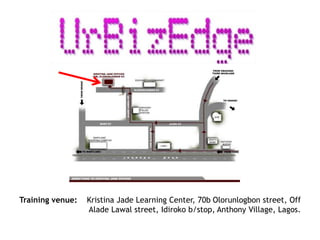
Training venue: Kristina Jade Learning Center, 70b Olorunlogbon street, Off
Alade Lawal street, Idiroko b/stop, Anthony Village, Lagos.
THANK YOU!
E-mail: info@UrBizEdge.com
Call: 234-808-938-2423

Microsoft excel training for professionals

  • 1.
    MICROSOFT EXCEL TRAINING In-depth& Business Data Analysis focused info@UrBizEdge.com 234-808-938-2423
  • 2.
  • 3.
    Data Types Everything youtype into Excel falls into one of four data types. They form the foundation of all you do in Excel. They are: • Number • Text • Boolean • Formula 3 info@UrBizEdge.com 234-808-938-2423
  • 4.
    Data Consistency 4 As anadvanced user, a lot of all your work in Excel will be interconnected and constantly evolving. We will cover the general rules you have to follow to make reports and analysis that can scale and be consistently used even as the projects you work on grow. info@UrBizEdge.com 234-808-938-2423
  • 5.
    Planning for Scalability 5 Inplanning for scalability, you always have to • Always work with the end in mind • Use a pre-determined naming scheme of files, worksheets and data fields • Name every sheet and file from the start • Avoid having too many tables in one Excel sheet • and many others… info@UrBizEdge.com 234-808-938-2423
  • 6.
    Data Sorting 6 Sorting isone of the power user’s most used tool. It allows you to present data in an ordered fashion. We’ll cover: • Top to Bottom sorting • Cascaded sorting (by multiple levels) • Left to Right sorting (advanced) • Sorting by cell or font color info@UrBizEdge.com 234-808-938-2423
  • 7.
    Data Filtering 7 Excel allowsyou to hide (or filter out) data with field entries you are not interested in. We’ll cover even special features of Filter. • Filter enables you to make dynamic charts when used in a summary table • Filter allows for arithmetic operation on the non-hidden data info@UrBizEdge.com 234-808-938-2423
  • 8.
    Data Cleaning 8 Oftentimes thedata we have is not in the form we need. We have to do some data cleaning. • Removal of Duplicate entries • Text-to-column to break a field to multiple fields • Subtotal and Grouping to make reports less clumsy • Data Validation to prevent errors info@UrBizEdge.com 234-808-938-2423
  • 9.
    Data Formatting info@urBizEdge.com 234-808-938-24239 No one will appreciate the numerous hours you’ve spent in Excel if your result is not well formatted. It’s like interior design, it gives beauty and value to your work. • Format as Table • Formatting for Print • Formatting for Email • Having the recipient or final user in mind
  • 10.
  • 11.
    Chart Types 11 • LineChart and when to use it • Column Chart and when to use it • Bar Chart and when to use it • Pie Chart and when to use it • Other Charts • Sparklines info@UrBizEdge.com 234-808-938-2423
  • 12.
    Combo Charts 12 Excel allowsyou to combine 2 or more charts on the same graph. • When to do this • How to do this • Using the same horizontal axis but two different vertical axes info@UrBizEdge.com 234-808-938-2423
  • 13.
    Best Practices 13 • Becareful about using a 3D chart for business reporting • Use line charts to show trend over a period of time • Use Column charts to show performance of independent metrics • Use Bar charts when column charts will be too clumsy in display • and many more … info@UrBizEdge.com 234-808-938-2423
  • 14.
    Pivot Table &Chart 14 info@UrBizEdge.com 234-808-938-2423
  • 15.
    PivotTable 15 PivotTable allows youto do instant analysis on a large data table. • Default PivotTable – Different Fields – Applying Filter – Changing field values • Tabular PivotTable • Using Formulas on Pivot table values • PivotTable Tricks info@UrBizEdge.com 234-808-938-2423
  • 16.
    PivotChart & PowerPivot 16 PivotChartis simply a chart of the PivotTable. • The unique features of the Pivot Chart PowerPivot is an addin for Excel 2010, and built into Excel 2013 • It allows you to work with more external database and also on very large database info@UrBizEdge.com 234-808-938-2423
  • 17.
  • 18.
    General Tools OfAnalysis 18 • Naming Sheets • Moving and Copying sheets • Inserting Sheets and Tab Color • Linking Sheets in formula, special tips • Freezing Panes and Splitting Windows • Different Views – Normal, Page Layout and Page Break Preview info@UrBizEdge.com 234-808-938-2423
  • 19.
    Lookup Functions 19 • VLOOKUP •HLOOKUP • Looking up the last data in a row or column • Overcoming the limitations of VLOOKUP and HLOOKUP using INDEX and MATCH • Creative use of LOOKUP info@UrBizEdge.com 234-808-938-2423
  • 20.
    Power Functions 20 • IF& IFERROR • AND, OR • Text functions and special tricks • COUNTIFS, SUMIFS and AVERAGEIFS • Using the formula tab creatively • Formula auto-complete • Formula Evaluation info@UrBizEdge.com 234-808-938-2423
  • 21.
    Named Range, GoalSeek, Scenario Manager and Solver 21 • Named Range and its practical uses • Goal Seek and a very interesting practical example • Scenario Manager and a typical use • Solver and its use in solving practical business decision and production problems. Linear programming. info@UrBizEdge.com 234-808-938-2423
  • 22.
  • 23.
    Features of aDashboard 23 • A screen view summary that is visual and automated • Knowing how to pick the important metrics to visualize • Knowing how to make a dynamic dashboard • Letting the dashboard answer the most important questions • and many more … info@UrBizEdge.com 234-808-938-2423
  • 24.
    Professional Reports 24 • BestPractices • Having an Almighty sheet • Knowing what to send and what to keep • Having the report audience in mind • E-mails: Done right the Excel way • Excel reports and printing • Excel Dashboard as a BI tool info@UrBizEdge.com 234-808-938-2423
  • 25.
  • 26.
    Excel to PowerPoint 26 •Linking Charts in PowerPoint to Excel • Embedding Excel sheets in PowerPoint • Formatting Tables in PowerPoint • Formatting Charts in PowerPoint • PowerPoint tips info@UrBizEdge.com 234-808-938-2423
  • 27.
  • 28.
    Introduction to VBA 28 •Why you might someday need VBA • Recording Macros • The Limitations of recorded Macros • The easy way to writing your VBA program • Getting vital help • Essential tips info@UrBizEdge.com 234-808-938-2423
  • 29.
    Training venue: KristinaJade Learning Center, 70b Olorunlogbon street, Off Alade Lawal street, Idiroko b/stop, Anthony Village, Lagos.
  • 30.