College of Engineering Pune (COEP)
Forerunners in Technical Education
A seminar on
.bmp Image Data format
Presented By
Mahesh Pawar (121697010)
College of Engineering Pune (COEP)
Forerunners in Technical Education
Some Common Image Formats
- JPG : Used for most digital photos but “lossy”
- GIF : Best for line drawings. 256 colors maximum. No loss
- BMP : Bitmap. Every pixel stored individually
- TIF : Standard in many technical applications. No loss
- PNG : Lossless image format
- RAW : Data as captured by digital camera
College of Engineering Pune (COEP)
Forerunners in Technical Education
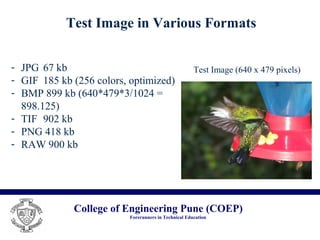
Test Image in Various Formats
- JPG 67 kb
- GIF 185 kb (256 colors, optimized)
- BMP 899 kb (640*479*3/1024 =
898.125)
- TIF 902 kb
- PNG 418 kb
- RAW 900 kb
Test Image (640 x 479 pixels)
College of Engineering Pune (COEP)
Forerunners in Technical Education
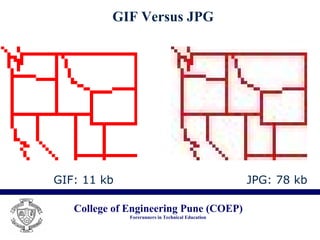
GIF Versus JPG
GIF: 11 kb JPG: 78 kb
College of Engineering Pune (COEP)
Forerunners in Technical Education
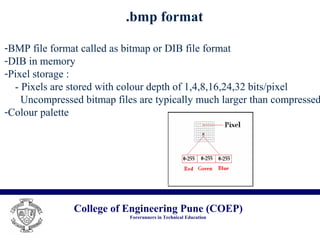
.bmp format
-BMP file format called as bitmap or DIB file format
-DIB in memory
-Pixel storage :
- Pixels are stored with colour depth of 1,4,8,16,24,32 bits/pixel
Uncompressed bitmap files are typically much larger than compressed
-Colour palette
College of Engineering Pune (COEP)
Forerunners in Technical Education
Bitmap File structure
- Bitmap-file Header
- Bitmap information Header
- Colour table
Fig. Bitmap File Format
College of Engineering Pune (COEP)
Forerunners in Technical Education
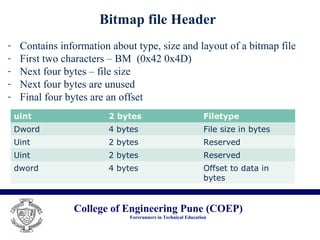
Bitmap file Header
uint 2 bytes Filetype
Dword 4 bytes File size in bytes
Uint 2 bytes Reserved
dword 4 bytes Offset to data in
bytes
- Contains information about type, size and layout of a bitmap file
- First two characters – BM (0x42 0x4D)
- Next four bytes – file size
- Next four bytes are unused
- Final four bytes are an offset
College of Engineering Pune (COEP)
Forerunners in Technical Education
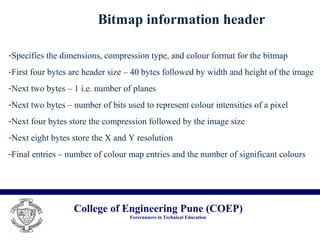
Bitmap information header
-Specifies the dimensions, compression type, and colour format for the bitmap
-First four bytes are header size – 40 bytes followed by width and height of the image
-Next two bytes – 1 i.e. number of planes
-Next two bytes – number of bits used to represent colour intensities of a pixel
-Next four bytes store the compression followed by the image size
-Next eight bytes store the X and Y resolution
-Final entries – number of colour map entries and the number of significant colours
College of Engineering Pune (COEP)
Forerunners in Technical Education
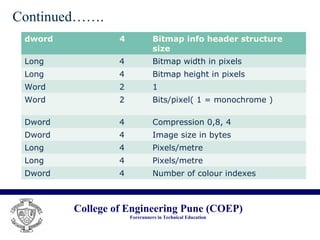
dword 4 Bitmap info header structure
size
Long 4 Bitmap width in pixels
Long 4 Bitmap height in pixels
Word 2 1
Word 2 Bits/pixel( 1 = monochrome )
Dword 4 Compression 0,8, 4
Dword 4 Image size in bytes
Long 4 Pixels/metre
Long 4 Pixels/metre
Dword 4 Number of colour indexes
Continued…….
College of Engineering Pune (COEP)
Forerunners in Technical Education
Colour Table & Image data
-Colour table is not present for bitmaps with 24 bit files.
-The format of the file depends on the number of bits used
to represent each pixel
-Bitmap data immediately following the colour table.
-Bitmap pixel data is stored upside down from its actual image
-A scan line must be zero padded to end
-The scan lines in the bitmap are stored from bottom to the top
-One important issue : managing junk bytes
College of Engineering Pune (COEP)
Forerunners in Technical Education
Usage of BMP format
-Simplicity
-Well documented and free of patents
-Most BMP files have a relatively large file size & can be compressed
with lossless data compression algorithm
College of Engineering Pune (COEP)
Forerunners in Technical Education
References
[1] https://en.Wikipedia.org/wiki/Image_file_formats
[2] John Miano, "Compressed Image File Formats“, ISBN - 0-201-60443-4,1999
[3] R. Witrow, “ OpenGL Graphics through Applications”, Springer-verlag London
Limited, 2008
College of Engineering Pune (COEP)
Forerunners in Technical Education
Thank you

.bmp image data format

  • 1.
    College of EngineeringPune (COEP) Forerunners in Technical Education A seminar on .bmp Image Data format Presented By Mahesh Pawar (121697010)
  • 2.
    College of EngineeringPune (COEP) Forerunners in Technical Education Some Common Image Formats - JPG : Used for most digital photos but “lossy” - GIF : Best for line drawings. 256 colors maximum. No loss - BMP : Bitmap. Every pixel stored individually - TIF : Standard in many technical applications. No loss - PNG : Lossless image format - RAW : Data as captured by digital camera
  • 3.
    College of EngineeringPune (COEP) Forerunners in Technical Education Test Image in Various Formats - JPG 67 kb - GIF 185 kb (256 colors, optimized) - BMP 899 kb (640*479*3/1024 = 898.125) - TIF 902 kb - PNG 418 kb - RAW 900 kb Test Image (640 x 479 pixels)
  • 4.
    College of EngineeringPune (COEP) Forerunners in Technical Education GIF Versus JPG GIF: 11 kb JPG: 78 kb
  • 5.
    College of EngineeringPune (COEP) Forerunners in Technical Education .bmp format -BMP file format called as bitmap or DIB file format -DIB in memory -Pixel storage : - Pixels are stored with colour depth of 1,4,8,16,24,32 bits/pixel Uncompressed bitmap files are typically much larger than compressed -Colour palette
  • 6.
    College of EngineeringPune (COEP) Forerunners in Technical Education Bitmap File structure - Bitmap-file Header - Bitmap information Header - Colour table Fig. Bitmap File Format
  • 7.
    College of EngineeringPune (COEP) Forerunners in Technical Education Bitmap file Header uint 2 bytes Filetype Dword 4 bytes File size in bytes Uint 2 bytes Reserved Uint 2 bytes Reserved dword 4 bytes Offset to data in bytes - Contains information about type, size and layout of a bitmap file - First two characters – BM (0x42 0x4D) - Next four bytes – file size - Next four bytes are unused - Final four bytes are an offset
  • 8.
    College of EngineeringPune (COEP) Forerunners in Technical Education Bitmap information header -Specifies the dimensions, compression type, and colour format for the bitmap -First four bytes are header size – 40 bytes followed by width and height of the image -Next two bytes – 1 i.e. number of planes -Next two bytes – number of bits used to represent colour intensities of a pixel -Next four bytes store the compression followed by the image size -Next eight bytes store the X and Y resolution -Final entries – number of colour map entries and the number of significant colours
  • 9.
    College of EngineeringPune (COEP) Forerunners in Technical Education dword 4 Bitmap info header structure size Long 4 Bitmap width in pixels Long 4 Bitmap height in pixels Word 2 1 Word 2 Bits/pixel( 1 = monochrome ) Dword 4 Compression 0,8, 4 Dword 4 Image size in bytes Long 4 Pixels/metre Long 4 Pixels/metre Dword 4 Number of colour indexes Continued…….
  • 10.
    College of EngineeringPune (COEP) Forerunners in Technical Education Colour Table & Image data -Colour table is not present for bitmaps with 24 bit files. -The format of the file depends on the number of bits used to represent each pixel -Bitmap data immediately following the colour table. -Bitmap pixel data is stored upside down from its actual image -A scan line must be zero padded to end -The scan lines in the bitmap are stored from bottom to the top -One important issue : managing junk bytes
  • 11.
    College of EngineeringPune (COEP) Forerunners in Technical Education Usage of BMP format -Simplicity -Well documented and free of patents -Most BMP files have a relatively large file size & can be compressed with lossless data compression algorithm
  • 12.
    College of EngineeringPune (COEP) Forerunners in Technical Education References [1] https://en.Wikipedia.org/wiki/Image_file_formats [2] John Miano, "Compressed Image File Formats“, ISBN - 0-201-60443-4,1999 [3] R. Witrow, “ OpenGL Graphics through Applications”, Springer-verlag London Limited, 2008
  • 13.
    College of EngineeringPune (COEP) Forerunners in Technical Education Thank you