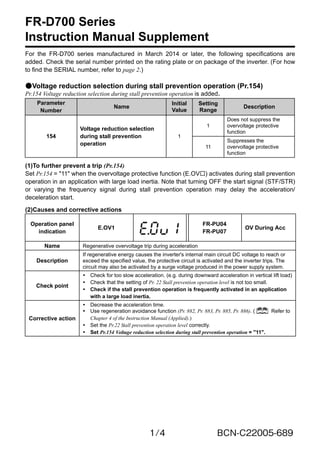
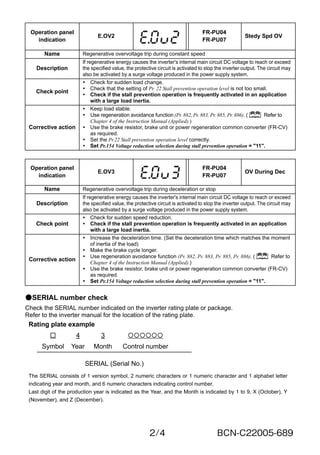
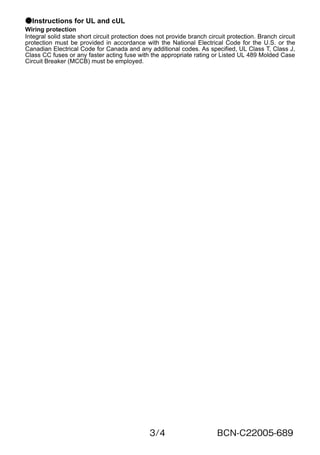
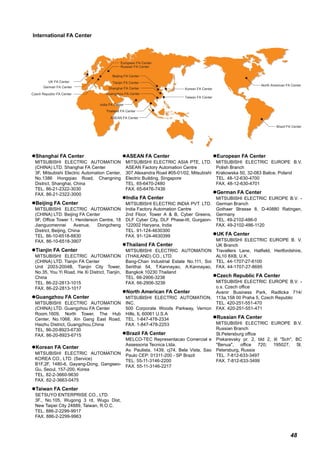
FR-D700
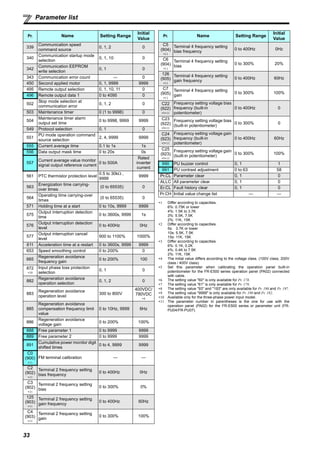
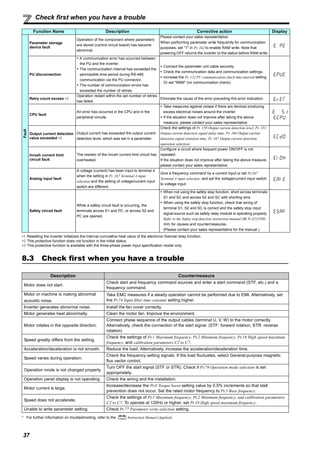
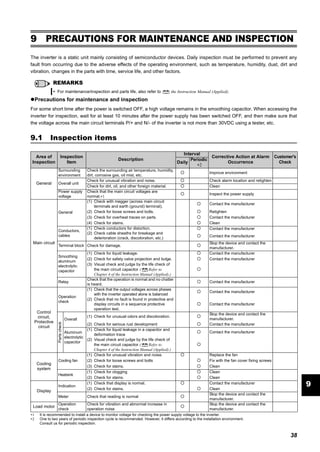
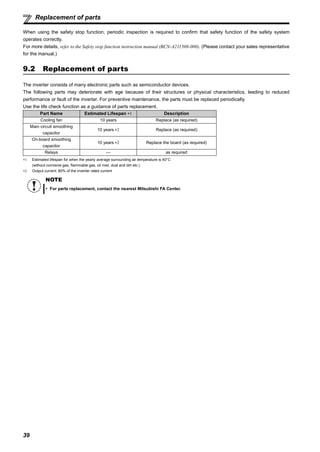
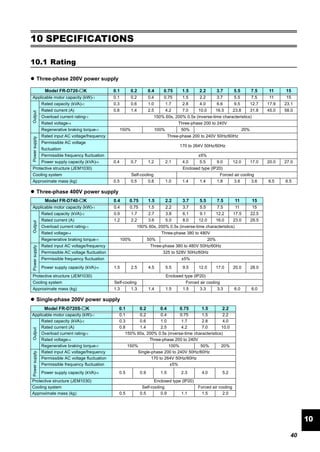
INSTRUCTION MANUAL (BASIC)
FR-D720-0.1K to 15K
FR-D740-0.4K to 15K
FR-D720S-0.1K to 2.2K
FR-D710W-0.1K to 0.75K
INVERTER
700
4
5
6
7
8
9
3
2
1
10
CONTENTS
OUTLINE ...................................................................................1
INSTALLATION AND WIRING ...................................................5
PRECAUTIONS FOR USE OF THE INVERTER.........................18
FAILSAFE OF THE SYSTEM WHICH USES THE INVERTER ...20
DRIVE THE MOTOR.................................................................21
ENERGY SAVING OPERATION FOR FANS AND PUMPS ........29
PARAMETERS .........................................................................30
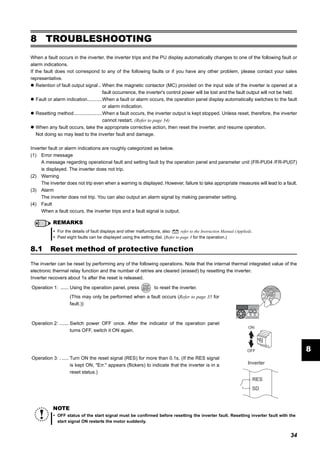
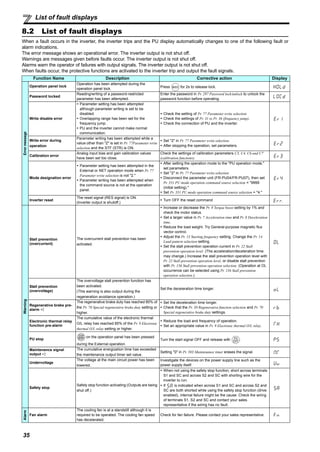
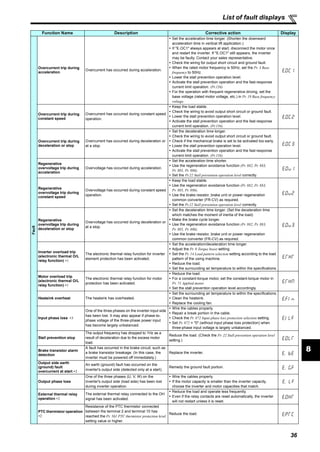
TROUBLESHOOTING ..............................................................34
PRECAUTIONS FOR MAINTENANCE AND INSPECTION ........38
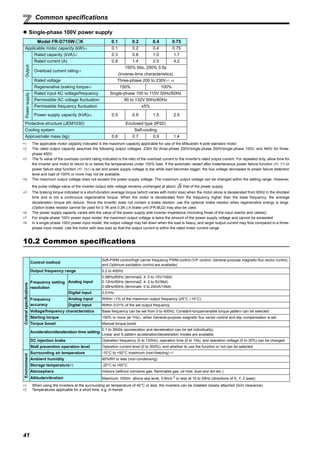
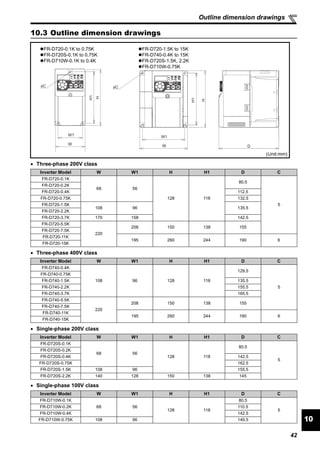
SPECIFICATIONS....................................................................40
Thank you for choosing this Mitsubishi Inverter.
This Instruction Manual (Basic) provides handling information and precautions for use of the equipment.
Please forward this Instruction Manual (Basic) to the end user.
To obtain the Instruction Manual (Applied) and the
Safety stop function instruction manual
Contact where you purchased the inverter, your Mitsubishi sales
representative, or the nearest Mitsubishi FA Center for the following
manuals:
Instruction Manual (Applied) [IB(NA)-0600366ENG]
Safety stop function instruction manual [BCN-A211508-000]
These manuals are required if you are going to utilize functions and
performance.
The PDF version of this manual is also available for download at
"MELFANS Web," the Mitsubishi Electric FA network service on the
world wide web (URL: http://www.MitsubishiElectric.co.jp/melfansweb)
1
2
3
4
5
6
7
8
9
10
A-1
This Instruction Manual (Basic) provides handling information and precautions for use of the equipment.
Please forward this Instruction Manual (Basic) to the end user.
1. Electric Shock Prevention
2. Fire Prevention
3.Injury Prevention
4. Additional Instructions
Also the following points must be noted to prevent an
accidental failure, injury, electric shock, etc.
(1) Transportation and Mounting
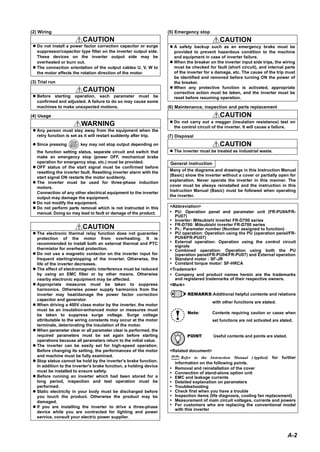
This section is specifically about safety matters
Do not attempt to install, operate, maintain or inspect the
inverter until you have read through the Instruction Manual
(Basic) and appended documents carefully and can use the
equipment correctly. Do not use this product until you have a
full knowledge of the equipment, safety information and
instructions.
In this Instruction Manual (Basic), the safety instruction levels
are classified into "WARNING" and "CAUTION".
Incorrect handling may cause
hazardous conditions, resulting in
death or severe injury.
Incorrect handling may cause
hazardous conditions, resulting in
medium or slight injury, or may cause
only material damage.
The level may even lead to a serious
consequence according to conditions. Both instruction levels
must be followed because these are important to personal
safety.
While power is ON or when the inverter is running, do not
open the front cover. Otherwise you may get an electric
shock.
Do not run the inverter with the front cover or wiring cover
removed. Otherwise you may access the exposed high-
voltage terminals or the charging part of the circuitry and
get an electric shock.
Even if power is OFF, do not remove the front cover except
for wiring or periodic inspection. You may accidentally
touch the charged inverter circuits and get an electric
shock.
Before wiring or inspection, power must be switched OFF.
To confirm that, LED indication of the operation panel must
be checked. (It must be OFF.) Any person who is involved in
wiring or inspection shall wait for at least 10 minutes after
the power supply has been switched OFF and check that
there are no residual voltage using a tester or the like. The
capacitor is charged with high voltage for some time after
power OFF, and it is dangerous.
This inverter must be earthed (grounded). Earthing
(grounding) must conform to the requirements of national and
local safety regulations and electrical code (NEC section 250,
IEC 536 class 1 and other applicable standards).
A neutral-point earthed (grounded) power supply for 400V
class inverter in compliance with EN standard must be used.
Any person who is involved in wiring or inspection of this
equipment shall be fully competent to do the work.
The inverter must be installed before wiring. Otherwise you
may get an electric shock or be injured.
Setting dial and key operations must be performed with dry
hands to prevent an electric shock. Otherwise you may get
an electric shock.
Do not subject the cables to scratches, excessive stress,
heavy loads or pinching. Otherwise you may get an electric
shock.
Do not change the cooling fan while power is ON. It is
dangerous to change the cooling fan while power is ON.
Do not touch the printed circuit board or handle the cables
with wet hands. Otherwise you may get an electric shock.
When measuring the main circuit capacitor capacity, the DC
voltage is applied to the motor for 1s at powering OFF.
Never touch the motor terminal, etc. right after powering
OFF to prevent an electric shock.
WARNING
CAUTION
CAUTION
WARNING
Inverter must be installed on a nonflammable wall without
holes (so that nobody touches the inverter heatsink on the
rear side, etc.). Mounting it to or near flammable material
can cause a fire.
If the inverter has become faulty, the inverter power must
be switched OFF. A continuous flow of large current could
cause a fire.
When using a brake resistor, a sequence that will turn OFF
power when a fault signal is output must be configured.
Otherwise the brake resistor may overheat due to damage of
the brake transistor and possibly cause a fire.
Do not connect a resistor directly to the DC terminals P/+
and N/-. Doing so could cause a fire.
The voltage applied to each terminal must be the ones
specified in the Instruction Manual. Otherwise burst,
damage, etc. may occur.
The cables must be connected to the correct terminals.
Otherwise burst, damage, etc. may occur.
Polarity must be correct. Otherwise burst, damage, etc.
may occur.
While power is ON or for some time after power-OFF, do not
touch the inverter since the inverter will be extremely hot.
Doing so can cause burns.
The product must be transported in correct method that
corresponds to the weight. Failure to do so may lead to
injuries.
Do not stack the boxes containing inverters higher than the
number recommended.
The product must be installed to the position where
withstands the weight of the product according to the
information in the Instruction Manual.
Do not install or operate the inverter if it is damaged or has
parts missing.
When carrying the inverter, do not hold it by the front cover
or setting dial; it may fall off or fail.
Do not stand or rest heavy objects on the product.
The inverter mounting orientation must be correct.
Foreign conductive objects must be prevented from
entering the inverter. That includes screws and metal
fragments or other flammable substance such as oil.
As the inverter is a precision instrument, do not drop or
subject it to impact.
The inverter must be used under the following
environment: Otherwise the inverter may be damaged.
∗1 Temperature applicable for a short time, e.g. in transit.
CAUTION
CAUTION
CAUTION
Environment
Surrounding
air
temperature
-10°C to +50°C (non-freezing)
Ambient
humidity
90%RH or less (non-condensing)
Storage
temperature
-20°C to +65°C *1
Atmosphere
Indoors (free from corrosive gas, flammable gas,
oil mist, dust and dirt)
Altitude/
vibration
Maximum 1,000m above sea level.
5.9m/s2 or less at 10 to 55Hz (directions of X, Y, Z
axes)
A-2
(2) Wiring
(3) Trial run
(4) Usage
(5) Emergency stop
(6) Maintenance, inspection and parts replacement
(7) Disposal
Do not install a power factor correction capacitor or surge
suppressor/capacitor type filter on the inverter output side.
These devices on the inverter output side may be
overheated or burn out.
The connection orientation of the output cables U, V, W to
the motor affects the rotation direction of the motor.
Before starting operation, each parameter must be
confirmed and adjusted. A failure to do so may cause some
machines to make unexpected motions.
Any person must stay away from the equipment when the
retry function is set as it will restart suddenly after trip.
Since pressing key may not stop output depending on
the function setting status, separate circuit and switch that
make an emergency stop (power OFF, mechanical brake
operation for emergency stop, etc.) must be provided.
OFF status of the start signal must be confirmed before
resetting the inverter fault. Resetting inverter alarm with the
start signal ON restarts the motor suddenly.
The inverter must be used for three-phase induction
motors.
Connection of any other electrical equipment to the inverter
output may damage the equipment.
Do not modify the equipment.
Do not perform parts removal which is not instructed in this
manual. Doing so may lead to fault or damage of the product.
The electronic thermal relay function does not guarantee
protection of the motor from overheating. It is
recommended to install both an external thermal and PTC
thermistor for overheat protection.
Do not use a magnetic contactor on the inverter input for
frequent starting/stopping of the inverter. Otherwise, the
life of the inverter decreases.
The effect of electromagnetic interference must be reduced
by using an EMC filter or by other means. Otherwise
nearby electronic equipment may be affected.
Appropriate measures must be taken to suppress
harmonics. Otherwise power supply harmonics from the
inverter may heat/damage the power factor correction
capacitor and generator.
When driving a 400V class motor by the inverter, the motor
must be an insulation-enhanced motor or measures must
be taken to suppress surge voltage. Surge voltage
attributable to the wiring constants may occur at the motor
terminals, deteriorating the insulation of the motor.
When parameter clear or all parameter clear is performed, the
required parameters must be set again before starting
operations because all parameters return to the initial value.
The inverter can be easily set for high-speed operation.
Before changing its setting, the performances of the motor
and machine must be fully examined.
Stop status cannot be hold by the inverter's brake function.
In addition to the inverter's brake function, a holding device
must be installed to ensure safety.
Before running an inverter which had been stored for a
long period, inspection and test operation must be
performed.
Static electricity in your body must be discharged before
you touch the product. Otherwise the product may be
damaged.
If you are installing the inverter to drive a three-phase
device while you are contracted for lighting and power
service, consult your electric power supplier.
CAUTION
CAUTION
WARNING
CAUTION
A safety backup such as an emergency brake must be
provided to prevent hazardous condition to the machine
and equipment in case of inverter failure.
When the breaker on the inverter input side trips, the wiring
must be checked for fault (short circuit), and internal parts
of the inverter for a damage, etc. The cause of the trip must
be identified and removed before turning ON the power of
the breaker.
When any protective function is activated, appropriate
corrective action must be taken, and the inverter must be
reset before resuming operation.
Do not carry out a megger (insulation resistance) test on
the control circuit of the inverter. It will cause a failure.
The inverter must be treated as industrial waste.
General instruction
Many of the diagrams and drawings in this Instruction Manual
(Basic) show the inverter without a cover or partially open for
explanation. Never operate the inverter in this manner. The
cover must be always reinstalled and the instruction in this
Instruction Manual (Basic) must be followed when operating
the inverter.
<Abbreviation>
PU: Operation panel and parameter unit (FR-PU04/FR-
PU07)
Inverter: Mitsubishi inverter FR-D700 series
FR-D700: Mitsubishi inverter FR-D700 series
Pr.: Parameter number (Number assigned to function)
PU operation: Operation using the PU (operation panel/FR-
PU04/FR-PU07)
External operation: Operation using the control circuit
signals
Combined operation: Operation using both the PU
(operation panel/FR-PU04/FR-PU07) and External operation
Standard motor : SF-JR
Constant torque motor: SF-HRCA
<Trademark>
Company and product names herein are the trademarks
and registered trademarks of their respective owners.
<Mark>
REMARKS:Additional helpful contents and relations
with other functions are stated.
Note: Contents requiring caution or cases when
set functions are not activated are stated.
POINT: Useful contents and points are stated.
<Related document>
Refer to the Instruction Manual (Applied) for further
information on the following points.
Removal and reinstallation of the cover
Connection of stand-alone option unit
EMC and leakage currents
Detailed explanation on parameters
Troubleshooting
Check first when you have a trouble
Inspection items (life diagnosis, cooling fan replacement)
Measurement of main circuit voltages, currents and powers
For customers who are replacing the conventional model
with this inverter
CAUTION
CAUTION
CAUTION
1
1 OUTLINE
1.1 Product checking and parts identification
Unpack the inverter and check the capacity plate on the front cover and the rating plate on the inverter side face to ensure that
the product agrees with your order and the inverter is intact.
Inverter model
REMARKS
· For how to find the SERIAL number, refer to page 46.
Harmonic suppression guideline (when inverters are used in Japan)
All models of general-purpose inverters used by specific consumers are covered by "Harmonic Suppression Guidelines for Consumers
Who Receive High Voltage or Special High Voltage". (For further details, refer to Chapter 3 of the Instruction Manual (Applied).)
FR - -
Symbol Voltage class
D740 1.5
Represents the
inverter capacity [kW]
K
D720 Three-phase 200V class
D740 Three-phase 400V class
D720S Single-phase 200V class
D710W Single-phase 100V class
Capacity plate
Inverter model Serial number
1.5K
Rating plate
FR-D740-1.5KInverter model
Input rating
Output rating
Serial number
Production year and month
Control circuit terminal block
(Refer to page 9)
Control logic switchover jumper
connector
The jumper connector is in the sink
logic (SINK) when shipped from the
factory. Move the jumper connector
to change to the source logic
(SOURCE). Always fit the jumper
connector to the either position.
( Refer to the Instruction Manual
(Applied))
Combed shaped wiring cover
Refer to the Instruction Manual
(Applied) for installation/removal.
Main circuit terminal block
(Refer to page 9)
Front cover
Refer to the Instruction
Manual (Applied) for
installation/removal.
PU connector
(Refer to page 8)
Voltage/current input switch
(Refer to page 8)
Operation panel
(Refer to page 2)
Cooling fan
The cooling fan is removable.
• Accessory
· Fan cover fixing screws (M3 × 35mm)
These screws are necessary for compliance with the
EU Directive. (Refer to page 43)
Capacity Quantity
1.5K to 3.7K 1
5.5K to 15K 2
2
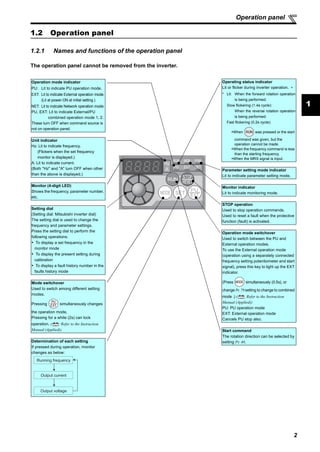
Operation panel
1
1.2 Operation panel
1.2.1 Names and functions of the operation panel
The operation panel cannot be removed from the inverter.
Operation mode indicator
PU: Lit to indicate PU operation mode.
EXT: Lit to indicate External operation mode.
(Lit at power-ON at initial setting.)
NET: Lit to indicate Network operation mode.
PU, EXT: Lit to indicate External/PU
combined operation mode 1, 2.
These turn OFF when command source is
not on operation panel.
Unit indicator
Hz: Lit to indicate frequency.
(Flickers when the set frequency
monitor is displayed.)
A: Lit to indicate current.
(Both "Hz" and "A" turn OFF when other
than the above is displayed.)
Monitor (4-digit LED)
Shows the frequency, parameter number,
etc.
Setting dial
(Setting dial: Mitsubishi inverter dial)
The setting dial is used to change the
frequency and parameter settings.
Press the setting dial to perform the
following operations:
To display a set frequency in the
monitor mode
To display the present setting during
calibration
To display a fault history number in the
faults history mode
Mode switchover
Used to switch among different setting
modes.
Pressing simultaneously changes
the operation mode.
Pressing for a while (2s) can lock
operation. ( Refer to the Instruction
Manual (Applied))
Determination of each setting
If pressed during operation, monitor
changes as below:
Running frequency
Output current
Output voltage
Operating status indicator
Lit or flicker during inverter operation. ∗
* Lit: When the forward rotation operation
is being performed.
Slow flickering (1.4s cycle):
When the reverse rotation operation
is being performed.
Fast flickering (0.2s cycle):
When was pressed or the start
command was given, but the
operation cannot be made.
When the frequency command is less
than the starting frequency.
When the MRS signal is input.
Parameter setting mode indicator
Lit to indicate parameter setting mode.
Monitor indicator
Lit to indicate monitoring mode.
STOP operation
Used to stop operation commands.
Used to reset a fault when the protective
function (fault) is activated.
Operation mode switchover
Used to switch between the PU and
External operation modes.
To use the External operation mode
(operation using a separately connected
frequency setting potentiometer and start
signal), press this key to light up the EXT
indicator.
(Press simultaneously (0.5s), or
change Pr. 79 setting to change to combined
mode .) ( Refer to the Instruction
Manual (Applied))
PU: PU operation mode
EXT: External operation mode
Cancels PU stop also.
Start command
The rotation direction can be selected by
setting Pr. 40.
3
Operation panel
1.2.2 Basic operation (factory setting)
STOP
Operation mode switchover
ParametersettingFaultshistoryMonitor/frequencysetting
At power-ON (External operation mode)
PU operation mode
(output frequency monitor)
Parameter setting mode
PU Jog operation mode
Output current monitor Output voltage monitor
Display the
present setting
Value change
Value change
Parameter write is completed!!
Parameter and a setting value
flicker alternately.
Parameter clear All parameter
clear
Faults history clear
Initial value
change list
(Example)
(Example)
Frequency setting has been
written and completed!!
and frequency flicker alternately.
[Operation for displaying faults history]
The past eight faults can be displayed using the setting dial.
(The latest fault is ended by ".".)
When no fault history exists, is displayed.
While a fault is displayed:
The display shifts as follows by pressing : Output frequency at the fault
Output current Output voltage Energization time.
(After Energization time, it goes back to a fault display.)
Pressing the setting dial shows the fault history number.
(Refer to page 35)
operation_panel.fm 3 ページ 2012年4月23日 月曜日 午前11時46分
4
Operation panel
1
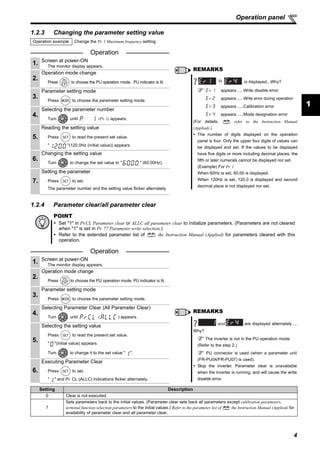
1.2.3 Changing the parameter setting value
1.2.4 Parameter clear/all parameter clear
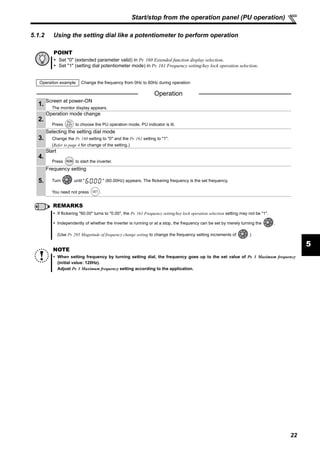
Operation example Change the Pr. 1 Maximum frequency setting.
Operation
1. Screen at power-ON
The monitor display appears.
2.
Operation mode change
Press to choose the PU operation mode. PU indicator is lit.
3.
Parameter setting mode
Press to choose the parameter setting mode.
4.
Selecting the parameter number
Turn until (Pr. 1) appears.
5.
Reading the setting value
Press to read the present set value.
" "(120.0Hz (initial value)) appears.
6.
Changing the setting value
Turn to change the set value to " " (60.00Hz).
7.
Setting the parameter
Press to set.
The parameter number and the setting value flicker alternately.
POINT
Set "1" in Pr.CL Parameter clear or ALLC all parameter clear to initialize parameters. (Parameters are not cleared
when "1" is set in Pr. 77 Parameter write selection.)
Refer to the extended parameter list of the Instruction Manual (Applied) for parameters cleared with this
operation.
Operation
1. Screen at power-ON
The monitor display appears.
2.
Operation mode change
Press to choose the PU operation mode. PU indicator is lit.
3.
Parameter setting mode
Press to choose the parameter setting mode.
4.
Selecting Parameter Clear (All Parameter Clear)
Turn until ( ) appears.
5.
Selecting the setting value
Press to read the present set value.
" "(initial value) appears.
Turn to change it to the set value " ".
6.
Executing Parameter Clear
Press to set.
" " and Pr. CL (ALLC) indications flicker alternately.
Setting Description
0 Clear is not executed.
1
Sets parameters back to the initial values. (Parameter clear sets back all parameters except calibration parameters,
terminal function selection parameters to the initial values.) Refer to the parameter list of the Instruction Manual (Applied) for
availability of parameter clear and all parameter clear.
REMARKS
is displayed...Why?
appears .....Write disable error
appears .....Write error during operation
appears .....Calibration error
appears .....Mode designation error
(For details, refer to the Instruction Manual
(Applied).)
The number of digits displayed on the operation
panel is four. Only the upper four digits of values can
be displayed and set. If the values to be displayed
have five digits or more including decimal places, the
fifth or later numerals cannot be displayed nor set.
(Example) For Pr. 1
When 60Hz is set, 60.00 is displayed.
When 120Hz is set, 120.0 is displayed and second
decimal place is not displayed nor set.
to
REMARKS
are displayed alternately ...
Why?
The inverter is not in the PU operation mode.
(Refer to the step 2.)
PU connector is used (when a parameter unit
(FR-PU04/FR-PU07) is used).
Stop the inverter. Parameter clear is unavailable
when the inverter is running, and will cause the write
disable error.
and
5
2 INSTALLATION AND WIRING
NOTE
The life of the inverter is influenced by surrounding air temperature. The surrounding air temperature should be as low as
possible within the permissible range. This must be noted especially when the inverter is installed in an enclosure. (Refer to page 7)
Wrong wiring might lead to damage of the inverter. The control signal lines must be kept fully away from the main
circuit to protect them from noise. (Refer to page 8)
Do not install a power factor correction capacitor, surge suppressor or noise filter (capacitor) on the inverter output
side. This will cause the inverter to trip or the capacitor and surge suppressor to be damaged. If any of the above
devices are connected, immediately remove them.
Electromagnetic wave interference
The input/output (main circuit) of the inverter includes high frequency components, which may interfere with the
communication devices (such as AM radios) used near the inverter. In this case, install the FR-BIF optional noise filter
(capacitor) (for use in the input side only) or FR-BSF01 or FR-BLF noise filter (ferrite core) to minimize interference.
( Refer to Chapter 3 of the Instruction Manual (Applied)).
Refer to the Instruction Manual of each option and peripheral devices for details of peripheral devices.
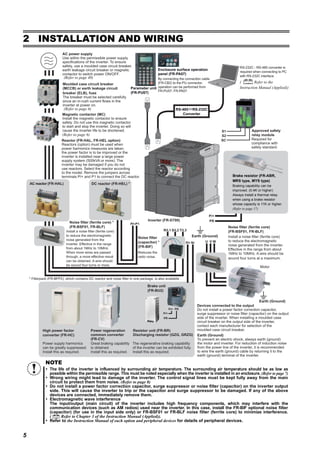
AC power supply
Use within the permissible power supply
specifications of the inverter. To ensure
safety, use a moulded case circuit breaker,
earth leakage circuit breaker or magnetic
contactor to switch power ON/OFF.
Magnetic contactor (MC)
Install the magnetic contactor to ensure
safety. Do not use this magnetic contactor
to start and stop the inverter. Doing so will
cause the inverter life to be shortened.
Noise filter (ferrite core)
(FR-BSF01, FR-BLF)
Install a noise filter (ferrite core)
to reduce the electromagnetic
noise generated from the inverter.
Effective in the range from about
1MHz to 10MHz. A wire should be
wound four turns at a maximum.
Earth (Ground)
Devices connected to the output
Do not install a power factor correction capacitor,
surge suppressor or noise filter (capacitor) on the output
side of the inverter. When installing a moulded case
circuit breaker on the output side of the inverter,
contact each manufacturer for selection of the
moulded case circuit breaker.
The regenerative braking capability
of the inverter can be exhibited fully.
Install this as required.
Power supply harmonics
can be greatly suppressed.
Install this as required.
High power factor
converter (FR-HC)
Power regeneration
common converter
(FR-CV)
R/L1 S/L2 T/L3
P1P/+
P/+ N/- U W
P/+
PR
V
Great braking capability
is obtained.
Install this as required.
Reactor (FR-HAL, FR-HEL option)
Reactors (option) must be used when
power harmonics measures are taken,
the power factor is to be improved or the
inverter is installed near a large power
supply system (500kVA or more). The
inverter may be damaged if you do not
use reactors. Select the reactor according
to the model. Remove the jumpers across
terminals P/+ and P1 to connect the DC reactor.
Inverter (FR-D700)
Noise filter (ferrite core) *
(FR-BSF01, FR-BLF)
Moulded case circuit breaker
(MCCB) or earth leakage circuit
breaker (ELB), fuse
The breaker must be selected carefully
since an in-rush current flows in the
inverter at power on.
Install a noise filter (ferrite core)
to reduce the electromagnetic
noise generated from the
inverter. Effective in the range
from about 1MHz to 10MHz.
When more wires are passed
through, a more effective result
can be obtained. A wire should
be wound four turns or more.
* Filterpack (FR-BFP2), which contains DC reactor and noise filter in one package, is also available.
Earth (Ground)
To prevent an electric shock, always earth (ground)
the motor and inverter. For reduction of induction noise
from the power line of the inverter, it is recommended
to wire the earth (ground) cable by returning it to the
earth (ground) terminal of the inverter.
AC reactor (FR-HAL) DC reactor (FR-HEL) *
Parameter unit
(FR-PU07)
Enclosure surface operation
panel (FR-PA07)
By connecting the connection cable
(FR-CB2) to the PU connector,
operation can be performed from
FR-PU07, FR-PA07.
Noise filter
(capacitor) *
(FR-BIF)
P/+
P/+
PR
PR
Brake unit
(FR-BU2)
Reduces the
radio noise.
Resistor unit (FR-BR)
Discharging resistor (GZG, GRZG)
RS-232C - RS-485 converter is
required when connecting to PC
with RS-232C interface.
Motor
Earth (Ground)
Approved safety
relay module
Required for
compliance with
safety standard.
RS-485 RS-232C
Converter
S1
S2
SC
(Refer to page 40)
(Refer to page 6)
(Refer to page 6)
( Refer to the
Instruction Manual (Applied))
Brake resistor (FR-ABR,
MRS type, MYS type)
Braking capability can be
improved. (0.4K or higher)
Always install a thermal relay
when using a brake resistor
whose capacity is 11K or higher.
(Refer to page 17)
6
Peripheral devices
2
2.1 Peripheral devices
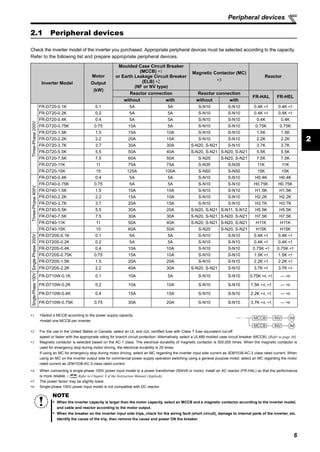
Check the inverter model of the inverter you purchased. Appropriate peripheral devices must be selected according to the capacity.
Refer to the following list and prepare appropriate peripheral devices.
∗1 Select a MCCB according to the power supply capacity.
Install one MCCB per inverter.
∗2 For the use in the United States or Canada, select an UL and cUL certified fuse with Class T fuse equivalent cut-off
speed or faster with the appropriate rating for branch circuit protection. Alternatively, select a UL489 molded case circuit breaker (MCCB). (Refer to page 46)
∗3 Magnetic contactor is selected based on the AC-1 class. The electrical durability of magnetic contactor is 500,000 times. When the magnetic contactor is
used for emergency stop during motor driving, the electrical durability is 25 times.
If using an MC for emergency stop during motor driving, select an MC regarding the inverter input side current as JEM1038-AC-3 class rated current. When
using an MC on the inverter output side for commercial-power supply operation switching using a general purpose motor, select an MC regarding the motor
rated current as JEM1038-AC-3 class rated current.
∗5 The power factor may be slightly lower.
∗6 Single-phase 100V power input model is not compatible with DC reactor.
Inverter Model
Motor
Output
(kW)
Moulded Case Circuit Breaker
(MCCB) ∗1
or Earth Leakage Circuit Breaker
(ELB) ∗2
(NF or NV type)
Magnetic Contactor (MC)
∗3
Reactor
Reactor connection Reactor connection
FR-HAL FR-HEL
without with without with
Three-Phase200V
FR-D720-0.1K 0.1 5A 5A S-N10 S-N10 0.4K ∗5 0.4K ∗5
FR-D720-0.2K 0.2 5A 5A S-N10 S-N10 0.4K ∗5 0.4K ∗5
FR-D720-0.4K 0.4 5A 5A S-N10 S-N10 0.4K 0.4K
FR-D720-0.75K 0.75 10A 5A S-N10 S-N10 0.75K 0.75K
FR-D720-1.5K 1.5 15A 10A S-N10 S-N10 1.5K 1.5K
FR-D720-2.2K 2.2 20A 15A S-N10 S-N10 2.2K 2.2K
FR-D720-3.7K 3.7 30A 30A S-N20, S-N21 S-N10 3.7K 3.7K
FR-D720-5.5K 5.5 50A 40A S-N20, S-N21 S-N20, S-N21 5.5K 5.5K
FR-D720-7.5K 7.5 60A 50A S-N25 S-N20, S-N21 7.5K 7.5K
FR-D720-11K 11 75A 75A S-N35 S-N35 11K 11K
FR-D720-15K 15 125A 100A S-N50 S-N50 15K 15K
Three-Phase400V
FR-D740-0.4K 0.4 5A 5A S-N10 S-N10 H0.4K H0.4K
FR-D740-0.75K 0.75 5A 5A S-N10 S-N10 H0.75K H0.75K
FR-D740-1.5K 1.5 10A 10A S-N10 S-N10 H1.5K H1.5K
FR-D740-2.2K 2.2 15A 10A S-N10 S-N10 H2.2K H2.2K
FR-D740-3.7K 3.7 20A 15A S-N10 S-N10 H3.7K H3.7K
FR-D740-5.5K 5.5 30A 20A S-N20, S-N21 S-N11, S-N12 H5.5K H5.5K
FR-D740-7.5K 7.5 30A 30A S-N20, S-N21 S-N20, S-N21 H7.5K H7.5K
FR-D740-11K 11 50A 40A S-N20, S-N21 S-N20, S-N21 H11K H11K
FR-D740-15K 15 60A 50A S-N25 S-N20, S-N21 H15K H15K
Single-Phase200V
FR-D720S-0.1K 0.1 5A 5A S-N10 S-N10 0.4K ∗5 0.4K ∗5
FR-D720S-0.2K 0.2 5A 5A S-N10 S-N10 0.4K ∗5 0.4K ∗5
FR-D720S-0.4K 0.4 10A 10A S-N10 S-N10 0.75K ∗5 0.75K ∗5
FR-D720S-0.75K 0.75 15A 10A S-N10 S-N10 1.5K ∗5 1.5K ∗5
FR-D720S-1.5K 1.5 20A 20A S-N10 S-N10 2.2K ∗5 2.2K ∗5
FR-D720S-2.2K 2.2 40A 30A S-N20, S-N21 S-N10 3.7K ∗5 3.7K ∗5
Single-Phase100V
FR-D710W-0.1K 0.1 10A 5A S-N10 S-N10 0.75K ∗4, ∗5 — ∗6
FR-D710W-0.2K 0.2 10A 10A S-N10 S-N10 1.5K ∗4, ∗5 — ∗6
FR-D710W-0.4K 0.4 15A 15A S-N10 S-N10 2.2K ∗4, ∗5 — ∗6
FR-D710W-0.75K 0.75 30A 20A S-N10 S-N10 3.7K ∗4, ∗5 — ∗6
∗4 When connecting a single-phase 100V power input model to a power transformer (50kVA or more), install an AC reactor (FR-HAL) so that the performance
is more reliable. ( Refer to Chapter 3 of the Instruction Manual (Applied))
NOTE
When the inverter capacity is larger than the motor capacity, select an MCCB and a magnetic contactor according to the inverter model,
and cable and reactor according to the motor output.
When the breaker on the inverter input side trips, check for the wiring fault (short circuit), damage to internal parts of the inverter, etc.
Identify the cause of the trip, then remove the cause and power ON the breaker.
MCCB INV
MCCB INV
IM
IM
7
Installation of the inverters and precautions
2.2 Installation of the inverters and precautions
(1) Installation of the inverter
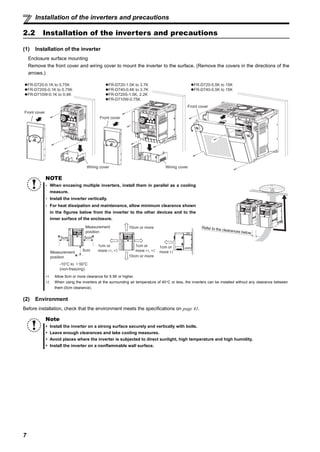
Enclosure surface mounting
Remove the front cover and wiring cover to mount the inverter to the surface. (Remove the covers in the directions of the
arrows.)
(2) Environment
Before installation, check that the environment meets the specifications on page 41.
NOTE
When encasing multiple inverters, install them in parallel as a cooling
measure.
Install the inverter vertically.
For heat dissipation and maintenance, allow minimum clearance shown
in the figures below from the inverter to the other devices and to the
inner surface of the enclosure.
∗1 Allow 5cm or more clearance for 5.5K or higher.
∗2 When using the inverters at the surrounding air temperature of 40°C or less, the inverters can be installed without any clearance between
them (0cm clearance).
Note
Install the inverter on a strong surface securely and vertically with bolts.
Leave enough clearances and take cooling measures.
Avoid places where the inverter is subjected to direct sunlight, high temperature and high humidity.
Install the inverter on a nonflammable wall surface.
Front cover
Front cover
Front cover
Wiring cover Wiring cover
FR-D720-0.1K to 0.75K
FR-D720S-0.1K to 0.75K
FR-D710W-0.1K to 0.4K
FR-D720-1.5K to 3.7K
FR-D740-0.4K to 3.7K
FR-D720S-1.5K, 2.2K
FR-D710W-0.75K
FR-D720-5.5K to 15K
FR-D740-5.5K to 15K
Refer to the clearances below.
10cm or more
10cm or more
Measurement
position
Measurement
position
5cm 5cm
5cm
-10 C to +50 C
(non-freezing)
1cm or
more ∗1, ∗2
1cm or
more ∗1, ∗2
1cm or
more ∗1
8
Wiring
2
2.3 Wiring
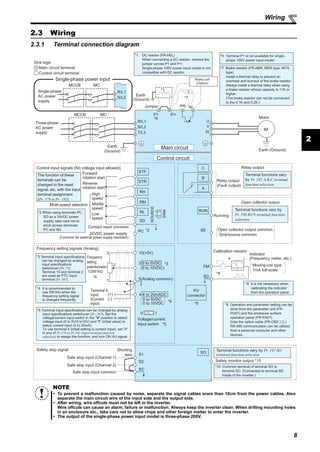
2.3.1 Terminal connection diagram
NOTE
To prevent a malfunction caused by noise, separate the signal cables more than 10cm from the power cables. Also
separate the main circuit wire of the input side and the output side.
After wiring, wire offcuts must not be left in the inverter.
Wire offcuts can cause an alarm, failure or malfunction. Always keep the inverter clean. When drilling mounting holes
in an enclosure etc., take care not to allow chips and other foreign matter to enter the inverter.
The output of the single-phase power input model is three-phase 200V.
Earth
(Ground)
Motor
IM
Earth (Ground)
Three-phase
AC power
supply
MCCB MC
R/L1
P1 P/+
PR N/-
S/L2
T/L3
U
V
W
Earth
(Ground)
*7 Brake resistor (FR-ABR, MRS type, MYS
type)
Install a thermal relay to prevent an
overheat and burnout of the brake resistor.
Always install a thermal relay when using
a brake resistor whose capacity is 11K or
higher.
(The brake resistor can not be connected
to the 0.1K and 0.2K.)
*8 It is not necessary when
calibrating the indicator
from the operation panel.
*9 Operation and parameter setting can be
done from the parameter unit (FR-
PU07) and the enclosure surface
operation panel (FR-PA07).
(Use the option cable (FR-CB2 ).)
RS-485 communication can be utilized
from a personal computer and other
devices.
Forward
rotation start
Reverse
rotation start
Middle
speed
High
speed
Low
speed
Control input signals (No voltage input allowed)
24VDC power supply
(Common for external power supply transistor)
Contact input common
STR
STF
RH
RM
RL
SD
PC
Relay output
Running
Open collector output
Open collector output common
Sink/source common
RUN
SE
A
B
C
Frequency setting signals (Analog)
2 0 to 5VDC
10(+5V)
2
3
1
4 4 to 20mADC
Frequency
setting
potentiometer
1/2W1kΩ
Terminal 4
input
(Current
input)
(+)
(-)
5(Analog common)
*4 It is recommended to
use 2W1kΩ when the
frequency setting signal
is changed frequently.
*4
*2 When using terminals PC-
SD as a 24VDC power
supply, take care not to
short across terminals
PC and SD.
PU
connector
*1. DC reactor (FR-HEL)
When connecting a DC reactor, remove the
jumper across P1 and P/+.
Single-phase 100V power input model is not
compatible with DC reactor.Control circuit terminal
Main circuit terminal
Sink logic
Jumper
*1
*7
*6
*2
*3
*5
The function of these
terminals can be
changed to the reset
signal, etc. with the input
terminal assignment
(Pr. 178 to Pr. 182).
Multi-speed selection
Terminal functions vary by
Pr. 190 RUN terminal function
selection
Terminal functions vary
by Pr. 192 A,B,C terminal
function selection
SINK
SOURCE
V I
*5
0 to 5VDC
(0 to 10VDC)
0 to 10VDC
*5 Terminal input specifications can be changed by analog
input specifications switchover (Pr. 267). Set the
voltage/current input switch in the "V" position to select
voltage input (0 to 5V/0 to10V) and "I" (initial value) to
select current input (4 to 20mA).
To use terminal 4 (initial setting is current input), set "4"
in any of Pr.178 to Pr.182 (input terminal function
selection) to assign the function, and turn ON AU signal.
Voltage/current
input switch
Main circuit
Control circuit
R
Relay output
(Fault output)
Brake unit
(Option)
FM
SD
Indicator
(Frequency meter, etc.)+ -
Moving-coil type
1mA full-scale
Calibration resistor
*8
*9
*3 Terminal input specifications
can be changed by analog
input specifications
switchover (Pr. 73).
Terminal 10 and terminal 2
are used as PTC input
terminal (Pr. 561).
Safe stop input (Channel 1)
Safe stop input (Channel 2)
Safe stop input common
Safety stop signal
S1
S2
SC
SO
Shorting
wire
Single-phase
AC power
supply
MCCB MC
R/L1
S/L2
Single-phase power input
*6 Terminal P1 is not available for single-
phase 100V power input model.
*10 Common terminal of terminal SO is
terminal SC. (Connected to terminal SD
inside of the inverter.)
Safety monitor output *10
Terminal functions vary by Pr. 197 SO
terminal function selection
9
Wiring
2.3.2 Terminal specifications
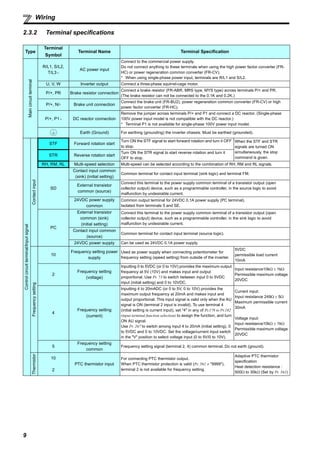
Type
Terminal
Symbol
Terminal Name Terminal Specification
Maincircuitterminal
R/L1, S/L2,
T/L3 ∗
AC power input
Connect to the commercial power supply.
Do not connect anything to these terminals when using the high power factor converter (FR-
HC) or power regeneration common converter (FR-CV).
* When using single-phase power input, terminals are R/L1 and S/L2.
U, V, W Inverter output Connect a three-phase squirrel-cage motor.
P/+, PR Brake resistor connection
Connect a brake resistor (FR-ABR, MRS type, MYS type) across terminals P/+ and PR.
(The brake resistor can not be connected to the 0.1K and 0.2K.)
P/+, N/- Brake unit connection
Connect the brake unit (FR-BU2), power regeneration common converter (FR-CV) or high
power factor converter (FR-HC).
P/+, P1 ∗ DC reactor connection
Remove the jumper across terminals P/+ and P1 and connect a DC reactor. (Single-phase
100V power input model is not compatible with the DC reactor.)
* Terminal P1 is not available for single-phase 100V power input model.
Earth (Ground) For earthing (grounding) the inverter chassis. Must be earthed (grounded).
Controlcircuitterminal/Inputsignal
Contactinput
STF Forward rotation start
Turn ON the STF signal to start forward rotation and turn it OFF
to stop.
When the STF and STR
signals are turned ON
simultaneously, the stop
command is given.
STR Reverse rotation start
Turn ON the STR signal to start reverse rotation and turn it
OFF to stop.
RH, RM, RL Multi-speed selection Multi-speed can be selected according to the combination of RH, RM and RL signals.
SD
Contact input common
(sink) (initial setting)
Common terminal for contact input terminal (sink logic) and terminal FM.
External transistor
common (source)
Connect this terminal to the power supply common terminal of a transistor output (open
collector output) device, such as a programmable controller, in the source logic to avoid
malfunction by undesirable current.
24VDC power supply
common
Common output terminal for 24VDC 0.1A power supply (PC terminal).
Isolated from terminals 5 and SE.
PC
External transistor
common (sink)
(initial setting)
Connect this terminal to the power supply common terminal of a transistor output (open
collector output) device, such as a programmable controller, in the sink logic to avoid
malfunction by undesirable current.
Contact input common
(source)
Common terminal for contact input terminal (source logic).
24VDC power supply Can be used as 24VDC 0.1A power supply.
Frequencysetting
10
Frequency setting power
supply
Used as power supply when connecting potentiometer for
frequency setting (speed setting) from outside of the inverter.
5VDC
permissible load current
10mA
2
Frequency setting
(voltage)
Inputting 0 to 5VDC (or 0 to 10V) provides the maximum output
frequency at 5V (10V) and makes input and output
proportional. Use Pr. 73 to switch between input 0 to 5VDC
input (initial setting) and 0 to 10VDC.
Input resistance10kΩ ± 1kΩ
Permissible maximum voltage
20VDC
4
Frequency setting
(current)
Inputting 4 to 20mADC (or 0 to 5V, 0 to 10V) provides the
maximum output frequency at 20mA and makes input and
output proportional. This input signal is valid only when the AU
signal is ON (terminal 2 input is invalid). To use terminal 4
(initial setting is current input), set "4" in any of Pr.178 to Pr.182
(input terminal function selection) to assign the function, and turn
ON AU signal.
Use Pr. 267 to switch among input 4 to 20mA (initial setting), 0
to 5VDC and 0 to 10VDC. Set the voltage/current input switch
in the "V" position to select voltage input (0 to 5V/0 to 10V).
Current input:
Input resistance 249Ω ± 5Ω
Maximum permissible current
30mA
Voltage input:
Input resistance10kΩ ± 1kΩ
Permissible maximum voltage
20VDC
5
Frequency setting
common
Frequency setting signal (terminal 2, 4) common terminal. Do not earth (ground).
Thermistor
10
2
PTC thermistor input
For connecting PTC thermistor output.
When PTC thermistor protection is valid (Pr. 561 ≠ "9999"),
terminal 2 is not available for frequency setting.
Adaptive PTC thermistor
specification
Heat detection resistance :
500Ω to 30kΩ (Set by Pr. 561)
10
Wiring
2
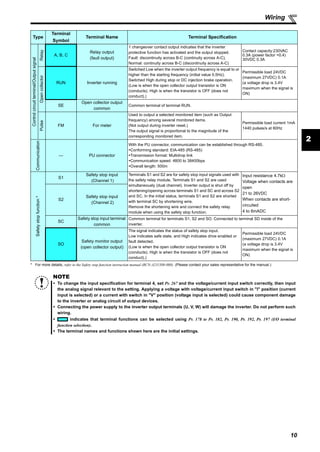
* For more details, refer to the Safety stop function instruction manual (BCN-A211508-000). (Please contact your sales representative for the manual.)
Controlcircuitterminal/Outputsignal
Relay
A, B, C
Relay output
(fault output)
1 changeover contact output indicates that the inverter
protective function has activated and the output stopped.
Fault: discontinuity across B-C (continuity across A-C),
Normal: continuity across B-C (discontinuity across A-C)
Contact capacity:230VAC
0.3A (power factor =0.4)
30VDC 0.3A
Opencollector
RUN Inverter running
Switched Low when the inverter output frequency is equal to or
higher than the starting frequency (initial value 0.5Hz).
Switched High during stop or DC injection brake operation.
(Low is when the open collector output transistor is ON
(conducts). High is when the transistor is OFF (does not
conduct).)
Permissible load 24VDC
(maximum 27VDC) 0.1A
(a voltage drop is 3.4V
maximum when the signal is
ON)
SE
Open collector output
common
Common terminal of terminal RUN.
Pulse
FM For meter
Used to output a selected monitored item (such as Output
frequency) among several monitored items.
(Not output during inverter reset.)
The output signal is proportional to the magnitude of the
corresponding monitored item.
Permissible load current 1mA
1440 pulses/s at 60Hz
Communication
— PU connector
With the PU connector, communication can be established through RS-485.
Conforming standard: EIA-485 (RS-485)
Transmission format: Multidrop link
Communication speed: 4800 to 38400bps
Overall length: 500m
Safetystopfunction*
S1
Safety stop input
(Channel 1)
Terminals S1 and S2 are for safety stop input signals used with
the safety relay module. Terminals S1 and S2 are used
simultaneously (dual channel). Inverter output is shut off by
shortening/opening across terminals S1 and SC and across S2
and SC. In the initial status, terminals S1 and S2 are shorted
with terminal SC by shortening wire.
Remove the shortening wire and connect the safety relay
module when using the safety stop function.
Input resistance 4.7kΩ
Voltage when contacts are
open
21 to 26VDC
When contacts are short-
circuited
4 to 6mADC
S2
Safety stop input
(Channel 2)
SC
Safety stop input terminal
common
Common terminal for terminals S1, S2 and SO. Connected to terminal SD inside of the
inverter.
SO
Safety monitor output
(open collector output)
The signal indicates the status of safety stop input.
Low indicates safe state, and High indicates drive enabled or
fault detected.
(Low is when the open collector output transistor is ON
(conducts). High is when the transistor is OFF (does not
conduct).)
Permissible load 24VDC
(maximum 27VDC) 0.1A
(a voltage drop is 3.4V
maximum when the signal is
ON)
NOTE
To change the input specification for terminal 4, set Pr. 267 and the voltage/current input switch correctly, then input
the analog signal relevant to the setting. Applying a voltage with voltage/current input switch in "I" position (current
input is selected) or a current with switch in "V" position (voltage input is selected) could cause component damage
to the inverter or analog circuit of output devices.
Connecting the power supply to the inverter output terminals (U, V, W) will damage the inverter. Do not perform such
wiring.
indicates that terminal functions can be selected using Pr. 178 to Pr. 182, Pr. 190, Pr. 192, Pr. 197 (I/O terminal
function selection).
The terminal names and functions shown here are the initial settings.
Type
Terminal
Symbol
Terminal Name Terminal Specification
11
Wiring
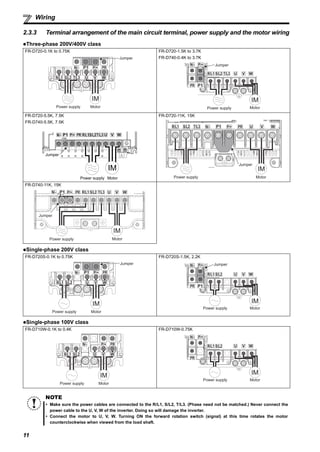
2.3.3 Terminal arrangement of the main circuit terminal, power supply and the motor wiring
Three-phase 200V/400V class
Single-phase 200V class
Single-phase 100V class
FR-D720-0.1K to 0.75K FR-D720-1.5K to 3.7K
FR-D740-0.4K to 3.7K
FR-D720-5.5K, 7.5K
FR-D740-5.5K, 7.5K
FR-D720-11K, 15K
FR-D740-11K, 15K
FR-D720S-0.1K to 0.75K FR-D720S-1.5K, 2.2K
FR-D710W-0.1K to 0.4K FR-D710W-0.75K
NOTE
Make sure the power cables are connected to the R/L1, S/L2, T/L3. (Phase need not be matched.) Never connect the
power cable to the U, V, W of the inverter. Doing so will damage the inverter.
Connect the motor to U, V, W. Turning ON the forward rotation switch (signal) at this time rotates the motor
counterclockwise when viewed from the load shaft.
MotorPower supply
N/- P/+ PR
IM
R/L1 S/L2 T/L3
Jumper
MotorPower supply
N/- P/+
PR
IM
R/L1 S/L2 T/L3
Jumper
Power supply Motor
IM
Jumper
N/- P/+ PR R/L1S/L2 T/L3
N/- P/+ PRR/L1 S/L2 T/L3
Jumper
MotorPower supply
IM
MotorPower supply
IM
N/- P/+ PR R/L1 S/L2 T/L3
Jumper
MotorPower supply
N/- P/+ PR
IM
Jumper
R/L1 S/L2
N/- P/+
PR
R/L1 S/L2
MotorPower supply
IM
Jumper
MotorPower supply
N/- P/+ PR
IM
R/L1 S/L2
N/- P/+
PR
R/L1 S/L2
MotorPower supply
IM
12
Wiring
2
(1) Cable sizes etc., of the main control circuit terminals and earth (ground) terminals
Select the recommended cable size to ensure that a voltage drop will be 2% or less.
If the wiring distance is long between the inverter and motor, a main circuit cable voltage drop will cause the motor torque to
decrease especially at the output of a low frequency.
The following table indicates a selection example for the wiring length of 20m.
Three-phase 200V class (when input power supply is 220V)
Three-phase 400V class (when input power supply is 440V)
Single-phase 200V class (when input power supply is 220V)
Single-phase 100V class (when input power supply is 100V)
∗1 The cable size is that of the cable (HIV cable (600V class 2 vinyl-insulated cable) etc.) with continuous maximum permissible temperature of 75°C. Assumes
that the surrounding air temperature is 50°C or less and the wiring distance is 20m or less.
∗2 The recommended cable size is that of the cable (THHW cable) with continuous maximum permissible temperature of 75°C. Assumes that the surrounding
air temperature is 40°C or less and the wiring distance is 20m or less. (Selection example for use mainly in the United States.)
∗3 The recommended cable size is that of the cable (PVC cable) with continuous maximum permissible temperature of 70°C. Assumes that the surrounding air
temperature is 40°C or less and the wiring distance is 20m or less. (Selection example for use mainly in Europe.)
∗4 The terminal screw size indicates the terminal size for R/L1, S/L2, T/L3, U, V, W, PR, P/+, N/-, P1 and a screw for earthing (grounding).
Screw size for earthing (grounding) the FR-D720-15K is indicated in parentheses.
For single-phase power input, the terminal screw size indicates the size of terminal screw for R/L1, S/L2, U, V, W, PR, P/+, N/-, P1 and a screw for earthing
(grounding).
The line voltage drop can be calculated by the following formula:
Line voltage drop [V]=
Use a larger diameter cable when the wiring distance is long or when it is desired to decrease the voltage drop (torque
reduction) in the low speed range.
Applicable Inverter
Model
Terminal
Screw
Size ∗4
Tightening
Torque
N·m
Crimping
Terminal
Cable Size
HIV Cables, etc. (mm2
) ∗1 AWG ∗2 PVC Cables, etc. (mm2
) ∗3
R/L1
S/L2
T/L3
U, V, W
R/L1
S/L2
T/L3
U, V, W
Earthing
(grounding)
cable
R/L1
S/L2
T/L3
U, V, W
R/L1
S/L2
T/L3
U, V, W
Earthing
(grounding)
cable
FR-D720-0.1K to 0.75K M3.5 1.2 2-3.5 2-3.5 2 2 2 14 14 2.5 2.5 2.5
FR-D720-1.5K, 2.2K M4 1.5 2-4 2-4 2 2 2 14 14 2.5 2.5 2.5
FR-D720-3.7K M4 1.5 5.5-4 5.5-4 3.5 3.5 3.5 12 12 4 4 4
FR-D720-5.5K M5 2.5 5.5-5 5.5-5 5.5 5.5 5.5 10 10 6 6 6
FR-D720-7.5K M5 2.5 14-5 8-5 14 8 5.5 6 8 16 10 6
FR-D720-11K M5 2.5 14-5 14-5 14 14 14 6 6 16 16 16
FR-D720-15K M6 (M5) 4.4 22-6 22-6 22 22 14 4 4 25 25 16
Applicable Inverter
Model
Terminal
Screw
Size ∗4
Tightening
Torque
N·m
Crimping
Terminal
Cable Size
HIV Cables, etc. (mm2) ∗1 AWG ∗2 PVC Cables, etc. (mm2) ∗3
R/L1
S/L2
T/L3
U, V, W
R/L1
S/L2
T/L3
U, V, W
Earthing
(grounding)
cable
R/L1
S/L2
T/L3
U, V, W
R/L1
S/L2
T/L3
U, V, W
Earthing
(grounding)
cable
FR-D740-0.4K to 3.7K M4 1.5 2-4 2-4 2 2 2 14 14 2.5 2.5 2.5
FR-D740-5.5K M4 1.5 5.5-4 2-4 3.5 2 3.5 12 14 4 2.5 4
FR-D740-7.5K M4 1.5 5.5-4 5.5-4 3.5 3.5 3.5 12 12 4 4 4
FR-D740-11K M4 1.5 5.5-4 5.5-4 5.5 5.5 8 10 10 6 6 10
FR-D740-15K M5 2.5 8-5 8-5 8 8 8 8 8 10 10 10
Applicable Inverter
Model
Terminal
Screw
Size ∗4
Tightening
Torque
N·m
Crimping
Terminal
Cable Size
HIV Cables, etc. (mm2
) ∗1 AWG ∗2 PVC Cables, etc. (mm2
) ∗3
R/L1
S/L2
U, V, W
R/L1
S/L2
U, V, W
Earthing
(grounding)
cable
R/L1
S/L2
U, V, W
R/L1
S/L2
U, V, W
Earthing
(grounding)
cable
FR-D720S-0.1K to 0.75K M3.5 1.2 2-3.5 2-3.5 2 2 2 14 14 2.5 2.5 2.5
FR-D720S-1.5K M4 1.5 2-4 2-4 2 2 2 14 14 2.5 2.5 2.5
FR-D720S-2.2K M4 1.5 5.5-4 2-4 3.5 2 3.5 12 14 4 2.5 4
Applicable Inverter
Model
Terminal
Screw
Size ∗4
Tightening
Torque
N·m
Crimping
Terminal
Cable Size
HIV Cables, etc. (mm2) ∗1 AWG ∗2 PVC Cables, etc. (mm2) ∗3
R/L1
S/L2
U, V, W
R/L1
S/L2
U, V, W
Earthing
(grounding)
cable
R/L1
S/L2
U, V, W
R/L1
S/L2
U, V, W
Earthing
(grounding)
cable
FR-D710W-0.1K to 0.4K M3.5 1.2 2-3.5 2-3.5 2 2 2 14 14 2.5 2.5 2.5
FR-D710W-0.75K M4 1.5 5.5-4 2-4 3.5 2 2 12 14 4 2.5 2.5
NOTE
Tighten the terminal screw to the specified torque. A screw that has been tightened too loosely can cause a short circuit or
malfunction. A screw that has been tightened too tightly can cause a short circuit or malfunction due to the unit breakage.
Use crimping terminals with insulation sleeve to wire the power supply and motor.
3 × wire resistance[mΩ/m] × wiring distance[m] × current[A]
1000
13
Wiring
(2) Total wiring length
The overall wiring length for connection of a single motor or multiple motors should be within the value in the table below.
100V, 200V class
400V class
When driving a 400V class motor by the inverter, surge voltages attributable to the wiring constants may occur at the motor
terminals, deteriorating the insulation of the motor. Take the following measures 1) or 2) in this case.
1) Use a "400V class inverter-driven insulation-enhanced motor" and set frequency in Pr. 72 PWM frequency selection
according to wiring length
2) Connect the surge voltage suppression filter (FR-ASF-H/FR-BMF-H) on the inverter output side.
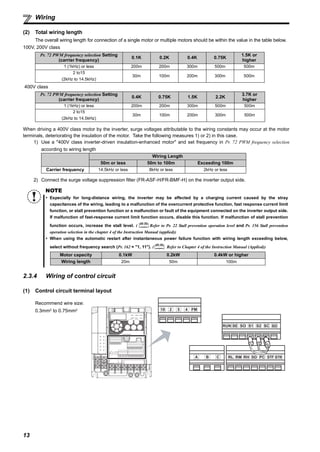
2.3.4 Wiring of control circuit
(1) Control circuit terminal layout
Pr. 72 PWM frequency selection Setting
(carrier frequency)
0.1K 0.2K 0.4K 0.75K
1.5K or
higher
1 (1kHz) or less 200m 200m 300m 500m 500m
2 to15
(2kHz to 14.5kHz)
30m 100m 200m 300m 500m
Pr. 72 PWM frequency selection Setting
(carrier frequency)
0.4K 0.75K 1.5K 2.2K
3.7K or
higher
1 (1kHz) or less 200m 200m 300m 500m 500m
2 to15
(2kHz to 14.5kHz)
30m 100m 200m 300m 500m
Wiring Length
50m or less 50m to 100m Exceeding 100m
Carrier frequency 14.5kHz or less 8kHz or less 2kHz or less
NOTE
Especially for long-distance wiring, the inverter may be affected by a charging current caused by the stray
capacitances of the wiring, leading to a malfunction of the overcurrent protective function, fast response current limit
function, or stall prevention function or a malfunction or fault of the equipment connected on the inverter output side.
If malfunction of fast-response current limit function occurs, disable this function. If malfunction of stall prevention
function occurs, increase the stall level. ( Refer to Pr. 22 Stall prevention operation level and Pr. 156 Stall prevention
operation selection in the chapter 4 of the Instruction Manual (applied))
When using the automatic restart after instantaneous power failure function with wiring length exceeding below,
select without frequency search (Pr. 162 = "1, 11"). ( Refer to Chapter 4 of the Instruction Manual (Applied))
Recommend wire size:
0.3mm2 to 0.75mm2
Motor capacity 0.1kW 0.2kW 0.4kW or higher
Wiring length 20m 50m 100m
STF STRPCSDRHRMRL
FM
CBA
10 2 5 4
RUN SE S1 S2 SCSO SD
14
Wiring
2
(2) Wiring method
Wiring
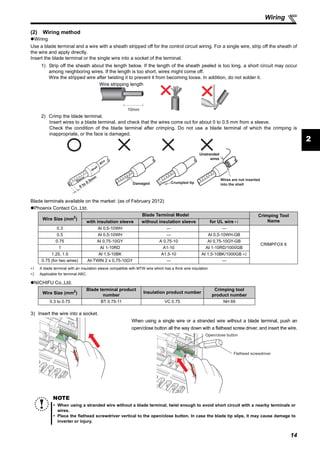
Use a blade terminal and a wire with a sheath stripped off for the control circuit wiring. For a single wire, strip off the sheath of
the wire and apply directly.
Insert the blade terminal or the single wire into a socket of the terminal.
1) Strip off the sheath about the length below. If the length of the sheath peeled is too long, a short circuit may occur
among neighboring wires. If the length is too short, wires might come off.
Wire the stripped wire after twisting it to prevent it from becoming loose. In addition, do not solder it.
2) Crimp the blade terminal.
Insert wires to a blade terminal, and check that the wires come out for about 0 to 0.5 mm from a sleeve.
Check the condition of the blade terminal after crimping. Do not use a blade terminal of which the crimping is
inappropriate, or the face is damaged.
Blade terminals available on the market: (as of February 2012)
Phoenix Contact Co.,Ltd.
∗1 A blade terminal with an insulation sleeve compatible with MTW wire which has a thick wire insulation
∗2 Applicable for terminal ABC.
NICHIFU Co.,Ltd.
Wire stripping length
Wire Size (mm2
)
Blade Terminal Model Crimping Tool
Namewith insulation sleeve without insulation sleeve for UL wire ∗1
0.3 AI 0,5-10WH — —
CRIMPFOX 6
0.5 AI 0,5-10WH — AI 0,5-10WH-GB
0.75 AI 0,75-10GY A 0,75-10 AI 0,75-10GY-GB
1 AI 1-10RD A1-10 AI 1-10RD/1000GB
1.25, 1.5 AI 1,5-10BK A1,5-10 AI 1,5-10BK/1000GB ∗2
0.75 (for two wires) AI-TWIN 2 x 0,75-10GY — —
Wire Size (mm2)
Blade terminal product
number
Insulation product number
Crimping tool
product number
0.3 to 0.75 BT 0.75-11 VC 0.75 NH 69
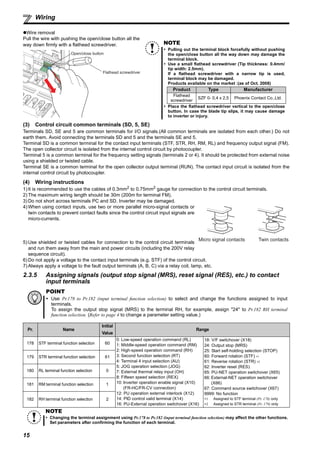
3) Insert the wire into a socket.
When using a single wire or a stranded wire without a blade terminal, push an
open/close button all the way down with a flathead screw driver, and insert the wire.
NOTE
When using a stranded wire without a blade terminal, twist enough to avoid short circuit with a nearby terminals or
wires.
Place the flathead screwdriver vertical to the open/close button. In case the blade tip slips, it may cause damage to
inverter or injury.
10mm
Unstranded
wires
Damaged
Wires are not inserted
into the shellCrumpled tipSleeve
Shell
W
ire
0 to 0.5mm
Open/close button
Flathead screwdriver
15
Wiring
Wire removal
(3) Control circuit common terminals (SD, 5, SE)
Terminals SD, SE and 5 are common terminals for I/O signals.(All common terminals are isolated from each other.) Do not
earth them. Avoid connecting the terminals SD and 5 and the terminals SE and 5.
Terminal SD is a common terminal for the contact input terminals (STF, STR, RH, RM, RL) and frequency output signal (FM).
The open collector circuit is isolated from the internal control circuit by photocoupler.
Terminal 5 is a common terminal for the frequency setting signals (terminals 2 or 4). It should be protected from external noise
using a shielded or twisted cable.
Terminal SE is a common terminal for the open collector output terminal (RUN). The contact input circuit is isolated from the
internal control circuit by photocoupler.
(4) Wiring instructions
1) It is recommended to use the cables of 0.3mm2
to 0.75mm2
gauge for connection to the control circuit terminals.
2) The maximum wiring length should be 30m (200m for terminal FM).
3) Do not short across terminals PC and SD. Inverter may be damaged.
4) When using contact inputs, use two or more parallel micro-signal contacts or
twin contacts to prevent contact faults since the control circuit input signals are
micro-currents.
5) Use shielded or twisted cables for connection to the control circuit terminals
and run them away from the main and power circuits (including the 200V relay
sequence circuit).
6) Do not apply a voltage to the contact input terminals (e.g. STF) of the control circuit.
7) Always apply a voltage to the fault output terminals (A, B, C) via a relay coil, lamp, etc.
2.3.5 Assigning signals (output stop signal (MRS), reset signal (RES), etc.) to contact
input terminals
Pull the wire with pushing the open/close button all the
way down firmly with a flathead screwdriver.
POINT
Use Pr.178 to Pr.182 (input terminal function selection) to select and change the functions assigned to input
terminals.
To assign the output stop signal (MRS) to the terminal RH, for example, assign "24" to Pr.182 RH terminal
function selection. (Refer to page 4 to change a parameter setting value.)
Pr. Name
Initial
Value
Range
178 STF terminal function selection 60
0: Low-speed operation command (RL)
1: Middle-speed operation command (RM)
2: High-speed operation command (RH)
3: Second function selection (RT)
4: Terminal 4 input selection (AU)
5: JOG operation selection (JOG)
7: External thermal relay input (OH)
8: Fifteen speed selection (REX)
10: Inverter operation enable signal (X10)
(FR-HC/FR-CV connection)
12: PU operation external interlock (X12)
14: PID control valid terminal (X14)
16: PU-External operation switchover (X16)
18: V/F switchover (X18)
24: Output stop (MRS)
25: Start self-holding selection (STOP)
60: Forward rotation (STF) ∗1
61: Reverse rotation (STR) ∗2
62: Inverter reset (RES)
65: PU-NET operation switchover (X65)
66: External-NET operation switchover
(X66)
67: Command source switchover (X67)
9999: No function
∗1 Assigned to STF terminal (Pr. 178) only
∗2 Assigned to STR terminal (Pr. 179) only
179 STR terminal function selection 61
180 RL terminal function selection 0
181 RM terminal function selection 1
182 RH terminal function selection 2
NOTE
Changing the terminal assignment using Pr.178 to Pr.182 (input terminal function selection) may affect the other functions.
Set parameters after confirming the function of each terminal.
Open/close button
Flathead screwdriver
NOTE
Pulling out the terminal block forcefully without pushing
the open/close button all the way down may damage the
terminal block.
Use a small flathead screwdriver (Tip thickness: 0.4mm/
tip width: 2.5mm).
If a flathead screwdriver with a narrow tip is used,
terminal block may be damaged.
Products available on the market :(as of Oct. 2008)
Place the flathead screwdriver vertical to the open/close
button. In case the blade tip slips, it may cause damage
to inverter or injury.
Product Type Manufacturer
Flathead
screwdriver
SZF 0- 0,4 x 2,5 Phoenix Contact Co.,Ltd.
Micro signal contacts Twin contacts
16
Wiring
2
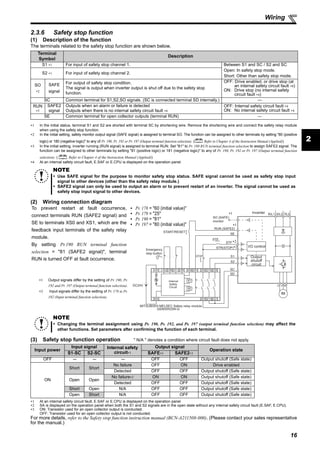
2.3.6 Safety stop function
(1) Description of the function
The terminals related to the safety stop function are shown below.
∗1 In the initial status, terminal S1 and S2 are shorted with terminal SC by shortening wire. Remove the shortening wire and connect the safety relay module
when using the safety stop function.
∗2 In the initial setting, safety monitor output signal (SAFE signal) is assigned to terminal SO. The function can be assigned to other terminals by setting "80 (positive
logic) or 180 (negative logic)" to any of Pr. 190, Pr. 192 or Pr. 197 (Output terminal function selection). ( Refer to Chapter 4 of the Instruction Manual (Applied))
∗3 In the initial setting, inverter running (RUN signal) is assigned to terminal RUN. Set "81" to Pr. 190 RUN terminal function selection to assign SAFE2 signal. The
function can be assigned to other terminals by setting "81 (positive logic) or 181 (negative logic)" to any of Pr. 190, Pr. 192 or Pr. 197 (Output terminal function
selection). ( Refer to Chapter 4 of the Instruction Manual (Applied))
∗4 At an internal safety circuit fault, E.SAF or E.CPU is displayed on the operation panel.
(2) Wiring connection diagram
(3) Safety stop function operation " N/A " denotes a condition where circuit fault does not apply.
∗1 At an internal safety circuit fault, E.SAF or E.CPU is displayed on the operation panel.
∗2 SA is displayed on the operation panel when both the S1 and S2 signals are in the open state without any internal safety circuit fault (E.SAF, E.CPU).
∗3 ON: Transistor used for an open collector output is conducted.
OFF: Transistor used for an open collector output is not conducted.
For more details, refer to the Safety stop function instruction manual (BCN-A211508-000). (Please contact your sales representative
for the manual.)
Terminal
Symbol
Description
S1 ∗1 For input of safety stop channel 1. Between S1 and SC / S2 and SC
Open: In safety stop mode.
Short: Other than safety stop mode.
S2 ∗1 For input of safety stop channel 2.
SO
∗2
SAFE
signal
For output of safety stop condition.
The signal is output when inverter output is shut off due to the safety stop
function.
OFF: Drive enabled, or drive stop (at
an internal safety circuit fault ∗4)
ON: Drive stop (no internal safety
circuit fault ∗4)
SC Common terminal for S1,S2,SO signals. (SC is connected terminal SD internally.) —
RUN
∗3
SAFE2
signal
Outputs when an alarm or failure is detected
Outputs when there is no internal safety circuit fault ∗4
OFF: Internal safety circuit fault ∗4
ON: No internal safety circuit fault ∗4
SE Common terminal for open collector outputs (terminal RUN) —
NOTE
Use SAFE signal for the purpose to monitor safety stop status. SAFE signal cannot be used as safety stop input
signal to other devices (other than the safety relay module.)
SAFE2 signal can only be used to output an alarm or to prevent restart of an inverter. The signal cannot be used as
safety stop input signal to other devices.
NOTE
Changing the terminal assignment using Pr. 190, Pr. 192, and Pr. 197 (output terminal function selection) may affect the
other functions. Set parameters after confirming the function of each terminal.
Input power
Input signal Internal safety
circuit∗1
Output signal
Operation state
S1-SC S2-SC SAFE∗3 SAFE2∗3
OFF ----- ----- ----- OFF OFF Output shutoff (Safe state)
ON
Short Short
No failure OFF ON Drive enabled
Detected OFF OFF Output shutoff (Safe state)
Open Open
No failure∗2 ON ON Output shutoff (Safe state)
Detected OFF OFF Output shutoff (Safe state)
Short Open N/A OFF OFF Output shutoff (Safe state)
Open Short N/A OFF OFF Output shutoff (Safe state)
S2
S1
SC
Inverter
START/RESET
+24V
Emergency
stop button
QS90SR2SN-Q
K1
X0 X1COM0 COM1
24G
Internal
Safety
Circuit
XS0 XS1 Z10Z00 Z20
Z11Z01 Z21
K2
DC24V
RUN (SAFE2)
R/L1 S/L2 T/L3
U V W
MITSUBISHI MELSEC Safety relay module
IM
SE
STF
STR(STOP)
STF
STOP
SD
Output
shutoff
circuit
I/O control
SO (SAFE)
monitor
To prevent restart at fault occurrence,
connect terminals RUN (SAFE2 signal) and
SE to terminals XS0 and XS1, which are the
feedback input terminals of the safety relay
module.
By setting Pr.190 RUN terminal function
selection = "81 (SAFE2 signal)", terminal
RUN is turned OFF at fault occurrence.
∗1 Output signals differ by the setting of Pr. 190, Pr.
192 and Pr. 197 (Output terminal function selection).
∗2 Input signals differ by the setting of Pr. 178 to Pr.
182 (Input terminal function selection).
Pr. 178 = "60 (initial value)"
Pr. 179 = "25"
Pr. 190 = "81"
Pr. 197 = "80 (initial value)"
∗2
∗2
∗1
∗1
17
Connection of a dedicated external brake resistor (MRS type, MYS type, FR-ABR)
2.4 Connection of a dedicated external brake resistor (MRS type,
MYS type, FR-ABR)
Install a dedicated brake resistor (MRS type, MYS type, FR-ABR) outside when the motor driven by the inverter is made to run
by the load, quick deceleration is required, etc. Connect a dedicated brake resistor (MRS type, MYS type, FR-ABR) to
terminal P/+ and PR. (For the locations of terminal P/+ and PR, refer to the terminal block layout (page 11).)
Set parameters below. ( Refer to the Instruction Manual (Applied) for the parameter details.)
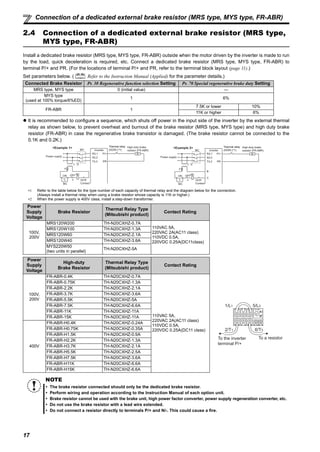
It is recommended to configure a sequence, which shuts off power in the input side of the inverter by the external thermal
relay as shown below, to prevent overheat and burnout of the brake resistor (MRS type, MYS type) and high duty brake
resistor (FR-ABR) in case the regenerative brake transistor is damaged. (The brake resistor cannot be connected to the
0.1K and 0.2K.)
∗1 Refer to the table below for the type number of each capacity of thermal relay and the diagram below for the connection.
(Always install a thermal relay when using a brake resistor whose capacity is 11K or higher.)
∗2 When the power supply is 400V class, install a step-down transformer.
Connected Brake Resistor Pr. 30 Regenerative function selection Setting Pr. 70 Special regenerative brake duty Setting
MRS type, MYS type 0 (initial value) —
MYS type
(used at 100% torque/6%ED)
1 6%
FR-ABR 1
7.5K or lower 10%
11K or higher 6%
Power
Supply
Voltage
Brake Resistor
Thermal Relay Type
(Mitsubishi product)
Contact Rating
100V,
200V
MRS120W200 TH-N20CXHZ-0.7A
110VAC 5A,
220VAC 2A(AC11 class)
110VDC 0.5A,
220VDC 0.25A(DC11class)
MRS120W100 TH-N20CXHZ-1.3A
MRS120W60 TH-N20CXHZ-2.1A
MRS120W40 TH-N20CXHZ-3.6A
MYS220W50
(two units in parallel)
TH-N20CXHZ-5A
Power
Supply
Voltage
High-duty
Brake Resistor
Thermal Relay Type
(Mitsubishi product)
Contact Rating
100V,
200V
FR-ABR-0.4K TH-N20CXHZ-0.7A
110VAC 5A,
220VAC 2A(AC11 class)
110VDC 0.5A,
220VDC 0.25A(DC11 class)
FR-ABR-0.75K TH-N20CXHZ-1.3A
FR-ABR-2.2K TH-N20CXHZ-2.1A
FR-ABR-3.7K TH-N20CXHZ-3.6A
FR-ABR-5.5K TH-N20CXHZ-5A
FR-ABR-7.5K TH-N20CXHZ-6.6A
FR-ABR-11K TH-N20CXHZ-11A
FR-ABR-15K TH-N20CXHZ-11A
400V
FR-ABR-H0.4K TH-N20CXHZ-0.24A
FR-ABR-H0.75K TH-N20CXHZ-0.35A
FR-ABR-H1.5K TH-N20CXHZ-0.9A
FR-ABR-H2.2K TH-N20CXHZ-1.3A
FR-ABR-H3.7K TH-N20CXHZ-2.1A
FR-ABR-H5.5K TH-N20CXHZ-2.5A
FR-ABR-H7.5K TH-N20CXHZ-3.6A
FR-ABR-H11K TH-N20CXHZ-6.6A
FR-ABR-H15K TH-N20CXHZ-6.6A
NOTE
The brake resistor connected should only be the dedicated brake resistor.
Perform wiring and operation according to the Instruction Manual of each option unit.
Brake resistor cannot be used with the brake unit, high power factor converter, power supply regeneration converter, etc.
Do not use the brake resistor with a lead wire extended.
Do not connect a resistor directly to terminals P/+ and N/-. This could cause a fire.
MC Inverter
MC
R
PR
P/+
S/L2
T/L3
R/L1
OFFON
OCR
Contact
Power supply
F
<Example 1>
MC
High-duty brake
resistor (FR-ABR)
T *2
Thermal relay
(OCR) (*1) Inverter
MC
R
PR
P/+
S/L2
T/L3
R/L1
OFFON
B
C
Power supply
F
<Example 2>
MC
High-duty brake
resistor (FR-ABR)
OCR
Contact
T
MC
*2
Thermal relay
(OCR) (*1)
To the inverter
terminal P/+
To a resistor
TH-N20
1/L1 5/L3
2/T1 6/T3
18
PRECAUTIONS FOR USE OF THE INVERTER
3
3 PRECAUTIONS FOR USE OF THE INVERTER
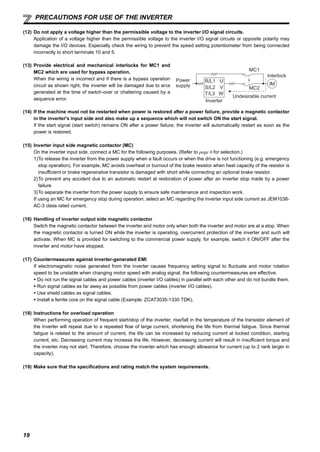
The FR-D700 series is a highly reliable product, but using incorrect peripheral circuits or incorrect operation/handling methods
may shorten the product life or damage the product.
Before starting operation, always recheck the following items.
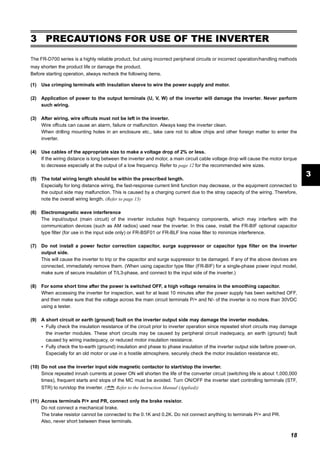
(1) Use crimping terminals with insulation sleeve to wire the power supply and motor.
(2) Application of power to the output terminals (U, V, W) of the inverter will damage the inverter. Never perform
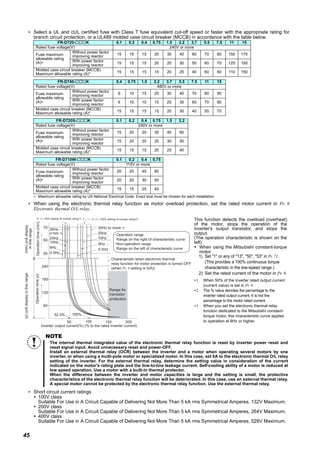
such wiring.
(3) After wiring, wire offcuts must not be left in the inverter.
Wire offcuts can cause an alarm, failure or malfunction. Always keep the inverter clean.
When drilling mounting holes in an enclosure etc., take care not to allow chips and other foreign matter to enter the
inverter.
(4) Use cables of the appropriate size to make a voltage drop of 2% or less.
If the wiring distance is long between the inverter and motor, a main circuit cable voltage drop will cause the motor torque
to decrease especially at the output of a low frequency. Refer to page 12 for the recommended wire sizes.
(5) The total wiring length should be within the prescribed length.
Especially for long distance wiring, the fast-response current limit function may decrease, or the equipment connected to
the output side may malfunction. This is caused by a charging current due to the stray capacity of the wiring. Therefore,
note the overall wiring length. (Refer to page 13)
(6) Electromagnetic wave interference
The input/output (main circuit) of the inverter includes high frequency components, which may interfere with the
communication devices (such as AM radios) used near the inverter. In this case, install the FR-BIF optional capacitor
type filter (for use in the input side only) or FR-BSF01 or FR-BLF line noise filter to minimize interference.
(7) Do not install a power factor correction capacitor, surge suppressor or capacitor type filter on the inverter
output side.
This will cause the inverter to trip or the capacitor and surge suppressor to be damaged. If any of the above devices are
connected, immediately remove them. (When using capacitor type filter (FR-BIF) for a single-phase power input model,
make sure of secure insulation of T/L3-phase, and connect to the input side of the inverter.)
(8) For some short time after the power is switched OFF, a high voltage remains in the smoothing capacitor.
When accessing the inverter for inspection, wait for at least 10 minutes after the power supply has been switched OFF,
and then make sure that the voltage across the main circuit terminals P/+ and N/- of the inverter is no more than 30VDC
using a tester.
(9) A short circuit or earth (ground) fault on the inverter output side may damage the inverter modules.
Fully check the insulation resistance of the circuit prior to inverter operation since repeated short circuits may damage
the inverter modules. These short circuits may be caused by peripheral circuit inadequacy, an earth (ground) fault
caused by wiring inadequacy, or reduced motor insulation resistance.
Fully check the to-earth (ground) insulation and phase to phase insulation of the inverter output side before power-on.
Especially for an old motor or use in a hostile atmosphere, securely check the motor insulation resistance etc.
(10) Do not use the inverter input side magnetic contactor to start/stop the inverter.
Since repeated inrush currents at power ON will shorten the life of the converter circuit (switching life is about 1,000,000
times), frequent starts and stops of the MC must be avoided. Turn ON/OFF the inverter start controlling terminals (STF,
STR) to run/stop the inverter. ( Refer to the Instruction Manual (Applied))
(11) Across terminals P/+ and PR, connect only the brake resistor.
Do not connect a mechanical brake.
The brake resistor cannot be connected to the 0.1K and 0.2K. Do not connect anything to terminals P/+ and PR.
Also, never short between these terminals.
19
PRECAUTIONS FOR USE OF THE INVERTER
(12) Do not apply a voltage higher than the permissible voltage to the inverter I/O signal circuits.
Application of a voltage higher than the permissible voltage to the inverter I/O signal circuits or opposite polarity may
damage the I/O devices. Especially check the wiring to prevent the speed setting potentiometer from being connected
incorrectly to short terminals 10 and 5.
(14) If the machine must not be restarted when power is restored after a power failure, provide a magnetic contactor
in the inverter's input side and also make up a sequence which will not switch ON the start signal.
If the start signal (start switch) remains ON after a power failure, the inverter will automatically restart as soon as the
power is restored.
(15) Inverter input side magnetic contactor (MC)
On the inverter input side, connect a MC for the following purposes. (Refer to page 6 for selection.)
1)To release the inverter from the power supply when a fault occurs or when the drive is not functioning (e.g. emergency
stop operation). For example, MC avoids overheat or burnout of the brake resistor when heat capacity of the resistor is
insufficient or brake regenerative transistor is damaged with short while connecting an optional brake resistor.
2)To prevent any accident due to an automatic restart at restoration of power after an inverter stop made by a power
failure
3)To separate the inverter from the power supply to ensure safe maintenance and inspection work.
If using an MC for emergency stop during operation, select an MC regarding the inverter input side current as JEM1038-
AC-3 class rated current.
(16) Handling of inverter output side magnetic contactor
Switch the magnetic contactor between the inverter and motor only when both the inverter and motor are at a stop. When
the magnetic contactor is turned ON while the inverter is operating, overcurrent protection of the inverter and such will
activate. When MC is provided for switching to the commercial power supply, for example, switch it ON/OFF after the
inverter and motor have stopped.
(17) Countermeasures against inverter-generated EMI
If electromagnetic noise generated from the inverter causes frequency setting signal to fluctuate and motor rotation
speed to be unstable when changing motor speed with analog signal, the following countermeasures are effective.
Do not run the signal cables and power cables (inverter I/O cables) in parallel with each other and do not bundle them.
Run signal cables as far away as possible from power cables (inverter I/O cables).
Use shield cables as signal cables.
Install a ferrite core on the signal cable (Example: ZCAT3035-1330 TDK).
(18) Instructions for overload operation
When performing operation of frequent start/stop of the inverter, rise/fall in the temperature of the transistor element of
the inverter will repeat due to a repeated flow of large current, shortening the life from thermal fatigue. Since thermal
fatigue is related to the amount of current, the life can be increased by reducing current at locked condition, starting
current, etc. Decreasing current may increase the life. However, decreasing current will result in insufficient torque and
the inverter may not start. Therefore, choose the inverter which has enough allowance for current (up to 2 rank larger in
capacity).
(19) Make sure that the specifications and rating match the system requirements.
(13) Provide electrical and mechanical interlocks for MC1 and
MC2 which are used for bypass operation.
When the wiring is incorrect and if there is a bypass operation
circuit as shown right, the inverter will be damaged due to arcs
generated at the time of switch-over or chattering caused by a
sequence error.
Power
supply
Inverter
Undesirable current
MC2
MC1
Interlock
U
V
W
R/L1
S/L2
T/L3
IM
20
4
4 FAILSAFE OF THE SYSTEM WHICH USES THE INVERTER
When a fault occurs, the inverter trips to output a fault signal. However, a fault output signal may not be output at an inverter
fault occurrence when the detection circuit or output circuit fails, etc. Although Mitsubishi assures best quality products,
provide an interlock which uses inverter status output signals to prevent accidents such as damage to machine when the
inverter fails for some reason and at the same time consider the system configuration where failsafe from outside the inverter,
without using the inverter, is enabled even if the inverter fails.
(1) Interlock method which uses the inverter status output signals
By combining the inverter status output signals to provide an interlock as shown below, an inverter alarm can be
detected.
(2) Backup method outside the inverter
Even if the interlock is provided by the inverter status signal, enough failsafe is not ensured depending on the failure
status of the inverter itself. For example, when the inverter CPU fails, even if the interlock is provided using the inverter
fault signal, start signal and RUN signal, there is a case where a fault signal is not output and RUN signal is kept output
even if an inverter fault occurs.
Provide a speed detector to detect the motor speed and current detector to detect the motor current and consider the
backup system such as checking up as below according to the level of importance of the system.
1)Start signal and actual operation check
Check the motor running and motor current while the start signal is input to the inverter by comparing the start signal to
the inverter and detected speed of the speed detector or detected current of the current detector. Note that the motor
current runs as the motor is running for the period until the motor stops since the inverter starts decelerating even if the
start signal turns OFF. For the logic check, configure a sequence considering the inverter deceleration time. In addition, it
is recommended to check the three-phase current when using the current detector.
2)Command speed and actual operation check
Check if there is no gap between the actual speed and commanded speed by comparing the inverter speed command
and detected speed of the speed detector.
No. Interlock Method Check Method Used Signals Refer to Page
1)
Inverter protective function
operation
Operation check of an alarm contact
Circuit error detection by negative logic
Fault output signal
(ALM signal)
Refer to Chapter 4 of
the Instruction
Manual (Applied).
2) Inverter operating status Operation ready signal check
Operation ready signal
(RY signal)
Refer to Chapter 4 of
the Instruction
Manual (Applied).
3) Inverter running status
Logic check of the start signal and
running signal
Start signal
(STF signal, STR signal)
Running signal (RUN signal)
Refer to Chapter 4 of
the Instruction
Manual (Applied).
4) Inverter running status
Logic check of the start signal and output
current
Start signal
(STF signal, STR signal)
Output current detection signal
(Y12 signal)
Refer to Chapter 4 of
the Instruction
Manual (Applied).
Inverter
Controller
System failure
To the alarm detection sensor
Sensor
(speed, temperature,
air volume, etc.)
21
Start/stop from the operation panel (PU operation)
5 DRIVE THE MOTOR
5.1 Start/stop from the operation panel (PU operation)
5.1.1 Setting the frequency by the operation panel
The inverter needs frequency command and start command.
Frequency command (set frequency) determines the rotation speed of the motor.
Turning ON the start command starts the motor to rotate.
POINT
From where is the frequency command given?
Operation at the frequency set in the frequency setting mode of the operation panel Refer to 5.1.1 (Refer to page 21)
Operation using the setting dial as the potentiometer Refer to 5.1.2 (Refer to page 22)
Change of frequency with ON/OFF switches connected to terminals Refer to 5.1.3 (Refer to page 23)
Perform frequency setting using voltage input signal Refer to 5.1.4 (Refer to page 24)
Perform frequency setting using current input signal Refer to 5.1.4 (Refer to page 24)
Operation example Operate at 30Hz.
Operation
1.
Screen at power-ON
The monitor display appears.
2.
Operation mode change
Press to choose the PU operation mode. PU indicator is lit.
3.
Frequency setting
Turn to show the frequency " " (30.00Hz) you want to set. The frequency flickers for about 5s. While the value is
flickering, press to set the frequency. " " and " " flicker alternately. After about 3s of flickering, the indication of
the value goes back to " " (0.00Hz) (monitor display). (If is not pressed, the indication of the value goes back to
" " (0.00Hz) after about 5s of flickering. In that case, turn again, and set the frequency.)
4.
Start acceleration constant speed
Press to start operation.
The frequency value on the display increases in Pr. 7 Acceleration time, and " " (30.00Hz) appears.
(To change the set frequency, perform the operation in above step 3. Starting from the previously set frequency.)
5.
Deceleration stop
Press to stop. The frequency vlue on the display decreases in Pr. 8 Deceleration time, and the motor stops rotating with
" " displayed.
REMARKS
can also be used like a potentiometer to perform operation. Refer to 5.1.2 (Refer to page 22.)
When you always operate in the PU operation mode at power-ON, set Pr. 79 Operation mode selection = "1" to choose the PU
operation mode always.
REMARKS
Set the required parameters according to the load and operating
conditions. (Refer to page 30.)
ON
Frequency
Time (s)
(Hz)
Start command
Frequency command
Inverter output
frequency
Operation panel
22
Start/stop from the operation panel (PU operation)
5
5.1.2 Using the setting dial like a potentiometer to perform operation
POINT
Set "0" (extended parameter valid) in Pr. 160 Extended function display selection.
Set "1" (setting dial potentiometer mode) in Pr. 161 Frequency setting/key lock operation selection.
Operation example Change the frequency from 0Hz to 60Hz during operation
Operation
1.
Screen at power-ON
The monitor display appears.
2.
Operation mode change
Press to choose the PU operation mode. PU indicator is lit.
3.
Selecting the setting dial mode
Change the Pr. 160 setting to "0" and the Pr. 161 setting to "1".
(Refer to page 4 for change of the setting.)
4.
Start
Press to start the inverter.
5.
Frequency setting
Turn until " " (60.00Hz) appears. The flickering frequency is the set frequency.
You need not press .
REMARKS
If flickering "60.00" turns to "0.00", the Pr. 161 Frequency setting/key lock operation selection setting may not be "1".
Independently of whether the inverter is running or at a stop, the frequency can be set by merely turning the .
(Use Pr. 295 Magnitude of frequency change setting to change the frequency setting increments of .)
NOTE
When setting frequency by turning setting dial, the frequency goes up to the set value of Pr. 1 Maximum frequency
(initial value: 120Hz).
Adjust Pr. 1 Maximum frequency setting according to the application.
23
Start/stop from the operation panel (PU operation)
5.1.3 Setting the frequency by switches (three-speed setting) (Pr. 4 to Pr. 6)
POINT
Use the operation panel ( ) to give a start command.
Switch ON the RH, RM, or RL signal to give a frequency command.
Set "4" (External/PU combined operation mode 2) in Pr. 79 Operation mode selection.
[Connection diagram]
Operation example Operation at low speed (10Hz)
Operation
1.
Screen at power-ON
The monitor display appears.
2.
Easy operation mode setting
Press and for 0.5s. " " appears, and the [PRM] indicator flickers.
3.
Operation mode selection
Turn until " " appears. [PU] and [PRM] indicators flicker.
4.
Operation mode setting
Press to enter the setting. (Set "4" in Pr. 79.)
" " and " " flicker alternately. [PU] and [EXT] indicators are lit.
5.
Start
Turn ON the low-speed switch (RL).
6.
Acceleration constant speed
Press to start running.
The frequency value on the display increases in Pr. 7 Acceleration time, and " " (10.00Hz) appears.
[RUN] indicator is lit during forward rotation operation and flickers slowly during reverse rotation operation.
7.
Deceleration
Press to stop.
The frequency value on the display decreases in Pr. 8 Deceleration time, and the motor stops rotating with " " (0.00Hz)
displayed.
8.
Stop
Turn OFF the low-speed switch (RL).
REMARKS
The initial values of the terminals RH, RM, RL are 60Hz, 30Hz, and 10Hz. (Use Pr. 4, Pr. 5 and Pr. 6 to change.)
In the initial setting, when two or three of multi-speed settings are simultaneously selected, priority is given to the set frequency
of the lower signal.
For example, when the RH and RM signals turn ON, the RM signal (Pr. 5) has a higher priority.
Maximum of 15-speed operation can be performed. ( Refer to Chapter 4 of the Instruction Manual (Applied).)
SD
RH
RM
RL
Inverter
Operation
panel
High speed
Middle speed
Low speed
ON
ON
ON
Outputfrequency(Hz)
Speed 1
(High speed)
Speed 2
(Middle speed)
Speed 3
(Low speed)
RH
RM
RL
Time
24
Start/stop from the operation panel (PU operation)
5
5.1.4 Setting the frequency by analog input (voltage input/current input)
POINT
Use the operation panel ( ) to give a start command.
Use the potentiometer (frequency setting potentiometer) (voltage input) or 4-to-20mA input (current input) to
give a frequency command.
Set "4" (External/PU combined operation mode 2) in Pr. 79 Operation mode selection.
[Connection example for voltage input] [Connection example for current input]
(The inverter supplies 5V power to the frequency setting
potentiometer. (terminal 10))
Assign the AU signal in one of Pr. 178 to Pr. 182.
Operation example Operate at 60Hz.
Operation
1.
Screen at power-ON
The monitor display appears.
2.
Assignment of the AU signal (current input) (Refer to the step 3 for voltage input.)
Set Pr. 160 to "0" to activate extended parameters.
To assign the AU signal, set "4" in one of Pr. 178 to Pr. 182. (Refer to page 4 to change the setting.)
Turn ON the AU signal.
3.
Easy operation mode setting
Press and for 0.5s. " " appears, and the [PRM] indicator flickers.
4.
Operation mode selection
Turn until " " appears. [PU] and [PRM] indicators flicker.
5.
Operation mode setting
Press to enter the setting. (Set "4" in Pr.79.)
" " and " " flicker alternately. [PU] and [EXT] indicators are lit.
6.
Start
Press . [RUN] flickers fast as no frequency command is given.
7.
Acceleration constant speed
For voltage input, turn the potentiometer (frequency setting potentiometer) clockwise slowly to full.
For current input, input 20mA.
The frequency value on the display increases in Pr. 7 Acceleration time, and " " (60.00Hz) appears.
[RUN] indicator is lit during forward rotation operation and flickers slowly during reverse rotation operation.
8.
Deceleration
For voltage input, turn the potentiometer (frequency setting potentiometer) counterclockwise slowly to full.
For current input, input 4mA.
The frequency value on the display decreases in Pr. 8 Deceleration time, and the motor stops rotating with " " (0.00Hz) displayed.
[RUN] flickers fast.
9.
Stop
Press . [RUN] indicator turns OFF.
REMARKS
For voltage input, the frequency (maximum potentiometer setting) at the full right turn of the (frequency setting) potentiometer is
60Hz in the initial setting. (To change the setting, use Pr. 125.) (Refer to page 28.)
For current input, the frequency at 20mA input is 60Hz in the initial setting. (To change the setting, use Pr. 126.) ( Refer to
Chapter 4 of the Instruction Manual (Applied.))
To input 10VDC to the terminal 2, set Pr. 73 Analog input selection = "0". The initial value is "1 (0 to 5V input)" ( Refer to
Chapter 4 of the Instruction Manual (Applied.)).
5
10
2
Frequency
setting
potentiometer
Inverter
Operation
panel
5(-)
4(+)
SD
Inverter
Operation
panelAU signal
Current signal
source
(4 to 20mADC)
AU signal
(terminal RH)
25
Start and stop using terminals (External operation)
5.2 Start and stop using terminals (External operation)
5.2.1 Setting the frequency by the operation panel (Pr. 79 = 3)
POINT
From where is the frequency command given?
Operation at the frequency set in the frequency setting mode of the operation panel Refer to 5.2.1 (Refer to page 25)
Give a frequency command by switch (multi-speed setting) Refer to 5.2.2 (Refer to page 26)
Perform frequency setting by a voltage input signal Refer to 5.2.3 (Refer to page 27)
Perform frequency setting by a current input signal Refer to 5.2.3 (Refer to page 27)
POINT
Switch ON the STF(STR) signal to give a start command.
Use the operation panel ( ) to give a frequency command.
Set "3" (External/PU combined operation mode 1) in Pr. 79.
Operation example Operate at 30Hz.
Operation
1.
Screen at power-ON
The monitor display appears.
2.
Easy operation mode setting
Press and for 0.5s. " " appears, and the [PRM] indicator flickers.
3.
Operation mode selection
Turn until " " appears. [EXT] and [PRM] indicators flicker.
4.
Operation mode setting
Press to enter the setting. (Set "3" in Pr. 79.)
" " and " " flicker alternately. [PU] and [EXT] indicators are lit.
5.
Frequency setting
Turn to show the frequency " " you want to set. The frequency flickers for about 5s. While the value is flickering,
press to set the frequency. " " and " " flicker alternately. After about 3s of flickering, the indication of the value
goes back to " " (monitor display). (If is not pressed, the indication of the value goes back to " " (0.00Hz)
after about 5s of flickering. In that case, turn again, and set the frequency.)
6.
Start acceleration constant speed
Turn the start switch (STF or STR) ON.
The frequency value on the display increases in Pr. 7 Acceleration time, and " " (30.00Hz) appears.
[RUN] indicator is lit during forward rotation operation and flickers during reverse rotation operation.
(To change the set frequency, perform the operation in above step 5. Starting from the previously set frequency.)
7.
Deceleration stop
Turn OFF the start switch (STF or STR). The frequency value on the display decreases in Pr. 8 Deceleration time, and the motor
stops rotating with " " (0.00Hz) displayed. [RUN] turns OFF.
SD
STF
STR
Inverter
Operation
panelForward rotation start
Reverse rotation start
[Connection diagram]
26
Start and stop using terminals (External operation)
5
5.2.2 Setting the frequency by switches (three-speed setting) (Pr. 4 to Pr. 6)
POINT
Switch ON the STF (STR) signal to give a start command.
Switch ON the RH, RM, or RL signal to give a frequency command.
Operation example Operation at high speed (60Hz)
Operation
1.
Screen at power-ON
The monitor display appears.
2.
Start
Turn ON the high-speed switch (RH).
3.
Acceleration constant speed
Turn ON the start switch (STF or STR). The frequency value on the display increases in Pr. 7 Acceleration time, and " "
(60.00Hz) appears.
[RUN] indicator is lit during forward rotation operation and flickers during reverse rotation operation.
When RM is turned ON, 30Hz is displayed. When RL is turned ON, 10Hz is displayed.
4.
Deceleration
Turn OFF the start switch (STF or STR). The frequency value on the display decreases in Pr. 8 Deceleration time, and the motor
stops rotating with " " (0.00Hz) displayed. [RUN] turns OFF.
5.
Stop
Turn OFF the high-speed switch (RH)
REMARKS
To always select the External operation mode, set Pr. 79 Operation mode selection = "2 (External operation mode)".
Initial values of terminals RH, RM, RL are 60Hz, 30Hz, and 10Hz. (To change, set Pr. 4, Pr. 5 and Pr. 6.)
In the initial setting, when two or three of multi-speed settings are simultaneously selected, priority is given to the set frequency
of the lower signal.
For example, when the RH and RM signals turn ON, the RM signal (Pr. 5) has a higher priority.
Maximum of 15-speed operation can be performed. ( Refer to Chapter 4 of the Instruction Manual (Applied).)
Inverter
Forward rotation start
Reverse rotation start
High speed
RM
STF
STR
RH
Middle speed
Low speed
SD
RL
[Connection diagram]
ON
ON
ON
Outputfrequency(Hz)
Speed 1
(High speed)
Speed 2
(Middle speed)
Speed 3
(Low speed)
RH
RM
RL
Time
27
Start and stop using terminals (External operation)
5.2.3 Setting the frequency by analog input (voltage input/current input)
POINT
Switch ON the STF(STR) signal to give a start command.
Use the potentiometer (frequency setting potentiometer) (voltage input) or 4-to-20mA input (current input) to
give a frequency command.
[Connection example for voltage input] [Connection example for current input]
(The inverter supplies 5V power to the frequency setting
potentiometer. (terminal 10))
Assign the AU signal in one of Pr. 178 to Pr. 182.
Operation example Operate at 60Hz.
Operation
1.
Screen at power-ON
The monitor display appears.
2.
Assignment of the AU signal (current input) (Refer to the step 3 for voltage input.)
Set Pr. 160 to "0" to activate extended parameters.
To assign the AU signal, set "4" in one of Pr. 178 to Pr. 182. (Refer to page 4 to change the setting.)
Turn ON the AU signal.
3.
Start
Turn the start switch (STF or STR) ON.
[RUN] flickers fast because the frequency command is not given.
4.
Acceleration constant speed
For voltage input, turn the potentiometer (frequency setting potentiometer) clockwise slowly to full.
For current input, input 20mA.
The frequency value on the display increases in Pr. 7 Acceleration time, and " " (60.00Hz) appears.
[RUN] indicator is lit during forward rotation operation and flickers slowly during reverse rotation operation.
5.
Deceleration
For voltage input, turn the potentiometer (frequency setting potentiometer) counterclockwise slowly to full.
For current input, input 4mA.
The frequency value on the display decreases in Pr. 8 Deceleration time, and the motor stops rotating with " " (0.00Hz)
displayed.
[RUN] flickers fast.
6.
Stop
Turn the start switch (STF or STR) OFF.
[RUN] turns OFF.
REMARKS
To always select the External operation mode, set Pr. 79 Operation mode selection = "2 (External operation mode)".
For voltage input, the frequency (maximum potentiometer setting) at the full right turn of the (frequency setting) potentiometer is
60Hz in the initial setting. (To change the setting, use Pr.125.) (Refer to page 28.)
For current input, the frequency at 20mA input is 60Hz in the initial setting. (To change the setting, use Pr. 126.) ( Refer to
Chapter 4 of the Instruction Manual (Applied.))
To input 10VDC to the terminal 2, set Pr.73 Analog input selection = "0". The initial value is "1 (0 to 5V input)".
( Refer to Chapter 4 of the Instruction Manual (Applied).)
Frequency setting
potentiometer
Inverter
5
10
2
Forward rotation start
Reverse rotation start
STF
STR
SD
Inverter
5(-)
4(+)
SD
AU signal (terminal RH)AU signal
Forward rotation start
Reverse rotation start
STF
STR
Current signal
source
(4 to 20mADC)
28
Start and stop using terminals (External operation)
5
5.2.4 Operating at 60Hz or higher using the external potentiometer
< How to change the maximum frequency>
Changing
example
When you want to use 0 to 5VDC input frequency setting potentiometer to change the frequency at 5V from 60Hz (initial value)
to 70Hz, make adjustment to output "70Hz" at 5V voltage input. Set "70Hz" in Pr. 125.
Operation
1.
Parameter selection
Turn until " " (Pr. 125) appears.
Press to show the present set value " " (60.00Hz).
2.
Changing the maximum frequency
Turn to change the set value to " "(70.00Hz).
Press to enter. " " and " " flicker alternately.
3.
Mode/monitor check
Press twice to choose the monitor/frequency monitor.
4.
Start
Turn the start switch (STF or STR) ON.
[RUN] flickers fast because the frequency command is not given.
5.
Acceleration constant speed
Turn the potentiometer (frequency setting potentiometer) clockwise slowly to full.
The frequency value on the display increases in Pr. 7 Acceleration time, and " " (70.00Hz) appears.
[RUN] indicator is lit during forward rotation operation and flickers slowly during reverse rotation operation.
6.
Deceleration
Turn the potentiometer (frequency setting potentiometer) counterclockwise slowly to full.
The frequency value on the display decreases in Pr. 8 Deceleration time, and the motor stops rotating with " " (0.00Hz)
displayed.
[RUN] flickers fast.
7.
Stop
Turn the start switch (STF or STR) OFF.
[RUN] turns OFF.
REMARKS
To change the value to 120Hz or more, the maximum frequency must be set to 120Hz or more.
Use calibration parameter C2 to set frequency at 0V and
calibration parameter C0 to adjust the meter.
( Refer to Chapter 4 of the Instruction Manual (Applied)).
To input 10VDC to the terminal 2, set Pr.73 Analog input
selection = "0". The initial value is "1 (0 to 5V input)".
( Refer to Chapter 4 of the Instruction Manual (Applied).)
As other adjustment methods of frequency setting voltage gain, there are methods to adjust with a voltage applied to across
terminals 2-5 and a method to adjust at any point without a voltage applied. ( Refer to Chapter 4 of the Instruction Manual
(Applied) for the setting method of calibration parameter C4.)
Change the frequency (60Hz) at the maximum current input (20mA in the initial setting)
Adjust it with Pr.126 Terminal 4 frequency setting gain frequency. ( Refer to Chapter 4 of the Instruction Manual (Applied).)
Change the frequency (0Hz) at the minimum current input (4mA in the initial setting)
Adjust with the calibration parameter C5 Terminal 4 frequency setting bias frequency. ( Refer to Chapter 4 of the Instruction
Manual (Applied).)
Initial value
Bias
C2 (Pr. 902)
0
0
Frequency
setting signal
100%
10V
0 5V
C3 (Pr. 902) C4 (Pr. 903)
Gain
Pr. 125
Output
frequency
(Hz)
60Hz
29
ENERGY SAVING OPERATION FOR FANS AND PUMPS
6 ENERGY SAVING OPERATION FOR FANS AND
PUMPS
Set the following functions to perform energy saving operation for fans and pumps.
(1) Load pattern selection (Pr. 14)
Select the optimum output characteristic (V/F characteristic) that is suitable for the
application and load characteristics.
Set Pr.14 Load pattern selection = "1 (for variable-torque load)."
When the output frequency is equal to or less than the base frequency, the output voltage
changes by its square in proportion to the output frequency.
Use this setting to drive a load whose load torque changes in proportion to the square of
the speed, such as a fan and a pump.
(2) Optimum excitation control (Pr. 60)
Without a detailed parameter setting, the inverter automatically performs energy saving operation.
Set Pr.60 Energy saving control selection = "9 (Optimum excitation control mode)."
The Optimum excitation control mode is a control system which controls excitation current to improve the motor efficiency
to the maximum and determines output voltage as an energy saving method.
NOTE
Load pattern selection is available only under V/F control. Load pattern selection is not available under General-
purpose magnetic flux vector control. ( Refer to Chapter 4 of the Instruction Manual (Applied).)
REMARKS
When the motor capacity is too small as compared to the inverter capacity or two or more motors are connected to one inverter,
the energy saving effect is not expected.
NOTE
When the Optimum excitation control mode is selected, deceleration time may be longer than the setting value. Since
overvoltage alarm tends to occur as compared to the constant-torque load characteristics, set a longer deceleration
time.
Optimum excitation control is available only under V/F control. Optimum excitation control is not available under
General-purpose magnetic flux vector control. ( Refer to Chapter 4 of the Instruction Manual (Applied).)
Optimum excitation control will not be performed during an automatic restart after instantaneous power failure.
Since output voltage is controlled by Optimum excitation control, output current may slightly increase.
100%
Outputvoltage
Pr. 3 Base frequency
Output frequency (Hz)
Pr. 14 = 1
30
Simple mode parameters
7
7 PARAMETERS
Simple variable-speed operation can be performed with the inverter in the initial settings. Set the required parameters
according to the load and operating conditions. Use the operation panel to set or change a parameter. (Refer to Chapter 4
of the Instruction Manual (Applied) for the detailed description of parameters.
7.1 Simple mode parameters
POINT
In the initial setting, only the simple mode parameters are displayed by the Pr.160 Extended function display selection
setting. Change the Pr.160 Extended function display selection setting as required. (Refer to page 57 to change the
parameter.
Parameter
Number
Name Unit
Initial
Value
Range Application
0 Torque boost 0.1%
6%/4%/3%/
2%*
0 to 30%
Use this parameter to increase starting torque under V/F
control. Use this when a loaded motor cannot be driven
and the warning [OL] occurs, then the inverter trips with
[OC1] under V/F control.
∗ Initial value depends on the inverter capacity.
(0.75K or lower/1.5K to 3.7K/5.5K, 7.5K/11K, 15K)
1 Maximum frequency 0.01Hz 120Hz 0 to 120Hz
Use this parameter to set the upper limit for the output
frequency.
2 Minimum frequency 0.01Hz 0Hz 0 to 120Hz
Use this parameter to set the lower limit for the output
frequency.
3 Base frequency 0.01Hz 60Hz 0 to 400Hz
Use this parameter when the rated motor frequency is 50Hz.
Check the rating plate of the motor.
4 Multi-speed setting (high speed) 0.01Hz 60Hz 0 to 400Hz
Use these parameters to change among pre-set operation
speeds with the terminals. The speeds are pre-set with
parameters.
5
Multi-speed setting (middle
speed)
0.01Hz 30Hz 0 to 400Hz
6 Multi-speed setting (low speed) 0.01Hz 10Hz 0 to 400Hz
7 Acceleration time 0.1s 5s/10s/15s* 0 to 3600s Use these parameters to set the acceleration/deceleration
time.
∗ Initial value depends on the inverter capacity.
(3.7K or lower/5.5K, 7.5K/11K, 15K)
8 Deceleration time 0.1s 5s/10s/15s* 0 to 3600s
9 Electronic thermal O/L relay 0.01A
Rated
inverter
current
0 to 500A
With this parameter, the inverter protects the motor from
heat.
Set the rated motor current.
79 Operation mode selection 1 0
0 External/PU switchover mode
1 Fixed to PU operation mode
2 Fixed to External operation mode
3
External/PU combined operation mode 1
(Start command from External, frequency command from
PU)
4
External/PU combined operation mode 2
(Frequency command from External, start command from
PU)
6 Switchover mode
7 External operation mode (PU operation interlock)
125
Terminal 2 frequency setting
gain frequency
0.01Hz 60Hz 0 to 400Hz
Use this parameter to change the frequency at the
maximum potentiometer setting (5V in the initial setting)
126
Terminal 4 frequency setting
gain frequency
0.01Hz 60Hz 0 to 400Hz
Use this parameter to change the frequency at the
maximum current input (20mA in the initial setting)
160
Extended function display
selection
1 9999
0 Simple mode + extended mode parameters are displayed.
9999 Only the simple mode parameters are displayed.
Pr.CL Parameter clear 1 0 0, 1
Setting "1" returns all parameters except calibration
parameters to the initial values.
ALLC All parameter clear 1 0 0, 1 Setting "1" returns all parameters to the initial values.
Er.CL Fault history clear 1 0 0, 1 Setting "1" clears eight past faults.
Pr.CH Initial value change list ⎯ ⎯ ⎯
Displays and sets the parameters changed from the initial
value.
6
31
Parameter list
7.2 Parameter list
REMARKS
indicates simple mode parameters.
The parameters surrounded by a black border in the table allow its setting to be changed during operation even if "0" (initial
value) is set in Pr. 77 Parameter write selection.
Pr. Name Setting Range
Initial
Value
0 Torque boost 0 to 30% 6/4/3/2%
∗1
1 Maximum frequency 0 to 120Hz 120Hz
2 Minimum frequency 0 to 120Hz 0Hz
3 Base frequency 0 to 400Hz 60Hz
4
Multi-speed setting (high
speed)
0 to 400Hz 60Hz
5
Multi-speed setting (middle
speed)
0 to 400Hz 30Hz
6
Multi-speed setting (low
speed)
0 to 400Hz 10Hz
7 Acceleration time 0 to 3600s 5/10/15s
∗2
8 Deceleration time 0 to 3600s 5/10/15s
∗2
9 Electronic thermal O/L relay 0 to 500A
Rated
inverter
current
10
DC injection brake operation
frequency
0 to 120Hz 3Hz
11
DC injection brake operation
time
0 to 10s 0.5s
12
DC injection brake operation
voltage
0 to 30% 6/4/2% ∗3
13 Starting frequency 0 to 60Hz 0.5Hz
14 Load pattern selection 0 to 3 0
15 Jog frequency 0 to 400Hz 5Hz
16
Jog acceleration/deceleration
time
0 to 3600s 0.5s
17 MRS input selection 0, 2, 4 0
18
High speed maximum
frequency
120 to 400Hz 120Hz
19 Base frequency voltage
0 to 1000V,
8888, 9999
9999
20
Acceleration/deceleration
reference frequency
1 to 400Hz 60Hz
22 Stall prevention operation level 0 to 200% 150%
23
Stall prevention operation level
compensation factor at double
speed
0 to 200%, 9999 9999
24 Multi-speed setting (speed 4) 0 to 400Hz, 9999 9999
25 Multi-speed setting (speed 5) 0 to 400Hz, 9999 9999
26 Multi-speed setting (speed 6) 0 to 400Hz, 9999 9999
27 Multi-speed setting (speed 7) 0 to 400Hz, 9999 9999
29
Acceleration/deceleration
pattern selection
0, 1, 2 0
30
Regenerative function
selection
0, 1, 2 0
31 Frequency jump 1A 0 to 400Hz, 9999 9999
32 Frequency jump 1B 0 to 400Hz, 9999 9999
33 Frequency jump 2A 0 to 400Hz, 9999 9999
34 Frequency jump 2B 0 to 400Hz, 9999 9999
35 Frequency jump 3A 0 to 400Hz, 9999 9999
36 Frequency jump 3B 0 to 400Hz, 9999 9999
37 Speed display
0,
0.01 to 9998
0
40
RUN key rotation direction
selection
0, 1 0
41 Up-to-frequency sensitivity 0 to 100% 10%
42 Output frequency detection 0 to 400Hz 6Hz
43
Output frequency detection for
reverse rotation
0 to 400Hz, 9999 9999
44
Second acceleration/
deceleration time
0 to 3600s 5/10/15s
∗2
45 Second deceleration time 0 to 3600s, 9999 9999
46 Second torque boost 0 to 30%, 9999 9999
47 Second V/F (base frequency) 0 to 400Hz, 9999 9999
48
Second stall prevention
operation current
0 to 200%, 9999 9999
51
Second electronic thermal O/L
relay
0 to 500A, 9999 9999
52
DU/PU main display data
selection
0, 5, 8 to 12, 14,
20, 23 to 25,
52 to 55, 61, 62,
64, 100
0
54 FM terminal function selection
1 to 3, 5, 8 to 12,
14, 21, 24, 52,
53, 61, 62
1
55
Frequency monitoring
reference
0 to 400Hz 60Hz
56 Current monitoring reference 0 to 500A
Rated
inverter
current
57 Restart coasting time
0, 0.1 to 5s,
9999
9999
58 Restart cushion time 0 to 60s 1s
59 Remote function selection 0, 1, 2, 3 0
60
Energy saving control
selection
0, 9 0
65 Retry selection 0 to 5 0
66
Stall prevention operation
reduction starting frequency
0 to 400Hz 60Hz
67
Number of retries at fault
occurrence
0 to 10,
101 to 110
0
68 Retry waiting time 0.1 to 600s 1s
69 Retry count display erase 0 0
70
Special regenerative brake
duty
0 to 30% 0%
71 Applied motor
0, 1, 3, 13, 23,
40, 43, 50, 53
0
72 PWM frequency selection 0 to 15 1
73 Analog input selection 0, 1, 10, 11 1
74 Input filter time constant 0 to 8 1
75
Reset selection/disconnected
PU detection/PU stop
selection
0 to 3,
14 to 17
14
77 Parameter write selection 0, 1, 2 0
78
Reverse rotation prevention
selection
0, 1, 2 0
79 Operation mode selection 0, 1, 2, 3, 4, 6, 7 0
80 Motor capacity
0.1 to 15kW,
9999
9999
82 Motor excitation current 0 to 500A, 9999 9999
83 Rated motor voltage 0 to 1000V
200V/
400V ∗4
Pr. Name Setting Range
Initial
Value
32
Parameter list
7
84 Rated motor frequency 10 to 120Hz 60Hz
90 Motor constant (R1) 0 to 50Ω , 9999 9999
96 Auto tuning setting/status 0, 11, 21 0
117
PU communication station
number
0 to 31
(0 to 247)
0
118 PU communication speed 48, 96, 192, 384 192
119
PU communication stop bit
length
0, 1, 10, 11 1
120
PU communication parity
check
0, 1, 2 2
121
Number of PU communication
retries
0 to 10, 9999 1
122
PU communication check time
interval
0,
0.1 to 999.8s,
9999
0
123
PU communication waiting
time setting
0 to 150ms,
9999
9999
124
PU communication CR/LF
selection
0, 1, 2 1
125
Terminal 2 frequency setting
gain frequency
0 to 400Hz 60Hz
126
Terminal 4 frequency setting
gain frequency
0 to 400Hz 60Hz
127
PID control automatic
switchover frequency
0 to 400Hz, 9999 9999
128 PID action selection
0, 20, 21,
40 to 43
0
129 PID proportional band
0.1 to 1000%,
9999
100%
130 PID integral time
0.1 to 3600s,
9999
1s
131 PID upper limit 0 to 100%, 9999 9999
132 PID lower limit 0 to 100%, 9999 9999
133 PID action set point 0 to 100%, 9999 9999
134 PID differential time
0.01 to 10s,
9999
9999
145 PU display language selection 0 to 7 0
146 ∗5
Built-in potentiometer
switching
0, 1 1
150 Output current detection level 0 to 200% 150%
151
Output current detection signal
delay time
0 to 10s 0s
152 Zero current detection level 0 to 200% 5%
153 Zero current detection time 0 to 1s 0.5s
156
Stall prevention operation
selection
0 to 31, 100,
101
0
157 OL signal output timer 0 to 25s, 9999 0s
160
Extended function display
selection
0, 9999 9999
161
Frequency setting/key lock
operation selection
0, 1, 10, 11 0
162
Automatic restart after
instantaneous power failure
selection
0, 1, 10, 11 1
165
Stall prevention operation level
for restart
0 to 200% 150%
166
Output current detection signal
retention time
0 to 10s, 9999 0.1s
167
Output current detection
operation selection
0, 1 0
168
Parameter for manufacturer setting. Do not set.
169
170 Watt-hour meter clear 0, 10, 9999 9999
171 Operation hour meter clear 0, 9999 9999
Pr. Name Setting Range
Initial
Value
178 STF terminal function selection
0 to 5, 7, 8, 10,
12, 14, 16, 18,
24, 25, 60 ∗6,
61 ∗7, 62,
65 to 67, 9999
60
179 STR terminal function selection 61
180 RL terminal function selection 0
181 RM terminal function selection 1
182 RH terminal function selection 2
190
RUN terminal function
selection
0, 1, 3, 4, 7, 8, 11
to 16, 25, 26, 46,
47, 64, 70, 80,
81, 90, 91, 93 ∗8,
95, 96, 98, 99,
100, 101, 103,
104, 107, 108,
111 to 116, 125,
126, 146, 147,
164, 170, 180,
181, 190, 191,
193 ∗8, 195, 196,
198, 199, 9999
∗9
0
192
A,B,C terminal function
selection
99
197 SO terminal function selection 80
232 Multi-speed setting (speed 8) 0 to 400Hz, 9999 9999
233 Multi-speed setting (speed 9) 0 to 400Hz, 9999 9999
234 Multi-speed setting (speed 10) 0 to 400Hz, 9999 9999
235 Multi-speed setting (speed 11) 0 to 400Hz, 9999 9999
236 Multi-speed setting (speed 12) 0 to 400Hz, 9999 9999
237 Multi-speed setting (speed 13) 0 to 400Hz, 9999 9999
238 Multi-speed setting (speed 14) 0 to 400Hz, 9999 9999
239 Multi-speed setting (speed 15) 0 to 400Hz, 9999 9999
240 Soft-PWM operation selection 0, 1 1
241
Analog input display unit
switchover
0, 1 0
244 Cooling fan operation selection 0, 1 1
245 Rated slip 0 to 50%, 9999 9999
246
Slip compensation time
constant
0.01 to 10s 0.5s
247
Constant-power range slip
compensation selection
0, 9999 9999
249
Earth (ground) fault detection
at start
0, 1 0
250 Stop selection
0 to 100s,
1000 to 1100s,
8888, 9999
9999
251
Output phase loss protection
selection
0, 1 1
255 Life alarm status display (0 to 15) 0
256
Inrush current limit circuit life
display
(0 to 100%) 100%
257
Control circuit capacitor life
display
(0 to 100%) 100%
258
Main circuit capacitor life
display
(0 to 100%) 100%
259
Main circuit capacitor life
measuring
0, 1
(2, 3, 8, 9)
0
260
PWM frequency automatic
switchover
0, 1 0
261 Power failure stop selection 0, 1, 2 0
267 Terminal 4 input selection 0, 1, 2 0
268
Monitor decimal digits
selection
0, 1, 9999 9999
269 Parameter for manufacturer setting. Do not set.
295
Magnitude of frequency
change setting
0, 0.01, 0.10,
1.00, 10.00
0
296 Password lock level
1 to 6,
101 to 106, 9999
9999
297 Password lock/unlock
1000 to 9998 (0
to 5, 9999)
9999
298 Frequency search gain 0 to 32767, 9999 9999
299
Rotation direction detection
selection at restarting
0, 1, 9999 0
338
Communication operation
command source
0, 1 0
Pr. Name Setting Range
Initial
Value
33
Parameter list
∗1 Differ according to capacities.
6%: 0.75K or lower
4%: 1.5K to 3.7K
3%: 5.5K, 7.5K
2%: 11K, 15K
∗2 Differ according to capacities.
5s: 3.7K or lower
10s: 5.5K, 7.5K
15s: 11K, 15K
∗3 Differ according to capacities.
6%: 0.1K, 0.2K
4%: 0.4K to 7.5K
2%: 11K, 15K
∗4 The initial value differs according to the voltage class. (100V class, 200V
class / 400V class)
∗5 Set this parameter when calibrating the operation panel built-in
potentiometer for the FR-E500 series operation panel (PA02) connected
with cable.
∗6 The setting value "60" is only available for Pr. 178.
∗7 The setting value "61" is only available for Pr. 179.
∗8 The setting value "93" and "193" are only available for Pr. 190 and Pr. 197.
∗9 The setting value "9999" is only available for Pr. 190 and Pr. 192.
∗10 Available only for the three-phase power input model.
∗11 The parameter number in parentheses is the one for use with the
operation panel (PA02) for the FR-E500 series or parameter unit (FR-
PU04/FR-PU07).
339
Communication speed
command source
0, 1, 2 0
340
Communication startup mode
selection
0, 1, 10 0
342
Communication EEPROM
write selection
0, 1 0
343 Communication error count — 0
450 Second applied motor 0, 1, 9999 9999
495 Remote output selection 0, 1, 10, 11 0
496 Remote output data 1 0 to 4095 0
502
Stop mode selection at
communication error
0, 1, 2 0
503 Maintenance timer 0 (1 to 9998) 0
504
Maintenance timer alarm
output set time
0 to 9998, 9999 9999
549 Protocol selection 0, 1 0
551
PU mode operation command
source selection
2, 4, 9999 9999
555 Current average time 0.1 to 1s 1s
556 Data output mask time 0 to 20s 0s
557
Current average value monitor
signal output reference current
0 to 500A
Rated
inverter
current
561 PTC thermistor protection level
0.5 to 30kΩ ,
9999
9999
563
Energization time carrying-
over times
(0 to 65535) 0
564
Operating time carrying-over
times
(0 to 65535) 0
571 Holding time at a start 0 to 10s, 9999 9999
575
Output interruption detection
time
0 to 3600s, 9999 1s
576
Output interruption detection
level
0 to 400Hz 0Hz
577
Output interruption cancel
level
900 to 1100% 1000%
611 Acceleration time at a restart 0 to 3600s, 9999 9999
653 Speed smoothing control 0 to 200% 0
665
Regeneration avoidance
frequency gain
0 to 200% 100
872
∗10
Input phase loss protection
selection
0, 1 0
882
Regeneration avoidance
operation selection
0, 1, 2 0
883
Regeneration avoidance
operation level
300 to 800V
400VDC/
780VDC
∗4
885
Regeneration avoidance
compensation frequency limit
value
0 to 10Hz, 9999 6Hz
886
Regeneration avoidance
voltage gain
0 to 200% 100%
888 Free parameter 1 0 to 9999 9999
889 Free parameter 2 0 to 9999 9999
891
Cumulative power monitor digit
shifted times
0 to 4, 9999 9999
C0
(900)
∗11
FM terminal calibration — —
C2
(902)
∗11
Terminal 2 frequency setting
bias frequency
0 to 400Hz 0Hz
C3
(902)
∗11
Terminal 2 frequency setting
bias
0 to 300% 0%
125
(903)
∗11
Terminal 2 frequency setting
gain frequency
0 to 400Hz 60Hz
C4
(903)
∗11
Terminal 2 frequency setting
gain
0 to 300% 100%
Pr. Name Setting Range
Initial
Value
C5
(904)
∗11
Terminal 4 frequency setting
bias frequency
0 to 400Hz 0Hz
C6
(904)
∗11
Terminal 4 frequency setting
bias
0 to 300% 20%
126
(905)
∗11
Terminal 4 frequency setting
gain frequency
0 to 400Hz 60Hz
C7
(905)
∗11
Terminal 4 frequency setting
gain
0 to 300% 100%
C22
(922)
∗5∗11
Frequency setting voltage bias
frequency (built-in
potentiometer)
0 to 400Hz 0
C23
(922)
∗5∗11
Frequency setting voltage bias
(built-in potentiometer)
0 to 300% 0
C24
(923)
∗5∗11
Frequency setting voltage gain
frequency (built-in
potentiometer)
0 to 400Hz 60Hz
C25
(923)
∗5∗11
Frequency setting voltage gain
(built-in potentiometer)
0 to 300% 100%
990 PU buzzer control 0, 1 1
991 PU contrast adjustment 0 to 63 58
Pr.CL Parameter clear 0, 1 0
ALLC All parameter clear 0, 1 0
Er.CL Fault history clear 0, 1 0
Pr.CH Initial value change list — —
Pr. Name Setting Range
Initial
Value
34
Reset method of protective function
8
8 TROUBLESHOOTING
When a fault occurs in the inverter, the inverter trips and the PU display automatically changes to one of the following fault or
alarm indications.
If the fault does not correspond to any of the following faults or if you have any other problem, please contact your sales
representative.
Retention of fault output signal .. When the magnetic contactor (MC) provided on the input side of the inverter is opened at a
fault occurrence, the inverter's control power will be lost and the fault output will not be held.
Fault or alarm indication...........When a fault or alarm occurs, the operation panel display automatically switches to the fault
or alarm indication.
Resetting method.....................When a fault occurs, the inverter output is kept stopped. Unless reset, therefore, the inverter
cannot restart. (Refer to page 34)
When any fault occurs, take the appropriate corrective action, then reset the inverter, and resume operation.
Not doing so may lead to the inverter fault and damage.
Inverter fault or alarm indications are roughly categorized as below.
(1) Error message
A message regarding operational fault and setting fault by the operation panel and parameter unit (FR-PU04 /FR-PU07)
is displayed. The inverter does not trip.
(2) Warning
The inverter does not trip even when a warning is displayed. However, failure to take appropriate measures will lead to a fault.
(3) Alarm
The inverter does not trip. You can also output an alarm signal by making parameter setting.
(4) Fault
When a fault occurs, the inverter trips and a fault signal is output.
8.1 Reset method of protective function
The inverter can be reset by performing any of the following operations. Note that the internal thermal integrated value of the
electronic thermal relay function and the number of retries are cleared (erased) by resetting the inverter.
Inverter recovers about 1s after the reset is released.
REMARKS
For the details of fault displays and other malfunctions, also refer to the Instruction Manual (Applied).
Past eight faults can be displayed using the setting dial. (Refer to page 3 for the operation.)
Operation 1: ...... Using the operation panel, press to reset the inverter.
(This may only be performed when a fault occurs (Refer to page 35 for
fault.))
Operation 2: ....... Switch power OFF once. After the indicator of the operation panel
turns OFF, switch it ON again.
Operation 3: . ..... Turn ON the reset signal (RES) for more than 0.1s. (If the RES signal
is kept ON, "Err." appears (flickers) to indicate that the inverter is in a
reset status.)
NOTE
OFF status of the start signal must be confirmed before resetting the inverter fault. Resetting inverter fault with the
start signal ON restarts the motor suddenly.
ON
OFF
SD
Inverter
RES
35
List of fault displays
8.2 List of fault displays
When a fault occurs in the inverter, the inverter trips and the PU display automatically changes to one of the following fault or
alarm indications.
The error message shows an operational error. The inverter output is not shut off.
Warnings are messages given before faults occur. The inverter output is not shut off.
Alarms warn the operator of failures with output signals. The inverter output is not shut off.
When faults occur, the protective functions are activated to the inverter trip and output the fault signals.
Function Name Description Corrective action Display
Errormessage
Operation panel lock
Operation has been attempted during the
operation panel lock. Press for 2s to release lock.
Password locked
Reading/writing of a password-restricted
parameter has been attempted.
Enter the password in Pr. 297 Password lock/unlock to unlock the
password function before operating.
Write disable error
Parameter setting has been attempted
although parameter writing is set to be
disabled.
Overlapping range has been set for the
frequency jump.
PU and the inverter cannot make normal
communication.
Check the setting of Pr. 77 Parameter write selection
Check the settings of Pr. 31 to Pr. 36 (frequency jump).
Check the connection of PU and the inverter.
Write error during
operation
Parameter writing has been attempted while a
value other than "2" is set in Pr. 77Parameter write
selection and the STF (STR) is ON.
Set "2" in Pr. 77 Parameter write selection.
After stopping the operation, set parameters.
Calibration error
Analog input bias and gain calibration values
have been set too close.
Check the settings of calibration parameters C3, C4, C6 and C7
(calibration functions).
Mode designation error
Parameter setting has been attempted in the
External or NET operation mode when Pr. 77
Parameter write selection is not "2."
Parameter writing has been attempted when
the command source is not at the operation
panel.
After setting the operation mode to the "PU operation mode,"
set parameters.
Set "2" in Pr. 77 Parameter write selection
Disconnect the parameter unit (FR-PU04/FR-PU07), then set
Pr. 551 PU mode operation command source selection = "9999
(initial setting)."
Set Pr. 551 PU mode operation command source selection = "4."
Inverter reset
The reset signal (RES signal) is ON.
(Inverter output is shutoff.)
Turn OFF the reset command
Warning
Stall prevention
(overcurrent)
The overcurrent stall prevention has been
activated.
Increase or decrease the Pr. 0 Torque boost setting by 1% and
check the motor status.
Set a larger value in Pr. 7 Acceleration time and Pr. 8 Deceleration
time.
Reduce the load weight. Try General-purpose magnetic flux
vector control.
Adjust the Pr. 13 Starting frequency setting. Change the Pr. 14
Load pattern selection setting.
Set the stall prevention operation current in Pr. 22 Stall
prevention operation level. (The acceleration/deceleration time
may change.) Increase the stall prevention operation level with
Pr. 22 Stall prevention operation level, or disable stall prevention
with Pr. 156 Stall prevention operation selection. (Operation at OL
occurrence can be selected using Pr. 156 Stall prevention
operation selection.)
Stall prevention
(overvoltage)
The overvoltage stall prevention function has
been activated.
(This warning is also output during the
regeneration avoidance operation.)
Set the deceleration time longer.
Regenerative brake pre-
alarm ∗2
The regenerative brake duty has reached 85% of
the Pr. 70 Special regenerative brake duty setting or
higher.
Set the deceleration time longer.
Check that the Pr. 30 Regenerative function selection and Pr. 70
Special regenerative brake duty settings.
Electronic thermal relay
function pre-alarm
The cumulative value of the electronic thermal
O/L relay has reached 85% of the Pr. 9 Electronic
thermal O/L relay setting or higher.
Reduce the load and frequency of operation.
Set an appropriate value in Pr. 9 Electronic thermal O/L relay.
PU stop
on the operation panel has been pressed
during the External operation.
Turn the start signal OFF and release with .
Maintenance signal
output ∗2
The cumulative energization time has exceeded
the maintenance output timer set value.
Setting "0" in Pr. 503 Maintenance timer erases the signal.
Undervoltage
The voltage at the main circuit power has been
lowered.
Investigate the devices on the power supply line such as the
power supply itself.
Safety stop
Safety stop function activating (Outputs are being
shut off.)
When not using the safety stop function, short across terminals
S1 and SC and across S2 and SC with shorting wire for the
inverter to run.
If is indicated when across S1 and SC and across S2 and
SC are both shorted while using the safety stop function (drive
enabled), internal failure might be the cause. Check the wiring
of terminals S1, S2 and SC and contact your sales
representative if the wiring has no fault.
Alarm
Fan alarm
The cooling fan is at a standstill although it is
required to be operated. The cooling fan speed
has decelerated.
Check for fan failure. Please contact your sales representative.
36
List of fault displays
8
Fault
Overcurrent trip during
acceleration
Overcurrent has occurred during acceleration.
Set the acceleration time longer. (Shorten the downward
acceleration time in vertical lift application.)
If "E.OC1" always appears at start, disconnect the motor once
and restart the inverter. If "E.OC1" still appears, the inverter
may be faulty. Contact your sales representative.
Check the wiring for output short circuit and ground fault.
When the rated motor frequency is 50Hz, set the Pr. 3 Base
frequency to 50Hz.
Lower the stall prevention operation level.
Activate the stall prevention operation and the fast-response
current limit operation. (Pr.156)
For the operation with frequent regenerative driving, set the
base voltage (rated motor voltage, etc.) in Pr. 19 Base frequency
voltage.
Overcurrent trip during
constant speed
Overcurrent has occurred during constant speed
operation.
Keep the load stable.
Check the wiring to avoid output short circuit or ground fault.
Lower the stall prevention operation level.
Activate the stall prevention operation and the fast-response
current limit operation. (Pr.156)
Overcurrent trip during
deceleration or stop
Overcurrent has occurred during deceleration or
at a stop.
Set the deceleration time longer.
Check the wiring to avoid output short circuit or ground fault.
Check if the mechanical brake is set to be activated too early.
Lower the stall prevention operation level.
Activate the stall prevention operation and the fast-response
current limit operation. (Pr.156)
Regenerative
overvoltage trip during
acceleration
Overvoltage has occurred during acceleration.
Set the acceleration time shorter.
Use the regeneration avoidance function (Pr. 882, Pr. 883,
Pr. 885, Pr. 886).
Set the Pr.22 Stall prevention operation level correctly.
Regenerative
overvoltage trip during
constant speed
Overvoltage has occurred during constant speed
operation.
Keep the load stable.
Use the regeneration avoidance function (Pr. 882, Pr. 883,
Pr. 885, Pr. 886).
Use the brake resistor, brake unit or power regeneration
common converter (FR-CV) as required.
Set the Pr.22 Stall prevention operation level correctly.
Regenerative
overvoltage trip during
deceleration or stop
Overvoltage has occurred during deceleration or
at a stop.
Set the deceleration time longer. (Set the deceleration time
which matches the moment of inertia of the load)
Make the brake cycle longer.
Use the regeneration avoidance function (Pr. 882, Pr. 883,
Pr. 885, Pr. 886).
Use the brake resistor, brake unit or power regeneration
common converter (FR-CV) as required.
Inverter overload trip
(electronic thermal O/L
relay function) ∗1
The electronic thermal relay function for inverter
element protection has been activated.
Set the acceleration/deceleration time longer.
Adjust the Pr. 0 Torque boost setting.
Set the Pr. 14 Load pattern selection setting according to the load
pattern of the using machine.
Reduce the load.
Set the surrounding air temperature to within the specifications.
Motor overload trip
(electronic thermal O/L
relay function) ∗1
The electronic thermal relay function for motor
protection has been activated.
Reduce the load.
For a constant-torque motor, set the constant-torque motor in
Pr. 71 Applied motor.
Set the stall prevention operation level accordingly.
Heatsink overheat The heatsink has overheated.
Set the surrounding air temperature to within the specifications.
Clean the heatsink.
Replace the cooling fan.
Input phase loss ∗3
One of the three phases on the inverter input side
has been lost. It may also appear if phase-to-
phase voltage of the three-phase power input
has become largely unbalanced.
Wire the cables properly.
Repair a break portion in the cable.
Check the Pr. 872 Input phase loss protection selection setting.
Set Pr. 872 = "0" (without input phase loss protection) when
three-phase input voltage is largely unbalanced.
Stall prevention stop
The output frequency has dropped to 1Hz as a
result of deceleration due to the excess motor
load.
Reduce the load. (Check the Pr. 22 Stall prevention operation level
setting.)
Brake transistor alarm
detection
A fault has occurred in the brake circuit, such as
a brake transistor breakage. (In this case, the
inverter must be powered off immediately.)
Replace the inverter.
Output side earth
(ground) fault
overcurrent at start ∗2
An earth (ground) fault has occurred on the
inverter's output side (detected only at a start).
Remedy the ground fault portion.
Output phase loss
One of the three phases (U, V, W) on the
inverter's output side (load side) has been lost
during inverter operation.
Wire the cables properly.
If the motor capacity is smaller than the inverter capacity,
choose the inverter and motor capacities that match.
External thermal relay
operation ∗2
The external thermal relay connected to the OH
signal has been activated.
Reduce the load and operate less frequently.
Even if the relay contacts are reset automatically, the inverter
will not restart unless it is reset.
PTC thermistor operation
∗2
Resistance of the PTC thermistor connected
between the terminal 2 and terminal 10 has
reached the Pr. 561 PTC thermistor protection level
setting value or higher.
Reduce the load.
Function Name Description Corrective action Display
37
Check first when you have a trouble
∗1 Resetting the inverter initializes the internal cumulative heat value of the electronic thermal relay function.
∗2 This protective function does not function in the initial status.
∗3 This protective function is available with the three-phase power input specification model only.
8.3 Check first when you have a trouble
* For further information on troubleshooting, refer to the Instruction Manual (Applied).
Fault
Parameter storage
device fault
Operation of the component where parameters
are stored (control circuit board) has become
abnormal.
Please contact your sales representative.
When performing parameter write frequently for communication
purposes, set "1" in Pr. 342 to enable RAM write. Note that
powering OFF returns the inverter to the status before RAM write.
PU disconnection
A communication error has occurred between
the PU and the inverter.
The communication interval has exceeded the
permissible time period during RS-485
communication via the PU connector.
The number of communication errors has
exceeded the number of retries.
Connect the parameter unit cable securely.
Check the communication data and communication settings.
Increase the Pr. 122 PU communication check time interval setting.
Or set "9999" (no communication check).
Retry count excess ∗2
Operation restart within the set number of retries
has failed.
Eliminate the cause of the error preceding this error indication.
CPU fault
An error has occurred in the CPU and in the
peripheral circuits.
Take measures against noises if there are devices producing
excess electrical noises around the inverter.
If the situation does not improve after taking the above
measure, please contact your sales representative.
/
Output current detection
value exceeded ∗2
Output current has exceeded the output current
detection level, which was set in a parameter.
Check the settings of Pr. 150 Output current detection level, Pr. 151
Output current detection signal delay time, Pr. 166 Output current
detection signal retention time, Pr. 167 Output current detection
operation selection.
Inrush current limit
circuit fault
The resistor of the inrush current limit circuit has
overheated.
Configure a circuit where frequent power ON/OFF is not
repeated.
If the situation does not improve after taking the above measure,
please contact your sales representative.
Analog input fault
A voltage (current) has been input to terminal 4
when the setting in Pr. 267 Terminal 4 input
selection and the setting of voltage/current input
switch are different.
Give a frequency command by a current input or set Pr.267
Terminal 4 input selection, and set the voltage/current input switch
to voltage input.
Safety circuit fault
While a safety circuit fault is occurring, the
terminals across S1 and PC, or across S2 and
PC are opened.
When not using the safety stop function, short across terminals
S1 and SC and across S2 and SC with shorting wire.
When using the safety stop function, check that wiring of
terminal S1, S2 and SC is correct and the safety stop input
signal source such as safety relay module is operating properly.
Refer to the Safety stop function instruction manual (BCN-A211508-
000) for causes and countermeasures.
(Please contact your sales representative for the manual.)
Description Countermeasure
Motor does not start.
Check start and frequency command sources and enter a start command (STF, etc.) and a
frequency command.
Motor or machine is making abnormal
acoustic noise.
Take EMC measures if a steady operation cannot be performed due to EMI. Alternatively, set
the Pr.74 Input filter time constant setting higher.
Inverter generates abnormal noise. Install the fan cover correctly.
Motor generates heat abnormally. Clean the motor fan. Improve the environment.
Motor rotates in the opposite direction.
Connect phase sequence of the output cables (terminal U, V, W) to the motor correctly.
Alternatively, check the connection of the start signal. (STF: forward rotation, STR: reverse
rotation)
Speed greatly differs from the setting.
Check the settings of Pr.1 Maximum frequency, Pr.2 Minimum frequency, Pr.18 High speed maximum
frequency, and calibration parameters C2 to C7.
Acceleration/deceleration is not smooth. Reduce the load. Alternatively, increase the acceleration/deceleration time.
Speed varies during operation.
Check the frequency setting signals. If the load fluctuates, select General-purpose magnetic
flux vector control.
Operation mode is not changed properly.
Turn OFF the start signal (STF or STR). Check if Pr.79 Operation mode selection is set
appropriately.
Operation panel display is not operating. Check the wiring and the installation.
Motor current is large.
Increase/decrease the Pr.0 Torque boost setting value by 0.5% increments so that stall
prevention does not occur. Set the rated motor frequency to Pr.3 Base frequency.
Speed does not accelerate.
Check the settings of Pr.1 Maximum frequency, Pr.2 Minimum frequency, and calibration parameters
C2 to C7. To operate at 120Hz or higher, set Pr.18 High speed maximum frequency.
Unable to write parameter setting. Check Pr.77 Parameter write selection setting.
Function Name Description Corrective action Display
38
Inspection items
9
9 PRECAUTIONS FOR MAINTENANCE AND INSPECTION
The inverter is a static unit mainly consisting of semiconductor devices. Daily inspection must be performed to prevent any
fault from occurring due to the adverse effects of the operating environment, such as temperature, humidity, dust, dirt and
vibration, changes in the parts with time, service life, and other factors.
Precautions for maintenance and inspection
For some short time after the power is switched OFF, a high voltage remains in the smoothing capacitor. When accessing the
inverter for inspection, wait for at least 10 minutes after the power supply has been switched OFF, and then make sure that
the voltage across the main circuit terminals P/+ and N/- of the inverter is not more than 30VDC using a tester, etc.
9.1 Inspection items
∗1 It is recommended to install a device to monitor voltage for checking the power supply voltage to the inverter.
∗2 One to two years of periodic inspection cycle is recommended. However, it differs according to the installation environment.
Consult us for periodic inspection.
REMARKS
For maintenance/inspection and parts life, also refer to the Instruction Manual (Applied).
Area of
Inspection
Inspection
Item
Description
Interval
Corrective Action at Alarm
Occurrence
Customer's
CheckDaily
Periodic
∗2
General
Surrounding
environment
Check the surrounding air temperature, humidity,
dirt, corrosive gas, oil mist, etc.
Improve environment
Overall unit
Check for unusual vibration and noise. Check alarm location and retighten
Check for dirt, oil, and other foreign material. Clean
Power supply
voltage
Check that the main circuit voltages are
normal.∗1
Inspect the power supply
Main circuit
General
(1) Check with megger (across main circuit
terminals and earth (ground) terminal).
Contact the manufacturer
(2) Check for loose screws and bolts. Retighten
(3) Check for overheat traces on parts. Contact the manufacturer
(4) Check for stains. Clean
Conductors,
cables
(1) Check conductors for distortion.
(2) Check cable sheaths for breakage and
deterioration (crack, discoloration, etc.)
Contact the manufacturer
Terminal block Check for damage.
Stop the device and contact the
manufacturer.
Smoothing
aluminum
electrolytic
capacitor
(1) Check for liquid leakage. Contact the manufacturer
(2) Check for safety valve projection and bulge. Contact the manufacturer
(3) Visual check and judge by the life check of
the main circuit capacitor ( Refer to
Chapter 4 of the Instruction Manual (Applied).)
Relay
Check that the operation is normal and no chatter
is heard.
Contact the manufacturer
Control
circuit,
Protective
circuit
Operation
check
(1) Check that the output voltages across phases
with the inverter operated alone is balanced
Contact the manufacturer
(2) Check that no fault is found in protective and
display circuits in a sequence protective
operation test.
Contact the manufacturer
Partscheck
Overall
(1) Check for unusual odors and discoloration.
Stop the device and contact the
manufacturer.
(2) Check for serious rust development Contact the manufacturer
Aluminum
electrolytic
capacitor
(1) Check for liquid leakage in a capacitor and
deformation trace
Contact the manufacturer
(2) Visual check and judge by the life check of
the main circuit capacitor ( Refer to
Chapter 4 of the Instruction Manual (Applied).)
Cooling
system
Cooling fan
(1) Check for unusual vibration and noise. Replace the fan
(2) Check for loose screws and bolts Fix with the fan cover fixing screws
(3) Check for stains. Clean
Heatsink
(1) Check for clogging Clean
(2) Check for stains. Clean
Display
Indication
(1) Check that display is normal. Contact the manufacturer
(2) Check for stains. Clean
Meter Check that reading is normal
Stop the device and contact the
manufacturer.
Load motor
Operation
check
Check for vibration and abnormal increase in
operation noise
Stop the device and contact the
manufacturer.
39
Replacement of parts
When using the safety stop function, periodic inspection is required to confirm that safety function of the safety system
operates correctly.
For more details, refer to the Safety stop function instruction manual (BCN-A211508-000). (Please contact your sales representative
for the manual.)
9.2 Replacement of parts
The inverter consists of many electronic parts such as semiconductor devices.
The following parts may deteriorate with age because of their structures or physical characteristics, leading to reduced
performance or fault of the inverter. For preventive maintenance, the parts must be replaced periodically.
Use the life check function as a guidance of parts replacement.
∗1 Estimated lifespan for when the yearly average surrounding air temperature is 40°C
(without corrosive gas, flammable gas, oil mist, dust and dirt etc.)
∗2 Output current: 80% of the inverter rated current
Part Name Estimated Lifespan ∗1 Description
Cooling fan 10 years Replace (as required)
Main circuit smoothing
capacitor
10 years ∗2 Replace (as required)
On-board smoothing
capacitor
10 years ∗2 Replace the board (as required)
Relays — as required
NOTE
For parts replacement, contact the nearest Mitsubishi FA Center.
40
Rating
10
10 SPECIFICATIONS
10.1 Rating
Three-phase 200V power supply
Three-phase 400V power supply
Single-phase 200V power supply
Model FR-D720- K 0.1 0.2 0.4 0.75 1.5 2.2 3.7 5.5 7.5 11 15
Applicable motor capacity (kW)∗1 0.1 0.2 0.4 0.75 1.5 2.2 3.7 5.5 7.5 11 15
Output
Rated capacity (kVA)∗2 0.3 0.6 1.0 1.7 2.8 4.0 6.6 9.5 12.7 17.9 23.1
Rated current (A) 0.8 1.4 2.5 4.2 7.0 10.0 16.5 23.8 31.8 45.0 58.0
Overload current rating∗3 150% 60s, 200% 0.5s (inverse-time characteristics)
Rated voltage∗4 Three-phase 200 to 240V
Regenerative braking torque∗5 150% 100% 50% 20%
Powersupply
Rated input AC voltage/frequency Three-phase 200 to 240V 50Hz/60Hz
Permissible AC voltage
fluctuation
170 to 264V 50Hz/60Hz
Permissible frequency fluctuation ±5%
Power supply capacity (kVA)∗6 0.4 0.7 1.2 2.1 4.0 5.5 9.0 12.0 17.0 20.0 27.0
Protective structure (JEM1030) Enclosed type (IP20)
Cooling system Self-cooling Forced air cooling
Approximate mass (kg) 0.5 0.5 0.8 1.0 1.4 1.4 1.8 3.6 3.6 6.5 6.5
Model FR-D740- K 0.4 0.75 1.5 2.2 3.7 5.5 7.5 11 15
Applicable motor capacity (kW)∗1 0.4 0.75 1.5 2.2 3.7 5.5 7.5 11 15
Output
Rated capacity (kVA)∗2 0.9 1.7 2.7 3.8 6.1 9.1 12.2 17.5 22.5
Rated current (A) 1.2 2.2 3.6 5.0 8.0 12.0 16.0 23.0 29.5
Overload current rating∗3 150% 60s, 200% 0.5s (inverse-time characteristics)
Rated voltage∗4 Three-phase 380 to 480V
Regenerative braking torque∗5 100% 50% 20%
Powersupply
Rated input AC voltage/frequency Three-phase 380 to 480V 50Hz/60Hz
Permissible AC voltage fluctuation 325 to 528V 50Hz/60Hz
Permissible frequency fluctuation ±5%
Power supply capacity (kVA)∗6 1.5 2.5 4.5 5.5 9.5 12.0 17.0 20.0 28.0
Protective structure (JEM1030) Enclosed type (IP20)
Cooling system Self-cooling Forced air cooling
Approximate mass (kg) 1.3 1.3 1.4 1.5 1.5 3.3 3.3 6.0 6.0
Model FR-D720S- K 0.1 0.2 0.4 0.75 1.5 2.2
Applicable motor capacity (kW)∗1 0.1 0.2 0.4 0.75 1.5 2.2
Output
Rated capacity (kVA)∗2 0.3 0.6 1.0 1.7 2.8 4.0
Rated current (A) 0.8 1.4 2.5 4.2 7.0 10.0
Overload current rating∗3 150% 60s, 200% 0.5s (inverse-time characteristics)
Rated voltage∗4 Three-phase 200 to 240V
Regenerative braking torque∗5 150% 100% 50% 20%
Powersupply
Rated input AC voltage/frequency Single-phase 200 to 240V 50Hz/60Hz
Permissible AC voltage fluctuation 170 to 264V 50Hz/60Hz
Permissible frequency fluctuation ±5%
Power supply capacity (kVA)∗6 0.5 0.9 1.5 2.3 4.0 5.2
Protective structure (JEM1030) Enclosed type (IP20)
Cooling system Self-cooling Forced air cooling
Approximate mass (kg) 0.5 0.5 0.9 1.1 1.5 2.0
41
Common specifications
Single-phase 100V power supply
∗1 The applicable motor capacity indicated is the maximum capacity applicable for use of the Mitsubishi 4-pole standard motor.
∗2 The rated output capacity assumes the following output voltages: 230V for three-phase 200V/single-phase 200V/single-phase 100V, and 440V for three-
phase 400V.
∗3 The % value of the overload current rating indicated is the ratio of the overload current to the inverter's rated output current. For repeated duty, allow time for
the inverter and motor to return to or below the temperatures under 100% load. If the automatic restart after instantaneous power failure function (Pr. 57) or
power failure stop function (Pr. 261) is set and power supply voltage is low while load becomes bigger, the bus voltage decreases to power failure detection
level and load of 100% or more may not be available.
∗4 The maximum output voltage does not exceed the power supply voltage. The maximum output voltage can be changed within the setting range. However,
the pulse voltage value of the inverter output side voltage remains unchanged at about that of the power supply.
∗5 The braking torque indicated is a short-duration average torque (which varies with motor loss) when the motor alone is decelerated from 60Hz in the shortest
time and is not a continuous regenerative torque. When the motor is decelerated from the frequency higher than the base frequency, the average
deceleration torque will reduce. Since the inverter does not contain a brake resistor, use the optional brake resistor when regenerative energy is large.
(Option brake resistor cannot be used for 0.1K and 0.2K.) A brake unit (FR-BU2) may also be used.
∗6 The power supply capacity varies with the value of the power supply side inverter impedance (including those of the input reactor and cables).
∗7 For single-phase 100V power input model, the maximum output voltage is twice the amount of the power supply voltage and cannot be exceeded.
∗8 In a single-phase 100V power input model, the output voltage may fall down when the load is heavy, and larger output current may flow compared to a three-
phase input model. Use the motor with less load so that the output current is within the rated motor current range.
10.2 Common specifications
∗1 When using the inverters at the surrounding air temperature of 40°C or less, the inverters can be installed closely attached (0cm clearance).
∗2 Temperatures applicable for a short time, e.g. in transit.
Model FR-D710W- K 0.1 0.2 0.4 0.75
Applicable motor capacity (kW)∗1 0.1 0.2 0.4 0.75
Output
Rated capacity (kVA)∗2 0.3 0.6 1.0 1.7
Rated current (A) 0.8 1.4 2.5 4.2
Overload current rating∗3
150% 60s, 200% 0.5s
(inverse-time characteristics)
Rated voltage Three-phase 200 to 230V∗7, ∗8
Regenerative braking torque∗5 150% 100%
Powersupply
Rated input AC voltage/frequency Single-phase 100 to 115V 50Hz/60Hz
Permissible AC voltage fluctuation 90 to 132V 50Hz/60Hz
Permissible frequency fluctuation ±5%
Power supply capacity (kVA)∗6 0.5 0.9 1.5 2.5
Protective structure (JEM1030) Enclosed type (IP20)
Cooling system Self-cooling
Approximate mass (kg) 0.6 0.7 0.9 1.4
Controlspecifications
Control method
Soft-PWM control/high carrier frequency PWM control (V/F control, General-purpose magnetic flux vector control,
and Optimum excitation control are available)
Output frequency range 0.2 to 400Hz
Frequency setting
resolution
Analog input
0.06Hz/60Hz (terminal2, 4: 0 to 10V/10bit)
0.12Hz/60Hz (terminal2, 4: 0 to 5V/9bit)
0.06Hz/60Hz (terminal4: 0 to 20mA/10bit)
Digital input 0.01Hz
Frequency
accuracy
Analog input Within ±1% of the maximum output frequency (25°C ±10°C)
Digital input Within 0.01% of the set output frequency
Voltage/frequency characteristics Base frequency can be set from 0 to 400Hz. Constant-torque/variable torque pattern can be selected
Starting torque 150% or more (at 1Hz)...when General-purpose magnetic flux vector control and slip compensation is set
Torque boost Manual torque boost
Acceleration/deceleration time setting
0.1 to 3600s (acceleration and deceleration can be set individually),
Linear and S-pattern acceleration/deceleration modes are available.
DC injection brake Operation frequency (0 to 120Hz), operation time (0 to 10s), and operation voltage (0 to 30%) can be changed
Stall prevention operation level Operation current level (0 to 200%), and whether to use the function or not can be selected
Environment
Surrounding air temperature -10°C to +50°C maximum (non-freezing) ∗1
Ambient humidity 90%RH or less (non-condensing)
Storage temperature∗2 -20°C to +65°C
Atmosphere Indoors (without corrosive gas, flammable gas, oil mist, dust and dirt etc.)
Altitude/vibration Maximum 1000m above sea level, 5.9m/s 2
or less at 10 to 55Hz (directions of X, Y, Z axes)
2
42
Outline dimension drawings
10
10.3 Outline dimension drawings
• Three-phase 200V class
• Three-phase 400V class
• Single-phase 200V class
• Single-phase 100V class
(Unit:mm)
Inverter Model W W1 H H1 D C
FR-D720-0.1K
68 56
128 118
80.5
5
FR-D720-0.2K
FR-D720-0.4K 112.5
FR-D720-0.75K 132.5
FR-D720-1.5K
108 96 135.5
FR-D720-2.2K
FR-D720-3.7K 170 158 142.5
FR-D720-5.5K
220
208 150 138 155
FR-D720-7.5K
FR-D720-11K
195 260 244 190 6
FR-D720-15K
Inverter Model W W1 H H1 D C
FR-D740-0.4K
108 96 128 118
129.5
5
FR-D740-0.75K
FR-D740-1.5K 135.5
FR-D740-2.2K 155.5
FR-D740-3.7K 165.5
FR-D740-5.5K
220
208 150 138 155
FR-D740-7.5K
FR-D740-11K
195 260 244 190 6
FR-D740-15K
Inverter Model W W1 H H1 D C
FR-D720S-0.1K
68 56
128 118
80.5
5
FR-D720S-0.2K
FR-D720S-0.4K 142.5
FR-D720S-0.75K 162.5
FR-D720S-1.5K 108 96 155.5
FR-D720S-2.2K 140 128 150 138 145
Inverter Model W W1 H H1 D C
FR-D710W-0.1K
68 56
128 118
80.5
5
FR-D710W-0.2K 110.5
FR-D710W-0.4K 142.5
FR-D710W-0.75K 108 96 149.5
W1
φC
W
H1
H
D
W1
W
H1
H
φC
FR-D720-0.1K to 0.75K
FR-D720S-0.1K to 0.75K
FR-D710W-0.1K to 0.4K
FR-D720-1.5K to 15K
FR-D740-0.4K to 15K
FR-D720S-1.5K, 2.2K
FR-D710W-0.75K
43
The EU Directives are issued to standardize different national regulations of the EU Member States and to facilitate free
movement of the equipment, whose safety is ensured, in the EU territory.
Since 1996, compliance with the EMC Directive that is one of the EU Directives has been legally required. Since 1997,
compliance with the Low Voltage Directive, another EU Directive, has been also legally required. When a manufacturer
confirms its equipment to be compliant with the EMC Directive and the Low Voltage Directive, the manufacturer must declare
the conformity and affix the CE marking.
The authorized representative in the EU
The authorized representative in the EU is shown below.
Name: Mitsubishi Electric Europe B.V.
Address: Gothaer Strasse 8, 40880 Ratingen, Germany
Note
We declare that this inverter, when equipped with the dedicated EMC filter, conforms with the EMC Directive in industrial
environments and affix the CE marking on the inverter.
When using the inverter in a residential area, take appropriate measures and ensure the conformity of the inverter used in
the residential area.
(1) EMC Directive
We declare that this inverter, when equipped with the EMC Directive compliant EMC filter, conforms with the EMC Directive
and affix the CE marking on the inverter (except the single-phase 100V power supply model).
EMC Directive: 2004/108/EC
Standard(s): EN61800-3:2004 (Second environment / PDS Category "C3")
Note: First environment
Environment including residential buildings. Includes building directly connected without a transformer to the low
voltage power supply network which supplies power to residential buildings.
Second environment
Environment including all buildings except buildings directly connected without a transformer to the lower voltage
power supply network which supplies power to residential buildings.
Note
∗ Set the EMC Directive compliant EMC filter to the inverter. Insert line noise filters and ferrite cores to the power and
control cables as required.
∗ Connect the inverter to an earthed power supply.
∗ Install a motor, the EMC Directive compliant EMC filter, and a control cable according to the instructions written in the
EMC Installation Guidelines (BCN-A21041-204). (Please contact your sales representative for the EMC Installation
Guidelines.)
∗ The cable length between the inverter and the motor is 5m maximum.
∗ Confirm that the final integrated system with the inverter conforms with the EMC Directive.
Appendix 1 Instructions for Compliance with the EU Directives
44
(2) Low Voltage Directive
We have self-confirmed our inverters as products compliant to the Low Voltage Directive (Conforming standard EN 61800-
5-1) and affix the CE marking on the inverters.
Outline of instructions
∗ Do not use an earth leakage circuit breaker as an electric shock protector without connecting the equipment to the earth.
Connect the equipment to the earth securely.
∗ Wire the earth (ground) terminal independently. (Do not connect two or more cables to one terminal.)
∗ Use the cable sizes on page 12 under the following conditions.
Surrounding air temperature: 40°C maximum
If conditions are different from above, select appropriate wire according to EN60204 ANNEX C TABLE 5.
∗ Use a tinned (plating should not include zinc) crimping terminal to connect the earth cable. When tightening the screw,
be careful not to damage the threads.
For use as a product compliant with the Low Voltage Directive, use PVC cable on page 12.
∗ Use the moulded case circuit breaker and magnetic contactor which conform to the EN or IEC Standard.
∗ When using an earth leakage circuit breaker, use a residual current operated protective device (RCD) of type B (breaker
which can detect both AC and DC). If not, provide double or reinforced insulation between the inverter and other
equipment, or put a transformer between the main power supply and inverter.
∗ Use the inverter under the conditions of overvoltage category II (usable regardless of the earth (ground) condition of the
power supply), overvoltage category III (usable with the earthed-neutral system power supply, 400V class only) specified
in IEC664.
To use the inverter under the conditions of pollution degree 3, install it in the enclosure of IP54 or higher.
To use the inverter outside of an enclosure in the environment of pollution degree 2, fix a fan cover with fan cover fixing
screws enclosed.
Note, the protection structure of the Inverter units is considered to be an IP00.
∗ On the input and output of the inverter, use cables of the type and size set forth in EN60204 Appendix C.
∗ The operating capacity of the relay outputs (terminal symbols A, B, C) should be 30VDC, 0.3A. (Relay output has basic
isolation from the inverter internal circuit.)
∗ Control circuit terminals on page 8 are safely isolated from the main circuit.
∗ Environment
3.7K or lower
Example for FR-D740-1.5K
5.5K or higher
Example for FR-D740-7.5K
Running In Storage During Transportation
Surrounding air
temperature
-10°C to +50°C -20°C to +65°C -20°C to +65°C
Humidity 90% RH or less 90% RH or less 90% RH or less
Maximum Altitude 1000m 1000m 10000m
Details are given in the technical information "Low Voltage Directive Conformance Guide" (BCN-A21041-203). Please contact your sales
representative for the manual.
Fan connection
connector
Fan
Fan cover
Fan cover
fixing screw
Fan
Fan cover
Fan cover
fixing screws
Fan connection
connector
45
∗ Select a UL and cUL certified fuse with Class T fuse equivalent cut-off speed or faster with the appropriate rating for
branch circuit protection, or a UL489 molded case circuit breaker (MCCB) in accordance with the table below.
∗ Maximum allowable rating by US National Electrical Code. Exact size must be chosen for each installation.
∗ When using the electronic thermal relay function as motor overload protection, set the rated motor current in Pr. 9
Electronic thermal O/L relay.
∗ Short circuit current ratings
100V class
Suitable For Use in A Circuit Capable of Delivering Not More Than 5 kA rms Symmetrical Amperes, 132V Maximum.
200V class
Suitable For Use in A Circuit Capable of Delivering Not More Than 5 kA rms Symmetrical Amperes, 264V Maximum.
400V class
Suitable For Use in A Circuit Capable of Delivering Not More Than 5 kA rms Symmetrical Amperes, 528V Maximum.
FR-D720- K 0.1 0.2 0.4 0.75 1.5 2.2 3.7 5.5 7.5 11 15
Rated fuse voltage(V) 240V or more
Fuse maximum
allowable rating
(A)∗
Without power factor
improving reactor 15 15 15 20 30 40 60 70 80 150 175
With power factor
improving reactor 15 15 15 20 20 30 50 60 70 125 150
Molded case circuit breaker (MCCB)
Maximum allowable rating (A)* 15 15 15 15 20 25 40 60 80 110 150
FR-D740- K 0.4 0.75 1.5 2.2 3.7 5.5 7.5 11 15
Rated fuse voltage(V) 480V or more
Fuse maximum
allowable rating
(A)∗
Without power factor
improving reactor 6 10 15 20 30 40 70 80 90
With power factor
improving reactor
6 10 10 15 25 35 60 70 90
Molded case circuit breaker (MCCB)
Maximum allowable rating (A)* 15 15 15 15 20 30 40 50 70
FR-D720S- K 0.1 0.2 0.4 0.75 1.5 2.2
Rated fuse voltage(V) 240V or more
Fuse maximum
allowable rating
(A)∗
Without power factor
improving reactor 15 20 20 30 40 60
With power factor
improving reactor
15 20 20 20 30 50
Molded case circuit breaker (MCCB)
Maximum allowable rating (A)* 15 15 15 20 25 40
FR-D710W- K 0.1 0.2 0.4 0.75
Rated fuse voltage(V) 115V or more
Fuse maximum
allowable rating
(A)∗
Without power factor
improving reactor 20 20 40 60
With power factor
improving reactor
20 20 30 50
Molded case circuit breaker (MCCB)
Maximum allowable rating (A)* 15 15 25 40
This function detects the overload (overheat)
of the motor, stops the operation of the
inverter's output transistor, and stops the
output.
(The operation characteristic is shown on the
left)
When using the Mitsubishi constant-torque
motor
1) Set "1" or any of "13", "50", "53" in Pr. 71.
(This provides a 100% continuous torque
characteristic in the low-speed range.)
2) Set the rated current of the motor in Pr. 9.
∗1 When 50% of the inverter rated output current
(current value) is set in Pr. 9
∗2 The % value denotes the percentage to the
inverter rated output current. It is not the
percentage to the motor rated current.
∗3 When you set the electronic thermal relay
function dedicated to the Mitsubishi constant-
torque motor, this characteristic curve applies
to operation at 6Hz or higher.
NOTE
⋅ The internal thermal integrated value of the electronic thermal relay function is reset by inverter power reset and
reset signal input. Avoid unnecessary reset and power-OFF.
⋅ Install an external thermal relay (OCR) between the inverter and a motor when operating several motors by one
inverter, or when using a multi-pole motor or specialized motor. In this case, set 0A to the electronic thermal O/L relay
setting of the inverter. For the external thermal relay, determine the setting value in consideration of the current
indicated on the motor's rating plate and the line-to-line leakage current. Self-cooling ability of a motor is reduced at
low speed operation. Use a motor with a built-in thermal protector.
⋅ When the difference between the inverter and motor capacities is large and the setting is small, the protective
characteristics of the electronic thermal relay function will be deteriorated. In this case, use an external thermal relay.
⋅ A special motor cannot be protected by the electronic thermal relay function. Use the external thermal relay.
Operation range
Range on the right of characteristic curve
Non-operation range
Range on the left of characteristic curve
Range for
transistor
protection
Inverter output current(%) (% to the rated inverter current)
52.5% 105%
50 100 150
60
120
180
240
50
60
70
(min)unitdisplay
inthisrange
Operationtime(min)
Pr. 9 = 50% setting of inverter rating*1, 2 Pr. 9 = 100% setting of inverter rating*2
(s)unitdisplayinthisrange
Operationtime(s)
Characteristic when electronic thermal
relay function for motor protection is turned OFF
(when Pr. 9 setting is 0(A))
6Hz
20Hz
10Hz
6Hz
0.5Hz
30Hz or more *3
30Hz
or more *3
20Hz
10Hz
0.5Hz
200
46
(Standard to comply with: UL 508C, CSA C22.2 No. 14)
1. General precaution
The bus capacitor discharge time is 10 minutes. Before starting wiring or inspection, switch power off, wait for more than 10 minutes,
and check for residual voltage between terminal P/+ and N/- with a meter etc., to avoid a hazard of electrical shock.
2. Environment
Before installation, check that the environment meets following specifications.
* Surrounding Air Temperature is a temperature measured at a measurement position in an enclosure. Ambient Temperature is a temperature outside an
enclosure.
3. Installation
The below types of inverter have been approved as products for use in enclosure and approval tests were conducted under the
following conditions. Design the enclosure so that the surrounding air temperature, humidity and ambience of the inverter will satisfy
the specifications.
Wiring protection
Integral solid state short circuit protection does not provide branch circuit protection. Branch circuit protection must be provided in
accordance with the National Electrical Code for the U.S. or the Canadian Electrical Code for Canada and any additional codes. As
specified, UL Class T fuses or any faster acting fuse with the appropriate rating or Listed UL 489 Molded Case Circuit Breaker
(MCCB) must be employed. (Refer to page 45)
4. Short circuit ratings
100V class
Suitable For Use in A Circuit Capable of Delivering Not More Than 100 kA rms Symmetrical Amperes, 132 V Maximum.
200V class
Suitable For Use in A Circuit Capable of Delivering Not More Than 100 kA rms Symmetrical Amperes, 264 V Maximum.
400V class
Suitable For Use in A Circuit Capable of Delivering Not More Than 100 kA rms Symmetrical Amperes, 528 V Maximum.
5. Wiring
⋅ The cables used should be 75°C copper cables.
⋅ Tighten the terminal screws to the specified torques.
Undertightening can cause a short or misoperation.
Overtightening can cause the screws and unit to be damaged, resulting in a short or misoperation.
⋅ Use the UL approved round crimping terminals. Crimp the terminals with the crimping tool recommended by the terminal
manufacturer.
6. Motor overload protection
When using the electronic thermal relay function as motor overload protection, set the rated motor current to Pr. 9 "Electronic thermal
O/L relay". (Refer to page 45.)
Check the SERIAL number indicated on the inverter rating plate or package. (Refer to page 1)
Appendix 2 Instructions for UL and cUL
Surrounding Air
Temperature*
-10°C to + 50°C (non-freezing)
enclosure
Ambient humidity 90%RH or less (non-condensing)
Storage temperature -20°C to + 65°C
Ambience Indoors (No corrosive and flammable gases, oil mist, dust and dirt.)
Altitude, vibration Below 1000m, 5.9m/s2
or less at 10 to 55Hz (directions of X, Y, Z axes)
REMARKS
Safety stop function is not certified by UL.
Appendix 3 SERIAL number check
Rating plate example
Symbol Year Month Control number
SERIAL (Serial No.)
The SERIAL consists of one symbol, two characters indicating the production year and month, and six characters indicating the control number.
Last digit of the production year is indicated as the Year, and the Month is indicated by 1 to 9, X (October), Y (November), and Z (December).
Measurement
position
Measurement
position
Inverter
5cm 5cm
5cm
47
REVISIONS
*The manual number is given on the bottom left of the back cover.
For Maximum Safety
• Mitsubishi inverters are not designed or manufactured to be used in equipment or systems in situations that
can affect or endanger human life.
• When considering this product for operation in special applications such as machinery or systems used in
passenger transportation, medical, aerospace, atomic power, electric power, or submarine repeating
applications, please contact your nearest Mitsubishi sales representative.
• Although this product was manufactured under conditions of strict quality control, you are strongly advised to
install safety devices to prevent serious accidents when it is used in facilities where breakdowns of the product
are likely to cause a serious accident.
• Please do not use this product for loads other than three-phase induction motors.
Print Date *Manual Number Revision
Aug. 2010 IB(NA)-0600438ENG-A First edition
Apr. 2012 IB(NA)-0600438ENG-B
Safety stop function
Energy saving operation for fans and pumps
Addition
IB(NA)-0600438ENG-B
1/1 BCN-C22005-656
Additional notes for Instructions for UL and cUL
Motor overload protection
When using the electronic thermal relay function as motor overload
protection, set the rated motor current in Pr.9 Electronic thermal O/L
relay.
General precaution
CAUTION - Risk of Electric Shock -
The bus capacitor discharge time is 10 minutes. Before starting wiring
or inspection, switch power off, wait for more than 10 minutes.
ATTENTION - Risque de choc électrique -
La durée de décharge du condensateur de bus est de 10 minutes.
Avant de commencer le câblage ou l’inspection, mettez l’appareil hors
tension et attendez plus de 10 minutes.
CAUTION
 Motor over temperature sensing is not provided by the drive.
BCN-C22005-656.fm 1 ページ 2013年8月29日 木曜日 午後1時16分
1/4 BCN-C22005-652
FR-D700 Series
Instruction Manual Supplement
For the FR-D700 series manufactured in March 2014 or later, the
following specifications are added. Check the serial number
printed on the rating plate or on package of the inverter.
(For how to find the SERIAL number, refer to page 3.)
1 6-point frequency jump (Pr.552)
The above parameters can be set when Pr.160 User group read selection = "0".
( Refer to Chapter 4 of the Instruction Manual (Applied) )
When it is desired to avoid resonance attributable to the natural frequency of a
mechanical system, these parameters allow resonant frequencies to be jumped.
Pr. Name
Initial
value
Setting
range
Description
31 Frequency jump 1A 9999
0 to 400Hz,
9999
1A to 1B, 2A to 2B, 3A to 3B are
frequency jumps (3-point jump)
9999: Function invalid
32 Frequency jump 1B 9999
0 to 400Hz,
9999
33 Frequency jump 2A 9999
0 to 400Hz,
9999
34 Frequency jump 2B 9999
0 to 400Hz,
9999
35 Frequency jump 3A 9999
0 to 400Hz,
9999
36 Frequency jump 3B 9999
0 to 400Hz,
9999
552
Frequency jump
range
9999
0 to 30Hz,
9999
Jump range for the six frequency jumps.
9999: 3-point jump
bcnc22005652.fm 1 ページ 2013年12月26日 木曜日 午後12時58分
2/4 BCN-C22005-652
(1) 3-point frequency jump (Pr.31 to Pr.36)
 Up to three areas may be set, with the
jump frequencies set to either the top or
bottom point of each area.
 The value set to 1A, 2A or 3A is a jump
point, and operation in the jump zone is
performed at these frequencies.
Example 1 To fix the frequency to 30Hz in the range of 30Hz to
35Hz, set 35Hz in Pr.34 and 30Hz in Pr.33.
Example 2 To jump the frequency to 35Hz in the range of 30Hz to
35Hz, set 35Hz in Pr.33 and 30Hz in Pr.34.
REMARKS
 During acceleration/deceleration, the running frequency within the set
area is valid.
 If the setting ranges of individual groups (1A and 1B, 2A and 2B, 3A
and 3B) overlap, Er1 (write disable error) will occur.
Pr. 31
Pr. 32
Pr. 33
Pr. 34
Pr. 35
Pr. 36
Frequency jump
Setfrequency(Hz)
Pr. 34: 35Hz
Pr. 33: 30Hz
Pr. 33: 35Hz
Pr. 34: 30Hz
bcnc22005652.fm 2 ページ 2013年12月26日 木曜日 午後12時58分
3/4 BCN-C22005-652
(2) 6-point frequency jump (Pr.552)
2 SERIAL number
Check the SERIAL number indicated on the inverter rating plate or package.
• SERIAL number check
Refer to the inverter manual for the location of the rating plate.
 The total of six jump ranges can be set using
Pr.31 to Pr.36.
 When frequency jump ranges overlap, the
lower limit of the lower jump range and the
upper limit of the upper jump range are used.
 When a frequency is set to a point within a
jump range, the set frequency is lowered or
increased to the jump range limits, according
to the following frequency input condition.
REMARKS
 Setting Pr.552 = "0" disables frequency jumps.
 During acceleration/deceleration, the running frequency within the set
area is valid.
Rating plate example
 4 3 
Symbol Year Month Control number
SERIAL
The SERIAL consists of one symbol, two characters indicating production
year and month, and six characters indicating control number.
The last digit of the production year is indicated as the Year, and the Month
is indicated by 1 to 9, X (October), Y (November), or Z (December.)
Pr.36
Pr.31
0
Pr.32
Pr.34
Pr.33
Pr.35
Setfrequencyafterfrequencyjump
Input set frequency
Jump range
Jump range
Pr.552
Pr.552
Frequency
input
condition
Set frequency after
frequency jump
When
accelerating
The setting frequency is decreased to
the lower limit of the jump range.
When
decelerating
The setting frequency is increased to
the upper limit of the jump range.
bcnc22005652.fm 3 ページ 2013年12月26日 木曜日 午後12時58分
4/4 BCN-C22005-652
MEMO
bcnc22005652.fm 4 ページ 2013年12月26日 木曜日 午後12時58分
1/4 BCN-C22005-689
FR-D700 Series
Instruction Manual Supplement
For the FR-D700 series manufactured in March 2014 or later, the following specifications are
added. Check the serial number printed on the rating plate or on package of the inverter. (For how
to find the SERIAL number, refer to page 2.)
●Voltage reduction selection during stall prevention operation (Pr.154)
Pr.154 Voltage reduction selection during stall prevention operation is added.
(1)To further prevent a trip (Pr.154)
Set Pr.154 = "11" when the overvoltage protective function (E.OV) activates during stall prevention
operation in an application with large load inertia. Note that turning OFF the start signal (STF/STR)
or varying the frequency signal during stall prevention operation may delay the acceleration/
deceleration start.
(2)Causes and corrective actions
Parameter
Number
Name
Initial
Value
Setting
Range
Description
154
Voltage reduction selection
during stall prevention
operation
1
1
Does not suppress the
overvoltage protective
function
11
Suppresses the
overvoltage protective
function
Operation panel
indication
E.OV1
FR-PU04
FR-PU07
OV During Acc
Name Regenerative overvoltage trip during acceleration
Description
If regenerative energy causes the inverter's internal main circuit DC voltage to reach or
exceed the specified value, the protective circuit is activated and the inverter trips. The
circuit may also be activated by a surge voltage produced in the power supply system.
Check point
 Check for too slow acceleration. (e.g. during downward acceleration in vertical lift load)
 Check that the setting of Pr. 22 Stall prevention operation level is not too small.
 Check if the stall prevention operation is frequently activated in an application
with a large load inertia.
Corrective action
 Decrease the acceleration time.
 Use regeneration avoidance function (Pr. 882, Pr. 883, Pr. 885, Pr. 886). ( Refer to
Chapter 4 of the Instruction Manual (Applied).)
 Set the Pr.22 Stall prevention operation level correctly.
 Set Pr.154 Voltage reduction selection during stall prevention operation = "11".
2/4 BCN-C22005-689
●SERIAL number check
Check the SERIAL number indicated on the inverter rating plate or package.
Refer to the inverter manual for the location of the rating plate.
Operation panel
indication
E.OV2
FR-PU04
FR-PU07
Stedy Spd OV
Name Regenerative overvoltage trip during constant speed
Description
If regenerative energy causes the inverter's internal main circuit DC voltage to reach or exceed
the specified value, the protective circuit is activated to stop the inverter output. The circuit may
also be activated by a surge voltage produced in the power supply system.
Check point
 Check for sudden load change.
 Check that the setting of Pr. 22 Stall prevention operation level is not too small.
 Check if the stall prevention operation is frequently activated in an application
with a large load inertia.
Corrective action
 Keep load stable.
 Use regeneration avoidance function (Pr. 882, Pr. 883, Pr. 885, Pr. 886). ( Refer to
Chapter 4 of the Instruction Manual (Applied).)
 Use the brake resistor, brake unit or power regeneration common converter (FR-CV)
as required.
 Set the Pr.22 Stall prevention operation level correctly.
 Set Pr.154 Voltage reduction selection during stall prevention operation = "11".
Operation panel
indication
E.OV3
FR-PU04
FR-PU07
OV During Dec
Name Regenerative overvoltage trip during deceleration or stop
Description
If regenerative energy causes the inverter's internal main circuit DC voltage to reach or exceed
the specified value, the protective circuit is activated to stop the inverter output. The circuit may
also be activated by a surge voltage produced in the power supply system.
Check point
 Check for sudden speed reduction.
 Check if the stall prevention operation is frequently activated in an application
with a large load inertia.
Corrective action
 Increase the deceleration time. (Set the deceleration time which matches the moment
of inertia of the load)
 Make the brake cycle longer.
 Use regeneration avoidance function (Pr. 882, Pr. 883, Pr. 885, Pr. 886). ( Refer to
Chapter 4 of the Instruction Manual (Applied).)
 Use the brake resistor, brake unit or power regeneration common converter (FR-CV)
as required.
 Set Pr.154 Voltage reduction selection during stall prevention operation = "11".
Rating plate example
 4 3 
Symbol Year Month Control number
SERIAL (Serial No.)
The SERIAL consists of 1 version symbol, 2 numeric characters or 1 numeric character and 1 alphabet letter
indicating year and month, and 6 numeric characters indicating control number.
Last digit of the production year is indicated as the Year, and the Month is indicated by 1 to 9, X (October), Y
(November), and Z (December).
3/4 BCN-C22005-689
●Instructions for UL and cUL
Wiring protection
Integral solid state short circuit protection does not provide branch circuit protection. Branch circuit
protection must be provided in accordance with the National Electrical Code for the U.S. or the
Canadian Electrical Code for Canada and any additional codes. As specified, UL Class T, Class J,
Class CC fuses or any faster acting fuse with the appropriate rating or Listed UL 489 Molded Case
Circuit Breaker (MCCB) must be employed.
4/4 BCN-C22005-689
MEMO
48
International FA Center
Korean FA Center
Beijing FA Center
German FA Center
UK FA Center
Czech Republic FA Center
Tianjin FA Center
Shanghai FA Center
Guangzhou FA Center
Taiwan FA Center
North American FA Center
ASEAN FA Center
Thailand FA Center
India FA Center
Brazil FA Center
Russian FA Center
European FA Center
Shanghai FA Center
MITSUBISHI ELECTRIC AUTOMATION
(CHINA) LTD. Shanghai FA Center
3F, Mitsubishi Electric Automation Center,
No.1386 Hongqiao Road, Changning
District, Shanghai, China
TEL. 86-21-2322-3030
FAX. 86-21-2322-3000
Beijing FA Center
MITSUBISHI ELECTRIC AUTOMATION
(CHINA) LTD. Beijing FA Center
9F, Office Tower 1, Henderson Centre, 18
Jianguomennei Avenue, Dongcheng
District, Beijing, China
TEL. 86-10-6518-8830
FAX. 86-10-6518-3907
Tianjin FA Center
MITSUBISHI ELECTRIC AUTOMATION
(CHINA) LTD. Tianjin FA Center
Unit 2003-2004B, Tianjin City Tower,
No.35, You Yi Road, He Xi District, Tianjin,
China
TEL. 86-22-2813-1015
FAX. 86-22-2813-1017
Guangzhou FA Center
MITSUBISHI ELECTRIC AUTOMATION
(CHINA) LTD. Guangzhou FA Center
Room.1609, North Tower, The Hub
Center, No.1068, Xin Gang East Road,
Haizhu District, Guangzhou,China
TEL. 86-20-8923-6730
FAX. 86-20-8923-6715
Korean FA Center
MITSUBISHI ELECTRIC AUTOMATION
KOREA CO., LTD. (Service)
B1F,2F, 1480-6, Gayang-Dong, Gangseo-
Gu, Seoul, 157-200, Korea
TEL. 82-2-3660-9630
FAX. 82-2-3663-0475
Taiwan FA Center
SETSUYO ENTERPRISE CO., LTD.
3F., No.105, Wugong 3 rd, Wugu Dist,
New Taipei City 24889, Taiwan, R.O.C.
TEL. 886-2-2299-9917
FAX. 886-2-2299-9963
ASEAN FA Center
MITSUBISHI ELECTRIC ASIA PTE, LTD.
ASEAN Factory Automation Centre
307 Alexandra Road #05-01/02, Mitsubishi
Electric Building, Singapore
TEL. 65-6470-2480
FAX. 65-6476-7439
India FA Center
MITSUBISHI ELECTRIC INDIA PVT. LTD.
India Factory Automation Centre
2nd Floor, Tower A & B, Cyber Greens,
DLF Cyber City, DLF Phase-III, Gurgaon-
122002 Haryana, India
TEL. 91-124-4630300
FAX. 91-124-4630399
Thailand FA Center
MITSUBISHI ELECTRIC AUTOMATION
(THAILAND) CO., LTD.
Bang-Chan Industrial Estate No.111, Soi
Serithai 54, T.Kannayao, A.Kannayao,
Bangkok 10230 Thailand
TEL. 66-2906-3238
FAX. 66-2906-3239
North American FA Center
MITSUBISHI ELECTRIC AUTOMATION,
INC.
500 Corporate Woods Parkway, Vernon
Hills, IL 60061 U.S.A
TEL. 1-847-478-2334
FAX. 1-847-478-2253
Brazil FA Center
MELCO-TEC Representacao Comercial e
Assessoria Tecnica Ltda.
Av. Paulista, 1439, cj74, Bela Vista, Sao
Paulo CEP: 01311-200 - SP Brazil
TEL. 55-11-3146-2200
FAX. 55-11-3146-2217
European FA Center
MITSUBISHI ELECTRIC EUROPE B.V.
Polish Branch
Krakowska 50, 32-083 Balice, Poland
TEL. 48-12-630-4700
FAX. 48-12-630-4701
German FA Center
MITSUBISHI ELECTRIC EUROPE B.V. -
German Branch
Gothaer Strasse 8, D-40880 Ratingen,
Germany
TEL. 49-2102-486-0
FAX. 49-2102-486-1120
UK FA Center
MITSUBISHI ELECTRIC EUROPE B. V.
UK Branch
Travellers Lane, Hatfield, Hertfordshire,
AL10 8XB, U.K.
TEL. 44-1707-27-6100
FAX. 44-1707-27-8695
Czech Republic FA Center
MITSUBISHI ELECTRIC EUROPE B.V. -
o.s. Czech office
Avenir Business Park, Radlicka 714/
113a,158 00 Praha 5, Czech Republic
TEL. 420-251-551-470
FAX. 420-251-551-471
Russian FA Center
MITSUBISHI ELECTRIC EUROPE B.V.
Russian Branch
St.Petersburg office
Piskarevsky pr. 2, bld 2, lit "Sch", BC
"Benua", office 720; 195027, St.
Petersburg, Russia
TEL. 7-812-633-3497
FAX. 7-812-633-3499
HEAD OFFICE: TOKYO BUILDING 2-7-3, MARUNOUCHI, CHIYODA-KU, TOKYO 100-8310, JAPAN
MODEL
MODEL
CODE
1A2-P34
FR-D700
INSTRUCTION MANUAL (BASIC)
IB(NA)-0600438ENG-B(1204)MEE Printed in Japan Specifications subject to change without notice.

Hướng dẫn sử dụng biến tần

  • 1.
    FR-D700 INSTRUCTION MANUAL (BASIC) FR-D720-0.1Kto 15K FR-D740-0.4K to 15K FR-D720S-0.1K to 2.2K FR-D710W-0.1K to 0.75K INVERTER 700 4 5 6 7 8 9 3 2 1 10 CONTENTS OUTLINE ...................................................................................1 INSTALLATION AND WIRING ...................................................5 PRECAUTIONS FOR USE OF THE INVERTER.........................18 FAILSAFE OF THE SYSTEM WHICH USES THE INVERTER ...20 DRIVE THE MOTOR.................................................................21 ENERGY SAVING OPERATION FOR FANS AND PUMPS ........29 PARAMETERS .........................................................................30 TROUBLESHOOTING ..............................................................34 PRECAUTIONS FOR MAINTENANCE AND INSPECTION ........38 SPECIFICATIONS....................................................................40 Thank you for choosing this Mitsubishi Inverter. This Instruction Manual (Basic) provides handling information and precautions for use of the equipment. Please forward this Instruction Manual (Basic) to the end user. To obtain the Instruction Manual (Applied) and the Safety stop function instruction manual Contact where you purchased the inverter, your Mitsubishi sales representative, or the nearest Mitsubishi FA Center for the following manuals: Instruction Manual (Applied) [IB(NA)-0600366ENG] Safety stop function instruction manual [BCN-A211508-000] These manuals are required if you are going to utilize functions and performance. The PDF version of this manual is also available for download at "MELFANS Web," the Mitsubishi Electric FA network service on the world wide web (URL: http://www.MitsubishiElectric.co.jp/melfansweb) 1 2 3 4 5 6 7 8 9 10
  • 2.
    A-1 This Instruction Manual(Basic) provides handling information and precautions for use of the equipment. Please forward this Instruction Manual (Basic) to the end user. 1. Electric Shock Prevention 2. Fire Prevention 3.Injury Prevention 4. Additional Instructions Also the following points must be noted to prevent an accidental failure, injury, electric shock, etc. (1) Transportation and Mounting This section is specifically about safety matters Do not attempt to install, operate, maintain or inspect the inverter until you have read through the Instruction Manual (Basic) and appended documents carefully and can use the equipment correctly. Do not use this product until you have a full knowledge of the equipment, safety information and instructions. In this Instruction Manual (Basic), the safety instruction levels are classified into "WARNING" and "CAUTION". Incorrect handling may cause hazardous conditions, resulting in death or severe injury. Incorrect handling may cause hazardous conditions, resulting in medium or slight injury, or may cause only material damage. The level may even lead to a serious consequence according to conditions. Both instruction levels must be followed because these are important to personal safety. While power is ON or when the inverter is running, do not open the front cover. Otherwise you may get an electric shock. Do not run the inverter with the front cover or wiring cover removed. Otherwise you may access the exposed high- voltage terminals or the charging part of the circuitry and get an electric shock. Even if power is OFF, do not remove the front cover except for wiring or periodic inspection. You may accidentally touch the charged inverter circuits and get an electric shock. Before wiring or inspection, power must be switched OFF. To confirm that, LED indication of the operation panel must be checked. (It must be OFF.) Any person who is involved in wiring or inspection shall wait for at least 10 minutes after the power supply has been switched OFF and check that there are no residual voltage using a tester or the like. The capacitor is charged with high voltage for some time after power OFF, and it is dangerous. This inverter must be earthed (grounded). Earthing (grounding) must conform to the requirements of national and local safety regulations and electrical code (NEC section 250, IEC 536 class 1 and other applicable standards). A neutral-point earthed (grounded) power supply for 400V class inverter in compliance with EN standard must be used. Any person who is involved in wiring or inspection of this equipment shall be fully competent to do the work. The inverter must be installed before wiring. Otherwise you may get an electric shock or be injured. Setting dial and key operations must be performed with dry hands to prevent an electric shock. Otherwise you may get an electric shock. Do not subject the cables to scratches, excessive stress, heavy loads or pinching. Otherwise you may get an electric shock. Do not change the cooling fan while power is ON. It is dangerous to change the cooling fan while power is ON. Do not touch the printed circuit board or handle the cables with wet hands. Otherwise you may get an electric shock. When measuring the main circuit capacitor capacity, the DC voltage is applied to the motor for 1s at powering OFF. Never touch the motor terminal, etc. right after powering OFF to prevent an electric shock. WARNING CAUTION CAUTION WARNING Inverter must be installed on a nonflammable wall without holes (so that nobody touches the inverter heatsink on the rear side, etc.). Mounting it to or near flammable material can cause a fire. If the inverter has become faulty, the inverter power must be switched OFF. A continuous flow of large current could cause a fire. When using a brake resistor, a sequence that will turn OFF power when a fault signal is output must be configured. Otherwise the brake resistor may overheat due to damage of the brake transistor and possibly cause a fire. Do not connect a resistor directly to the DC terminals P/+ and N/-. Doing so could cause a fire. The voltage applied to each terminal must be the ones specified in the Instruction Manual. Otherwise burst, damage, etc. may occur. The cables must be connected to the correct terminals. Otherwise burst, damage, etc. may occur. Polarity must be correct. Otherwise burst, damage, etc. may occur. While power is ON or for some time after power-OFF, do not touch the inverter since the inverter will be extremely hot. Doing so can cause burns. The product must be transported in correct method that corresponds to the weight. Failure to do so may lead to injuries. Do not stack the boxes containing inverters higher than the number recommended. The product must be installed to the position where withstands the weight of the product according to the information in the Instruction Manual. Do not install or operate the inverter if it is damaged or has parts missing. When carrying the inverter, do not hold it by the front cover or setting dial; it may fall off or fail. Do not stand or rest heavy objects on the product. The inverter mounting orientation must be correct. Foreign conductive objects must be prevented from entering the inverter. That includes screws and metal fragments or other flammable substance such as oil. As the inverter is a precision instrument, do not drop or subject it to impact. The inverter must be used under the following environment: Otherwise the inverter may be damaged. ∗1 Temperature applicable for a short time, e.g. in transit. CAUTION CAUTION CAUTION Environment Surrounding air temperature -10°C to +50°C (non-freezing) Ambient humidity 90%RH or less (non-condensing) Storage temperature -20°C to +65°C *1 Atmosphere Indoors (free from corrosive gas, flammable gas, oil mist, dust and dirt) Altitude/ vibration Maximum 1,000m above sea level. 5.9m/s2 or less at 10 to 55Hz (directions of X, Y, Z axes)
  • 3.
    A-2 (2) Wiring (3) Trialrun (4) Usage (5) Emergency stop (6) Maintenance, inspection and parts replacement (7) Disposal Do not install a power factor correction capacitor or surge suppressor/capacitor type filter on the inverter output side. These devices on the inverter output side may be overheated or burn out. The connection orientation of the output cables U, V, W to the motor affects the rotation direction of the motor. Before starting operation, each parameter must be confirmed and adjusted. A failure to do so may cause some machines to make unexpected motions. Any person must stay away from the equipment when the retry function is set as it will restart suddenly after trip. Since pressing key may not stop output depending on the function setting status, separate circuit and switch that make an emergency stop (power OFF, mechanical brake operation for emergency stop, etc.) must be provided. OFF status of the start signal must be confirmed before resetting the inverter fault. Resetting inverter alarm with the start signal ON restarts the motor suddenly. The inverter must be used for three-phase induction motors. Connection of any other electrical equipment to the inverter output may damage the equipment. Do not modify the equipment. Do not perform parts removal which is not instructed in this manual. Doing so may lead to fault or damage of the product. The electronic thermal relay function does not guarantee protection of the motor from overheating. It is recommended to install both an external thermal and PTC thermistor for overheat protection. Do not use a magnetic contactor on the inverter input for frequent starting/stopping of the inverter. Otherwise, the life of the inverter decreases. The effect of electromagnetic interference must be reduced by using an EMC filter or by other means. Otherwise nearby electronic equipment may be affected. Appropriate measures must be taken to suppress harmonics. Otherwise power supply harmonics from the inverter may heat/damage the power factor correction capacitor and generator. When driving a 400V class motor by the inverter, the motor must be an insulation-enhanced motor or measures must be taken to suppress surge voltage. Surge voltage attributable to the wiring constants may occur at the motor terminals, deteriorating the insulation of the motor. When parameter clear or all parameter clear is performed, the required parameters must be set again before starting operations because all parameters return to the initial value. The inverter can be easily set for high-speed operation. Before changing its setting, the performances of the motor and machine must be fully examined. Stop status cannot be hold by the inverter's brake function. In addition to the inverter's brake function, a holding device must be installed to ensure safety. Before running an inverter which had been stored for a long period, inspection and test operation must be performed. Static electricity in your body must be discharged before you touch the product. Otherwise the product may be damaged. If you are installing the inverter to drive a three-phase device while you are contracted for lighting and power service, consult your electric power supplier. CAUTION CAUTION WARNING CAUTION A safety backup such as an emergency brake must be provided to prevent hazardous condition to the machine and equipment in case of inverter failure. When the breaker on the inverter input side trips, the wiring must be checked for fault (short circuit), and internal parts of the inverter for a damage, etc. The cause of the trip must be identified and removed before turning ON the power of the breaker. When any protective function is activated, appropriate corrective action must be taken, and the inverter must be reset before resuming operation. Do not carry out a megger (insulation resistance) test on the control circuit of the inverter. It will cause a failure. The inverter must be treated as industrial waste. General instruction Many of the diagrams and drawings in this Instruction Manual (Basic) show the inverter without a cover or partially open for explanation. Never operate the inverter in this manner. The cover must be always reinstalled and the instruction in this Instruction Manual (Basic) must be followed when operating the inverter. <Abbreviation> PU: Operation panel and parameter unit (FR-PU04/FR- PU07) Inverter: Mitsubishi inverter FR-D700 series FR-D700: Mitsubishi inverter FR-D700 series Pr.: Parameter number (Number assigned to function) PU operation: Operation using the PU (operation panel/FR- PU04/FR-PU07) External operation: Operation using the control circuit signals Combined operation: Operation using both the PU (operation panel/FR-PU04/FR-PU07) and External operation Standard motor : SF-JR Constant torque motor: SF-HRCA <Trademark> Company and product names herein are the trademarks and registered trademarks of their respective owners. <Mark> REMARKS:Additional helpful contents and relations with other functions are stated. Note: Contents requiring caution or cases when set functions are not activated are stated. POINT: Useful contents and points are stated. <Related document> Refer to the Instruction Manual (Applied) for further information on the following points. Removal and reinstallation of the cover Connection of stand-alone option unit EMC and leakage currents Detailed explanation on parameters Troubleshooting Check first when you have a trouble Inspection items (life diagnosis, cooling fan replacement) Measurement of main circuit voltages, currents and powers For customers who are replacing the conventional model with this inverter CAUTION CAUTION CAUTION
  • 4.
    1 1 OUTLINE 1.1 Productchecking and parts identification Unpack the inverter and check the capacity plate on the front cover and the rating plate on the inverter side face to ensure that the product agrees with your order and the inverter is intact. Inverter model REMARKS · For how to find the SERIAL number, refer to page 46. Harmonic suppression guideline (when inverters are used in Japan) All models of general-purpose inverters used by specific consumers are covered by "Harmonic Suppression Guidelines for Consumers Who Receive High Voltage or Special High Voltage". (For further details, refer to Chapter 3 of the Instruction Manual (Applied).) FR - - Symbol Voltage class D740 1.5 Represents the inverter capacity [kW] K D720 Three-phase 200V class D740 Three-phase 400V class D720S Single-phase 200V class D710W Single-phase 100V class Capacity plate Inverter model Serial number 1.5K Rating plate FR-D740-1.5KInverter model Input rating Output rating Serial number Production year and month Control circuit terminal block (Refer to page 9) Control logic switchover jumper connector The jumper connector is in the sink logic (SINK) when shipped from the factory. Move the jumper connector to change to the source logic (SOURCE). Always fit the jumper connector to the either position. ( Refer to the Instruction Manual (Applied)) Combed shaped wiring cover Refer to the Instruction Manual (Applied) for installation/removal. Main circuit terminal block (Refer to page 9) Front cover Refer to the Instruction Manual (Applied) for installation/removal. PU connector (Refer to page 8) Voltage/current input switch (Refer to page 8) Operation panel (Refer to page 2) Cooling fan The cooling fan is removable. • Accessory · Fan cover fixing screws (M3 × 35mm) These screws are necessary for compliance with the EU Directive. (Refer to page 43) Capacity Quantity 1.5K to 3.7K 1 5.5K to 15K 2
  • 5.
    2 Operation panel 1 1.2 Operationpanel 1.2.1 Names and functions of the operation panel The operation panel cannot be removed from the inverter. Operation mode indicator PU: Lit to indicate PU operation mode. EXT: Lit to indicate External operation mode. (Lit at power-ON at initial setting.) NET: Lit to indicate Network operation mode. PU, EXT: Lit to indicate External/PU combined operation mode 1, 2. These turn OFF when command source is not on operation panel. Unit indicator Hz: Lit to indicate frequency. (Flickers when the set frequency monitor is displayed.) A: Lit to indicate current. (Both "Hz" and "A" turn OFF when other than the above is displayed.) Monitor (4-digit LED) Shows the frequency, parameter number, etc. Setting dial (Setting dial: Mitsubishi inverter dial) The setting dial is used to change the frequency and parameter settings. Press the setting dial to perform the following operations: To display a set frequency in the monitor mode To display the present setting during calibration To display a fault history number in the faults history mode Mode switchover Used to switch among different setting modes. Pressing simultaneously changes the operation mode. Pressing for a while (2s) can lock operation. ( Refer to the Instruction Manual (Applied)) Determination of each setting If pressed during operation, monitor changes as below: Running frequency Output current Output voltage Operating status indicator Lit or flicker during inverter operation. ∗ * Lit: When the forward rotation operation is being performed. Slow flickering (1.4s cycle): When the reverse rotation operation is being performed. Fast flickering (0.2s cycle): When was pressed or the start command was given, but the operation cannot be made. When the frequency command is less than the starting frequency. When the MRS signal is input. Parameter setting mode indicator Lit to indicate parameter setting mode. Monitor indicator Lit to indicate monitoring mode. STOP operation Used to stop operation commands. Used to reset a fault when the protective function (fault) is activated. Operation mode switchover Used to switch between the PU and External operation modes. To use the External operation mode (operation using a separately connected frequency setting potentiometer and start signal), press this key to light up the EXT indicator. (Press simultaneously (0.5s), or change Pr. 79 setting to change to combined mode .) ( Refer to the Instruction Manual (Applied)) PU: PU operation mode EXT: External operation mode Cancels PU stop also. Start command The rotation direction can be selected by setting Pr. 40.
  • 6.
    3 Operation panel 1.2.2 Basicoperation (factory setting) STOP Operation mode switchover ParametersettingFaultshistoryMonitor/frequencysetting At power-ON (External operation mode) PU operation mode (output frequency monitor) Parameter setting mode PU Jog operation mode Output current monitor Output voltage monitor Display the present setting Value change Value change Parameter write is completed!! Parameter and a setting value flicker alternately. Parameter clear All parameter clear Faults history clear Initial value change list (Example) (Example) Frequency setting has been written and completed!! and frequency flicker alternately. [Operation for displaying faults history] The past eight faults can be displayed using the setting dial. (The latest fault is ended by ".".) When no fault history exists, is displayed. While a fault is displayed: The display shifts as follows by pressing : Output frequency at the fault Output current Output voltage Energization time. (After Energization time, it goes back to a fault display.) Pressing the setting dial shows the fault history number. (Refer to page 35) operation_panel.fm 3 ページ 2012年4月23日 月曜日 午前11時46分
  • 7.
    4 Operation panel 1 1.2.3 Changingthe parameter setting value 1.2.4 Parameter clear/all parameter clear Operation example Change the Pr. 1 Maximum frequency setting. Operation 1. Screen at power-ON The monitor display appears. 2. Operation mode change Press to choose the PU operation mode. PU indicator is lit. 3. Parameter setting mode Press to choose the parameter setting mode. 4. Selecting the parameter number Turn until (Pr. 1) appears. 5. Reading the setting value Press to read the present set value. " "(120.0Hz (initial value)) appears. 6. Changing the setting value Turn to change the set value to " " (60.00Hz). 7. Setting the parameter Press to set. The parameter number and the setting value flicker alternately. POINT Set "1" in Pr.CL Parameter clear or ALLC all parameter clear to initialize parameters. (Parameters are not cleared when "1" is set in Pr. 77 Parameter write selection.) Refer to the extended parameter list of the Instruction Manual (Applied) for parameters cleared with this operation. Operation 1. Screen at power-ON The monitor display appears. 2. Operation mode change Press to choose the PU operation mode. PU indicator is lit. 3. Parameter setting mode Press to choose the parameter setting mode. 4. Selecting Parameter Clear (All Parameter Clear) Turn until ( ) appears. 5. Selecting the setting value Press to read the present set value. " "(initial value) appears. Turn to change it to the set value " ". 6. Executing Parameter Clear Press to set. " " and Pr. CL (ALLC) indications flicker alternately. Setting Description 0 Clear is not executed. 1 Sets parameters back to the initial values. (Parameter clear sets back all parameters except calibration parameters, terminal function selection parameters to the initial values.) Refer to the parameter list of the Instruction Manual (Applied) for availability of parameter clear and all parameter clear. REMARKS is displayed...Why? appears .....Write disable error appears .....Write error during operation appears .....Calibration error appears .....Mode designation error (For details, refer to the Instruction Manual (Applied).) The number of digits displayed on the operation panel is four. Only the upper four digits of values can be displayed and set. If the values to be displayed have five digits or more including decimal places, the fifth or later numerals cannot be displayed nor set. (Example) For Pr. 1 When 60Hz is set, 60.00 is displayed. When 120Hz is set, 120.0 is displayed and second decimal place is not displayed nor set. to REMARKS are displayed alternately ... Why? The inverter is not in the PU operation mode. (Refer to the step 2.) PU connector is used (when a parameter unit (FR-PU04/FR-PU07) is used). Stop the inverter. Parameter clear is unavailable when the inverter is running, and will cause the write disable error. and
  • 8.
    5 2 INSTALLATION ANDWIRING NOTE The life of the inverter is influenced by surrounding air temperature. The surrounding air temperature should be as low as possible within the permissible range. This must be noted especially when the inverter is installed in an enclosure. (Refer to page 7) Wrong wiring might lead to damage of the inverter. The control signal lines must be kept fully away from the main circuit to protect them from noise. (Refer to page 8) Do not install a power factor correction capacitor, surge suppressor or noise filter (capacitor) on the inverter output side. This will cause the inverter to trip or the capacitor and surge suppressor to be damaged. If any of the above devices are connected, immediately remove them. Electromagnetic wave interference The input/output (main circuit) of the inverter includes high frequency components, which may interfere with the communication devices (such as AM radios) used near the inverter. In this case, install the FR-BIF optional noise filter (capacitor) (for use in the input side only) or FR-BSF01 or FR-BLF noise filter (ferrite core) to minimize interference. ( Refer to Chapter 3 of the Instruction Manual (Applied)). Refer to the Instruction Manual of each option and peripheral devices for details of peripheral devices. AC power supply Use within the permissible power supply specifications of the inverter. To ensure safety, use a moulded case circuit breaker, earth leakage circuit breaker or magnetic contactor to switch power ON/OFF. Magnetic contactor (MC) Install the magnetic contactor to ensure safety. Do not use this magnetic contactor to start and stop the inverter. Doing so will cause the inverter life to be shortened. Noise filter (ferrite core) (FR-BSF01, FR-BLF) Install a noise filter (ferrite core) to reduce the electromagnetic noise generated from the inverter. Effective in the range from about 1MHz to 10MHz. A wire should be wound four turns at a maximum. Earth (Ground) Devices connected to the output Do not install a power factor correction capacitor, surge suppressor or noise filter (capacitor) on the output side of the inverter. When installing a moulded case circuit breaker on the output side of the inverter, contact each manufacturer for selection of the moulded case circuit breaker. The regenerative braking capability of the inverter can be exhibited fully. Install this as required. Power supply harmonics can be greatly suppressed. Install this as required. High power factor converter (FR-HC) Power regeneration common converter (FR-CV) R/L1 S/L2 T/L3 P1P/+ P/+ N/- U W P/+ PR V Great braking capability is obtained. Install this as required. Reactor (FR-HAL, FR-HEL option) Reactors (option) must be used when power harmonics measures are taken, the power factor is to be improved or the inverter is installed near a large power supply system (500kVA or more). The inverter may be damaged if you do not use reactors. Select the reactor according to the model. Remove the jumpers across terminals P/+ and P1 to connect the DC reactor. Inverter (FR-D700) Noise filter (ferrite core) * (FR-BSF01, FR-BLF) Moulded case circuit breaker (MCCB) or earth leakage circuit breaker (ELB), fuse The breaker must be selected carefully since an in-rush current flows in the inverter at power on. Install a noise filter (ferrite core) to reduce the electromagnetic noise generated from the inverter. Effective in the range from about 1MHz to 10MHz. When more wires are passed through, a more effective result can be obtained. A wire should be wound four turns or more. * Filterpack (FR-BFP2), which contains DC reactor and noise filter in one package, is also available. Earth (Ground) To prevent an electric shock, always earth (ground) the motor and inverter. For reduction of induction noise from the power line of the inverter, it is recommended to wire the earth (ground) cable by returning it to the earth (ground) terminal of the inverter. AC reactor (FR-HAL) DC reactor (FR-HEL) * Parameter unit (FR-PU07) Enclosure surface operation panel (FR-PA07) By connecting the connection cable (FR-CB2) to the PU connector, operation can be performed from FR-PU07, FR-PA07. Noise filter (capacitor) * (FR-BIF) P/+ P/+ PR PR Brake unit (FR-BU2) Reduces the radio noise. Resistor unit (FR-BR) Discharging resistor (GZG, GRZG) RS-232C - RS-485 converter is required when connecting to PC with RS-232C interface. Motor Earth (Ground) Approved safety relay module Required for compliance with safety standard. RS-485 RS-232C Converter S1 S2 SC (Refer to page 40) (Refer to page 6) (Refer to page 6) ( Refer to the Instruction Manual (Applied)) Brake resistor (FR-ABR, MRS type, MYS type) Braking capability can be improved. (0.4K or higher) Always install a thermal relay when using a brake resistor whose capacity is 11K or higher. (Refer to page 17)
  • 9.
    6 Peripheral devices 2 2.1 Peripheraldevices Check the inverter model of the inverter you purchased. Appropriate peripheral devices must be selected according to the capacity. Refer to the following list and prepare appropriate peripheral devices. ∗1 Select a MCCB according to the power supply capacity. Install one MCCB per inverter. ∗2 For the use in the United States or Canada, select an UL and cUL certified fuse with Class T fuse equivalent cut-off speed or faster with the appropriate rating for branch circuit protection. Alternatively, select a UL489 molded case circuit breaker (MCCB). (Refer to page 46) ∗3 Magnetic contactor is selected based on the AC-1 class. The electrical durability of magnetic contactor is 500,000 times. When the magnetic contactor is used for emergency stop during motor driving, the electrical durability is 25 times. If using an MC for emergency stop during motor driving, select an MC regarding the inverter input side current as JEM1038-AC-3 class rated current. When using an MC on the inverter output side for commercial-power supply operation switching using a general purpose motor, select an MC regarding the motor rated current as JEM1038-AC-3 class rated current. ∗5 The power factor may be slightly lower. ∗6 Single-phase 100V power input model is not compatible with DC reactor. Inverter Model Motor Output (kW) Moulded Case Circuit Breaker (MCCB) ∗1 or Earth Leakage Circuit Breaker (ELB) ∗2 (NF or NV type) Magnetic Contactor (MC) ∗3 Reactor Reactor connection Reactor connection FR-HAL FR-HEL without with without with Three-Phase200V FR-D720-0.1K 0.1 5A 5A S-N10 S-N10 0.4K ∗5 0.4K ∗5 FR-D720-0.2K 0.2 5A 5A S-N10 S-N10 0.4K ∗5 0.4K ∗5 FR-D720-0.4K 0.4 5A 5A S-N10 S-N10 0.4K 0.4K FR-D720-0.75K 0.75 10A 5A S-N10 S-N10 0.75K 0.75K FR-D720-1.5K 1.5 15A 10A S-N10 S-N10 1.5K 1.5K FR-D720-2.2K 2.2 20A 15A S-N10 S-N10 2.2K 2.2K FR-D720-3.7K 3.7 30A 30A S-N20, S-N21 S-N10 3.7K 3.7K FR-D720-5.5K 5.5 50A 40A S-N20, S-N21 S-N20, S-N21 5.5K 5.5K FR-D720-7.5K 7.5 60A 50A S-N25 S-N20, S-N21 7.5K 7.5K FR-D720-11K 11 75A 75A S-N35 S-N35 11K 11K FR-D720-15K 15 125A 100A S-N50 S-N50 15K 15K Three-Phase400V FR-D740-0.4K 0.4 5A 5A S-N10 S-N10 H0.4K H0.4K FR-D740-0.75K 0.75 5A 5A S-N10 S-N10 H0.75K H0.75K FR-D740-1.5K 1.5 10A 10A S-N10 S-N10 H1.5K H1.5K FR-D740-2.2K 2.2 15A 10A S-N10 S-N10 H2.2K H2.2K FR-D740-3.7K 3.7 20A 15A S-N10 S-N10 H3.7K H3.7K FR-D740-5.5K 5.5 30A 20A S-N20, S-N21 S-N11, S-N12 H5.5K H5.5K FR-D740-7.5K 7.5 30A 30A S-N20, S-N21 S-N20, S-N21 H7.5K H7.5K FR-D740-11K 11 50A 40A S-N20, S-N21 S-N20, S-N21 H11K H11K FR-D740-15K 15 60A 50A S-N25 S-N20, S-N21 H15K H15K Single-Phase200V FR-D720S-0.1K 0.1 5A 5A S-N10 S-N10 0.4K ∗5 0.4K ∗5 FR-D720S-0.2K 0.2 5A 5A S-N10 S-N10 0.4K ∗5 0.4K ∗5 FR-D720S-0.4K 0.4 10A 10A S-N10 S-N10 0.75K ∗5 0.75K ∗5 FR-D720S-0.75K 0.75 15A 10A S-N10 S-N10 1.5K ∗5 1.5K ∗5 FR-D720S-1.5K 1.5 20A 20A S-N10 S-N10 2.2K ∗5 2.2K ∗5 FR-D720S-2.2K 2.2 40A 30A S-N20, S-N21 S-N10 3.7K ∗5 3.7K ∗5 Single-Phase100V FR-D710W-0.1K 0.1 10A 5A S-N10 S-N10 0.75K ∗4, ∗5 — ∗6 FR-D710W-0.2K 0.2 10A 10A S-N10 S-N10 1.5K ∗4, ∗5 — ∗6 FR-D710W-0.4K 0.4 15A 15A S-N10 S-N10 2.2K ∗4, ∗5 — ∗6 FR-D710W-0.75K 0.75 30A 20A S-N10 S-N10 3.7K ∗4, ∗5 — ∗6 ∗4 When connecting a single-phase 100V power input model to a power transformer (50kVA or more), install an AC reactor (FR-HAL) so that the performance is more reliable. ( Refer to Chapter 3 of the Instruction Manual (Applied)) NOTE When the inverter capacity is larger than the motor capacity, select an MCCB and a magnetic contactor according to the inverter model, and cable and reactor according to the motor output. When the breaker on the inverter input side trips, check for the wiring fault (short circuit), damage to internal parts of the inverter, etc. Identify the cause of the trip, then remove the cause and power ON the breaker. MCCB INV MCCB INV IM IM
  • 10.
    7 Installation of theinverters and precautions 2.2 Installation of the inverters and precautions (1) Installation of the inverter Enclosure surface mounting Remove the front cover and wiring cover to mount the inverter to the surface. (Remove the covers in the directions of the arrows.) (2) Environment Before installation, check that the environment meets the specifications on page 41. NOTE When encasing multiple inverters, install them in parallel as a cooling measure. Install the inverter vertically. For heat dissipation and maintenance, allow minimum clearance shown in the figures below from the inverter to the other devices and to the inner surface of the enclosure. ∗1 Allow 5cm or more clearance for 5.5K or higher. ∗2 When using the inverters at the surrounding air temperature of 40°C or less, the inverters can be installed without any clearance between them (0cm clearance). Note Install the inverter on a strong surface securely and vertically with bolts. Leave enough clearances and take cooling measures. Avoid places where the inverter is subjected to direct sunlight, high temperature and high humidity. Install the inverter on a nonflammable wall surface. Front cover Front cover Front cover Wiring cover Wiring cover FR-D720-0.1K to 0.75K FR-D720S-0.1K to 0.75K FR-D710W-0.1K to 0.4K FR-D720-1.5K to 3.7K FR-D740-0.4K to 3.7K FR-D720S-1.5K, 2.2K FR-D710W-0.75K FR-D720-5.5K to 15K FR-D740-5.5K to 15K Refer to the clearances below. 10cm or more 10cm or more Measurement position Measurement position 5cm 5cm 5cm -10 C to +50 C (non-freezing) 1cm or more ∗1, ∗2 1cm or more ∗1, ∗2 1cm or more ∗1
  • 11.
    8 Wiring 2 2.3 Wiring 2.3.1 Terminalconnection diagram NOTE To prevent a malfunction caused by noise, separate the signal cables more than 10cm from the power cables. Also separate the main circuit wire of the input side and the output side. After wiring, wire offcuts must not be left in the inverter. Wire offcuts can cause an alarm, failure or malfunction. Always keep the inverter clean. When drilling mounting holes in an enclosure etc., take care not to allow chips and other foreign matter to enter the inverter. The output of the single-phase power input model is three-phase 200V. Earth (Ground) Motor IM Earth (Ground) Three-phase AC power supply MCCB MC R/L1 P1 P/+ PR N/- S/L2 T/L3 U V W Earth (Ground) *7 Brake resistor (FR-ABR, MRS type, MYS type) Install a thermal relay to prevent an overheat and burnout of the brake resistor. Always install a thermal relay when using a brake resistor whose capacity is 11K or higher. (The brake resistor can not be connected to the 0.1K and 0.2K.) *8 It is not necessary when calibrating the indicator from the operation panel. *9 Operation and parameter setting can be done from the parameter unit (FR- PU07) and the enclosure surface operation panel (FR-PA07). (Use the option cable (FR-CB2 ).) RS-485 communication can be utilized from a personal computer and other devices. Forward rotation start Reverse rotation start Middle speed High speed Low speed Control input signals (No voltage input allowed) 24VDC power supply (Common for external power supply transistor) Contact input common STR STF RH RM RL SD PC Relay output Running Open collector output Open collector output common Sink/source common RUN SE A B C Frequency setting signals (Analog) 2 0 to 5VDC 10(+5V) 2 3 1 4 4 to 20mADC Frequency setting potentiometer 1/2W1kΩ Terminal 4 input (Current input) (+) (-) 5(Analog common) *4 It is recommended to use 2W1kΩ when the frequency setting signal is changed frequently. *4 *2 When using terminals PC- SD as a 24VDC power supply, take care not to short across terminals PC and SD. PU connector *1. DC reactor (FR-HEL) When connecting a DC reactor, remove the jumper across P1 and P/+. Single-phase 100V power input model is not compatible with DC reactor.Control circuit terminal Main circuit terminal Sink logic Jumper *1 *7 *6 *2 *3 *5 The function of these terminals can be changed to the reset signal, etc. with the input terminal assignment (Pr. 178 to Pr. 182). Multi-speed selection Terminal functions vary by Pr. 190 RUN terminal function selection Terminal functions vary by Pr. 192 A,B,C terminal function selection SINK SOURCE V I *5 0 to 5VDC (0 to 10VDC) 0 to 10VDC *5 Terminal input specifications can be changed by analog input specifications switchover (Pr. 267). Set the voltage/current input switch in the "V" position to select voltage input (0 to 5V/0 to10V) and "I" (initial value) to select current input (4 to 20mA). To use terminal 4 (initial setting is current input), set "4" in any of Pr.178 to Pr.182 (input terminal function selection) to assign the function, and turn ON AU signal. Voltage/current input switch Main circuit Control circuit R Relay output (Fault output) Brake unit (Option) FM SD Indicator (Frequency meter, etc.)+ - Moving-coil type 1mA full-scale Calibration resistor *8 *9 *3 Terminal input specifications can be changed by analog input specifications switchover (Pr. 73). Terminal 10 and terminal 2 are used as PTC input terminal (Pr. 561). Safe stop input (Channel 1) Safe stop input (Channel 2) Safe stop input common Safety stop signal S1 S2 SC SO Shorting wire Single-phase AC power supply MCCB MC R/L1 S/L2 Single-phase power input *6 Terminal P1 is not available for single- phase 100V power input model. *10 Common terminal of terminal SO is terminal SC. (Connected to terminal SD inside of the inverter.) Safety monitor output *10 Terminal functions vary by Pr. 197 SO terminal function selection
  • 12.
    9 Wiring 2.3.2 Terminal specifications Type Terminal Symbol TerminalName Terminal Specification Maincircuitterminal R/L1, S/L2, T/L3 ∗ AC power input Connect to the commercial power supply. Do not connect anything to these terminals when using the high power factor converter (FR- HC) or power regeneration common converter (FR-CV). * When using single-phase power input, terminals are R/L1 and S/L2. U, V, W Inverter output Connect a three-phase squirrel-cage motor. P/+, PR Brake resistor connection Connect a brake resistor (FR-ABR, MRS type, MYS type) across terminals P/+ and PR. (The brake resistor can not be connected to the 0.1K and 0.2K.) P/+, N/- Brake unit connection Connect the brake unit (FR-BU2), power regeneration common converter (FR-CV) or high power factor converter (FR-HC). P/+, P1 ∗ DC reactor connection Remove the jumper across terminals P/+ and P1 and connect a DC reactor. (Single-phase 100V power input model is not compatible with the DC reactor.) * Terminal P1 is not available for single-phase 100V power input model. Earth (Ground) For earthing (grounding) the inverter chassis. Must be earthed (grounded). Controlcircuitterminal/Inputsignal Contactinput STF Forward rotation start Turn ON the STF signal to start forward rotation and turn it OFF to stop. When the STF and STR signals are turned ON simultaneously, the stop command is given. STR Reverse rotation start Turn ON the STR signal to start reverse rotation and turn it OFF to stop. RH, RM, RL Multi-speed selection Multi-speed can be selected according to the combination of RH, RM and RL signals. SD Contact input common (sink) (initial setting) Common terminal for contact input terminal (sink logic) and terminal FM. External transistor common (source) Connect this terminal to the power supply common terminal of a transistor output (open collector output) device, such as a programmable controller, in the source logic to avoid malfunction by undesirable current. 24VDC power supply common Common output terminal for 24VDC 0.1A power supply (PC terminal). Isolated from terminals 5 and SE. PC External transistor common (sink) (initial setting) Connect this terminal to the power supply common terminal of a transistor output (open collector output) device, such as a programmable controller, in the sink logic to avoid malfunction by undesirable current. Contact input common (source) Common terminal for contact input terminal (source logic). 24VDC power supply Can be used as 24VDC 0.1A power supply. Frequencysetting 10 Frequency setting power supply Used as power supply when connecting potentiometer for frequency setting (speed setting) from outside of the inverter. 5VDC permissible load current 10mA 2 Frequency setting (voltage) Inputting 0 to 5VDC (or 0 to 10V) provides the maximum output frequency at 5V (10V) and makes input and output proportional. Use Pr. 73 to switch between input 0 to 5VDC input (initial setting) and 0 to 10VDC. Input resistance10kΩ ± 1kΩ Permissible maximum voltage 20VDC 4 Frequency setting (current) Inputting 4 to 20mADC (or 0 to 5V, 0 to 10V) provides the maximum output frequency at 20mA and makes input and output proportional. This input signal is valid only when the AU signal is ON (terminal 2 input is invalid). To use terminal 4 (initial setting is current input), set "4" in any of Pr.178 to Pr.182 (input terminal function selection) to assign the function, and turn ON AU signal. Use Pr. 267 to switch among input 4 to 20mA (initial setting), 0 to 5VDC and 0 to 10VDC. Set the voltage/current input switch in the "V" position to select voltage input (0 to 5V/0 to 10V). Current input: Input resistance 249Ω ± 5Ω Maximum permissible current 30mA Voltage input: Input resistance10kΩ ± 1kΩ Permissible maximum voltage 20VDC 5 Frequency setting common Frequency setting signal (terminal 2, 4) common terminal. Do not earth (ground). Thermistor 10 2 PTC thermistor input For connecting PTC thermistor output. When PTC thermistor protection is valid (Pr. 561 ≠ "9999"), terminal 2 is not available for frequency setting. Adaptive PTC thermistor specification Heat detection resistance : 500Ω to 30kΩ (Set by Pr. 561)
  • 13.
    10 Wiring 2 * For moredetails, refer to the Safety stop function instruction manual (BCN-A211508-000). (Please contact your sales representative for the manual.) Controlcircuitterminal/Outputsignal Relay A, B, C Relay output (fault output) 1 changeover contact output indicates that the inverter protective function has activated and the output stopped. Fault: discontinuity across B-C (continuity across A-C), Normal: continuity across B-C (discontinuity across A-C) Contact capacity:230VAC 0.3A (power factor =0.4) 30VDC 0.3A Opencollector RUN Inverter running Switched Low when the inverter output frequency is equal to or higher than the starting frequency (initial value 0.5Hz). Switched High during stop or DC injection brake operation. (Low is when the open collector output transistor is ON (conducts). High is when the transistor is OFF (does not conduct).) Permissible load 24VDC (maximum 27VDC) 0.1A (a voltage drop is 3.4V maximum when the signal is ON) SE Open collector output common Common terminal of terminal RUN. Pulse FM For meter Used to output a selected monitored item (such as Output frequency) among several monitored items. (Not output during inverter reset.) The output signal is proportional to the magnitude of the corresponding monitored item. Permissible load current 1mA 1440 pulses/s at 60Hz Communication — PU connector With the PU connector, communication can be established through RS-485. Conforming standard: EIA-485 (RS-485) Transmission format: Multidrop link Communication speed: 4800 to 38400bps Overall length: 500m Safetystopfunction* S1 Safety stop input (Channel 1) Terminals S1 and S2 are for safety stop input signals used with the safety relay module. Terminals S1 and S2 are used simultaneously (dual channel). Inverter output is shut off by shortening/opening across terminals S1 and SC and across S2 and SC. In the initial status, terminals S1 and S2 are shorted with terminal SC by shortening wire. Remove the shortening wire and connect the safety relay module when using the safety stop function. Input resistance 4.7kΩ Voltage when contacts are open 21 to 26VDC When contacts are short- circuited 4 to 6mADC S2 Safety stop input (Channel 2) SC Safety stop input terminal common Common terminal for terminals S1, S2 and SO. Connected to terminal SD inside of the inverter. SO Safety monitor output (open collector output) The signal indicates the status of safety stop input. Low indicates safe state, and High indicates drive enabled or fault detected. (Low is when the open collector output transistor is ON (conducts). High is when the transistor is OFF (does not conduct).) Permissible load 24VDC (maximum 27VDC) 0.1A (a voltage drop is 3.4V maximum when the signal is ON) NOTE To change the input specification for terminal 4, set Pr. 267 and the voltage/current input switch correctly, then input the analog signal relevant to the setting. Applying a voltage with voltage/current input switch in "I" position (current input is selected) or a current with switch in "V" position (voltage input is selected) could cause component damage to the inverter or analog circuit of output devices. Connecting the power supply to the inverter output terminals (U, V, W) will damage the inverter. Do not perform such wiring. indicates that terminal functions can be selected using Pr. 178 to Pr. 182, Pr. 190, Pr. 192, Pr. 197 (I/O terminal function selection). The terminal names and functions shown here are the initial settings. Type Terminal Symbol Terminal Name Terminal Specification
  • 14.
    11 Wiring 2.3.3 Terminal arrangementof the main circuit terminal, power supply and the motor wiring Three-phase 200V/400V class Single-phase 200V class Single-phase 100V class FR-D720-0.1K to 0.75K FR-D720-1.5K to 3.7K FR-D740-0.4K to 3.7K FR-D720-5.5K, 7.5K FR-D740-5.5K, 7.5K FR-D720-11K, 15K FR-D740-11K, 15K FR-D720S-0.1K to 0.75K FR-D720S-1.5K, 2.2K FR-D710W-0.1K to 0.4K FR-D710W-0.75K NOTE Make sure the power cables are connected to the R/L1, S/L2, T/L3. (Phase need not be matched.) Never connect the power cable to the U, V, W of the inverter. Doing so will damage the inverter. Connect the motor to U, V, W. Turning ON the forward rotation switch (signal) at this time rotates the motor counterclockwise when viewed from the load shaft. MotorPower supply N/- P/+ PR IM R/L1 S/L2 T/L3 Jumper MotorPower supply N/- P/+ PR IM R/L1 S/L2 T/L3 Jumper Power supply Motor IM Jumper N/- P/+ PR R/L1S/L2 T/L3 N/- P/+ PRR/L1 S/L2 T/L3 Jumper MotorPower supply IM MotorPower supply IM N/- P/+ PR R/L1 S/L2 T/L3 Jumper MotorPower supply N/- P/+ PR IM Jumper R/L1 S/L2 N/- P/+ PR R/L1 S/L2 MotorPower supply IM Jumper MotorPower supply N/- P/+ PR IM R/L1 S/L2 N/- P/+ PR R/L1 S/L2 MotorPower supply IM
  • 15.
    12 Wiring 2 (1) Cable sizesetc., of the main control circuit terminals and earth (ground) terminals Select the recommended cable size to ensure that a voltage drop will be 2% or less. If the wiring distance is long between the inverter and motor, a main circuit cable voltage drop will cause the motor torque to decrease especially at the output of a low frequency. The following table indicates a selection example for the wiring length of 20m. Three-phase 200V class (when input power supply is 220V) Three-phase 400V class (when input power supply is 440V) Single-phase 200V class (when input power supply is 220V) Single-phase 100V class (when input power supply is 100V) ∗1 The cable size is that of the cable (HIV cable (600V class 2 vinyl-insulated cable) etc.) with continuous maximum permissible temperature of 75°C. Assumes that the surrounding air temperature is 50°C or less and the wiring distance is 20m or less. ∗2 The recommended cable size is that of the cable (THHW cable) with continuous maximum permissible temperature of 75°C. Assumes that the surrounding air temperature is 40°C or less and the wiring distance is 20m or less. (Selection example for use mainly in the United States.) ∗3 The recommended cable size is that of the cable (PVC cable) with continuous maximum permissible temperature of 70°C. Assumes that the surrounding air temperature is 40°C or less and the wiring distance is 20m or less. (Selection example for use mainly in Europe.) ∗4 The terminal screw size indicates the terminal size for R/L1, S/L2, T/L3, U, V, W, PR, P/+, N/-, P1 and a screw for earthing (grounding). Screw size for earthing (grounding) the FR-D720-15K is indicated in parentheses. For single-phase power input, the terminal screw size indicates the size of terminal screw for R/L1, S/L2, U, V, W, PR, P/+, N/-, P1 and a screw for earthing (grounding). The line voltage drop can be calculated by the following formula: Line voltage drop [V]= Use a larger diameter cable when the wiring distance is long or when it is desired to decrease the voltage drop (torque reduction) in the low speed range. Applicable Inverter Model Terminal Screw Size ∗4 Tightening Torque N·m Crimping Terminal Cable Size HIV Cables, etc. (mm2 ) ∗1 AWG ∗2 PVC Cables, etc. (mm2 ) ∗3 R/L1 S/L2 T/L3 U, V, W R/L1 S/L2 T/L3 U, V, W Earthing (grounding) cable R/L1 S/L2 T/L3 U, V, W R/L1 S/L2 T/L3 U, V, W Earthing (grounding) cable FR-D720-0.1K to 0.75K M3.5 1.2 2-3.5 2-3.5 2 2 2 14 14 2.5 2.5 2.5 FR-D720-1.5K, 2.2K M4 1.5 2-4 2-4 2 2 2 14 14 2.5 2.5 2.5 FR-D720-3.7K M4 1.5 5.5-4 5.5-4 3.5 3.5 3.5 12 12 4 4 4 FR-D720-5.5K M5 2.5 5.5-5 5.5-5 5.5 5.5 5.5 10 10 6 6 6 FR-D720-7.5K M5 2.5 14-5 8-5 14 8 5.5 6 8 16 10 6 FR-D720-11K M5 2.5 14-5 14-5 14 14 14 6 6 16 16 16 FR-D720-15K M6 (M5) 4.4 22-6 22-6 22 22 14 4 4 25 25 16 Applicable Inverter Model Terminal Screw Size ∗4 Tightening Torque N·m Crimping Terminal Cable Size HIV Cables, etc. (mm2) ∗1 AWG ∗2 PVC Cables, etc. (mm2) ∗3 R/L1 S/L2 T/L3 U, V, W R/L1 S/L2 T/L3 U, V, W Earthing (grounding) cable R/L1 S/L2 T/L3 U, V, W R/L1 S/L2 T/L3 U, V, W Earthing (grounding) cable FR-D740-0.4K to 3.7K M4 1.5 2-4 2-4 2 2 2 14 14 2.5 2.5 2.5 FR-D740-5.5K M4 1.5 5.5-4 2-4 3.5 2 3.5 12 14 4 2.5 4 FR-D740-7.5K M4 1.5 5.5-4 5.5-4 3.5 3.5 3.5 12 12 4 4 4 FR-D740-11K M4 1.5 5.5-4 5.5-4 5.5 5.5 8 10 10 6 6 10 FR-D740-15K M5 2.5 8-5 8-5 8 8 8 8 8 10 10 10 Applicable Inverter Model Terminal Screw Size ∗4 Tightening Torque N·m Crimping Terminal Cable Size HIV Cables, etc. (mm2 ) ∗1 AWG ∗2 PVC Cables, etc. (mm2 ) ∗3 R/L1 S/L2 U, V, W R/L1 S/L2 U, V, W Earthing (grounding) cable R/L1 S/L2 U, V, W R/L1 S/L2 U, V, W Earthing (grounding) cable FR-D720S-0.1K to 0.75K M3.5 1.2 2-3.5 2-3.5 2 2 2 14 14 2.5 2.5 2.5 FR-D720S-1.5K M4 1.5 2-4 2-4 2 2 2 14 14 2.5 2.5 2.5 FR-D720S-2.2K M4 1.5 5.5-4 2-4 3.5 2 3.5 12 14 4 2.5 4 Applicable Inverter Model Terminal Screw Size ∗4 Tightening Torque N·m Crimping Terminal Cable Size HIV Cables, etc. (mm2) ∗1 AWG ∗2 PVC Cables, etc. (mm2) ∗3 R/L1 S/L2 U, V, W R/L1 S/L2 U, V, W Earthing (grounding) cable R/L1 S/L2 U, V, W R/L1 S/L2 U, V, W Earthing (grounding) cable FR-D710W-0.1K to 0.4K M3.5 1.2 2-3.5 2-3.5 2 2 2 14 14 2.5 2.5 2.5 FR-D710W-0.75K M4 1.5 5.5-4 2-4 3.5 2 2 12 14 4 2.5 2.5 NOTE Tighten the terminal screw to the specified torque. A screw that has been tightened too loosely can cause a short circuit or malfunction. A screw that has been tightened too tightly can cause a short circuit or malfunction due to the unit breakage. Use crimping terminals with insulation sleeve to wire the power supply and motor. 3 × wire resistance[mΩ/m] × wiring distance[m] × current[A] 1000
  • 16.
    13 Wiring (2) Total wiringlength The overall wiring length for connection of a single motor or multiple motors should be within the value in the table below. 100V, 200V class 400V class When driving a 400V class motor by the inverter, surge voltages attributable to the wiring constants may occur at the motor terminals, deteriorating the insulation of the motor. Take the following measures 1) or 2) in this case. 1) Use a "400V class inverter-driven insulation-enhanced motor" and set frequency in Pr. 72 PWM frequency selection according to wiring length 2) Connect the surge voltage suppression filter (FR-ASF-H/FR-BMF-H) on the inverter output side. 2.3.4 Wiring of control circuit (1) Control circuit terminal layout Pr. 72 PWM frequency selection Setting (carrier frequency) 0.1K 0.2K 0.4K 0.75K 1.5K or higher 1 (1kHz) or less 200m 200m 300m 500m 500m 2 to15 (2kHz to 14.5kHz) 30m 100m 200m 300m 500m Pr. 72 PWM frequency selection Setting (carrier frequency) 0.4K 0.75K 1.5K 2.2K 3.7K or higher 1 (1kHz) or less 200m 200m 300m 500m 500m 2 to15 (2kHz to 14.5kHz) 30m 100m 200m 300m 500m Wiring Length 50m or less 50m to 100m Exceeding 100m Carrier frequency 14.5kHz or less 8kHz or less 2kHz or less NOTE Especially for long-distance wiring, the inverter may be affected by a charging current caused by the stray capacitances of the wiring, leading to a malfunction of the overcurrent protective function, fast response current limit function, or stall prevention function or a malfunction or fault of the equipment connected on the inverter output side. If malfunction of fast-response current limit function occurs, disable this function. If malfunction of stall prevention function occurs, increase the stall level. ( Refer to Pr. 22 Stall prevention operation level and Pr. 156 Stall prevention operation selection in the chapter 4 of the Instruction Manual (applied)) When using the automatic restart after instantaneous power failure function with wiring length exceeding below, select without frequency search (Pr. 162 = "1, 11"). ( Refer to Chapter 4 of the Instruction Manual (Applied)) Recommend wire size: 0.3mm2 to 0.75mm2 Motor capacity 0.1kW 0.2kW 0.4kW or higher Wiring length 20m 50m 100m STF STRPCSDRHRMRL FM CBA 10 2 5 4 RUN SE S1 S2 SCSO SD
  • 17.
    14 Wiring 2 (2) Wiring method Wiring Usea blade terminal and a wire with a sheath stripped off for the control circuit wiring. For a single wire, strip off the sheath of the wire and apply directly. Insert the blade terminal or the single wire into a socket of the terminal. 1) Strip off the sheath about the length below. If the length of the sheath peeled is too long, a short circuit may occur among neighboring wires. If the length is too short, wires might come off. Wire the stripped wire after twisting it to prevent it from becoming loose. In addition, do not solder it. 2) Crimp the blade terminal. Insert wires to a blade terminal, and check that the wires come out for about 0 to 0.5 mm from a sleeve. Check the condition of the blade terminal after crimping. Do not use a blade terminal of which the crimping is inappropriate, or the face is damaged. Blade terminals available on the market: (as of February 2012) Phoenix Contact Co.,Ltd. ∗1 A blade terminal with an insulation sleeve compatible with MTW wire which has a thick wire insulation ∗2 Applicable for terminal ABC. NICHIFU Co.,Ltd. Wire stripping length Wire Size (mm2 ) Blade Terminal Model Crimping Tool Namewith insulation sleeve without insulation sleeve for UL wire ∗1 0.3 AI 0,5-10WH — — CRIMPFOX 6 0.5 AI 0,5-10WH — AI 0,5-10WH-GB 0.75 AI 0,75-10GY A 0,75-10 AI 0,75-10GY-GB 1 AI 1-10RD A1-10 AI 1-10RD/1000GB 1.25, 1.5 AI 1,5-10BK A1,5-10 AI 1,5-10BK/1000GB ∗2 0.75 (for two wires) AI-TWIN 2 x 0,75-10GY — — Wire Size (mm2) Blade terminal product number Insulation product number Crimping tool product number 0.3 to 0.75 BT 0.75-11 VC 0.75 NH 69 3) Insert the wire into a socket. When using a single wire or a stranded wire without a blade terminal, push an open/close button all the way down with a flathead screw driver, and insert the wire. NOTE When using a stranded wire without a blade terminal, twist enough to avoid short circuit with a nearby terminals or wires. Place the flathead screwdriver vertical to the open/close button. In case the blade tip slips, it may cause damage to inverter or injury. 10mm Unstranded wires Damaged Wires are not inserted into the shellCrumpled tipSleeve Shell W ire 0 to 0.5mm Open/close button Flathead screwdriver
  • 18.
    15 Wiring Wire removal (3) Controlcircuit common terminals (SD, 5, SE) Terminals SD, SE and 5 are common terminals for I/O signals.(All common terminals are isolated from each other.) Do not earth them. Avoid connecting the terminals SD and 5 and the terminals SE and 5. Terminal SD is a common terminal for the contact input terminals (STF, STR, RH, RM, RL) and frequency output signal (FM). The open collector circuit is isolated from the internal control circuit by photocoupler. Terminal 5 is a common terminal for the frequency setting signals (terminals 2 or 4). It should be protected from external noise using a shielded or twisted cable. Terminal SE is a common terminal for the open collector output terminal (RUN). The contact input circuit is isolated from the internal control circuit by photocoupler. (4) Wiring instructions 1) It is recommended to use the cables of 0.3mm2 to 0.75mm2 gauge for connection to the control circuit terminals. 2) The maximum wiring length should be 30m (200m for terminal FM). 3) Do not short across terminals PC and SD. Inverter may be damaged. 4) When using contact inputs, use two or more parallel micro-signal contacts or twin contacts to prevent contact faults since the control circuit input signals are micro-currents. 5) Use shielded or twisted cables for connection to the control circuit terminals and run them away from the main and power circuits (including the 200V relay sequence circuit). 6) Do not apply a voltage to the contact input terminals (e.g. STF) of the control circuit. 7) Always apply a voltage to the fault output terminals (A, B, C) via a relay coil, lamp, etc. 2.3.5 Assigning signals (output stop signal (MRS), reset signal (RES), etc.) to contact input terminals Pull the wire with pushing the open/close button all the way down firmly with a flathead screwdriver. POINT Use Pr.178 to Pr.182 (input terminal function selection) to select and change the functions assigned to input terminals. To assign the output stop signal (MRS) to the terminal RH, for example, assign "24" to Pr.182 RH terminal function selection. (Refer to page 4 to change a parameter setting value.) Pr. Name Initial Value Range 178 STF terminal function selection 60 0: Low-speed operation command (RL) 1: Middle-speed operation command (RM) 2: High-speed operation command (RH) 3: Second function selection (RT) 4: Terminal 4 input selection (AU) 5: JOG operation selection (JOG) 7: External thermal relay input (OH) 8: Fifteen speed selection (REX) 10: Inverter operation enable signal (X10) (FR-HC/FR-CV connection) 12: PU operation external interlock (X12) 14: PID control valid terminal (X14) 16: PU-External operation switchover (X16) 18: V/F switchover (X18) 24: Output stop (MRS) 25: Start self-holding selection (STOP) 60: Forward rotation (STF) ∗1 61: Reverse rotation (STR) ∗2 62: Inverter reset (RES) 65: PU-NET operation switchover (X65) 66: External-NET operation switchover (X66) 67: Command source switchover (X67) 9999: No function ∗1 Assigned to STF terminal (Pr. 178) only ∗2 Assigned to STR terminal (Pr. 179) only 179 STR terminal function selection 61 180 RL terminal function selection 0 181 RM terminal function selection 1 182 RH terminal function selection 2 NOTE Changing the terminal assignment using Pr.178 to Pr.182 (input terminal function selection) may affect the other functions. Set parameters after confirming the function of each terminal. Open/close button Flathead screwdriver NOTE Pulling out the terminal block forcefully without pushing the open/close button all the way down may damage the terminal block. Use a small flathead screwdriver (Tip thickness: 0.4mm/ tip width: 2.5mm). If a flathead screwdriver with a narrow tip is used, terminal block may be damaged. Products available on the market :(as of Oct. 2008) Place the flathead screwdriver vertical to the open/close button. In case the blade tip slips, it may cause damage to inverter or injury. Product Type Manufacturer Flathead screwdriver SZF 0- 0,4 x 2,5 Phoenix Contact Co.,Ltd. Micro signal contacts Twin contacts
  • 19.
    16 Wiring 2 2.3.6 Safety stopfunction (1) Description of the function The terminals related to the safety stop function are shown below. ∗1 In the initial status, terminal S1 and S2 are shorted with terminal SC by shortening wire. Remove the shortening wire and connect the safety relay module when using the safety stop function. ∗2 In the initial setting, safety monitor output signal (SAFE signal) is assigned to terminal SO. The function can be assigned to other terminals by setting "80 (positive logic) or 180 (negative logic)" to any of Pr. 190, Pr. 192 or Pr. 197 (Output terminal function selection). ( Refer to Chapter 4 of the Instruction Manual (Applied)) ∗3 In the initial setting, inverter running (RUN signal) is assigned to terminal RUN. Set "81" to Pr. 190 RUN terminal function selection to assign SAFE2 signal. The function can be assigned to other terminals by setting "81 (positive logic) or 181 (negative logic)" to any of Pr. 190, Pr. 192 or Pr. 197 (Output terminal function selection). ( Refer to Chapter 4 of the Instruction Manual (Applied)) ∗4 At an internal safety circuit fault, E.SAF or E.CPU is displayed on the operation panel. (2) Wiring connection diagram (3) Safety stop function operation " N/A " denotes a condition where circuit fault does not apply. ∗1 At an internal safety circuit fault, E.SAF or E.CPU is displayed on the operation panel. ∗2 SA is displayed on the operation panel when both the S1 and S2 signals are in the open state without any internal safety circuit fault (E.SAF, E.CPU). ∗3 ON: Transistor used for an open collector output is conducted. OFF: Transistor used for an open collector output is not conducted. For more details, refer to the Safety stop function instruction manual (BCN-A211508-000). (Please contact your sales representative for the manual.) Terminal Symbol Description S1 ∗1 For input of safety stop channel 1. Between S1 and SC / S2 and SC Open: In safety stop mode. Short: Other than safety stop mode. S2 ∗1 For input of safety stop channel 2. SO ∗2 SAFE signal For output of safety stop condition. The signal is output when inverter output is shut off due to the safety stop function. OFF: Drive enabled, or drive stop (at an internal safety circuit fault ∗4) ON: Drive stop (no internal safety circuit fault ∗4) SC Common terminal for S1,S2,SO signals. (SC is connected terminal SD internally.) — RUN ∗3 SAFE2 signal Outputs when an alarm or failure is detected Outputs when there is no internal safety circuit fault ∗4 OFF: Internal safety circuit fault ∗4 ON: No internal safety circuit fault ∗4 SE Common terminal for open collector outputs (terminal RUN) — NOTE Use SAFE signal for the purpose to monitor safety stop status. SAFE signal cannot be used as safety stop input signal to other devices (other than the safety relay module.) SAFE2 signal can only be used to output an alarm or to prevent restart of an inverter. The signal cannot be used as safety stop input signal to other devices. NOTE Changing the terminal assignment using Pr. 190, Pr. 192, and Pr. 197 (output terminal function selection) may affect the other functions. Set parameters after confirming the function of each terminal. Input power Input signal Internal safety circuit∗1 Output signal Operation state S1-SC S2-SC SAFE∗3 SAFE2∗3 OFF ----- ----- ----- OFF OFF Output shutoff (Safe state) ON Short Short No failure OFF ON Drive enabled Detected OFF OFF Output shutoff (Safe state) Open Open No failure∗2 ON ON Output shutoff (Safe state) Detected OFF OFF Output shutoff (Safe state) Short Open N/A OFF OFF Output shutoff (Safe state) Open Short N/A OFF OFF Output shutoff (Safe state) S2 S1 SC Inverter START/RESET +24V Emergency stop button QS90SR2SN-Q K1 X0 X1COM0 COM1 24G Internal Safety Circuit XS0 XS1 Z10Z00 Z20 Z11Z01 Z21 K2 DC24V RUN (SAFE2) R/L1 S/L2 T/L3 U V W MITSUBISHI MELSEC Safety relay module IM SE STF STR(STOP) STF STOP SD Output shutoff circuit I/O control SO (SAFE) monitor To prevent restart at fault occurrence, connect terminals RUN (SAFE2 signal) and SE to terminals XS0 and XS1, which are the feedback input terminals of the safety relay module. By setting Pr.190 RUN terminal function selection = "81 (SAFE2 signal)", terminal RUN is turned OFF at fault occurrence. ∗1 Output signals differ by the setting of Pr. 190, Pr. 192 and Pr. 197 (Output terminal function selection). ∗2 Input signals differ by the setting of Pr. 178 to Pr. 182 (Input terminal function selection). Pr. 178 = "60 (initial value)" Pr. 179 = "25" Pr. 190 = "81" Pr. 197 = "80 (initial value)" ∗2 ∗2 ∗1 ∗1
  • 20.
    17 Connection of adedicated external brake resistor (MRS type, MYS type, FR-ABR) 2.4 Connection of a dedicated external brake resistor (MRS type, MYS type, FR-ABR) Install a dedicated brake resistor (MRS type, MYS type, FR-ABR) outside when the motor driven by the inverter is made to run by the load, quick deceleration is required, etc. Connect a dedicated brake resistor (MRS type, MYS type, FR-ABR) to terminal P/+ and PR. (For the locations of terminal P/+ and PR, refer to the terminal block layout (page 11).) Set parameters below. ( Refer to the Instruction Manual (Applied) for the parameter details.) It is recommended to configure a sequence, which shuts off power in the input side of the inverter by the external thermal relay as shown below, to prevent overheat and burnout of the brake resistor (MRS type, MYS type) and high duty brake resistor (FR-ABR) in case the regenerative brake transistor is damaged. (The brake resistor cannot be connected to the 0.1K and 0.2K.) ∗1 Refer to the table below for the type number of each capacity of thermal relay and the diagram below for the connection. (Always install a thermal relay when using a brake resistor whose capacity is 11K or higher.) ∗2 When the power supply is 400V class, install a step-down transformer. Connected Brake Resistor Pr. 30 Regenerative function selection Setting Pr. 70 Special regenerative brake duty Setting MRS type, MYS type 0 (initial value) — MYS type (used at 100% torque/6%ED) 1 6% FR-ABR 1 7.5K or lower 10% 11K or higher 6% Power Supply Voltage Brake Resistor Thermal Relay Type (Mitsubishi product) Contact Rating 100V, 200V MRS120W200 TH-N20CXHZ-0.7A 110VAC 5A, 220VAC 2A(AC11 class) 110VDC 0.5A, 220VDC 0.25A(DC11class) MRS120W100 TH-N20CXHZ-1.3A MRS120W60 TH-N20CXHZ-2.1A MRS120W40 TH-N20CXHZ-3.6A MYS220W50 (two units in parallel) TH-N20CXHZ-5A Power Supply Voltage High-duty Brake Resistor Thermal Relay Type (Mitsubishi product) Contact Rating 100V, 200V FR-ABR-0.4K TH-N20CXHZ-0.7A 110VAC 5A, 220VAC 2A(AC11 class) 110VDC 0.5A, 220VDC 0.25A(DC11 class) FR-ABR-0.75K TH-N20CXHZ-1.3A FR-ABR-2.2K TH-N20CXHZ-2.1A FR-ABR-3.7K TH-N20CXHZ-3.6A FR-ABR-5.5K TH-N20CXHZ-5A FR-ABR-7.5K TH-N20CXHZ-6.6A FR-ABR-11K TH-N20CXHZ-11A FR-ABR-15K TH-N20CXHZ-11A 400V FR-ABR-H0.4K TH-N20CXHZ-0.24A FR-ABR-H0.75K TH-N20CXHZ-0.35A FR-ABR-H1.5K TH-N20CXHZ-0.9A FR-ABR-H2.2K TH-N20CXHZ-1.3A FR-ABR-H3.7K TH-N20CXHZ-2.1A FR-ABR-H5.5K TH-N20CXHZ-2.5A FR-ABR-H7.5K TH-N20CXHZ-3.6A FR-ABR-H11K TH-N20CXHZ-6.6A FR-ABR-H15K TH-N20CXHZ-6.6A NOTE The brake resistor connected should only be the dedicated brake resistor. Perform wiring and operation according to the Instruction Manual of each option unit. Brake resistor cannot be used with the brake unit, high power factor converter, power supply regeneration converter, etc. Do not use the brake resistor with a lead wire extended. Do not connect a resistor directly to terminals P/+ and N/-. This could cause a fire. MC Inverter MC R PR P/+ S/L2 T/L3 R/L1 OFFON OCR Contact Power supply F <Example 1> MC High-duty brake resistor (FR-ABR) T *2 Thermal relay (OCR) (*1) Inverter MC R PR P/+ S/L2 T/L3 R/L1 OFFON B C Power supply F <Example 2> MC High-duty brake resistor (FR-ABR) OCR Contact T MC *2 Thermal relay (OCR) (*1) To the inverter terminal P/+ To a resistor TH-N20 1/L1 5/L3 2/T1 6/T3
  • 21.
    18 PRECAUTIONS FOR USEOF THE INVERTER 3 3 PRECAUTIONS FOR USE OF THE INVERTER The FR-D700 series is a highly reliable product, but using incorrect peripheral circuits or incorrect operation/handling methods may shorten the product life or damage the product. Before starting operation, always recheck the following items. (1) Use crimping terminals with insulation sleeve to wire the power supply and motor. (2) Application of power to the output terminals (U, V, W) of the inverter will damage the inverter. Never perform such wiring. (3) After wiring, wire offcuts must not be left in the inverter. Wire offcuts can cause an alarm, failure or malfunction. Always keep the inverter clean. When drilling mounting holes in an enclosure etc., take care not to allow chips and other foreign matter to enter the inverter. (4) Use cables of the appropriate size to make a voltage drop of 2% or less. If the wiring distance is long between the inverter and motor, a main circuit cable voltage drop will cause the motor torque to decrease especially at the output of a low frequency. Refer to page 12 for the recommended wire sizes. (5) The total wiring length should be within the prescribed length. Especially for long distance wiring, the fast-response current limit function may decrease, or the equipment connected to the output side may malfunction. This is caused by a charging current due to the stray capacity of the wiring. Therefore, note the overall wiring length. (Refer to page 13) (6) Electromagnetic wave interference The input/output (main circuit) of the inverter includes high frequency components, which may interfere with the communication devices (such as AM radios) used near the inverter. In this case, install the FR-BIF optional capacitor type filter (for use in the input side only) or FR-BSF01 or FR-BLF line noise filter to minimize interference. (7) Do not install a power factor correction capacitor, surge suppressor or capacitor type filter on the inverter output side. This will cause the inverter to trip or the capacitor and surge suppressor to be damaged. If any of the above devices are connected, immediately remove them. (When using capacitor type filter (FR-BIF) for a single-phase power input model, make sure of secure insulation of T/L3-phase, and connect to the input side of the inverter.) (8) For some short time after the power is switched OFF, a high voltage remains in the smoothing capacitor. When accessing the inverter for inspection, wait for at least 10 minutes after the power supply has been switched OFF, and then make sure that the voltage across the main circuit terminals P/+ and N/- of the inverter is no more than 30VDC using a tester. (9) A short circuit or earth (ground) fault on the inverter output side may damage the inverter modules. Fully check the insulation resistance of the circuit prior to inverter operation since repeated short circuits may damage the inverter modules. These short circuits may be caused by peripheral circuit inadequacy, an earth (ground) fault caused by wiring inadequacy, or reduced motor insulation resistance. Fully check the to-earth (ground) insulation and phase to phase insulation of the inverter output side before power-on. Especially for an old motor or use in a hostile atmosphere, securely check the motor insulation resistance etc. (10) Do not use the inverter input side magnetic contactor to start/stop the inverter. Since repeated inrush currents at power ON will shorten the life of the converter circuit (switching life is about 1,000,000 times), frequent starts and stops of the MC must be avoided. Turn ON/OFF the inverter start controlling terminals (STF, STR) to run/stop the inverter. ( Refer to the Instruction Manual (Applied)) (11) Across terminals P/+ and PR, connect only the brake resistor. Do not connect a mechanical brake. The brake resistor cannot be connected to the 0.1K and 0.2K. Do not connect anything to terminals P/+ and PR. Also, never short between these terminals.
  • 22.
    19 PRECAUTIONS FOR USEOF THE INVERTER (12) Do not apply a voltage higher than the permissible voltage to the inverter I/O signal circuits. Application of a voltage higher than the permissible voltage to the inverter I/O signal circuits or opposite polarity may damage the I/O devices. Especially check the wiring to prevent the speed setting potentiometer from being connected incorrectly to short terminals 10 and 5. (14) If the machine must not be restarted when power is restored after a power failure, provide a magnetic contactor in the inverter's input side and also make up a sequence which will not switch ON the start signal. If the start signal (start switch) remains ON after a power failure, the inverter will automatically restart as soon as the power is restored. (15) Inverter input side magnetic contactor (MC) On the inverter input side, connect a MC for the following purposes. (Refer to page 6 for selection.) 1)To release the inverter from the power supply when a fault occurs or when the drive is not functioning (e.g. emergency stop operation). For example, MC avoids overheat or burnout of the brake resistor when heat capacity of the resistor is insufficient or brake regenerative transistor is damaged with short while connecting an optional brake resistor. 2)To prevent any accident due to an automatic restart at restoration of power after an inverter stop made by a power failure 3)To separate the inverter from the power supply to ensure safe maintenance and inspection work. If using an MC for emergency stop during operation, select an MC regarding the inverter input side current as JEM1038- AC-3 class rated current. (16) Handling of inverter output side magnetic contactor Switch the magnetic contactor between the inverter and motor only when both the inverter and motor are at a stop. When the magnetic contactor is turned ON while the inverter is operating, overcurrent protection of the inverter and such will activate. When MC is provided for switching to the commercial power supply, for example, switch it ON/OFF after the inverter and motor have stopped. (17) Countermeasures against inverter-generated EMI If electromagnetic noise generated from the inverter causes frequency setting signal to fluctuate and motor rotation speed to be unstable when changing motor speed with analog signal, the following countermeasures are effective. Do not run the signal cables and power cables (inverter I/O cables) in parallel with each other and do not bundle them. Run signal cables as far away as possible from power cables (inverter I/O cables). Use shield cables as signal cables. Install a ferrite core on the signal cable (Example: ZCAT3035-1330 TDK). (18) Instructions for overload operation When performing operation of frequent start/stop of the inverter, rise/fall in the temperature of the transistor element of the inverter will repeat due to a repeated flow of large current, shortening the life from thermal fatigue. Since thermal fatigue is related to the amount of current, the life can be increased by reducing current at locked condition, starting current, etc. Decreasing current may increase the life. However, decreasing current will result in insufficient torque and the inverter may not start. Therefore, choose the inverter which has enough allowance for current (up to 2 rank larger in capacity). (19) Make sure that the specifications and rating match the system requirements. (13) Provide electrical and mechanical interlocks for MC1 and MC2 which are used for bypass operation. When the wiring is incorrect and if there is a bypass operation circuit as shown right, the inverter will be damaged due to arcs generated at the time of switch-over or chattering caused by a sequence error. Power supply Inverter Undesirable current MC2 MC1 Interlock U V W R/L1 S/L2 T/L3 IM
  • 23.
    20 4 4 FAILSAFE OFTHE SYSTEM WHICH USES THE INVERTER When a fault occurs, the inverter trips to output a fault signal. However, a fault output signal may not be output at an inverter fault occurrence when the detection circuit or output circuit fails, etc. Although Mitsubishi assures best quality products, provide an interlock which uses inverter status output signals to prevent accidents such as damage to machine when the inverter fails for some reason and at the same time consider the system configuration where failsafe from outside the inverter, without using the inverter, is enabled even if the inverter fails. (1) Interlock method which uses the inverter status output signals By combining the inverter status output signals to provide an interlock as shown below, an inverter alarm can be detected. (2) Backup method outside the inverter Even if the interlock is provided by the inverter status signal, enough failsafe is not ensured depending on the failure status of the inverter itself. For example, when the inverter CPU fails, even if the interlock is provided using the inverter fault signal, start signal and RUN signal, there is a case where a fault signal is not output and RUN signal is kept output even if an inverter fault occurs. Provide a speed detector to detect the motor speed and current detector to detect the motor current and consider the backup system such as checking up as below according to the level of importance of the system. 1)Start signal and actual operation check Check the motor running and motor current while the start signal is input to the inverter by comparing the start signal to the inverter and detected speed of the speed detector or detected current of the current detector. Note that the motor current runs as the motor is running for the period until the motor stops since the inverter starts decelerating even if the start signal turns OFF. For the logic check, configure a sequence considering the inverter deceleration time. In addition, it is recommended to check the three-phase current when using the current detector. 2)Command speed and actual operation check Check if there is no gap between the actual speed and commanded speed by comparing the inverter speed command and detected speed of the speed detector. No. Interlock Method Check Method Used Signals Refer to Page 1) Inverter protective function operation Operation check of an alarm contact Circuit error detection by negative logic Fault output signal (ALM signal) Refer to Chapter 4 of the Instruction Manual (Applied). 2) Inverter operating status Operation ready signal check Operation ready signal (RY signal) Refer to Chapter 4 of the Instruction Manual (Applied). 3) Inverter running status Logic check of the start signal and running signal Start signal (STF signal, STR signal) Running signal (RUN signal) Refer to Chapter 4 of the Instruction Manual (Applied). 4) Inverter running status Logic check of the start signal and output current Start signal (STF signal, STR signal) Output current detection signal (Y12 signal) Refer to Chapter 4 of the Instruction Manual (Applied). Inverter Controller System failure To the alarm detection sensor Sensor (speed, temperature, air volume, etc.)
  • 24.
    21 Start/stop from theoperation panel (PU operation) 5 DRIVE THE MOTOR 5.1 Start/stop from the operation panel (PU operation) 5.1.1 Setting the frequency by the operation panel The inverter needs frequency command and start command. Frequency command (set frequency) determines the rotation speed of the motor. Turning ON the start command starts the motor to rotate. POINT From where is the frequency command given? Operation at the frequency set in the frequency setting mode of the operation panel Refer to 5.1.1 (Refer to page 21) Operation using the setting dial as the potentiometer Refer to 5.1.2 (Refer to page 22) Change of frequency with ON/OFF switches connected to terminals Refer to 5.1.3 (Refer to page 23) Perform frequency setting using voltage input signal Refer to 5.1.4 (Refer to page 24) Perform frequency setting using current input signal Refer to 5.1.4 (Refer to page 24) Operation example Operate at 30Hz. Operation 1. Screen at power-ON The monitor display appears. 2. Operation mode change Press to choose the PU operation mode. PU indicator is lit. 3. Frequency setting Turn to show the frequency " " (30.00Hz) you want to set. The frequency flickers for about 5s. While the value is flickering, press to set the frequency. " " and " " flicker alternately. After about 3s of flickering, the indication of the value goes back to " " (0.00Hz) (monitor display). (If is not pressed, the indication of the value goes back to " " (0.00Hz) after about 5s of flickering. In that case, turn again, and set the frequency.) 4. Start acceleration constant speed Press to start operation. The frequency value on the display increases in Pr. 7 Acceleration time, and " " (30.00Hz) appears. (To change the set frequency, perform the operation in above step 3. Starting from the previously set frequency.) 5. Deceleration stop Press to stop. The frequency vlue on the display decreases in Pr. 8 Deceleration time, and the motor stops rotating with " " displayed. REMARKS can also be used like a potentiometer to perform operation. Refer to 5.1.2 (Refer to page 22.) When you always operate in the PU operation mode at power-ON, set Pr. 79 Operation mode selection = "1" to choose the PU operation mode always. REMARKS Set the required parameters according to the load and operating conditions. (Refer to page 30.) ON Frequency Time (s) (Hz) Start command Frequency command Inverter output frequency Operation panel
  • 25.
    22 Start/stop from theoperation panel (PU operation) 5 5.1.2 Using the setting dial like a potentiometer to perform operation POINT Set "0" (extended parameter valid) in Pr. 160 Extended function display selection. Set "1" (setting dial potentiometer mode) in Pr. 161 Frequency setting/key lock operation selection. Operation example Change the frequency from 0Hz to 60Hz during operation Operation 1. Screen at power-ON The monitor display appears. 2. Operation mode change Press to choose the PU operation mode. PU indicator is lit. 3. Selecting the setting dial mode Change the Pr. 160 setting to "0" and the Pr. 161 setting to "1". (Refer to page 4 for change of the setting.) 4. Start Press to start the inverter. 5. Frequency setting Turn until " " (60.00Hz) appears. The flickering frequency is the set frequency. You need not press . REMARKS If flickering "60.00" turns to "0.00", the Pr. 161 Frequency setting/key lock operation selection setting may not be "1". Independently of whether the inverter is running or at a stop, the frequency can be set by merely turning the . (Use Pr. 295 Magnitude of frequency change setting to change the frequency setting increments of .) NOTE When setting frequency by turning setting dial, the frequency goes up to the set value of Pr. 1 Maximum frequency (initial value: 120Hz). Adjust Pr. 1 Maximum frequency setting according to the application.
  • 26.
    23 Start/stop from theoperation panel (PU operation) 5.1.3 Setting the frequency by switches (three-speed setting) (Pr. 4 to Pr. 6) POINT Use the operation panel ( ) to give a start command. Switch ON the RH, RM, or RL signal to give a frequency command. Set "4" (External/PU combined operation mode 2) in Pr. 79 Operation mode selection. [Connection diagram] Operation example Operation at low speed (10Hz) Operation 1. Screen at power-ON The monitor display appears. 2. Easy operation mode setting Press and for 0.5s. " " appears, and the [PRM] indicator flickers. 3. Operation mode selection Turn until " " appears. [PU] and [PRM] indicators flicker. 4. Operation mode setting Press to enter the setting. (Set "4" in Pr. 79.) " " and " " flicker alternately. [PU] and [EXT] indicators are lit. 5. Start Turn ON the low-speed switch (RL). 6. Acceleration constant speed Press to start running. The frequency value on the display increases in Pr. 7 Acceleration time, and " " (10.00Hz) appears. [RUN] indicator is lit during forward rotation operation and flickers slowly during reverse rotation operation. 7. Deceleration Press to stop. The frequency value on the display decreases in Pr. 8 Deceleration time, and the motor stops rotating with " " (0.00Hz) displayed. 8. Stop Turn OFF the low-speed switch (RL). REMARKS The initial values of the terminals RH, RM, RL are 60Hz, 30Hz, and 10Hz. (Use Pr. 4, Pr. 5 and Pr. 6 to change.) In the initial setting, when two or three of multi-speed settings are simultaneously selected, priority is given to the set frequency of the lower signal. For example, when the RH and RM signals turn ON, the RM signal (Pr. 5) has a higher priority. Maximum of 15-speed operation can be performed. ( Refer to Chapter 4 of the Instruction Manual (Applied).) SD RH RM RL Inverter Operation panel High speed Middle speed Low speed ON ON ON Outputfrequency(Hz) Speed 1 (High speed) Speed 2 (Middle speed) Speed 3 (Low speed) RH RM RL Time
  • 27.
    24 Start/stop from theoperation panel (PU operation) 5 5.1.4 Setting the frequency by analog input (voltage input/current input) POINT Use the operation panel ( ) to give a start command. Use the potentiometer (frequency setting potentiometer) (voltage input) or 4-to-20mA input (current input) to give a frequency command. Set "4" (External/PU combined operation mode 2) in Pr. 79 Operation mode selection. [Connection example for voltage input] [Connection example for current input] (The inverter supplies 5V power to the frequency setting potentiometer. (terminal 10)) Assign the AU signal in one of Pr. 178 to Pr. 182. Operation example Operate at 60Hz. Operation 1. Screen at power-ON The monitor display appears. 2. Assignment of the AU signal (current input) (Refer to the step 3 for voltage input.) Set Pr. 160 to "0" to activate extended parameters. To assign the AU signal, set "4" in one of Pr. 178 to Pr. 182. (Refer to page 4 to change the setting.) Turn ON the AU signal. 3. Easy operation mode setting Press and for 0.5s. " " appears, and the [PRM] indicator flickers. 4. Operation mode selection Turn until " " appears. [PU] and [PRM] indicators flicker. 5. Operation mode setting Press to enter the setting. (Set "4" in Pr.79.) " " and " " flicker alternately. [PU] and [EXT] indicators are lit. 6. Start Press . [RUN] flickers fast as no frequency command is given. 7. Acceleration constant speed For voltage input, turn the potentiometer (frequency setting potentiometer) clockwise slowly to full. For current input, input 20mA. The frequency value on the display increases in Pr. 7 Acceleration time, and " " (60.00Hz) appears. [RUN] indicator is lit during forward rotation operation and flickers slowly during reverse rotation operation. 8. Deceleration For voltage input, turn the potentiometer (frequency setting potentiometer) counterclockwise slowly to full. For current input, input 4mA. The frequency value on the display decreases in Pr. 8 Deceleration time, and the motor stops rotating with " " (0.00Hz) displayed. [RUN] flickers fast. 9. Stop Press . [RUN] indicator turns OFF. REMARKS For voltage input, the frequency (maximum potentiometer setting) at the full right turn of the (frequency setting) potentiometer is 60Hz in the initial setting. (To change the setting, use Pr. 125.) (Refer to page 28.) For current input, the frequency at 20mA input is 60Hz in the initial setting. (To change the setting, use Pr. 126.) ( Refer to Chapter 4 of the Instruction Manual (Applied.)) To input 10VDC to the terminal 2, set Pr. 73 Analog input selection = "0". The initial value is "1 (0 to 5V input)" ( Refer to Chapter 4 of the Instruction Manual (Applied.)). 5 10 2 Frequency setting potentiometer Inverter Operation panel 5(-) 4(+) SD Inverter Operation panelAU signal Current signal source (4 to 20mADC) AU signal (terminal RH)
  • 28.
    25 Start and stopusing terminals (External operation) 5.2 Start and stop using terminals (External operation) 5.2.1 Setting the frequency by the operation panel (Pr. 79 = 3) POINT From where is the frequency command given? Operation at the frequency set in the frequency setting mode of the operation panel Refer to 5.2.1 (Refer to page 25) Give a frequency command by switch (multi-speed setting) Refer to 5.2.2 (Refer to page 26) Perform frequency setting by a voltage input signal Refer to 5.2.3 (Refer to page 27) Perform frequency setting by a current input signal Refer to 5.2.3 (Refer to page 27) POINT Switch ON the STF(STR) signal to give a start command. Use the operation panel ( ) to give a frequency command. Set "3" (External/PU combined operation mode 1) in Pr. 79. Operation example Operate at 30Hz. Operation 1. Screen at power-ON The monitor display appears. 2. Easy operation mode setting Press and for 0.5s. " " appears, and the [PRM] indicator flickers. 3. Operation mode selection Turn until " " appears. [EXT] and [PRM] indicators flicker. 4. Operation mode setting Press to enter the setting. (Set "3" in Pr. 79.) " " and " " flicker alternately. [PU] and [EXT] indicators are lit. 5. Frequency setting Turn to show the frequency " " you want to set. The frequency flickers for about 5s. While the value is flickering, press to set the frequency. " " and " " flicker alternately. After about 3s of flickering, the indication of the value goes back to " " (monitor display). (If is not pressed, the indication of the value goes back to " " (0.00Hz) after about 5s of flickering. In that case, turn again, and set the frequency.) 6. Start acceleration constant speed Turn the start switch (STF or STR) ON. The frequency value on the display increases in Pr. 7 Acceleration time, and " " (30.00Hz) appears. [RUN] indicator is lit during forward rotation operation and flickers during reverse rotation operation. (To change the set frequency, perform the operation in above step 5. Starting from the previously set frequency.) 7. Deceleration stop Turn OFF the start switch (STF or STR). The frequency value on the display decreases in Pr. 8 Deceleration time, and the motor stops rotating with " " (0.00Hz) displayed. [RUN] turns OFF. SD STF STR Inverter Operation panelForward rotation start Reverse rotation start [Connection diagram]
  • 29.
    26 Start and stopusing terminals (External operation) 5 5.2.2 Setting the frequency by switches (three-speed setting) (Pr. 4 to Pr. 6) POINT Switch ON the STF (STR) signal to give a start command. Switch ON the RH, RM, or RL signal to give a frequency command. Operation example Operation at high speed (60Hz) Operation 1. Screen at power-ON The monitor display appears. 2. Start Turn ON the high-speed switch (RH). 3. Acceleration constant speed Turn ON the start switch (STF or STR). The frequency value on the display increases in Pr. 7 Acceleration time, and " " (60.00Hz) appears. [RUN] indicator is lit during forward rotation operation and flickers during reverse rotation operation. When RM is turned ON, 30Hz is displayed. When RL is turned ON, 10Hz is displayed. 4. Deceleration Turn OFF the start switch (STF or STR). The frequency value on the display decreases in Pr. 8 Deceleration time, and the motor stops rotating with " " (0.00Hz) displayed. [RUN] turns OFF. 5. Stop Turn OFF the high-speed switch (RH) REMARKS To always select the External operation mode, set Pr. 79 Operation mode selection = "2 (External operation mode)". Initial values of terminals RH, RM, RL are 60Hz, 30Hz, and 10Hz. (To change, set Pr. 4, Pr. 5 and Pr. 6.) In the initial setting, when two or three of multi-speed settings are simultaneously selected, priority is given to the set frequency of the lower signal. For example, when the RH and RM signals turn ON, the RM signal (Pr. 5) has a higher priority. Maximum of 15-speed operation can be performed. ( Refer to Chapter 4 of the Instruction Manual (Applied).) Inverter Forward rotation start Reverse rotation start High speed RM STF STR RH Middle speed Low speed SD RL [Connection diagram] ON ON ON Outputfrequency(Hz) Speed 1 (High speed) Speed 2 (Middle speed) Speed 3 (Low speed) RH RM RL Time
  • 30.
    27 Start and stopusing terminals (External operation) 5.2.3 Setting the frequency by analog input (voltage input/current input) POINT Switch ON the STF(STR) signal to give a start command. Use the potentiometer (frequency setting potentiometer) (voltage input) or 4-to-20mA input (current input) to give a frequency command. [Connection example for voltage input] [Connection example for current input] (The inverter supplies 5V power to the frequency setting potentiometer. (terminal 10)) Assign the AU signal in one of Pr. 178 to Pr. 182. Operation example Operate at 60Hz. Operation 1. Screen at power-ON The monitor display appears. 2. Assignment of the AU signal (current input) (Refer to the step 3 for voltage input.) Set Pr. 160 to "0" to activate extended parameters. To assign the AU signal, set "4" in one of Pr. 178 to Pr. 182. (Refer to page 4 to change the setting.) Turn ON the AU signal. 3. Start Turn the start switch (STF or STR) ON. [RUN] flickers fast because the frequency command is not given. 4. Acceleration constant speed For voltage input, turn the potentiometer (frequency setting potentiometer) clockwise slowly to full. For current input, input 20mA. The frequency value on the display increases in Pr. 7 Acceleration time, and " " (60.00Hz) appears. [RUN] indicator is lit during forward rotation operation and flickers slowly during reverse rotation operation. 5. Deceleration For voltage input, turn the potentiometer (frequency setting potentiometer) counterclockwise slowly to full. For current input, input 4mA. The frequency value on the display decreases in Pr. 8 Deceleration time, and the motor stops rotating with " " (0.00Hz) displayed. [RUN] flickers fast. 6. Stop Turn the start switch (STF or STR) OFF. [RUN] turns OFF. REMARKS To always select the External operation mode, set Pr. 79 Operation mode selection = "2 (External operation mode)". For voltage input, the frequency (maximum potentiometer setting) at the full right turn of the (frequency setting) potentiometer is 60Hz in the initial setting. (To change the setting, use Pr.125.) (Refer to page 28.) For current input, the frequency at 20mA input is 60Hz in the initial setting. (To change the setting, use Pr. 126.) ( Refer to Chapter 4 of the Instruction Manual (Applied.)) To input 10VDC to the terminal 2, set Pr.73 Analog input selection = "0". The initial value is "1 (0 to 5V input)". ( Refer to Chapter 4 of the Instruction Manual (Applied).) Frequency setting potentiometer Inverter 5 10 2 Forward rotation start Reverse rotation start STF STR SD Inverter 5(-) 4(+) SD AU signal (terminal RH)AU signal Forward rotation start Reverse rotation start STF STR Current signal source (4 to 20mADC)
  • 31.
    28 Start and stopusing terminals (External operation) 5 5.2.4 Operating at 60Hz or higher using the external potentiometer < How to change the maximum frequency> Changing example When you want to use 0 to 5VDC input frequency setting potentiometer to change the frequency at 5V from 60Hz (initial value) to 70Hz, make adjustment to output "70Hz" at 5V voltage input. Set "70Hz" in Pr. 125. Operation 1. Parameter selection Turn until " " (Pr. 125) appears. Press to show the present set value " " (60.00Hz). 2. Changing the maximum frequency Turn to change the set value to " "(70.00Hz). Press to enter. " " and " " flicker alternately. 3. Mode/monitor check Press twice to choose the monitor/frequency monitor. 4. Start Turn the start switch (STF or STR) ON. [RUN] flickers fast because the frequency command is not given. 5. Acceleration constant speed Turn the potentiometer (frequency setting potentiometer) clockwise slowly to full. The frequency value on the display increases in Pr. 7 Acceleration time, and " " (70.00Hz) appears. [RUN] indicator is lit during forward rotation operation and flickers slowly during reverse rotation operation. 6. Deceleration Turn the potentiometer (frequency setting potentiometer) counterclockwise slowly to full. The frequency value on the display decreases in Pr. 8 Deceleration time, and the motor stops rotating with " " (0.00Hz) displayed. [RUN] flickers fast. 7. Stop Turn the start switch (STF or STR) OFF. [RUN] turns OFF. REMARKS To change the value to 120Hz or more, the maximum frequency must be set to 120Hz or more. Use calibration parameter C2 to set frequency at 0V and calibration parameter C0 to adjust the meter. ( Refer to Chapter 4 of the Instruction Manual (Applied)). To input 10VDC to the terminal 2, set Pr.73 Analog input selection = "0". The initial value is "1 (0 to 5V input)". ( Refer to Chapter 4 of the Instruction Manual (Applied).) As other adjustment methods of frequency setting voltage gain, there are methods to adjust with a voltage applied to across terminals 2-5 and a method to adjust at any point without a voltage applied. ( Refer to Chapter 4 of the Instruction Manual (Applied) for the setting method of calibration parameter C4.) Change the frequency (60Hz) at the maximum current input (20mA in the initial setting) Adjust it with Pr.126 Terminal 4 frequency setting gain frequency. ( Refer to Chapter 4 of the Instruction Manual (Applied).) Change the frequency (0Hz) at the minimum current input (4mA in the initial setting) Adjust with the calibration parameter C5 Terminal 4 frequency setting bias frequency. ( Refer to Chapter 4 of the Instruction Manual (Applied).) Initial value Bias C2 (Pr. 902) 0 0 Frequency setting signal 100% 10V 0 5V C3 (Pr. 902) C4 (Pr. 903) Gain Pr. 125 Output frequency (Hz) 60Hz
  • 32.
    29 ENERGY SAVING OPERATIONFOR FANS AND PUMPS 6 ENERGY SAVING OPERATION FOR FANS AND PUMPS Set the following functions to perform energy saving operation for fans and pumps. (1) Load pattern selection (Pr. 14) Select the optimum output characteristic (V/F characteristic) that is suitable for the application and load characteristics. Set Pr.14 Load pattern selection = "1 (for variable-torque load)." When the output frequency is equal to or less than the base frequency, the output voltage changes by its square in proportion to the output frequency. Use this setting to drive a load whose load torque changes in proportion to the square of the speed, such as a fan and a pump. (2) Optimum excitation control (Pr. 60) Without a detailed parameter setting, the inverter automatically performs energy saving operation. Set Pr.60 Energy saving control selection = "9 (Optimum excitation control mode)." The Optimum excitation control mode is a control system which controls excitation current to improve the motor efficiency to the maximum and determines output voltage as an energy saving method. NOTE Load pattern selection is available only under V/F control. Load pattern selection is not available under General- purpose magnetic flux vector control. ( Refer to Chapter 4 of the Instruction Manual (Applied).) REMARKS When the motor capacity is too small as compared to the inverter capacity or two or more motors are connected to one inverter, the energy saving effect is not expected. NOTE When the Optimum excitation control mode is selected, deceleration time may be longer than the setting value. Since overvoltage alarm tends to occur as compared to the constant-torque load characteristics, set a longer deceleration time. Optimum excitation control is available only under V/F control. Optimum excitation control is not available under General-purpose magnetic flux vector control. ( Refer to Chapter 4 of the Instruction Manual (Applied).) Optimum excitation control will not be performed during an automatic restart after instantaneous power failure. Since output voltage is controlled by Optimum excitation control, output current may slightly increase. 100% Outputvoltage Pr. 3 Base frequency Output frequency (Hz) Pr. 14 = 1
  • 33.
    30 Simple mode parameters 7 7PARAMETERS Simple variable-speed operation can be performed with the inverter in the initial settings. Set the required parameters according to the load and operating conditions. Use the operation panel to set or change a parameter. (Refer to Chapter 4 of the Instruction Manual (Applied) for the detailed description of parameters. 7.1 Simple mode parameters POINT In the initial setting, only the simple mode parameters are displayed by the Pr.160 Extended function display selection setting. Change the Pr.160 Extended function display selection setting as required. (Refer to page 57 to change the parameter. Parameter Number Name Unit Initial Value Range Application 0 Torque boost 0.1% 6%/4%/3%/ 2%* 0 to 30% Use this parameter to increase starting torque under V/F control. Use this when a loaded motor cannot be driven and the warning [OL] occurs, then the inverter trips with [OC1] under V/F control. ∗ Initial value depends on the inverter capacity. (0.75K or lower/1.5K to 3.7K/5.5K, 7.5K/11K, 15K) 1 Maximum frequency 0.01Hz 120Hz 0 to 120Hz Use this parameter to set the upper limit for the output frequency. 2 Minimum frequency 0.01Hz 0Hz 0 to 120Hz Use this parameter to set the lower limit for the output frequency. 3 Base frequency 0.01Hz 60Hz 0 to 400Hz Use this parameter when the rated motor frequency is 50Hz. Check the rating plate of the motor. 4 Multi-speed setting (high speed) 0.01Hz 60Hz 0 to 400Hz Use these parameters to change among pre-set operation speeds with the terminals. The speeds are pre-set with parameters. 5 Multi-speed setting (middle speed) 0.01Hz 30Hz 0 to 400Hz 6 Multi-speed setting (low speed) 0.01Hz 10Hz 0 to 400Hz 7 Acceleration time 0.1s 5s/10s/15s* 0 to 3600s Use these parameters to set the acceleration/deceleration time. ∗ Initial value depends on the inverter capacity. (3.7K or lower/5.5K, 7.5K/11K, 15K) 8 Deceleration time 0.1s 5s/10s/15s* 0 to 3600s 9 Electronic thermal O/L relay 0.01A Rated inverter current 0 to 500A With this parameter, the inverter protects the motor from heat. Set the rated motor current. 79 Operation mode selection 1 0 0 External/PU switchover mode 1 Fixed to PU operation mode 2 Fixed to External operation mode 3 External/PU combined operation mode 1 (Start command from External, frequency command from PU) 4 External/PU combined operation mode 2 (Frequency command from External, start command from PU) 6 Switchover mode 7 External operation mode (PU operation interlock) 125 Terminal 2 frequency setting gain frequency 0.01Hz 60Hz 0 to 400Hz Use this parameter to change the frequency at the maximum potentiometer setting (5V in the initial setting) 126 Terminal 4 frequency setting gain frequency 0.01Hz 60Hz 0 to 400Hz Use this parameter to change the frequency at the maximum current input (20mA in the initial setting) 160 Extended function display selection 1 9999 0 Simple mode + extended mode parameters are displayed. 9999 Only the simple mode parameters are displayed. Pr.CL Parameter clear 1 0 0, 1 Setting "1" returns all parameters except calibration parameters to the initial values. ALLC All parameter clear 1 0 0, 1 Setting "1" returns all parameters to the initial values. Er.CL Fault history clear 1 0 0, 1 Setting "1" clears eight past faults. Pr.CH Initial value change list ⎯ ⎯ ⎯ Displays and sets the parameters changed from the initial value. 6
  • 34.
    31 Parameter list 7.2 Parameterlist REMARKS indicates simple mode parameters. The parameters surrounded by a black border in the table allow its setting to be changed during operation even if "0" (initial value) is set in Pr. 77 Parameter write selection. Pr. Name Setting Range Initial Value 0 Torque boost 0 to 30% 6/4/3/2% ∗1 1 Maximum frequency 0 to 120Hz 120Hz 2 Minimum frequency 0 to 120Hz 0Hz 3 Base frequency 0 to 400Hz 60Hz 4 Multi-speed setting (high speed) 0 to 400Hz 60Hz 5 Multi-speed setting (middle speed) 0 to 400Hz 30Hz 6 Multi-speed setting (low speed) 0 to 400Hz 10Hz 7 Acceleration time 0 to 3600s 5/10/15s ∗2 8 Deceleration time 0 to 3600s 5/10/15s ∗2 9 Electronic thermal O/L relay 0 to 500A Rated inverter current 10 DC injection brake operation frequency 0 to 120Hz 3Hz 11 DC injection brake operation time 0 to 10s 0.5s 12 DC injection brake operation voltage 0 to 30% 6/4/2% ∗3 13 Starting frequency 0 to 60Hz 0.5Hz 14 Load pattern selection 0 to 3 0 15 Jog frequency 0 to 400Hz 5Hz 16 Jog acceleration/deceleration time 0 to 3600s 0.5s 17 MRS input selection 0, 2, 4 0 18 High speed maximum frequency 120 to 400Hz 120Hz 19 Base frequency voltage 0 to 1000V, 8888, 9999 9999 20 Acceleration/deceleration reference frequency 1 to 400Hz 60Hz 22 Stall prevention operation level 0 to 200% 150% 23 Stall prevention operation level compensation factor at double speed 0 to 200%, 9999 9999 24 Multi-speed setting (speed 4) 0 to 400Hz, 9999 9999 25 Multi-speed setting (speed 5) 0 to 400Hz, 9999 9999 26 Multi-speed setting (speed 6) 0 to 400Hz, 9999 9999 27 Multi-speed setting (speed 7) 0 to 400Hz, 9999 9999 29 Acceleration/deceleration pattern selection 0, 1, 2 0 30 Regenerative function selection 0, 1, 2 0 31 Frequency jump 1A 0 to 400Hz, 9999 9999 32 Frequency jump 1B 0 to 400Hz, 9999 9999 33 Frequency jump 2A 0 to 400Hz, 9999 9999 34 Frequency jump 2B 0 to 400Hz, 9999 9999 35 Frequency jump 3A 0 to 400Hz, 9999 9999 36 Frequency jump 3B 0 to 400Hz, 9999 9999 37 Speed display 0, 0.01 to 9998 0 40 RUN key rotation direction selection 0, 1 0 41 Up-to-frequency sensitivity 0 to 100% 10% 42 Output frequency detection 0 to 400Hz 6Hz 43 Output frequency detection for reverse rotation 0 to 400Hz, 9999 9999 44 Second acceleration/ deceleration time 0 to 3600s 5/10/15s ∗2 45 Second deceleration time 0 to 3600s, 9999 9999 46 Second torque boost 0 to 30%, 9999 9999 47 Second V/F (base frequency) 0 to 400Hz, 9999 9999 48 Second stall prevention operation current 0 to 200%, 9999 9999 51 Second electronic thermal O/L relay 0 to 500A, 9999 9999 52 DU/PU main display data selection 0, 5, 8 to 12, 14, 20, 23 to 25, 52 to 55, 61, 62, 64, 100 0 54 FM terminal function selection 1 to 3, 5, 8 to 12, 14, 21, 24, 52, 53, 61, 62 1 55 Frequency monitoring reference 0 to 400Hz 60Hz 56 Current monitoring reference 0 to 500A Rated inverter current 57 Restart coasting time 0, 0.1 to 5s, 9999 9999 58 Restart cushion time 0 to 60s 1s 59 Remote function selection 0, 1, 2, 3 0 60 Energy saving control selection 0, 9 0 65 Retry selection 0 to 5 0 66 Stall prevention operation reduction starting frequency 0 to 400Hz 60Hz 67 Number of retries at fault occurrence 0 to 10, 101 to 110 0 68 Retry waiting time 0.1 to 600s 1s 69 Retry count display erase 0 0 70 Special regenerative brake duty 0 to 30% 0% 71 Applied motor 0, 1, 3, 13, 23, 40, 43, 50, 53 0 72 PWM frequency selection 0 to 15 1 73 Analog input selection 0, 1, 10, 11 1 74 Input filter time constant 0 to 8 1 75 Reset selection/disconnected PU detection/PU stop selection 0 to 3, 14 to 17 14 77 Parameter write selection 0, 1, 2 0 78 Reverse rotation prevention selection 0, 1, 2 0 79 Operation mode selection 0, 1, 2, 3, 4, 6, 7 0 80 Motor capacity 0.1 to 15kW, 9999 9999 82 Motor excitation current 0 to 500A, 9999 9999 83 Rated motor voltage 0 to 1000V 200V/ 400V ∗4 Pr. Name Setting Range Initial Value
  • 35.
    32 Parameter list 7 84 Ratedmotor frequency 10 to 120Hz 60Hz 90 Motor constant (R1) 0 to 50Ω , 9999 9999 96 Auto tuning setting/status 0, 11, 21 0 117 PU communication station number 0 to 31 (0 to 247) 0 118 PU communication speed 48, 96, 192, 384 192 119 PU communication stop bit length 0, 1, 10, 11 1 120 PU communication parity check 0, 1, 2 2 121 Number of PU communication retries 0 to 10, 9999 1 122 PU communication check time interval 0, 0.1 to 999.8s, 9999 0 123 PU communication waiting time setting 0 to 150ms, 9999 9999 124 PU communication CR/LF selection 0, 1, 2 1 125 Terminal 2 frequency setting gain frequency 0 to 400Hz 60Hz 126 Terminal 4 frequency setting gain frequency 0 to 400Hz 60Hz 127 PID control automatic switchover frequency 0 to 400Hz, 9999 9999 128 PID action selection 0, 20, 21, 40 to 43 0 129 PID proportional band 0.1 to 1000%, 9999 100% 130 PID integral time 0.1 to 3600s, 9999 1s 131 PID upper limit 0 to 100%, 9999 9999 132 PID lower limit 0 to 100%, 9999 9999 133 PID action set point 0 to 100%, 9999 9999 134 PID differential time 0.01 to 10s, 9999 9999 145 PU display language selection 0 to 7 0 146 ∗5 Built-in potentiometer switching 0, 1 1 150 Output current detection level 0 to 200% 150% 151 Output current detection signal delay time 0 to 10s 0s 152 Zero current detection level 0 to 200% 5% 153 Zero current detection time 0 to 1s 0.5s 156 Stall prevention operation selection 0 to 31, 100, 101 0 157 OL signal output timer 0 to 25s, 9999 0s 160 Extended function display selection 0, 9999 9999 161 Frequency setting/key lock operation selection 0, 1, 10, 11 0 162 Automatic restart after instantaneous power failure selection 0, 1, 10, 11 1 165 Stall prevention operation level for restart 0 to 200% 150% 166 Output current detection signal retention time 0 to 10s, 9999 0.1s 167 Output current detection operation selection 0, 1 0 168 Parameter for manufacturer setting. Do not set. 169 170 Watt-hour meter clear 0, 10, 9999 9999 171 Operation hour meter clear 0, 9999 9999 Pr. Name Setting Range Initial Value 178 STF terminal function selection 0 to 5, 7, 8, 10, 12, 14, 16, 18, 24, 25, 60 ∗6, 61 ∗7, 62, 65 to 67, 9999 60 179 STR terminal function selection 61 180 RL terminal function selection 0 181 RM terminal function selection 1 182 RH terminal function selection 2 190 RUN terminal function selection 0, 1, 3, 4, 7, 8, 11 to 16, 25, 26, 46, 47, 64, 70, 80, 81, 90, 91, 93 ∗8, 95, 96, 98, 99, 100, 101, 103, 104, 107, 108, 111 to 116, 125, 126, 146, 147, 164, 170, 180, 181, 190, 191, 193 ∗8, 195, 196, 198, 199, 9999 ∗9 0 192 A,B,C terminal function selection 99 197 SO terminal function selection 80 232 Multi-speed setting (speed 8) 0 to 400Hz, 9999 9999 233 Multi-speed setting (speed 9) 0 to 400Hz, 9999 9999 234 Multi-speed setting (speed 10) 0 to 400Hz, 9999 9999 235 Multi-speed setting (speed 11) 0 to 400Hz, 9999 9999 236 Multi-speed setting (speed 12) 0 to 400Hz, 9999 9999 237 Multi-speed setting (speed 13) 0 to 400Hz, 9999 9999 238 Multi-speed setting (speed 14) 0 to 400Hz, 9999 9999 239 Multi-speed setting (speed 15) 0 to 400Hz, 9999 9999 240 Soft-PWM operation selection 0, 1 1 241 Analog input display unit switchover 0, 1 0 244 Cooling fan operation selection 0, 1 1 245 Rated slip 0 to 50%, 9999 9999 246 Slip compensation time constant 0.01 to 10s 0.5s 247 Constant-power range slip compensation selection 0, 9999 9999 249 Earth (ground) fault detection at start 0, 1 0 250 Stop selection 0 to 100s, 1000 to 1100s, 8888, 9999 9999 251 Output phase loss protection selection 0, 1 1 255 Life alarm status display (0 to 15) 0 256 Inrush current limit circuit life display (0 to 100%) 100% 257 Control circuit capacitor life display (0 to 100%) 100% 258 Main circuit capacitor life display (0 to 100%) 100% 259 Main circuit capacitor life measuring 0, 1 (2, 3, 8, 9) 0 260 PWM frequency automatic switchover 0, 1 0 261 Power failure stop selection 0, 1, 2 0 267 Terminal 4 input selection 0, 1, 2 0 268 Monitor decimal digits selection 0, 1, 9999 9999 269 Parameter for manufacturer setting. Do not set. 295 Magnitude of frequency change setting 0, 0.01, 0.10, 1.00, 10.00 0 296 Password lock level 1 to 6, 101 to 106, 9999 9999 297 Password lock/unlock 1000 to 9998 (0 to 5, 9999) 9999 298 Frequency search gain 0 to 32767, 9999 9999 299 Rotation direction detection selection at restarting 0, 1, 9999 0 338 Communication operation command source 0, 1 0 Pr. Name Setting Range Initial Value
  • 36.
    33 Parameter list ∗1 Differaccording to capacities. 6%: 0.75K or lower 4%: 1.5K to 3.7K 3%: 5.5K, 7.5K 2%: 11K, 15K ∗2 Differ according to capacities. 5s: 3.7K or lower 10s: 5.5K, 7.5K 15s: 11K, 15K ∗3 Differ according to capacities. 6%: 0.1K, 0.2K 4%: 0.4K to 7.5K 2%: 11K, 15K ∗4 The initial value differs according to the voltage class. (100V class, 200V class / 400V class) ∗5 Set this parameter when calibrating the operation panel built-in potentiometer for the FR-E500 series operation panel (PA02) connected with cable. ∗6 The setting value "60" is only available for Pr. 178. ∗7 The setting value "61" is only available for Pr. 179. ∗8 The setting value "93" and "193" are only available for Pr. 190 and Pr. 197. ∗9 The setting value "9999" is only available for Pr. 190 and Pr. 192. ∗10 Available only for the three-phase power input model. ∗11 The parameter number in parentheses is the one for use with the operation panel (PA02) for the FR-E500 series or parameter unit (FR- PU04/FR-PU07). 339 Communication speed command source 0, 1, 2 0 340 Communication startup mode selection 0, 1, 10 0 342 Communication EEPROM write selection 0, 1 0 343 Communication error count — 0 450 Second applied motor 0, 1, 9999 9999 495 Remote output selection 0, 1, 10, 11 0 496 Remote output data 1 0 to 4095 0 502 Stop mode selection at communication error 0, 1, 2 0 503 Maintenance timer 0 (1 to 9998) 0 504 Maintenance timer alarm output set time 0 to 9998, 9999 9999 549 Protocol selection 0, 1 0 551 PU mode operation command source selection 2, 4, 9999 9999 555 Current average time 0.1 to 1s 1s 556 Data output mask time 0 to 20s 0s 557 Current average value monitor signal output reference current 0 to 500A Rated inverter current 561 PTC thermistor protection level 0.5 to 30kΩ , 9999 9999 563 Energization time carrying- over times (0 to 65535) 0 564 Operating time carrying-over times (0 to 65535) 0 571 Holding time at a start 0 to 10s, 9999 9999 575 Output interruption detection time 0 to 3600s, 9999 1s 576 Output interruption detection level 0 to 400Hz 0Hz 577 Output interruption cancel level 900 to 1100% 1000% 611 Acceleration time at a restart 0 to 3600s, 9999 9999 653 Speed smoothing control 0 to 200% 0 665 Regeneration avoidance frequency gain 0 to 200% 100 872 ∗10 Input phase loss protection selection 0, 1 0 882 Regeneration avoidance operation selection 0, 1, 2 0 883 Regeneration avoidance operation level 300 to 800V 400VDC/ 780VDC ∗4 885 Regeneration avoidance compensation frequency limit value 0 to 10Hz, 9999 6Hz 886 Regeneration avoidance voltage gain 0 to 200% 100% 888 Free parameter 1 0 to 9999 9999 889 Free parameter 2 0 to 9999 9999 891 Cumulative power monitor digit shifted times 0 to 4, 9999 9999 C0 (900) ∗11 FM terminal calibration — — C2 (902) ∗11 Terminal 2 frequency setting bias frequency 0 to 400Hz 0Hz C3 (902) ∗11 Terminal 2 frequency setting bias 0 to 300% 0% 125 (903) ∗11 Terminal 2 frequency setting gain frequency 0 to 400Hz 60Hz C4 (903) ∗11 Terminal 2 frequency setting gain 0 to 300% 100% Pr. Name Setting Range Initial Value C5 (904) ∗11 Terminal 4 frequency setting bias frequency 0 to 400Hz 0Hz C6 (904) ∗11 Terminal 4 frequency setting bias 0 to 300% 20% 126 (905) ∗11 Terminal 4 frequency setting gain frequency 0 to 400Hz 60Hz C7 (905) ∗11 Terminal 4 frequency setting gain 0 to 300% 100% C22 (922) ∗5∗11 Frequency setting voltage bias frequency (built-in potentiometer) 0 to 400Hz 0 C23 (922) ∗5∗11 Frequency setting voltage bias (built-in potentiometer) 0 to 300% 0 C24 (923) ∗5∗11 Frequency setting voltage gain frequency (built-in potentiometer) 0 to 400Hz 60Hz C25 (923) ∗5∗11 Frequency setting voltage gain (built-in potentiometer) 0 to 300% 100% 990 PU buzzer control 0, 1 1 991 PU contrast adjustment 0 to 63 58 Pr.CL Parameter clear 0, 1 0 ALLC All parameter clear 0, 1 0 Er.CL Fault history clear 0, 1 0 Pr.CH Initial value change list — — Pr. Name Setting Range Initial Value
  • 37.
    34 Reset method ofprotective function 8 8 TROUBLESHOOTING When a fault occurs in the inverter, the inverter trips and the PU display automatically changes to one of the following fault or alarm indications. If the fault does not correspond to any of the following faults or if you have any other problem, please contact your sales representative. Retention of fault output signal .. When the magnetic contactor (MC) provided on the input side of the inverter is opened at a fault occurrence, the inverter's control power will be lost and the fault output will not be held. Fault or alarm indication...........When a fault or alarm occurs, the operation panel display automatically switches to the fault or alarm indication. Resetting method.....................When a fault occurs, the inverter output is kept stopped. Unless reset, therefore, the inverter cannot restart. (Refer to page 34) When any fault occurs, take the appropriate corrective action, then reset the inverter, and resume operation. Not doing so may lead to the inverter fault and damage. Inverter fault or alarm indications are roughly categorized as below. (1) Error message A message regarding operational fault and setting fault by the operation panel and parameter unit (FR-PU04 /FR-PU07) is displayed. The inverter does not trip. (2) Warning The inverter does not trip even when a warning is displayed. However, failure to take appropriate measures will lead to a fault. (3) Alarm The inverter does not trip. You can also output an alarm signal by making parameter setting. (4) Fault When a fault occurs, the inverter trips and a fault signal is output. 8.1 Reset method of protective function The inverter can be reset by performing any of the following operations. Note that the internal thermal integrated value of the electronic thermal relay function and the number of retries are cleared (erased) by resetting the inverter. Inverter recovers about 1s after the reset is released. REMARKS For the details of fault displays and other malfunctions, also refer to the Instruction Manual (Applied). Past eight faults can be displayed using the setting dial. (Refer to page 3 for the operation.) Operation 1: ...... Using the operation panel, press to reset the inverter. (This may only be performed when a fault occurs (Refer to page 35 for fault.)) Operation 2: ....... Switch power OFF once. After the indicator of the operation panel turns OFF, switch it ON again. Operation 3: . ..... Turn ON the reset signal (RES) for more than 0.1s. (If the RES signal is kept ON, "Err." appears (flickers) to indicate that the inverter is in a reset status.) NOTE OFF status of the start signal must be confirmed before resetting the inverter fault. Resetting inverter fault with the start signal ON restarts the motor suddenly. ON OFF SD Inverter RES
  • 38.
    35 List of faultdisplays 8.2 List of fault displays When a fault occurs in the inverter, the inverter trips and the PU display automatically changes to one of the following fault or alarm indications. The error message shows an operational error. The inverter output is not shut off. Warnings are messages given before faults occur. The inverter output is not shut off. Alarms warn the operator of failures with output signals. The inverter output is not shut off. When faults occur, the protective functions are activated to the inverter trip and output the fault signals. Function Name Description Corrective action Display Errormessage Operation panel lock Operation has been attempted during the operation panel lock. Press for 2s to release lock. Password locked Reading/writing of a password-restricted parameter has been attempted. Enter the password in Pr. 297 Password lock/unlock to unlock the password function before operating. Write disable error Parameter setting has been attempted although parameter writing is set to be disabled. Overlapping range has been set for the frequency jump. PU and the inverter cannot make normal communication. Check the setting of Pr. 77 Parameter write selection Check the settings of Pr. 31 to Pr. 36 (frequency jump). Check the connection of PU and the inverter. Write error during operation Parameter writing has been attempted while a value other than "2" is set in Pr. 77Parameter write selection and the STF (STR) is ON. Set "2" in Pr. 77 Parameter write selection. After stopping the operation, set parameters. Calibration error Analog input bias and gain calibration values have been set too close. Check the settings of calibration parameters C3, C4, C6 and C7 (calibration functions). Mode designation error Parameter setting has been attempted in the External or NET operation mode when Pr. 77 Parameter write selection is not "2." Parameter writing has been attempted when the command source is not at the operation panel. After setting the operation mode to the "PU operation mode," set parameters. Set "2" in Pr. 77 Parameter write selection Disconnect the parameter unit (FR-PU04/FR-PU07), then set Pr. 551 PU mode operation command source selection = "9999 (initial setting)." Set Pr. 551 PU mode operation command source selection = "4." Inverter reset The reset signal (RES signal) is ON. (Inverter output is shutoff.) Turn OFF the reset command Warning Stall prevention (overcurrent) The overcurrent stall prevention has been activated. Increase or decrease the Pr. 0 Torque boost setting by 1% and check the motor status. Set a larger value in Pr. 7 Acceleration time and Pr. 8 Deceleration time. Reduce the load weight. Try General-purpose magnetic flux vector control. Adjust the Pr. 13 Starting frequency setting. Change the Pr. 14 Load pattern selection setting. Set the stall prevention operation current in Pr. 22 Stall prevention operation level. (The acceleration/deceleration time may change.) Increase the stall prevention operation level with Pr. 22 Stall prevention operation level, or disable stall prevention with Pr. 156 Stall prevention operation selection. (Operation at OL occurrence can be selected using Pr. 156 Stall prevention operation selection.) Stall prevention (overvoltage) The overvoltage stall prevention function has been activated. (This warning is also output during the regeneration avoidance operation.) Set the deceleration time longer. Regenerative brake pre- alarm ∗2 The regenerative brake duty has reached 85% of the Pr. 70 Special regenerative brake duty setting or higher. Set the deceleration time longer. Check that the Pr. 30 Regenerative function selection and Pr. 70 Special regenerative brake duty settings. Electronic thermal relay function pre-alarm The cumulative value of the electronic thermal O/L relay has reached 85% of the Pr. 9 Electronic thermal O/L relay setting or higher. Reduce the load and frequency of operation. Set an appropriate value in Pr. 9 Electronic thermal O/L relay. PU stop on the operation panel has been pressed during the External operation. Turn the start signal OFF and release with . Maintenance signal output ∗2 The cumulative energization time has exceeded the maintenance output timer set value. Setting "0" in Pr. 503 Maintenance timer erases the signal. Undervoltage The voltage at the main circuit power has been lowered. Investigate the devices on the power supply line such as the power supply itself. Safety stop Safety stop function activating (Outputs are being shut off.) When not using the safety stop function, short across terminals S1 and SC and across S2 and SC with shorting wire for the inverter to run. If is indicated when across S1 and SC and across S2 and SC are both shorted while using the safety stop function (drive enabled), internal failure might be the cause. Check the wiring of terminals S1, S2 and SC and contact your sales representative if the wiring has no fault. Alarm Fan alarm The cooling fan is at a standstill although it is required to be operated. The cooling fan speed has decelerated. Check for fan failure. Please contact your sales representative.
  • 39.
    36 List of faultdisplays 8 Fault Overcurrent trip during acceleration Overcurrent has occurred during acceleration. Set the acceleration time longer. (Shorten the downward acceleration time in vertical lift application.) If "E.OC1" always appears at start, disconnect the motor once and restart the inverter. If "E.OC1" still appears, the inverter may be faulty. Contact your sales representative. Check the wiring for output short circuit and ground fault. When the rated motor frequency is 50Hz, set the Pr. 3 Base frequency to 50Hz. Lower the stall prevention operation level. Activate the stall prevention operation and the fast-response current limit operation. (Pr.156) For the operation with frequent regenerative driving, set the base voltage (rated motor voltage, etc.) in Pr. 19 Base frequency voltage. Overcurrent trip during constant speed Overcurrent has occurred during constant speed operation. Keep the load stable. Check the wiring to avoid output short circuit or ground fault. Lower the stall prevention operation level. Activate the stall prevention operation and the fast-response current limit operation. (Pr.156) Overcurrent trip during deceleration or stop Overcurrent has occurred during deceleration or at a stop. Set the deceleration time longer. Check the wiring to avoid output short circuit or ground fault. Check if the mechanical brake is set to be activated too early. Lower the stall prevention operation level. Activate the stall prevention operation and the fast-response current limit operation. (Pr.156) Regenerative overvoltage trip during acceleration Overvoltage has occurred during acceleration. Set the acceleration time shorter. Use the regeneration avoidance function (Pr. 882, Pr. 883, Pr. 885, Pr. 886). Set the Pr.22 Stall prevention operation level correctly. Regenerative overvoltage trip during constant speed Overvoltage has occurred during constant speed operation. Keep the load stable. Use the regeneration avoidance function (Pr. 882, Pr. 883, Pr. 885, Pr. 886). Use the brake resistor, brake unit or power regeneration common converter (FR-CV) as required. Set the Pr.22 Stall prevention operation level correctly. Regenerative overvoltage trip during deceleration or stop Overvoltage has occurred during deceleration or at a stop. Set the deceleration time longer. (Set the deceleration time which matches the moment of inertia of the load) Make the brake cycle longer. Use the regeneration avoidance function (Pr. 882, Pr. 883, Pr. 885, Pr. 886). Use the brake resistor, brake unit or power regeneration common converter (FR-CV) as required. Inverter overload trip (electronic thermal O/L relay function) ∗1 The electronic thermal relay function for inverter element protection has been activated. Set the acceleration/deceleration time longer. Adjust the Pr. 0 Torque boost setting. Set the Pr. 14 Load pattern selection setting according to the load pattern of the using machine. Reduce the load. Set the surrounding air temperature to within the specifications. Motor overload trip (electronic thermal O/L relay function) ∗1 The electronic thermal relay function for motor protection has been activated. Reduce the load. For a constant-torque motor, set the constant-torque motor in Pr. 71 Applied motor. Set the stall prevention operation level accordingly. Heatsink overheat The heatsink has overheated. Set the surrounding air temperature to within the specifications. Clean the heatsink. Replace the cooling fan. Input phase loss ∗3 One of the three phases on the inverter input side has been lost. It may also appear if phase-to- phase voltage of the three-phase power input has become largely unbalanced. Wire the cables properly. Repair a break portion in the cable. Check the Pr. 872 Input phase loss protection selection setting. Set Pr. 872 = "0" (without input phase loss protection) when three-phase input voltage is largely unbalanced. Stall prevention stop The output frequency has dropped to 1Hz as a result of deceleration due to the excess motor load. Reduce the load. (Check the Pr. 22 Stall prevention operation level setting.) Brake transistor alarm detection A fault has occurred in the brake circuit, such as a brake transistor breakage. (In this case, the inverter must be powered off immediately.) Replace the inverter. Output side earth (ground) fault overcurrent at start ∗2 An earth (ground) fault has occurred on the inverter's output side (detected only at a start). Remedy the ground fault portion. Output phase loss One of the three phases (U, V, W) on the inverter's output side (load side) has been lost during inverter operation. Wire the cables properly. If the motor capacity is smaller than the inverter capacity, choose the inverter and motor capacities that match. External thermal relay operation ∗2 The external thermal relay connected to the OH signal has been activated. Reduce the load and operate less frequently. Even if the relay contacts are reset automatically, the inverter will not restart unless it is reset. PTC thermistor operation ∗2 Resistance of the PTC thermistor connected between the terminal 2 and terminal 10 has reached the Pr. 561 PTC thermistor protection level setting value or higher. Reduce the load. Function Name Description Corrective action Display
  • 40.
    37 Check first whenyou have a trouble ∗1 Resetting the inverter initializes the internal cumulative heat value of the electronic thermal relay function. ∗2 This protective function does not function in the initial status. ∗3 This protective function is available with the three-phase power input specification model only. 8.3 Check first when you have a trouble * For further information on troubleshooting, refer to the Instruction Manual (Applied). Fault Parameter storage device fault Operation of the component where parameters are stored (control circuit board) has become abnormal. Please contact your sales representative. When performing parameter write frequently for communication purposes, set "1" in Pr. 342 to enable RAM write. Note that powering OFF returns the inverter to the status before RAM write. PU disconnection A communication error has occurred between the PU and the inverter. The communication interval has exceeded the permissible time period during RS-485 communication via the PU connector. The number of communication errors has exceeded the number of retries. Connect the parameter unit cable securely. Check the communication data and communication settings. Increase the Pr. 122 PU communication check time interval setting. Or set "9999" (no communication check). Retry count excess ∗2 Operation restart within the set number of retries has failed. Eliminate the cause of the error preceding this error indication. CPU fault An error has occurred in the CPU and in the peripheral circuits. Take measures against noises if there are devices producing excess electrical noises around the inverter. If the situation does not improve after taking the above measure, please contact your sales representative. / Output current detection value exceeded ∗2 Output current has exceeded the output current detection level, which was set in a parameter. Check the settings of Pr. 150 Output current detection level, Pr. 151 Output current detection signal delay time, Pr. 166 Output current detection signal retention time, Pr. 167 Output current detection operation selection. Inrush current limit circuit fault The resistor of the inrush current limit circuit has overheated. Configure a circuit where frequent power ON/OFF is not repeated. If the situation does not improve after taking the above measure, please contact your sales representative. Analog input fault A voltage (current) has been input to terminal 4 when the setting in Pr. 267 Terminal 4 input selection and the setting of voltage/current input switch are different. Give a frequency command by a current input or set Pr.267 Terminal 4 input selection, and set the voltage/current input switch to voltage input. Safety circuit fault While a safety circuit fault is occurring, the terminals across S1 and PC, or across S2 and PC are opened. When not using the safety stop function, short across terminals S1 and SC and across S2 and SC with shorting wire. When using the safety stop function, check that wiring of terminal S1, S2 and SC is correct and the safety stop input signal source such as safety relay module is operating properly. Refer to the Safety stop function instruction manual (BCN-A211508- 000) for causes and countermeasures. (Please contact your sales representative for the manual.) Description Countermeasure Motor does not start. Check start and frequency command sources and enter a start command (STF, etc.) and a frequency command. Motor or machine is making abnormal acoustic noise. Take EMC measures if a steady operation cannot be performed due to EMI. Alternatively, set the Pr.74 Input filter time constant setting higher. Inverter generates abnormal noise. Install the fan cover correctly. Motor generates heat abnormally. Clean the motor fan. Improve the environment. Motor rotates in the opposite direction. Connect phase sequence of the output cables (terminal U, V, W) to the motor correctly. Alternatively, check the connection of the start signal. (STF: forward rotation, STR: reverse rotation) Speed greatly differs from the setting. Check the settings of Pr.1 Maximum frequency, Pr.2 Minimum frequency, Pr.18 High speed maximum frequency, and calibration parameters C2 to C7. Acceleration/deceleration is not smooth. Reduce the load. Alternatively, increase the acceleration/deceleration time. Speed varies during operation. Check the frequency setting signals. If the load fluctuates, select General-purpose magnetic flux vector control. Operation mode is not changed properly. Turn OFF the start signal (STF or STR). Check if Pr.79 Operation mode selection is set appropriately. Operation panel display is not operating. Check the wiring and the installation. Motor current is large. Increase/decrease the Pr.0 Torque boost setting value by 0.5% increments so that stall prevention does not occur. Set the rated motor frequency to Pr.3 Base frequency. Speed does not accelerate. Check the settings of Pr.1 Maximum frequency, Pr.2 Minimum frequency, and calibration parameters C2 to C7. To operate at 120Hz or higher, set Pr.18 High speed maximum frequency. Unable to write parameter setting. Check Pr.77 Parameter write selection setting. Function Name Description Corrective action Display
  • 41.
    38 Inspection items 9 9 PRECAUTIONSFOR MAINTENANCE AND INSPECTION The inverter is a static unit mainly consisting of semiconductor devices. Daily inspection must be performed to prevent any fault from occurring due to the adverse effects of the operating environment, such as temperature, humidity, dust, dirt and vibration, changes in the parts with time, service life, and other factors. Precautions for maintenance and inspection For some short time after the power is switched OFF, a high voltage remains in the smoothing capacitor. When accessing the inverter for inspection, wait for at least 10 minutes after the power supply has been switched OFF, and then make sure that the voltage across the main circuit terminals P/+ and N/- of the inverter is not more than 30VDC using a tester, etc. 9.1 Inspection items ∗1 It is recommended to install a device to monitor voltage for checking the power supply voltage to the inverter. ∗2 One to two years of periodic inspection cycle is recommended. However, it differs according to the installation environment. Consult us for periodic inspection. REMARKS For maintenance/inspection and parts life, also refer to the Instruction Manual (Applied). Area of Inspection Inspection Item Description Interval Corrective Action at Alarm Occurrence Customer's CheckDaily Periodic ∗2 General Surrounding environment Check the surrounding air temperature, humidity, dirt, corrosive gas, oil mist, etc. Improve environment Overall unit Check for unusual vibration and noise. Check alarm location and retighten Check for dirt, oil, and other foreign material. Clean Power supply voltage Check that the main circuit voltages are normal.∗1 Inspect the power supply Main circuit General (1) Check with megger (across main circuit terminals and earth (ground) terminal). Contact the manufacturer (2) Check for loose screws and bolts. Retighten (3) Check for overheat traces on parts. Contact the manufacturer (4) Check for stains. Clean Conductors, cables (1) Check conductors for distortion. (2) Check cable sheaths for breakage and deterioration (crack, discoloration, etc.) Contact the manufacturer Contact the manufacturer Terminal block Check for damage. Stop the device and contact the manufacturer. Smoothing aluminum electrolytic capacitor (1) Check for liquid leakage. Contact the manufacturer (2) Check for safety valve projection and bulge. Contact the manufacturer (3) Visual check and judge by the life check of the main circuit capacitor ( Refer to Chapter 4 of the Instruction Manual (Applied).) Relay Check that the operation is normal and no chatter is heard. Contact the manufacturer Control circuit, Protective circuit Operation check (1) Check that the output voltages across phases with the inverter operated alone is balanced Contact the manufacturer (2) Check that no fault is found in protective and display circuits in a sequence protective operation test. Contact the manufacturer Partscheck Overall (1) Check for unusual odors and discoloration. Stop the device and contact the manufacturer. (2) Check for serious rust development Contact the manufacturer Aluminum electrolytic capacitor (1) Check for liquid leakage in a capacitor and deformation trace Contact the manufacturer (2) Visual check and judge by the life check of the main circuit capacitor ( Refer to Chapter 4 of the Instruction Manual (Applied).) Cooling system Cooling fan (1) Check for unusual vibration and noise. Replace the fan (2) Check for loose screws and bolts Fix with the fan cover fixing screws (3) Check for stains. Clean Heatsink (1) Check for clogging Clean (2) Check for stains. Clean Display Indication (1) Check that display is normal. Contact the manufacturer (2) Check for stains. Clean Meter Check that reading is normal Stop the device and contact the manufacturer. Load motor Operation check Check for vibration and abnormal increase in operation noise Stop the device and contact the manufacturer.
  • 42.
    39 Replacement of parts Whenusing the safety stop function, periodic inspection is required to confirm that safety function of the safety system operates correctly. For more details, refer to the Safety stop function instruction manual (BCN-A211508-000). (Please contact your sales representative for the manual.) 9.2 Replacement of parts The inverter consists of many electronic parts such as semiconductor devices. The following parts may deteriorate with age because of their structures or physical characteristics, leading to reduced performance or fault of the inverter. For preventive maintenance, the parts must be replaced periodically. Use the life check function as a guidance of parts replacement. ∗1 Estimated lifespan for when the yearly average surrounding air temperature is 40°C (without corrosive gas, flammable gas, oil mist, dust and dirt etc.) ∗2 Output current: 80% of the inverter rated current Part Name Estimated Lifespan ∗1 Description Cooling fan 10 years Replace (as required) Main circuit smoothing capacitor 10 years ∗2 Replace (as required) On-board smoothing capacitor 10 years ∗2 Replace the board (as required) Relays — as required NOTE For parts replacement, contact the nearest Mitsubishi FA Center.
  • 43.
    40 Rating 10 10 SPECIFICATIONS 10.1 Rating Three-phase200V power supply Three-phase 400V power supply Single-phase 200V power supply Model FR-D720- K 0.1 0.2 0.4 0.75 1.5 2.2 3.7 5.5 7.5 11 15 Applicable motor capacity (kW)∗1 0.1 0.2 0.4 0.75 1.5 2.2 3.7 5.5 7.5 11 15 Output Rated capacity (kVA)∗2 0.3 0.6 1.0 1.7 2.8 4.0 6.6 9.5 12.7 17.9 23.1 Rated current (A) 0.8 1.4 2.5 4.2 7.0 10.0 16.5 23.8 31.8 45.0 58.0 Overload current rating∗3 150% 60s, 200% 0.5s (inverse-time characteristics) Rated voltage∗4 Three-phase 200 to 240V Regenerative braking torque∗5 150% 100% 50% 20% Powersupply Rated input AC voltage/frequency Three-phase 200 to 240V 50Hz/60Hz Permissible AC voltage fluctuation 170 to 264V 50Hz/60Hz Permissible frequency fluctuation ±5% Power supply capacity (kVA)∗6 0.4 0.7 1.2 2.1 4.0 5.5 9.0 12.0 17.0 20.0 27.0 Protective structure (JEM1030) Enclosed type (IP20) Cooling system Self-cooling Forced air cooling Approximate mass (kg) 0.5 0.5 0.8 1.0 1.4 1.4 1.8 3.6 3.6 6.5 6.5 Model FR-D740- K 0.4 0.75 1.5 2.2 3.7 5.5 7.5 11 15 Applicable motor capacity (kW)∗1 0.4 0.75 1.5 2.2 3.7 5.5 7.5 11 15 Output Rated capacity (kVA)∗2 0.9 1.7 2.7 3.8 6.1 9.1 12.2 17.5 22.5 Rated current (A) 1.2 2.2 3.6 5.0 8.0 12.0 16.0 23.0 29.5 Overload current rating∗3 150% 60s, 200% 0.5s (inverse-time characteristics) Rated voltage∗4 Three-phase 380 to 480V Regenerative braking torque∗5 100% 50% 20% Powersupply Rated input AC voltage/frequency Three-phase 380 to 480V 50Hz/60Hz Permissible AC voltage fluctuation 325 to 528V 50Hz/60Hz Permissible frequency fluctuation ±5% Power supply capacity (kVA)∗6 1.5 2.5 4.5 5.5 9.5 12.0 17.0 20.0 28.0 Protective structure (JEM1030) Enclosed type (IP20) Cooling system Self-cooling Forced air cooling Approximate mass (kg) 1.3 1.3 1.4 1.5 1.5 3.3 3.3 6.0 6.0 Model FR-D720S- K 0.1 0.2 0.4 0.75 1.5 2.2 Applicable motor capacity (kW)∗1 0.1 0.2 0.4 0.75 1.5 2.2 Output Rated capacity (kVA)∗2 0.3 0.6 1.0 1.7 2.8 4.0 Rated current (A) 0.8 1.4 2.5 4.2 7.0 10.0 Overload current rating∗3 150% 60s, 200% 0.5s (inverse-time characteristics) Rated voltage∗4 Three-phase 200 to 240V Regenerative braking torque∗5 150% 100% 50% 20% Powersupply Rated input AC voltage/frequency Single-phase 200 to 240V 50Hz/60Hz Permissible AC voltage fluctuation 170 to 264V 50Hz/60Hz Permissible frequency fluctuation ±5% Power supply capacity (kVA)∗6 0.5 0.9 1.5 2.3 4.0 5.2 Protective structure (JEM1030) Enclosed type (IP20) Cooling system Self-cooling Forced air cooling Approximate mass (kg) 0.5 0.5 0.9 1.1 1.5 2.0
  • 44.
    41 Common specifications Single-phase 100Vpower supply ∗1 The applicable motor capacity indicated is the maximum capacity applicable for use of the Mitsubishi 4-pole standard motor. ∗2 The rated output capacity assumes the following output voltages: 230V for three-phase 200V/single-phase 200V/single-phase 100V, and 440V for three- phase 400V. ∗3 The % value of the overload current rating indicated is the ratio of the overload current to the inverter's rated output current. For repeated duty, allow time for the inverter and motor to return to or below the temperatures under 100% load. If the automatic restart after instantaneous power failure function (Pr. 57) or power failure stop function (Pr. 261) is set and power supply voltage is low while load becomes bigger, the bus voltage decreases to power failure detection level and load of 100% or more may not be available. ∗4 The maximum output voltage does not exceed the power supply voltage. The maximum output voltage can be changed within the setting range. However, the pulse voltage value of the inverter output side voltage remains unchanged at about that of the power supply. ∗5 The braking torque indicated is a short-duration average torque (which varies with motor loss) when the motor alone is decelerated from 60Hz in the shortest time and is not a continuous regenerative torque. When the motor is decelerated from the frequency higher than the base frequency, the average deceleration torque will reduce. Since the inverter does not contain a brake resistor, use the optional brake resistor when regenerative energy is large. (Option brake resistor cannot be used for 0.1K and 0.2K.) A brake unit (FR-BU2) may also be used. ∗6 The power supply capacity varies with the value of the power supply side inverter impedance (including those of the input reactor and cables). ∗7 For single-phase 100V power input model, the maximum output voltage is twice the amount of the power supply voltage and cannot be exceeded. ∗8 In a single-phase 100V power input model, the output voltage may fall down when the load is heavy, and larger output current may flow compared to a three- phase input model. Use the motor with less load so that the output current is within the rated motor current range. 10.2 Common specifications ∗1 When using the inverters at the surrounding air temperature of 40°C or less, the inverters can be installed closely attached (0cm clearance). ∗2 Temperatures applicable for a short time, e.g. in transit. Model FR-D710W- K 0.1 0.2 0.4 0.75 Applicable motor capacity (kW)∗1 0.1 0.2 0.4 0.75 Output Rated capacity (kVA)∗2 0.3 0.6 1.0 1.7 Rated current (A) 0.8 1.4 2.5 4.2 Overload current rating∗3 150% 60s, 200% 0.5s (inverse-time characteristics) Rated voltage Three-phase 200 to 230V∗7, ∗8 Regenerative braking torque∗5 150% 100% Powersupply Rated input AC voltage/frequency Single-phase 100 to 115V 50Hz/60Hz Permissible AC voltage fluctuation 90 to 132V 50Hz/60Hz Permissible frequency fluctuation ±5% Power supply capacity (kVA)∗6 0.5 0.9 1.5 2.5 Protective structure (JEM1030) Enclosed type (IP20) Cooling system Self-cooling Approximate mass (kg) 0.6 0.7 0.9 1.4 Controlspecifications Control method Soft-PWM control/high carrier frequency PWM control (V/F control, General-purpose magnetic flux vector control, and Optimum excitation control are available) Output frequency range 0.2 to 400Hz Frequency setting resolution Analog input 0.06Hz/60Hz (terminal2, 4: 0 to 10V/10bit) 0.12Hz/60Hz (terminal2, 4: 0 to 5V/9bit) 0.06Hz/60Hz (terminal4: 0 to 20mA/10bit) Digital input 0.01Hz Frequency accuracy Analog input Within ±1% of the maximum output frequency (25°C ±10°C) Digital input Within 0.01% of the set output frequency Voltage/frequency characteristics Base frequency can be set from 0 to 400Hz. Constant-torque/variable torque pattern can be selected Starting torque 150% or more (at 1Hz)...when General-purpose magnetic flux vector control and slip compensation is set Torque boost Manual torque boost Acceleration/deceleration time setting 0.1 to 3600s (acceleration and deceleration can be set individually), Linear and S-pattern acceleration/deceleration modes are available. DC injection brake Operation frequency (0 to 120Hz), operation time (0 to 10s), and operation voltage (0 to 30%) can be changed Stall prevention operation level Operation current level (0 to 200%), and whether to use the function or not can be selected Environment Surrounding air temperature -10°C to +50°C maximum (non-freezing) ∗1 Ambient humidity 90%RH or less (non-condensing) Storage temperature∗2 -20°C to +65°C Atmosphere Indoors (without corrosive gas, flammable gas, oil mist, dust and dirt etc.) Altitude/vibration Maximum 1000m above sea level, 5.9m/s 2 or less at 10 to 55Hz (directions of X, Y, Z axes) 2
  • 45.
    42 Outline dimension drawings 10 10.3Outline dimension drawings • Three-phase 200V class • Three-phase 400V class • Single-phase 200V class • Single-phase 100V class (Unit:mm) Inverter Model W W1 H H1 D C FR-D720-0.1K 68 56 128 118 80.5 5 FR-D720-0.2K FR-D720-0.4K 112.5 FR-D720-0.75K 132.5 FR-D720-1.5K 108 96 135.5 FR-D720-2.2K FR-D720-3.7K 170 158 142.5 FR-D720-5.5K 220 208 150 138 155 FR-D720-7.5K FR-D720-11K 195 260 244 190 6 FR-D720-15K Inverter Model W W1 H H1 D C FR-D740-0.4K 108 96 128 118 129.5 5 FR-D740-0.75K FR-D740-1.5K 135.5 FR-D740-2.2K 155.5 FR-D740-3.7K 165.5 FR-D740-5.5K 220 208 150 138 155 FR-D740-7.5K FR-D740-11K 195 260 244 190 6 FR-D740-15K Inverter Model W W1 H H1 D C FR-D720S-0.1K 68 56 128 118 80.5 5 FR-D720S-0.2K FR-D720S-0.4K 142.5 FR-D720S-0.75K 162.5 FR-D720S-1.5K 108 96 155.5 FR-D720S-2.2K 140 128 150 138 145 Inverter Model W W1 H H1 D C FR-D710W-0.1K 68 56 128 118 80.5 5 FR-D710W-0.2K 110.5 FR-D710W-0.4K 142.5 FR-D710W-0.75K 108 96 149.5 W1 φC W H1 H D W1 W H1 H φC FR-D720-0.1K to 0.75K FR-D720S-0.1K to 0.75K FR-D710W-0.1K to 0.4K FR-D720-1.5K to 15K FR-D740-0.4K to 15K FR-D720S-1.5K, 2.2K FR-D710W-0.75K
  • 46.
    43 The EU Directivesare issued to standardize different national regulations of the EU Member States and to facilitate free movement of the equipment, whose safety is ensured, in the EU territory. Since 1996, compliance with the EMC Directive that is one of the EU Directives has been legally required. Since 1997, compliance with the Low Voltage Directive, another EU Directive, has been also legally required. When a manufacturer confirms its equipment to be compliant with the EMC Directive and the Low Voltage Directive, the manufacturer must declare the conformity and affix the CE marking. The authorized representative in the EU The authorized representative in the EU is shown below. Name: Mitsubishi Electric Europe B.V. Address: Gothaer Strasse 8, 40880 Ratingen, Germany Note We declare that this inverter, when equipped with the dedicated EMC filter, conforms with the EMC Directive in industrial environments and affix the CE marking on the inverter. When using the inverter in a residential area, take appropriate measures and ensure the conformity of the inverter used in the residential area. (1) EMC Directive We declare that this inverter, when equipped with the EMC Directive compliant EMC filter, conforms with the EMC Directive and affix the CE marking on the inverter (except the single-phase 100V power supply model). EMC Directive: 2004/108/EC Standard(s): EN61800-3:2004 (Second environment / PDS Category "C3") Note: First environment Environment including residential buildings. Includes building directly connected without a transformer to the low voltage power supply network which supplies power to residential buildings. Second environment Environment including all buildings except buildings directly connected without a transformer to the lower voltage power supply network which supplies power to residential buildings. Note ∗ Set the EMC Directive compliant EMC filter to the inverter. Insert line noise filters and ferrite cores to the power and control cables as required. ∗ Connect the inverter to an earthed power supply. ∗ Install a motor, the EMC Directive compliant EMC filter, and a control cable according to the instructions written in the EMC Installation Guidelines (BCN-A21041-204). (Please contact your sales representative for the EMC Installation Guidelines.) ∗ The cable length between the inverter and the motor is 5m maximum. ∗ Confirm that the final integrated system with the inverter conforms with the EMC Directive. Appendix 1 Instructions for Compliance with the EU Directives
  • 47.
    44 (2) Low VoltageDirective We have self-confirmed our inverters as products compliant to the Low Voltage Directive (Conforming standard EN 61800- 5-1) and affix the CE marking on the inverters. Outline of instructions ∗ Do not use an earth leakage circuit breaker as an electric shock protector without connecting the equipment to the earth. Connect the equipment to the earth securely. ∗ Wire the earth (ground) terminal independently. (Do not connect two or more cables to one terminal.) ∗ Use the cable sizes on page 12 under the following conditions. Surrounding air temperature: 40°C maximum If conditions are different from above, select appropriate wire according to EN60204 ANNEX C TABLE 5. ∗ Use a tinned (plating should not include zinc) crimping terminal to connect the earth cable. When tightening the screw, be careful not to damage the threads. For use as a product compliant with the Low Voltage Directive, use PVC cable on page 12. ∗ Use the moulded case circuit breaker and magnetic contactor which conform to the EN or IEC Standard. ∗ When using an earth leakage circuit breaker, use a residual current operated protective device (RCD) of type B (breaker which can detect both AC and DC). If not, provide double or reinforced insulation between the inverter and other equipment, or put a transformer between the main power supply and inverter. ∗ Use the inverter under the conditions of overvoltage category II (usable regardless of the earth (ground) condition of the power supply), overvoltage category III (usable with the earthed-neutral system power supply, 400V class only) specified in IEC664. To use the inverter under the conditions of pollution degree 3, install it in the enclosure of IP54 or higher. To use the inverter outside of an enclosure in the environment of pollution degree 2, fix a fan cover with fan cover fixing screws enclosed. Note, the protection structure of the Inverter units is considered to be an IP00. ∗ On the input and output of the inverter, use cables of the type and size set forth in EN60204 Appendix C. ∗ The operating capacity of the relay outputs (terminal symbols A, B, C) should be 30VDC, 0.3A. (Relay output has basic isolation from the inverter internal circuit.) ∗ Control circuit terminals on page 8 are safely isolated from the main circuit. ∗ Environment 3.7K or lower Example for FR-D740-1.5K 5.5K or higher Example for FR-D740-7.5K Running In Storage During Transportation Surrounding air temperature -10°C to +50°C -20°C to +65°C -20°C to +65°C Humidity 90% RH or less 90% RH or less 90% RH or less Maximum Altitude 1000m 1000m 10000m Details are given in the technical information "Low Voltage Directive Conformance Guide" (BCN-A21041-203). Please contact your sales representative for the manual. Fan connection connector Fan Fan cover Fan cover fixing screw Fan Fan cover Fan cover fixing screws Fan connection connector
  • 48.
    45 ∗ Select aUL and cUL certified fuse with Class T fuse equivalent cut-off speed or faster with the appropriate rating for branch circuit protection, or a UL489 molded case circuit breaker (MCCB) in accordance with the table below. ∗ Maximum allowable rating by US National Electrical Code. Exact size must be chosen for each installation. ∗ When using the electronic thermal relay function as motor overload protection, set the rated motor current in Pr. 9 Electronic thermal O/L relay. ∗ Short circuit current ratings 100V class Suitable For Use in A Circuit Capable of Delivering Not More Than 5 kA rms Symmetrical Amperes, 132V Maximum. 200V class Suitable For Use in A Circuit Capable of Delivering Not More Than 5 kA rms Symmetrical Amperes, 264V Maximum. 400V class Suitable For Use in A Circuit Capable of Delivering Not More Than 5 kA rms Symmetrical Amperes, 528V Maximum. FR-D720- K 0.1 0.2 0.4 0.75 1.5 2.2 3.7 5.5 7.5 11 15 Rated fuse voltage(V) 240V or more Fuse maximum allowable rating (A)∗ Without power factor improving reactor 15 15 15 20 30 40 60 70 80 150 175 With power factor improving reactor 15 15 15 20 20 30 50 60 70 125 150 Molded case circuit breaker (MCCB) Maximum allowable rating (A)* 15 15 15 15 20 25 40 60 80 110 150 FR-D740- K 0.4 0.75 1.5 2.2 3.7 5.5 7.5 11 15 Rated fuse voltage(V) 480V or more Fuse maximum allowable rating (A)∗ Without power factor improving reactor 6 10 15 20 30 40 70 80 90 With power factor improving reactor 6 10 10 15 25 35 60 70 90 Molded case circuit breaker (MCCB) Maximum allowable rating (A)* 15 15 15 15 20 30 40 50 70 FR-D720S- K 0.1 0.2 0.4 0.75 1.5 2.2 Rated fuse voltage(V) 240V or more Fuse maximum allowable rating (A)∗ Without power factor improving reactor 15 20 20 30 40 60 With power factor improving reactor 15 20 20 20 30 50 Molded case circuit breaker (MCCB) Maximum allowable rating (A)* 15 15 15 20 25 40 FR-D710W- K 0.1 0.2 0.4 0.75 Rated fuse voltage(V) 115V or more Fuse maximum allowable rating (A)∗ Without power factor improving reactor 20 20 40 60 With power factor improving reactor 20 20 30 50 Molded case circuit breaker (MCCB) Maximum allowable rating (A)* 15 15 25 40 This function detects the overload (overheat) of the motor, stops the operation of the inverter's output transistor, and stops the output. (The operation characteristic is shown on the left) When using the Mitsubishi constant-torque motor 1) Set "1" or any of "13", "50", "53" in Pr. 71. (This provides a 100% continuous torque characteristic in the low-speed range.) 2) Set the rated current of the motor in Pr. 9. ∗1 When 50% of the inverter rated output current (current value) is set in Pr. 9 ∗2 The % value denotes the percentage to the inverter rated output current. It is not the percentage to the motor rated current. ∗3 When you set the electronic thermal relay function dedicated to the Mitsubishi constant- torque motor, this characteristic curve applies to operation at 6Hz or higher. NOTE ⋅ The internal thermal integrated value of the electronic thermal relay function is reset by inverter power reset and reset signal input. Avoid unnecessary reset and power-OFF. ⋅ Install an external thermal relay (OCR) between the inverter and a motor when operating several motors by one inverter, or when using a multi-pole motor or specialized motor. In this case, set 0A to the electronic thermal O/L relay setting of the inverter. For the external thermal relay, determine the setting value in consideration of the current indicated on the motor's rating plate and the line-to-line leakage current. Self-cooling ability of a motor is reduced at low speed operation. Use a motor with a built-in thermal protector. ⋅ When the difference between the inverter and motor capacities is large and the setting is small, the protective characteristics of the electronic thermal relay function will be deteriorated. In this case, use an external thermal relay. ⋅ A special motor cannot be protected by the electronic thermal relay function. Use the external thermal relay. Operation range Range on the right of characteristic curve Non-operation range Range on the left of characteristic curve Range for transistor protection Inverter output current(%) (% to the rated inverter current) 52.5% 105% 50 100 150 60 120 180 240 50 60 70 (min)unitdisplay inthisrange Operationtime(min) Pr. 9 = 50% setting of inverter rating*1, 2 Pr. 9 = 100% setting of inverter rating*2 (s)unitdisplayinthisrange Operationtime(s) Characteristic when electronic thermal relay function for motor protection is turned OFF (when Pr. 9 setting is 0(A)) 6Hz 20Hz 10Hz 6Hz 0.5Hz 30Hz or more *3 30Hz or more *3 20Hz 10Hz 0.5Hz 200
  • 49.
    46 (Standard to complywith: UL 508C, CSA C22.2 No. 14) 1. General precaution The bus capacitor discharge time is 10 minutes. Before starting wiring or inspection, switch power off, wait for more than 10 minutes, and check for residual voltage between terminal P/+ and N/- with a meter etc., to avoid a hazard of electrical shock. 2. Environment Before installation, check that the environment meets following specifications. * Surrounding Air Temperature is a temperature measured at a measurement position in an enclosure. Ambient Temperature is a temperature outside an enclosure. 3. Installation The below types of inverter have been approved as products for use in enclosure and approval tests were conducted under the following conditions. Design the enclosure so that the surrounding air temperature, humidity and ambience of the inverter will satisfy the specifications. Wiring protection Integral solid state short circuit protection does not provide branch circuit protection. Branch circuit protection must be provided in accordance with the National Electrical Code for the U.S. or the Canadian Electrical Code for Canada and any additional codes. As specified, UL Class T fuses or any faster acting fuse with the appropriate rating or Listed UL 489 Molded Case Circuit Breaker (MCCB) must be employed. (Refer to page 45) 4. Short circuit ratings 100V class Suitable For Use in A Circuit Capable of Delivering Not More Than 100 kA rms Symmetrical Amperes, 132 V Maximum. 200V class Suitable For Use in A Circuit Capable of Delivering Not More Than 100 kA rms Symmetrical Amperes, 264 V Maximum. 400V class Suitable For Use in A Circuit Capable of Delivering Not More Than 100 kA rms Symmetrical Amperes, 528 V Maximum. 5. Wiring ⋅ The cables used should be 75°C copper cables. ⋅ Tighten the terminal screws to the specified torques. Undertightening can cause a short or misoperation. Overtightening can cause the screws and unit to be damaged, resulting in a short or misoperation. ⋅ Use the UL approved round crimping terminals. Crimp the terminals with the crimping tool recommended by the terminal manufacturer. 6. Motor overload protection When using the electronic thermal relay function as motor overload protection, set the rated motor current to Pr. 9 "Electronic thermal O/L relay". (Refer to page 45.) Check the SERIAL number indicated on the inverter rating plate or package. (Refer to page 1) Appendix 2 Instructions for UL and cUL Surrounding Air Temperature* -10°C to + 50°C (non-freezing) enclosure Ambient humidity 90%RH or less (non-condensing) Storage temperature -20°C to + 65°C Ambience Indoors (No corrosive and flammable gases, oil mist, dust and dirt.) Altitude, vibration Below 1000m, 5.9m/s2 or less at 10 to 55Hz (directions of X, Y, Z axes) REMARKS Safety stop function is not certified by UL. Appendix 3 SERIAL number check Rating plate example Symbol Year Month Control number SERIAL (Serial No.) The SERIAL consists of one symbol, two characters indicating the production year and month, and six characters indicating the control number. Last digit of the production year is indicated as the Year, and the Month is indicated by 1 to 9, X (October), Y (November), and Z (December). Measurement position Measurement position Inverter 5cm 5cm 5cm
  • 50.
    47 REVISIONS *The manual numberis given on the bottom left of the back cover. For Maximum Safety • Mitsubishi inverters are not designed or manufactured to be used in equipment or systems in situations that can affect or endanger human life. • When considering this product for operation in special applications such as machinery or systems used in passenger transportation, medical, aerospace, atomic power, electric power, or submarine repeating applications, please contact your nearest Mitsubishi sales representative. • Although this product was manufactured under conditions of strict quality control, you are strongly advised to install safety devices to prevent serious accidents when it is used in facilities where breakdowns of the product are likely to cause a serious accident. • Please do not use this product for loads other than three-phase induction motors. Print Date *Manual Number Revision Aug. 2010 IB(NA)-0600438ENG-A First edition Apr. 2012 IB(NA)-0600438ENG-B Safety stop function Energy saving operation for fans and pumps Addition IB(NA)-0600438ENG-B
  • 51.
    1/1 BCN-C22005-656 Additional notesfor Instructions for UL and cUL Motor overload protection When using the electronic thermal relay function as motor overload protection, set the rated motor current in Pr.9 Electronic thermal O/L relay. General precaution CAUTION - Risk of Electric Shock - The bus capacitor discharge time is 10 minutes. Before starting wiring or inspection, switch power off, wait for more than 10 minutes. ATTENTION - Risque de choc électrique - La durée de décharge du condensateur de bus est de 10 minutes. Avant de commencer le câblage ou l’inspection, mettez l’appareil hors tension et attendez plus de 10 minutes. CAUTION  Motor over temperature sensing is not provided by the drive. BCN-C22005-656.fm 1 ページ 2013年8月29日 木曜日 午後1時16分
  • 52.
    1/4 BCN-C22005-652 FR-D700 Series InstructionManual Supplement For the FR-D700 series manufactured in March 2014 or later, the following specifications are added. Check the serial number printed on the rating plate or on package of the inverter. (For how to find the SERIAL number, refer to page 3.) 1 6-point frequency jump (Pr.552) The above parameters can be set when Pr.160 User group read selection = "0". ( Refer to Chapter 4 of the Instruction Manual (Applied) ) When it is desired to avoid resonance attributable to the natural frequency of a mechanical system, these parameters allow resonant frequencies to be jumped. Pr. Name Initial value Setting range Description 31 Frequency jump 1A 9999 0 to 400Hz, 9999 1A to 1B, 2A to 2B, 3A to 3B are frequency jumps (3-point jump) 9999: Function invalid 32 Frequency jump 1B 9999 0 to 400Hz, 9999 33 Frequency jump 2A 9999 0 to 400Hz, 9999 34 Frequency jump 2B 9999 0 to 400Hz, 9999 35 Frequency jump 3A 9999 0 to 400Hz, 9999 36 Frequency jump 3B 9999 0 to 400Hz, 9999 552 Frequency jump range 9999 0 to 30Hz, 9999 Jump range for the six frequency jumps. 9999: 3-point jump bcnc22005652.fm 1 ページ 2013年12月26日 木曜日 午後12時58分
  • 53.
    2/4 BCN-C22005-652 (1) 3-pointfrequency jump (Pr.31 to Pr.36)  Up to three areas may be set, with the jump frequencies set to either the top or bottom point of each area.  The value set to 1A, 2A or 3A is a jump point, and operation in the jump zone is performed at these frequencies. Example 1 To fix the frequency to 30Hz in the range of 30Hz to 35Hz, set 35Hz in Pr.34 and 30Hz in Pr.33. Example 2 To jump the frequency to 35Hz in the range of 30Hz to 35Hz, set 35Hz in Pr.33 and 30Hz in Pr.34. REMARKS  During acceleration/deceleration, the running frequency within the set area is valid.  If the setting ranges of individual groups (1A and 1B, 2A and 2B, 3A and 3B) overlap, Er1 (write disable error) will occur. Pr. 31 Pr. 32 Pr. 33 Pr. 34 Pr. 35 Pr. 36 Frequency jump Setfrequency(Hz) Pr. 34: 35Hz Pr. 33: 30Hz Pr. 33: 35Hz Pr. 34: 30Hz bcnc22005652.fm 2 ページ 2013年12月26日 木曜日 午後12時58分
  • 54.
    3/4 BCN-C22005-652 (2) 6-pointfrequency jump (Pr.552) 2 SERIAL number Check the SERIAL number indicated on the inverter rating plate or package. • SERIAL number check Refer to the inverter manual for the location of the rating plate.  The total of six jump ranges can be set using Pr.31 to Pr.36.  When frequency jump ranges overlap, the lower limit of the lower jump range and the upper limit of the upper jump range are used.  When a frequency is set to a point within a jump range, the set frequency is lowered or increased to the jump range limits, according to the following frequency input condition. REMARKS  Setting Pr.552 = "0" disables frequency jumps.  During acceleration/deceleration, the running frequency within the set area is valid. Rating plate example  4 3  Symbol Year Month Control number SERIAL The SERIAL consists of one symbol, two characters indicating production year and month, and six characters indicating control number. The last digit of the production year is indicated as the Year, and the Month is indicated by 1 to 9, X (October), Y (November), or Z (December.) Pr.36 Pr.31 0 Pr.32 Pr.34 Pr.33 Pr.35 Setfrequencyafterfrequencyjump Input set frequency Jump range Jump range Pr.552 Pr.552 Frequency input condition Set frequency after frequency jump When accelerating The setting frequency is decreased to the lower limit of the jump range. When decelerating The setting frequency is increased to the upper limit of the jump range. bcnc22005652.fm 3 ページ 2013年12月26日 木曜日 午後12時58分
  • 55.
    4/4 BCN-C22005-652 MEMO bcnc22005652.fm 4ページ 2013年12月26日 木曜日 午後12時58分
  • 56.
    1/4 BCN-C22005-689 FR-D700 Series InstructionManual Supplement For the FR-D700 series manufactured in March 2014 or later, the following specifications are added. Check the serial number printed on the rating plate or on package of the inverter. (For how to find the SERIAL number, refer to page 2.) ●Voltage reduction selection during stall prevention operation (Pr.154) Pr.154 Voltage reduction selection during stall prevention operation is added. (1)To further prevent a trip (Pr.154) Set Pr.154 = "11" when the overvoltage protective function (E.OV) activates during stall prevention operation in an application with large load inertia. Note that turning OFF the start signal (STF/STR) or varying the frequency signal during stall prevention operation may delay the acceleration/ deceleration start. (2)Causes and corrective actions Parameter Number Name Initial Value Setting Range Description 154 Voltage reduction selection during stall prevention operation 1 1 Does not suppress the overvoltage protective function 11 Suppresses the overvoltage protective function Operation panel indication E.OV1 FR-PU04 FR-PU07 OV During Acc Name Regenerative overvoltage trip during acceleration Description If regenerative energy causes the inverter's internal main circuit DC voltage to reach or exceed the specified value, the protective circuit is activated and the inverter trips. The circuit may also be activated by a surge voltage produced in the power supply system. Check point  Check for too slow acceleration. (e.g. during downward acceleration in vertical lift load)  Check that the setting of Pr. 22 Stall prevention operation level is not too small.  Check if the stall prevention operation is frequently activated in an application with a large load inertia. Corrective action  Decrease the acceleration time.  Use regeneration avoidance function (Pr. 882, Pr. 883, Pr. 885, Pr. 886). ( Refer to Chapter 4 of the Instruction Manual (Applied).)  Set the Pr.22 Stall prevention operation level correctly.  Set Pr.154 Voltage reduction selection during stall prevention operation = "11".
  • 57.
    2/4 BCN-C22005-689 ●SERIAL numbercheck Check the SERIAL number indicated on the inverter rating plate or package. Refer to the inverter manual for the location of the rating plate. Operation panel indication E.OV2 FR-PU04 FR-PU07 Stedy Spd OV Name Regenerative overvoltage trip during constant speed Description If regenerative energy causes the inverter's internal main circuit DC voltage to reach or exceed the specified value, the protective circuit is activated to stop the inverter output. The circuit may also be activated by a surge voltage produced in the power supply system. Check point  Check for sudden load change.  Check that the setting of Pr. 22 Stall prevention operation level is not too small.  Check if the stall prevention operation is frequently activated in an application with a large load inertia. Corrective action  Keep load stable.  Use regeneration avoidance function (Pr. 882, Pr. 883, Pr. 885, Pr. 886). ( Refer to Chapter 4 of the Instruction Manual (Applied).)  Use the brake resistor, brake unit or power regeneration common converter (FR-CV) as required.  Set the Pr.22 Stall prevention operation level correctly.  Set Pr.154 Voltage reduction selection during stall prevention operation = "11". Operation panel indication E.OV3 FR-PU04 FR-PU07 OV During Dec Name Regenerative overvoltage trip during deceleration or stop Description If regenerative energy causes the inverter's internal main circuit DC voltage to reach or exceed the specified value, the protective circuit is activated to stop the inverter output. The circuit may also be activated by a surge voltage produced in the power supply system. Check point  Check for sudden speed reduction.  Check if the stall prevention operation is frequently activated in an application with a large load inertia. Corrective action  Increase the deceleration time. (Set the deceleration time which matches the moment of inertia of the load)  Make the brake cycle longer.  Use regeneration avoidance function (Pr. 882, Pr. 883, Pr. 885, Pr. 886). ( Refer to Chapter 4 of the Instruction Manual (Applied).)  Use the brake resistor, brake unit or power regeneration common converter (FR-CV) as required.  Set Pr.154 Voltage reduction selection during stall prevention operation = "11". Rating plate example  4 3  Symbol Year Month Control number SERIAL (Serial No.) The SERIAL consists of 1 version symbol, 2 numeric characters or 1 numeric character and 1 alphabet letter indicating year and month, and 6 numeric characters indicating control number. Last digit of the production year is indicated as the Year, and the Month is indicated by 1 to 9, X (October), Y (November), and Z (December).
  • 58.
    3/4 BCN-C22005-689 ●Instructions forUL and cUL Wiring protection Integral solid state short circuit protection does not provide branch circuit protection. Branch circuit protection must be provided in accordance with the National Electrical Code for the U.S. or the Canadian Electrical Code for Canada and any additional codes. As specified, UL Class T, Class J, Class CC fuses or any faster acting fuse with the appropriate rating or Listed UL 489 Molded Case Circuit Breaker (MCCB) must be employed.
  • 59.
  • 60.
    48 International FA Center KoreanFA Center Beijing FA Center German FA Center UK FA Center Czech Republic FA Center Tianjin FA Center Shanghai FA Center Guangzhou FA Center Taiwan FA Center North American FA Center ASEAN FA Center Thailand FA Center India FA Center Brazil FA Center Russian FA Center European FA Center Shanghai FA Center MITSUBISHI ELECTRIC AUTOMATION (CHINA) LTD. Shanghai FA Center 3F, Mitsubishi Electric Automation Center, No.1386 Hongqiao Road, Changning District, Shanghai, China TEL. 86-21-2322-3030 FAX. 86-21-2322-3000 Beijing FA Center MITSUBISHI ELECTRIC AUTOMATION (CHINA) LTD. Beijing FA Center 9F, Office Tower 1, Henderson Centre, 18 Jianguomennei Avenue, Dongcheng District, Beijing, China TEL. 86-10-6518-8830 FAX. 86-10-6518-3907 Tianjin FA Center MITSUBISHI ELECTRIC AUTOMATION (CHINA) LTD. Tianjin FA Center Unit 2003-2004B, Tianjin City Tower, No.35, You Yi Road, He Xi District, Tianjin, China TEL. 86-22-2813-1015 FAX. 86-22-2813-1017 Guangzhou FA Center MITSUBISHI ELECTRIC AUTOMATION (CHINA) LTD. Guangzhou FA Center Room.1609, North Tower, The Hub Center, No.1068, Xin Gang East Road, Haizhu District, Guangzhou,China TEL. 86-20-8923-6730 FAX. 86-20-8923-6715 Korean FA Center MITSUBISHI ELECTRIC AUTOMATION KOREA CO., LTD. (Service) B1F,2F, 1480-6, Gayang-Dong, Gangseo- Gu, Seoul, 157-200, Korea TEL. 82-2-3660-9630 FAX. 82-2-3663-0475 Taiwan FA Center SETSUYO ENTERPRISE CO., LTD. 3F., No.105, Wugong 3 rd, Wugu Dist, New Taipei City 24889, Taiwan, R.O.C. TEL. 886-2-2299-9917 FAX. 886-2-2299-9963 ASEAN FA Center MITSUBISHI ELECTRIC ASIA PTE, LTD. ASEAN Factory Automation Centre 307 Alexandra Road #05-01/02, Mitsubishi Electric Building, Singapore TEL. 65-6470-2480 FAX. 65-6476-7439 India FA Center MITSUBISHI ELECTRIC INDIA PVT. LTD. India Factory Automation Centre 2nd Floor, Tower A & B, Cyber Greens, DLF Cyber City, DLF Phase-III, Gurgaon- 122002 Haryana, India TEL. 91-124-4630300 FAX. 91-124-4630399 Thailand FA Center MITSUBISHI ELECTRIC AUTOMATION (THAILAND) CO., LTD. Bang-Chan Industrial Estate No.111, Soi Serithai 54, T.Kannayao, A.Kannayao, Bangkok 10230 Thailand TEL. 66-2906-3238 FAX. 66-2906-3239 North American FA Center MITSUBISHI ELECTRIC AUTOMATION, INC. 500 Corporate Woods Parkway, Vernon Hills, IL 60061 U.S.A TEL. 1-847-478-2334 FAX. 1-847-478-2253 Brazil FA Center MELCO-TEC Representacao Comercial e Assessoria Tecnica Ltda. Av. Paulista, 1439, cj74, Bela Vista, Sao Paulo CEP: 01311-200 - SP Brazil TEL. 55-11-3146-2200 FAX. 55-11-3146-2217 European FA Center MITSUBISHI ELECTRIC EUROPE B.V. Polish Branch Krakowska 50, 32-083 Balice, Poland TEL. 48-12-630-4700 FAX. 48-12-630-4701 German FA Center MITSUBISHI ELECTRIC EUROPE B.V. - German Branch Gothaer Strasse 8, D-40880 Ratingen, Germany TEL. 49-2102-486-0 FAX. 49-2102-486-1120 UK FA Center MITSUBISHI ELECTRIC EUROPE B. V. UK Branch Travellers Lane, Hatfield, Hertfordshire, AL10 8XB, U.K. TEL. 44-1707-27-6100 FAX. 44-1707-27-8695 Czech Republic FA Center MITSUBISHI ELECTRIC EUROPE B.V. - o.s. Czech office Avenir Business Park, Radlicka 714/ 113a,158 00 Praha 5, Czech Republic TEL. 420-251-551-470 FAX. 420-251-551-471 Russian FA Center MITSUBISHI ELECTRIC EUROPE B.V. Russian Branch St.Petersburg office Piskarevsky pr. 2, bld 2, lit "Sch", BC "Benua", office 720; 195027, St. Petersburg, Russia TEL. 7-812-633-3497 FAX. 7-812-633-3499
  • 61.
    HEAD OFFICE: TOKYOBUILDING 2-7-3, MARUNOUCHI, CHIYODA-KU, TOKYO 100-8310, JAPAN MODEL MODEL CODE 1A2-P34 FR-D700 INSTRUCTION MANUAL (BASIC) IB(NA)-0600438ENG-B(1204)MEE Printed in Japan Specifications subject to change without notice.