Home Automation Using ARDUINO
Submitted By:-
Rupshanker Mishra
Roll No. – 214212
CSE 3rd year 6th semester
Introduction
Existing Problem
Home Automation
Technology used
How is it work?
Where is home automation going?
Applications
Advantages
Disadvantages
Scope
Outline
 My Seminar is about “Home automation using
Arduino”.
 Control most of your devices at home using your Laptop
or phone.
 Get feedback about the status of your home via Internet.
 Provide an easily and comfortable way to control your
home devices from any place.
Introduction
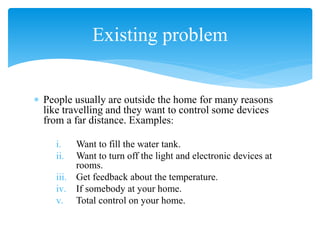
 People usually are outside the home for many reasons
like travelling and they want to control some devices
from a far distance. Examples:
i. Want to fill the water tank.
ii. Want to turn off the light and electronic devices at
rooms.
iii. Get feedback about the temperature.
iv. If somebody at your home.
v. Total control on your home.
Existing problem
Home Automation
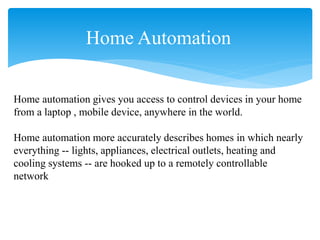
Home automation gives you access to control devices in your home
from a laptop , mobile device, anywhere in the world.
Home automation more accurately describes homes in which nearly
everything -- lights, appliances, electrical outlets, heating and
cooling systems -- are hooked up to a remotely controllable
network
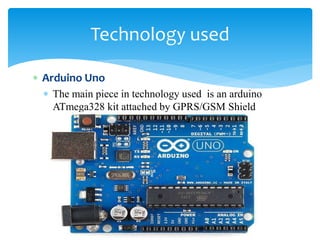
 Arduino Uno
 The main piece in technology used is an arduino
ATmega328 kit attached by GPRS/GSM Shield
Technology used
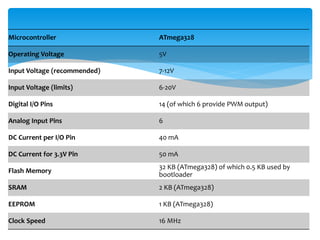
Microcontroller ATmega328
Operating Voltage 5V
Input Voltage (recommended) 7-12V
Input Voltage (limits) 6-20V
Digital I/O Pins 14 (of which 6 provide PWM output)
Analog Input Pins 6
DC Current per I/O Pin 40 mA
DC Current for 3.3V Pin 50 mA
Flash Memory
32 KB (ATmega328) of which 0.5 KB used by
bootloader
SRAM 2 KB (ATmega328)
EEPROM 1 KB (ATmega328)
Clock Speed 16 MHz
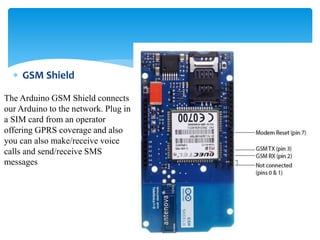
 GSM Shield
The Arduino GSM Shield connects
our Arduino to the network. Plug in
a SIM card from an operator
offering GPRS coverage and also
you can also make/receive voice
calls and send/receive SMS
messages
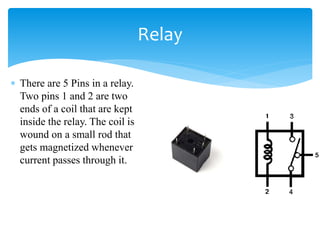
 There are 5 Pins in a relay.
Two pins 1 and 2 are two
ends of a coil that are kept
inside the relay. The coil is
wound on a small rod that
gets magnetized whenever
current passes through it.
Relay
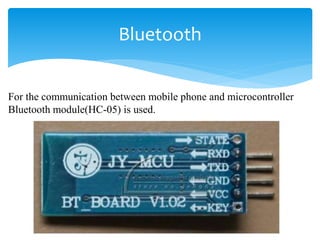
Bluetooth
For the communication between mobile phone and microcontroller
Bluetooth module(HC-05) is used.
Software
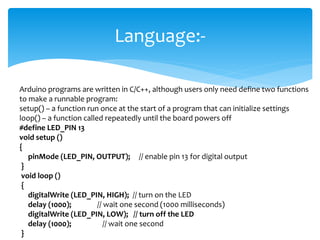
Language:-
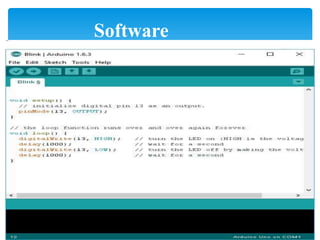
Arduino programs are written in C/C++, although users only need define two functions
to make a runnable program:
setup() – a function run once at the start of a program that can initialize settings
loop() – a function called repeatedly until the board powers off
#define LED_PIN 13
void setup ()
{
pinMode (LED_PIN, OUTPUT); // enable pin 13 for digital output
}
void loop ()
{
digitalWrite (LED_PIN, HIGH); // turn on the LED
delay (1000); // wait one second (1000 milliseconds)
digitalWrite (LED_PIN, LOW); // turn off the LED
delay (1000); // wait one second
}
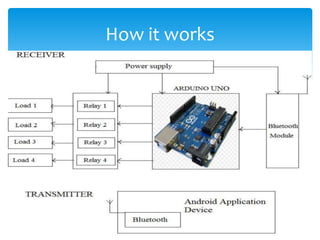
How it works
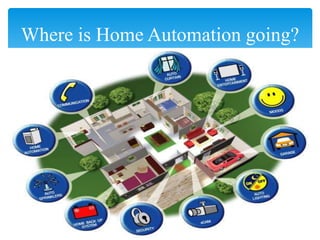
Where is Home Automation going?
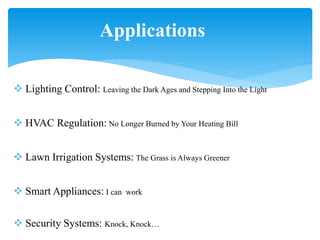
Applications
 Lighting Control: Leaving the Dark Ages and Stepping Into the Light
 HVAC Regulation: No Longer Burned by Your Heating Bill
 Lawn Irrigation Systems: The Grass is Always Greener
 Smart Appliances: I can work
 Security Systems: Knock, Knock…
Advantages
 Adds Safety Through Appliance and Lighting Control.
 Secures Home Through Automated Door Locks.
 Increases Awareness Through Security Cameras.
 Increases Convenience Through Temperature Adjustment.
 Saves Time.
 Saves Money and Increases Convenience.
 Contributes to Economy.
 Increases Peace of Mind.
 Keeps Tabs On Your Children.
Advantages (cont.….)
Disadvantages
 Equipment and installation costs.
 System crashes due to any damage in the interconnection.
 Human errors.
 Reliability.
Scope
New Era in Energy Use.
Home security goes wireless.
Wearable technology is the new black.
Voice commands rule.
DEMO…..
Any Questions……………Thank You…… 

Home automation

  • 1.
    Home Automation UsingARDUINO Submitted By:- Rupshanker Mishra Roll No. – 214212 CSE 3rd year 6th semester
  • 2.
    Introduction Existing Problem Home Automation Technologyused How is it work? Where is home automation going? Applications Advantages Disadvantages Scope Outline
  • 3.
     My Seminaris about “Home automation using Arduino”.  Control most of your devices at home using your Laptop or phone.  Get feedback about the status of your home via Internet.  Provide an easily and comfortable way to control your home devices from any place. Introduction
  • 4.
     People usuallyare outside the home for many reasons like travelling and they want to control some devices from a far distance. Examples: i. Want to fill the water tank. ii. Want to turn off the light and electronic devices at rooms. iii. Get feedback about the temperature. iv. If somebody at your home. v. Total control on your home. Existing problem
  • 5.
    Home Automation Home automationgives you access to control devices in your home from a laptop , mobile device, anywhere in the world. Home automation more accurately describes homes in which nearly everything -- lights, appliances, electrical outlets, heating and cooling systems -- are hooked up to a remotely controllable network
  • 6.
     Arduino Uno The main piece in technology used is an arduino ATmega328 kit attached by GPRS/GSM Shield Technology used
  • 7.
    Microcontroller ATmega328 Operating Voltage5V Input Voltage (recommended) 7-12V Input Voltage (limits) 6-20V Digital I/O Pins 14 (of which 6 provide PWM output) Analog Input Pins 6 DC Current per I/O Pin 40 mA DC Current for 3.3V Pin 50 mA Flash Memory 32 KB (ATmega328) of which 0.5 KB used by bootloader SRAM 2 KB (ATmega328) EEPROM 1 KB (ATmega328) Clock Speed 16 MHz
  • 8.
     GSM Shield TheArduino GSM Shield connects our Arduino to the network. Plug in a SIM card from an operator offering GPRS coverage and also you can also make/receive voice calls and send/receive SMS messages
  • 9.
     There are5 Pins in a relay. Two pins 1 and 2 are two ends of a coil that are kept inside the relay. The coil is wound on a small rod that gets magnetized whenever current passes through it. Relay
  • 10.
    Bluetooth For the communicationbetween mobile phone and microcontroller Bluetooth module(HC-05) is used.
  • 11.
  • 12.
    Language:- Arduino programs arewritten in C/C++, although users only need define two functions to make a runnable program: setup() – a function run once at the start of a program that can initialize settings loop() – a function called repeatedly until the board powers off #define LED_PIN 13 void setup () { pinMode (LED_PIN, OUTPUT); // enable pin 13 for digital output } void loop () { digitalWrite (LED_PIN, HIGH); // turn on the LED delay (1000); // wait one second (1000 milliseconds) digitalWrite (LED_PIN, LOW); // turn off the LED delay (1000); // wait one second }
  • 13.
  • 14.
    Where is HomeAutomation going?
  • 15.
    Applications  Lighting Control:Leaving the Dark Ages and Stepping Into the Light  HVAC Regulation: No Longer Burned by Your Heating Bill  Lawn Irrigation Systems: The Grass is Always Greener  Smart Appliances: I can work  Security Systems: Knock, Knock…
  • 16.
    Advantages  Adds SafetyThrough Appliance and Lighting Control.  Secures Home Through Automated Door Locks.  Increases Awareness Through Security Cameras.  Increases Convenience Through Temperature Adjustment.  Saves Time.  Saves Money and Increases Convenience.
  • 17.
     Contributes toEconomy.  Increases Peace of Mind.  Keeps Tabs On Your Children. Advantages (cont.….)
  • 18.
    Disadvantages  Equipment andinstallation costs.  System crashes due to any damage in the interconnection.  Human errors.  Reliability.
  • 19.
    Scope New Era inEnergy Use. Home security goes wireless. Wearable technology is the new black. Voice commands rule.
  • 20.
  • 21.