P R O F . S T E V E N L . J O H N S O N
T w i t t e r : @ S t e v e n L J o h n s o n
http://stevenljohnson.org
http://community.mis.temple.edu/mis5101fall10/
MIS5101: Business Intelligence
Week 10 – Outcome Measures
Schedule Reminders
  11/10 Computer Lab – Accessing Data (SQL)
  11/17 Computer Lab – Analyzing Data (Excel)
  11/24 Happy Thanksgiving (Eve)
  12/1 Topic: Security, Privacy and Data Mining
(2 Cases)
  12/8 Group Project Due
Group Project Presentations
  12/15 Final Exam
Today’s Agenda
  Last Week Discussion
  Case Discussion
  Blog + Reading Discussion
  NoSQL + SQL
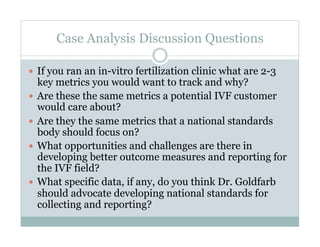
Case Analysis Discussion Questions
  If you ran an in-vitro fertilization clinic what are 2-3
key metrics you would want to track and why?
  Are these the same metrics a potential IVF customer
would care about?
  Are they the same metrics that a national standards
body should focus on?
  What opportunities and challenges are there in
developing better outcome measures and reporting for
the IVF field?
  What specific data, if any, do you think Dr. Goldfarb
should advocate developing national standards for
collecting and reporting?
100 Second Reflection
1.  What is something you want to remember about
the outcome measures at the end of the semester?
2.  What would you like to know more about?
3.  Any comments?
Blog Discussion
  Performance Measurement
  KPIs
  Performance measurement systems
  Performance measurement as a process
  Deciding what to measure
  Gathering performance data
  Interpreting performance results
  Avoiding performance measurement pitfalls
  From performance measurement to performance
management
Measuring the User Experience: Collecting,
Analyzing, and Presenting Usability Metrics
Summary of section 4.6, performance metrics
  Task success metrics – characteristics of completion
  Time-on-task - how quickly
  Errors - number of mistakes
  Efficiency - amount of effort (cognitive and physical)
  Learnability –changes in efficiency over time
Chapter 8
  Combined and comparative measures
7
NoSQL Use Cases
  Frequently-written, rarely read statistical data (e.g., a web hit counter):
in-memory key/value store (Redis), or update-in-place document store
(MongoDB)
  Big Data (e.g., weather stats or business analytics): freeform, distributed db
system (Hadoop).
  Binary assets (e.g., MP3s and PDFs): datastore serves directly to browser
(Amazon S3)
  Transient data (e.g., web sessions, locks, or short-term stats): transient
datastore (e.g., Memcache)
  Replicate your data set to multiple locations (e.g.,as syncing a music database
between a web app and a mobile device): add replication features (CouchDB).
  High availability apps where minimizing downtime is critical: automatically
clustered, redundant setup of datastores (Cassandra,Riak)
  Highly normalized, transactional, ad-hoc-queries: SQL databases. Adding new
tools to our toolbox, not removing old ones.
Source: NoSQL, Heroku, and You - http://blog.heroku.com/archives/2010/7/20/nosql/
Introduction to SQL
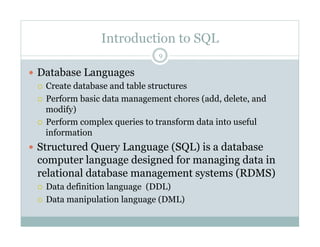
  Database Languages
  Create database and table structures
  Perform basic data management chores (add, delete, and
modify)
  Perform complex queries to transform data into useful
information
  Structured Query Language (SQL) is a database
computer language designed for managing data in
relational database management systems (RDMS)
  Data definition language (DDL)
  Data manipulation language (DML)
9
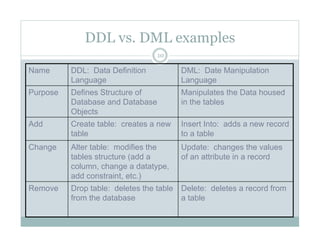
DDL vs. DML examples
Name DDL: Data Definition
Language
DML: Date Manipulation
Language
Purpose Defines Structure of
Database and Database
Objects
Manipulates the Data housed
in the tables
Add Create table: creates a new
table
Insert Into: adds a new record
to a table
Change Alter table: modifies the
tables structure (add a
column, change a datatype,
add constraint, etc.)
Update: changes the values
of an attribute in a record
Remove Drop table: deletes the table
from the database
Delete: deletes a record from
a table
10
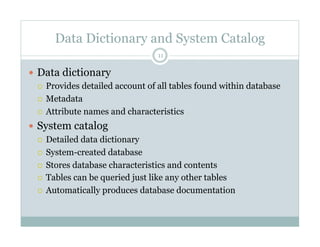
Data Dictionary and System Catalog
  Data dictionary
  Provides detailed account of all tables found within database
  Metadata
  Attribute names and characteristics
  System catalog
  Detailed data dictionary
  System-created database
  Stores database characteristics and contents
  Tables can be queried just like any other tables
  Automatically produces database documentation
11
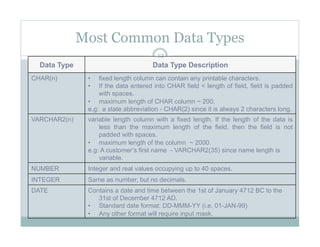
Most Common Data Types
Data Type Data Type Description
CHAR(n) •  fixed length column can contain any printable characters.
•  If the data entered into CHAR field < length of field, field is padded
with spaces.
•  maximum length of CHAR column ~ 200.
e.g: a state abbreviation - CHAR(2) since it is always 2 characters long.
VARCHAR2(n) variable length column with a fixed length. If the length of the data is
less than the maximum length of the field, then the field is not
padded with spaces.
•  maximum length of the column ~ 2000.
e.g: A customer’s first name - VARCHAR2(35) since name length is
variable.
NUMBER Integer and real values occupying up to 40 spaces.
INTEGER Same as number, but no decimals.
DATE Contains a date and time between the 1st of January 4712 BC to the
31st of December 4712 AD.
•  Standard date format: DD-MMM-YY (i.e. 01-JAN-99)
•  Any other format will require input mask.
12
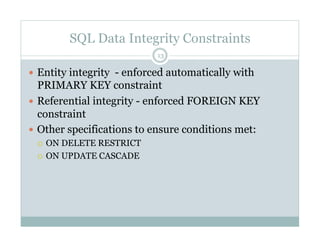
SQL Data Integrity Constraints
  Entity integrity - enforced automatically with
PRIMARY KEY constraint
  Referential integrity - enforced FOREIGN KEY
constraint
  Other specifications to ensure conditions met:
  ON DELETE RESTRICT
  ON UPDATE CASCADE
13
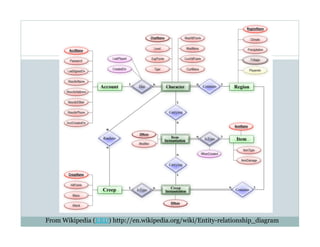
Entity Relationship Diagram
From Wikipedia (ERD) http://en.wikipedia.org/wiki/Entity-relationship_diagram
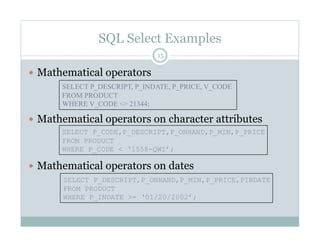
SQL Select Examples
  Mathematical operators
  Mathematical operators on character attributes
  Mathematical operators on dates
15
SELECT P_DESCRIPT, P_INDATE, P_PRICE, V_CODE
FROM PRODUCT
WHERE V_CODE <> 21344;
SELECT P_CODE,P_DESCRIPT,P_ONHAND,P_MIN,P_PRICE
FROM PRODUCT
WHERE P_CODE < ‘1558-QWI’;
SELECT P_DESCRIPT,P_ONHAND,P_MIN,P_PRICE,PINDATE
FROM PRODUCT
WHERE P_INDATE >= ‘01/20/2002’;
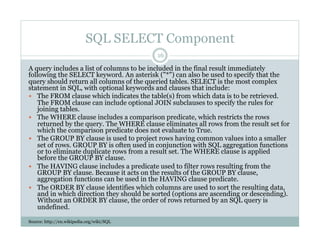
SQL SELECT Component
A query includes a list of columns to be included in the final result immediately
following the SELECT keyword. An asterisk ("*") can also be used to specify that the
query should return all columns of the queried tables. SELECT is the most complex
statement in SQL, with optional keywords and clauses that include:
  The FROM clause which indicates the table(s) from which data is to be retrieved.
The FROM clause can include optional JOIN subclauses to specify the rules for
joining tables.
  The WHERE clause includes a comparison predicate, which restricts the rows
returned by the query. The WHERE clause eliminates all rows from the result set for
which the comparison predicate does not evaluate to True.
  The GROUP BY clause is used to project rows having common values into a smaller
set of rows. GROUP BY is often used in conjunction with SQL aggregation functions
or to eliminate duplicate rows from a result set. The WHERE clause is applied
before the GROUP BY clause.
  The HAVING clause includes a predicate used to filter rows resulting from the
GROUP BY clause. Because it acts on the results of the GROUP BY clause,
aggregation functions can be used in the HAVING clause predicate.
  The ORDER BY clause identifies which columns are used to sort the resulting data,
and in which direction they should be sorted (options are ascending or descending).
Without an ORDER BY clause, the order of rows returned by an SQL query is
undefined.
Source: http://en.wikipedia.org/wiki/SQL
16
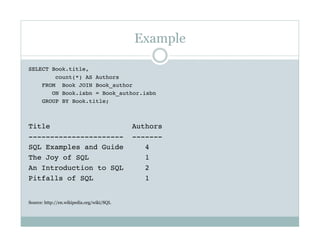
Example
SELECT Book.title,
count(*) AS Authors
FROM Book JOIN Book_author 
ON Book.isbn = Book_author.isbn
GROUP BY Book.title;
Title Authors
---------------------- -------
SQL Examples and Guide 4
The Joy of SQL 1
An Introduction to SQL 2
Pitfalls of SQL 1
Source: http://en.wikipedia.org/wiki/SQL
P R O F . S T E V E N L . J O H N S O N
E M A I L : S T E V E N @ T E M P L E . E D U
T w i t t e r : @ S t e v e n L J o h n s o n
http://stevenljohnson.org
http://community.mis.temple.edu/mis5001fall10johnson/
For More Information

MIS5101 WK10 Outcome Measures

  • 1.
    P R OF . S T E V E N L . J O H N S O N T w i t t e r : @ S t e v e n L J o h n s o n http://stevenljohnson.org http://community.mis.temple.edu/mis5101fall10/ MIS5101: Business Intelligence Week 10 – Outcome Measures
  • 2.
    Schedule Reminders   11/10Computer Lab – Accessing Data (SQL)   11/17 Computer Lab – Analyzing Data (Excel)   11/24 Happy Thanksgiving (Eve)   12/1 Topic: Security, Privacy and Data Mining (2 Cases)   12/8 Group Project Due Group Project Presentations   12/15 Final Exam
  • 3.
    Today’s Agenda   LastWeek Discussion   Case Discussion   Blog + Reading Discussion   NoSQL + SQL
  • 4.
    Case Analysis DiscussionQuestions   If you ran an in-vitro fertilization clinic what are 2-3 key metrics you would want to track and why?   Are these the same metrics a potential IVF customer would care about?   Are they the same metrics that a national standards body should focus on?   What opportunities and challenges are there in developing better outcome measures and reporting for the IVF field?   What specific data, if any, do you think Dr. Goldfarb should advocate developing national standards for collecting and reporting?
  • 5.
    100 Second Reflection 1. What is something you want to remember about the outcome measures at the end of the semester? 2.  What would you like to know more about? 3.  Any comments?
  • 6.
    Blog Discussion   PerformanceMeasurement   KPIs   Performance measurement systems   Performance measurement as a process   Deciding what to measure   Gathering performance data   Interpreting performance results   Avoiding performance measurement pitfalls   From performance measurement to performance management
  • 7.
    Measuring the UserExperience: Collecting, Analyzing, and Presenting Usability Metrics Summary of section 4.6, performance metrics   Task success metrics – characteristics of completion   Time-on-task - how quickly   Errors - number of mistakes   Efficiency - amount of effort (cognitive and physical)   Learnability –changes in efficiency over time Chapter 8   Combined and comparative measures 7
  • 8.
    NoSQL Use Cases  Frequently-written, rarely read statistical data (e.g., a web hit counter): in-memory key/value store (Redis), or update-in-place document store (MongoDB)   Big Data (e.g., weather stats or business analytics): freeform, distributed db system (Hadoop).   Binary assets (e.g., MP3s and PDFs): datastore serves directly to browser (Amazon S3)   Transient data (e.g., web sessions, locks, or short-term stats): transient datastore (e.g., Memcache)   Replicate your data set to multiple locations (e.g.,as syncing a music database between a web app and a mobile device): add replication features (CouchDB).   High availability apps where minimizing downtime is critical: automatically clustered, redundant setup of datastores (Cassandra,Riak)   Highly normalized, transactional, ad-hoc-queries: SQL databases. Adding new tools to our toolbox, not removing old ones. Source: NoSQL, Heroku, and You - http://blog.heroku.com/archives/2010/7/20/nosql/
  • 9.
    Introduction to SQL  Database Languages   Create database and table structures   Perform basic data management chores (add, delete, and modify)   Perform complex queries to transform data into useful information   Structured Query Language (SQL) is a database computer language designed for managing data in relational database management systems (RDMS)   Data definition language (DDL)   Data manipulation language (DML) 9
  • 10.
    DDL vs. DMLexamples Name DDL: Data Definition Language DML: Date Manipulation Language Purpose Defines Structure of Database and Database Objects Manipulates the Data housed in the tables Add Create table: creates a new table Insert Into: adds a new record to a table Change Alter table: modifies the tables structure (add a column, change a datatype, add constraint, etc.) Update: changes the values of an attribute in a record Remove Drop table: deletes the table from the database Delete: deletes a record from a table 10
  • 11.
    Data Dictionary andSystem Catalog   Data dictionary   Provides detailed account of all tables found within database   Metadata   Attribute names and characteristics   System catalog   Detailed data dictionary   System-created database   Stores database characteristics and contents   Tables can be queried just like any other tables   Automatically produces database documentation 11
  • 12.
    Most Common DataTypes Data Type Data Type Description CHAR(n) •  fixed length column can contain any printable characters. •  If the data entered into CHAR field < length of field, field is padded with spaces. •  maximum length of CHAR column ~ 200. e.g: a state abbreviation - CHAR(2) since it is always 2 characters long. VARCHAR2(n) variable length column with a fixed length. If the length of the data is less than the maximum length of the field, then the field is not padded with spaces. •  maximum length of the column ~ 2000. e.g: A customer’s first name - VARCHAR2(35) since name length is variable. NUMBER Integer and real values occupying up to 40 spaces. INTEGER Same as number, but no decimals. DATE Contains a date and time between the 1st of January 4712 BC to the 31st of December 4712 AD. •  Standard date format: DD-MMM-YY (i.e. 01-JAN-99) •  Any other format will require input mask. 12
  • 13.
    SQL Data IntegrityConstraints   Entity integrity - enforced automatically with PRIMARY KEY constraint   Referential integrity - enforced FOREIGN KEY constraint   Other specifications to ensure conditions met:   ON DELETE RESTRICT   ON UPDATE CASCADE 13
  • 14.
    Entity Relationship Diagram FromWikipedia (ERD) http://en.wikipedia.org/wiki/Entity-relationship_diagram
  • 15.
    SQL Select Examples  Mathematical operators   Mathematical operators on character attributes   Mathematical operators on dates 15 SELECT P_DESCRIPT, P_INDATE, P_PRICE, V_CODE FROM PRODUCT WHERE V_CODE <> 21344; SELECT P_CODE,P_DESCRIPT,P_ONHAND,P_MIN,P_PRICE FROM PRODUCT WHERE P_CODE < ‘1558-QWI’; SELECT P_DESCRIPT,P_ONHAND,P_MIN,P_PRICE,PINDATE FROM PRODUCT WHERE P_INDATE >= ‘01/20/2002’;
  • 16.
    SQL SELECT Component Aquery includes a list of columns to be included in the final result immediately following the SELECT keyword. An asterisk ("*") can also be used to specify that the query should return all columns of the queried tables. SELECT is the most complex statement in SQL, with optional keywords and clauses that include:   The FROM clause which indicates the table(s) from which data is to be retrieved. The FROM clause can include optional JOIN subclauses to specify the rules for joining tables.   The WHERE clause includes a comparison predicate, which restricts the rows returned by the query. The WHERE clause eliminates all rows from the result set for which the comparison predicate does not evaluate to True.   The GROUP BY clause is used to project rows having common values into a smaller set of rows. GROUP BY is often used in conjunction with SQL aggregation functions or to eliminate duplicate rows from a result set. The WHERE clause is applied before the GROUP BY clause.   The HAVING clause includes a predicate used to filter rows resulting from the GROUP BY clause. Because it acts on the results of the GROUP BY clause, aggregation functions can be used in the HAVING clause predicate.   The ORDER BY clause identifies which columns are used to sort the resulting data, and in which direction they should be sorted (options are ascending or descending). Without an ORDER BY clause, the order of rows returned by an SQL query is undefined. Source: http://en.wikipedia.org/wiki/SQL 16
  • 17.
    Example SELECT Book.title, count(*) ASAuthors FROM Book JOIN Book_author ON Book.isbn = Book_author.isbn GROUP BY Book.title; Title Authors ---------------------- ------- SQL Examples and Guide 4 The Joy of SQL 1 An Introduction to SQL 2 Pitfalls of SQL 1 Source: http://en.wikipedia.org/wiki/SQL
  • 18.
    P R OF . S T E V E N L . J O H N S O N E M A I L : S T E V E N @ T E M P L E . E D U T w i t t e r : @ S t e v e n L J o h n s o n http://stevenljohnson.org http://community.mis.temple.edu/mis5001fall10johnson/ For More Information