Banking Management System
Topic
Definition1
importance2
Implement3
Requirements4
Face problems
5
ER-Diagram6
Contents
Entities & attribute7
Modeling8
S.Q.L
9
Conclusion
10
Question answer
11
Contents
Over View
Collection of information
that is organized so that it
can easily access.
Data store in tables,rows
And column
Data Base
 A database management system (DBMS) is system
software.
 Creating and managing databases.
 The DBMS provides users and programmers with a
systematic way to create, retrieve, update and
manage data.
Definition of DBMS1
Importance of DBMS2
 A database management system is important because
 It helps make data management more efficient and effective.
 A database management system stores.
 organizes and manages a large amount of information within a
single software application.
 Use of this system increases efficiency of business operations and
reduces overall costs.
Importance of DBMS2
 Analyze user environment.
 Develop logical model.
 Choose DBMS.
 Map logical model DBMS.
 Develop physical Design.
 Evaluate Physical Model.
 Tune System.
 Implement System.
3 Implement
 Customer
 Banker-info
 Branch
 Loan
 Credit-Card
 Account
Requirements BMS4
 Verification of documentation.
 Customer service representative / Personal banker
Clearing , Account opening , online transfers etc.
 Forms of special crossing cheques.
 Customer debit and credit problem.
 Employee is not efficient.
 Customer Communication problem face.
Face a Problems5
 They do not communication with us accurate time.
 Death of any person.
 Verification of Deduction of Zakat.
 Provision for Bad Debit.
 Missing Vouchers.
 Verification of lockers facilities.
Face a Problems5
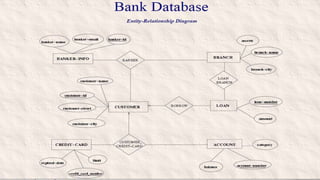
ER-Diagram6
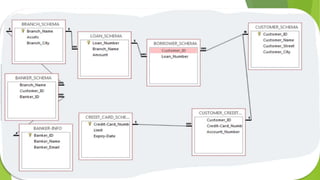
1: ENTITIES (Customer)
ATTRIBUTES (Customer-id , Customer-name , Customer-street , Customer-city)
2: ENTITIES (Banker-info)
ATTRIBUTES (Banker-name , Banker-email , Banker-id)
3: ENTITIES (Branch)
ATTRIBUTES (Assets , Branch-name , Branch-city)
4: ENTITIES (Loan)
ATTRIBUTES (loan-number , Amount)
5: ENTITIES (Credit-Card)
ATTRIBUTES (Expired-date , Limit , Credit_card_number )
6: ENTITIES (Account)
ATTRIBUTES (Balance , Account-number , Category)
Entities & attribute7
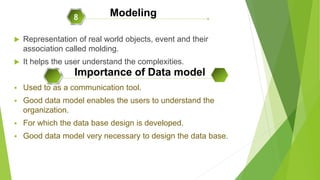
 Representation of real world objects, event and their
association called molding.
 It helps the user understand the complexities.
 Used to as a communication tool.
 Good data model enables the users to understand the
organization.
 For which the data base design is developed.
 Good data model very necessary to design the data base.
Modeling8
Importance of Data model
Types of data model
 Object-based Data model
 Record based model
 Physical Data model
Object based Data Model
 Object based model use the concept.
 Like Entities, attributes, relationship
 Entities
Person, place, things, for which data is collected.
 Attribute
The characteristics of entity is called attribute.
 Relationship
The association b/w two or more entity.
Record based data model
 Used to describe external and conceptual level of data
base.
 Also use to describe internal level to some extent.
 They are used to develop and logical structure.
 The record may different type.
 Each record types define of fixed number of field.
Types of Record based
 Hierarchical Model
 Network model
 Relational model
(In our project we use the relational model)
Physical Data model
 Describe the store the data in computer.
 They give information, such as record structure.
 They are not as many physical data model as logical data
model
S.Q.L9
S.Q.L (Structured Query Language)
S.Q.L
 S.Q.L stands foe Structured Query language.
 It is not full features programming language.
 It is simply data sub language
 SQL was developed by IBM.
 It endorsed as a national standard by ANSI
 (American national standard institution).
 New standard SQL3 also exists.
 The most widely implement of version of SQL is ANSI-92
 SQL is English-like language.
 It uses words Like SELECT, INSERT etc.
 SQL commands are not case Sensitive
 SQL provide commands for variety of task including.
o Inserting, updating, deleting row in a table.
o Creating, modifying, and deleting.
o Controlling access to the data base and data base object.
Features of S.Q.L
DDL (Data Definition Language)
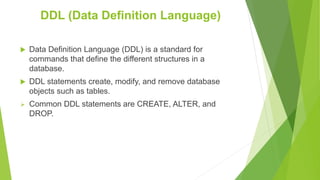
 Data Definition Language (DDL) is a standard for
commands that define the different structures in a
database.
 DDL statements create, modify, and remove database
objects such as tables.
 Common DDL statements are CREATE, ALTER, and
DROP.
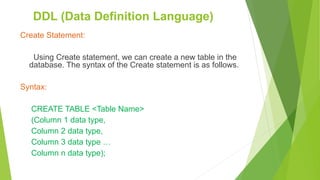
Create Statement:
Using Create statement, we can create a new table in the
database. The syntax of the Create statement is as follows.
Syntax:
CREATE TABLE <Table Name>
(Column 1 data type,
Column 2 data type,
Column 3 data type …
Column n data type);
DDL (Data Definition Language)
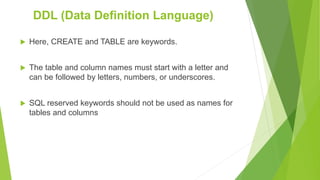
 Here, CREATE and TABLE are keywords.
 The table and column names must start with a letter and
can be followed by letters, numbers, or underscores.
 SQL reserved keywords should not be used as names for
tables and columns
DDL (Data Definition Language)
Alter Statement:
 Using alter statement we can do the following alterations
in our existing table.
 Adding a new column
 Renaming a column
DDL (Data Definition Language)
Adding a new column:
The syntax for adding a new column into the table is as
follows.
Syntax:
ALTER TABLE <Table name>
ADD(column 1 data type, column 2 data type, … column
n data type);
 Here, ALTER, TABLE and ADD are keywords.
DDL (Data Definition Language)
Renaming a column:
The syntax for renaming a column is as follows.
Syntax:
ALTER TABLE <Table name> RENAME COLUMN <old
name> TO <new name>;
 Here, ALTER, TABLE, RENAME, COLUMN and TO are
keywords.
DDL (Data Definition Language)
Drop Statement:
The drop statement is used to delete a table and all the
rows in the table.
Syntax:
DROP TABLE <Table name>
 Here, DROP and TABLE are keywords.
DDL (Data Definition Language)
DML (Data manipulation Language)
 The DML commands are used to insert and modify the data
in the database. It enables us to perform the following
tasks.
 Inserting a row or the values of particular columns into the
table (Using Insert statement)
 Updating values of columns in a table (Using Update
statement)
 Deleting rows in a table (Using Delete statement)
Syntax 1: (To insert values for the specified columns in a table)
INSERT INTO <Table Name> (column 1, column 2, … column n)
VALUES (value1, value2, … value n);
 Here, INSERT, INTO and VALUES are keywords.
DML (Data manipulation Language)
Update Statement:
The update statement is used to update or change
records that match specified criteria. This is accomplished
by using a WHERE clause.
Syntax:
UPDATE <Table Name>
SET column 1 = value 1, column 2 = value 2, … column 3 =
value 3
WHERE <condition>;
DML (Data manipulation Language)
Delete Statement:
The delete statement is used to delete the records or rows
from the table.
Syntax:
DELETE FROM <Table Name>
WHERE <Condition>
 Here, DELETE, FROM and WHERE are keywords.
DML (Data manipulation Language)
9
Security
Security
 Overview To Database Security.
 Why need of database security.
 What is Database Security.
 Concepts of Database Security.
Security9
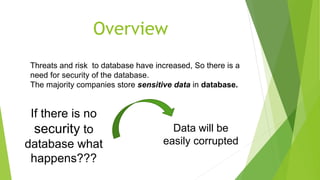
Threats and risk to database have increased, So there is a
need for security of the database.
The majority companies store sensitive data in database.
If there is no
security to
database what
happens???
Data will be
easily corrupted
Overview
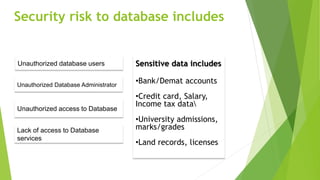
Security risk to database includes
Unauthorized database users
Unauthorized Database Administrator
Unauthorized access to Database
Lack of access to Database
services
Sensitive data includes
•Bank/Demat accounts
•Credit card, Salary,
Income tax data
•University admissions,
marks/grades
•Land records, licenses
Definition of Database Security
Database Security is defined as the
process by which “Confidentiality,
Integrity and Availability” of the database
can be protected.

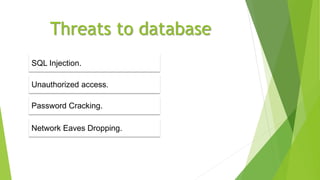
Threats to database
Unauthorized access.
Password Cracking.
Network Eaves Dropping.
SQL Injection.

SQL Injection
A form of attack on a database-driven of insecure code on a system connected
to the Internet , bypassing the firewall Web site in which the attacker executes
unauthorized SQL commands by taking advantage.
3/4/2017
Vulnerabilities:
Poor Input validation to web
application.
Unsafe ,dynamically constructed
SQL commands.
Weak permissions that fail to
restrict the application to Database
Methods of securing the database
Authorization - privileges,
views.
Authentication – passwords.
Encryption - public key / private
key, secure sockets.
Logical - firewalls, net proxies.
3/4/2017Database security issues
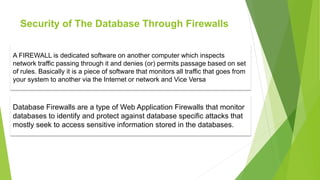
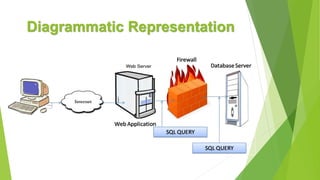
Security of The Database Through Firewalls
A FIREWALL is dedicated software on another computer which inspects
network traffic passing through it and denies (or) permits passage based on set
of rules. Basically it is a piece of software that monitors all traffic that goes from
your system to another via the Internet or network and Vice Versa
Database Firewalls are a type of Web Application Firewalls that monitor
databases to identify and protect against database specific attacks that
mostly seek to access sensitive information stored in the databases.
How Database Firewall works
The Database Firewalls include a set of pre-defined, customizable security audit policies
and they can identify database attacks based on threat patterns called signatures.
The SQL input statements (or) queries are compared to these signatures, which are
updated frequently by the vendors to identify known attacks on the database.
But all the attacks on the databases may not be familiar.
Database Firewalls build (or come with) white list of approved SQL commands(or)
statements that are safe.
All the input commands are compared with this white list and only those that are already
present in the white list are sent to the database.
Diagrammatic Representation
DATABASES MANAGEMENT SYSTEM
Keys
DATABASES MANAGEMENT SYSTEM
Conclusion
10
Conclusion
 A DBMS is a systematic operational system which consists of tools
making data, data saving and data manipulation an easier task.
 DBMS is the majorly used through out the wold for data handling.
 Thus its a good data manager till today.
 If some one ask you question How do we protect data form crashes.
Bank mangement system

Bank mangement system

  • 3.
  • 4.
  • 5.
  • 7.
    Over View Collection ofinformation that is organized so that it can easily access. Data store in tables,rows And column Data Base
  • 8.
     A databasemanagement system (DBMS) is system software.  Creating and managing databases.  The DBMS provides users and programmers with a systematic way to create, retrieve, update and manage data. Definition of DBMS1
  • 9.
  • 10.
     A databasemanagement system is important because  It helps make data management more efficient and effective.  A database management system stores.  organizes and manages a large amount of information within a single software application.  Use of this system increases efficiency of business operations and reduces overall costs. Importance of DBMS2
  • 11.
     Analyze userenvironment.  Develop logical model.  Choose DBMS.  Map logical model DBMS.  Develop physical Design.  Evaluate Physical Model.  Tune System.  Implement System. 3 Implement
  • 12.
     Customer  Banker-info Branch  Loan  Credit-Card  Account Requirements BMS4
  • 13.
     Verification ofdocumentation.  Customer service representative / Personal banker Clearing , Account opening , online transfers etc.  Forms of special crossing cheques.  Customer debit and credit problem.  Employee is not efficient.  Customer Communication problem face. Face a Problems5
  • 14.
     They donot communication with us accurate time.  Death of any person.  Verification of Deduction of Zakat.  Provision for Bad Debit.  Missing Vouchers.  Verification of lockers facilities. Face a Problems5
  • 15.
  • 17.
    1: ENTITIES (Customer) ATTRIBUTES(Customer-id , Customer-name , Customer-street , Customer-city) 2: ENTITIES (Banker-info) ATTRIBUTES (Banker-name , Banker-email , Banker-id) 3: ENTITIES (Branch) ATTRIBUTES (Assets , Branch-name , Branch-city) 4: ENTITIES (Loan) ATTRIBUTES (loan-number , Amount) 5: ENTITIES (Credit-Card) ATTRIBUTES (Expired-date , Limit , Credit_card_number ) 6: ENTITIES (Account) ATTRIBUTES (Balance , Account-number , Category) Entities & attribute7
  • 18.
     Representation ofreal world objects, event and their association called molding.  It helps the user understand the complexities.  Used to as a communication tool.  Good data model enables the users to understand the organization.  For which the data base design is developed.  Good data model very necessary to design the data base. Modeling8 Importance of Data model
  • 19.
    Types of datamodel  Object-based Data model  Record based model  Physical Data model
  • 20.
    Object based DataModel  Object based model use the concept.  Like Entities, attributes, relationship  Entities Person, place, things, for which data is collected.  Attribute The characteristics of entity is called attribute.  Relationship The association b/w two or more entity.
  • 21.
    Record based datamodel  Used to describe external and conceptual level of data base.  Also use to describe internal level to some extent.  They are used to develop and logical structure.  The record may different type.  Each record types define of fixed number of field.
  • 22.
    Types of Recordbased  Hierarchical Model  Network model  Relational model (In our project we use the relational model)
  • 23.
    Physical Data model Describe the store the data in computer.  They give information, such as record structure.  They are not as many physical data model as logical data model
  • 24.
  • 25.
    S.Q.L  S.Q.L standsfoe Structured Query language.  It is not full features programming language.  It is simply data sub language  SQL was developed by IBM.  It endorsed as a national standard by ANSI  (American national standard institution).  New standard SQL3 also exists.  The most widely implement of version of SQL is ANSI-92
  • 26.
     SQL isEnglish-like language.  It uses words Like SELECT, INSERT etc.  SQL commands are not case Sensitive  SQL provide commands for variety of task including. o Inserting, updating, deleting row in a table. o Creating, modifying, and deleting. o Controlling access to the data base and data base object. Features of S.Q.L
  • 27.
    DDL (Data DefinitionLanguage)  Data Definition Language (DDL) is a standard for commands that define the different structures in a database.  DDL statements create, modify, and remove database objects such as tables.  Common DDL statements are CREATE, ALTER, and DROP.
  • 28.
    Create Statement: Using Createstatement, we can create a new table in the database. The syntax of the Create statement is as follows. Syntax: CREATE TABLE <Table Name> (Column 1 data type, Column 2 data type, Column 3 data type … Column n data type); DDL (Data Definition Language)
  • 29.
     Here, CREATEand TABLE are keywords.  The table and column names must start with a letter and can be followed by letters, numbers, or underscores.  SQL reserved keywords should not be used as names for tables and columns DDL (Data Definition Language)
  • 30.
    Alter Statement:  Usingalter statement we can do the following alterations in our existing table.  Adding a new column  Renaming a column DDL (Data Definition Language)
  • 31.
    Adding a newcolumn: The syntax for adding a new column into the table is as follows. Syntax: ALTER TABLE <Table name> ADD(column 1 data type, column 2 data type, … column n data type);  Here, ALTER, TABLE and ADD are keywords. DDL (Data Definition Language)
  • 32.
    Renaming a column: Thesyntax for renaming a column is as follows. Syntax: ALTER TABLE <Table name> RENAME COLUMN <old name> TO <new name>;  Here, ALTER, TABLE, RENAME, COLUMN and TO are keywords. DDL (Data Definition Language)
  • 33.
    Drop Statement: The dropstatement is used to delete a table and all the rows in the table. Syntax: DROP TABLE <Table name>  Here, DROP and TABLE are keywords. DDL (Data Definition Language)
  • 34.
    DML (Data manipulationLanguage)  The DML commands are used to insert and modify the data in the database. It enables us to perform the following tasks.  Inserting a row or the values of particular columns into the table (Using Insert statement)  Updating values of columns in a table (Using Update statement)  Deleting rows in a table (Using Delete statement)
  • 35.
    Syntax 1: (Toinsert values for the specified columns in a table) INSERT INTO <Table Name> (column 1, column 2, … column n) VALUES (value1, value2, … value n);  Here, INSERT, INTO and VALUES are keywords. DML (Data manipulation Language)
  • 36.
    Update Statement: The updatestatement is used to update or change records that match specified criteria. This is accomplished by using a WHERE clause. Syntax: UPDATE <Table Name> SET column 1 = value 1, column 2 = value 2, … column 3 = value 3 WHERE <condition>; DML (Data manipulation Language)
  • 37.
    Delete Statement: The deletestatement is used to delete the records or rows from the table. Syntax: DELETE FROM <Table Name> WHERE <Condition>  Here, DELETE, FROM and WHERE are keywords. DML (Data manipulation Language)
  • 38.
  • 39.
     Overview ToDatabase Security.  Why need of database security.  What is Database Security.  Concepts of Database Security. Security9
  • 40.
    Threats and riskto database have increased, So there is a need for security of the database. The majority companies store sensitive data in database. If there is no security to database what happens??? Data will be easily corrupted Overview
  • 41.
    Security risk todatabase includes Unauthorized database users Unauthorized Database Administrator Unauthorized access to Database Lack of access to Database services Sensitive data includes •Bank/Demat accounts •Credit card, Salary, Income tax data •University admissions, marks/grades •Land records, licenses
  • 42.
    Definition of DatabaseSecurity Database Security is defined as the process by which “Confidentiality, Integrity and Availability” of the database can be protected.
  • 43.
    Threats to database Unauthorizedaccess. Password Cracking. Network Eaves Dropping. SQL Injection.
  • 44.
     SQL Injection A formof attack on a database-driven of insecure code on a system connected to the Internet , bypassing the firewall Web site in which the attacker executes unauthorized SQL commands by taking advantage. 3/4/2017 Vulnerabilities: Poor Input validation to web application. Unsafe ,dynamically constructed SQL commands. Weak permissions that fail to restrict the application to Database
  • 45.
    Methods of securingthe database Authorization - privileges, views. Authentication – passwords. Encryption - public key / private key, secure sockets. Logical - firewalls, net proxies. 3/4/2017Database security issues
  • 46.
    Security of TheDatabase Through Firewalls A FIREWALL is dedicated software on another computer which inspects network traffic passing through it and denies (or) permits passage based on set of rules. Basically it is a piece of software that monitors all traffic that goes from your system to another via the Internet or network and Vice Versa Database Firewalls are a type of Web Application Firewalls that monitor databases to identify and protect against database specific attacks that mostly seek to access sensitive information stored in the databases.
  • 47.
    How Database Firewallworks The Database Firewalls include a set of pre-defined, customizable security audit policies and they can identify database attacks based on threat patterns called signatures. The SQL input statements (or) queries are compared to these signatures, which are updated frequently by the vendors to identify known attacks on the database. But all the attacks on the databases may not be familiar. Database Firewalls build (or come with) white list of approved SQL commands(or) statements that are safe. All the input commands are compared with this white list and only those that are already present in the white list are sent to the database.
  • 48.
  • 49.
  • 51.
  • 52.
    Conclusion  A DBMSis a systematic operational system which consists of tools making data, data saving and data manipulation an easier task.  DBMS is the majorly used through out the wold for data handling.  Thus its a good data manager till today.  If some one ask you question How do we protect data form crashes.