MEDIA AND INFORMATION
LITERACY (MIL)
Mr. Arniel Ping
St. Stephen’s High School
Manila, Philippines
Introduction to MIL (Part 3):
Design Elements and Principles
Performance Task: Project
MIL PPT 03
Revised: October 5, 2017
LEARNING COMPETENCIES
Learners will be able to…
• discuss basic text and visual design
elements and principles (SSHS);
• identify design elements and principles
used in different text and visual media
(SSHS);
LEARNING COMPETENCIES
Learners will be able to…
• produce and evaluate a creative text based
presentation using design principle and
elements (MIL11/12TIM-IVb-6);
• produce and evaluate a creative visual based
presentation using design principle and
elements (MIL11/12VIM-IVc-10); and
LEARNING COMPETENCIES
Learners will be able to…
• create a text and visual digital poster which
will campaign for high school students to
be a responsible user and competent
producer of media and information (SSHS);
TOPIC OUTLINE
I- Introduction to Media and Information
Literacy
A. Design Elements and Principles
B. Performance Task: Project
1. Cooperative Learning - Digital Poster
Making
TEXT DESIGN PRINCIPLES
AND ELEMENTS
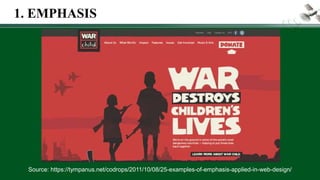
1.EMPHASIS
• importance or value given to a
part of the text-based content
• make the text bold
• Italicized
• have a heavier weight
• darkened or lightened
•enlarged
1. EMPHASIS
Source: https://tympanus.net/codrops/2011/10/08/25-examples-of-emphasis-applied-in-web-design/
1. EMPHASIS
Source: https://twitter.com/philredcross/status/706041623839244288
1. EMPHASIS
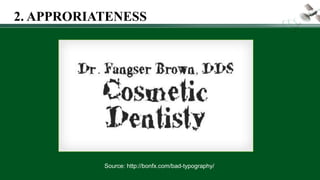
2. APPROPRIATENESS
• how fitting or suitable the text is
used for a specific audience,
purpose or event
THIS IS SERIF “Times New Roman”
THIS IS SAN SERIF “Arial”
THIS IS SCRIPT “Edwardian Script”
THIS IS DECORATIVE “Giddyup
Std”
2. APPRORIATENESS
Sources: http://bonfx.com/bad-typography/
2. APPRORIATENESS
Source: http://bonfx.com/bad-typography/
2. APPRORIATENESS
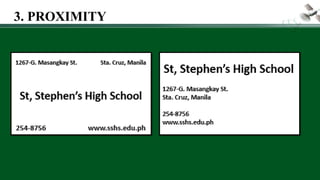
3. PROXIMITY
•how near or how far the text
elements from each other
•when two things are closely related,
bring them close together
3. PROXIMITY
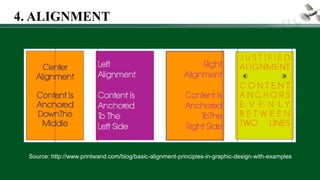
4. ALIGNMENT
•how the text is positioned in the page
•left, center, right, or justified
Source: http://www.printwand.com/blog/basic-alignment-principles-in-graphic-design-with-examples
4. ALIGNMENT
5. ORGANIZATION
• conscious effort to organize the different
text elements in a page
• ensures that while some text elements
are separated from each other, they are
still somehow connected with the rest of
the elements in the page
5. ORGANIZATION
Source:
MIL TG by CHED
5. ORGANIZATION
Source:
https://doc
ontent.wor
dpress.co
m/2015/04
/08/want-
a-good-
design-
remember
-to-c-r-a-p-
contrast-
repetition-
alignment-
proximity/
6. REPETITION
•consistency of elements
•unity of the entire design
•repeating some typefaces
within the page
6. REPETITION
Source:
https://doc
ontent.wor
dpress.co
m/2015/04
/08/want-
a-good-
design-
remember
-to-c-r-a-p-
contrast-
repetition-
alignment-
proximity/
7. CONTRAST
•creates visual interest
•two elements are different from
each other
 white text on a dark background
large font with a small font
 serif and sans serif
 thin elements with wide elements
 cool color and warm color
CONTRAST: TWO ELEMENTS ARE DIFFERENT
7. CONTRAST
Source:
https://doc
ontent.wor
dpress.co
m/2015/04
/08/want-
a-good-
design-
remember
-to-c-r-a-p-
contrast-
repetition-
alignment-
proximity/
VISUAL DESIGN ELEMENTS
AND PRINCIPLES
1.CONSISTENCY
• Consistency of margins, typeface,
typestyle, and colors is necessary,
especially in slide presentations or
documents that are more than one
page.
Source: https://www.pinterest.com/pin/28077197647114171/
1. CONSISTENCY
Source: https://gofishdigital.com/guide-design-consistency/
1. CONSISTENCY
Source: http://www.loopassociates.com/projects/brand-consistency-leading-to-millions-in-cost-reduction/
1. CONSISTENCY
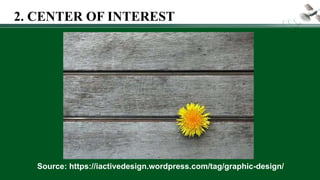
2. CENTER OF INTEREST
• an area that first attracts attention in a
composition
• important objects or elements in a
composition
• can be achieved by contrast of values,
more colors, and placement
Source: https://oss.adm.ntu.edu.sg/wheng004/tag/design/
2. CENTER OF INTEREST
Source: https://iactivedesign.wordpress.com/tag/graphic-design/
2. CENTER OF INTEREST
3. BALANCE
•visual equality in shape, form, value,
color, etc.
•can be symmetrical and evenly
balanced, or asymmetrical and
unevenly balanced
Source: http://operationwritehome.org/all-things-being-equal-balance-in-design/
3. BALANCE
Source:
http://en.koreaportal.com
/articles/7525/20160102/
one-punch-man-
anime.htm
3. BALANCE
Source: https://oss.adm.ntu.edu.sg/wheng004/tag/design/
3. BALANCE
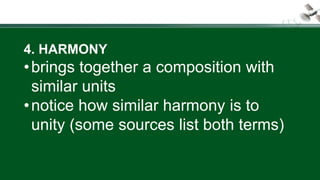
4. HARMONY
•brings together a composition with
similar units
•notice how similar harmony is to
unity (some sources list both terms)
Source: https://oss.adm.ntu.edu.sg/wheng004/tag/design/
4. HARMONY
Source: https://www.johnlovett.com/design-overview
4. HARMONY
5. CONTRAST
• offers some change in value creating a visual
discord in a composition
• shows the difference between shapes and
can be used as a background to bring
objects out and forward in a design
• can also be used to create an area of
emphasis
Source: https://oss.adm.ntu.edu.sg/wheng004/tag/design/
5. CONTRAST
Source:
https://www.design
contest.com/blog/c
ontrast-in-design/
5. CONTRAST
6. DIRECTIONAL MOVEMENT
•a visual flow through the composition
•can be the suggestion of motion in a
design as you move from object to
object by way of placement and
position
Source: https://oss.adm.ntu.edu.sg/wheng004/tag/design/
6. DIRECTIONAL MOVEMENT
Source: https://webdesign.tutsplus.com/articles/visual-direction-in-web-design--webdesign-2545
6. DIRECTIONAL MOVEMENT
Source: https://webdesign.tutsplus.com/articles/visual-direction-in-web-design--webdesign-2545
6. DIRECTIONAL MOVEMENT
7. RHYTHM
• a movement in which some
elements recur regularly
• like a dance, it will have a flow of
objects that will seem to be like
the beat of music
Source: https://oss.adm.ntu.edu.sg/wheng004/tag/design/
7. RHYTHM
Source: https://www.hatchdesign.ca/principles-of-design-part-2-rhythm/
7. RHYTHM
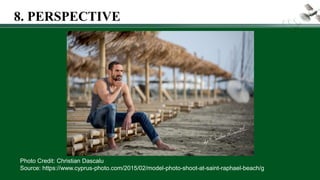
8. PERSPECTIVE
• created through the arrangement of
objects in two dimensional space to
look like they appear in real life
• learned meaning of the relationship
between different objects seen in
space
Source: https://www.youtube.com/watch?v=phWtQ2odZh0
8. PERSPECTIVE
Source: http://www.studentartguide.com/articles/one-point-perspective-drawing
8. PERSPECTIVE
Source: https://tomadondesign.wordpress.com/two-point-perspective-drawing/
8. PERSPECTIVE
Source: https://piaart.wordpress.com/two-point-perspective/
8. PERSPECTIVE
Source: https://en.wikipedia.org/wiki/Taj_Mahal
8. PERSPECTIVE
Photo Credit: Christian Dascalu
Source: https://www.cyprus-photo.com/2015/02/model-photo-shoot-at-saint-raphael-beach/g
8. PERSPECTIVE
9. DOMINANCE
• gives interest, counteracting
confusion and monotony
• can be applied to one or more of
the elements to give emphasis
Source: https://oss.adm.ntu.edu.sg/wheng004/tag/design/
9. DOMINANCE
DISCUSS TEXT AND VISUAL
DESIGN ELEMENTS AND
PRINCIPLES APPLIED IN THE
FOLLOWING MEDIA:
FORMATIVE ASSESSMENT
Source:
https://cscro6.wordpr
ess.com/arta-
corner/#jp-carousel-
2112
Source:
https://cscro6.wordpr
ess.com/arta-
corner/#jp-carousel-
2108
Source: http://opinion.inquirer.net/106642/editorial-cartoon-august-26-2017
Source:
http://news.abs-
cbn.com/focus/multimedia/infographic/09/04/17/what-is-
japanese-encephalitis
Source:
http://cnnphilippines.
com/news/2017/02/01/
HIV-cases-increase-
2016-DOH.html
Source: https://www.tes.com/lessons/tmup-FOeYTHX1A/two-point-perspective-drawing
Source: http://www.pinoyexchange.com/forums/showthread.php?t=313065&page=7
Photo Credit: HUF MAGAZINE
Source:
https://www.pinterest.co.uk/pin/32
3625923206850410/
Source:
http://mymovieworl
d-
coolman0304.blogs
pot.com/2017/07/bi
rdshot-trailer-and-
poster-pista-
ng.html
Source: http://ar.melinterest.com/?r=site/search&category=MLA114368/
Source: http://www.thephotoargus.com/35-superb-examples-of-still-life-photography/
Source: http://www.marklobo.com.au/news/category/melbourne-photographers/food-photography-
melbourne-photographers/
Source:
https://downmagaz.co
m/business_magazine
_economics/47156-
entrepreneur-
philippines-february-
2015.html
Source:
http://www.inquirer.net/page-
one-single
Source: https://cinemabravo.com/2017/05/11/sigrid-andrea-bernardos-kita-kita-to-have-ph-premiere-at-
up-cine-adarna-on-may-12/
Source: https://www.facebook.com/
Source: http://www.deped.gov.ph/
Source:
https://www.rappler.com/
technology/social-
media/180340-zarks-
burger-8-pesos-rush
Source: https://www.demandgenreport.com/industry-topics/rich-
media/2906-the-power-of-visual-content-infographic
PERFORMANCE TASK
DIGITAL POSTER MAKING
OBJECTIVES
 Create a digital poster which will
be a campaign for high school
students to be a responsible user
and competent producer of media
information
COOPERATIVE LEARNING
 Group of 3 students
PERFORMANCE TASK- DIGITAL POSTER MAKING
MESSAGE
 Be a responsible user and competent producer of
media information.
MEDIUM
 Digital poster which will be shared on Facebook.
AUDIENCE
 High School Students (JHS and SHS)
PERFORMANCE TASK- DIGITAL POSTER MAKING
MATERIALS / TOOLS
 Web tool : Canva (www.canva.com)
 Photo editing software or applications
 Computer
 Smartphone Camera
PERFORMANCE TASK NO. 2 - DIGITAL POSTER
MAKING
Photo Credit :
https://www.canva.com/
http://www.digitalrabbitcellular.com/
PLEASE KEEP IN MIND.
The selected digital poster will be
shared on Edmodo and Facebook.
The digital poster must focus on the
issue and not attack or mentioned
personalities. Use of foul words are
not allowed.
Photo Credit:
www.Edmodo.com
www.facebook.com
PLEASE KEEP IN MIND.
Cite credit for
borrowed materials
(i.e. image, design,
etc.)
Photo Credit: http://www.freepik.com/free-photo/young-
man-holding-many-books_857159.htm
Date Venue
Time
Allotted
Procedure
Day 1 Classroom 1 period • Conceptualize your poster.
(Message and Design)
• Take pictures to be used for
the poster.
Day 2 Computer
Laboratory
2 periods • Create your digital poster
using Canva. You’re allowed
to use additional tools.
• Submit the digital poster in
our Edmodo group.
PERFORMANCE TASK NO. 3 - DIGITAL POSTER
MAKING
RUBRIC
Criteria Excellent Good Fair NI
Content
 Be a
responsible
user and
producer of
media
information.
Message
is clear,
accurate,
and
strong.
10
Message
is clear
and
accurate.
8
Message
is clear but
question-
able.
5
Message
is unclear
and/ or
inaccurate.
2
RUBRIC
Criteria Excellent Good Fair NI
Graphic
 Relevance and
Citation
All graphics
are related to
the topic and
make it easier
to
understand.
All borrowed
graphics have
a source
citation.
10
All graphics
are related to
the topic and
most make it
easier to
understand.
One
borrowed
graphics have
no source
citation.
8
All graphics
relate to the
topic. Two
borrowed
graphics have
no source
citation.
5
Graphics do
not relate to
the topic
and/or three
or more
borrowed
graphics do
not have a
source
citation.
2
RUBRIC
Criteria Excellent Good Fair NI
Design and
Layout
The poster
is excep-
tionally
attractive
in terms of
design,
layout, and
neatness.
10
The poster
is
attractive
in terms of
design,
layout, and
neatness.
8
The poster
is
acceptably
attractive
though
layout is
cluttered.
5
The poster
is poorly
designed
and the
layout is
cluttered.
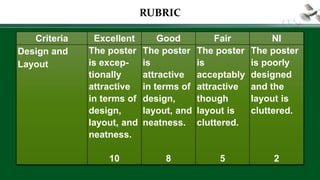
2
RUBRIC
Criteria Excellent Good Fair NI
Work Ethics
 Cooperation
Every
individual
in the
group
contributed
to the
creation of
the digital
poster.
10
Group
work is
done
mostly by
two
individuals.
8
Group
work is
done
mostly by
one
individual.
5
Group
members
are not
working
during the
designated
time.
2
TOPICS
Campaign Against Cyberbullying
Be Safe in Cyberspace
Media Message Analysis (Critical Thinking)
Think Before You Click
No to Plagiarism
Proper Behavior on the Internet (Netiquette)
(Note: Students may proposed a related topic which
will be approved by the teacher.)
SAMPLE
DIGITAL POSTERS
Image Credit:
http://www.technology
rocksseriously.com/20
14/10/before-you-
post-
think.html#.WSPui6ka
aGI
Image Credit:
http://www.cl
assroomcape
rs.co.uk/onlin
e-safety-
school-
poster.html
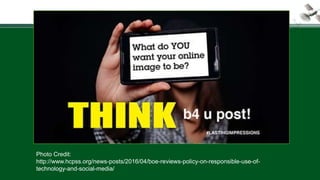
Photo Credit:
http://www.hcpss.org/news-posts/2016/04/boe-reviews-policy-on-responsible-use-of-
technology-and-social-media/
Photo Credit:
https://store.accutrain.
com/products/sfs002-
pos-eng-1000
 Media and Information Literacy Curriculum
Guide by DepEd
 Media and Information Literacy Teaching
Guide by CHED
 Media and Information Literacy by Boots C.
Liquigan, Diwa Learning Systems Inc.
References
References
• https://designschool.canva.com/design-
elements-principles/
• https://designschool.canva.com/blog/visual-
design-composition/
• http://digital-photography-school.com/how-to-
use-leading-lines-for-better-compositions/
• https://designshack.net/articles/typography/ser
if-vs-sans-serif-fonts-is-one-really-better-than-
the-other/
References
• http://www.tvdsb.ca/webpages/baxterc/res
ources.cfm?subpage=143055
• http://rubistar.4teachers.org/index.php?sc
reen=ShowRubric&rubric_id=1125149&
• http://teacherweb.com/ME/JALeonardMidd
leSchoolOldTown/Ecologywebquest/page
3.htm

mil Elements and Principles.pdf