Visual design.. Tools and  principles for educational interface designers
To transfer a written or spoken information into an imagery message (video, animation, statue, painting…etcIt is a method for seeing the unseenIt is not just about the pretty look and fancy colorsIn education: visual design should consider the learner’s perspectives and learning theories What is visual design?
Capture and represent a multiplicity of relationships and patterns within an information space or domain to make them perceptually accessible and understandable using minimal cognitive effort on the part of learners(Sedig, Liang & Morey, 2009)The role of visual design In learning and teaching
What we see is a combination of Masses Solid objects one normally associates with designSpacesOpen space and enclosed spaceA skillful designer coordinates the use of mass and space to create a visually pleasant experience for the viewerVisual design elements
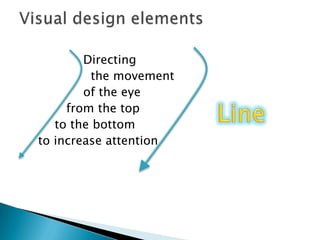
			Directing			  the movement			of the eye		    from the top	      to the bottom    to increase attentionVisual design elementsLine
Itcreateanopticalreactionthat recordedin the memory as anaid to identificationVisual design elementsColor
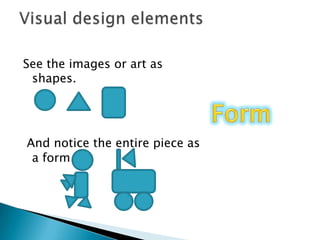
See the images or art as shapes. And notice the entire piece as a formVisual design elementsForm
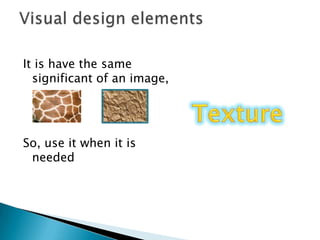
It is have the same significant of an image,So, use it when it is needed Visual design elementsTexture
The ABC’s R’ US Visual Design Model (Beriswill, J.E, 2004)AlignmentBalanceContrastChunkingRepetitionUtilitySimplicityVisual design Principles
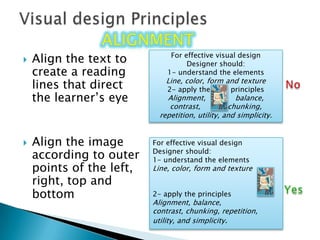
Align the text to create a reading lines that direct the learner’s eyeAlign the image according to outer points of the left, right, top and bottom Visual design PrinciplesalignmentFor effective visual designDesigner should:1- understand the elementsLine, color, form and texture2- apply the         principlesAlignment,             balance, contrast,            chunking, repetition, utility, and simplicity.For effective visual designDesigner should:1- understand the elementsLine, color, form and texture2- apply the principlesAlignment, balance,contrast, chunking, repetition,utility, and simplicity.No Yes
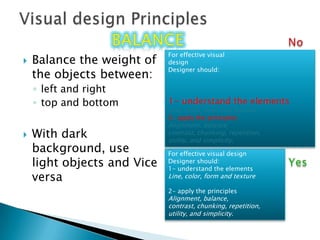
Visual design PrinciplesbalancebalanceNo For effective visualdesignDesigner should:1- understand the elementsLine, color, form and texture2- apply the principlesAlignment, balance,contrast, chunking, repetition, utility, and simplicity.Balance the weight of the objects between:left and right top and bottomWith dark background, use light objects and Vice versaFor effective visual designDesigner should:1- understand the elementsLine, color, form and texture2- apply the principlesAlignment, balance,contrast, chunking, repetition,utility, and simplicity.Yes
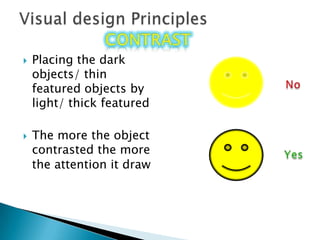
Visual design PrinciplescontrastcontrastPlacing the dark objects/ thin featured objects by light/ thick featuredThe more the object contrasted the more the attention it draw No Yes
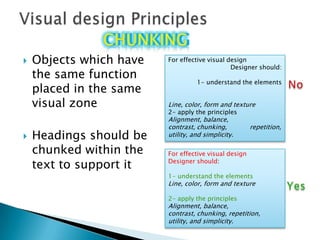
Objects which have the same function placed in the same visual zoneHeadings should be chunked within the text to support it Visual design PrincipleschunkingChunking For effective visual designDesigner should:1- understand the elementsLine, color, form and texture2- apply the principlesAlignment, balance,contrast, chunking,	         repetition,utility, and simplicity.No For effective visual designDesigner should:1- understand the elementsLine, color, form and texture2- apply the principlesAlignment, balance,contrast, chunking, repetition,utility, and simplicity.Yes
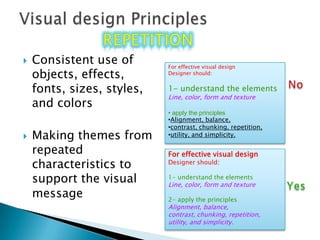
Visual design PrinciplesrepetitionrepetitionConsistent use of objects, effects, fonts, sizes, styles, and colorsMaking themes from repeated characteristics to support the visual messageFor effective visual designDesigner should:1- understand the elementsLine, color, form and texture apply the principles
Alignment, balance,
contrast, chunking, repetition,
utility, and simplicity.No For effective visual designDesigner should:1- understand the elementsLine, color, form and texture2- apply the principlesAlignment, balance,contrast, chunking, repetition,utility, and simplicity.Yes

Visual design

  • 1.
    Visual design.. Toolsand principles for educational interface designers
  • 2.
    To transfer awritten or spoken information into an imagery message (video, animation, statue, painting…etcIt is a method for seeing the unseenIt is not just about the pretty look and fancy colorsIn education: visual design should consider the learner’s perspectives and learning theories What is visual design?
  • 3.
    Capture and representa multiplicity of relationships and patterns within an information space or domain to make them perceptually accessible and understandable using minimal cognitive effort on the part of learners(Sedig, Liang & Morey, 2009)The role of visual design In learning and teaching
  • 4.
    What we seeis a combination of Masses Solid objects one normally associates with designSpacesOpen space and enclosed spaceA skillful designer coordinates the use of mass and space to create a visually pleasant experience for the viewerVisual design elements
  • 5.
    Directing themovement of the eye from the top to the bottom to increase attentionVisual design elementsLine
  • 6.
    Itcreateanopticalreactionthat recordedin thememory as anaid to identificationVisual design elementsColor
  • 7.
    See the imagesor art as shapes. And notice the entire piece as a formVisual design elementsForm
  • 8.
    It is havethe same significant of an image,So, use it when it is needed Visual design elementsTexture
  • 9.
    The ABC’s R’US Visual Design Model (Beriswill, J.E, 2004)AlignmentBalanceContrastChunkingRepetitionUtilitySimplicityVisual design Principles
  • 10.
    Align the textto create a reading lines that direct the learner’s eyeAlign the image according to outer points of the left, right, top and bottom Visual design PrinciplesalignmentFor effective visual designDesigner should:1- understand the elementsLine, color, form and texture2- apply the principlesAlignment, balance, contrast, chunking, repetition, utility, and simplicity.For effective visual designDesigner should:1- understand the elementsLine, color, form and texture2- apply the principlesAlignment, balance,contrast, chunking, repetition,utility, and simplicity.No Yes
  • 11.
    Visual design PrinciplesbalancebalanceNoFor effective visualdesignDesigner should:1- understand the elementsLine, color, form and texture2- apply the principlesAlignment, balance,contrast, chunking, repetition, utility, and simplicity.Balance the weight of the objects between:left and right top and bottomWith dark background, use light objects and Vice versaFor effective visual designDesigner should:1- understand the elementsLine, color, form and texture2- apply the principlesAlignment, balance,contrast, chunking, repetition,utility, and simplicity.Yes
  • 12.
    Visual design PrinciplescontrastcontrastPlacingthe dark objects/ thin featured objects by light/ thick featuredThe more the object contrasted the more the attention it draw No Yes
  • 13.
    Objects which havethe same function placed in the same visual zoneHeadings should be chunked within the text to support it Visual design PrincipleschunkingChunking For effective visual designDesigner should:1- understand the elementsLine, color, form and texture2- apply the principlesAlignment, balance,contrast, chunking, repetition,utility, and simplicity.No For effective visual designDesigner should:1- understand the elementsLine, color, form and texture2- apply the principlesAlignment, balance,contrast, chunking, repetition,utility, and simplicity.Yes
  • 14.
    Visual design PrinciplesrepetitionrepetitionConsistentuse of objects, effects, fonts, sizes, styles, and colorsMaking themes from repeated characteristics to support the visual messageFor effective visual designDesigner should:1- understand the elementsLine, color, form and texture apply the principles
  • 15.
  • 16.
  • 17.
    utility, and simplicity.NoFor effective visual designDesigner should:1- understand the elementsLine, color, form and texture2- apply the principlesAlignment, balance,contrast, chunking, repetition,utility, and simplicity.Yes