Applications
Targeting
OpenStack
Multiple paths to deploying
applications on OpenStack
clouds.
Horizon, Chef & enStratus
Dell, Opscode & enStratus
           OpenStack Conference, Spring 2012


Rob Hirschfeld
        @zehicle
        http://robhirschfeld.com
        rob_hirschfeld@dell.com


Matt Ray
       @mattray
       http://leastresistance.net
       matt@opscode.com


Keith Hudgins
        @keithhudgins
        http://cloudmess.com
        keith.hudgins@enstratus.com
Dell, Opscode & enStratus
                            OpenStack Conference, Spring 2012


“Deploy Stuff on OpenStack”
 There are multiple right ways to leverage
  cloud resources.
 Our objective is to show you different
  options to leverage OpenStack
 Each has benefits and limitations
 All methods can co-exist!


 We   want to SHOW you
Dell, Opscode & enStratus
                               OpenStack Conference, Spring 2012


Real Work / Real Tools
 OpenStack   is ready to rock
 Having the right tools helps
   Shorten time to value
   Improve consistency
   Work with your strengths

 Reference   deployment is important
Dell, Opscode & enStratus
               OpenStack Conference, Spring 2012


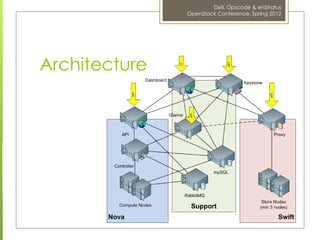
Architecture
Dell, Opscode & enStratus
                                                                                      OpenStack Conference, Spring 2012


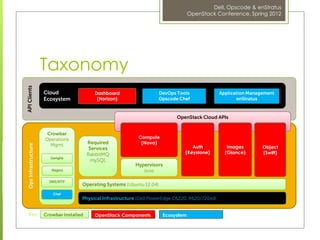
                      Taxonomy
API Clients


                      Cloud                  Dashboard                   DevOps Tools              Application Management
                      Ecosystem               (Horizon)                  Opscode Chef                     enStratus


                                                                                OpenStack Cloud APIs


                       Crowbar
                      Operations                              Compute
                        Mgmt              Required             (Nova)
 Ops Infrastructure


                                           Services                                   Auth            Images        Object
                                          RabbitMQ                                 (Keystone)        (Glance)       (Swift)
                        Ganglia
                                            mySQL
                                                             Hypervisors
                         Nagios                                 (KVM)

                        DNS/NTP
                                      Operating Systems (Ubuntu 12.04)
                          Chef
                                      Physical Infrastructure (Dell PowerEdge C6220, R620/720xd)


   Key:               Crowbar Installed      OpenStack Components         Ecosystem
Dell, Opscode & enStratus
                                    OpenStack Conference, Spring 2012


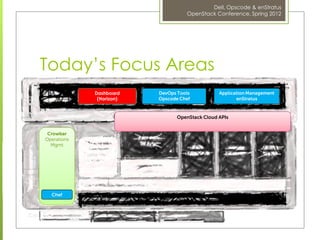
Today’s Focus Areas
             Dashboard    DevOps Tools           Application Management
              (Horizon)   Opscode Chef                  enStratus


                                 OpenStack Cloud APIs


 Crowbar
Operations
  Mgmt


  Chef
Dell, Opscode & enStratus
                                OpenStack Conference, Spring 2012


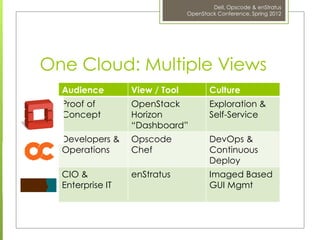
One Cloud: Multiple Views
  Audience        View / Tool          Culture
  Proof of        OpenStack            Exploration &
  Concept         Horizon              Self-Service
                  “Dashboard”
  Developers &    Opscode              DevOps &
  Operations      Chef                 Continuous
                                       Deploy
  CIO &           enStratus            Imaged Based
  Enterprise IT                        GUI Mgmt
Dell, Opscode & enStratus
                         OpenStack Conference, Spring 2012


Starting Point:
A Reference Deploy
 Dell’sopen source Crowbar project lays
  down a consistent reference deployment
 Includes & integrates Nova, Keystone,
  Glance, Dashboard and Swift.
 Important to have a repeatable
  deployments because consistent &
  describable implementation matters
 Demo starts with OpenStack already
  deployed (Crowbar uses Chef)
Dell, Opscode & enStratus
                                         OpenStack Conference, Spring 2012


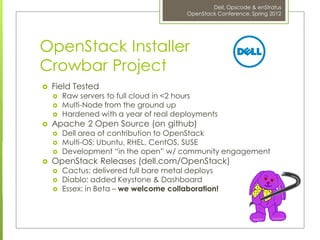
OpenStack Installer
Crowbar Project
   Field Tested
       Raw servers to full cloud in <2 hours
       Multi-Node from the ground up
       Hardened with a year of real deployments
   Apache 2 Open Source (on github)
       Dell area of contribution to OpenStack
       Multi-OS: Ubuntu, RHEL, CentOS, SUSE
       Development “in the open” w/ community engagement
   OpenStack Releases (dell.com/OpenStack)
       Cactus: delivered full bare metal deploys
       Diablo: added Keystone & Dashboard
       Essex: in Beta – we welcome collaboration!
Dell, Opscode & enStratus
                                                                OpenStack Conference, Spring 2012


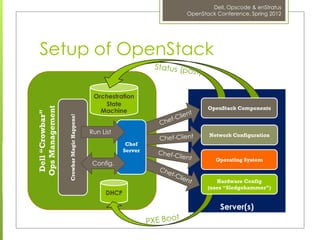
 Setup of OpenStack

                                            Orchestration
                                               State
                                                                       OpenStack Components
Ops Management


                                              Machine
 Dell “Crowbar”


                  Crowbar Magic Happens!


                                           Run List                    Network Configuration
                                                        Chef
                                                       Server
                                                                          Operating System
                                            Config.

                                                                          Hardware Config
                                                                       (uses “Sledgehammer”)
                                                DHCP

                                                                           Server(s)
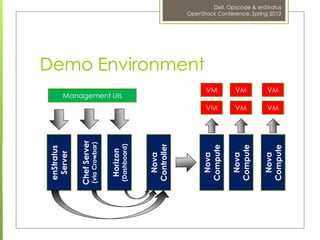
enStratus
  Server

Chef Server
(via Crowbar)


  Horizon
                     Management UIs


(Dashboard)


 Nova
Controller
                                      Demo Environment


  Nova
                              VM

                VM


 Compute

  Nova
                              VM

                VM


 Compute

  Nova
                              VM

                VM
                                                         OpenStack Conference, Spring 2012
                                                                 Dell, Opscode & enStratus


 Compute
Dell, Opscode & enStratus
                             OpenStack Conference, Spring 2012


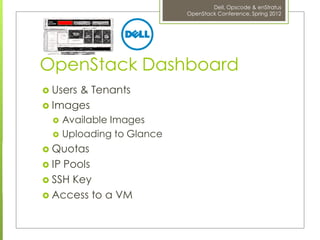
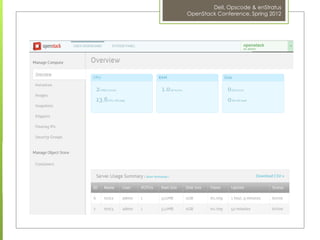
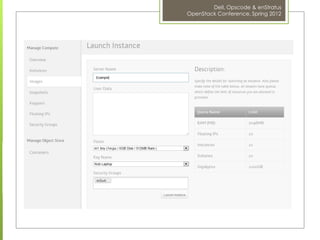
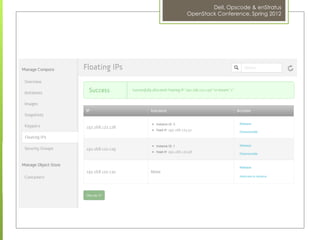
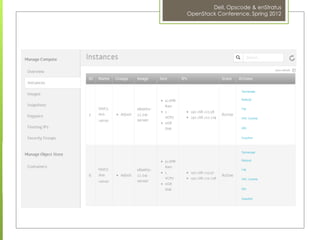
OpenStack Dashboard
 Users
      & Tenants
 Images
      Available Images
      Uploading to Glance
 Quotas
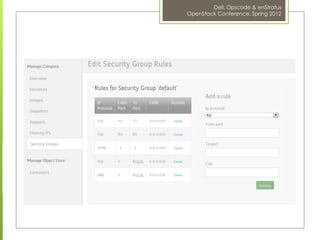
 IPPools
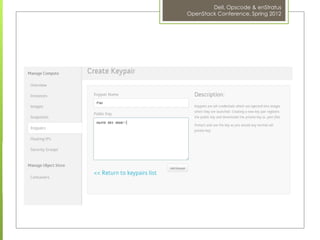
 SSH Key
 Access to a VM
Dell, Opscode & enStratus
OpenStack Conference, Spring 2012
Dell, Opscode & enStratus
OpenStack Conference, Spring 2012
Dell, Opscode & enStratus
OpenStack Conference, Spring 2012
Dell, Opscode & enStratus
OpenStack Conference, Spring 2012
Dell, Opscode & enStratus
OpenStack Conference, Spring 2012
Dell, Opscode & enStratus
OpenStack Conference, Spring 2012
Dell, Opscode & enStratus
         OpenStack Conference, Spring 2012


DevOps
Dell, Opscode & enStratus
                             OpenStack Conference, Spring 2012


Infrastructure as Code
 Programmatically    provision and configure
  your infrastructure
 Treat it like any other code base
     Track changes
     Versioned
     Branches
 Reconstruct your business from a code
 repository, data backups, and bare metal
 resources.
Dell, Opscode & enStratus
                                 OpenStack Conference, Spring 2012


Chef
 Resources    represent infrastructure actions
    Packages, files, services, users, etc.
 Recipes   are the execution of Resources
    Explicit order of deployment
 Cookbooks     contain Recipes and support
    Versioned and shared
 Nodes  have a run list of recipes &
 attributes
Dell, Opscode & enStratus
                           OpenStack Conference, Spring 2012


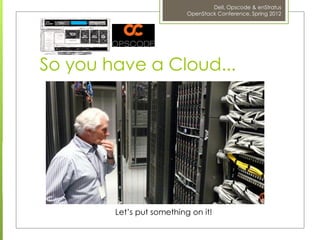
So you have a Cloud...


        Let’s put something on it!
Dell, Opscode & enStratus
                     OpenStack Conference, Spring 2012


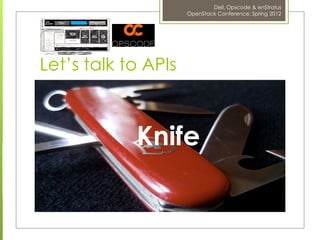
Let’s talk to APIs


            Knife
Dell, Opscode & enStratus
                                          OpenStack Conference, Spring 2012


knife openstack
Available openstack subcommands: (for details, knife SUB-COMMAND -
  -help)

** OPENSTACK COMMANDS **
knife openstack flavor list (options)
knife openstack image list (options)
knife openstack server create (options)
knife openstack server delete SERVER [SERVER] (options)
knife openstack server list (options)
Dell, Opscode & enStratus
                                           OpenStack Conference, Spring 2012


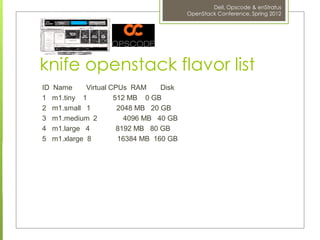
knife openstack flavor list
ID   Name      Virtual CPUs RAM     Disk
1    m1.tiny 1          512 MB 0 GB
2    m1.small 1          2048 MB 20 GB
3    m1.medium 2           4096 MB 40 GB
4    m1.large 4          8192 MB 80 GB
5    m1.xlarge 8         16384 MB 160 GB
Dell, Opscode & enStratus
                                            OpenStack Conference, Spring 2012


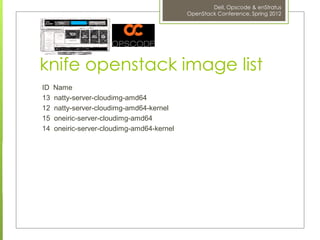
knife openstack image list
ID   Name
13   natty-server-cloudimg-amd64
12   natty-server-cloudimg-amd64-kernel
15   oneiric-server-cloudimg-amd64
14   oneiric-server-cloudimg-amd64-kernel
Dell, Opscode & enStratus
                                                  OpenStack Conference, Spring 2012


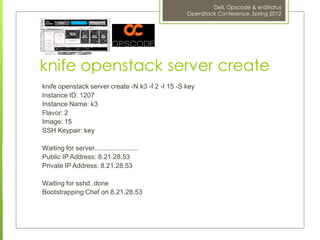
knife openstack server create
knife openstack server create -N k3 -f 2 -I 15 -S key
Instance ID: 1207
Instance Name: k3
Flavor: 2
Image: 15
SSH Keypair: key

Waiting for server........................
Public IP Address: 8.21.28.53
Private IP Address: 8.21.28.53

Waiting for sshd..done
Bootstrapping Chef on 8.21.28.53
Dell, Opscode & enStratus
                                                          OpenStack Conference, Spring 2012


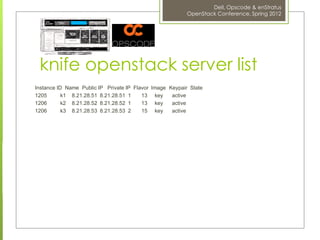
 knife openstack server list
Instance ID Name Public IP Private IP Flavor Image Keypair State
1205       k1 8.21.28.51 8.21.28.51 1    13 key     active
1206       k2 8.21.28.52 8.21.28.52 1    13 key     active
1206       k3 8.21.28.53 8.21.28.53 2    15 key     active
Dell, Opscode & enStratus
                                                                            OpenStack Conference, Spring 2012


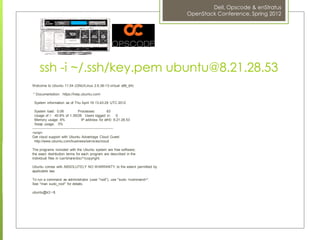
     ssh -i ~/.ssh/key.pem ubuntu@8.21.28.53
Welcome to Ubuntu 11.04 (GNU/Linux 2.6.38-13-virtual x86_64)

* Documentation: https://help.ubuntu.com/

 System information as of Thu April 19 13:43:29 UTC 2012

  System load: 0.08                    Processes:              63
  Usage of /: 40.8% of 1.35GB Users logged in: 0
  Memory usage: 6%                        IP address for eth0: 8.21.28.53
  Swap usage: 0%
---------------------------------------------------------------------
<snip>
Get cloud support with Ubuntu Advantage Cloud Guest
  http://www.ubuntu.com/business/services/cloud

The programs included with the Ubuntu system are free software;
the exact distribution terms for each program are described in the
individual files in /usr/share/doc/*/copyright.

Ubuntu comes with ABSOLUTELY NO WARRANTY, to the extent permitted by
applicable law.

To run a command as administrator (user "root"), use "sudo <command>".
See "man sudo_root" for details.

ubuntu@k3:~$
Dell, Opscode & enStratus
                               OpenStack Conference, Spring 2012


Build & Manage Anything
 Linux, Windows, Solaris, OSX, BSDs
 Servers, workstations, clusters
 IaaS infrastructure
 PaaS infrastructure
 SaaS applications
 Storage systems
Dell, Opscode & enStratus
                      OpenStack Conference, Spring 2012


Infrastructure Portability
 knife-ec2
 knife-hp
 knife-rackspace
 knife-openstack
 (and   many more)
Dell, Opscode & enStratus
OpenStack Conference, Spring 2012
Dell, Opscode & enStratus
                                 OpenStack Conference, Spring 2012


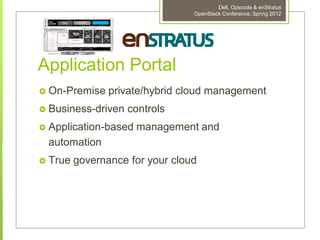
Application Portal
   On-Premise private/hybrid cloud management
   Business-driven controls
   Application-based management and
    automation
   True governance for your cloud
Dell, Opscode & enStratus
                   OpenStack Conference, Spring 2012


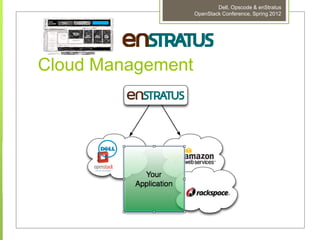
Cloud Management
Dell, Opscode & enStratus
                                   OpenStack Conference, Spring 2012


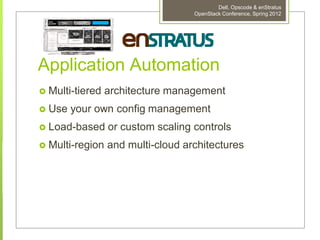
Application Automation
   Multi-tiered architecture management
   Use your own config management
   Load-based or custom scaling controls
   Multi-region and multi-cloud architectures
Dell, Opscode & enStratus
                            OpenStack Conference, Spring 2012


Conclusion
 There are many correct ways to access
  OpenStack capability
 Choose the tools that work best for your
  users
 You do not have to pick one, they will
  work together
Dell, Opscode & enStratus
           OpenStack Conference, Spring 2012


Rob Hirschfeld
        @zehicle
        http://robhirschfeld.com
        rob_hirschfeld@dell.com


Matt Ray
       @mattray
       http://leastresistance.net
       matt@opscode.com


Keith Hudgins
        @keithhudgins
        http://cloudmess.com
        keith.hudgins@enstratus.com

Open stack design 2012 applications targeting openstack-final

  • 1.
    Applications Targeting OpenStack Multiple paths todeploying applications on OpenStack clouds. Horizon, Chef & enStratus
  • 2.
    Dell, Opscode &enStratus OpenStack Conference, Spring 2012 Rob Hirschfeld @zehicle http://robhirschfeld.com rob_hirschfeld@dell.com Matt Ray @mattray http://leastresistance.net matt@opscode.com Keith Hudgins @keithhudgins http://cloudmess.com keith.hudgins@enstratus.com
  • 3.
    Dell, Opscode &enStratus OpenStack Conference, Spring 2012 “Deploy Stuff on OpenStack”  There are multiple right ways to leverage cloud resources.  Our objective is to show you different options to leverage OpenStack  Each has benefits and limitations  All methods can co-exist!  We want to SHOW you
  • 4.
    Dell, Opscode &enStratus OpenStack Conference, Spring 2012 Real Work / Real Tools  OpenStack is ready to rock  Having the right tools helps  Shorten time to value  Improve consistency  Work with your strengths  Reference deployment is important
  • 5.
    Dell, Opscode &enStratus OpenStack Conference, Spring 2012 Architecture
  • 6.
    Dell, Opscode &enStratus OpenStack Conference, Spring 2012 Taxonomy API Clients Cloud Dashboard DevOps Tools Application Management Ecosystem (Horizon) Opscode Chef enStratus OpenStack Cloud APIs Crowbar Operations Compute Mgmt Required (Nova) Ops Infrastructure Services Auth Images Object RabbitMQ (Keystone) (Glance) (Swift) Ganglia mySQL Hypervisors Nagios (KVM) DNS/NTP Operating Systems (Ubuntu 12.04) Chef Physical Infrastructure (Dell PowerEdge C6220, R620/720xd) Key: Crowbar Installed OpenStack Components Ecosystem
  • 7.
    Dell, Opscode &enStratus OpenStack Conference, Spring 2012 Today’s Focus Areas Dashboard DevOps Tools Application Management (Horizon) Opscode Chef enStratus OpenStack Cloud APIs Crowbar Operations Mgmt Chef
  • 8.
    Dell, Opscode &enStratus OpenStack Conference, Spring 2012 One Cloud: Multiple Views Audience View / Tool Culture Proof of OpenStack Exploration & Concept Horizon Self-Service “Dashboard” Developers & Opscode DevOps & Operations Chef Continuous Deploy CIO & enStratus Imaged Based Enterprise IT GUI Mgmt
  • 9.
    Dell, Opscode &enStratus OpenStack Conference, Spring 2012 Starting Point: A Reference Deploy  Dell’sopen source Crowbar project lays down a consistent reference deployment  Includes & integrates Nova, Keystone, Glance, Dashboard and Swift.  Important to have a repeatable deployments because consistent & describable implementation matters  Demo starts with OpenStack already deployed (Crowbar uses Chef)
  • 10.
    Dell, Opscode &enStratus OpenStack Conference, Spring 2012 OpenStack Installer Crowbar Project  Field Tested  Raw servers to full cloud in <2 hours  Multi-Node from the ground up  Hardened with a year of real deployments  Apache 2 Open Source (on github)  Dell area of contribution to OpenStack  Multi-OS: Ubuntu, RHEL, CentOS, SUSE  Development “in the open” w/ community engagement  OpenStack Releases (dell.com/OpenStack)  Cactus: delivered full bare metal deploys  Diablo: added Keystone & Dashboard  Essex: in Beta – we welcome collaboration!
  • 11.
    Dell, Opscode &enStratus OpenStack Conference, Spring 2012 Setup of OpenStack Orchestration State OpenStack Components Ops Management Machine Dell “Crowbar” Crowbar Magic Happens! Run List Network Configuration Chef Server Operating System Config. Hardware Config (uses “Sledgehammer”) DHCP Server(s)
  • 12.
    enStratus Server ChefServer (via Crowbar) Horizon Management UIs (Dashboard) Nova Controller Demo Environment Nova VM VM Compute Nova VM VM Compute Nova VM VM OpenStack Conference, Spring 2012 Dell, Opscode & enStratus Compute
  • 13.
    Dell, Opscode &enStratus OpenStack Conference, Spring 2012 OpenStack Dashboard  Users & Tenants  Images  Available Images  Uploading to Glance  Quotas  IPPools  SSH Key  Access to a VM
  • 14.
    Dell, Opscode &enStratus OpenStack Conference, Spring 2012
  • 15.
    Dell, Opscode &enStratus OpenStack Conference, Spring 2012
  • 16.
    Dell, Opscode &enStratus OpenStack Conference, Spring 2012
  • 17.
    Dell, Opscode &enStratus OpenStack Conference, Spring 2012
  • 18.
    Dell, Opscode &enStratus OpenStack Conference, Spring 2012
  • 19.
    Dell, Opscode &enStratus OpenStack Conference, Spring 2012
  • 20.
    Dell, Opscode &enStratus OpenStack Conference, Spring 2012 DevOps
  • 21.
    Dell, Opscode &enStratus OpenStack Conference, Spring 2012 Infrastructure as Code  Programmatically provision and configure your infrastructure  Treat it like any other code base  Track changes  Versioned  Branches  Reconstruct your business from a code repository, data backups, and bare metal resources.
  • 22.
    Dell, Opscode &enStratus OpenStack Conference, Spring 2012 Chef  Resources represent infrastructure actions  Packages, files, services, users, etc.  Recipes are the execution of Resources  Explicit order of deployment  Cookbooks contain Recipes and support  Versioned and shared  Nodes have a run list of recipes & attributes
  • 23.
    Dell, Opscode &enStratus OpenStack Conference, Spring 2012 So you have a Cloud... Let’s put something on it!
  • 24.
    Dell, Opscode &enStratus OpenStack Conference, Spring 2012 Let’s talk to APIs Knife
  • 25.
    Dell, Opscode &enStratus OpenStack Conference, Spring 2012 knife openstack Available openstack subcommands: (for details, knife SUB-COMMAND - -help) ** OPENSTACK COMMANDS ** knife openstack flavor list (options) knife openstack image list (options) knife openstack server create (options) knife openstack server delete SERVER [SERVER] (options) knife openstack server list (options)
  • 26.
    Dell, Opscode &enStratus OpenStack Conference, Spring 2012 knife openstack flavor list ID Name Virtual CPUs RAM Disk 1 m1.tiny 1 512 MB 0 GB 2 m1.small 1 2048 MB 20 GB 3 m1.medium 2 4096 MB 40 GB 4 m1.large 4 8192 MB 80 GB 5 m1.xlarge 8 16384 MB 160 GB
  • 27.
    Dell, Opscode &enStratus OpenStack Conference, Spring 2012 knife openstack image list ID Name 13 natty-server-cloudimg-amd64 12 natty-server-cloudimg-amd64-kernel 15 oneiric-server-cloudimg-amd64 14 oneiric-server-cloudimg-amd64-kernel
  • 28.
    Dell, Opscode &enStratus OpenStack Conference, Spring 2012 knife openstack server create knife openstack server create -N k3 -f 2 -I 15 -S key Instance ID: 1207 Instance Name: k3 Flavor: 2 Image: 15 SSH Keypair: key Waiting for server........................ Public IP Address: 8.21.28.53 Private IP Address: 8.21.28.53 Waiting for sshd..done Bootstrapping Chef on 8.21.28.53
  • 29.
    Dell, Opscode &enStratus OpenStack Conference, Spring 2012 knife openstack server list Instance ID Name Public IP Private IP Flavor Image Keypair State 1205 k1 8.21.28.51 8.21.28.51 1 13 key active 1206 k2 8.21.28.52 8.21.28.52 1 13 key active 1206 k3 8.21.28.53 8.21.28.53 2 15 key active
  • 30.
    Dell, Opscode &enStratus OpenStack Conference, Spring 2012 ssh -i ~/.ssh/key.pem ubuntu@8.21.28.53 Welcome to Ubuntu 11.04 (GNU/Linux 2.6.38-13-virtual x86_64) * Documentation: https://help.ubuntu.com/ System information as of Thu April 19 13:43:29 UTC 2012 System load: 0.08 Processes: 63 Usage of /: 40.8% of 1.35GB Users logged in: 0 Memory usage: 6% IP address for eth0: 8.21.28.53 Swap usage: 0% --------------------------------------------------------------------- <snip> Get cloud support with Ubuntu Advantage Cloud Guest http://www.ubuntu.com/business/services/cloud The programs included with the Ubuntu system are free software; the exact distribution terms for each program are described in the individual files in /usr/share/doc/*/copyright. Ubuntu comes with ABSOLUTELY NO WARRANTY, to the extent permitted by applicable law. To run a command as administrator (user "root"), use "sudo <command>". See "man sudo_root" for details. ubuntu@k3:~$
  • 31.
    Dell, Opscode &enStratus OpenStack Conference, Spring 2012 Build & Manage Anything  Linux, Windows, Solaris, OSX, BSDs  Servers, workstations, clusters  IaaS infrastructure  PaaS infrastructure  SaaS applications  Storage systems
  • 32.
    Dell, Opscode &enStratus OpenStack Conference, Spring 2012 Infrastructure Portability  knife-ec2  knife-hp  knife-rackspace  knife-openstack  (and many more)
  • 33.
    Dell, Opscode &enStratus OpenStack Conference, Spring 2012
  • 34.
    Dell, Opscode &enStratus OpenStack Conference, Spring 2012 Application Portal  On-Premise private/hybrid cloud management  Business-driven controls  Application-based management and automation  True governance for your cloud
  • 35.
    Dell, Opscode &enStratus OpenStack Conference, Spring 2012 Cloud Management
  • 36.
    Dell, Opscode &enStratus OpenStack Conference, Spring 2012 Application Automation  Multi-tiered architecture management  Use your own config management  Load-based or custom scaling controls  Multi-region and multi-cloud architectures
  • 37.
    Dell, Opscode &enStratus OpenStack Conference, Spring 2012 Conclusion  There are many correct ways to access OpenStack capability  Choose the tools that work best for your users  You do not have to pick one, they will work together
  • 38.
    Dell, Opscode &enStratus OpenStack Conference, Spring 2012 Rob Hirschfeld @zehicle http://robhirschfeld.com rob_hirschfeld@dell.com Matt Ray @mattray http://leastresistance.net matt@opscode.com Keith Hudgins @keithhudgins http://cloudmess.com keith.hudgins@enstratus.com