
Migrate SQL Server Apps to SQL Azure Cloud DBMark Kromer, MicrosoftJoe D’Antoni, Synthes
Session Objectives and TakeawaysObjectives:Overview of SQL Azure Cloud DBMigrate application databases to AzureDemonstrate database migration from SQL Server to CloudApplication Database Deployment with Data-Tier Application
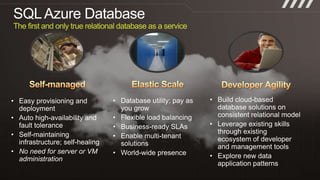
SQL Azure DatabaseThe first and only true relational database as a serviceSubtitle colorElastic ScaleSelf-managedDeveloper AgilityBuild cloud-based database solutions on consistent relational model
Leverage existing skills through existing ecosystem of developer and management tools
Explore new data application patterns
Database utility; pay as you grow
Flexible load balancing
Business-ready SLAs
Enable multi-tenant solutions
World-wide presence
Easy provisioning and deployment
Auto high-availability and fault tolerance
Self-maintaining infrastructure; self-healing
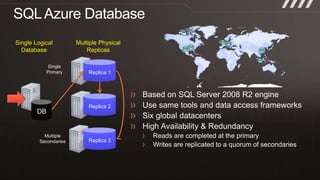
No need for server or VM administrationSQL Azure DatabaseSingle LogicalDatabaseMultiple PhysicalReplicasReplica 1Single PrimaryBased on SQL Server 2008 R2 engineUse same tools and data access frameworksSix global datacentersHigh Availability & RedundancyReads are completed at the primaryWrites are replicated to a quorum of secondariesReplica 2DBReplica 3MultipleSecondaries
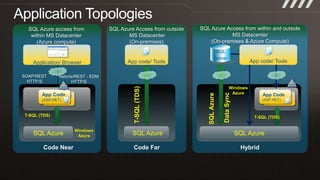
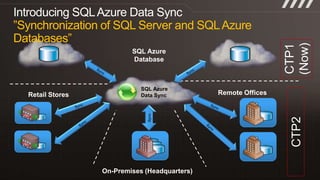
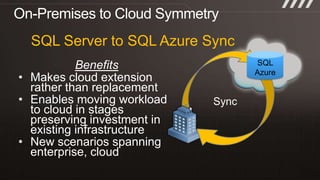
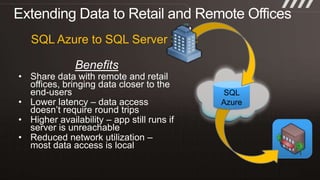
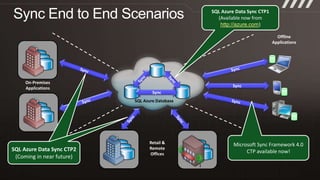
Application TopologiesSQL Azure Access from within and outside MS Datacenter(On-premises & Azure Compute)SQL Azure Access from outside MS Datacenter(On-premises)SQL Azure access fromwithin MS Datacenter (Azure compute)SQL ServerApp code/ ToolsApp code/ ToolsApplication/ BrowserSOAP/RESTHTTP/SAstoria/REST - EDMHTTP/SWindowsAzureSQL Azure Data SyncApp Code(ASP.NET)App Code(ASP.NET)T-SQL (TDS)App Code(ASP.NET)App Code(ASP.NET)T-SQL (TDS)T-SQL (TDS)WindowsAzureSQL Azure SQL Azure SQL Azure Code NearCode FarHybrid
demoSQL Azure Database Management
demoApplication Migration from On-Premises SQL Server to SQL Azure in the Cloud
demoDatabase Migration from SQL Server to SQL Azure

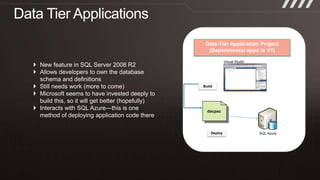
Data Migration and Data-Tier Applications with SQL Azure

Editor's Notes

  • #5 Slide ObjectiveUse this slide to transition into an explanation of SQL Azure Database (Reporting and Data Sync will be covered later)Explain at a high level how SQL Azure worksSpeaker NotesDesign Principle of SQL Azure: Focus on combining the best features of SQL Server running at scale with low frictionSQL Azure is a high availability databaseAlways three transaction consistent replicas of the databaseOne primary replica; two slave replicasFailure of a replica will result in another replica being spun up immediately by the fabricFailure of the primary replica means a slave replica will become the primary and a new slave will spin upMinimal down timeTypically just a few dropped connectionsEasy to code for the failover scenario- if you are ding god connection management and error handling will be fineClustered index required on all tables to allow replicationNotesUseful article from SQL Azure teamhttp://msdn.microsoft.com/en-us/magazine/ee321567.aspx
  • #16 So what are the requirements for this? It is part of Visual Studio 2010 functionality. Additionally, to deploy data-tier applications, you need to running SQL 2008 R2 (enterprise
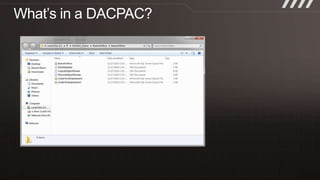
  • #17 This is a view of an expanded DACPAC—as you can see it consists of 3 SQL scripts—the main schema script and any pre and post deployment scripts. There are a couple of XML files that define the physical and logical models around the data. As vendors begin to use this technology as method to roll out databases for their technology, as DBAs this will be the place where we can preview their schema and identify any potential issues. Also, not that you would do this, but always review code in a dacpac you downloaded from an unknown source, to ensure that there isn’t any malicious code. In Visual Studio 2010 Premium and higher, you can compare two DACPAC schema files, or just use a file comparison tool.