Microsoft Access -
PA Harris, Vanderbilt University
A Primer for Relational Database
Design and Use
Paul A. Harris, Ph.D.
Director, GCRC Informatics
October 3, 2003
Microsoft Access – Module 1
PA Harris, Vanderbilt University
An Overview of MS-Access
What is Microsoft Access?
Microsoft Access is a relational database management
system (DBMS or RDBMS). At the very core, it is a
software “engine” that provides an interface between
physical data and user application queries.
Other examples of DBMS applications include:
•Oracle
•mySQL
•SQL Server (Microsoft)
•DB2 (IBM)
•Informix
PA Harris, Vanderbilt University
Why choose MS-Access over
SPSS / Excel?
Although there is always overlap, the following rules might
help when deciding when / when not to use MS Access:
•MS Access is best used for long-term data storage and/or
data sharing.
•MS Excel is best used for minor data collection,
manipulation, and especially visualization. MS Excel ለጥቅል
መረጃ ማሰባሰብ, ማባዛት እና በተለይ የእይታ ስራን ያገለግላል.
•SPSS is best used for minor data collection and especially
data analysis. ለአነስተኛ የመረጃ አሰባሰብ እና በተለይም የውሂብ
ትንተና SPSS በጥቅም ላይ ይውላል
PA Harris, Vanderbilt University
Why choose MS-Access over
other DBMS systems?
Cheap, readily available (packaged with MS-Office
Premium).
Easy to use (relative to other systems –Oracle may require
one FTE to maintain the server as a database administrator
and another FTE to serve as an application developer).
Includes front-end tools for rapid application development
(RAD). This also makes MS-Access a good prototype
environment.
PA Harris, Vanderbilt University
Why choose other DBMS
systems over MS-Access?
MS-Access can handle a large number of records, but is
somewhat slow compared to some of the high-end platforms.
Multiple users may use the database simultaneously, but MS-
Access is known to become unstable with greater than 3-5
users.
There is a “snob factor”. I personally recommend the use of
other systems (Oracle, SQL Server, mySQL, etc) when
writing grant proposals - especially phase II type grants).
PA Harris, Vanderbilt University
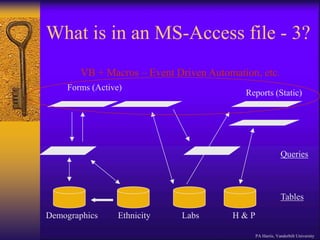
What is in an MS-Access file - 1?
Although the term “database” typically refers to a collection of
related data tables, an Access database includes more than just
data. In addition to tables, you can add:
•Saved queries (stored procedures) - organizing and/or
manipulating data
•Forms – gui interaction with data, event programming
•Reports – customized results for printing (~ static forms)
•Macros and VB programs for extending functionality
Microsoft provides some logical integration of these tools
through “wizards”. However, these are pretty basic - most
developers must pick and choose the best approach when
implementing applications.
PA Harris, Vanderbilt University
What is in an MS-Access file - 2?
Unless advanced
techniques are employed,
all entities are stored in
one *.mdb file. When
running, a locking file
(*.ldb) is also visible.
Only the mdb file needs
to be copied to transfer
the database to another
computer or location.
Ex.
MSCI_ByrneGuestLecture.mdb
PA Harris, Vanderbilt University
What is in an MS-Access file - 3?
Demographics Ethnicity Labs H & P
Tables
Queries
Forms (Active)
Reports (Static)
VB + Macros – Event Driven Automation, etc.
PA Harris, Vanderbilt University
Advanced – Splitting
PA Harris, Vanderbilt University
Back-End File - Contains all Data Tables
VB + Macros – Event Driven Automation, etc.
Demographicsስነ-ሕዝብ
Ethni
cityየዘ
ር
Labs H & P
Tables
Queries
Forms (Active) Reports (Static)
Front-End File - Contains all Application Entities (Forms,
Queries, etc.) and links to data tables in back-end file. Note
you may have more than one FE to accommodate different
user types.
Microsoft Access – Module 1
Summary
PA Harris, Vanderbilt University
MS-Access is a powerful relational database
program. It has many integrated features and
can be greatly customized to fit most
personal/departmental needs for data
collection and storage.
Microsoft Access – Module 2
PA Harris, Vanderbilt University
Creating / Working with Tables
Tables – Glucose Measurement
Database
We wish to construct a database to track waking
glucose measurements for an indefinite amount of
time on 100 patients receiving 3 possible drug
combinations.
Why would this be difficult in MS-Excel or SPSS?
PA Harris, Vanderbilt University
Tables Overview
 Think of Access as a collection of
spreadsheets that are relationally linked.
STORE
DATA
ONE
TIME
/
ONE
PLACE
DO
NOT
STORE
CALCULATED
DATA
Demographics
Patient_ID
Fname
Lname
Address
Phone
Gender
Race
DOB
Height
Glucose
Glucose_ID
Patient_ID
Date
Weight
Med_ID
Glucose
Meds
Med_ID
DrugCombonatio
n
PA Harris, Vanderbilt University
Table Demonstration - Live
General Setup for Tables
Describe General Options
Show Validation Rule
Relationships
Lookup Option
PA Harris, Vanderbilt University
Table Relationships - Live
Table Relationships
Describe Cascade Features
PA Harris, Vanderbilt University
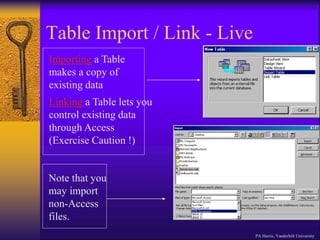
Table Import / Link - Live
Importing a Table
makes a copy of
existing data
Linking a Table lets you
control existing data
through Access
(Exercise Caution !)
Note that you
may import
non-Access
files.
PA Harris, Vanderbilt University
MS Access – Module 2 Summary
PA Harris, Vanderbilt University
Data storage principles
1. Attempt to store data 1 time / 1 place;
2. Do not store data that may be calculated from
other fields (utilize queries); and
3. Strive for very discrete data storage (no
ambiguity – garbage in / garbage out).
4. Choose real or arbitrary (autonumber) unique
identifier for each record.
Relationships
Use table relationships to automatically cascade
delete and update records.
Other Data Sources
Import = Copy; Link = Live Connect.
Microsoft Access – Module 3
PA Harris, Vanderbilt University
Creating / Working with Queries
Query Overview - 1
 An MS-Access query is a set of stored SQL
instructions that manipulate and/or select data
from one or more tables.
 Select Query – Data grouping and/or filtering
 Make-Table Query – Select + creates/populates
new table.
 Update Query – Updates fields from specified
table data
 Append Query – Runs query on one table,
appends results to a table
 Delete Query – Delete selected records from table
PA Harris, Vanderbilt University
Query Overview - 2
 SQL (Structured Query Language) is a very
widely used database language designed
specifically for communicating with databases
 SQL is not proprietary – almost every DBMS
supports SQL (including MS-Access).
 SQL is relatively easy to learn, but extremely
powerful – one of the easiest ways to learn is to
use MS-Access Query by Example methods, then
look at the generated SQL command
 Remember that a query is nothing more than the
database engine running the stored SQL command
(it looks and sometimes acts like a table, but really
adds little mass to the database file) PA Harris, Vanderbilt University
One Table Query Example - Live
Right-Click + Add to add
table(s)
Drag and Drop Fields
Custom sort
by one or
more fields.
Use this
button to
toggle
between
design, sheet
and SQL
views.
PA Harris, Vanderbilt University
2-Table Query Example - Live
Drag and Drop Fields
Right-Click + Add to add table(s)
Note that relationship often automatic.
Calculated Field
BMI: [Weight]/([Height]/100)^2
Right-Clicking gray area
above field enables
property changes.
PA Harris, Vanderbilt University
Query – Calculating Fields
Name the calculated field, then type a colon, then
type the equation using brackets ( [ ] ) around table
fields. If there is ambiguity in the field names
between tables, you may need to type table.[field]
format.
Ex: BMI: [Weight]/([Height]/100)^2
PA Harris, Vanderbilt University
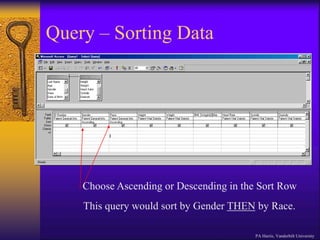
Query – Sorting Data
Choose Ascending or Descending in the Sort Row
This query would sort by Gender THEN by Race.
PA Harris, Vanderbilt University
Query – Filtering Data
This query will return all records in the database for:
Females
who are not white
whose height are greater than 150 cm
and who weigh between 60 and 70 kg
You
need
not
“show”
the
data
field
to
use
as
a
filter.
PA Harris, Vanderbilt University
Query – Filter Operators
= equals
> greater than
>= greater than or equal
< less than
<= less than or equal
<> not equal to
Between between two values
Is Null field is empty
is not null field is not empty
Like Matches a pattern (Like John*)
OR Logical OR (one or other is true)
AND Logical AND (both are true)
etc.
PA Harris, Vanderbilt University
Query – Grouping Data - 1
Clicking the Totals Button
Enables Grouping, Counting
and Statistical Options
Notice new “Total” row.
Each field (column) can be set.
Running this
Query
indicates there
are 203
Females and
261 Males in
the database.
PA Harris, Vanderbilt University
Query – Grouping Data -2
Totals Options Include:
Group By
Sum
Avg
Min
Max
Count
StDev
Var
PA Harris, Vanderbilt University
Query – Export Data
Create and Save
Query
1)
Use OfficeLinks (Excel Toggle
Option) to “Analyze it with Excel”
2)
Data Automatically
Exported to Excel
3)
PA Harris, Vanderbilt University
MS Access – Module 3 Summary
PA Harris, Vanderbilt University
Queries are extremely easy to set up/use and provide an up-
to-date snapshot of your data at any time.
Queries may be used to calculate values based upon
existing fields, join fields from separate tables, globally
update or delete data, and export linked/calculated data to
external programs.
Under the hood, queries are really nothing more than stored
SQL statements that are run upon command. They add
little mass to the file application.
If you use MS-Access for nothing else, you should learn to
import data and become proficient with query functionality.
MS-Access Import/Query Practice
Import data from the sample Excel file “msci_data.xls” into
an Access database table. Design and save a new query
named to display only the following fields: 1) Case; 2) Sex;
3) BMI_Av (a calculated field computed by averaging
BMI_1 and BMI_2). Select filter criteria in the query to
show only those records where: 1) age is between 30 and 90;
2) the sex field equals 0; and 3) and the survdays field
contains a value between 100 and 300.
Using the imported table from part A, design and save a new
query named Question2 to provide summary data for each
sex / alive combination (ie we want to see 4 rows of data).
For each of these combinations compute: 1) count of case
numbers; 2) average of length of stay (LOS); and 3)
standard deviation of length of stay (LOS).
Microsoft Access – Module 4
PA Harris, Vanderbilt University
Creating / Working with
Forms/Reports
Graphical User Interface (GUI)
Although it is possible to enter data directly into a
table, you can enhance data quality by forcing data
entry through forms.
Depending upon your users, you may wish to set
things up so they never even see the database
window. In other words, you can design your
application so they only touch the data through
programmed forms.
PA Harris, Vanderbilt University
Graphical User Interface (GUI)
Continuing with the glucose database we
formulated earlier, we’ll now attempt to build a
graphical user interface to:
1) Collect Data
2) Periodically report data through pre-formatted
reports
3) Quit the program
PA Harris, Vanderbilt University
GUI – Forms/Report Live
Out of Program
PA Harris, Vanderbilt University
MS Access – Module 4 Summary
PA Harris, Vanderbilt University
Use forms and reports together to build a data software
application.
Design to the lowest common denominator (Murphy will
use your program early and often)
Always look for and design carrots to win over the true
data entry personnel. If it saves them time or offers
something they couldn’t do before, they might use the
application.
Look for champions – bright, energetic individuals who
will try something new, etc.
MS Access – Resources
PA Harris, Vanderbilt University
I cannot recommend the BEST MS-Access book.
However, I can recommend the following series of books
that I usually turn to when learning new technology:
•Visual Quickstart Series – beginner/intermediate level
•O’Reilly Series – intermediate/advanced level
There is also an excellent tutorial on the web:
http://mis.bus.sfu.ca/tutorials/MSAccess/tutorials.html

Microsoft Access.ppt

  • 1.
    Microsoft Access - PAHarris, Vanderbilt University A Primer for Relational Database Design and Use Paul A. Harris, Ph.D. Director, GCRC Informatics October 3, 2003
  • 2.
    Microsoft Access –Module 1 PA Harris, Vanderbilt University An Overview of MS-Access
  • 3.
    What is MicrosoftAccess? Microsoft Access is a relational database management system (DBMS or RDBMS). At the very core, it is a software “engine” that provides an interface between physical data and user application queries. Other examples of DBMS applications include: •Oracle •mySQL •SQL Server (Microsoft) •DB2 (IBM) •Informix PA Harris, Vanderbilt University
  • 4.
    Why choose MS-Accessover SPSS / Excel? Although there is always overlap, the following rules might help when deciding when / when not to use MS Access: •MS Access is best used for long-term data storage and/or data sharing. •MS Excel is best used for minor data collection, manipulation, and especially visualization. MS Excel ለጥቅል መረጃ ማሰባሰብ, ማባዛት እና በተለይ የእይታ ስራን ያገለግላል. •SPSS is best used for minor data collection and especially data analysis. ለአነስተኛ የመረጃ አሰባሰብ እና በተለይም የውሂብ ትንተና SPSS በጥቅም ላይ ይውላል PA Harris, Vanderbilt University
  • 5.
    Why choose MS-Accessover other DBMS systems? Cheap, readily available (packaged with MS-Office Premium). Easy to use (relative to other systems –Oracle may require one FTE to maintain the server as a database administrator and another FTE to serve as an application developer). Includes front-end tools for rapid application development (RAD). This also makes MS-Access a good prototype environment. PA Harris, Vanderbilt University
  • 6.
    Why choose otherDBMS systems over MS-Access? MS-Access can handle a large number of records, but is somewhat slow compared to some of the high-end platforms. Multiple users may use the database simultaneously, but MS- Access is known to become unstable with greater than 3-5 users. There is a “snob factor”. I personally recommend the use of other systems (Oracle, SQL Server, mySQL, etc) when writing grant proposals - especially phase II type grants). PA Harris, Vanderbilt University
  • 7.
    What is inan MS-Access file - 1? Although the term “database” typically refers to a collection of related data tables, an Access database includes more than just data. In addition to tables, you can add: •Saved queries (stored procedures) - organizing and/or manipulating data •Forms – gui interaction with data, event programming •Reports – customized results for printing (~ static forms) •Macros and VB programs for extending functionality Microsoft provides some logical integration of these tools through “wizards”. However, these are pretty basic - most developers must pick and choose the best approach when implementing applications. PA Harris, Vanderbilt University
  • 8.
    What is inan MS-Access file - 2? Unless advanced techniques are employed, all entities are stored in one *.mdb file. When running, a locking file (*.ldb) is also visible. Only the mdb file needs to be copied to transfer the database to another computer or location. Ex. MSCI_ByrneGuestLecture.mdb PA Harris, Vanderbilt University
  • 9.
    What is inan MS-Access file - 3? Demographics Ethnicity Labs H & P Tables Queries Forms (Active) Reports (Static) VB + Macros – Event Driven Automation, etc. PA Harris, Vanderbilt University
  • 10.
    Advanced – Splitting PAHarris, Vanderbilt University Back-End File - Contains all Data Tables VB + Macros – Event Driven Automation, etc. Demographicsስነ-ሕዝብ Ethni cityየዘ ር Labs H & P Tables Queries Forms (Active) Reports (Static) Front-End File - Contains all Application Entities (Forms, Queries, etc.) and links to data tables in back-end file. Note you may have more than one FE to accommodate different user types.
  • 11.
    Microsoft Access –Module 1 Summary PA Harris, Vanderbilt University MS-Access is a powerful relational database program. It has many integrated features and can be greatly customized to fit most personal/departmental needs for data collection and storage.
  • 12.
    Microsoft Access –Module 2 PA Harris, Vanderbilt University Creating / Working with Tables
  • 13.
    Tables – GlucoseMeasurement Database We wish to construct a database to track waking glucose measurements for an indefinite amount of time on 100 patients receiving 3 possible drug combinations. Why would this be difficult in MS-Excel or SPSS? PA Harris, Vanderbilt University
  • 14.
    Tables Overview  Thinkof Access as a collection of spreadsheets that are relationally linked. STORE DATA ONE TIME / ONE PLACE DO NOT STORE CALCULATED DATA Demographics Patient_ID Fname Lname Address Phone Gender Race DOB Height Glucose Glucose_ID Patient_ID Date Weight Med_ID Glucose Meds Med_ID DrugCombonatio n PA Harris, Vanderbilt University
  • 15.
    Table Demonstration -Live General Setup for Tables Describe General Options Show Validation Rule Relationships Lookup Option PA Harris, Vanderbilt University
  • 16.
    Table Relationships -Live Table Relationships Describe Cascade Features PA Harris, Vanderbilt University
  • 17.
    Table Import /Link - Live Importing a Table makes a copy of existing data Linking a Table lets you control existing data through Access (Exercise Caution !) Note that you may import non-Access files. PA Harris, Vanderbilt University
  • 18.
    MS Access –Module 2 Summary PA Harris, Vanderbilt University Data storage principles 1. Attempt to store data 1 time / 1 place; 2. Do not store data that may be calculated from other fields (utilize queries); and 3. Strive for very discrete data storage (no ambiguity – garbage in / garbage out). 4. Choose real or arbitrary (autonumber) unique identifier for each record. Relationships Use table relationships to automatically cascade delete and update records. Other Data Sources Import = Copy; Link = Live Connect.
  • 19.
    Microsoft Access –Module 3 PA Harris, Vanderbilt University Creating / Working with Queries
  • 20.
    Query Overview -1  An MS-Access query is a set of stored SQL instructions that manipulate and/or select data from one or more tables.  Select Query – Data grouping and/or filtering  Make-Table Query – Select + creates/populates new table.  Update Query – Updates fields from specified table data  Append Query – Runs query on one table, appends results to a table  Delete Query – Delete selected records from table PA Harris, Vanderbilt University
  • 21.
    Query Overview -2  SQL (Structured Query Language) is a very widely used database language designed specifically for communicating with databases  SQL is not proprietary – almost every DBMS supports SQL (including MS-Access).  SQL is relatively easy to learn, but extremely powerful – one of the easiest ways to learn is to use MS-Access Query by Example methods, then look at the generated SQL command  Remember that a query is nothing more than the database engine running the stored SQL command (it looks and sometimes acts like a table, but really adds little mass to the database file) PA Harris, Vanderbilt University
  • 22.
    One Table QueryExample - Live Right-Click + Add to add table(s) Drag and Drop Fields Custom sort by one or more fields. Use this button to toggle between design, sheet and SQL views. PA Harris, Vanderbilt University
  • 23.
    2-Table Query Example- Live Drag and Drop Fields Right-Click + Add to add table(s) Note that relationship often automatic. Calculated Field BMI: [Weight]/([Height]/100)^2 Right-Clicking gray area above field enables property changes. PA Harris, Vanderbilt University
  • 24.
    Query – CalculatingFields Name the calculated field, then type a colon, then type the equation using brackets ( [ ] ) around table fields. If there is ambiguity in the field names between tables, you may need to type table.[field] format. Ex: BMI: [Weight]/([Height]/100)^2 PA Harris, Vanderbilt University
  • 25.
    Query – SortingData Choose Ascending or Descending in the Sort Row This query would sort by Gender THEN by Race. PA Harris, Vanderbilt University
  • 26.
    Query – FilteringData This query will return all records in the database for: Females who are not white whose height are greater than 150 cm and who weigh between 60 and 70 kg You need not “show” the data field to use as a filter. PA Harris, Vanderbilt University
  • 27.
    Query – FilterOperators = equals > greater than >= greater than or equal < less than <= less than or equal <> not equal to Between between two values Is Null field is empty is not null field is not empty Like Matches a pattern (Like John*) OR Logical OR (one or other is true) AND Logical AND (both are true) etc. PA Harris, Vanderbilt University
  • 28.
    Query – GroupingData - 1 Clicking the Totals Button Enables Grouping, Counting and Statistical Options Notice new “Total” row. Each field (column) can be set. Running this Query indicates there are 203 Females and 261 Males in the database. PA Harris, Vanderbilt University
  • 29.
    Query – GroupingData -2 Totals Options Include: Group By Sum Avg Min Max Count StDev Var PA Harris, Vanderbilt University
  • 30.
    Query – ExportData Create and Save Query 1) Use OfficeLinks (Excel Toggle Option) to “Analyze it with Excel” 2) Data Automatically Exported to Excel 3) PA Harris, Vanderbilt University
  • 31.
    MS Access –Module 3 Summary PA Harris, Vanderbilt University Queries are extremely easy to set up/use and provide an up- to-date snapshot of your data at any time. Queries may be used to calculate values based upon existing fields, join fields from separate tables, globally update or delete data, and export linked/calculated data to external programs. Under the hood, queries are really nothing more than stored SQL statements that are run upon command. They add little mass to the file application. If you use MS-Access for nothing else, you should learn to import data and become proficient with query functionality.
  • 32.
    MS-Access Import/Query Practice Importdata from the sample Excel file “msci_data.xls” into an Access database table. Design and save a new query named to display only the following fields: 1) Case; 2) Sex; 3) BMI_Av (a calculated field computed by averaging BMI_1 and BMI_2). Select filter criteria in the query to show only those records where: 1) age is between 30 and 90; 2) the sex field equals 0; and 3) and the survdays field contains a value between 100 and 300. Using the imported table from part A, design and save a new query named Question2 to provide summary data for each sex / alive combination (ie we want to see 4 rows of data). For each of these combinations compute: 1) count of case numbers; 2) average of length of stay (LOS); and 3) standard deviation of length of stay (LOS).
  • 33.
    Microsoft Access –Module 4 PA Harris, Vanderbilt University Creating / Working with Forms/Reports
  • 34.
    Graphical User Interface(GUI) Although it is possible to enter data directly into a table, you can enhance data quality by forcing data entry through forms. Depending upon your users, you may wish to set things up so they never even see the database window. In other words, you can design your application so they only touch the data through programmed forms. PA Harris, Vanderbilt University
  • 35.
    Graphical User Interface(GUI) Continuing with the glucose database we formulated earlier, we’ll now attempt to build a graphical user interface to: 1) Collect Data 2) Periodically report data through pre-formatted reports 3) Quit the program PA Harris, Vanderbilt University
  • 36.
    GUI – Forms/ReportLive Out of Program PA Harris, Vanderbilt University
  • 37.
    MS Access –Module 4 Summary PA Harris, Vanderbilt University Use forms and reports together to build a data software application. Design to the lowest common denominator (Murphy will use your program early and often) Always look for and design carrots to win over the true data entry personnel. If it saves them time or offers something they couldn’t do before, they might use the application. Look for champions – bright, energetic individuals who will try something new, etc.
  • 38.
    MS Access –Resources PA Harris, Vanderbilt University I cannot recommend the BEST MS-Access book. However, I can recommend the following series of books that I usually turn to when learning new technology: •Visual Quickstart Series – beginner/intermediate level •O’Reilly Series – intermediate/advanced level There is also an excellent tutorial on the web: http://mis.bus.sfu.ca/tutorials/MSAccess/tutorials.html