Concepts of Database Management
Seventh Edition
Chapter 4
Keys and Relationship
Objectives
• Understand different type of keys in a Table.
• Understand the different type of Table relationship
• Identify the primary key and foreign key to create a
relationship.
• Create primary and foreign key in an actual DBMS
2
Table Relationship
• Remember in Chapter 1 we discuss the hierarchy
of data, namely:
– Field or Column
– Record or Row
– Table or File
– Database
• Now, Tables normally does not stand alone, that
is, in the modern database software like MS
Access, mySQL, Oracle or MS SQL, table(s)
normally has relationship with another table.
3
Three Types of Relationship
• There are three types of table relationship:
– One to one or denoted as 1:1
– One to many or denoted as 1:M
– Many to Many or denoted as M:N
4
Examples of One-to-One Relationship
• A student belongs to only one Program
• A student has one and only ID
• An employee has one computer assign
• Could you name your own example?
5
Examples of One-to-Many
Relationship
• A Division could have more than one Program
offered
• A Program could have many students enrolled
• Could you name your own example?
6
Examples of Many-to-Many
Relationship
• A student could take many course and a course
could have many students
• An author could have many books and a book
could have many author
• A music album could have many artists/performers
and an artist/performer could have many albums
• Could you name your own example?
7
Key in a table
• A key in a table is a field or group of fields that
creates identity, makes relationship with another
table and/or make a table more efficient.
8
Primary Key & Foreign
• A Primary key is a key that uniquely identifies a
row in each table. It is normally denoted with its
first two letters, namely, PK.
• A Foreign key is a key borrowed from another
related table (that’s why its foreign) in order to
make the relationship between two tables. It is
normally denoted with its first two letters, namely,
FK.
9
Examples from Premier Database –
Primary Key
10
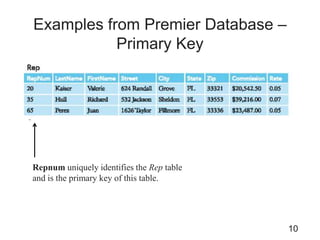
Repnum uniquely identifies the Rep table
and is the primary key of this table.
Examples from Premier Database –
Primary Key
11
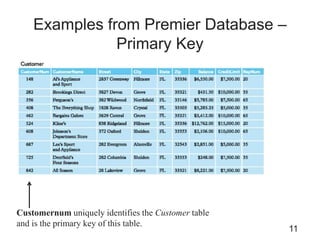
Customernum uniquely identifies the Customer table
and is the primary key of this table.
Examples from Premier Database –
Primary Key
12
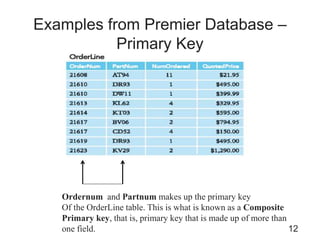
Ordernum and Partnum makes up the primary key
Of the OrderLine table. This is what is known as a Composite
Primary key, that is, primary key that is made up of more than
one field.
Examples from Premier Database
• Could you identify any more primary keys from
Premier Database?
13
Examples from Premier Database –
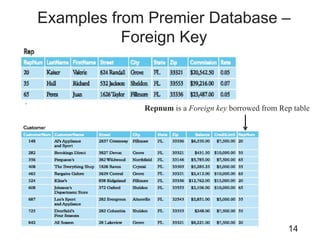
Foreign Key
14
Repnum is a Foreign key borrowed from Rep table
Examples from Premier Database
• Could you identify any more foreign keys from
Premier Database?
15
Notation example
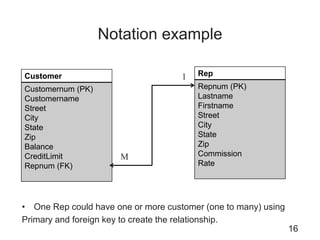
• One Rep could have one or more customer (one to many) using
Primary and foreign key to create the relationship.
16
Customer
Customernum (PK)
Customername
Street
City
State
Zip
Balance
CreditLimit
Repnum (FK)
Rep
Repnum (PK)
Lastname
Firstname
Street
City
State
Zip
Commission
Rate
1
M
Notation example
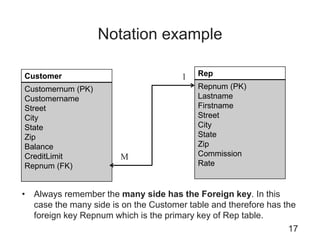
• Always remember the many side has the Foreign key. In this
case the many side is on the Customer table and therefore has the
foreign key Repnum which is the primary key of Rep table.
17
Customer
Customernum (PK)
Customername
Street
City
State
Zip
Balance
CreditLimit
Repnum (FK)
Rep
Repnum (PK)
Lastname
Firstname
Street
City
State
Zip
Commission
Rate
1
M
Examples from Premier Database
• Could you identify the different relationship among
tables in Premier Database because of the Primary
and Foreign keys?
18
Referential Integrity
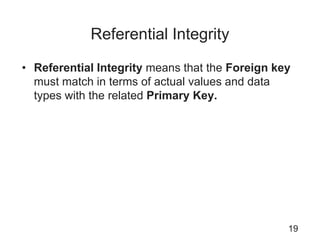
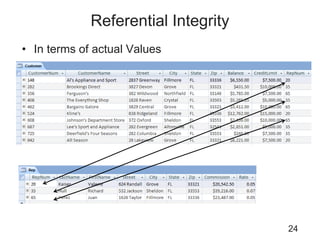
• Referential Integrity means that the Foreign key
must match in terms of actual values and data
types with the related Primary Key.
19
Referential Integrity
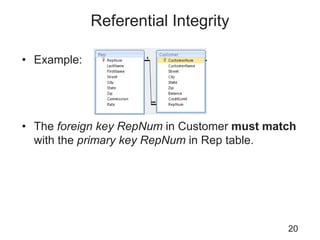
• Example:
• The foreign key RepNum in Customer must match
with the primary key RepNum in Rep table.
20
Referential Integrity
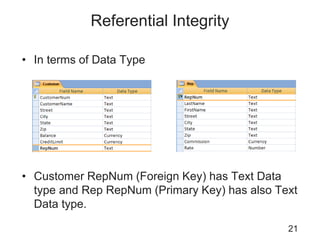
• In terms of Data Type
• Customer RepNum (Foreign Key) has Text Data
type and Rep RepNum (Primary Key) has also Text
Data type.
21
Seatwork
22
• Colonial and Solmaris
• Identify the primary key and foreign keys for each
table. Put the name of the table and name its
primary key and if there is a foreign key identify the
foreign key.
• Identify how each table that has the foreign key
relates to another table. See slide No. 16 and 17
Demo in creating Primary and Foreign
Key in MS Access
23
Referential Integrity
• In terms of actual Values
24
Non-Graded Seatwork
25
• Colonial and Solmaris
– Check the tables that are related to each other and
then check data types for both Foreign and Primary
Keys that are related.
– Check also the values of the related Primary Keys if
you could find it in the related Foreign keys.
– Try to enter values in the Foreign Key that could not
be found in related table that has the Primary Key.
Did MS Access pops out an error message? What
does it say?
On-your-own Exercise
26
– Imagine we want to make a simple appointment database for a small
clinic here in Pohnpei with a fictitious name Health Wealth clinic. And
the database would record appointments for Patients with their
Doctor on a given date.
– Now a Patient could have one or more appointments in Health Wealth
clinic to one or more Doctor.
– A Doctor could also have one or more appointment with one or more
patients every day.
– Create a database in MS Access named Keys-Lastname.accdb
– Create three tables, namely, Patients, Doctors and Appointments.
– Create necessary fields for each table that you think should be there.
– Create a Primary Key for each tables.
– And create also Foreign keys if necessary to create relationship
among tables.
– Use the Database Tools to create the Relationship among tables after
you created both the Primary Keys and Foreign Keys.
– Enter at least 3 doctors, 5 patients and 8 appointments
– Send your work to nationalcis@gmail.com with the title Database
with Keys activity
Summary (continued)
• Modern database normally has tables that has
logical relationships with one another.
• Three primary type of relationships are one-to-one,
one-to-many and many-to-many.
• Each row/record in a Table should be unique using
a Primary Key
• To create a relationship among tables you must
have the Foreign key on the other table.
• Referential Integrity protects the integrity of your
data by matching both your Primary key and
Foreign in terms of Data types and actual values.
27

IS230 - Chapter 4 - Keys and Relationship - Revised.ppt

  • 1.
    Concepts of DatabaseManagement Seventh Edition Chapter 4 Keys and Relationship
  • 2.
    Objectives • Understand differenttype of keys in a Table. • Understand the different type of Table relationship • Identify the primary key and foreign key to create a relationship. • Create primary and foreign key in an actual DBMS 2
  • 3.
    Table Relationship • Rememberin Chapter 1 we discuss the hierarchy of data, namely: – Field or Column – Record or Row – Table or File – Database • Now, Tables normally does not stand alone, that is, in the modern database software like MS Access, mySQL, Oracle or MS SQL, table(s) normally has relationship with another table. 3
  • 4.
    Three Types ofRelationship • There are three types of table relationship: – One to one or denoted as 1:1 – One to many or denoted as 1:M – Many to Many or denoted as M:N 4
  • 5.
    Examples of One-to-OneRelationship • A student belongs to only one Program • A student has one and only ID • An employee has one computer assign • Could you name your own example? 5
  • 6.
    Examples of One-to-Many Relationship •A Division could have more than one Program offered • A Program could have many students enrolled • Could you name your own example? 6
  • 7.
    Examples of Many-to-Many Relationship •A student could take many course and a course could have many students • An author could have many books and a book could have many author • A music album could have many artists/performers and an artist/performer could have many albums • Could you name your own example? 7
  • 8.
    Key in atable • A key in a table is a field or group of fields that creates identity, makes relationship with another table and/or make a table more efficient. 8
  • 9.
    Primary Key &Foreign • A Primary key is a key that uniquely identifies a row in each table. It is normally denoted with its first two letters, namely, PK. • A Foreign key is a key borrowed from another related table (that’s why its foreign) in order to make the relationship between two tables. It is normally denoted with its first two letters, namely, FK. 9
  • 10.
    Examples from PremierDatabase – Primary Key 10 Repnum uniquely identifies the Rep table and is the primary key of this table.
  • 11.
    Examples from PremierDatabase – Primary Key 11 Customernum uniquely identifies the Customer table and is the primary key of this table.
  • 12.
    Examples from PremierDatabase – Primary Key 12 Ordernum and Partnum makes up the primary key Of the OrderLine table. This is what is known as a Composite Primary key, that is, primary key that is made up of more than one field.
  • 13.
    Examples from PremierDatabase • Could you identify any more primary keys from Premier Database? 13
  • 14.
    Examples from PremierDatabase – Foreign Key 14 Repnum is a Foreign key borrowed from Rep table
  • 15.
    Examples from PremierDatabase • Could you identify any more foreign keys from Premier Database? 15
  • 16.
    Notation example • OneRep could have one or more customer (one to many) using Primary and foreign key to create the relationship. 16 Customer Customernum (PK) Customername Street City State Zip Balance CreditLimit Repnum (FK) Rep Repnum (PK) Lastname Firstname Street City State Zip Commission Rate 1 M
  • 17.
    Notation example • Alwaysremember the many side has the Foreign key. In this case the many side is on the Customer table and therefore has the foreign key Repnum which is the primary key of Rep table. 17 Customer Customernum (PK) Customername Street City State Zip Balance CreditLimit Repnum (FK) Rep Repnum (PK) Lastname Firstname Street City State Zip Commission Rate 1 M
  • 18.
    Examples from PremierDatabase • Could you identify the different relationship among tables in Premier Database because of the Primary and Foreign keys? 18
  • 19.
    Referential Integrity • ReferentialIntegrity means that the Foreign key must match in terms of actual values and data types with the related Primary Key. 19
  • 20.
    Referential Integrity • Example: •The foreign key RepNum in Customer must match with the primary key RepNum in Rep table. 20
  • 21.
    Referential Integrity • Interms of Data Type • Customer RepNum (Foreign Key) has Text Data type and Rep RepNum (Primary Key) has also Text Data type. 21
  • 22.
    Seatwork 22 • Colonial andSolmaris • Identify the primary key and foreign keys for each table. Put the name of the table and name its primary key and if there is a foreign key identify the foreign key. • Identify how each table that has the foreign key relates to another table. See slide No. 16 and 17
  • 23.
    Demo in creatingPrimary and Foreign Key in MS Access 23
  • 24.
    Referential Integrity • Interms of actual Values 24
  • 25.
    Non-Graded Seatwork 25 • Colonialand Solmaris – Check the tables that are related to each other and then check data types for both Foreign and Primary Keys that are related. – Check also the values of the related Primary Keys if you could find it in the related Foreign keys. – Try to enter values in the Foreign Key that could not be found in related table that has the Primary Key. Did MS Access pops out an error message? What does it say?
  • 26.
    On-your-own Exercise 26 – Imaginewe want to make a simple appointment database for a small clinic here in Pohnpei with a fictitious name Health Wealth clinic. And the database would record appointments for Patients with their Doctor on a given date. – Now a Patient could have one or more appointments in Health Wealth clinic to one or more Doctor. – A Doctor could also have one or more appointment with one or more patients every day. – Create a database in MS Access named Keys-Lastname.accdb – Create three tables, namely, Patients, Doctors and Appointments. – Create necessary fields for each table that you think should be there. – Create a Primary Key for each tables. – And create also Foreign keys if necessary to create relationship among tables. – Use the Database Tools to create the Relationship among tables after you created both the Primary Keys and Foreign Keys. – Enter at least 3 doctors, 5 patients and 8 appointments – Send your work to nationalcis@gmail.com with the title Database with Keys activity
  • 27.
    Summary (continued) • Moderndatabase normally has tables that has logical relationships with one another. • Three primary type of relationships are one-to-one, one-to-many and many-to-many. • Each row/record in a Table should be unique using a Primary Key • To create a relationship among tables you must have the Foreign key on the other table. • Referential Integrity protects the integrity of your data by matching both your Primary key and Foreign in terms of Data types and actual values. 27