Microsoft Access A Primer for Relational  Database Design and Use Jimmy Taylor February 17, 2010
What is Microsoft Access? Microsoft Access is a relational database management system (DBMS or RDBMS).  At the very core, it is a software “engine” that provides an interface between physical data and user application queries. Other examples of DBMS applications include: Oracle mySQL SQL Server (Microsoft) DB2 (IBM) Informix
Why choose MS-Access over SPSS / Excel? Although there is always overlap, the following rules might help when deciding when / when not to use MS Access: MS Access is best used for long-term data storage and/or data sharing. MS Excel is best used for minor data collection, manipulation, and especially visualization. SPSS is best used for minor data collection and especially data analysis. It is easy to export data from MS Access to Excel    SPSS
Why choose MS-Access over other DBMS systems? Cheap, readily available (packaged with MS-Office Premium). Easy to use (relative to other systems –Oracle may require one FTE to maintain the server as a database administrator and another FTE to serve as an application developer). Includes front-end tools for rapid application development (RAD).  This also makes MS-Access a good prototype environment.
Microsoft Access – Module 1 Summary MS-Access is a powerful relational database program.  It has many integrated features and can be greatly customized to fit most personal/departmental needs for data collection and storage. For more info:  Microsoft Access Assistance
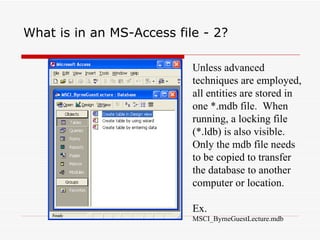
What is in an MS-Access file - 2? Unless advanced techniques are employed, all entities are stored in one *.mdb file.  When running, a locking file (*.ldb) is also visible.  Only the mdb file needs to be copied to transfer the database to another computer or location. Ex. MSCI_ByrneGuestLecture.mdb
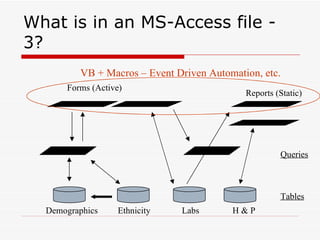
What is in an MS-Access file - 3? Demographics Ethnicity Labs H & P Tables Queries Forms (Active) Reports (Static) VB + Macros – Event Driven Automation, etc.
MS Access – Module 2 Summary   Data storage principles Attempt to store data 1 time / 1 place;  Do not store data that may be calculated from other fields (utilize queries); and  Strive for very discrete data storage (no ambiguity – garbage in / garbage out). Choose real or arbitrary (autonumber) unique identifier for each record. Relationships Use table relationships to automatically cascade delete and update records.
MS Access – Module 3 Summary   Queries are extremely easy to set up/use and provide an up-to-date snapshot of your data at any time. Queries may be used to calculate values based upon existing fields, join fields from separate tables, globally update or delete data, and export linked/calculated data to external programs. Under the hood, queries are really nothing more than stored SQL statements that are run upon command.  They add little mass to the file application.
MS Access – Resources  I cannot recommend the BEST MS-Access book.  However, I can recommend the following series of books that I usually turn to when learning new technology: Visual Quickstart Series – beginner/intermediate level O’Reilly Series – intermediate/advanced level There is also an excellent tutorial on the web: http://mis.bus.sfu.ca/tutorials/MSAccess/tutorials.html
Thanks for your attention

Microsoft access powerpoint final

  • 1.
    Microsoft Access APrimer for Relational Database Design and Use Jimmy Taylor February 17, 2010
  • 2.
    What is MicrosoftAccess? Microsoft Access is a relational database management system (DBMS or RDBMS). At the very core, it is a software “engine” that provides an interface between physical data and user application queries. Other examples of DBMS applications include: Oracle mySQL SQL Server (Microsoft) DB2 (IBM) Informix
  • 3.
    Why choose MS-Accessover SPSS / Excel? Although there is always overlap, the following rules might help when deciding when / when not to use MS Access: MS Access is best used for long-term data storage and/or data sharing. MS Excel is best used for minor data collection, manipulation, and especially visualization. SPSS is best used for minor data collection and especially data analysis. It is easy to export data from MS Access to Excel  SPSS
  • 4.
    Why choose MS-Accessover other DBMS systems? Cheap, readily available (packaged with MS-Office Premium). Easy to use (relative to other systems –Oracle may require one FTE to maintain the server as a database administrator and another FTE to serve as an application developer). Includes front-end tools for rapid application development (RAD). This also makes MS-Access a good prototype environment.
  • 5.
    Microsoft Access –Module 1 Summary MS-Access is a powerful relational database program. It has many integrated features and can be greatly customized to fit most personal/departmental needs for data collection and storage. For more info: Microsoft Access Assistance
  • 6.
    What is inan MS-Access file - 2? Unless advanced techniques are employed, all entities are stored in one *.mdb file. When running, a locking file (*.ldb) is also visible. Only the mdb file needs to be copied to transfer the database to another computer or location. Ex. MSCI_ByrneGuestLecture.mdb
  • 7.
    What is inan MS-Access file - 3? Demographics Ethnicity Labs H & P Tables Queries Forms (Active) Reports (Static) VB + Macros – Event Driven Automation, etc.
  • 8.
    MS Access –Module 2 Summary Data storage principles Attempt to store data 1 time / 1 place; Do not store data that may be calculated from other fields (utilize queries); and Strive for very discrete data storage (no ambiguity – garbage in / garbage out). Choose real or arbitrary (autonumber) unique identifier for each record. Relationships Use table relationships to automatically cascade delete and update records.
  • 9.
    MS Access –Module 3 Summary Queries are extremely easy to set up/use and provide an up-to-date snapshot of your data at any time. Queries may be used to calculate values based upon existing fields, join fields from separate tables, globally update or delete data, and export linked/calculated data to external programs. Under the hood, queries are really nothing more than stored SQL statements that are run upon command. They add little mass to the file application.
  • 10.
    MS Access –Resources I cannot recommend the BEST MS-Access book. However, I can recommend the following series of books that I usually turn to when learning new technology: Visual Quickstart Series – beginner/intermediate level O’Reilly Series – intermediate/advanced level There is also an excellent tutorial on the web: http://mis.bus.sfu.ca/tutorials/MSAccess/tutorials.html
  • 11.
    Thanks for yourattention