MICROCONTROLLER 8051
Presented ByMUKESH KUMAR KASHYAP
Roll No-3352808033

&

SHRI SHANKARACHARYA INSTITUTE OF TECHNOLGY
MANAGEMENT,BHILAI
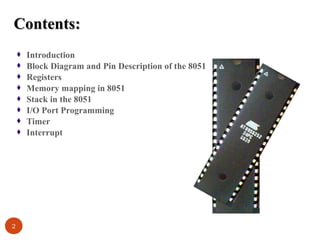
Contents:
Introduction
Block Diagram and Pin Description of the 8051
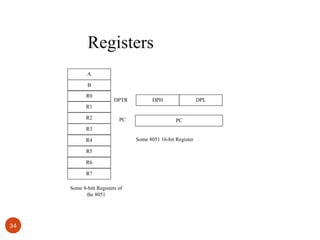
Registers
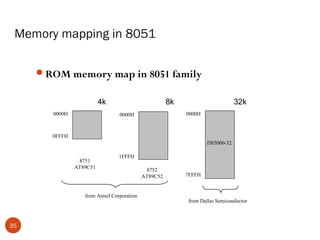
Memory mapping in 8051
Stack in the 8051
I/O Port Programming
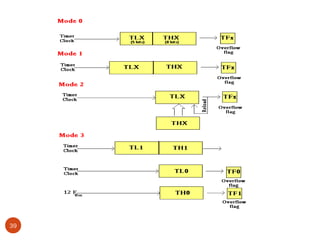
Timer
Interrupt

2
Why do we need to learn
Microprocessors/controllers?
The microprocessor is the core of computer systems.
Nowadays many communication, digital entertainment,

portable devices, are controlled by them.
A designer should know what types of components he needs,
ways to reduce production costs and product reliable.

3
Different aspects of a microprocessor/controller
Hardware :Interface to the real world

Software :order how to deal with inputs

4
The necessary tools for a
microprocessor/controller
CPU: Central Processing Unit
I/O: Input /Output
Bus: Address bus & Data bus
Memory: RAM & ROM
Timer
Interrupt
Serial Port
Parallel Port

5
Microprocessors:
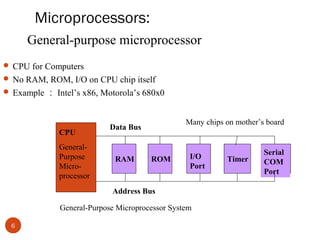
General-purpose microprocessor
 CPU for Computers
 No RAM, ROM, I/O on CPU chip itself
 Example : Intel’s x86, Motorola’s 680x0

CPU
GeneralPurpose
Microprocessor

Many chips on mother’s board

Data Bus

RAM

ROM

I/O
Port

Address Bus
General-Purpose Microprocessor System
6

Timer

Serial
COM
Port
Microcontroller :
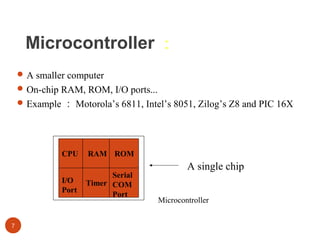
 A smaller computer
 On-chip RAM, ROM, I/O ports...
 Example : Motorola’s 6811, Intel’s 8051, Zilog’s Z8 and PIC 16X

CPU
I/O
Port

7

RAM ROM
Serial
Timer COM
Port

A single chip
Microcontroller
Microprocessor vs. Microcontroller
Microprocessor
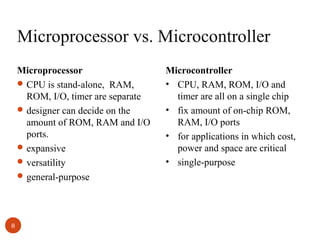
 CPU is stand-alone, RAM,
ROM, I/O, timer are separate
 designer can decide on the
amount of ROM, RAM and I/O
ports.
 expansive
 versatility
 general-purpose

8

Microcontroller
• CPU, RAM, ROM, I/O and
timer are all on a single chip
• fix amount of on-chip ROM,
RAM, I/O ports
• for applications in which cost,
power and space are critical
• single-purpose
Embedded System
 Embedded system means the processor is embedded into that

application.
 An embedded product uses a microprocessor or microcontroller
to do one task only.
 In an embedded system, there is only one application software
that is typically burned into ROM.
 Example : printer, keyboard, video game player

9
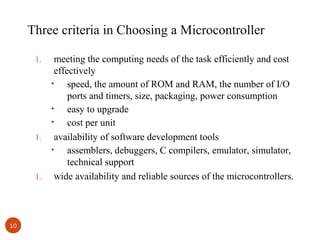
Three criteria in Choosing a Microcontroller
1.

1.

1.

10

meeting the computing needs of the task efficiently and cost
effectively
•
speed, the amount of ROM and RAM, the number of I/O
ports and timers, size, packaging, power consumption
•
easy to upgrade
•
cost per unit
availability of software development tools
•
assemblers, debuggers, C compilers, emulator, simulator,
technical support
wide availability and reliable sources of the microcontrollers.
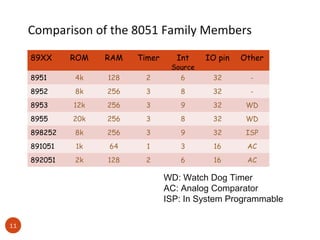
Comparison of the 8051 Family Members
89XX

ROM

RAM

Timer

Int

IO pin

Other

8951

4k

128

2

Source
6

32

-

8952

8k

256

3

8

32

-

8953

12k

256

3

9

32

WD

8955

20k

256

3

8

32

WD

898252

8k

256

3

9

32

ISP

891051

1k

64

1

3

16

AC

892051

2k

128

2

6

16

AC

WD: Watch Dog Timer
AC: Analog Comparator
ISP: In System Programmable
11
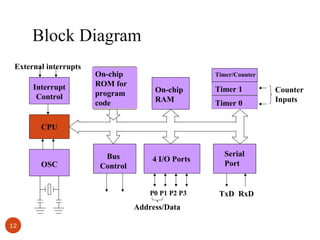
Block Diagram
External interrupts
Interrupt
Control

On-chip
ROM for
program
code

Timer/Counter

On-chip
RAM

Timer 1
Timer 0

CPU

OSC

Bus
Control

4 I/O Ports

P0 P1 P2 P3

Address/Data
12

Serial
Port

TxD RxD

Counter
Inputs
13
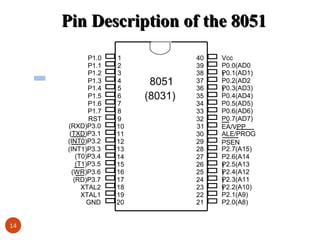
Pin Description of the 8051
P1.0
P1.1
P1.2
P1.3
P1.4
P1.5
P1.6
P1.7
RST
(RXD)P3.0
(TXD)P3.1
(INT0)P3.2
(INT1)P3.3
(T0)P3.4
(T1)P3.5
(WR)P3.6
(RD)P3.7
XTAL2
XTAL1
GND
14

1
2
3
4
5
6
7
8
9
10
11
12
13
14
15
16
17
18
19
20

8051
(8031)

40
39
38
37
36
35
34
33
32
31
30
29
28
27
26
25
24
23
22
21

Vcc
P0.0(AD0
P0.1(AD1)
)
P0.2(AD2
P0.3(AD3)
)
P0.4(AD4)
P0.5(AD5)
P0.6(AD6)
P0.7(AD7)
EA/VPP
ALE/PROG
PSEN
P2.7(A15)
P2.6(A14
P
) 2.5(A13
P2.4(A12
)
P
) 2.3(A11
P2.2(A10)
)
P2.1(A9)
P2.0(A8)
Pins of 8051 ( 1/4 )

Vcc ( pin 40 ):
Vcc provides supply voltage to the chip.
The voltage source is +5V.
GND ( pin 20 ): ground
XTAL1 and XTAL2 ( pins 19,18 )

15
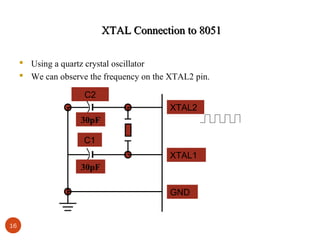
XTAL Connection to 8051
 Using a quartz crystal oscillator
 We can observe the frequency on the XTAL2 pin.
C2
XTAL2
30pF
C1
XTAL1
30pF
GND

16
Pins of 8051 ( 2/4 )
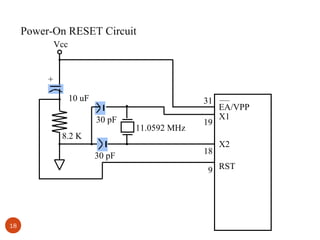
RST ( pin 9 ): reset
It is an input pin and is active high ( normally low ) .
The high pulse must be high at least 2 machine cycles.
It is a power-on reset.
Upon applying a high pulse to RST, the microcontroller

will reset and all values in registers will be lost.
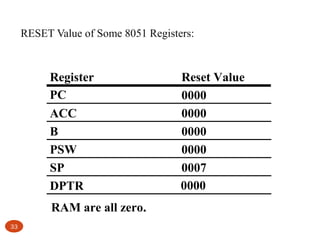
Reset values of some 8051 registers

17
Power-On RESET Circuit
Vcc

+
10 uF

31
30 pF

8.2 K
30 pF

11.0592 MHz

19
18

EA/VPP
X1
X2

9 RST

18
Pins of 8051 ( 3/4 )

/EA ( pin 31 ): external access
There is no on-chip ROM in 8031 and 8032 .
The /EA pin is connected to GND to indicate the code is

stored externally.
/PSEN & ALE are used for external ROM.
For 8051, /EA pin is connected to Vcc.
“/” means active low.
 /PSEN ( pin 29 ): program store enable
This is an output pin and is connected to the OE pin of
the ROM.
19
Pins of 8051 ( 4/4 )
ALE ( pin 30 ): address latch enable
It is an output pin and is active high.
8051 port 0 provides both address and data.
The ALE pin is used for de-multiplexing the

address and data by connecting to the G pin of the
74LS373 latch.
I/O port pins
The four ports P0, P1, P2, and P3.
Each port uses 8 pins.
All I/O pins are bi-directional.
20
Pins of I/O Port
The 8051 has four I/O ports
Port 0 ( pins 32-39 ): P0 ( P0.0 ~ P0.7 )
Port 1 ( pins 1-8 ) : P1 ( P1.0 ~ P1.7 )
Port 2 ( pins 21-28 ): P2 ( P2.0 ~ P2.7 )
Port 3 ( pins 10-17 ): P3 ( P3.0 ~ P3.7 )
Each port has 8 pins.
Named P0.X ( X=0,1,...,7 ) , P1.X, P2.X, P3.X
Ex : P0.0 is the bit 0 ( LSB ) of P0
Ex : P0.7 is the bit 7 ( MSB ) of P0
These 8 bits form a byte.
Each port can be used as input or output (bi-direction).

21
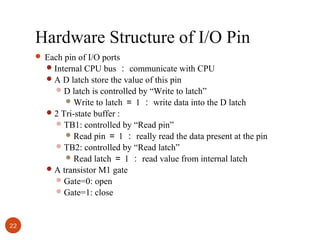
Hardware Structure of I/O Pin
 Each pin of I/O ports
 Internal CPU bus : communicate with CPU
 A D latch store the value of this pin
 D latch is controlled by “Write to latch”

to latch = 1 : write data into the D latch
 2 Tri-state buffer :
 TB1: controlled by “Read pin”
 Read pin = 1 : really read the data present at the pin
 TB2: controlled by “Read latch”
 Read latch = 1 : read value from internal latch
 A transistor M1 gate
 Gate=0: open
 Gate=1: close
 Write

22
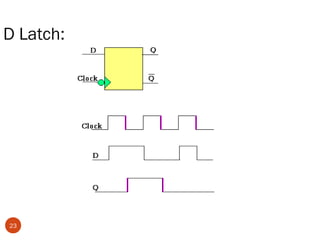
D Latch:

23
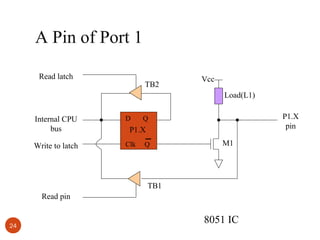
A Pin of Port 1
Read latch

TB2

Vcc
Load(L1)

Internal CPU
bus

D

Write to latch

Clk

P1.X
pin

Q

P1.X
Q

M1

TB1
Read pin

24

8051 IC
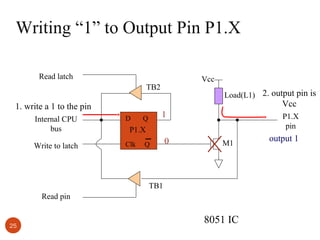
Writing “1” to Output Pin P1.X
Read latch

Vcc

TB2

Load(L1) 2. output pin is

Vcc

1. write a 1 to the pin
Internal CPU
bus

D

Write to latch

Clk

1

Q

P1.X
pin

P1.X
Q

0

M1

TB1
Read pin

25

8051 IC

output 1
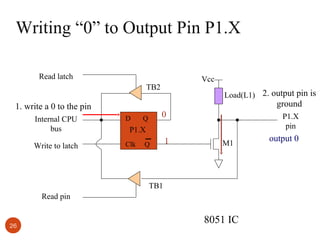
Writing “0” to Output Pin P1.X
Read latch

Vcc

TB2

Load(L1) 2. output pin is

ground

1. write a 0 to the pin
Internal CPU
bus

D

Write to latch

Clk

0

Q

P1.X
pin

P1.X
Q

1

M1

TB1
Read pin

26

8051 IC

output 0
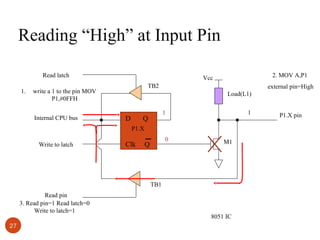
Reading “High” at Input Pin
Read latch
1.

TB2

write a 1 to the pin MOV
P1,#0FFH
Internal CPU bus

2. MOV A,P1

Vcc

external pin=High
Load(L1)

D

1

Q

1

P1.X
Write to latch

Clk

0

Q

M1

TB1
Read pin
3. Read pin=1 Read latch=0
Write to latch=1
27

8051 IC

P1.X pin
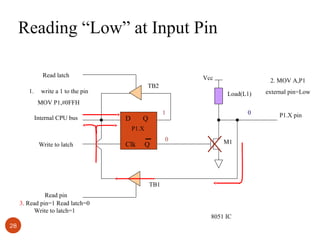
Reading “Low” at Input Pin
Read latch
1.

Vcc

2. MOV A,P1

TB2

write a 1 to the pin

Load(L1)

external pin=Low

MOV P1,#0FFH
Internal CPU bus

D

1

Q

0

P1.X
Write to latch

Clk

Q

0

M1

TB1
Read pin
3. Read pin=1 Read latch=0
Write to latch=1
28

8051 IC

P1.X pin
Other Pins
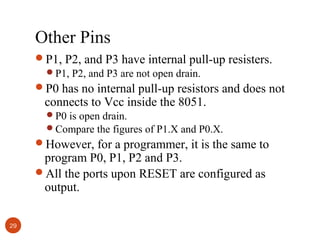
P1, P2, and P3 have internal pull-up resisters.
P1, P2, and P3 are not open drain.
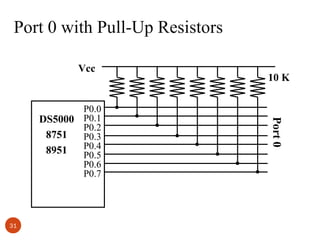
P0 has no internal pull-up resistors and does not

connects to Vcc inside the 8051.

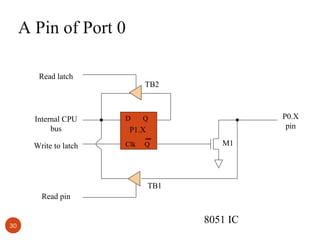
P0 is open drain.
Compare the figures of P1.X and P0.X.

However, for a programmer, it is the same to

program P0, P1, P2 and P3.
All the ports upon RESET are configured as
output.
29
A Pin of Port 0
Read latch

TB2

Internal CPU
bus

D

Write to latch

Clk

P0.X
pin

Q

P1.X
Q

M1

TB1
Read pin

30

8051 IC
Port 0 with Pull-Up Resistors
Vcc

31

Port 0

P0.0
DS5000 P0.1
P0.2
8751
P0.3
P0.4
8951
P0.5
P0.6
P0.7

10 K
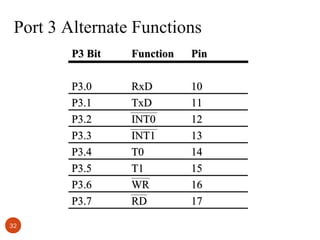
Port 3 Alternate Functions
P3 Bit

Pin

P3.0
P3.1
P3.2
P3.3
P3.4
P3.5
P3.6
P3.7
32

Function
RxD
TxD
INT0
INT1
T0
T1
WR
RD

10
11
12
13
14
15
16
17
RESET Value of Some 8051 Registers:

Register
PC
ACC
B
PSW
SP
DPTR
RAM are all zero.
33

Reset Value
0000
0000
0000
0000
0007
0000
Registers
A
B
R0

DPTR

DPH

DPL

R1
R2

PC

PC

R3
R4
R5
R6
R7
Some 8-bitt Registers of
the 8051

34

Some 8051 16-bit Register
Memory mapping in 8051
ROM memory map in 8051 family
4k
0000H

8k

32k
0000H

0000H

0FFFH
DS5000-32
8751
AT89C51

1FFFH

from Atmel Corporation

35

8752
AT89C52

7FFFH

from Dallas Semiconductor
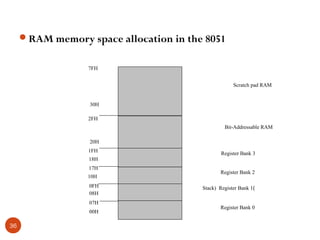
RAM memory space allocation in the 8051
7FH
Scratch pad RAM

30H
2FH
Bit-Addressable RAM
20H
1FH
18H
17H
10H
0FH
08H
07H
00H

36

Register Bank 3
Register Bank 2
Stack) Register Bank 1)
Register Bank 0
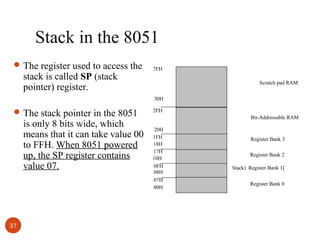
Stack in the 8051
 The register used to access the

stack is called SP (stack
pointer) register.

7FH
Scratch pad RAM
30H

 The stack pointer in the 8051

is only 8 bits wide, which
means that it can take value 00
to FFH. When 8051 powered
up, the SP register contains
value 07.

37

2FH
Bit-Addressable RAM
20H
1FH
18H
17H
10H
0FH
08H
07H
00H

Register Bank 3
Register Bank 2
Stack) Register Bank 1)
Register Bank 0
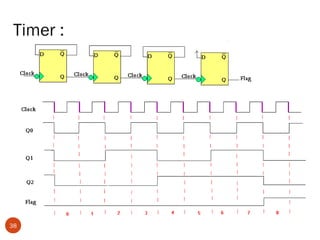
Timer :

38
39
TMOD Register:

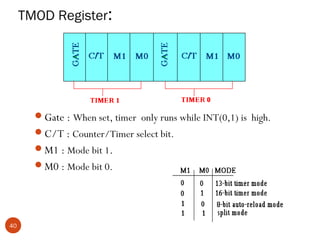
Gate : When set, timer only runs while INT(0,1) is high.
C/T : Counter/Timer select bit.
M1 : Mode bit 1.
M0 : Mode bit 0.

40
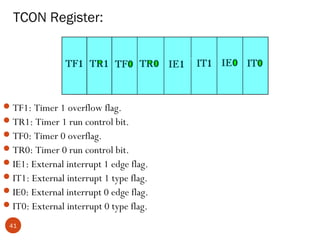
TCON Register:

 TF1: Timer 1 overflow flag.
 TR1: Timer 1 run control bit.
 TF0: Timer 0 overflag.
 TR0: Timer 0 run control bit.
 IE1: External interrupt 1 edge flag.
 IT1: External interrupt 1 type flag.
 IE0: External interrupt 0 edge flag.
 IT0: External interrupt 0 type flag.
41
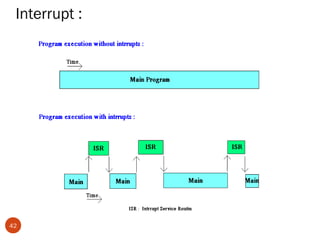
Interrupt :

42
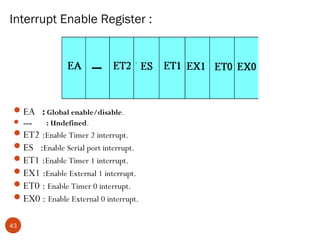
Interrupt Enable Register :

 EA : Global enable/disable.
 ---

: Undefined.

 ET2 :Enable Timer 2 interrupt.
 ES :Enable Serial port interrupt.
 ET1 :Enable Timer 1 interrupt.
 EX1 :Enable External 1 interrupt.
 ET0 : Enable Timer 0 interrupt.
 EX0 : Enable External 0 interrupt.
43
References
 “The 8051 Microcontroller and Embedded System” by

Muhammad Ali Mazidi & Janice Gillespie Mazidi.

 “INTEL MCS-51” Wikipedia,

http://en.wikipedia.org/wiki/Intel_MCS-51
• “INTEL 8051” Wikipedia,

http://it.wikipedia.org/wiki/Intel_8051
• “Keil 8051 Microcontroller Development Tools-Keil

uVision4”
www.keil.com/c51/
 “User guide to use Keil uVision4” in Youtube
http://www.youtube.com/watch?v=sdJFLVdApXQ

44

Microcontroller 8051

  • 1.
    MICROCONTROLLER 8051 Presented ByMUKESHKUMAR KASHYAP Roll No-3352808033 & SHRI SHANKARACHARYA INSTITUTE OF TECHNOLGY MANAGEMENT,BHILAI
  • 2.
    Contents: Introduction Block Diagram andPin Description of the 8051 Registers Memory mapping in 8051 Stack in the 8051 I/O Port Programming Timer Interrupt 2
  • 3.
    Why do weneed to learn Microprocessors/controllers? The microprocessor is the core of computer systems. Nowadays many communication, digital entertainment, portable devices, are controlled by them. A designer should know what types of components he needs, ways to reduce production costs and product reliable. 3
  • 4.
    Different aspects ofa microprocessor/controller Hardware :Interface to the real world Software :order how to deal with inputs 4
  • 5.
    The necessary toolsfor a microprocessor/controller CPU: Central Processing Unit I/O: Input /Output Bus: Address bus & Data bus Memory: RAM & ROM Timer Interrupt Serial Port Parallel Port 5
  • 6.
    Microprocessors: General-purpose microprocessor  CPUfor Computers  No RAM, ROM, I/O on CPU chip itself  Example : Intel’s x86, Motorola’s 680x0 CPU GeneralPurpose Microprocessor Many chips on mother’s board Data Bus RAM ROM I/O Port Address Bus General-Purpose Microprocessor System 6 Timer Serial COM Port
  • 7.
    Microcontroller :  Asmaller computer  On-chip RAM, ROM, I/O ports...  Example : Motorola’s 6811, Intel’s 8051, Zilog’s Z8 and PIC 16X CPU I/O Port 7 RAM ROM Serial Timer COM Port A single chip Microcontroller
  • 8.
    Microprocessor vs. Microcontroller Microprocessor CPU is stand-alone, RAM, ROM, I/O, timer are separate  designer can decide on the amount of ROM, RAM and I/O ports.  expansive  versatility  general-purpose 8 Microcontroller • CPU, RAM, ROM, I/O and timer are all on a single chip • fix amount of on-chip ROM, RAM, I/O ports • for applications in which cost, power and space are critical • single-purpose
  • 9.
    Embedded System  Embeddedsystem means the processor is embedded into that application.  An embedded product uses a microprocessor or microcontroller to do one task only.  In an embedded system, there is only one application software that is typically burned into ROM.  Example : printer, keyboard, video game player 9
  • 10.
    Three criteria inChoosing a Microcontroller 1. 1. 1. 10 meeting the computing needs of the task efficiently and cost effectively • speed, the amount of ROM and RAM, the number of I/O ports and timers, size, packaging, power consumption • easy to upgrade • cost per unit availability of software development tools • assemblers, debuggers, C compilers, emulator, simulator, technical support wide availability and reliable sources of the microcontrollers.
  • 11.
    Comparison of the8051 Family Members 89XX ROM RAM Timer Int IO pin Other 8951 4k 128 2 Source 6 32 - 8952 8k 256 3 8 32 - 8953 12k 256 3 9 32 WD 8955 20k 256 3 8 32 WD 898252 8k 256 3 9 32 ISP 891051 1k 64 1 3 16 AC 892051 2k 128 2 6 16 AC WD: Watch Dog Timer AC: Analog Comparator ISP: In System Programmable 11
  • 12.
    Block Diagram External interrupts Interrupt Control On-chip ROMfor program code Timer/Counter On-chip RAM Timer 1 Timer 0 CPU OSC Bus Control 4 I/O Ports P0 P1 P2 P3 Address/Data 12 Serial Port TxD RxD Counter Inputs
  • 13.
  • 14.
    Pin Description ofthe 8051 P1.0 P1.1 P1.2 P1.3 P1.4 P1.5 P1.6 P1.7 RST (RXD)P3.0 (TXD)P3.1 (INT0)P3.2 (INT1)P3.3 (T0)P3.4 (T1)P3.5 (WR)P3.6 (RD)P3.7 XTAL2 XTAL1 GND 14 1 2 3 4 5 6 7 8 9 10 11 12 13 14 15 16 17 18 19 20 8051 (8031) 40 39 38 37 36 35 34 33 32 31 30 29 28 27 26 25 24 23 22 21 Vcc P0.0(AD0 P0.1(AD1) ) P0.2(AD2 P0.3(AD3) ) P0.4(AD4) P0.5(AD5) P0.6(AD6) P0.7(AD7) EA/VPP ALE/PROG PSEN P2.7(A15) P2.6(A14 P ) 2.5(A13 P2.4(A12 ) P ) 2.3(A11 P2.2(A10) ) P2.1(A9) P2.0(A8)
  • 15.
    Pins of 8051( 1/4 ) Vcc ( pin 40 ): Vcc provides supply voltage to the chip. The voltage source is +5V. GND ( pin 20 ): ground XTAL1 and XTAL2 ( pins 19,18 ) 15
  • 16.
    XTAL Connection to8051  Using a quartz crystal oscillator  We can observe the frequency on the XTAL2 pin. C2 XTAL2 30pF C1 XTAL1 30pF GND 16
  • 17.
    Pins of 8051( 2/4 ) RST ( pin 9 ): reset It is an input pin and is active high ( normally low ) . The high pulse must be high at least 2 machine cycles. It is a power-on reset. Upon applying a high pulse to RST, the microcontroller will reset and all values in registers will be lost. Reset values of some 8051 registers 17
  • 18.
    Power-On RESET Circuit Vcc + 10uF 31 30 pF 8.2 K 30 pF 11.0592 MHz 19 18 EA/VPP X1 X2 9 RST 18
  • 19.
    Pins of 8051( 3/4 ) /EA ( pin 31 ): external access There is no on-chip ROM in 8031 and 8032 . The /EA pin is connected to GND to indicate the code is stored externally. /PSEN & ALE are used for external ROM. For 8051, /EA pin is connected to Vcc. “/” means active low.  /PSEN ( pin 29 ): program store enable This is an output pin and is connected to the OE pin of the ROM. 19
  • 20.
    Pins of 8051( 4/4 ) ALE ( pin 30 ): address latch enable It is an output pin and is active high. 8051 port 0 provides both address and data. The ALE pin is used for de-multiplexing the address and data by connecting to the G pin of the 74LS373 latch. I/O port pins The four ports P0, P1, P2, and P3. Each port uses 8 pins. All I/O pins are bi-directional. 20
  • 21.
    Pins of I/OPort The 8051 has four I/O ports Port 0 ( pins 32-39 ): P0 ( P0.0 ~ P0.7 ) Port 1 ( pins 1-8 ) : P1 ( P1.0 ~ P1.7 ) Port 2 ( pins 21-28 ): P2 ( P2.0 ~ P2.7 ) Port 3 ( pins 10-17 ): P3 ( P3.0 ~ P3.7 ) Each port has 8 pins. Named P0.X ( X=0,1,...,7 ) , P1.X, P2.X, P3.X Ex : P0.0 is the bit 0 ( LSB ) of P0 Ex : P0.7 is the bit 7 ( MSB ) of P0 These 8 bits form a byte. Each port can be used as input or output (bi-direction). 21
  • 22.
    Hardware Structure ofI/O Pin  Each pin of I/O ports  Internal CPU bus : communicate with CPU  A D latch store the value of this pin  D latch is controlled by “Write to latch” to latch = 1 : write data into the D latch  2 Tri-state buffer :  TB1: controlled by “Read pin”  Read pin = 1 : really read the data present at the pin  TB2: controlled by “Read latch”  Read latch = 1 : read value from internal latch  A transistor M1 gate  Gate=0: open  Gate=1: close  Write 22
  • 23.
  • 24.
    A Pin ofPort 1 Read latch TB2 Vcc Load(L1) Internal CPU bus D Write to latch Clk P1.X pin Q P1.X Q M1 TB1 Read pin 24 8051 IC
  • 25.
    Writing “1” toOutput Pin P1.X Read latch Vcc TB2 Load(L1) 2. output pin is Vcc 1. write a 1 to the pin Internal CPU bus D Write to latch Clk 1 Q P1.X pin P1.X Q 0 M1 TB1 Read pin 25 8051 IC output 1
  • 26.
    Writing “0” toOutput Pin P1.X Read latch Vcc TB2 Load(L1) 2. output pin is ground 1. write a 0 to the pin Internal CPU bus D Write to latch Clk 0 Q P1.X pin P1.X Q 1 M1 TB1 Read pin 26 8051 IC output 0
  • 27.
    Reading “High” atInput Pin Read latch 1. TB2 write a 1 to the pin MOV P1,#0FFH Internal CPU bus 2. MOV A,P1 Vcc external pin=High Load(L1) D 1 Q 1 P1.X Write to latch Clk 0 Q M1 TB1 Read pin 3. Read pin=1 Read latch=0 Write to latch=1 27 8051 IC P1.X pin
  • 28.
    Reading “Low” atInput Pin Read latch 1. Vcc 2. MOV A,P1 TB2 write a 1 to the pin Load(L1) external pin=Low MOV P1,#0FFH Internal CPU bus D 1 Q 0 P1.X Write to latch Clk Q 0 M1 TB1 Read pin 3. Read pin=1 Read latch=0 Write to latch=1 28 8051 IC P1.X pin
  • 29.
    Other Pins P1, P2,and P3 have internal pull-up resisters. P1, P2, and P3 are not open drain. P0 has no internal pull-up resistors and does not connects to Vcc inside the 8051. P0 is open drain. Compare the figures of P1.X and P0.X. However, for a programmer, it is the same to program P0, P1, P2 and P3. All the ports upon RESET are configured as output. 29
  • 30.
    A Pin ofPort 0 Read latch TB2 Internal CPU bus D Write to latch Clk P0.X pin Q P1.X Q M1 TB1 Read pin 30 8051 IC
  • 31.
    Port 0 withPull-Up Resistors Vcc 31 Port 0 P0.0 DS5000 P0.1 P0.2 8751 P0.3 P0.4 8951 P0.5 P0.6 P0.7 10 K
  • 32.
    Port 3 AlternateFunctions P3 Bit Pin P3.0 P3.1 P3.2 P3.3 P3.4 P3.5 P3.6 P3.7 32 Function RxD TxD INT0 INT1 T0 T1 WR RD 10 11 12 13 14 15 16 17
  • 33.
    RESET Value ofSome 8051 Registers: Register PC ACC B PSW SP DPTR RAM are all zero. 33 Reset Value 0000 0000 0000 0000 0007 0000
  • 34.
  • 35.
    Memory mapping in8051 ROM memory map in 8051 family 4k 0000H 8k 32k 0000H 0000H 0FFFH DS5000-32 8751 AT89C51 1FFFH from Atmel Corporation 35 8752 AT89C52 7FFFH from Dallas Semiconductor
  • 36.
    RAM memory spaceallocation in the 8051 7FH Scratch pad RAM 30H 2FH Bit-Addressable RAM 20H 1FH 18H 17H 10H 0FH 08H 07H 00H 36 Register Bank 3 Register Bank 2 Stack) Register Bank 1) Register Bank 0
  • 37.
    Stack in the8051  The register used to access the stack is called SP (stack pointer) register. 7FH Scratch pad RAM 30H  The stack pointer in the 8051 is only 8 bits wide, which means that it can take value 00 to FFH. When 8051 powered up, the SP register contains value 07. 37 2FH Bit-Addressable RAM 20H 1FH 18H 17H 10H 0FH 08H 07H 00H Register Bank 3 Register Bank 2 Stack) Register Bank 1) Register Bank 0
  • 38.
  • 39.
  • 40.
    TMOD Register: Gate :When set, timer only runs while INT(0,1) is high. C/T : Counter/Timer select bit. M1 : Mode bit 1. M0 : Mode bit 0. 40
  • 41.
    TCON Register:  TF1:Timer 1 overflow flag.  TR1: Timer 1 run control bit.  TF0: Timer 0 overflag.  TR0: Timer 0 run control bit.  IE1: External interrupt 1 edge flag.  IT1: External interrupt 1 type flag.  IE0: External interrupt 0 edge flag.  IT0: External interrupt 0 type flag. 41
  • 42.
  • 43.
    Interrupt Enable Register:  EA : Global enable/disable.  --- : Undefined.  ET2 :Enable Timer 2 interrupt.  ES :Enable Serial port interrupt.  ET1 :Enable Timer 1 interrupt.  EX1 :Enable External 1 interrupt.  ET0 : Enable Timer 0 interrupt.  EX0 : Enable External 0 interrupt. 43
  • 44.
    References  “The 8051Microcontroller and Embedded System” by Muhammad Ali Mazidi & Janice Gillespie Mazidi.  “INTEL MCS-51” Wikipedia, http://en.wikipedia.org/wiki/Intel_MCS-51 • “INTEL 8051” Wikipedia, http://it.wikipedia.org/wiki/Intel_8051 • “Keil 8051 Microcontroller Development Tools-Keil uVision4” www.keil.com/c51/  “User guide to use Keil uVision4” in Youtube http://www.youtube.com/watch?v=sdJFLVdApXQ 44

Editor's Notes

  • #7 Intel’s x86: 8086,8088,80386,80486, Pentium Motorola’s 680x0: 68000, 68010, 68020,68030,6040
  • #9 versatility 多用途的: any number of applications for PC
  • #10 processor 整合到整個系統中, 你只看到此系統的外觀, 應用, 感覺不到有 processor 在其中. Embedded system 通常只有一項應用, 而 PC 有許多 applications (game, accounting, fax, mail...) A printer is an example of embedded system since the processor inside it performs one task only.
  • #22 Program is to read data from P0 and then send data to P1