

L X C T O D O C K E R
V I A C O N T I N U O U S D E L I V E RY
!
@ M I C H A E L N E A L E
@ C L O U D B E E S
A B O U T M E & C L O U D B E E S
• co-founder
• cloudbees: continuous delivery company
• Best known for Jenkins!
S U M M A RY
• Challenge: 3 disparate ways of containerisation
• evolution from cgroups to LXC - finally to docker
• a work in progress
• How Docker fits in with CD
• Lessons learned about containers in anger
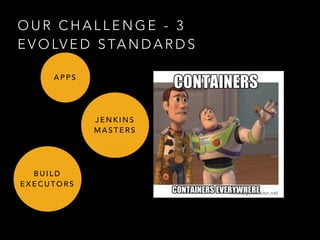
O U R C H A L L E N G E - 3
E V O LV E D S TA N D A R D S
A P P S
J E N K I N S
M A S T E R S
B U I L D
E X E C U T O R S
• PaaS - more freedom for users
• Multi tenancy needs
• Containment
• use: cgroups, lxc, erlang control plane.
A P P S
• Non trivial to host: plugins, user config.
• multi tenancy (again)
• persistent volumes !!
• openvpn servers/clients and more
• rapid iteration
• existing solution was: chef + lxc
J E N K I N S
M A S T E R S
• flexible build environments (user customisation)
• clean workspace (no processes)
• lxc + zfs + rest api
• covers os-x (virtualised kvm)
• network isolation (builds do all sorts of things)
• multi tenancy (large, we call it “mansion”)
• shorter duration containers
B U I L D
E X E C U T O R S
• Why ZFS?
• pooling of disks
• pool of slaves (consistent hash==get a server with your stuff
cached on it from last build)
• future: docker + zfs tempting
• C.O.W semantics (similar to aufs/devicemapper)
• shared pools
• Highly variable workload (season, time of day)
B U I L D
E X E C U T O R S
http://developer-blog.cloudbees.com/2014/03/hi-speed-linux-builds-for-
devcloud.html
http://developer-
blog.cloudbees.com/
2013/05/inside-linux-
containers-lxc-with.html?
q=lxc
Evidence
• > 3 years LXC in production
• 1000’s of servers
• … but 3 different ways of doing similar-ish things evolved,
so…
C O N TA I N E R S
U N I F Y A L L
T H R E E : D O C K E R
A P P S
J E N K I N S
M A S T E R S
B U I L D
S L AV E S
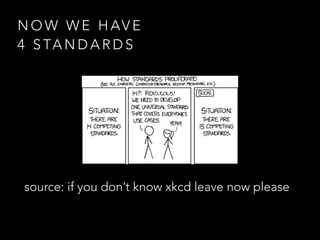
source: if you don’t know xkcd leave now please
N O W W E H AV E
4 S TA N D A R D S
Q U I C K A S I D E
• continuous delivery
refresher
C O N T I N U O U S D E P L O Y M E N T
• ftp *.php to server
C O N T I N U O U S D E L I V E RY
• Feature ready, feature deployed
• risk proportional to time between deploys
• more deploys == lower risk
• You all know this right?
C D & D O C K E R
• like wine & cheese (or a whale and containers?)
• docker image == unit of deployment
• triviality of concurrent docker images
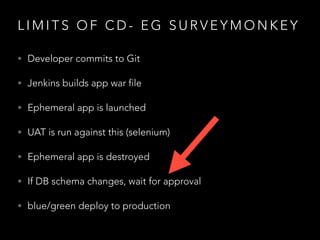
L I M I T S O F C D - E G S U R V E Y M O N K E Y
• Developer commits to Git
• Jenkins builds app war file
• Ephemeral app is launched
• UAT is run against this (selenium)
• Ephemeral app is destroyed
• If DB schema changes, wait for approval
• blue/green deploy to production
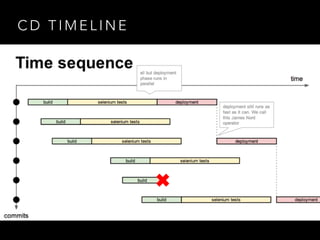
C D T I M E L I N E
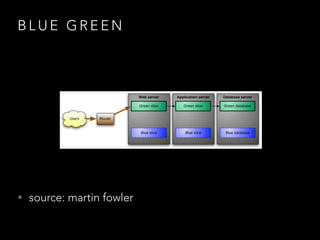
B L U E G R E E N
• source: martin fowler
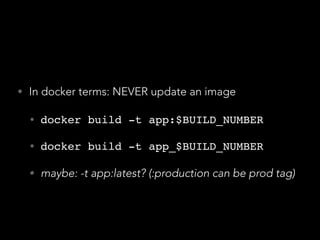
• In docker terms: NEVER update an image
• docker build -t app:$BUILD_NUMBER!
• docker build -t app_$BUILD_NUMBER!
• maybe: -t app:latest? (:production can be prod tag)
N E X T P H A S E O F O U R J O U R N E Y
• Deploying lots of Jenkins
• From cgroups -> lxc -> docker over time
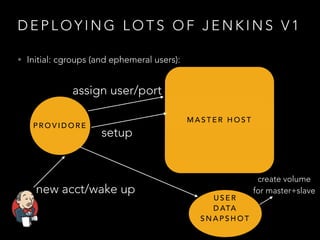
D E P L O Y I N G L O T S O F J E N K I N S V 1
• Initial: cgroups (and ephemeral users):
P R O V I D O R E
M A S T E R H O S T
assign user/port
new acct/wake up
setup
U S E R
D ATA
S N A P S H O T
create volume
for master+slave
W H AT W E D I D N E X T
• Chef
• Needed some structure around setup
• Smart people were doing it
• recipes were a hit with the team
A L S O I N T R O D U C E D L X C F O R M A S T E R S
• Tweakable image
• Superior containment
• OpenVPN and other network improvements
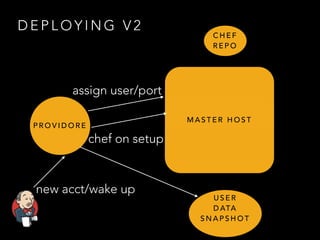
D E P L O Y I N G V 2
P R O V I D O R E
M A S T E R H O S T
assign user/port
new acct/wake up
chef on setup
U S E R
D ATA
S N A P S H O T
C H E F
R E P O
C H A L L E N G E S W I T H C H E F B O O T
• LXC image not often updated (cost/time)
• ∴ more work done on startup (via chef)
• ∴ slower, error prone, runtime dependency on chef
repo
C H A L L E N G E S U P D AT I N G I M A G E
• Sans docker: lots of large files to push and pull
• Starting “cold” each time
• No registry
• No Dockerfile
• No cache of images
• No easy dev. desktop experience
L X C - > D O C K E R
• AOT image preparation
• Layered FS makes cost affordable
• don’t leave it to (Jenkins/app) boot time
• Developers can do it on desktop
• “refresh driven development”
• truly portable images
• “socialise container bugs”
N O T E : O N C O N TA I N E R S A N D M E M O RY
• our old model
• thinking: swap bad, kill apps when out of memory
• turns out people hate this
• no swap accounting
• docker memory (-m parameter)
• swapaccount=1 kernel param (eg pvgrub/ec2: /boot/grub/
menu.lst)
• docker way: the right way (account for swap, prevent accidents)
S U M M A RY:
• Docker turns into perfect solution
T H E I D E A L D O C K E R F I L E
• Prefer native packaging
• Dockerfile essentially series of package installs
• and small minor steps
• anything > 1 line bash is a OS package
T H E I D E A L D O C K E R F I L E
• No one agreed with me.
C H E F - S O L O
• compromise: chef-solo ahead of time
• Docker image built ahead of time
• Dockerfile generated based on chef-solo
• re-use of chef recipes, but done at the “correct” time
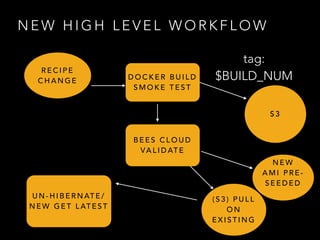
N E W H I G H L E V E L W O R K F L O W
R E C I P E
C H A N G E D O C K E R B U I L D
S M O K E T E S T
S 3
B E E S C L O U D
VA L I D AT E
( S 3 ) P U L L
O N
E X I S T I N G
N E W
A M I P R E -
S E E D E D
U N - H I B E R N AT E /
N E W G E T L AT E S T
tag:
$BUILD_NUM
R E S U LT
• Cold build of AOT image - 6 minutes (old 15) - in .au
• Warm build in seconds
• build on desktop or CI
• though: registry in .au can be PAINFUL
N E X T C H A L L E N G E : D I S T R I B U T I N G
I M A G E S
• We didn’t have per-node (lxc) image caching
• Download on launch or refresh (s3 fast enough)
• AMIs refreshed “reasonably” often, servers rotated
• Docker gave us that for free, but…
R E G I S T RY ?
• Continuous Delivery generates a LOT of artifacts
• every build
• Want to keep everything (sort of)
• Need a perfect scalable store for large binary objects
• Solomon guarantees index backed up on 12 

continents**
• Need to quickly get images on boxes
G E T T I N G I M A G E S O N B O X E S
• Options
• Twitter “murder” (clever use of bittorrent)
• We host (mostly) on ec2: s3 reliably 50-200MB/s
• Reduce permutations of images required on a box
• Private registry
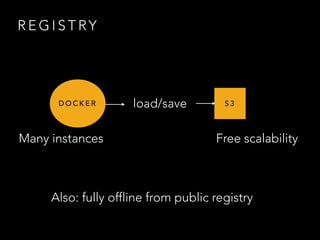
R E G I S T RY
• Needs to be very HA
• It’s a runtime production grade dependency
• High throughput for large blobs (push and pull)
• We run on EC2 (US-east-1 and EU-west-1)
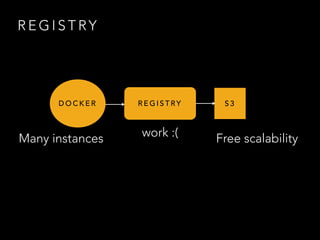
R E G I S T RY
D O C K E R R E G I S T RY S 3
Many instances Free scalabilitywork :(
R E G I S T RY
D O C K E R S 3
Many instances Free scalability
load/save
Also: fully offline from public registry
S 3
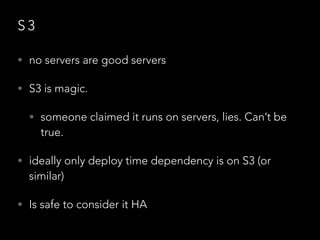
• no servers are good servers
• S3 is magic.
• someone claimed it runs on servers, lies. Can’t be
true.
• ideally only deploy time dependency is on S3 (or
similar)
• Is safe to consider it HA
D O G E S T RY
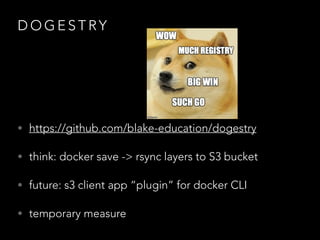
• https://github.com/blake-education/dogestry
• think: docker save -> rsync layers to S3 bucket
• future: s3 client app “plugin” for docker CLI
• temporary measure
D O G E S T RY
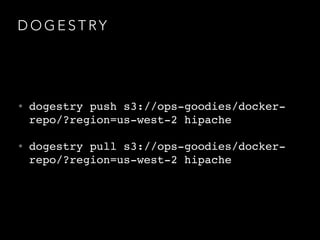
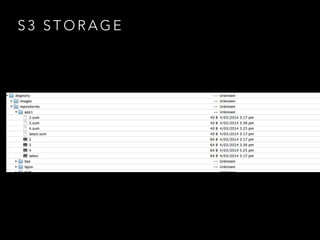
• dogestry push s3://ops-goodies/docker-
repo/?region=us-west-2 hipache!
• dogestry pull s3://ops-goodies/docker-
repo/?region=us-west-2 hipache
S 3 S T O R A G E
R E G I S T RY - F U T U R E O P T I O N S
• shift to private registry or s3 client
• private registry “client” on each node with /etc/hosts
hack (backed by s3)
• just use index.docker.io for private
• For Now: Using private registry where it makes sense
• Now: dogestry/s3
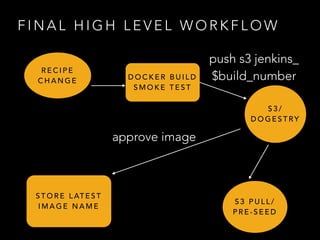
F I N A L H I G H L E V E L W O R K F L O W
R E C I P E
C H A N G E D O C K E R B U I L D
S M O K E T E S T
S 3 /
D O G E S T RY
S T O R E L AT E S T
I M A G E N A M E
push s3 jenkins_
$build_number
S 3 P U L L /
P R E - S E E D
approve image
S U P E R V I S I O N
• Currently using runit with “docker run”
• Fits in with existing systems, log shipping etc.
• Behaves itself
• Systemd also good
• Future: docker “native” daemonisation
P E R B U I L D R E P O V S TA G
• ie “docker pull jenkins:$BUILD_NUMBER” vs
“docker pull jenkins_$BUILD_NUMBER”
• Why not use tags for builds?
• Massive repo growth, every build (Cont. Delivery)
• ever need to export whole repo? purge tags?
• historical impact on pull (resolved now?)
F I N A L L E S S O N S L E A R N E D …
• Multi tenancy needs (user-namespace !!!)
• Solutions
• whitelisted dockerfiles to base images on
• produce docker image for user
• desires
• securely allow users full freedom (uid=0 mapping)
B U I L D
E X E C U T O R S
M U LT I
T E N A N C Y
C H A L L E N G E
O N E D O C K E R I M A G E P E R A P P ?
• A) One docker image per app, or
• B) Generic docker image, with app bind-mount in at
runtime
!
• Advantage B: less of an explosion of images. Faster to
get new box “seeded”. JVM apps, node apps, Go
apps all work well this way.
D O C K E R A S PA C K A G I N G S Y S T E M
• Demos of on-prem products
• Continuously deliver (push) images for field engineers
• change to demo content - new image
• change to version - new image
J E N K I N S - C I . O R G
• Now docker powered
• Managed with puppet, for example
• https://github.com/jenkins-infra/bind
• https://github.com/jenkins-infra/jenkins-infra/blob/dns/dist/profile/manifests/bind.pp
• puppet module: https://github.com/garethr/garethr-docker
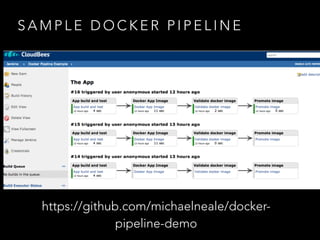
S A M P L E D O C K E R P I P E L I N E
https://github.com/michaelneale/docker-
pipeline-demo
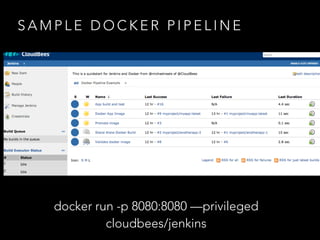
S A M P L E D O C K E R P I P E L I N E
docker run -p 8080:8080 —privileged
cloudbees/jenkins
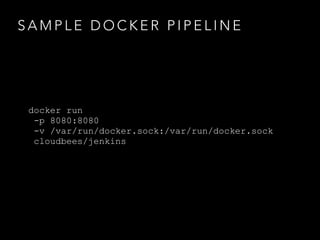
S A M P L E D O C K E R P I P E L I N E
docker run
-p 8080:8080
-v /var/run/docker.sock:/var/run/docker.sock
cloudbees/jenkins
D O C K E R F I L E A S B U I L D F I L E
• Why not? Canonical build definition
• Run unit tests
• output “xunit" reports (allows test trend reporting)
• clone an opensource project, “docker build .” - reflex.
H A S H D O C K E R F I L E C O N T E N T
• hash contents of docker file
• name image as hash
• only build if hash not found in docker images
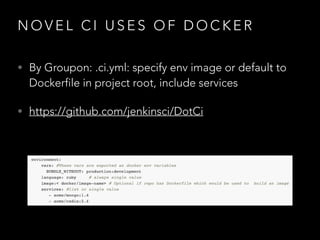
N O V E L C I U S E S O F D O C K E R
• By Groupon: .ci.yml: specify env image or default to
Dockerfile in project root, include services
• https://github.com/jenkinsci/DotCi
C O N TA I N E R C H A L L E N G E S
• containers and CPU
• Slice up large box == 

false appearance of more CPU power
• LD_PRELOAD “fake” value?
• cgroups cpuset cumbersome
!
• Security of multitenancy
• and docker killed it!
• linux is my IDE, my platform
• apps delivered as compositions of linux tools and system
• many languages
• images actually are “portable”
• future is bright
PA A S I S D E A D
Q U E S T I O N S
• @michaelneale & github/michaelneale
• www.michaelneale.net
!
• #docker-dev #jenkins IRC as michaelneale
• cloudbees.com
• developer-blog.cloudbees.com

LXC to Docker Via Continuous Delivery

  • 1.
    L X CT O D O C K E R V I A C O N T I N U O U S D E L I V E RY ! @ M I C H A E L N E A L E @ C L O U D B E E S
  • 2.
    A B OU T M E & C L O U D B E E S • co-founder • cloudbees: continuous delivery company • Best known for Jenkins!
  • 3.
    S U MM A RY • Challenge: 3 disparate ways of containerisation • evolution from cgroups to LXC - finally to docker • a work in progress • How Docker fits in with CD • Lessons learned about containers in anger
  • 4.
    O U RC H A L L E N G E - 3 E V O LV E D S TA N D A R D S A P P S J E N K I N S M A S T E R S B U I L D E X E C U T O R S
  • 5.
    • PaaS -more freedom for users • Multi tenancy needs • Containment • use: cgroups, lxc, erlang control plane. A P P S
  • 6.
    • Non trivialto host: plugins, user config. • multi tenancy (again) • persistent volumes !! • openvpn servers/clients and more • rapid iteration • existing solution was: chef + lxc J E N K I N S M A S T E R S
  • 7.
    • flexible buildenvironments (user customisation) • clean workspace (no processes) • lxc + zfs + rest api • covers os-x (virtualised kvm) • network isolation (builds do all sorts of things) • multi tenancy (large, we call it “mansion”) • shorter duration containers B U I L D E X E C U T O R S
  • 8.
    • Why ZFS? •pooling of disks • pool of slaves (consistent hash==get a server with your stuff cached on it from last build) • future: docker + zfs tempting • C.O.W semantics (similar to aufs/devicemapper) • shared pools • Highly variable workload (season, time of day) B U I L D E X E C U T O R S http://developer-blog.cloudbees.com/2014/03/hi-speed-linux-builds-for- devcloud.html
  • 9.
  • 10.
    • > 3years LXC in production • 1000’s of servers • … but 3 different ways of doing similar-ish things evolved, so… C O N TA I N E R S
  • 11.
    U N IF Y A L L T H R E E : D O C K E R A P P S J E N K I N S M A S T E R S B U I L D S L AV E S
  • 12.
    source: if youdon’t know xkcd leave now please N O W W E H AV E 4 S TA N D A R D S
  • 13.
    Q U IC K A S I D E • continuous delivery refresher
  • 14.
    C O NT I N U O U S D E P L O Y M E N T • ftp *.php to server
  • 15.
    C O NT I N U O U S D E L I V E RY • Feature ready, feature deployed • risk proportional to time between deploys • more deploys == lower risk • You all know this right?
  • 16.
    C D &D O C K E R • like wine & cheese (or a whale and containers?) • docker image == unit of deployment • triviality of concurrent docker images
  • 17.
    L I MI T S O F C D - E G S U R V E Y M O N K E Y • Developer commits to Git • Jenkins builds app war file • Ephemeral app is launched • UAT is run against this (selenium) • Ephemeral app is destroyed • If DB schema changes, wait for approval • blue/green deploy to production
  • 18.
    C D TI M E L I N E
  • 19.
    B L UE G R E E N • source: martin fowler
  • 20.
    • In dockerterms: NEVER update an image • docker build -t app:$BUILD_NUMBER! • docker build -t app_$BUILD_NUMBER! • maybe: -t app:latest? (:production can be prod tag)
  • 21.
    N E XT P H A S E O F O U R J O U R N E Y • Deploying lots of Jenkins • From cgroups -> lxc -> docker over time
  • 22.
    D E PL O Y I N G L O T S O F J E N K I N S V 1 • Initial: cgroups (and ephemeral users): P R O V I D O R E M A S T E R H O S T assign user/port new acct/wake up setup U S E R D ATA S N A P S H O T create volume for master+slave
  • 23.
    W H ATW E D I D N E X T • Chef • Needed some structure around setup • Smart people were doing it • recipes were a hit with the team
  • 24.
    A L SO I N T R O D U C E D L X C F O R M A S T E R S • Tweakable image • Superior containment • OpenVPN and other network improvements
  • 25.
    D E PL O Y I N G V 2 P R O V I D O R E M A S T E R H O S T assign user/port new acct/wake up chef on setup U S E R D ATA S N A P S H O T C H E F R E P O
  • 26.
    C H AL L E N G E S W I T H C H E F B O O T • LXC image not often updated (cost/time) • ∴ more work done on startup (via chef) • ∴ slower, error prone, runtime dependency on chef repo
  • 27.
    C H AL L E N G E S U P D AT I N G I M A G E • Sans docker: lots of large files to push and pull • Starting “cold” each time • No registry • No Dockerfile • No cache of images • No easy dev. desktop experience
  • 28.
    L X C- > D O C K E R • AOT image preparation • Layered FS makes cost affordable • don’t leave it to (Jenkins/app) boot time • Developers can do it on desktop • “refresh driven development” • truly portable images • “socialise container bugs”
  • 29.
    N O TE : O N C O N TA I N E R S A N D M E M O RY • our old model • thinking: swap bad, kill apps when out of memory • turns out people hate this • no swap accounting • docker memory (-m parameter) • swapaccount=1 kernel param (eg pvgrub/ec2: /boot/grub/ menu.lst) • docker way: the right way (account for swap, prevent accidents)
  • 30.
    S U MM A RY: • Docker turns into perfect solution
  • 31.
    T H EI D E A L D O C K E R F I L E • Prefer native packaging • Dockerfile essentially series of package installs • and small minor steps • anything > 1 line bash is a OS package
  • 32.
    T H EI D E A L D O C K E R F I L E • No one agreed with me.
  • 33.
    C H EF - S O L O • compromise: chef-solo ahead of time • Docker image built ahead of time • Dockerfile generated based on chef-solo • re-use of chef recipes, but done at the “correct” time
  • 34.
    N E WH I G H L E V E L W O R K F L O W R E C I P E C H A N G E D O C K E R B U I L D S M O K E T E S T S 3 B E E S C L O U D VA L I D AT E ( S 3 ) P U L L O N E X I S T I N G N E W A M I P R E - S E E D E D U N - H I B E R N AT E / N E W G E T L AT E S T tag: $BUILD_NUM
  • 35.
    R E SU LT • Cold build of AOT image - 6 minutes (old 15) - in .au • Warm build in seconds • build on desktop or CI • though: registry in .au can be PAINFUL
  • 37.
    N E XT C H A L L E N G E : D I S T R I B U T I N G I M A G E S • We didn’t have per-node (lxc) image caching • Download on launch or refresh (s3 fast enough) • AMIs refreshed “reasonably” often, servers rotated • Docker gave us that for free, but…
  • 38.
    R E GI S T RY ? • Continuous Delivery generates a LOT of artifacts • every build • Want to keep everything (sort of) • Need a perfect scalable store for large binary objects • Solomon guarantees index backed up on 12 
 continents** • Need to quickly get images on boxes
  • 39.
    G E TT I N G I M A G E S O N B O X E S • Options • Twitter “murder” (clever use of bittorrent) • We host (mostly) on ec2: s3 reliably 50-200MB/s • Reduce permutations of images required on a box • Private registry
  • 40.
    R E GI S T RY • Needs to be very HA • It’s a runtime production grade dependency • High throughput for large blobs (push and pull) • We run on EC2 (US-east-1 and EU-west-1)
  • 41.
    R E GI S T RY D O C K E R R E G I S T RY S 3 Many instances Free scalabilitywork :(
  • 42.
    R E GI S T RY D O C K E R S 3 Many instances Free scalability load/save Also: fully offline from public registry
  • 43.
    S 3 • noservers are good servers • S3 is magic. • someone claimed it runs on servers, lies. Can’t be true. • ideally only deploy time dependency is on S3 (or similar) • Is safe to consider it HA
  • 44.
    D O GE S T RY • https://github.com/blake-education/dogestry • think: docker save -> rsync layers to S3 bucket • future: s3 client app “plugin” for docker CLI • temporary measure
  • 45.
    D O GE S T RY • dogestry push s3://ops-goodies/docker- repo/?region=us-west-2 hipache! • dogestry pull s3://ops-goodies/docker- repo/?region=us-west-2 hipache
  • 46.
    S 3 ST O R A G E
  • 47.
    R E GI S T RY - F U T U R E O P T I O N S • shift to private registry or s3 client • private registry “client” on each node with /etc/hosts hack (backed by s3) • just use index.docker.io for private • For Now: Using private registry where it makes sense • Now: dogestry/s3
  • 48.
    F I NA L H I G H L E V E L W O R K F L O W R E C I P E C H A N G E D O C K E R B U I L D S M O K E T E S T S 3 / D O G E S T RY S T O R E L AT E S T I M A G E N A M E push s3 jenkins_ $build_number S 3 P U L L / P R E - S E E D approve image
  • 49.
    S U PE R V I S I O N • Currently using runit with “docker run” • Fits in with existing systems, log shipping etc. • Behaves itself • Systemd also good • Future: docker “native” daemonisation
  • 50.
    P E RB U I L D R E P O V S TA G • ie “docker pull jenkins:$BUILD_NUMBER” vs “docker pull jenkins_$BUILD_NUMBER” • Why not use tags for builds? • Massive repo growth, every build (Cont. Delivery) • ever need to export whole repo? purge tags? • historical impact on pull (resolved now?)
  • 51.
    F I NA L L E S S O N S L E A R N E D …
  • 52.
    • Multi tenancyneeds (user-namespace !!!) • Solutions • whitelisted dockerfiles to base images on • produce docker image for user • desires • securely allow users full freedom (uid=0 mapping) B U I L D E X E C U T O R S M U LT I T E N A N C Y C H A L L E N G E
  • 53.
    O N ED O C K E R I M A G E P E R A P P ? • A) One docker image per app, or • B) Generic docker image, with app bind-mount in at runtime ! • Advantage B: less of an explosion of images. Faster to get new box “seeded”. JVM apps, node apps, Go apps all work well this way.
  • 54.
    D O CK E R A S PA C K A G I N G S Y S T E M • Demos of on-prem products • Continuously deliver (push) images for field engineers • change to demo content - new image • change to version - new image
  • 55.
    J E NK I N S - C I . O R G • Now docker powered • Managed with puppet, for example • https://github.com/jenkins-infra/bind • https://github.com/jenkins-infra/jenkins-infra/blob/dns/dist/profile/manifests/bind.pp • puppet module: https://github.com/garethr/garethr-docker
  • 56.
    S A MP L E D O C K E R P I P E L I N E https://github.com/michaelneale/docker- pipeline-demo
  • 57.
    S A MP L E D O C K E R P I P E L I N E docker run -p 8080:8080 —privileged cloudbees/jenkins
  • 58.
    S A MP L E D O C K E R P I P E L I N E docker run -p 8080:8080 -v /var/run/docker.sock:/var/run/docker.sock cloudbees/jenkins
  • 59.
    D O CK E R F I L E A S B U I L D F I L E • Why not? Canonical build definition • Run unit tests • output “xunit" reports (allows test trend reporting) • clone an opensource project, “docker build .” - reflex.
  • 60.
    H A SH D O C K E R F I L E C O N T E N T • hash contents of docker file • name image as hash • only build if hash not found in docker images
  • 61.
    N O VE L C I U S E S O F D O C K E R • By Groupon: .ci.yml: specify env image or default to Dockerfile in project root, include services • https://github.com/jenkinsci/DotCi
  • 62.
    C O NTA I N E R C H A L L E N G E S • containers and CPU • Slice up large box == 
 false appearance of more CPU power • LD_PRELOAD “fake” value? • cgroups cpuset cumbersome ! • Security of multitenancy
  • 63.
    • and dockerkilled it! • linux is my IDE, my platform • apps delivered as compositions of linux tools and system • many languages • images actually are “portable” • future is bright PA A S I S D E A D
  • 64.
    Q U ES T I O N S • @michaelneale & github/michaelneale • www.michaelneale.net ! • #docker-dev #jenkins IRC as michaelneale • cloudbees.com • developer-blog.cloudbees.com