Building Your
Development
Pipeline
Docker
Olly Pomeroy
CloudBees
Laura Frank Tacho
Agenda
● Why use containers for your pipeline
● Building images in build agents
● Automated testing with containers
● Security and scanning
● Deploying to production
What is a pipeline?
A set of processes to make software development more efficient,
secure, and high-quality.
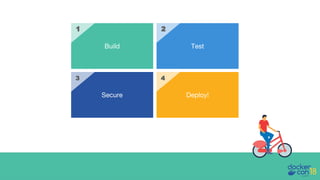
We want to deploy a containerized image. Our pipeline includes:
● Building the image
● Automated testing
● Security scanning
● Promoting the image and deploying to production
Build Test
Secure Deploy!
21
3 4
Why use containers for
your pipeline?
Containers make it easy to create consistent, reproducible
environments because your environment is declared in a Dockerfile.
You know exactly what’s running, where, and can modify and
reproduce environments easily
It also allows for efficiency by sharing some artifacts between dev,
test, and prod.
It’s about what’s INSIDE the container...
Since containers are lightweight, isolated, and fast to boot, they
enable different workflows that are a great fit for your pipelines
● Fanning out to run large tasks across multiple containers
● Parallelizing workflows
You also have the extra benefit of using common tooling to set up
tests, which reduces the cognitive overhead and allows developers to
be more autonomous.
...And what goes on OUTSIDE in systems and workflows
But there are still no shortcuts!
Certain things will be made easier, but Docker can’t do the work for
you. It’s still up to you to:
● Follow 12-factor app guidelines like pinning dependencies
● Pay attention to size of images and understand what’s in them
● Perform security and vulnerability scans
Building Images in a
Pipeline
• We size our build agents for that 1 job that requires a lot of
CPU, the rest of the time they are pretty idle…
• We don’t standardize our tools, so I need EVERYTHING on
EVERY build agent…
Build Agents Today...
• We size our build agents for that 1 job that requires a lot of
CPU, the rest of the time they are pretty idle… On Demand
Build Agents
• We don’t standardize our tools, so I need EVERYTHING on
EVERY build agent… A Build Agent Container Image for
everyone! :)
But is this Secure?
Build Agents Today...
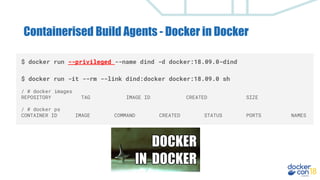
Containerised Build Agents - Docker in Docker
$ docker run --privileged --name dind -d docker:18.09.0-dind
$ docker run -it --rm --link dind:docker docker:18.09.0 sh
/ # docker images
REPOSITORY TAG IMAGE ID CREATED SIZE
/ # docker ps
CONTAINER ID IMAGE COMMAND CREATED STATUS PORTS NAMES
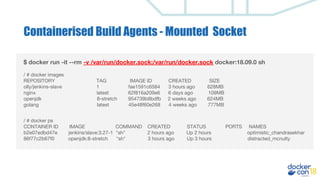
$ docker run -it --rm -v /var/run/docker.sock:/var/run/docker.sock docker:18.09.0 sh
/ # docker images
REPOSITORY TAG IMAGE ID CREATED SIZE
olly/jenkins-slave 1 fae1591c6584 3 hours ago 628MB
nginx latest 62f816a209e6 6 days ago 109MB
openjdk 8-stretch 954739b8bdfb 2 weeks ago 624MB
golang latest 45e48f60e268 4 weeks ago 777MB
/ # docker ps
CONTAINER ID IMAGE COMMAND CREATED STATUS PORTS NAMES
b2e07edbd47e jenkins/slave:3.27-1 "sh" 2 hours ago Up 2 hours optimistic_chandrasekhar
86f77c2b67f0 openjdk:8-stretch "sh" 3 hours ago Up 3 hours distracted_mcnulty
Containerised Build Agents - Mounted Socket
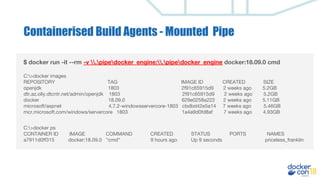
$ docker run -it --rm -v .pipedocker_engine:.pipedocker_engine docker:18.09.0 cmd
C:>docker images
REPOSITORY TAG IMAGE ID CREATED SIZE
openjdk 1803 2f91c65915d9 2 weeks ago 5.2GB
dtr.az.olly.dtcntr.net/admin/openjdk 1803 2f91c65915d9 2 weeks ago 5.2GB
docker 18.09.0 629e0258a222 2 weeks ago 5.11GB
microsoft/aspnet 4.7.2-windowsservercore-1803 cbdbd42e5a14 7 weeks ago 5.46GB
mcr.microsoft.com/windows/servercore 1803 1a4a9d0fd8af 7 weeks ago 4.93GB
C:>docker ps
CONTAINER ID IMAGE COMMAND CREATED STATUS PORTS NAMES
a7911d0ff315 docker:18.09.0 "cmd" 9 hours ago Up 9 seconds priceless_franklin
Containerised Build Agents - Mounted Pipe
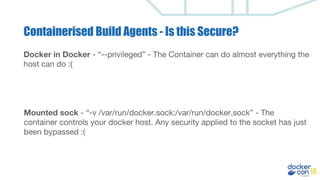
Docker in Docker - “--privileged” - The Container can do almost everything the
host can do :(
Mounted sock - “-v /var/run/docker.sock:/var/run/docker.sock” - The
container controls your docker host. Any security applied to the socket has just
been bypassed :(
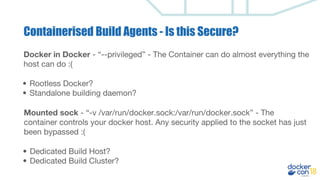
Containerised Build Agents - Is this Secure?
Docker in Docker - “--privileged” - The Container can do almost everything the
host can do :(
• Rootless Docker?
• Standalone building daemon?
Mounted sock - “-v /var/run/docker.sock:/var/run/docker.sock” - The
container controls your docker host. Any security applied to the socket has just
been bypassed :(
• Dedicated Build Host?
• Dedicated Build Cluster?
Containerised Build Agents - Is this Secure?
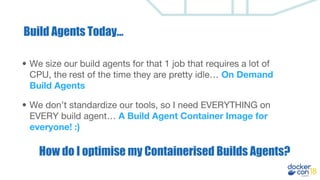
• We size our build agents for that 1 job that requires a lot of
CPU, the rest of the time they are pretty idle… On Demand
Build Agents
• We don’t standardize our tools, so I need EVERYTHING on
EVERY build agent… A Build Agent Container Image for
everyone! :)
How do I optimise my Containerised Builds Agents?
Build Agents Today...
Building Performance - MultiStage Builds
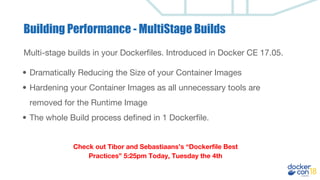
Multi-stage builds in your Dockerfiles. Introduced in Docker CE 17.05.
FROM golang:1.7.3 AS BUILDER
WORKDIR /go/src/github.com/alexellis/href-counter/
RUN go get -d -v golang.org/x/net/html
COPY app.go .
RUN CGO_ENABLED=0 GOOS=linux go build -a -installsuffix cgo -o app
.
FROM alpine:latest
RUN apk --no-cache add ca-certificates
WORKDIR /root/
COPY --from=BUILDER /go/src/github.com/alexellis/href-counter/app .
CMD ["./app"]
Building Performance - MultiStage Builds
Multi-stage builds in your Dockerfiles. Introduced in Docker CE 17.05.
• Dramatically Reducing the Size of your Container Images
• Hardening your Container Images as all unnecessary tools are
removed for the Runtime Image
• The whole Build process defined in 1 Dockerfile.
Check out Tibor and Sebastiaans’s “Dockerfile Best
Practices” 5:25pm Today, Tuesday the 4th
Building Performance - Buildkit
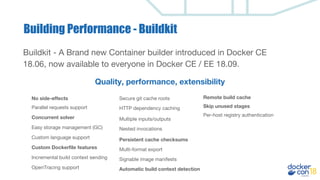
Buildkit - A Brand new Container builder introduced in Docker CE
18.06, now available to everyone in Docker CE / EE 18.09.
No side-effects
Quality, performance, extensibility
Parallel requests support
Concurrent solver
Easy storage management (GC)
Custom language support
Custom Dockerfile features
Incremental build context sending
Persistent cache checksums
Secure git cache roots
HTTP dependency caching
Multiple inputs/outputs
Nested invocations
Multi-format export
OpenTracing support
Signable image manifests
Automatic build context detection
Remote build cache
Skip unused stages
Per-host registry authentication
Building Performance - Buildkit
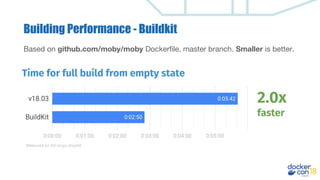
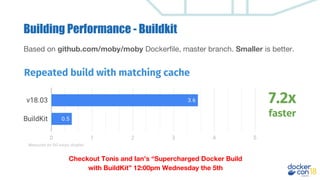
Based on github.com/moby/moby Dockerfile, master branch. Smaller is better.
Time for full build from empty state
2.0x
faster
Measured on DO 4vcpu droplet
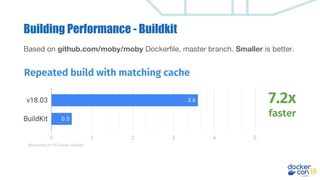
Repeated build with matching cache
7.2x
faster
Measured on DO 4vcpu droplet
Building Performance - Buildkit
Based on github.com/moby/moby Dockerfile, master branch. Smaller is better.
Checkout Tonis and Ian’s “Supercharged Docker Build
with BuildKit” 12:00pm Wednesday the 5th
Building Performance - Buildkit
Based on github.com/moby/moby Dockerfile, master branch. Smaller is better.
Repeated build with matching cache
7.2x
faster
Measured on DO 4vcpu droplet
Building Container Images
Testing with containers
Build once, use everywhere
Treat your Dockerfile as a shared artifact that can before different
types of testing during all phases in your development process
● local testing during development
● standalone unit tests
● browser and integration tests
● promotion to staging or QA environments
Maintain flexibility in each environment
● Dev and test environments can be very different
○ Reuse the Dockerfile (or a shared base image, if that makes sense)
○ Create a specific docker-compose.yml file with your testing
environment
○ Long(er)-running dev environment can coexist alongside ephemeral test
environments
In practice: integration testing patterns
docker-compose.yml docker-compose.test.yml
version: '3'
services:
vote:
build: ../vote/
ports: ["80"]
depends_on:
- redis
- db
networks:
- front-tier
- back-tier
result:
...
worker:
...
redis:
...
db:
...
version: '3'
services:
test:
build: ./tests/
depends_on:
- vote
- result
- worker
vote:
...
result:
...
worker:
...
redis:
...
db:
...
Create new one-off application
environment
Create service to run integration tests
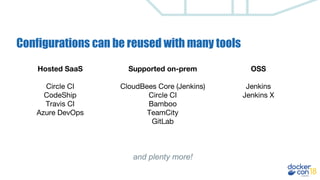
Configurations can be reused with many tools
OSS
Jenkins
Jenkins X
Hosted SaaS
Circle CI
CodeShip
Travis CI
Azure DevOps
Supported on-prem
CloudBees Core (Jenkins)
Circle CI
Bamboo
TeamCity
GitLab
and plenty more!
Parallel Testing with Docker
● Theory: employ task parallelism to split work across parallel
computers (containers)
○ Think of your container as just one process, and split testing
loads across processes
○ Improve performance on-demand by adding more containers
○ Manage environments simply with Docker ecosystem tools
Parallel Testing with Docker
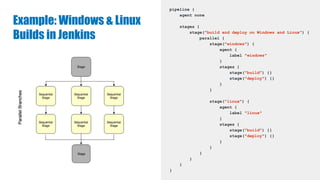
● In practice: most CI tools do this for you i.e. declarative pipelines in
Jenkinsfile, CodeShip steps, GitLab
● Use cases
○ Test against a matrix of versions
○ Cross-compile on Linux and Windows
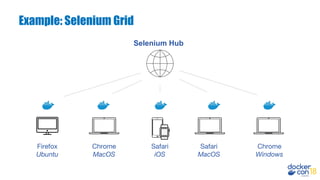
○ Run integration tests against different browsers
● Caution: parallelism is great for testing, but not deploying.
Example: Windows & Linux
Builds in Jenkins
pipeline {
agent none
stages {
stage("build and deploy on Windows and Linux") {
parallel {
stage("windows") {
agent {
label "windows"
}
stages {
stage("build") {}
stage("deploy") {}
}
}
stage("linux") {
agent {
label "linux"
}
stages {
stage("build") {}
stage("deploy") {}
}
}
}
}
}
}
Example: Selenium Grid
Selenium Hub
Firefox
Ubuntu
Chrome
MacOS
Safari
iOS
Safari
MacOS
Chrome
Windows
Securing Container Images
Security question
Q. I’ve downloaded all these containers, how do I know what's inside them?
What happens if there is out of data packages in there? How do I know what all
the Vulnerabilities are exposed?
A. It's fine….. They came from the DockerHub and the Dockerfile looks ok…..
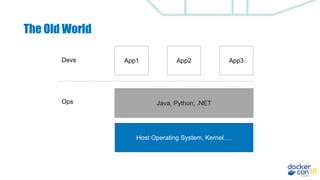
The Old World
Host Operating System, Kernel….
Java, Python, .NET
App1 App3App2Devs
Ops
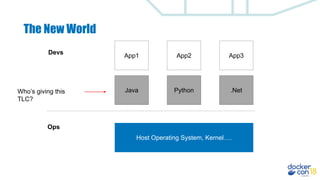
The New World
Host Operating System, Kernel….
App1 App3App2
Devs
Java .NetPython
Ops
Who’s giving this
TLC?
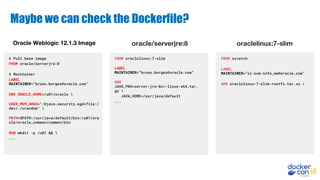
Maybe we can check the Dockerfile?
# Pull base image
FROM oracle/serverjre:8
# Maintainer
LABEL
MAINTAINER=”bruno.borges@oracle.com”
ENV ORACLE_HOME=/u01/oracle 
USER_MEM_ARGS="-Djava.security.egd=file:/
dev/./urandom" 
PATH=$PATH:/usr/java/default/bin:/u01/ora
cle/oracle_common/common/bin
RUN mkdir -p /u01 && 
...
Oracle Weblogic 12.1.3 Image
FROM oraclelinux:7-slim
LABEL
MAINTAINER=”bruno.borges@oracle.com”
ENV
JAVA_PKG=server-jre-8u*-linux-x64.tar.
gz 
JAVA_HOME=/usr/java/default
...
oracle/serverjre:8
FROM scratch
LABEL
MAINTAINER=”ol-ovm-info_ww@oracle.com”
ADD oraclelinux-7-slim-rootfs.tar.xz /
oraclelinux:7-slim
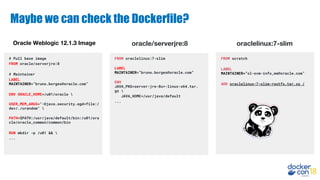
Maybe we can check the Dockerfile?
# Pull base image
FROM oracle/serverjre:8
# Maintainer
LABEL
MAINTAINER=”bruno.borges@oracle.com”
ENV ORACLE_HOME=/u01/oracle 
USER_MEM_ARGS="-Djava.security.egd=file:/
dev/./urandom" 
PATH=$PATH:/usr/java/default/bin:/u01/ora
cle/oracle_common/common/bin
RUN mkdir -p /u01 && 
...
FROM scratch
LABEL
MAINTAINER=”ol-ovm-info_ww@oracle.com”
ADD oraclelinux-7-slim-rootfs.tar.xz /
FROM oraclelinux:7-slim
LABEL
MAINTAINER=”bruno.borges@oracle.com”
ENV
JAVA_PKG=server-jre-8u*-linux-x64.tar.
gz 
JAVA_HOME=/usr/java/default
...
Oracle Weblogic 12.1.3 Image oracle/serverjre:8 oraclelinux:7-slim
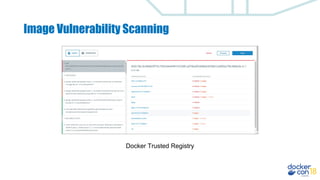
Image Vulnerability Scanning
Docker Trusted Registry
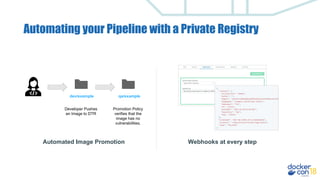
Automating your Pipeline with a Private Registry
Automated Image Promotion
dev/example qa/example
Developer Pushes
an Image to DTR
Promotion Policy
verifies that the
image has no
vulnerabilities.
Webhooks at every step
How do I control what runs in my cluster??
How do I stop my developers running unknown images from the internet on my
production clusters?
$ kubectl apply -f exampleapp.yaml
Error from server (Forbidden): error when creating "exampleapp.yaml": pods
"nginx" is forbidden: one or more container images do not meet the required
signing policy: [nginx: image did not meet required signing policy]
$ docker run nginx:latest
docker: Error response from daemon: image did not meet required signing
policy.
Deploying in Containers
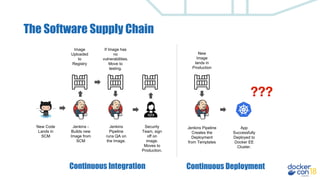
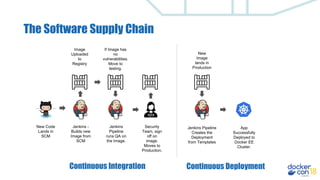
The Software Supply Chain
New Code
Lands in
SCM
Jenkins -
Builds new
Image from
SCM
Image
Uploaded
to
Registry
If Image has
no
vulnerabilities.
Move to
testing.
Jenkins
Pipeline
runs QA on
the Image.
Security
Team, sign
off on
image.
Moves to
Production.
New
Image
lands in
Production
Jenkins Pipeline
Creates the
Deployment
from Templates
App
Successfully
Deployed to
Docker EE
Cluster.
Continuous Integration Continuous Deployment
???
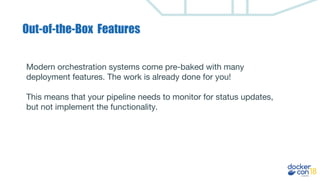
Out-of-the-Box Features
Modern orchestration systems come pre-baked with many
deployment features. The work is already done for you!
This means that your pipeline needs to monitor for status updates,
but not implement the functionality.
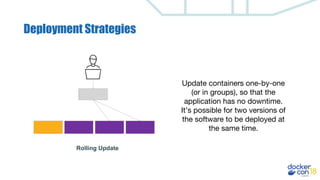
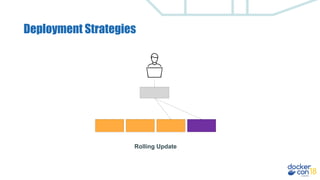
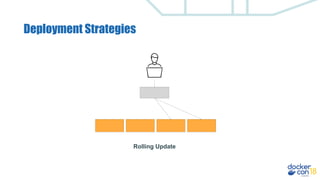
Deployment Strategies
Rolling Update
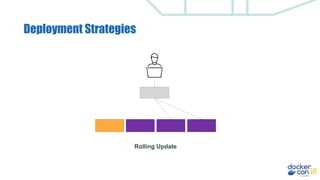
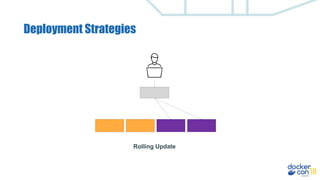
Update containers one-by-one
(or in groups), so that the
application has no downtime.
It’s possible for two versions of
the software to be deployed at
the same time.
Deployment Strategies
Rolling Update
Deployment Strategies
Rolling Update
Deployment Strategies
Rolling Update
Deployment Strategies
Rolling Update
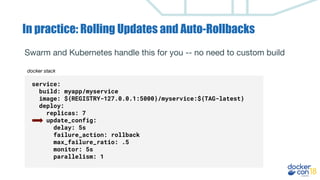
In practice: Rolling Updates and Auto-Rollbacks
Swarm and Kubernetes handle this for you -- no need to custom build
service:
build: myapp/myservice
image: ${REGISTRY-127.0.0.1:5000}/myservice:${TAG-latest}
deploy:
replicas: 7
update_config:
delay: 5s
failure_action: rollback
max_failure_ratio: .5
monitor: 5s
parallelism: 1
docker stack
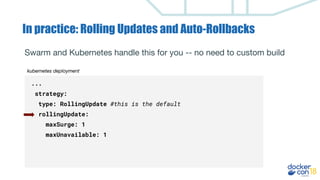
In practice: Rolling Updates and Auto-Rollbacks
...
strategy:
type: RollingUpdate #this is the default
rollingUpdate:
maxSurge: 1
maxUnavailable: 1
Swarm and Kubernetes handle this for you -- no need to custom build
kubernetes deployment
The Software Supply Chain
New Code
Lands in
SCM
Jenkins -
Builds new
Image from
SCM
Image
Uploaded
to
Registry
If Image has
no
vulnerabilities.
Move to
testing.
Jenkins
Pipeline
runs QA on
the Image.
Security
Team, sign
off on
image.
Moves to
Production.
New
Image
lands in
Production
Jenkins Pipeline
Creates the
Deployment
from Templates
App
Successfully
Deployed to
Docker EE
Cluster.
Continuous Integration Continuous Deployment
The Software Supply Chain
Thank You!
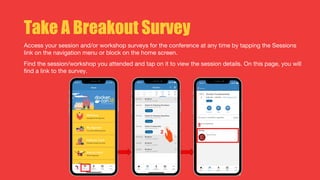
Take A Breakout Survey
Access your session and/or workshop surveys for the conference at any time by tapping the Sessions
link on the navigation menu or block on the home screen.
Find the session/workshop you attended and tap on it to view the session details. On this page, you will
find a link to the survey.

DCEU 18: Building Your Development Pipeline

  • 1.
  • 2.
  • 3.
    Agenda ● Why usecontainers for your pipeline ● Building images in build agents ● Automated testing with containers ● Security and scanning ● Deploying to production
  • 4.
    What is apipeline? A set of processes to make software development more efficient, secure, and high-quality. We want to deploy a containerized image. Our pipeline includes: ● Building the image ● Automated testing ● Security scanning ● Promoting the image and deploying to production
  • 5.
  • 6.
    Why use containersfor your pipeline?
  • 7.
    Containers make iteasy to create consistent, reproducible environments because your environment is declared in a Dockerfile. You know exactly what’s running, where, and can modify and reproduce environments easily It also allows for efficiency by sharing some artifacts between dev, test, and prod. It’s about what’s INSIDE the container...
  • 8.
    Since containers arelightweight, isolated, and fast to boot, they enable different workflows that are a great fit for your pipelines ● Fanning out to run large tasks across multiple containers ● Parallelizing workflows You also have the extra benefit of using common tooling to set up tests, which reduces the cognitive overhead and allows developers to be more autonomous. ...And what goes on OUTSIDE in systems and workflows
  • 9.
    But there arestill no shortcuts! Certain things will be made easier, but Docker can’t do the work for you. It’s still up to you to: ● Follow 12-factor app guidelines like pinning dependencies ● Pay attention to size of images and understand what’s in them ● Perform security and vulnerability scans
  • 10.
  • 11.
    • We sizeour build agents for that 1 job that requires a lot of CPU, the rest of the time they are pretty idle… • We don’t standardize our tools, so I need EVERYTHING on EVERY build agent… Build Agents Today...
  • 12.
    • We sizeour build agents for that 1 job that requires a lot of CPU, the rest of the time they are pretty idle… On Demand Build Agents • We don’t standardize our tools, so I need EVERYTHING on EVERY build agent… A Build Agent Container Image for everyone! :) But is this Secure? Build Agents Today...
  • 13.
    Containerised Build Agents- Docker in Docker $ docker run --privileged --name dind -d docker:18.09.0-dind $ docker run -it --rm --link dind:docker docker:18.09.0 sh / # docker images REPOSITORY TAG IMAGE ID CREATED SIZE / # docker ps CONTAINER ID IMAGE COMMAND CREATED STATUS PORTS NAMES
  • 14.
    $ docker run-it --rm -v /var/run/docker.sock:/var/run/docker.sock docker:18.09.0 sh / # docker images REPOSITORY TAG IMAGE ID CREATED SIZE olly/jenkins-slave 1 fae1591c6584 3 hours ago 628MB nginx latest 62f816a209e6 6 days ago 109MB openjdk 8-stretch 954739b8bdfb 2 weeks ago 624MB golang latest 45e48f60e268 4 weeks ago 777MB / # docker ps CONTAINER ID IMAGE COMMAND CREATED STATUS PORTS NAMES b2e07edbd47e jenkins/slave:3.27-1 "sh" 2 hours ago Up 2 hours optimistic_chandrasekhar 86f77c2b67f0 openjdk:8-stretch "sh" 3 hours ago Up 3 hours distracted_mcnulty Containerised Build Agents - Mounted Socket
  • 15.
    $ docker run-it --rm -v .pipedocker_engine:.pipedocker_engine docker:18.09.0 cmd C:>docker images REPOSITORY TAG IMAGE ID CREATED SIZE openjdk 1803 2f91c65915d9 2 weeks ago 5.2GB dtr.az.olly.dtcntr.net/admin/openjdk 1803 2f91c65915d9 2 weeks ago 5.2GB docker 18.09.0 629e0258a222 2 weeks ago 5.11GB microsoft/aspnet 4.7.2-windowsservercore-1803 cbdbd42e5a14 7 weeks ago 5.46GB mcr.microsoft.com/windows/servercore 1803 1a4a9d0fd8af 7 weeks ago 4.93GB C:>docker ps CONTAINER ID IMAGE COMMAND CREATED STATUS PORTS NAMES a7911d0ff315 docker:18.09.0 "cmd" 9 hours ago Up 9 seconds priceless_franklin Containerised Build Agents - Mounted Pipe
  • 16.
    Docker in Docker- “--privileged” - The Container can do almost everything the host can do :( Mounted sock - “-v /var/run/docker.sock:/var/run/docker.sock” - The container controls your docker host. Any security applied to the socket has just been bypassed :( Containerised Build Agents - Is this Secure?
  • 17.
    Docker in Docker- “--privileged” - The Container can do almost everything the host can do :( • Rootless Docker? • Standalone building daemon? Mounted sock - “-v /var/run/docker.sock:/var/run/docker.sock” - The container controls your docker host. Any security applied to the socket has just been bypassed :( • Dedicated Build Host? • Dedicated Build Cluster? Containerised Build Agents - Is this Secure?
  • 18.
    • We sizeour build agents for that 1 job that requires a lot of CPU, the rest of the time they are pretty idle… On Demand Build Agents • We don’t standardize our tools, so I need EVERYTHING on EVERY build agent… A Build Agent Container Image for everyone! :) How do I optimise my Containerised Builds Agents? Build Agents Today...
  • 19.
    Building Performance -MultiStage Builds Multi-stage builds in your Dockerfiles. Introduced in Docker CE 17.05. FROM golang:1.7.3 AS BUILDER WORKDIR /go/src/github.com/alexellis/href-counter/ RUN go get -d -v golang.org/x/net/html COPY app.go . RUN CGO_ENABLED=0 GOOS=linux go build -a -installsuffix cgo -o app . FROM alpine:latest RUN apk --no-cache add ca-certificates WORKDIR /root/ COPY --from=BUILDER /go/src/github.com/alexellis/href-counter/app . CMD ["./app"]
  • 20.
    Building Performance -MultiStage Builds Multi-stage builds in your Dockerfiles. Introduced in Docker CE 17.05. • Dramatically Reducing the Size of your Container Images • Hardening your Container Images as all unnecessary tools are removed for the Runtime Image • The whole Build process defined in 1 Dockerfile. Check out Tibor and Sebastiaans’s “Dockerfile Best Practices” 5:25pm Today, Tuesday the 4th
  • 21.
    Building Performance -Buildkit Buildkit - A Brand new Container builder introduced in Docker CE 18.06, now available to everyone in Docker CE / EE 18.09. No side-effects Quality, performance, extensibility Parallel requests support Concurrent solver Easy storage management (GC) Custom language support Custom Dockerfile features Incremental build context sending Persistent cache checksums Secure git cache roots HTTP dependency caching Multiple inputs/outputs Nested invocations Multi-format export OpenTracing support Signable image manifests Automatic build context detection Remote build cache Skip unused stages Per-host registry authentication
  • 22.
    Building Performance -Buildkit Based on github.com/moby/moby Dockerfile, master branch. Smaller is better. Time for full build from empty state 2.0x faster Measured on DO 4vcpu droplet
  • 23.
    Repeated build withmatching cache 7.2x faster Measured on DO 4vcpu droplet Building Performance - Buildkit Based on github.com/moby/moby Dockerfile, master branch. Smaller is better.
  • 24.
    Checkout Tonis andIan’s “Supercharged Docker Build with BuildKit” 12:00pm Wednesday the 5th Building Performance - Buildkit Based on github.com/moby/moby Dockerfile, master branch. Smaller is better. Repeated build with matching cache 7.2x faster Measured on DO 4vcpu droplet
  • 25.
  • 26.
  • 27.
    Build once, useeverywhere Treat your Dockerfile as a shared artifact that can before different types of testing during all phases in your development process ● local testing during development ● standalone unit tests ● browser and integration tests ● promotion to staging or QA environments
  • 28.
    Maintain flexibility ineach environment ● Dev and test environments can be very different ○ Reuse the Dockerfile (or a shared base image, if that makes sense) ○ Create a specific docker-compose.yml file with your testing environment ○ Long(er)-running dev environment can coexist alongside ephemeral test environments
  • 29.
    In practice: integrationtesting patterns docker-compose.yml docker-compose.test.yml version: '3' services: vote: build: ../vote/ ports: ["80"] depends_on: - redis - db networks: - front-tier - back-tier result: ... worker: ... redis: ... db: ... version: '3' services: test: build: ./tests/ depends_on: - vote - result - worker vote: ... result: ... worker: ... redis: ... db: ... Create new one-off application environment Create service to run integration tests
  • 30.
    Configurations can bereused with many tools OSS Jenkins Jenkins X Hosted SaaS Circle CI CodeShip Travis CI Azure DevOps Supported on-prem CloudBees Core (Jenkins) Circle CI Bamboo TeamCity GitLab and plenty more!
  • 31.
    Parallel Testing withDocker ● Theory: employ task parallelism to split work across parallel computers (containers) ○ Think of your container as just one process, and split testing loads across processes ○ Improve performance on-demand by adding more containers ○ Manage environments simply with Docker ecosystem tools
  • 32.
    Parallel Testing withDocker ● In practice: most CI tools do this for you i.e. declarative pipelines in Jenkinsfile, CodeShip steps, GitLab ● Use cases ○ Test against a matrix of versions ○ Cross-compile on Linux and Windows ○ Run integration tests against different browsers ● Caution: parallelism is great for testing, but not deploying.
  • 33.
    Example: Windows &Linux Builds in Jenkins pipeline { agent none stages { stage("build and deploy on Windows and Linux") { parallel { stage("windows") { agent { label "windows" } stages { stage("build") {} stage("deploy") {} } } stage("linux") { agent { label "linux" } stages { stage("build") {} stage("deploy") {} } } } } } }
  • 34.
    Example: Selenium Grid SeleniumHub Firefox Ubuntu Chrome MacOS Safari iOS Safari MacOS Chrome Windows
  • 35.
  • 36.
    Security question Q. I’vedownloaded all these containers, how do I know what's inside them? What happens if there is out of data packages in there? How do I know what all the Vulnerabilities are exposed? A. It's fine….. They came from the DockerHub and the Dockerfile looks ok…..
  • 37.
    The Old World HostOperating System, Kernel…. Java, Python, .NET App1 App3App2Devs Ops
  • 38.
    The New World HostOperating System, Kernel…. App1 App3App2 Devs Java .NetPython Ops Who’s giving this TLC?
  • 39.
    Maybe we cancheck the Dockerfile? # Pull base image FROM oracle/serverjre:8 # Maintainer LABEL MAINTAINER=”bruno.borges@oracle.com” ENV ORACLE_HOME=/u01/oracle USER_MEM_ARGS="-Djava.security.egd=file:/ dev/./urandom" PATH=$PATH:/usr/java/default/bin:/u01/ora cle/oracle_common/common/bin RUN mkdir -p /u01 && ... Oracle Weblogic 12.1.3 Image FROM oraclelinux:7-slim LABEL MAINTAINER=”bruno.borges@oracle.com” ENV JAVA_PKG=server-jre-8u*-linux-x64.tar. gz JAVA_HOME=/usr/java/default ... oracle/serverjre:8 FROM scratch LABEL MAINTAINER=”ol-ovm-info_ww@oracle.com” ADD oraclelinux-7-slim-rootfs.tar.xz / oraclelinux:7-slim
  • 40.
    Maybe we cancheck the Dockerfile? # Pull base image FROM oracle/serverjre:8 # Maintainer LABEL MAINTAINER=”bruno.borges@oracle.com” ENV ORACLE_HOME=/u01/oracle USER_MEM_ARGS="-Djava.security.egd=file:/ dev/./urandom" PATH=$PATH:/usr/java/default/bin:/u01/ora cle/oracle_common/common/bin RUN mkdir -p /u01 && ... FROM scratch LABEL MAINTAINER=”ol-ovm-info_ww@oracle.com” ADD oraclelinux-7-slim-rootfs.tar.xz / FROM oraclelinux:7-slim LABEL MAINTAINER=”bruno.borges@oracle.com” ENV JAVA_PKG=server-jre-8u*-linux-x64.tar. gz JAVA_HOME=/usr/java/default ... Oracle Weblogic 12.1.3 Image oracle/serverjre:8 oraclelinux:7-slim
  • 41.
  • 42.
    Automating your Pipelinewith a Private Registry Automated Image Promotion dev/example qa/example Developer Pushes an Image to DTR Promotion Policy verifies that the image has no vulnerabilities. Webhooks at every step
  • 43.
    How do Icontrol what runs in my cluster?? How do I stop my developers running unknown images from the internet on my production clusters? $ kubectl apply -f exampleapp.yaml Error from server (Forbidden): error when creating "exampleapp.yaml": pods "nginx" is forbidden: one or more container images do not meet the required signing policy: [nginx: image did not meet required signing policy] $ docker run nginx:latest docker: Error response from daemon: image did not meet required signing policy.
  • 44.
  • 45.
    The Software SupplyChain New Code Lands in SCM Jenkins - Builds new Image from SCM Image Uploaded to Registry If Image has no vulnerabilities. Move to testing. Jenkins Pipeline runs QA on the Image. Security Team, sign off on image. Moves to Production. New Image lands in Production Jenkins Pipeline Creates the Deployment from Templates App Successfully Deployed to Docker EE Cluster. Continuous Integration Continuous Deployment ???
  • 46.
    Out-of-the-Box Features Modern orchestrationsystems come pre-baked with many deployment features. The work is already done for you! This means that your pipeline needs to monitor for status updates, but not implement the functionality.
  • 47.
    Deployment Strategies Rolling Update Updatecontainers one-by-one (or in groups), so that the application has no downtime. It’s possible for two versions of the software to be deployed at the same time.
  • 48.
  • 49.
  • 50.
  • 51.
  • 52.
    In practice: RollingUpdates and Auto-Rollbacks Swarm and Kubernetes handle this for you -- no need to custom build service: build: myapp/myservice image: ${REGISTRY-127.0.0.1:5000}/myservice:${TAG-latest} deploy: replicas: 7 update_config: delay: 5s failure_action: rollback max_failure_ratio: .5 monitor: 5s parallelism: 1 docker stack
  • 53.
    In practice: RollingUpdates and Auto-Rollbacks ... strategy: type: RollingUpdate #this is the default rollingUpdate: maxSurge: 1 maxUnavailable: 1 Swarm and Kubernetes handle this for you -- no need to custom build kubernetes deployment
  • 54.
    The Software SupplyChain New Code Lands in SCM Jenkins - Builds new Image from SCM Image Uploaded to Registry If Image has no vulnerabilities. Move to testing. Jenkins Pipeline runs QA on the Image. Security Team, sign off on image. Moves to Production. New Image lands in Production Jenkins Pipeline Creates the Deployment from Templates App Successfully Deployed to Docker EE Cluster. Continuous Integration Continuous Deployment
  • 55.
  • 56.
  • 57.
    Take A BreakoutSurvey Access your session and/or workshop surveys for the conference at any time by tapping the Sessions link on the navigation menu or block on the home screen. Find the session/workshop you attended and tap on it to view the session details. On this page, you will find a link to the survey.