How did you use media technologies
             in the construction and
  research, planning and evaluation
                             stages?
Research
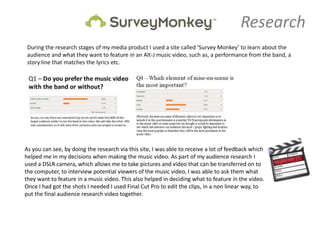
 During the research stages of my media product I used a site called ‘Survey Monkey’ to learn about the
 audience and what they want to feature in an Alt-J music video, such as, a performance from the band, a
 story line that matches the lyrics etc.


As you can see, by doing the research via this site, I was able to receive a lot of feedback which
helped me in my decisions when making the music video. As part of my audience research I
used a DSLR camera, which allows me to take pictures and video that can be transferred on to
the computer, to interview potential viewers of the music video, I was able to ask them what
they want to feature in a music video. This also helped in deciding what to feature in the video.
Once I had got the shots I needed I used Final Cut Pro to edit the clips, in a non linear way, to
put the final audience research video together.
Planning
During the planning stages I used Google Maps to choose the
location, where parts of the music video would be filmed. As
you can see below, I took a screen shot of a birds eye view of
the woods the chase scene would be shot.


I also used Microsoft word to create a shooting schedule,
this allowed me to plan out what Crew, Cast, resources and
shots would be taking place at what times of the day (This
was only an estimated schedule but was necessary to create
a starting point)


Also as part of the planning stage, I took a few images with different shot types, this helped me to determine some of
the shots and scenes that feature in the actual music video- It helped me to decide what shots would portray the
story the best.
This required a DSLR camera and a tripod provided by the college. As well as photographing certain shots I wanted to
feature in the video, I also produced a story board which includes drawings of a sequence of shots that make up
certain parts of the movie.

Below are some of the pictures, these are the types of shots that featured in the final media product:
Construction
After shooting the music video with a camera and
tripod, provided by the college, to construct the final media
product, I used Final Cut Pro.
This was used to edit the footage, captured by the DSLR
camera, in a non-linear way. By using the timeline, along the
bottom, I could drag and drop different clips around until
they were in a suitable place that made the video flow and
make sense.
I was also able to edit the length of the clips, for example if
the clip was originally 10 seconds long I could cut it down
and only use part of the clip that was needed.
Final cut Pro also enable me to edit the sound.
I could also add filters and transitions on to the clips to make
the clip slower, faster or make two clips fade into one
another.


The other media technology I used throughout the whole
process was Photoshop. Using this software I was able to
produce an album cover, album poster and a tour poster.
Using this software I was able to create and edit pictures in a
non-linear way. To create the album cover I edited a picture I
had previously taken on the DSLR camera. I was able to
change the contrast and vibrancy to create the vibrant pink
and purple colours, I did this to make the image a more Alt-J
style front cover. As you can see on the left a real Alt-J media
product and my media product. The colours are different but
the styling and patterns are slightly similar. This software
was also used in a similar way to create a digipak for the
band.
Using Photoshop I was able to create these two         For the second poster I used similar tools to
posters. For the album release I was able to put the   add a picture of the band, as I am advertising
album cover on to the page, then I selected a small    a live event. I was also able to add text, this
part of the album and enlarged it to be the            included the name of the tour and dates on
background. Using this software I could fade the       which the band will be performing and the
background so it wasn’t too overcrowded. Using         location. These are key convention’s of a
other tools on Photoshop I could enter text, as I am   poster as fans need to know how to buy
advertising an album the poster requires a date of     tickets of they want to see the band live.
release and the title of the album, so fans know                        Overall I was able to use
what the new album is called. Also using the text      Photoshop to create media products that
feature I was able to add reviews by well known        reflect and advertise the band. I also used
music magazines to entice more fans and people to      Photoshop to help me follow the forms and
buy the album.                                         conventions of real media products.
Evaluation
Throughout the process of creating the media products I uploaded finished media products and articles
about my work on a site called ‘Blogger’ This allowed me to keep my work in a secure work space and
enabled me to get feedback from the audience and viewers on the media products.
In the evaluation stages I was able to add images and presentations on to the blogging site which aided
me in the evaluation my media products. To create the presentations that can be uploaded to blogger I
used a site called ‘Slide share’ and Microsoft PowerPoint to create the actual presentations. By using
PowerPoint I could add text and images used to evaluate the media products. Like Photoshop and Final
Cut pro I could also edit and information in a non-linear way. This meant I could start one slide, leave it
and then go back to it when I was ready to add or edit what I had already started. Once the presentations
where completed I upload them to slide share which can then be embed onto my blogger site. Using
these different technologies I was able to present my work and media products in different and more
attractive ways.


Finally, once the media product had been completed I uploaded the video on to YouTube, so I could
receive feedback from the audience and other viewers. As well as uploading it to YouTube I also uploaded
it to my blog, on blogger. This also allows me to receive comments and feedback from users and
audiences

Media technologies evaluation

  • 1.
    How did youuse media technologies in the construction and research, planning and evaluation stages?
  • 2.
    Research During theresearch stages of my media product I used a site called ‘Survey Monkey’ to learn about the audience and what they want to feature in an Alt-J music video, such as, a performance from the band, a story line that matches the lyrics etc. As you can see, by doing the research via this site, I was able to receive a lot of feedback which helped me in my decisions when making the music video. As part of my audience research I used a DSLR camera, which allows me to take pictures and video that can be transferred on to the computer, to interview potential viewers of the music video, I was able to ask them what they want to feature in a music video. This also helped in deciding what to feature in the video. Once I had got the shots I needed I used Final Cut Pro to edit the clips, in a non linear way, to put the final audience research video together.
  • 3.
    Planning During the planningstages I used Google Maps to choose the location, where parts of the music video would be filmed. As you can see below, I took a screen shot of a birds eye view of the woods the chase scene would be shot. I also used Microsoft word to create a shooting schedule, this allowed me to plan out what Crew, Cast, resources and shots would be taking place at what times of the day (This was only an estimated schedule but was necessary to create a starting point) Also as part of the planning stage, I took a few images with different shot types, this helped me to determine some of the shots and scenes that feature in the actual music video- It helped me to decide what shots would portray the story the best. This required a DSLR camera and a tripod provided by the college. As well as photographing certain shots I wanted to feature in the video, I also produced a story board which includes drawings of a sequence of shots that make up certain parts of the movie. Below are some of the pictures, these are the types of shots that featured in the final media product:
  • 4.
    Construction After shooting themusic video with a camera and tripod, provided by the college, to construct the final media product, I used Final Cut Pro. This was used to edit the footage, captured by the DSLR camera, in a non-linear way. By using the timeline, along the bottom, I could drag and drop different clips around until they were in a suitable place that made the video flow and make sense. I was also able to edit the length of the clips, for example if the clip was originally 10 seconds long I could cut it down and only use part of the clip that was needed. Final cut Pro also enable me to edit the sound. I could also add filters and transitions on to the clips to make the clip slower, faster or make two clips fade into one another. The other media technology I used throughout the whole process was Photoshop. Using this software I was able to produce an album cover, album poster and a tour poster. Using this software I was able to create and edit pictures in a non-linear way. To create the album cover I edited a picture I had previously taken on the DSLR camera. I was able to change the contrast and vibrancy to create the vibrant pink and purple colours, I did this to make the image a more Alt-J style front cover. As you can see on the left a real Alt-J media product and my media product. The colours are different but the styling and patterns are slightly similar. This software was also used in a similar way to create a digipak for the band.
  • 5.
    Using Photoshop Iwas able to create these two For the second poster I used similar tools to posters. For the album release I was able to put the add a picture of the band, as I am advertising album cover on to the page, then I selected a small a live event. I was also able to add text, this part of the album and enlarged it to be the included the name of the tour and dates on background. Using this software I could fade the which the band will be performing and the background so it wasn’t too overcrowded. Using location. These are key convention’s of a other tools on Photoshop I could enter text, as I am poster as fans need to know how to buy advertising an album the poster requires a date of tickets of they want to see the band live. release and the title of the album, so fans know Overall I was able to use what the new album is called. Also using the text Photoshop to create media products that feature I was able to add reviews by well known reflect and advertise the band. I also used music magazines to entice more fans and people to Photoshop to help me follow the forms and buy the album. conventions of real media products.
  • 6.
    Evaluation Throughout the processof creating the media products I uploaded finished media products and articles about my work on a site called ‘Blogger’ This allowed me to keep my work in a secure work space and enabled me to get feedback from the audience and viewers on the media products. In the evaluation stages I was able to add images and presentations on to the blogging site which aided me in the evaluation my media products. To create the presentations that can be uploaded to blogger I used a site called ‘Slide share’ and Microsoft PowerPoint to create the actual presentations. By using PowerPoint I could add text and images used to evaluate the media products. Like Photoshop and Final Cut pro I could also edit and information in a non-linear way. This meant I could start one slide, leave it and then go back to it when I was ready to add or edit what I had already started. Once the presentations where completed I upload them to slide share which can then be embed onto my blogger site. Using these different technologies I was able to present my work and media products in different and more attractive ways. Finally, once the media product had been completed I uploaded the video on to YouTube, so I could receive feedback from the audience and other viewers. As well as uploading it to YouTube I also uploaded it to my blog, on blogger. This also allows me to receive comments and feedback from users and audiences