© GiS – Gesellschaft für integrierte Systemplanung mbH
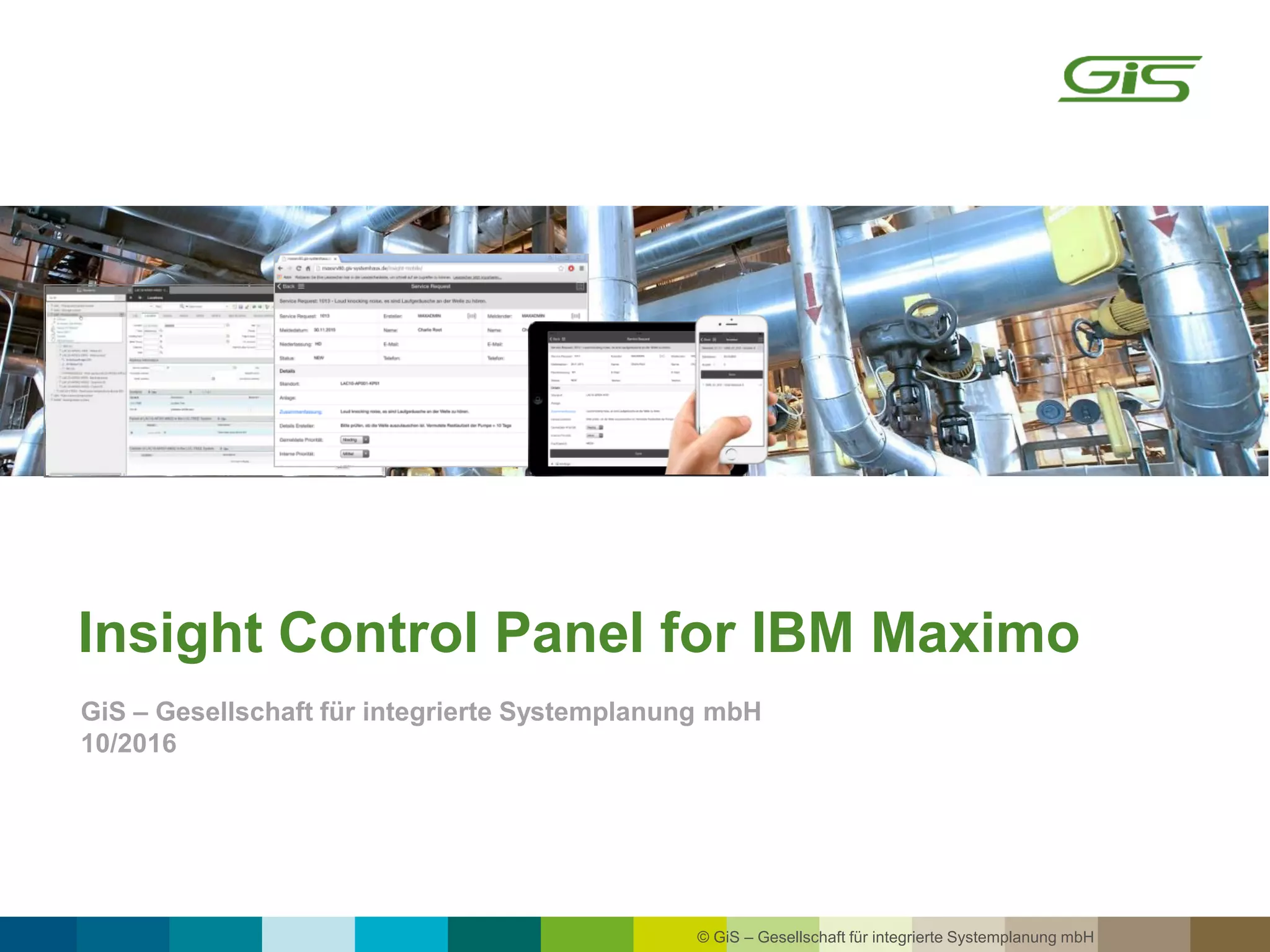
Insight Control Panel for IBM Maximo
GiS – Gesellschaft für integrierte Systemplanung mbH
10/2016
© GiS – Gesellschaft für integrierte Systemplanung mbH 2
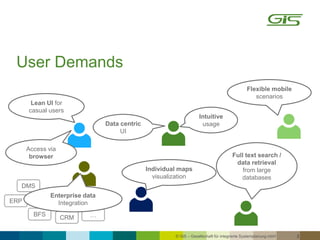
User Demands
Individual maps
visualization
Intuitive
usage
Lean UI for
casual users
Full text search /
data retrieval
from large
databases
DMS
ERP
BFS
CRM …
Access via
browser
Flexible mobile
scenarios
Data centric
UI
Enterprise data
Integration
© GiS – Gesellschaft für integrierte Systemplanung mbH 3
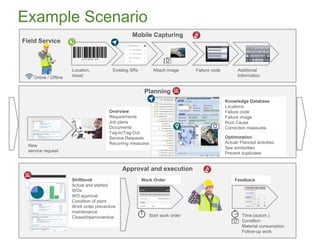
Planning
Overview
Requirements
Job plans
Documents
Tag-In/Tag-Out
Service Requests
Recurring measures
Approval and execution
Mobile Capturing
Field Service
Failure codeAttach imageLocation,
Asset
Additional
Information
Existing SRs
Online / Offline
Shiftbook
Actual and started
WOs
WO approval
Condition of plant
Work order preventive
maintenance
Closed/open/overdue
Work Order
Example Scenario
Feedback
Start work order Time (autom.)
Condition
Material consumption
Follow-up work
New
service request
Optimization
Actual/ Planned activities
See similarities
Prevent duplicates
Knowledge Database
Locations
Failure code
Failure image
Root Cause
Correction measures
© GiS – Gesellschaft für integrierte Systemplanung mbH 4
IBM MaximoopenJet other Systems
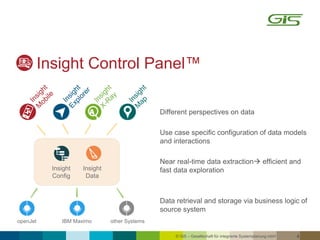
Different perspectives on data
Use case specific configuration of data models
and interactions
Near real-time data extraction efficient and
fast data exploration
Data retrieval and storage via business logic of
source system
Insight
Config
Insight
Data
Insight Control Panel™
© GiS – Gesellschaft für integrierte Systemplanung mbH 5
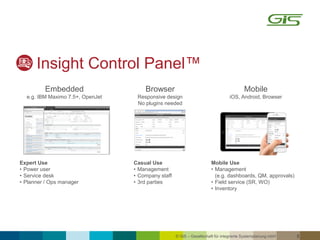
Embedded
e.g. IBM Maximo 7.5+, OpenJet
Browser
Responsive design
No plugins needed
Mobile
iOS, Android, Browser
Expert Use
• Power user
• Service desk
• Planner / Ops manager
Casual Use
• Management
• Company staff
• 3rd parties
Mobile Use
• Management
(e.g. dashboards, QM, approvals)
• Field service (SR, WO)
• Inventory
Insight Control Panel™
© GiS – Gesellschaft für integrierte Systemplanung mbH 6
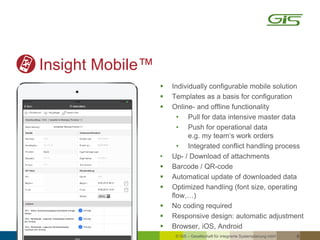
Insight Mobile™
 Individually configurable mobile solution
 Templates as a basis for configuration
 Online- and offline functionality
• Pull for data intensive master data
• Push for operational data
e.g. my team‘s work orders
• Integrated conflict handling process
• Up- / Download of attachments
 Barcode / QR-code
 Automatical update of downloaded data
 Optimized handling (font size, operating
flow,…)
 No coding required
 Responsive design: automatic adjustment
 Browser, iOS, Android
© GiS – Gesellschaft für integrierte Systemplanung mbH 7
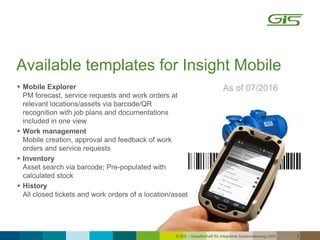
Available templates for Insight Mobile
As of 07/2016 Mobile Explorer
PM forecast, service requests and work orders at
relevant locations/assets via barcode/QR
recognition with job plans and documentations
included in one view
 Work management
Mobile creation, approval and feedback of work
orders and service requests
 Inventory
Asset search via barcode; Pre-populated with
calculated stock
 History
All closed tickets and work orders of a location/asset
© GiS – Gesellschaft für integrierte Systemplanung mbH 8
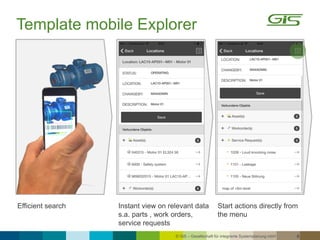
Instant view on relevant data
s.a. parts , work orders,
service requests
Efficient search Start actions directly from
the menu
Template mobile Explorer
© GiS – Gesellschaft für integrierte Systemplanung mbH 9
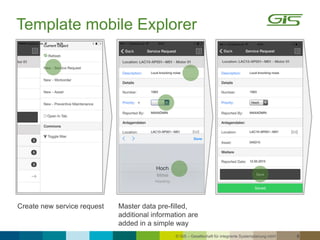
Master data pre-filled,
additional information are
added in a simple way
Create new service request
Template mobile Explorer
© GiS – Gesellschaft für integrierte Systemplanung mbH 10
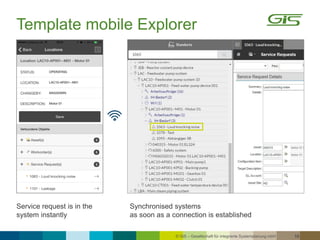
Synchronised systems
as soon as a connection is established
Service request is in the
system instantly
Template mobile Explorer
© GiS – Gesellschaft für integrierte Systemplanung mbH 11
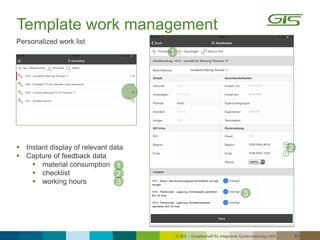
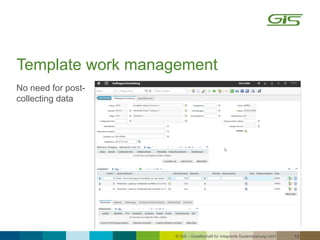
Template work management
 Instant display of relevant data
 Capture of feedback data
 material consumption
 checklist
 working hours
Personalized work list
1
2
3
1
2
3
© GiS – Gesellschaft für integrierte Systemplanung mbH 12
No need for post-
collecting data
Template work management
© GiS – Gesellschaft für integrierte Systemplanung mbH 13
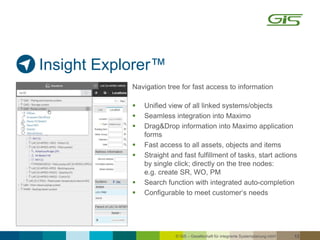
Insight Explorer™
Navigation tree for fast access to information
 Unified view of all linked systems/objects
 Seamless integration into Maximo
 Drag&Drop information into Maximo application
forms
 Fast access to all assets, objects and items
 Straight and fast fulfillment of tasks, start actions
by single click; directly on the tree nodes:
e.g. create SR, WO, PM
 Search function with integrated auto-completion
 Configurable to meet customer‘s needs
© GiS – Gesellschaft für integrierte Systemplanung mbH 14
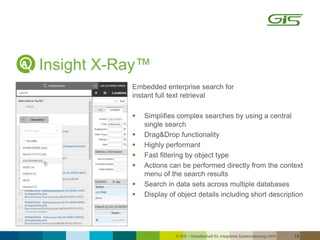
Insight X-Ray™
Embedded enterprise search for
instant full text retrieval
 Simplifies complex searches by using a central
single search
 Drag&Drop functionality
 Highly performant
 Fast filtering by object type
 Actions can be performed directly from the context
menu of the search results
 Search in data sets across multiple databases
 Display of object details including short description
© GiS – Gesellschaft für integrierte Systemplanung mbH 15
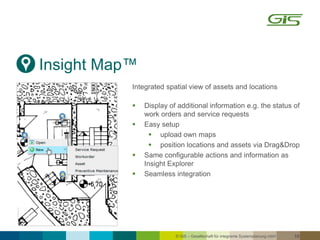
Insight Map™
Integrated spatial view of assets and locations
 Display of additional information e.g. the status of
work orders and service requests
 Easy setup
 upload own maps
 position locations and assets via Drag&Drop
 Same configurable actions and information as
Insight Explorer
 Seamless integration
© GiS – Gesellschaft für integrierte Systemplanung mbH 16
 Config UI
‒ Copy functionality
‒ Integration of all objects/attributes/relations
‒ Assignment of security groups
‒ No coding required
‒ Specific backend-logic integrable
 Ready-to-use templates
 Multi-use of data models in different perpectives
 No deployment required , Update of config at login
Insight Config™
© GiS – Gesellschaft für integrierte Systemplanung mbH 17
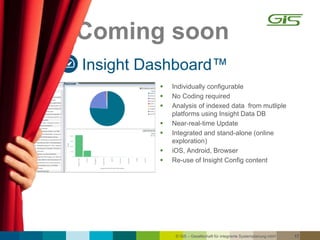
Insight Dashboard™
 Individually configurable
 No Coding required
 Analysis of indexed data from mutliple
platforms using Insight Data DB
 Near-real-time Update
 Integrated and stand-alone (online
exploration)
 iOS, Android, Browser
 Re-use of Insight Config content
Coming soon
© GiS – Gesellschaft für integrierte Systemplanung mbH 18
Templates Usability Package
As of July 2016
 Work planning:
‒ PM forecast, service requests and work orders at related locations/assets via full text search.
Job plans and documentation included in one view
‒ Organization of work orders with nested work orders via drag&drop
‒ Creation, approval and feedback of work orders and service requests
 Inventory:
Asset search via full text serach
 Repair history:
Display of closed tickets and work orders at locations/assets
 Master Data Management:
(Re-)Organization of locations/assets via drag&drop
 Customer centric view on information for Service Provider
© GiS – Gesellschaft für integrierte Systemplanung mbH 19
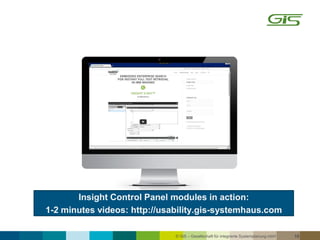
Insight Control Panel modules in action:
1-2 minutes videos: http://usability.gis-systemhaus.com
© GiS – Gesellschaft für integrierte Systemplanung mbH 20
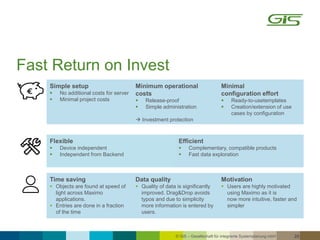
Time saving
 Objects are found at speed of
light across Maximo
applications.
 Entries are done in a fraction
of the time
Data quality
 Quality of data is significantly
improved. Drag&Drop avoids
typos and due to simplicity
more information is entered by
users.
Motivation
 Users are highly motivated
using Maximo as it is
now more intuitive, faster and
simpler
Flexible
 Device independent
 Independent from Backend
Efficient
 Complementary, compatible products
 Fast data exploration
Simple setup
 No additional costs for server
 Minimal project costs
Minimum operational
costs
 Release-proof
 Simple administration
 Investment protection
Minimal
configuration effort
 Ready-to-usetemplates
 Creation/extension of use
cases by configuration
Fast Return on Invest
© GiS – Gesellschaft für integrierte Systemplanung mbH 21
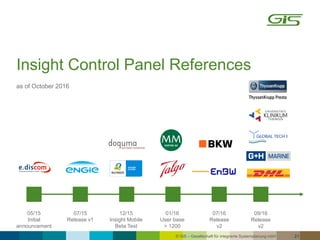
Insight Control Panel References
as of October 2016
05/15
Initial
announcement
07/15
Release v1
01/16
User base
> 1200
12/15
Insight Mobile
Beta Test
07/16
Release
v2
09/16
Release
v2
© GiS – Gesellschaft für integrierte Systemplanung mbH 22
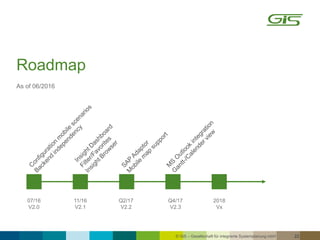
Roadmap
As of 06/2016
07/16
V2.0
11/16
V2.1
Q4/17
V2.3
Q2/17
V2.2
2018
Vx
© GiS – Gesellschaft für integrierte Systemplanung mbH 23
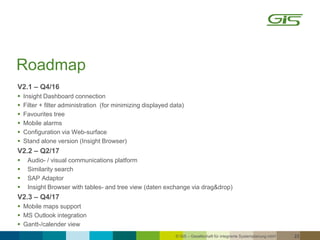
Roadmap
V2.1 – Q4/16
 Insight Dashboard connection
 Filter + filter administration (for minimizing displayed data)
 Favourites tree
 Mobile alarms
 Configuration via Web-surface
 Stand alone version (Insight Browser)
V2.2 – Q2/17
 Audio- / visual communications platform
 Similarity search
 SAP Adaptor
 Insight Browser with tables- and tree view (daten exchange via drag&drop)
V2.3 – Q4/17
 Mobile maps support
 MS Outlook integration
 Gantt-/calender view
© GiS – Gesellschaft für integrierte Systemplanung mbH 24
GiS is an international medium sized consulting firm with over thirty
years experience providing solutions and services for Enterprise Asset
Management Systems. GiS solutions are characterized by its holistic
approach where we do not just focus on the solution implementation but
aligning the clients asset management strategy with their corporate
strategy unlocking business value in the process.
Headquartered in Germany GiS has extensive experience across a
broad range of clients in asset intensive industries such as Nuclear,
Conventional Power Plants and Renewables, Chemicals, Oil & Gas,
Telcos, Production and Plant Manufacturing.
As an IBM business partner GiS provides add on products and
enhancement solutions for IBM Maximo. These enhancements optimize
and broaden the performance, functionality and usability of IBM
Maximo.
About us
© GiS – Gesellschaft für integrierte Systemplanung mbH
Since 1984 Consulting and Integration partner in
the area of Enterprise Asset and Operations
Management Systems for complex plants and
facilities
GiS - Gesellschaft für integrierte Systemplanung mbH
Junkersstr. 2
69469 Weinheim
Germany
Tel:
Fax: +49 6201 503-66
E-Mail:
http://gis-systemhaus.de
25
+49 6201 503-40
sales@gis-systemhaus.de
Head of Sales
Andreas Rosemann
© GiS – Gesellschaft für integrierte Systemplanung mbH 26
Acknowledgements and Disclaimers
Information provided are for informational purposes only, and are neither intended to, nor shall have the effect of being,
legal or other guidance or advice to any participant.
While efforts were made to verify the completeness and accuracy of the information contained in this presentation, it is
provided AS-IS without warranty of any kind, express or implied. GiS shall not be responsible for any damages arising out
of the use of, or otherwise related to, this presentation or any other materials.
Nothing contained in this presentation is intended to, nor shall have the effect of, creating any warranties or
representations from GiS or its suppliers or licensors, or altering the terms and conditions of the applicable license
agreement governing the use of GiS software.
Nothing contained in these materials is intended to, nor shall have the effect of, stating or implying that any activities
undertaken by you will result in any specific sales, revenue growth or other results.

Insight Control Panel for SAP PM, IBM Maximo and Infor EAM

  • 1.
    © GiS –Gesellschaft für integrierte Systemplanung mbH Insight Control Panel for IBM Maximo GiS – Gesellschaft für integrierte Systemplanung mbH 10/2016
  • 2.
    © GiS –Gesellschaft für integrierte Systemplanung mbH 2 User Demands Individual maps visualization Intuitive usage Lean UI for casual users Full text search / data retrieval from large databases DMS ERP BFS CRM … Access via browser Flexible mobile scenarios Data centric UI Enterprise data Integration
  • 3.
    © GiS –Gesellschaft für integrierte Systemplanung mbH 3 Planning Overview Requirements Job plans Documents Tag-In/Tag-Out Service Requests Recurring measures Approval and execution Mobile Capturing Field Service Failure codeAttach imageLocation, Asset Additional Information Existing SRs Online / Offline Shiftbook Actual and started WOs WO approval Condition of plant Work order preventive maintenance Closed/open/overdue Work Order Example Scenario Feedback Start work order Time (autom.) Condition Material consumption Follow-up work New service request Optimization Actual/ Planned activities See similarities Prevent duplicates Knowledge Database Locations Failure code Failure image Root Cause Correction measures
  • 4.
    © GiS –Gesellschaft für integrierte Systemplanung mbH 4 IBM MaximoopenJet other Systems Different perspectives on data Use case specific configuration of data models and interactions Near real-time data extraction efficient and fast data exploration Data retrieval and storage via business logic of source system Insight Config Insight Data Insight Control Panel™
  • 5.
    © GiS –Gesellschaft für integrierte Systemplanung mbH 5 Embedded e.g. IBM Maximo 7.5+, OpenJet Browser Responsive design No plugins needed Mobile iOS, Android, Browser Expert Use • Power user • Service desk • Planner / Ops manager Casual Use • Management • Company staff • 3rd parties Mobile Use • Management (e.g. dashboards, QM, approvals) • Field service (SR, WO) • Inventory Insight Control Panel™
  • 6.
    © GiS –Gesellschaft für integrierte Systemplanung mbH 6 Insight Mobile™  Individually configurable mobile solution  Templates as a basis for configuration  Online- and offline functionality • Pull for data intensive master data • Push for operational data e.g. my team‘s work orders • Integrated conflict handling process • Up- / Download of attachments  Barcode / QR-code  Automatical update of downloaded data  Optimized handling (font size, operating flow,…)  No coding required  Responsive design: automatic adjustment  Browser, iOS, Android
  • 7.
    © GiS –Gesellschaft für integrierte Systemplanung mbH 7 Available templates for Insight Mobile As of 07/2016 Mobile Explorer PM forecast, service requests and work orders at relevant locations/assets via barcode/QR recognition with job plans and documentations included in one view  Work management Mobile creation, approval and feedback of work orders and service requests  Inventory Asset search via barcode; Pre-populated with calculated stock  History All closed tickets and work orders of a location/asset
  • 8.
    © GiS –Gesellschaft für integrierte Systemplanung mbH 8 Instant view on relevant data s.a. parts , work orders, service requests Efficient search Start actions directly from the menu Template mobile Explorer
  • 9.
    © GiS –Gesellschaft für integrierte Systemplanung mbH 9 Master data pre-filled, additional information are added in a simple way Create new service request Template mobile Explorer
  • 10.
    © GiS –Gesellschaft für integrierte Systemplanung mbH 10 Synchronised systems as soon as a connection is established Service request is in the system instantly Template mobile Explorer
  • 11.
    © GiS –Gesellschaft für integrierte Systemplanung mbH 11 Template work management  Instant display of relevant data  Capture of feedback data  material consumption  checklist  working hours Personalized work list 1 2 3 1 2 3
  • 12.
    © GiS –Gesellschaft für integrierte Systemplanung mbH 12 No need for post- collecting data Template work management
  • 13.
    © GiS –Gesellschaft für integrierte Systemplanung mbH 13 Insight Explorer™ Navigation tree for fast access to information  Unified view of all linked systems/objects  Seamless integration into Maximo  Drag&Drop information into Maximo application forms  Fast access to all assets, objects and items  Straight and fast fulfillment of tasks, start actions by single click; directly on the tree nodes: e.g. create SR, WO, PM  Search function with integrated auto-completion  Configurable to meet customer‘s needs
  • 14.
    © GiS –Gesellschaft für integrierte Systemplanung mbH 14 Insight X-Ray™ Embedded enterprise search for instant full text retrieval  Simplifies complex searches by using a central single search  Drag&Drop functionality  Highly performant  Fast filtering by object type  Actions can be performed directly from the context menu of the search results  Search in data sets across multiple databases  Display of object details including short description
  • 15.
    © GiS –Gesellschaft für integrierte Systemplanung mbH 15 Insight Map™ Integrated spatial view of assets and locations  Display of additional information e.g. the status of work orders and service requests  Easy setup  upload own maps  position locations and assets via Drag&Drop  Same configurable actions and information as Insight Explorer  Seamless integration
  • 16.
    © GiS –Gesellschaft für integrierte Systemplanung mbH 16  Config UI ‒ Copy functionality ‒ Integration of all objects/attributes/relations ‒ Assignment of security groups ‒ No coding required ‒ Specific backend-logic integrable  Ready-to-use templates  Multi-use of data models in different perpectives  No deployment required , Update of config at login Insight Config™
  • 17.
    © GiS –Gesellschaft für integrierte Systemplanung mbH 17 Insight Dashboard™  Individually configurable  No Coding required  Analysis of indexed data from mutliple platforms using Insight Data DB  Near-real-time Update  Integrated and stand-alone (online exploration)  iOS, Android, Browser  Re-use of Insight Config content Coming soon
  • 18.
    © GiS –Gesellschaft für integrierte Systemplanung mbH 18 Templates Usability Package As of July 2016  Work planning: ‒ PM forecast, service requests and work orders at related locations/assets via full text search. Job plans and documentation included in one view ‒ Organization of work orders with nested work orders via drag&drop ‒ Creation, approval and feedback of work orders and service requests  Inventory: Asset search via full text serach  Repair history: Display of closed tickets and work orders at locations/assets  Master Data Management: (Re-)Organization of locations/assets via drag&drop  Customer centric view on information for Service Provider
  • 19.
    © GiS –Gesellschaft für integrierte Systemplanung mbH 19 Insight Control Panel modules in action: 1-2 minutes videos: http://usability.gis-systemhaus.com
  • 20.
    © GiS –Gesellschaft für integrierte Systemplanung mbH 20 Time saving  Objects are found at speed of light across Maximo applications.  Entries are done in a fraction of the time Data quality  Quality of data is significantly improved. Drag&Drop avoids typos and due to simplicity more information is entered by users. Motivation  Users are highly motivated using Maximo as it is now more intuitive, faster and simpler Flexible  Device independent  Independent from Backend Efficient  Complementary, compatible products  Fast data exploration Simple setup  No additional costs for server  Minimal project costs Minimum operational costs  Release-proof  Simple administration  Investment protection Minimal configuration effort  Ready-to-usetemplates  Creation/extension of use cases by configuration Fast Return on Invest
  • 21.
    © GiS –Gesellschaft für integrierte Systemplanung mbH 21 Insight Control Panel References as of October 2016 05/15 Initial announcement 07/15 Release v1 01/16 User base > 1200 12/15 Insight Mobile Beta Test 07/16 Release v2 09/16 Release v2
  • 22.
    © GiS –Gesellschaft für integrierte Systemplanung mbH 22 Roadmap As of 06/2016 07/16 V2.0 11/16 V2.1 Q4/17 V2.3 Q2/17 V2.2 2018 Vx
  • 23.
    © GiS –Gesellschaft für integrierte Systemplanung mbH 23 Roadmap V2.1 – Q4/16  Insight Dashboard connection  Filter + filter administration (for minimizing displayed data)  Favourites tree  Mobile alarms  Configuration via Web-surface  Stand alone version (Insight Browser) V2.2 – Q2/17  Audio- / visual communications platform  Similarity search  SAP Adaptor  Insight Browser with tables- and tree view (daten exchange via drag&drop) V2.3 – Q4/17  Mobile maps support  MS Outlook integration  Gantt-/calender view
  • 24.
    © GiS –Gesellschaft für integrierte Systemplanung mbH 24 GiS is an international medium sized consulting firm with over thirty years experience providing solutions and services for Enterprise Asset Management Systems. GiS solutions are characterized by its holistic approach where we do not just focus on the solution implementation but aligning the clients asset management strategy with their corporate strategy unlocking business value in the process. Headquartered in Germany GiS has extensive experience across a broad range of clients in asset intensive industries such as Nuclear, Conventional Power Plants and Renewables, Chemicals, Oil & Gas, Telcos, Production and Plant Manufacturing. As an IBM business partner GiS provides add on products and enhancement solutions for IBM Maximo. These enhancements optimize and broaden the performance, functionality and usability of IBM Maximo. About us
  • 25.
    © GiS –Gesellschaft für integrierte Systemplanung mbH Since 1984 Consulting and Integration partner in the area of Enterprise Asset and Operations Management Systems for complex plants and facilities GiS - Gesellschaft für integrierte Systemplanung mbH Junkersstr. 2 69469 Weinheim Germany Tel: Fax: +49 6201 503-66 E-Mail: http://gis-systemhaus.de 25 +49 6201 503-40 sales@gis-systemhaus.de Head of Sales Andreas Rosemann
  • 26.
    © GiS –Gesellschaft für integrierte Systemplanung mbH 26 Acknowledgements and Disclaimers Information provided are for informational purposes only, and are neither intended to, nor shall have the effect of being, legal or other guidance or advice to any participant. While efforts were made to verify the completeness and accuracy of the information contained in this presentation, it is provided AS-IS without warranty of any kind, express or implied. GiS shall not be responsible for any damages arising out of the use of, or otherwise related to, this presentation or any other materials. Nothing contained in this presentation is intended to, nor shall have the effect of, creating any warranties or representations from GiS or its suppliers or licensors, or altering the terms and conditions of the applicable license agreement governing the use of GiS software. Nothing contained in these materials is intended to, nor shall have the effect of, stating or implying that any activities undertaken by you will result in any specific sales, revenue growth or other results.