Maintenance Portal for SAP/Maximo/Infor EAM
Insight Control Panel
GIS MBH
Weinheim | November 6, 2018
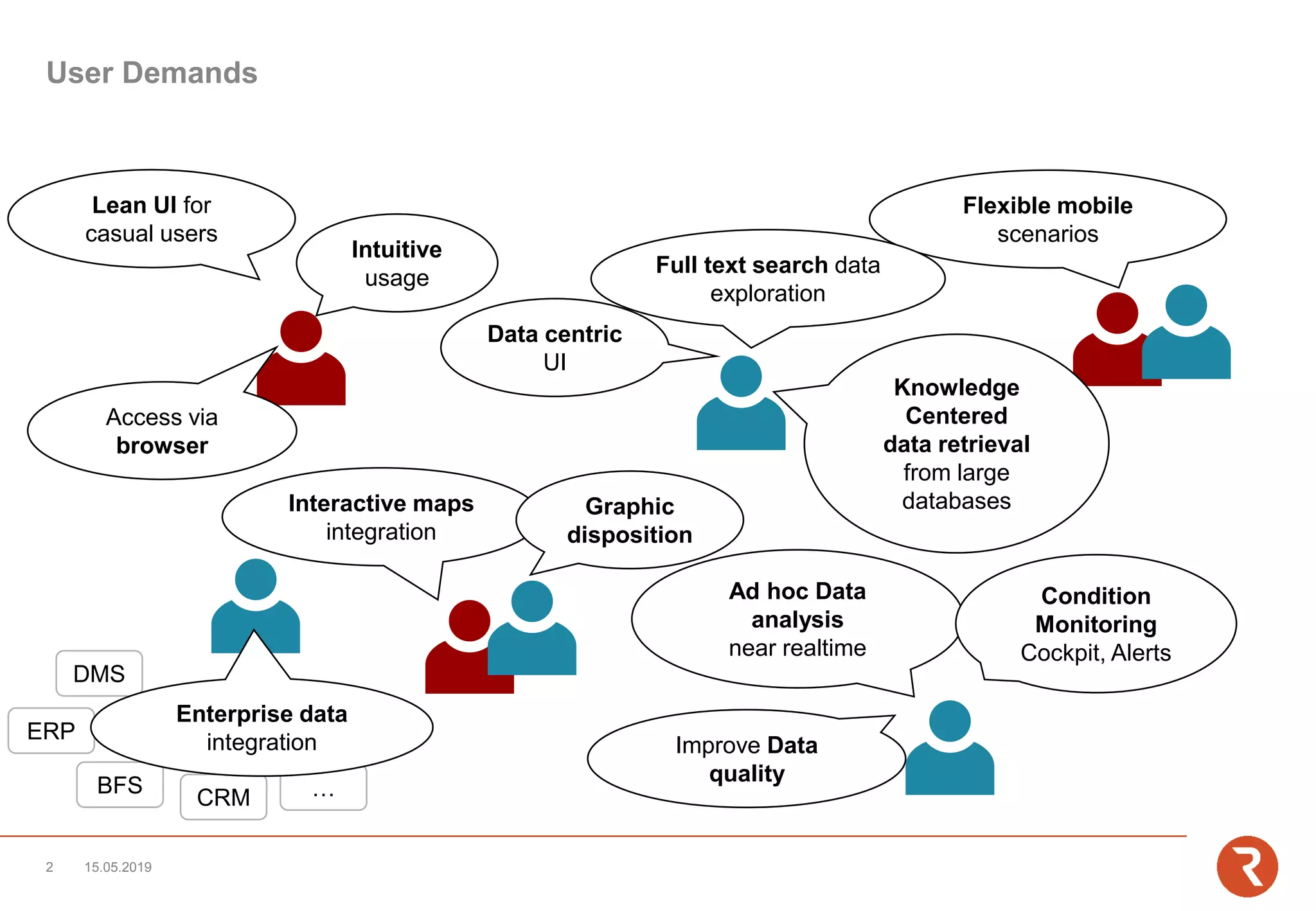
User Demands
Flexible mobile
scenarios
Intuitive
usage
Ad hoc Data
analysis
near realtime
DMS
ERP
BFS
CRM …
Access via
browser
Interactive maps
integration
Data centric
UI
Enterprise data
integration
Full text search data
exploration
Condition
Monitoring
Cockpit, Alerts
Improve Data
quality
Lean UI for
casual users
Knowledge
Centered
data retrieval
from large
databases
15.05.20192
Graphic
disposition
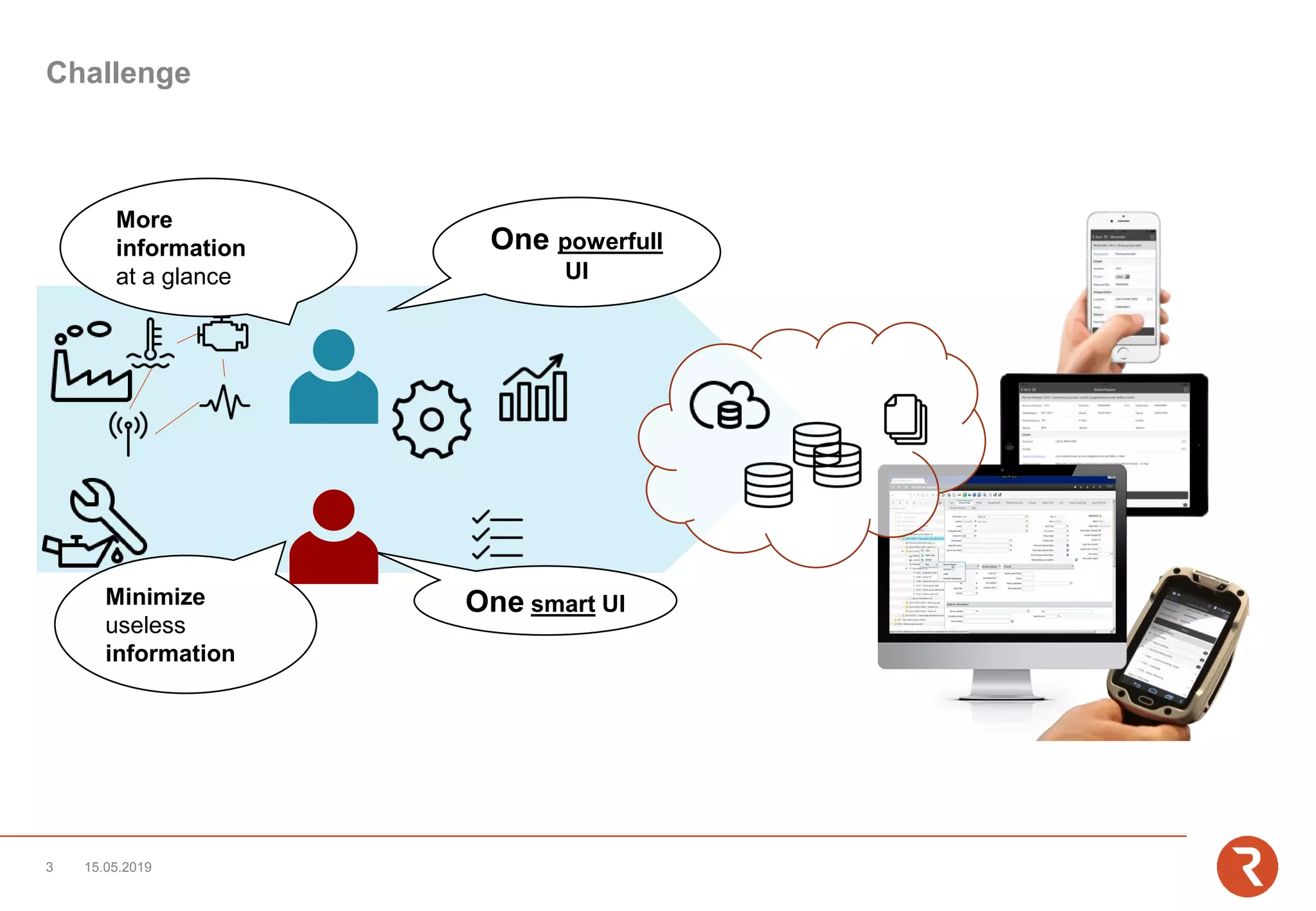
Challenge
Minimize
useless
information
One smart UI
More
information
at a glance
One powerfull
UI
15.05.20193
Solution
Design flexible scenarios across the boundaries of individual data silos
UsertypesPerspectivesData
InsightServer
Insight Control Panel™
Multiple perspectives on data optimized for different user types and demands
All relevant data at a glance
Casual/Mobile use Expert use
Insight DesktopInsight Mobile
15.05.2019
5
IBM
Maximo
openBMS
SAP
PM/CS
Navision
Dynamics
Insight
Business
Suite
• Data Base Connector
• Web Services
Supported Backends Integration
Technologies
Infor
EAM
Comming soon
UsertypesPerspectivesData
Mobile
iOS, Android, Windows 10, Browser
Mobile Use
• Maintenance staff/Field service
(Instructions/Information/Documentation)
• Inventory Management (Stocktaking, Stock Issue)
• Management (dashboards, QM, approvals)
• 3rd parties
• Casual User (Service requests)
• Service / Acceptance protocoll
Desktop
z.B. IBM Maximo, SAP PM/CS, Infor EAM
Expert Use
• Power user
• Service desk
• Planner / Ops manager
• Analyst
• Disponent
15.05.20197
Insight Control Panel™
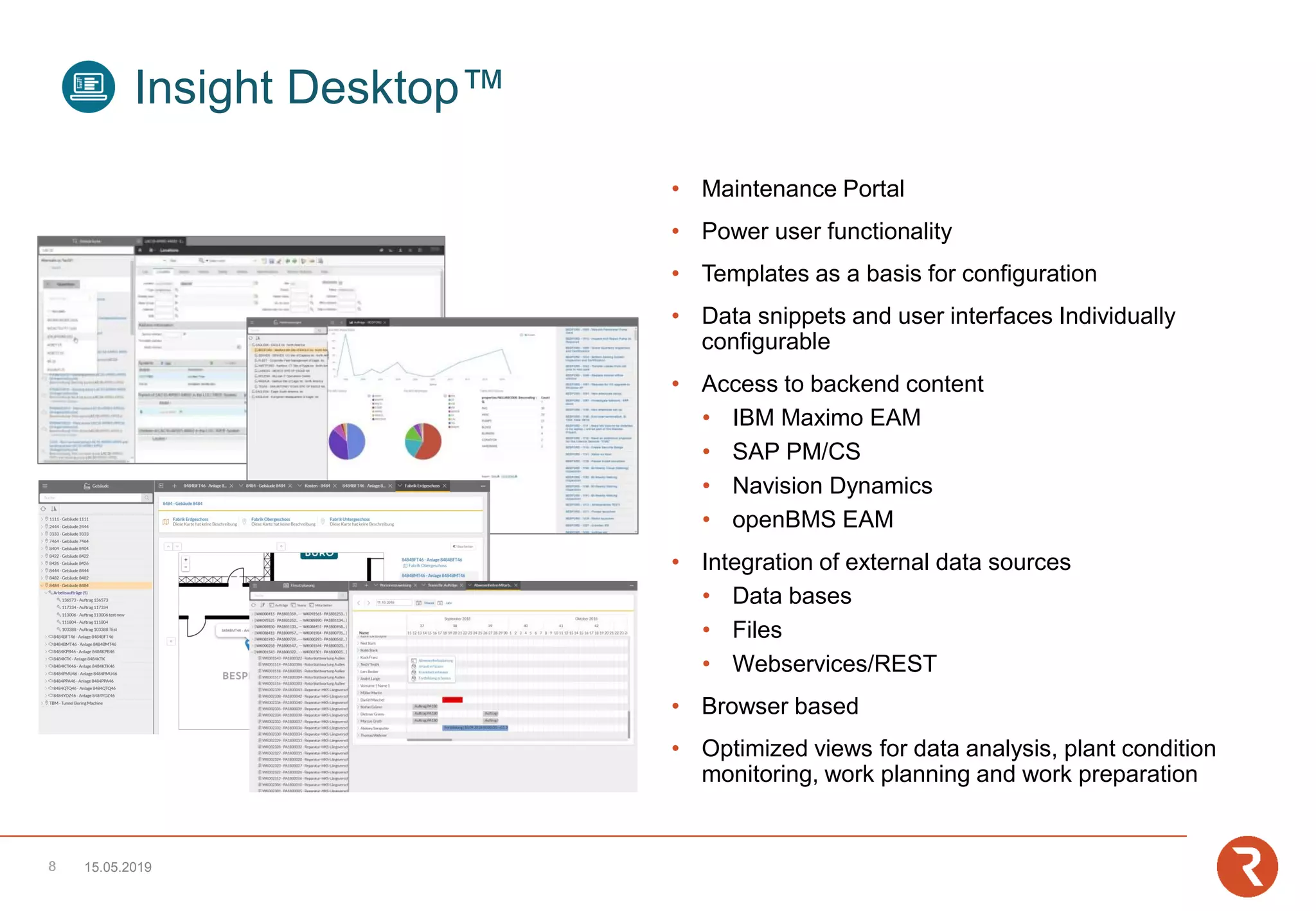
• Maintenance Portal
• Power user functionality
• Templates as a basis for configuration
• Data snippets and user interfaces Individually
configurable
• Access to backend content
• IBM Maximo EAM
• SAP PM/CS
• Navision Dynamics
• openBMS EAM
• Integration of external data sources
• Data bases
• Files
• Webservices/REST
• Browser based
• Optimized views for data analysis, plant condition
monitoring, work planning and work preparation
15.05.2019
Insight Desktop™
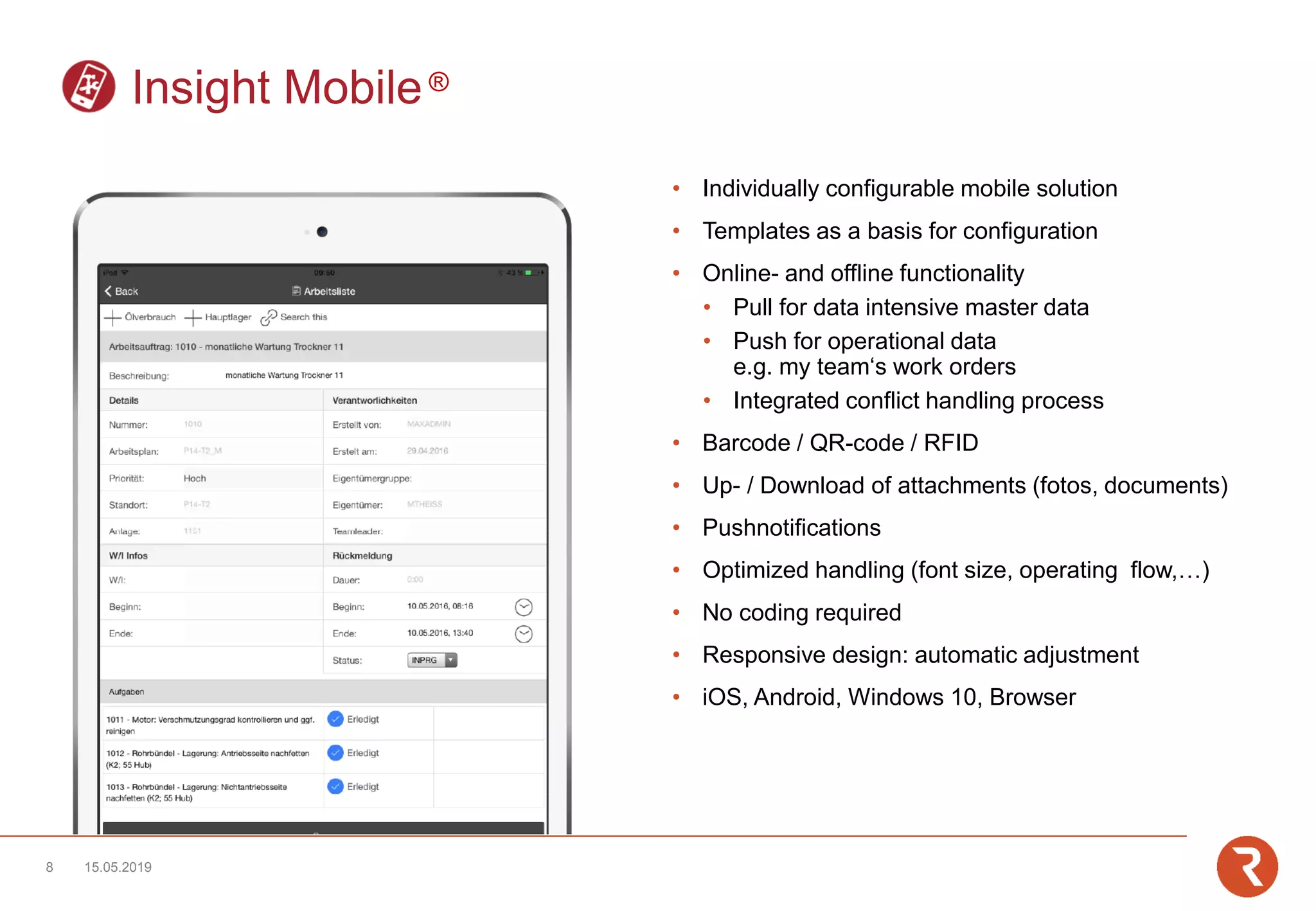
• Individually configurable mobile solution
• Templates as a basis for configuration
• Online- and offline functionality
• Pull for data intensive master data
• Push for operational data
e.g. my team‘s work orders
• Integrated conflict handling process
• Barcode / QR-code / RFID
• Up- / Download of attachments (fotos, documents)
• Pushnotifications
• Optimized handling (font size, operating flow,…)
• No coding required
• Responsive design: automatic adjustment
• iOS, Android, Windows 10, Browser
15.05.20198
Insight Mobile®
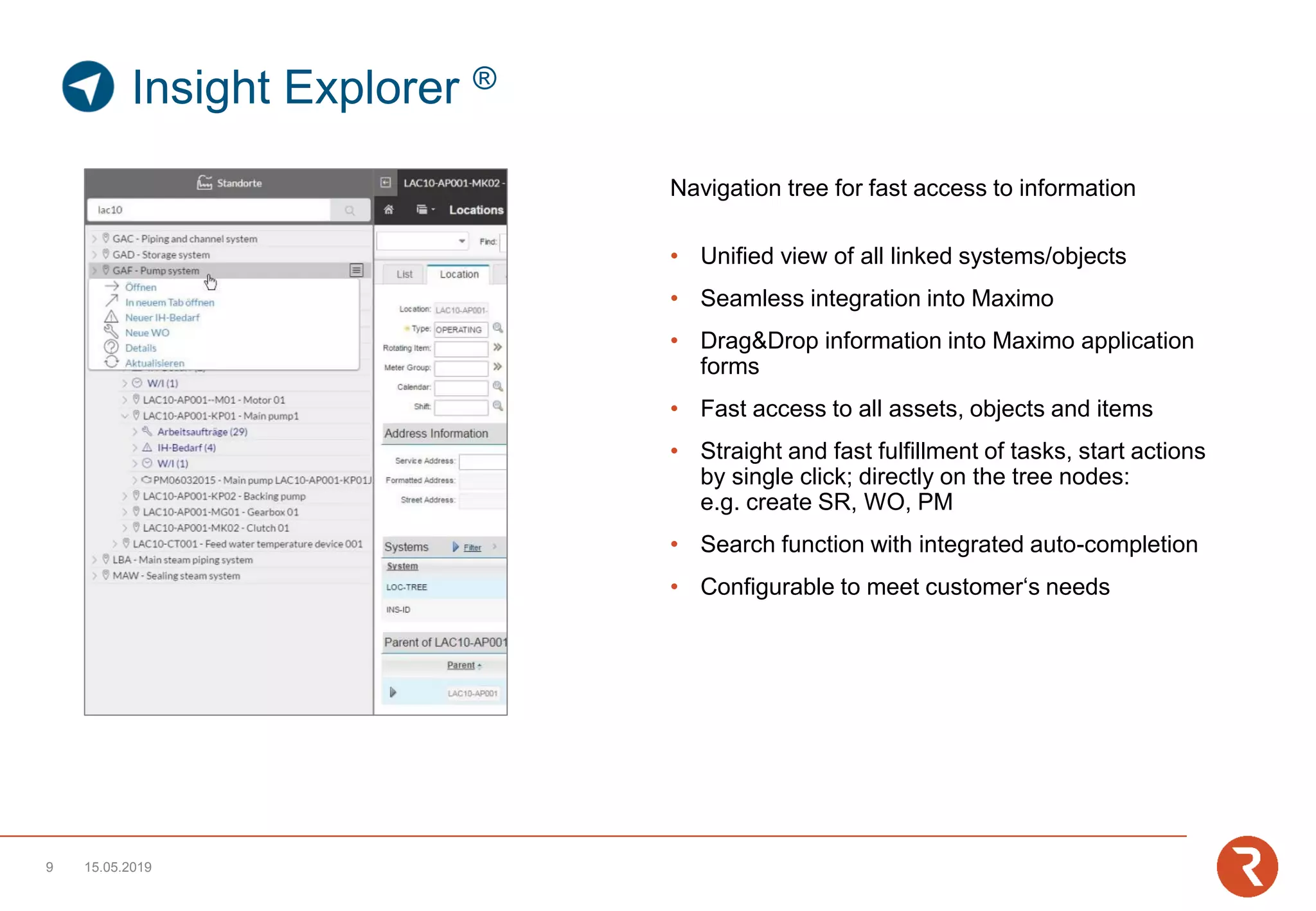
Navigation tree for fast access to information
• Unified view of all linked systems/objects
• Seamless integration into Maximo
• Drag&Drop information into Maximo application
forms
• Fast access to all assets, objects and items
• Straight and fast fulfillment of tasks, start actions
by single click; directly on the tree nodes:
e.g. create SR, WO, PM
• Search function with integrated auto-completion
• Configurable to meet customer‘s needs
15.05.20199
Insight Explorer ®
Embedded enterprise search for
instant full text retrieval
• Simplifies complex searches by using a central
single search
• Drag&Drop functionality
• Highly performant
• Fast filtering by object type
• Actions can be performed directly from the context
menu of the search results
• Search in data sets across multiple databases
• Display of object details including short description
15.05.201910
Insight X-Ray ®
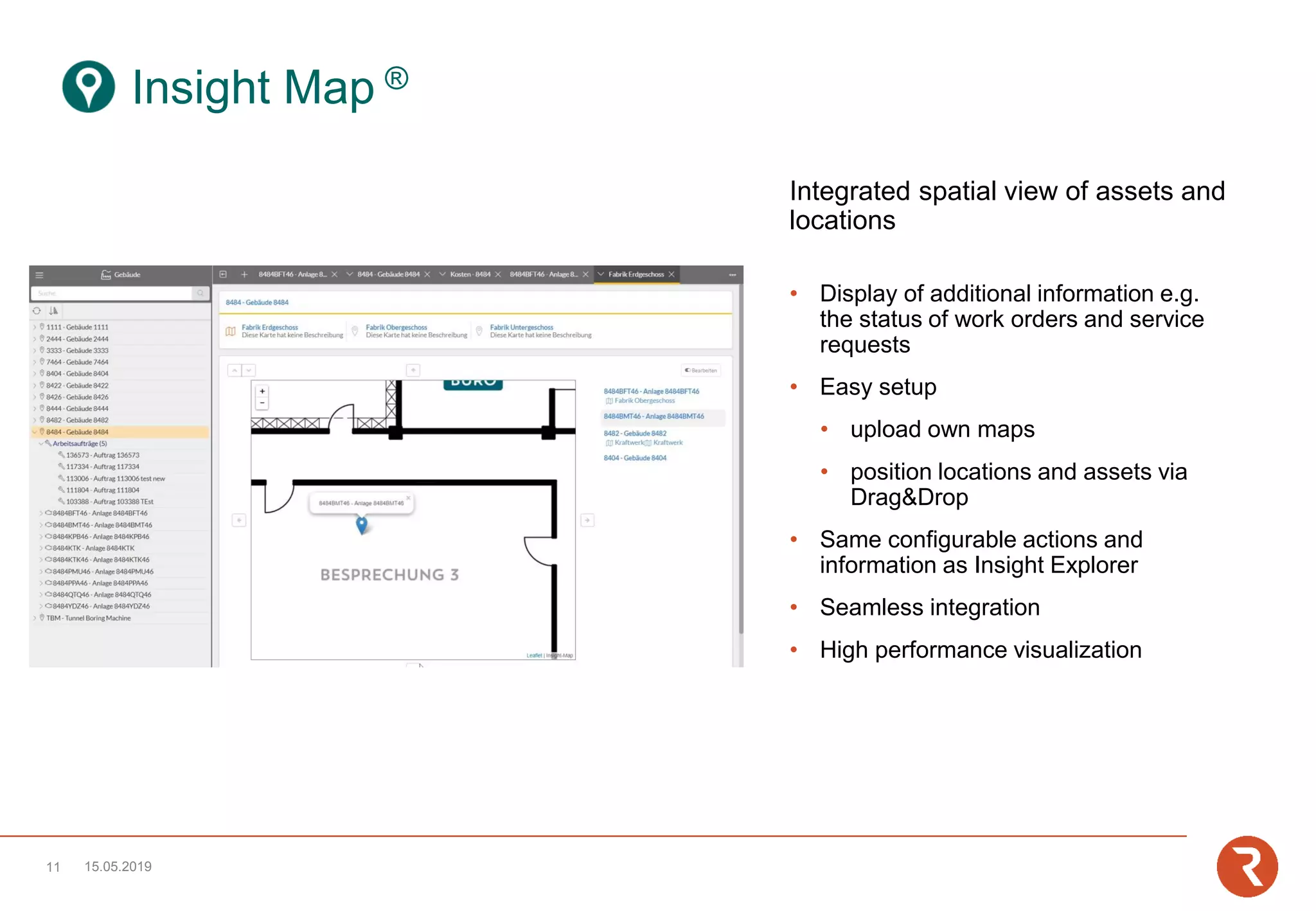
Integrated spatial view of assets and
locations
• Display of additional information e.g.
the status of work orders and service
requests
• Easy setup
• upload own maps
• position locations and assets via
Drag&Drop
• Same configurable actions and
information as Insight Explorer
• Seamless integration
• High performance visualization
15.05.201911
Insight Map ®
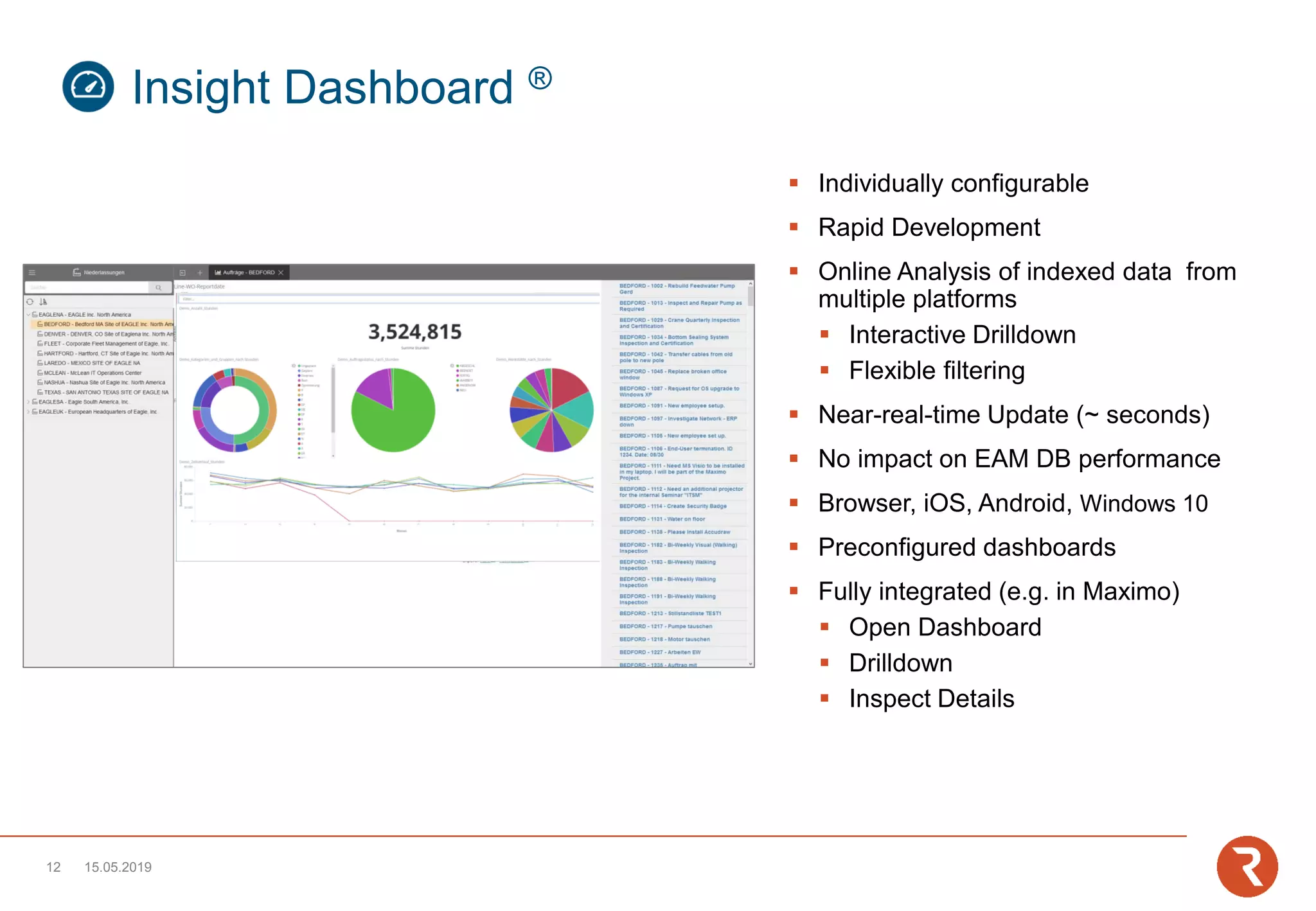
▪ Individually configurable
▪ Rapid Development
▪ Online Analysis of indexed data from
multiple platforms
▪ Interactive Drilldown
▪ Flexible filtering
▪ Near-real-time Update (~ seconds)
▪ No impact on EAM DB performance
▪ Browser, iOS, Android, Windows 10
▪ Preconfigured dashboards
▪ Fully integrated (e.g. in Maximo)
▪ Open Dashboard
▪ Drilldown
▪ Inspect Details
15.05.201912
Insight Dashboard ®
Open dashboard with
context sensitive filter
Use dashboard capabilities for further
drill down and filtering
Identify specific data sets for further
investigation in Maximo
1.
2.
3.
Dashboard: Workorders/Failurecodes
Filter: Location LAC10-AP001)
Dashboard: Workorders/Failurecodes
Filter: Failure Class Valve)
Application: Workorder Tracking
Record: Workorder CA17-005467)
15.05.201913
integrated - Interactive
▪ Individually configurable
▪ Interactive Charts for displaying work and
resource allocation (capacity and scheduling)
▪ Planning across multiple maintenance
management systems through (multi) backend
integration
▪ Integrated crew and qualification management
▪ Management of crews
▪ Without extension of the backend functionality
▪ Inclusion of existing resources (people, tools,
qualifications, ...)
▪ Integrated absence planning
▪ Management of Absences
▪ Inclusion of existing absence planning
▪ Drag&Drop functionality
▪ Interact with all other perspectives of the Insight
desktop
15.05.201914
Insight Planning™
▪ Config UI
▪ Copy functionality
▪ Integration of all objects/attributes/relations
▪ Assignment of security groups
▪ No coding required
▪ Specific backend-logic integrable
▪ Ready-to-use templates
▪ Multi-use of data models in different perpectives
▪ No deployment required , Update of config at login
15.05.201915
Insight Config™
Use case
Field Service
Failure codeAttach imageLocation
Asset
Additional
Information
Existing
MessagesOnline / Offline
Work approved
Take ownership
Start Time
Up and running
Follow-up work
Pushnotification
Work in Progress
Stop Time (autom.)
Work done Document Actuals
CapturingPlanning
Overview
(locations, assets, spare
parts, actual service
requests,
documentation,…)
Avoiding duplicates
Create workorder
Knowledge Database
Ad hoc Analysis
Failure code
Failure image
Root cause
Correction measures
Document Condition
Execution
15.05.201916
Optimization
Prevent duplicates
Work assignment
Pre-job briefing
Disposition
People
Tools
Material
Root/Cause/Remedy
Material
Working hours
▪ Work planning:
▪ PM forecast, service requests and work orders at related locations/assets via full text search. Job plans and
documentation included in one view
▪ Organization of work orders with nested work orders via drag&drop
▪ Creation, approval and feedback of work orders and service requests
▪ Inventory:
Asset search via full text serach
▪ Repair history:
Display of closed tickets and work orders at locations/assets
▪ Master Data Management:
(Re-)Organization of locations/assets via drag&drop
▪ Customer centric view on information for Service Provider
15.05.201917
Desktop Templates
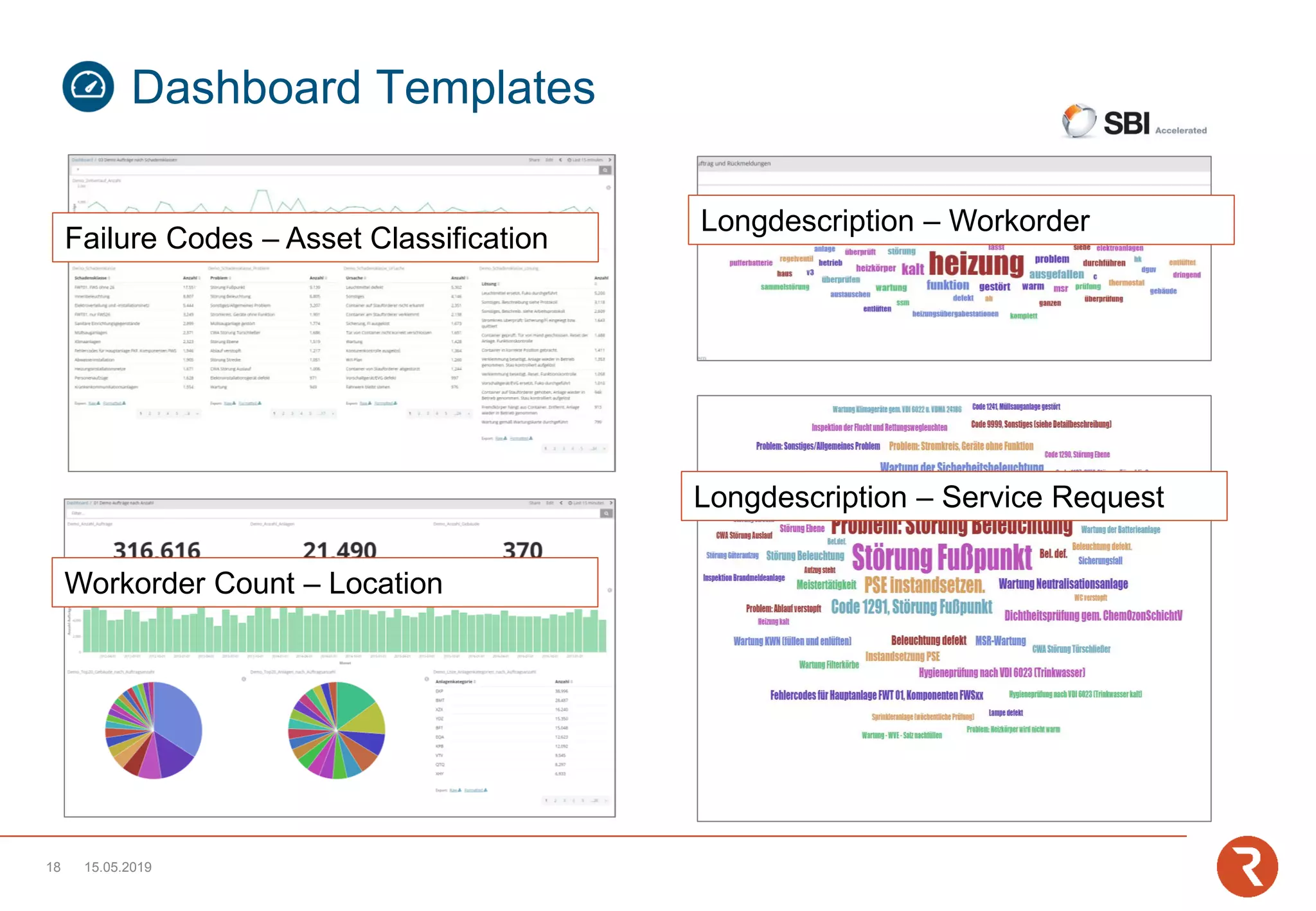
Longdescription – Workorder
Longdescription – Service Request
Failure Codes – Asset Classification
Workorder Count – Location
15.05.201918
Dashboard Templates
▪ Mobiler Explorer
PM forecast, service requests and work orders at relevant
locations/assets via barcode/QR recognition with job plans
and documentations included in one view
▪ Work management
Mobile creation, approval and feedback of work orders and
service requests
▪ Inventory
Asset search via barcode; Pre-populated with calculated
stock
▪ History
All closed tickets and work orders of a location/asset
15.05.201919
Mobile Templates
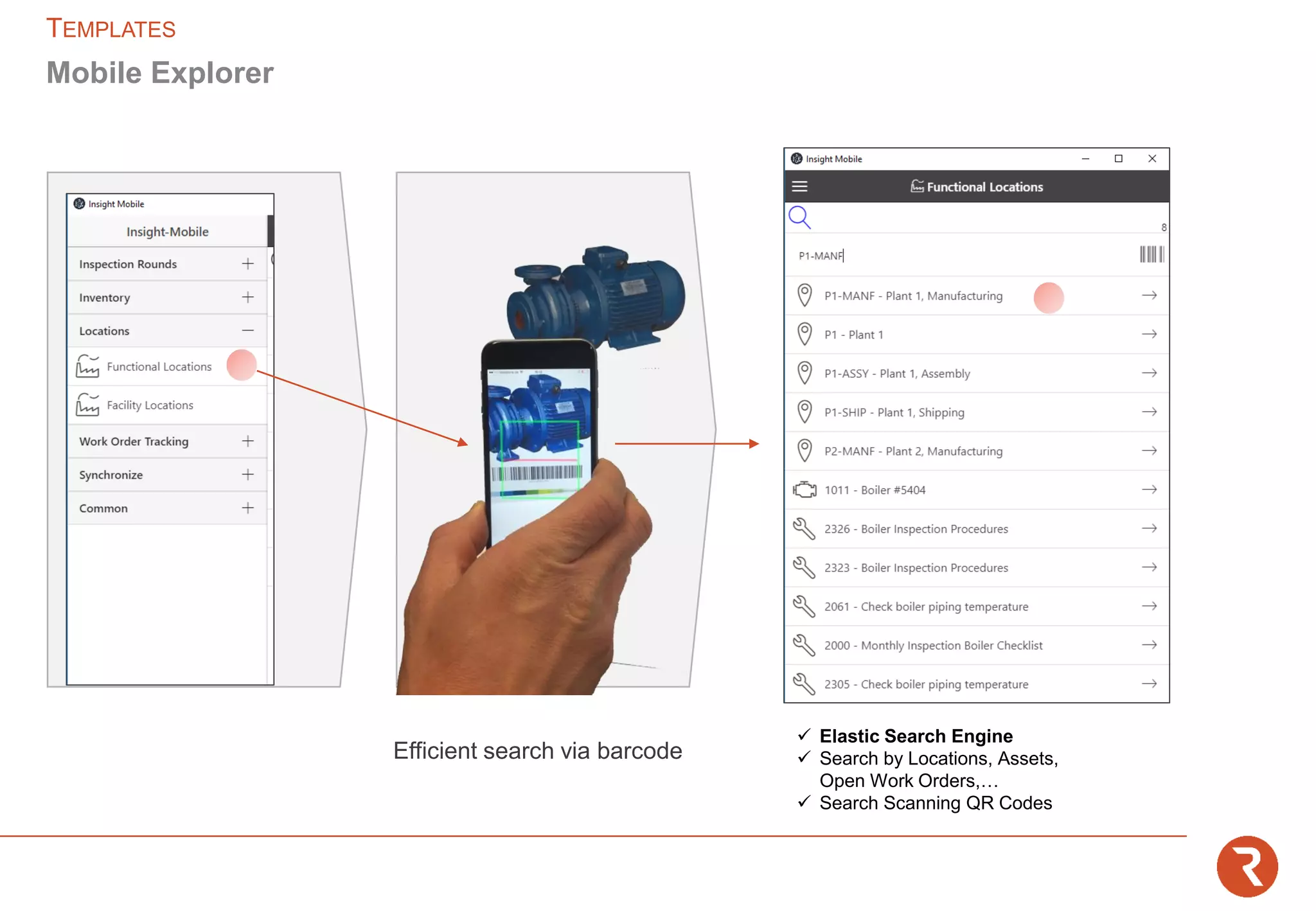
✓ Elastic Search Engine
✓ Search by Locations, Assets,
Open Work Orders,…
✓ Search Scanning QR Codes
Mobile Explorer
TEMPLATES
Efficient search via barcode
✓ Object Related to the Locations or Assets
(WO, PM/Forecast, Assets, Spare Parts,
Documents)
✓ Creation of Service Request
✓ Creation of Work Orders with Priority and
Failure Reporting
Mobile Explorer
TEMPLATES
Approval
Accept
Work
Work
List
WAPPR → APPR
Assign Owner or Person Group
Assign Material
APPR → INPRG
Take ownership
Set Scheduled Finish
INPRG → COMP
Reporting (Actuals, Logs,
Follow Up)
Reporting
TEMPLATES|WORKMANAGEMENT
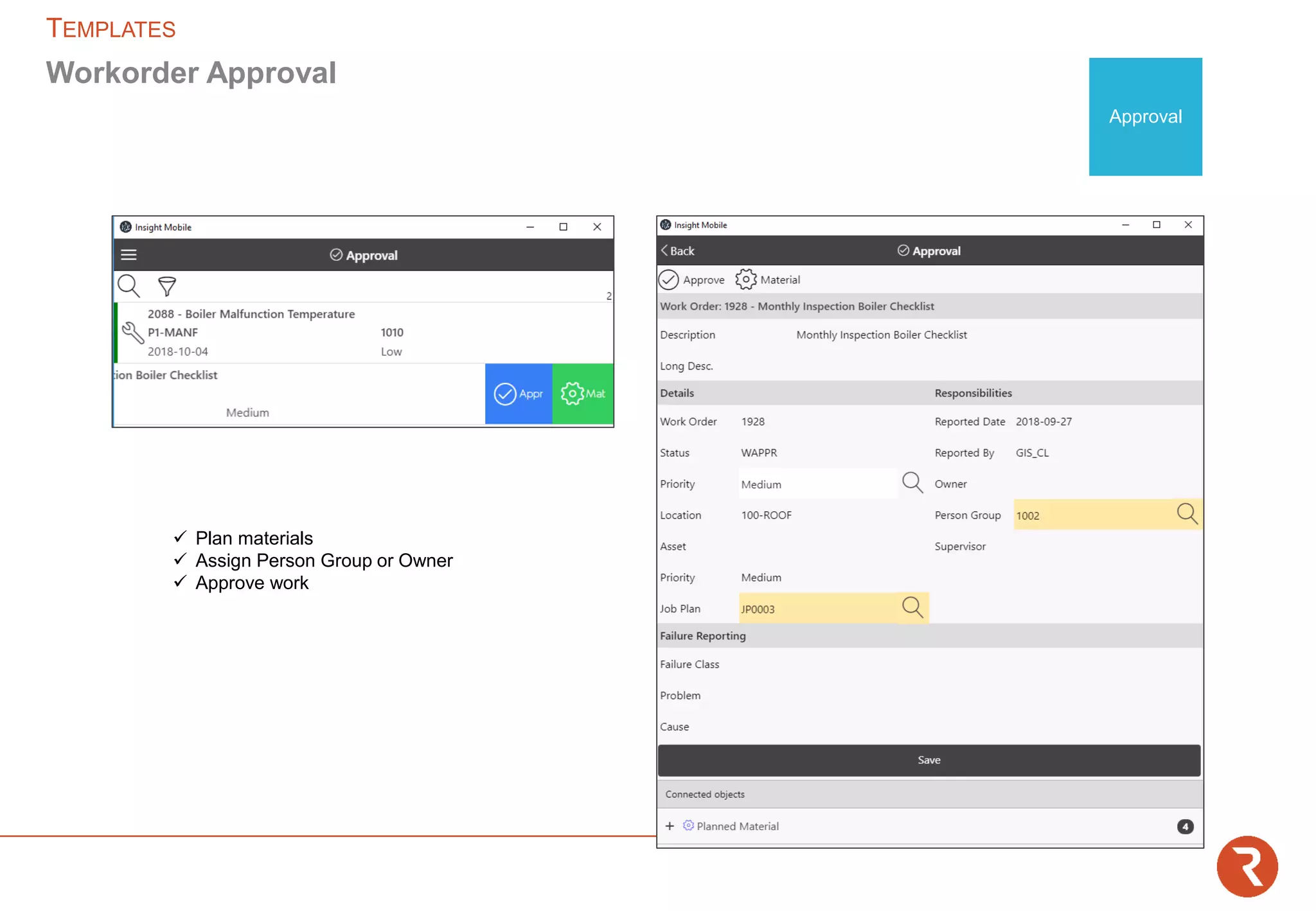
✓ Plan materials
✓ Assign Person Group or Owner
✓ Approve work
Workorder Approval
TEMPLATES
Approval
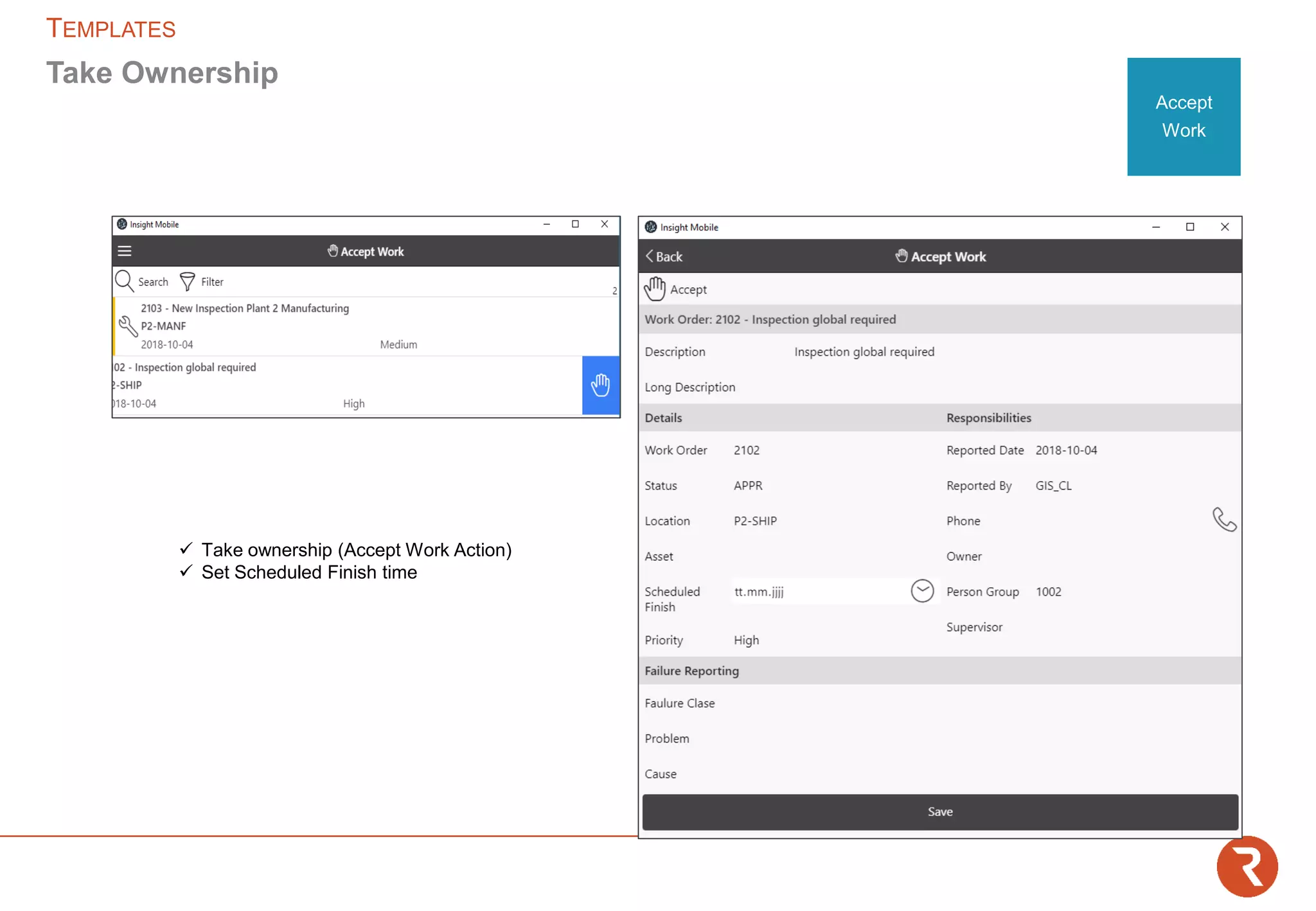
✓ Take ownership (Accept Work Action)
✓ Set Scheduled Finish time
Take Ownership
TEMPLATES
Accept
Work
✓ Reporting Actuals (Labour, Materials)
✓ Reporting Logs
✓ Creation of Follow Up WO
✓ Attach Documents
✓ Complete Failure Reporting
✓ Complete Work
Report
TEMPLATES
Work
List
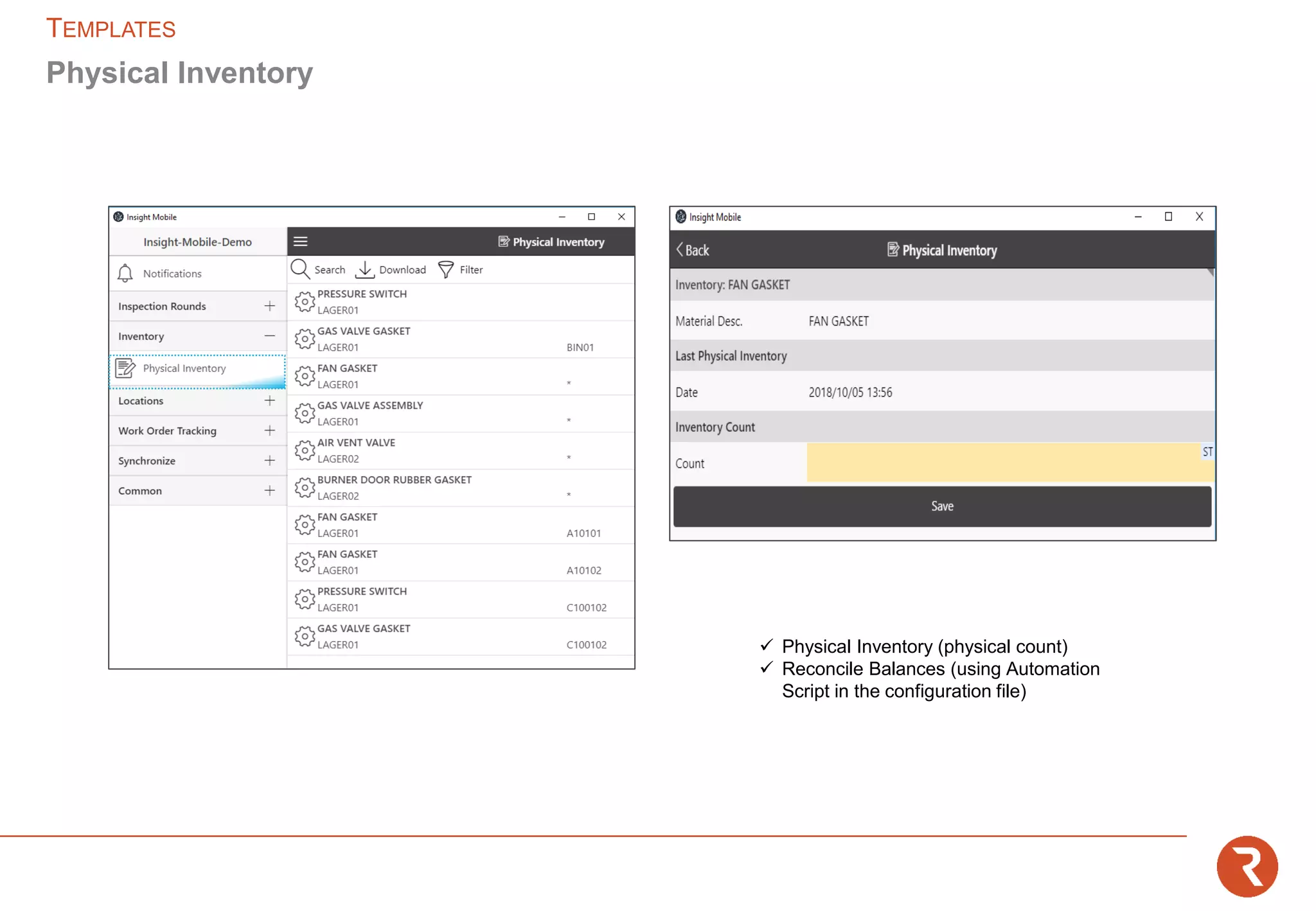
✓ Physical Inventory (physical count)
✓ Reconcile Balances (using Automation
Script in the configuration file)
Physical Inventory
TEMPLATES
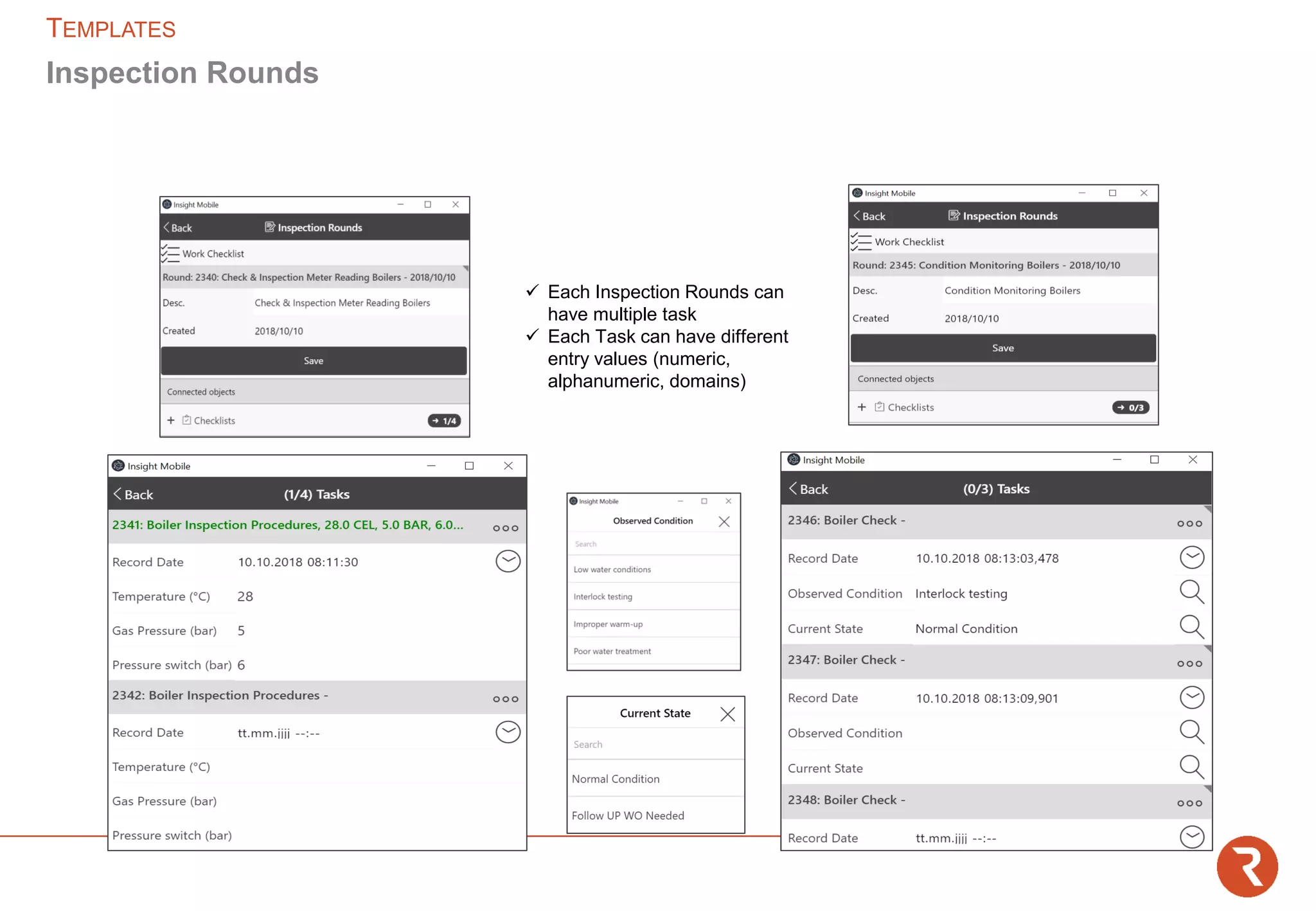
✓ Start Inspection Rounds
✓ Document (ad hoc or scheduled)
Inspection Rounds
✓ Detect Follow ups
✓ Complete
Inspection Rounds
TEMPLATES
✓ Each Inspection Rounds can
have multiple task
✓ Each Task can have different
entry values (numeric,
alphanumeric, domains)
Inspection Rounds
TEMPLATES
Insight Control Panel Module:
https://insight.gis-systemhaus.de
15.05.201929
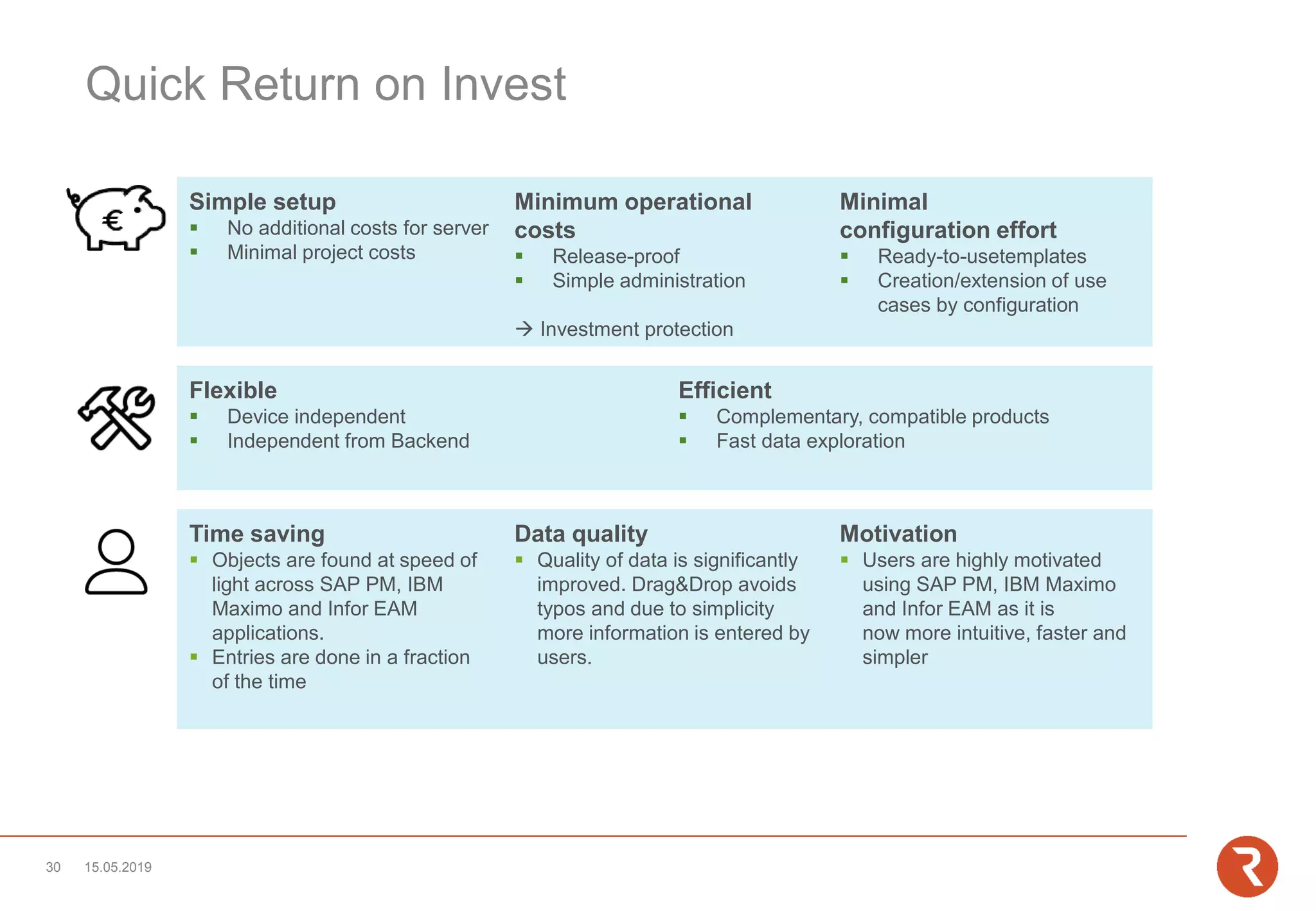
Quick Return on Invest
Time saving
▪ Objects are found at speed of
light across SAP PM, IBM
Maximo and Infor EAM
applications.
▪ Entries are done in a fraction
of the time
Data quality
▪ Quality of data is significantly
improved. Drag&Drop avoids
typos and due to simplicity
more information is entered by
users.
Motivation
▪ Users are highly motivated
using SAP PM, IBM Maximo
and Infor EAM as it is
now more intuitive, faster and
simpler
Flexible
▪ Device independent
▪ Independent from Backend
Efficient
▪ Complementary, compatible products
▪ Fast data exploration
Simple setup
▪ No additional costs for server
▪ Minimal project costs
Minimum operational
costs
▪ Release-proof
▪ Simple administration
→ Investment protection
Minimal
configuration effort
▪ Ready-to-usetemplates
▪ Creation/extension of use
cases by configuration
15.05.201930
Insight Control Panel References
05/15
Initiale Ankündigung
07/15
Release v1
01/16
User base
> 1200
12/15
Insight Mobile
Beta Test
07/16
Release
v2
09/16 12/16
User base
> 3000
15.05.201931
About us
The consulting firm GIS mbH has been supporting customers since 1984 in maintenance,
organizational and process consulting as well as in the implementation and optimization of SAP PM /
CS, IBM Maximo and Infor EAM.
As a digitization specialist, GIS is part of ROBUR, a group of companies which, as an industrial
services specialist with approx. 2,000 employees, supports its customers from planning and
implementation through installation, operation and maintenance, to the relocation and dismantling of
industrial plants.
Furthermore, GIS with Insight Mobile offers the possibility to mobilize maintenance independently of
the system. Insight Mobile is part of the maintenance portal Insight Control Panel for desktop and
mobile users. This portal includes add-on solutions such as an object search explorer, map
integration, full-text search, planning board, and dashboards. With this overall package, GIS
accompanies its customers on their way to digital transformation and Industry 4.0.
15.05.201932
GIS – Gesellschaft für integrierte Systemplanung mbH
Eisleber Str. 4 | 69469 Weinheim
f.ostwald@gis-systemhaus.de | www.gis-systemhaus.de
Telephone +49 203 75 69 79 4 or +49 173 473 12 81
Frank Ostwald
Vertriebsleiter SAP - Instandhaltung
33 | Mai-19
Contact
15.05.201934

Maintenance Portal for SAP PM, IBM Maximo and Infor EAM

  • 1.
    Maintenance Portal forSAP/Maximo/Infor EAM Insight Control Panel GIS MBH Weinheim | November 6, 2018
  • 2.
    User Demands Flexible mobile scenarios Intuitive usage Adhoc Data analysis near realtime DMS ERP BFS CRM … Access via browser Interactive maps integration Data centric UI Enterprise data integration Full text search data exploration Condition Monitoring Cockpit, Alerts Improve Data quality Lean UI for casual users Knowledge Centered data retrieval from large databases 15.05.20192 Graphic disposition
  • 3.
  • 4.
    Solution Design flexible scenariosacross the boundaries of individual data silos UsertypesPerspectivesData
  • 5.
    InsightServer Insight Control Panel™ Multipleperspectives on data optimized for different user types and demands All relevant data at a glance Casual/Mobile use Expert use Insight DesktopInsight Mobile 15.05.2019 5 IBM Maximo openBMS SAP PM/CS Navision Dynamics Insight Business Suite • Data Base Connector • Web Services Supported Backends Integration Technologies Infor EAM Comming soon UsertypesPerspectivesData
  • 6.
    Mobile iOS, Android, Windows10, Browser Mobile Use • Maintenance staff/Field service (Instructions/Information/Documentation) • Inventory Management (Stocktaking, Stock Issue) • Management (dashboards, QM, approvals) • 3rd parties • Casual User (Service requests) • Service / Acceptance protocoll Desktop z.B. IBM Maximo, SAP PM/CS, Infor EAM Expert Use • Power user • Service desk • Planner / Ops manager • Analyst • Disponent 15.05.20197 Insight Control Panel™
  • 7.
    • Maintenance Portal •Power user functionality • Templates as a basis for configuration • Data snippets and user interfaces Individually configurable • Access to backend content • IBM Maximo EAM • SAP PM/CS • Navision Dynamics • openBMS EAM • Integration of external data sources • Data bases • Files • Webservices/REST • Browser based • Optimized views for data analysis, plant condition monitoring, work planning and work preparation 15.05.2019 Insight Desktop™
  • 8.
    • Individually configurablemobile solution • Templates as a basis for configuration • Online- and offline functionality • Pull for data intensive master data • Push for operational data e.g. my team‘s work orders • Integrated conflict handling process • Barcode / QR-code / RFID • Up- / Download of attachments (fotos, documents) • Pushnotifications • Optimized handling (font size, operating flow,…) • No coding required • Responsive design: automatic adjustment • iOS, Android, Windows 10, Browser 15.05.20198 Insight Mobile®
  • 9.
    Navigation tree forfast access to information • Unified view of all linked systems/objects • Seamless integration into Maximo • Drag&Drop information into Maximo application forms • Fast access to all assets, objects and items • Straight and fast fulfillment of tasks, start actions by single click; directly on the tree nodes: e.g. create SR, WO, PM • Search function with integrated auto-completion • Configurable to meet customer‘s needs 15.05.20199 Insight Explorer ®
  • 10.
    Embedded enterprise searchfor instant full text retrieval • Simplifies complex searches by using a central single search • Drag&Drop functionality • Highly performant • Fast filtering by object type • Actions can be performed directly from the context menu of the search results • Search in data sets across multiple databases • Display of object details including short description 15.05.201910 Insight X-Ray ®
  • 11.
    Integrated spatial viewof assets and locations • Display of additional information e.g. the status of work orders and service requests • Easy setup • upload own maps • position locations and assets via Drag&Drop • Same configurable actions and information as Insight Explorer • Seamless integration • High performance visualization 15.05.201911 Insight Map ®
  • 12.
    ▪ Individually configurable ▪Rapid Development ▪ Online Analysis of indexed data from multiple platforms ▪ Interactive Drilldown ▪ Flexible filtering ▪ Near-real-time Update (~ seconds) ▪ No impact on EAM DB performance ▪ Browser, iOS, Android, Windows 10 ▪ Preconfigured dashboards ▪ Fully integrated (e.g. in Maximo) ▪ Open Dashboard ▪ Drilldown ▪ Inspect Details 15.05.201912 Insight Dashboard ®
  • 13.
    Open dashboard with contextsensitive filter Use dashboard capabilities for further drill down and filtering Identify specific data sets for further investigation in Maximo 1. 2. 3. Dashboard: Workorders/Failurecodes Filter: Location LAC10-AP001) Dashboard: Workorders/Failurecodes Filter: Failure Class Valve) Application: Workorder Tracking Record: Workorder CA17-005467) 15.05.201913 integrated - Interactive
  • 14.
    ▪ Individually configurable ▪Interactive Charts for displaying work and resource allocation (capacity and scheduling) ▪ Planning across multiple maintenance management systems through (multi) backend integration ▪ Integrated crew and qualification management ▪ Management of crews ▪ Without extension of the backend functionality ▪ Inclusion of existing resources (people, tools, qualifications, ...) ▪ Integrated absence planning ▪ Management of Absences ▪ Inclusion of existing absence planning ▪ Drag&Drop functionality ▪ Interact with all other perspectives of the Insight desktop 15.05.201914 Insight Planning™
  • 15.
    ▪ Config UI ▪Copy functionality ▪ Integration of all objects/attributes/relations ▪ Assignment of security groups ▪ No coding required ▪ Specific backend-logic integrable ▪ Ready-to-use templates ▪ Multi-use of data models in different perpectives ▪ No deployment required , Update of config at login 15.05.201915 Insight Config™
  • 16.
    Use case Field Service FailurecodeAttach imageLocation Asset Additional Information Existing MessagesOnline / Offline Work approved Take ownership Start Time Up and running Follow-up work Pushnotification Work in Progress Stop Time (autom.) Work done Document Actuals CapturingPlanning Overview (locations, assets, spare parts, actual service requests, documentation,…) Avoiding duplicates Create workorder Knowledge Database Ad hoc Analysis Failure code Failure image Root cause Correction measures Document Condition Execution 15.05.201916 Optimization Prevent duplicates Work assignment Pre-job briefing Disposition People Tools Material Root/Cause/Remedy Material Working hours
  • 17.
    ▪ Work planning: ▪PM forecast, service requests and work orders at related locations/assets via full text search. Job plans and documentation included in one view ▪ Organization of work orders with nested work orders via drag&drop ▪ Creation, approval and feedback of work orders and service requests ▪ Inventory: Asset search via full text serach ▪ Repair history: Display of closed tickets and work orders at locations/assets ▪ Master Data Management: (Re-)Organization of locations/assets via drag&drop ▪ Customer centric view on information for Service Provider 15.05.201917 Desktop Templates
  • 18.
    Longdescription – Workorder Longdescription– Service Request Failure Codes – Asset Classification Workorder Count – Location 15.05.201918 Dashboard Templates
  • 19.
    ▪ Mobiler Explorer PMforecast, service requests and work orders at relevant locations/assets via barcode/QR recognition with job plans and documentations included in one view ▪ Work management Mobile creation, approval and feedback of work orders and service requests ▪ Inventory Asset search via barcode; Pre-populated with calculated stock ▪ History All closed tickets and work orders of a location/asset 15.05.201919 Mobile Templates
  • 20.
    ✓ Elastic SearchEngine ✓ Search by Locations, Assets, Open Work Orders,… ✓ Search Scanning QR Codes Mobile Explorer TEMPLATES Efficient search via barcode
  • 21.
    ✓ Object Relatedto the Locations or Assets (WO, PM/Forecast, Assets, Spare Parts, Documents) ✓ Creation of Service Request ✓ Creation of Work Orders with Priority and Failure Reporting Mobile Explorer TEMPLATES
  • 22.
    Approval Accept Work Work List WAPPR → APPR AssignOwner or Person Group Assign Material APPR → INPRG Take ownership Set Scheduled Finish INPRG → COMP Reporting (Actuals, Logs, Follow Up) Reporting TEMPLATES|WORKMANAGEMENT
  • 23.
    ✓ Plan materials ✓Assign Person Group or Owner ✓ Approve work Workorder Approval TEMPLATES Approval
  • 24.
    ✓ Take ownership(Accept Work Action) ✓ Set Scheduled Finish time Take Ownership TEMPLATES Accept Work
  • 25.
    ✓ Reporting Actuals(Labour, Materials) ✓ Reporting Logs ✓ Creation of Follow Up WO ✓ Attach Documents ✓ Complete Failure Reporting ✓ Complete Work Report TEMPLATES Work List
  • 26.
    ✓ Physical Inventory(physical count) ✓ Reconcile Balances (using Automation Script in the configuration file) Physical Inventory TEMPLATES
  • 27.
    ✓ Start InspectionRounds ✓ Document (ad hoc or scheduled) Inspection Rounds ✓ Detect Follow ups ✓ Complete Inspection Rounds TEMPLATES
  • 28.
    ✓ Each InspectionRounds can have multiple task ✓ Each Task can have different entry values (numeric, alphanumeric, domains) Inspection Rounds TEMPLATES
  • 29.
    Insight Control PanelModule: https://insight.gis-systemhaus.de 15.05.201929
  • 30.
    Quick Return onInvest Time saving ▪ Objects are found at speed of light across SAP PM, IBM Maximo and Infor EAM applications. ▪ Entries are done in a fraction of the time Data quality ▪ Quality of data is significantly improved. Drag&Drop avoids typos and due to simplicity more information is entered by users. Motivation ▪ Users are highly motivated using SAP PM, IBM Maximo and Infor EAM as it is now more intuitive, faster and simpler Flexible ▪ Device independent ▪ Independent from Backend Efficient ▪ Complementary, compatible products ▪ Fast data exploration Simple setup ▪ No additional costs for server ▪ Minimal project costs Minimum operational costs ▪ Release-proof ▪ Simple administration → Investment protection Minimal configuration effort ▪ Ready-to-usetemplates ▪ Creation/extension of use cases by configuration 15.05.201930
  • 31.
    Insight Control PanelReferences 05/15 Initiale Ankündigung 07/15 Release v1 01/16 User base > 1200 12/15 Insight Mobile Beta Test 07/16 Release v2 09/16 12/16 User base > 3000 15.05.201931
  • 32.
    About us The consultingfirm GIS mbH has been supporting customers since 1984 in maintenance, organizational and process consulting as well as in the implementation and optimization of SAP PM / CS, IBM Maximo and Infor EAM. As a digitization specialist, GIS is part of ROBUR, a group of companies which, as an industrial services specialist with approx. 2,000 employees, supports its customers from planning and implementation through installation, operation and maintenance, to the relocation and dismantling of industrial plants. Furthermore, GIS with Insight Mobile offers the possibility to mobilize maintenance independently of the system. Insight Mobile is part of the maintenance portal Insight Control Panel for desktop and mobile users. This portal includes add-on solutions such as an object search explorer, map integration, full-text search, planning board, and dashboards. With this overall package, GIS accompanies its customers on their way to digital transformation and Industry 4.0. 15.05.201932
  • 33.
    GIS – Gesellschaftfür integrierte Systemplanung mbH Eisleber Str. 4 | 69469 Weinheim f.ostwald@gis-systemhaus.de | www.gis-systemhaus.de Telephone +49 203 75 69 79 4 or +49 173 473 12 81 Frank Ostwald Vertriebsleiter SAP - Instandhaltung 33 | Mai-19 Contact
  • 34.