NEW MAXIMO
VERSION 7.6
OFFERINGS
NEW MAXIMO OFFERINGS
With IBM releasing lots of new Maximo offerings in
May 2017, we wanted to share the most current
product information with our customers.
There is a new feature pack for Maximo 7.6.0.8, new
versions of Scheduler and Scheduler Plus 7.6.5, the
next mobile release –Maximo Anywhere 7.6.2,
and Maximo Asset Health Insights 7.6.0.2!
These are all available now for SaaS and on premise.
And don’t forget, Maximo 7.5 goes out of support in
April 2018, and older versions are already
unsupported. With new ways for you to extract value
from your business, there has never been a better
time to upgrade to Maximo 7.6!
MAXIMO 7.6.0.8 FEATURE
PACK – AVAILABLE NOW!
On May 19, 2017, IBM Software released the 7.6.0.8 Feature Pack
for Maximo Asset Management. It is a gateway to many new
features and functionality including:
 New Budget Monitoring Application
 New Time Zone Rules Application
 Inspection Tools to build and conduct online inspections for
assets and locations
 Enhanced UX and Work Centers
 New landing page for Work Centers
 New Security Group Templates that enable access to Work
Centers, and tools and tasks
 Platform Certifications: Windows Server 2016, SQL Server 2016
and Oracle EBS 12.2.6
Maximo 7.6.0.8
BUDGET
TRACKING
APPLICATIO
N
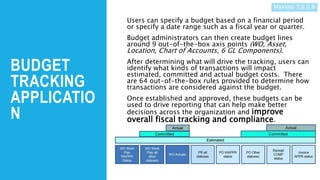
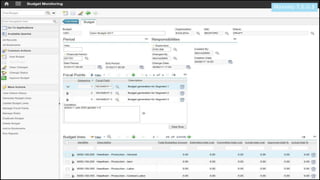
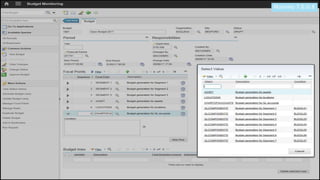
Users can specify a budget based on a financial period
or specify a date range such as a fiscal year or quarter.
Budget administrators can then create budget lines
around 9 out-of-the-box axis points (WO, Asset,
Location, Chart of Accounts, 6 GL Components).
After determining what will drive the tracking, users can
identify what kinds of transactions will impact
estimated, committed and actual budget costs. There
are 64 out-of-the-box rules provided to determine how
transactions are considered against the budget.
Once established and approved, these budgets can be
used to drive reporting that can help make better
decisions across the organization and improve
overall fiscal tracking and compliance.
Maximo 7.6.0.8
Maximo 7.6.0.8
Maximo 7.6.0.8
INSPECTION TOOLS
AND TASKS
Starting with 7.6.0.4, Work
Centers have been
released for Technicians,
Supervisors, Business
Analysts, and most
recently Service
Requestors. 7.6.0.8 now
offers support for
Inspection processes.
An Inspection form can be
created that becomes the
framework for the steps
needed to be performed
during an inspection,
defining the kinds of
questions and responses
that need to be captured.
It is managed with a status
like other Maximo
documents.
Once active, these
Inspections can be
executed and data easily
captured in the field on a
smart phone or tablet to
drive safety,
standards and
regulatory
compliance.
Watch Video
Maximo 7.6.0.8
TIME ZONE RULES APPLICATION
Organizations with multiple and/or
global sites can specify time zone
rules to identify the local date and
time when records are created for a
process, such as generating work
orders from a preventive
maintenance record.
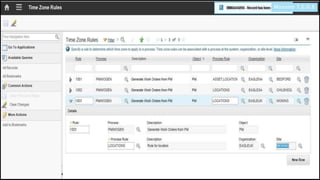
You create a time zone rule by
associating the process and the
process rule with the Maximo
business object. Time zone rules
can be associated with a process at
the system, organization, or site
level.
Maximo 7.6.0.8
Maximo 7.6.0.8
MAXIMO SCHEDULER 7.6.5
Weekly and Monthly Planning Buckets
-Alternative resource availability input
Performance
-Better UI responsiveness and refresh at different
zoom levels and data volume
Optimization enhancements to streamline processes
-Faster running models now support Multi-Skill
Labour and improved Error Reporting
-Optimization Engine upgraded to IBM iLog DOC
3.9
• Add-on product
to Maximo EAM,
code embedded
in core Maximo
therefore a
single install
• Requires a
separate license
purchase
• Includes
integration
adapter and
optimization
engine and
models
Scheduler 7.6.5
Scheduler 7.6.5
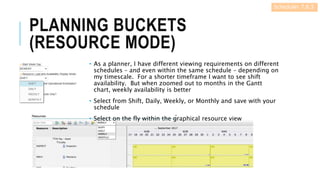
PLANNING BUCKETS
(RESOURCE MODE)
• As a planner, I have different viewing requirements on different
schedules – and even within the same schedule – depending on
my timescale. For a shorter timeframe I want to see shift
availability. But when zoomed out to months in the Gantt
chart, weekly availability is better
• Select from Shift, Daily, Weekly, or Monthly and save with your
schedule
• Select on the fly within the graphical resource view
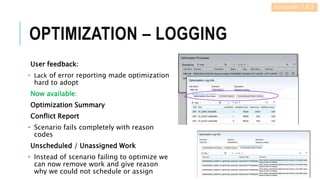
OPTIMIZATION – LOGGING
User feedback:
• Lack of error reporting made optimization
hard to adopt
Now available:
Optimization Summary
Conflict Report
• Scenario fails completely with reason
codes
Unscheduled / Unassigned Work
• Instead of scenario failing to optimize we
can now remove work and give reason
why we could not schedule or assign
Scheduler 7.6.5
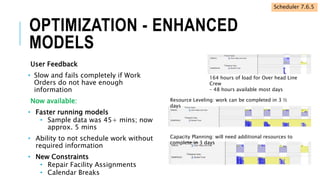
OPTIMIZATION - ENHANCED
MODELS
User Feedback
• Slow and fails completely if Work
Orders do not have enough
information
Now available:
• Faster running models
• Sample data was 45+ mins; now
approx. 5 mins
• Ability to not schedule work without
required information
• New Constraints
• Repair Facility Assignments
• Calendar Breaks
164 hours of load for Over head Line
Crew
– 48 hours available most days
Resource Leveling: work can be completed in 3 ½
days
Capacity Planning: will need additional resources to
complete in 3 days
Scheduler 7.6.5
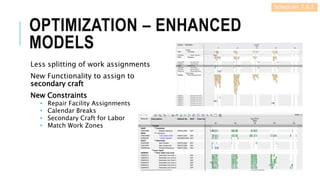
OPTIMIZATION – ENHANCED
MODELS
Less splitting of work assignments
New Functionality to assign to
secondary craft
New Constraints
• Repair Facility Assignments
• Calendar Breaks
• Secondary Craft for Labor
• Match Work Zones
Scheduler 7.6.5
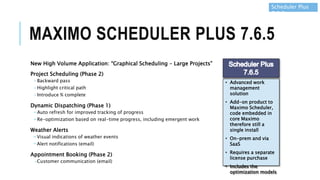
MAXIMO SCHEDULER PLUS 7.6.5
New High Volume Application: “Graphical Scheduling – Large Projects”
Project Scheduling (Phase 2)
-Backward pass
-Highlight critical path
-Introduce % complete
Dynamic Dispatching (Phase 1)
−Auto refresh for improved tracking of progress
−Re-optimization based on real-time progress, including emergent work
Weather Alerts
−Visual indications of weather events
−Alert notifications (email)
Appointment Booking (Phase 2)
-Customer communication (email)
Scheduler Plus
7.6.5
• Advanced work
management
solution
• Add-on product to
Maximo Scheduler,
code embedded in
core Maximo
therefore still a
single install
• On-prem and via
SaaS
• Requires a separate
license purchase
• Includes the
optimization models
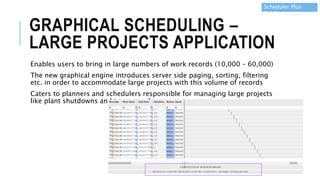
GRAPHICAL SCHEDULING –
LARGE PROJECTS APPLICATION
Enables users to bring in large numbers of work records (10,000 – 60,000)
The new graphical engine introduces server side paging, sorting, filtering
etc. in order to accommodate large projects with this volume of records
Caters to planners and schedulers responsible for managing large projects
like plant shutdowns and turnarounds.
Scheduler Plus
7.6.5
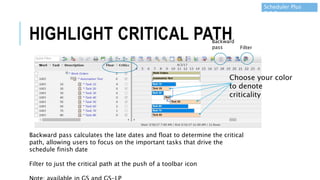
HIGHLIGHT CRITICAL PATH
Backward pass calculates the late dates and float to determine the critical
path, allowing users to focus on the important tasks that drive the
schedule finish date
Filter to just the critical path at the push of a toolbar icon
Choose your color
to denote
criticality
Filter
Backward
pass
Scheduler Plus
7.6.5
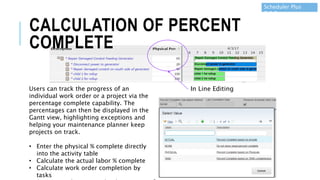
Users can track the progress of an
individual work order or a project via the
percentage complete capability. The
percentages can then be displayed in the
Gantt view, highlighting exceptions and
helping your maintenance planner keep
projects on track.
• Enter the physical % complete directly
into the activity table
• Calculate the actual labor % complete
• Calculate work order completion by
tasks
In Line Editing
Scheduler Plus
7.6.5
CALCULATION OF PERCENT
COMPLETE
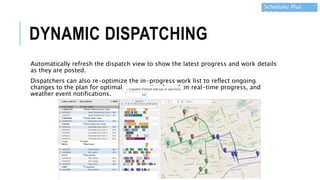
DYNAMIC DISPATCHING
Automatically refresh the dispatch view to show the latest progress and work details
as they are posted.
Dispatchers can also re-optimize the in-progress work list to reflect ongoing
changes to the plan for optimal crew routing based on real-time progress, and
weather event notifications.
Scheduler Plus
7.6.5
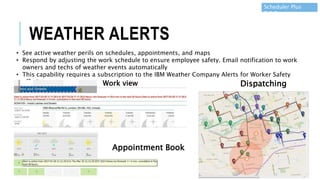
• See active weather perils on schedules, appointments, and maps
• Respond by adjusting the work schedule to ensure employee safety. Email notification to work
owners and techs of weather events automatically
• This capability requires a subscription to the IBM Weather Company Alerts for Worker Safety
offering Work view
Appointment Book
Dispatching
Scheduler Plus
7.6.5
WEATHER ALERTS
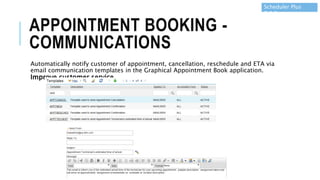
APPOINTMENT BOOKING -
COMMUNICATIONS
Automatically notify customer of appointment, cancellation, reschedule and ETA via
email communication templates in the Graphical Appointment Book application.
Improve customer service.
Scheduler Plus
7.6.5
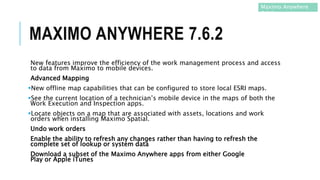
MAXIMO ANYWHERE 7.6.2
New features improve the efficiency of the work management process and access
to data from Maximo to mobile devices.
Advanced Mapping
New offline map capabilities that can be configured to store local ESRI maps.
See the current location of a technician’s mobile device in the maps of both the
Work Execution and Inspection apps.
Locate objects on a map that are associated with assets, locations and work
orders when installing Maximo Spatial.
Undo work orders
Enable the ability to refresh any changes rather than having to refresh the
complete set of lookup or system data
Download a subset of the Maximo Anywhere apps from either Google
Play or Apple iTunes
Maximo Anywhere
7.6.2
MAXIMO ASSET HEALTH
INSIGHTS 7.6.0.2
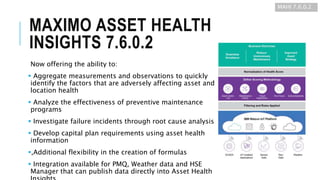
Now offering the ability to:
 Aggregate measurements and observations to quickly
identify the factors that are adversely affecting asset and
location health
 Analyze the effectiveness of preventive maintenance
programs
 Investigate failure incidents through root cause analysis
 Develop capital plan requirements using asset health
information
,Additional flexibility in the creation of formulas
 Integration available for PMQ, Weather data and HSE
Manager that can publish data directly into Asset Health
MAHI 7.6.0.2
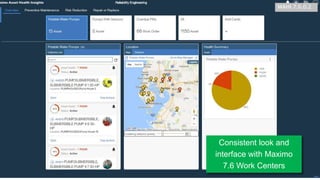
Consistent look and
interface with Maximo
7.6 Work Centers
MAHI 7.6.0.2
INFO@BPDZENITH.COM
WWW.BPDZENITH.COM
BPD ZENITH UK | CANADA | USA | AUSTRALIA |
NEW ZEALAND
Contact us
to begin
your
Maximo
7.6
journey

Maximo 7.6.0.8

  • 1.
  • 2.
    NEW MAXIMO OFFERINGS WithIBM releasing lots of new Maximo offerings in May 2017, we wanted to share the most current product information with our customers. There is a new feature pack for Maximo 7.6.0.8, new versions of Scheduler and Scheduler Plus 7.6.5, the next mobile release –Maximo Anywhere 7.6.2, and Maximo Asset Health Insights 7.6.0.2! These are all available now for SaaS and on premise. And don’t forget, Maximo 7.5 goes out of support in April 2018, and older versions are already unsupported. With new ways for you to extract value from your business, there has never been a better time to upgrade to Maximo 7.6!
  • 3.
    MAXIMO 7.6.0.8 FEATURE PACK– AVAILABLE NOW! On May 19, 2017, IBM Software released the 7.6.0.8 Feature Pack for Maximo Asset Management. It is a gateway to many new features and functionality including:  New Budget Monitoring Application  New Time Zone Rules Application  Inspection Tools to build and conduct online inspections for assets and locations  Enhanced UX and Work Centers  New landing page for Work Centers  New Security Group Templates that enable access to Work Centers, and tools and tasks  Platform Certifications: Windows Server 2016, SQL Server 2016 and Oracle EBS 12.2.6 Maximo 7.6.0.8
  • 4.
    BUDGET TRACKING APPLICATIO N Users can specifya budget based on a financial period or specify a date range such as a fiscal year or quarter. Budget administrators can then create budget lines around 9 out-of-the-box axis points (WO, Asset, Location, Chart of Accounts, 6 GL Components). After determining what will drive the tracking, users can identify what kinds of transactions will impact estimated, committed and actual budget costs. There are 64 out-of-the-box rules provided to determine how transactions are considered against the budget. Once established and approved, these budgets can be used to drive reporting that can help make better decisions across the organization and improve overall fiscal tracking and compliance. Maximo 7.6.0.8
  • 5.
  • 6.
  • 7.
    INSPECTION TOOLS AND TASKS Startingwith 7.6.0.4, Work Centers have been released for Technicians, Supervisors, Business Analysts, and most recently Service Requestors. 7.6.0.8 now offers support for Inspection processes. An Inspection form can be created that becomes the framework for the steps needed to be performed during an inspection, defining the kinds of questions and responses that need to be captured. It is managed with a status like other Maximo documents. Once active, these Inspections can be executed and data easily captured in the field on a smart phone or tablet to drive safety, standards and regulatory compliance. Watch Video Maximo 7.6.0.8
  • 8.
    TIME ZONE RULESAPPLICATION Organizations with multiple and/or global sites can specify time zone rules to identify the local date and time when records are created for a process, such as generating work orders from a preventive maintenance record. You create a time zone rule by associating the process and the process rule with the Maximo business object. Time zone rules can be associated with a process at the system, organization, or site level. Maximo 7.6.0.8
  • 9.
  • 10.
    MAXIMO SCHEDULER 7.6.5 Weeklyand Monthly Planning Buckets -Alternative resource availability input Performance -Better UI responsiveness and refresh at different zoom levels and data volume Optimization enhancements to streamline processes -Faster running models now support Multi-Skill Labour and improved Error Reporting -Optimization Engine upgraded to IBM iLog DOC 3.9 • Add-on product to Maximo EAM, code embedded in core Maximo therefore a single install • Requires a separate license purchase • Includes integration adapter and optimization engine and models Scheduler 7.6.5
  • 11.
    Scheduler 7.6.5 PLANNING BUCKETS (RESOURCEMODE) • As a planner, I have different viewing requirements on different schedules – and even within the same schedule – depending on my timescale. For a shorter timeframe I want to see shift availability. But when zoomed out to months in the Gantt chart, weekly availability is better • Select from Shift, Daily, Weekly, or Monthly and save with your schedule • Select on the fly within the graphical resource view
  • 12.
    OPTIMIZATION – LOGGING Userfeedback: • Lack of error reporting made optimization hard to adopt Now available: Optimization Summary Conflict Report • Scenario fails completely with reason codes Unscheduled / Unassigned Work • Instead of scenario failing to optimize we can now remove work and give reason why we could not schedule or assign Scheduler 7.6.5
  • 13.
    OPTIMIZATION - ENHANCED MODELS UserFeedback • Slow and fails completely if Work Orders do not have enough information Now available: • Faster running models • Sample data was 45+ mins; now approx. 5 mins • Ability to not schedule work without required information • New Constraints • Repair Facility Assignments • Calendar Breaks 164 hours of load for Over head Line Crew – 48 hours available most days Resource Leveling: work can be completed in 3 ½ days Capacity Planning: will need additional resources to complete in 3 days Scheduler 7.6.5
  • 14.
    OPTIMIZATION – ENHANCED MODELS Lesssplitting of work assignments New Functionality to assign to secondary craft New Constraints • Repair Facility Assignments • Calendar Breaks • Secondary Craft for Labor • Match Work Zones Scheduler 7.6.5
  • 15.
    MAXIMO SCHEDULER PLUS7.6.5 New High Volume Application: “Graphical Scheduling – Large Projects” Project Scheduling (Phase 2) -Backward pass -Highlight critical path -Introduce % complete Dynamic Dispatching (Phase 1) −Auto refresh for improved tracking of progress −Re-optimization based on real-time progress, including emergent work Weather Alerts −Visual indications of weather events −Alert notifications (email) Appointment Booking (Phase 2) -Customer communication (email) Scheduler Plus 7.6.5 • Advanced work management solution • Add-on product to Maximo Scheduler, code embedded in core Maximo therefore still a single install • On-prem and via SaaS • Requires a separate license purchase • Includes the optimization models
  • 16.
    GRAPHICAL SCHEDULING – LARGEPROJECTS APPLICATION Enables users to bring in large numbers of work records (10,000 – 60,000) The new graphical engine introduces server side paging, sorting, filtering etc. in order to accommodate large projects with this volume of records Caters to planners and schedulers responsible for managing large projects like plant shutdowns and turnarounds. Scheduler Plus 7.6.5
  • 17.
    HIGHLIGHT CRITICAL PATH Backwardpass calculates the late dates and float to determine the critical path, allowing users to focus on the important tasks that drive the schedule finish date Filter to just the critical path at the push of a toolbar icon Choose your color to denote criticality Filter Backward pass Scheduler Plus 7.6.5
  • 18.
    Users can trackthe progress of an individual work order or a project via the percentage complete capability. The percentages can then be displayed in the Gantt view, highlighting exceptions and helping your maintenance planner keep projects on track. • Enter the physical % complete directly into the activity table • Calculate the actual labor % complete • Calculate work order completion by tasks In Line Editing Scheduler Plus 7.6.5 CALCULATION OF PERCENT COMPLETE
  • 19.
    DYNAMIC DISPATCHING Automatically refreshthe dispatch view to show the latest progress and work details as they are posted. Dispatchers can also re-optimize the in-progress work list to reflect ongoing changes to the plan for optimal crew routing based on real-time progress, and weather event notifications. Scheduler Plus 7.6.5
  • 20.
    • See activeweather perils on schedules, appointments, and maps • Respond by adjusting the work schedule to ensure employee safety. Email notification to work owners and techs of weather events automatically • This capability requires a subscription to the IBM Weather Company Alerts for Worker Safety offering Work view Appointment Book Dispatching Scheduler Plus 7.6.5 WEATHER ALERTS
  • 21.
    APPOINTMENT BOOKING - COMMUNICATIONS Automaticallynotify customer of appointment, cancellation, reschedule and ETA via email communication templates in the Graphical Appointment Book application. Improve customer service. Scheduler Plus 7.6.5
  • 22.
    MAXIMO ANYWHERE 7.6.2 Newfeatures improve the efficiency of the work management process and access to data from Maximo to mobile devices. Advanced Mapping New offline map capabilities that can be configured to store local ESRI maps. See the current location of a technician’s mobile device in the maps of both the Work Execution and Inspection apps. Locate objects on a map that are associated with assets, locations and work orders when installing Maximo Spatial. Undo work orders Enable the ability to refresh any changes rather than having to refresh the complete set of lookup or system data Download a subset of the Maximo Anywhere apps from either Google Play or Apple iTunes Maximo Anywhere 7.6.2
  • 23.
    MAXIMO ASSET HEALTH INSIGHTS7.6.0.2 Now offering the ability to:  Aggregate measurements and observations to quickly identify the factors that are adversely affecting asset and location health  Analyze the effectiveness of preventive maintenance programs  Investigate failure incidents through root cause analysis  Develop capital plan requirements using asset health information ,Additional flexibility in the creation of formulas  Integration available for PMQ, Weather data and HSE Manager that can publish data directly into Asset Health MAHI 7.6.0.2
  • 24.
    Consistent look and interfacewith Maximo 7.6 Work Centers MAHI 7.6.0.2
  • 25.
    INFO@BPDZENITH.COM WWW.BPDZENITH.COM BPD ZENITH UK| CANADA | USA | AUSTRALIA | NEW ZEALAND Contact us to begin your Maximo 7.6 journey