
Matlab:Organizing Data
Contents:Cell ArraysFunction HandlesStructures
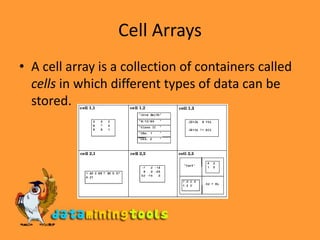
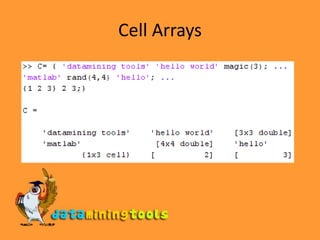
Cell ArraysA cell array is a collection of containers called cells in which different types of data can be stored.
Cell ArraysUse ‘{’ and ‘}’ to define the starting and beginning of a Cell Array.
Cell Arrays
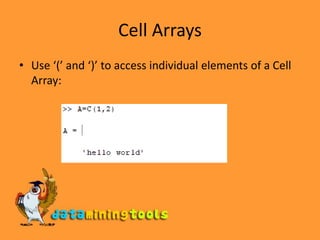
Cell ArraysUse ‘(’ and ‘)’ to access individual elements of a Cell Array:
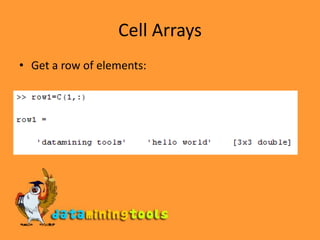
Cell ArraysGet a row of elements:
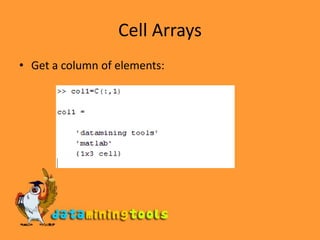
Cell ArraysGet a column of elements:
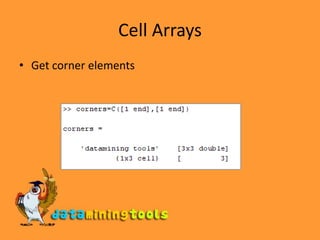
Cell ArraysGet corner elements
Cell ArraysCell Array Indexing SummaryUse curly braces {} for setting or getting the contents of cell arrays.Use parentheses () for indexing into a cell array to collect a subset of cells together in another cell array.
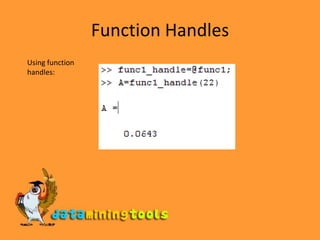
Function HandlesMATLAB functions are written to named M-files or are produced at the command line as anonymous functions. In either case, a function handle is used to pass the function as an input argument to a function.
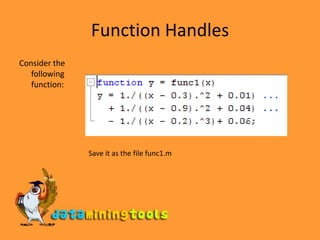
Function HandlesConsider the following function:Save it as the file func1.m
Function HandlesUsing function handles:
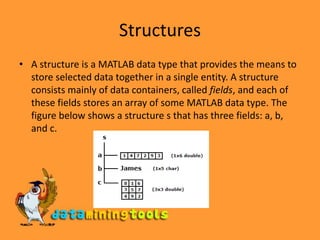
StructuresA structure is a MATLAB data type that provides the means to store selected data together in a single entity. A structure consists mainly of data containers, called fields, and each of these fields stores an array of some MATLAB data type. The figure below shows a structure s that has three fields: a, b, and c.
Defining structuresOR
Visit more self help tutorialsPick a tutorial of your choice and browse through it at your own pace.The tutorials section is free, self-guiding and will not involve any additional support.Visit us at www.dataminingtools.net

Matlab Organizing Data