http://www.tutorialspoint.com/matlab/matlab_calculus.htm Copyright © tutorialspoint.com
MATLAB - CALCULUS
MATLAB provides various ways for solving problems of differentialand integralcalculus, solving differential
equations of any degree and calculationof limits. Best of all, youcaneasily plot the graphs of complex functions
and check maxima, minima and other stationery points ona graphby solving the originalfunction, as wellas its
derivative.
Inthis chapter and incoming couple of chapters, we willdealwiththe problems of calculus. Inthis chapter, we will
discuss pre-calculus concepts i.e., calculating limits of functions and verifying the properties of limits.
Inthe next chapter Differential, we willcompute derivative of anexpressionand find the localmaxima and minima
ona graph. We willalso discuss solving differentialequations.
Finally, inthe Integration chapter, we willdiscuss integralcalculus.
Calculating Limits
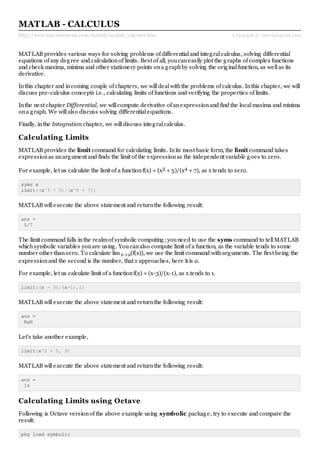
MATLAB provides the limit command for calculating limits. Inits most basic form, the limit command takes
expressionas anargument and finds the limit of the expressionas the independent variable goes to zero.
For example, let us calculate the limit of a functionf(x) = (x3 + 5)/(x4 + 7), as x tends to zero.
syms x
limit((x^3 + 5)/(x^4 + 7))
MATLAB willexecute the above statement and returnthe following result:
ans =
5/7
The limit command falls inthe realmof symbolic computing; youneed to use the syms command to tellMATLAB
whichsymbolic variables youare using. Youcanalso compute limit of a function, as the variable tends to some
number other thanzero. To calculate limx->a(f(x)), we use the limit command witharguments. The first being the
expressionand the second is the number, that x approaches, here it is a.
For example, let us calculate limit of a functionf(x) = (x-3)/(x-1), as x tends to 1.
limit((x - 3)/(x-1),1)
MATLAB willexecute the above statement and returnthe following result:
ans =
NaN
Let's take another example,
limit(x^2 + 5, 3)
MATLAB willexecute the above statement and returnthe following result:
ans =
14
Calculating Limits using Octave
Following is Octave versionof the above example using symbolic package, try to execute and compare the
result:
pkg load symbolic
symbols
x=sym("x");
subs((x^3+5)/(x^4+7),x,0)
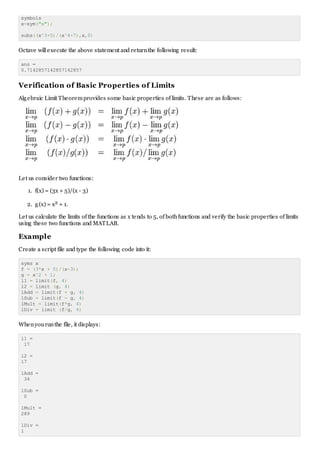
Octave willexecute the above statement and returnthe following result:
ans =
0.7142857142857142857
Verification of Basic Properties of Limits
Algebraic Limit Theoremprovides some basic properties of limits. These are as follows:
Let us consider two functions:
1. f(x) = (3x + 5)/(x - 3)
2. g(x) = x2 + 1.
Let us calculate the limits of the functions as x tends to 5, of bothfunctions and verify the basic properties of limits
using these two functions and MATLAB.
Example
Create a script file and type the following code into it:
syms x
f = (3*x + 5)/(x-3);
g = x^2 + 1;
l1 = limit(f, 4)
l2 = limit (g, 4)
lAdd = limit(f + g, 4)
lSub = limit(f - g, 4)
lMult = limit(f*g, 4)
lDiv = limit (f/g, 4)
Whenyourunthe file, it displays:
l1 =
17
l2 =
17
lAdd =
34
lSub =
0
lMult =
289
lDiv =
1
Verification of Basic Properties of Limits using Octave
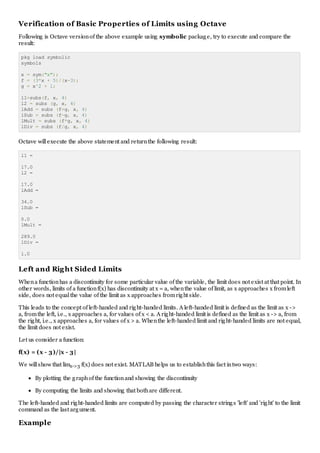
Following is Octave versionof the above example using symbolic package, try to execute and compare the
result:
pkg load symbolic
symbols
x = sym("x");
f = (3*x + 5)/(x-3);
g = x^2 + 1;
l1=subs(f, x, 4)
l2 = subs (g, x, 4)
lAdd = subs (f+g, x, 4)
lSub = subs (f-g, x, 4)
lMult = subs (f*g, x, 4)
lDiv = subs (f/g, x, 4)
Octave willexecute the above statement and returnthe following result:
l1 =
17.0
l2 =
17.0
lAdd =
34.0
lSub =
0.0
lMult =
289.0
lDiv =
1.0
Left and Right Sided Limits
Whena functionhas a discontinuity for some particular value of the variable, the limit does not exist at that point. In
other words, limits of a functionf(x) has discontinuity at x = a, whenthe value of limit, as x approaches x fromleft
side, does not equalthe value of the limit as x approaches fromright side.
This leads to the concept of left-handed and right-handed limits. A left-handed limit is defined as the limit as x ->
a, fromthe left, i.e., x approaches a, for values of x < a. A right-handed limit is defined as the limit as x -> a, from
the right, i.e., x approaches a, for values of x > a. Whenthe left-handed limit and right-handed limits are not equal,
the limit does not exist.
Let us consider a function:
f(x) = (x - 3)/|x - 3|
We willshow that limx->3 f(x) does not exist. MATLAB helps us to establishthis fact intwo ways:
By plotting the graphof the functionand showing the discontinuity
By computing the limits and showing that bothare different.
The left-handed and right-handed limits are computed by passing the character strings 'left' and 'right' to the limit
command as the last argument.
Example
Create a script file and type the following code into it:
f = (x - 3)/abs(x-3);
ezplot(f,[-1,5])
l = limit(f,x,3,'left')
r = limit(f,x,3,'right')
Whenyourunthe file, MATLAB draws the following plot,
and displays the following output:
l =
-1
r =
1

Matlab calculus

  • 1.
    http://www.tutorialspoint.com/matlab/matlab_calculus.htm Copyright ©tutorialspoint.com MATLAB - CALCULUS MATLAB provides various ways for solving problems of differentialand integralcalculus, solving differential equations of any degree and calculationof limits. Best of all, youcaneasily plot the graphs of complex functions and check maxima, minima and other stationery points ona graphby solving the originalfunction, as wellas its derivative. Inthis chapter and incoming couple of chapters, we willdealwiththe problems of calculus. Inthis chapter, we will discuss pre-calculus concepts i.e., calculating limits of functions and verifying the properties of limits. Inthe next chapter Differential, we willcompute derivative of anexpressionand find the localmaxima and minima ona graph. We willalso discuss solving differentialequations. Finally, inthe Integration chapter, we willdiscuss integralcalculus. Calculating Limits MATLAB provides the limit command for calculating limits. Inits most basic form, the limit command takes expressionas anargument and finds the limit of the expressionas the independent variable goes to zero. For example, let us calculate the limit of a functionf(x) = (x3 + 5)/(x4 + 7), as x tends to zero. syms x limit((x^3 + 5)/(x^4 + 7)) MATLAB willexecute the above statement and returnthe following result: ans = 5/7 The limit command falls inthe realmof symbolic computing; youneed to use the syms command to tellMATLAB whichsymbolic variables youare using. Youcanalso compute limit of a function, as the variable tends to some number other thanzero. To calculate limx->a(f(x)), we use the limit command witharguments. The first being the expressionand the second is the number, that x approaches, here it is a. For example, let us calculate limit of a functionf(x) = (x-3)/(x-1), as x tends to 1. limit((x - 3)/(x-1),1) MATLAB willexecute the above statement and returnthe following result: ans = NaN Let's take another example, limit(x^2 + 5, 3) MATLAB willexecute the above statement and returnthe following result: ans = 14 Calculating Limits using Octave Following is Octave versionof the above example using symbolic package, try to execute and compare the result: pkg load symbolic
  • 2.
    symbols x=sym("x"); subs((x^3+5)/(x^4+7),x,0) Octave willexecute theabove statement and returnthe following result: ans = 0.7142857142857142857 Verification of Basic Properties of Limits Algebraic Limit Theoremprovides some basic properties of limits. These are as follows: Let us consider two functions: 1. f(x) = (3x + 5)/(x - 3) 2. g(x) = x2 + 1. Let us calculate the limits of the functions as x tends to 5, of bothfunctions and verify the basic properties of limits using these two functions and MATLAB. Example Create a script file and type the following code into it: syms x f = (3*x + 5)/(x-3); g = x^2 + 1; l1 = limit(f, 4) l2 = limit (g, 4) lAdd = limit(f + g, 4) lSub = limit(f - g, 4) lMult = limit(f*g, 4) lDiv = limit (f/g, 4) Whenyourunthe file, it displays: l1 = 17 l2 = 17 lAdd = 34 lSub = 0 lMult = 289 lDiv = 1
  • 3.
    Verification of BasicProperties of Limits using Octave Following is Octave versionof the above example using symbolic package, try to execute and compare the result: pkg load symbolic symbols x = sym("x"); f = (3*x + 5)/(x-3); g = x^2 + 1; l1=subs(f, x, 4) l2 = subs (g, x, 4) lAdd = subs (f+g, x, 4) lSub = subs (f-g, x, 4) lMult = subs (f*g, x, 4) lDiv = subs (f/g, x, 4) Octave willexecute the above statement and returnthe following result: l1 = 17.0 l2 = 17.0 lAdd = 34.0 lSub = 0.0 lMult = 289.0 lDiv = 1.0 Left and Right Sided Limits Whena functionhas a discontinuity for some particular value of the variable, the limit does not exist at that point. In other words, limits of a functionf(x) has discontinuity at x = a, whenthe value of limit, as x approaches x fromleft side, does not equalthe value of the limit as x approaches fromright side. This leads to the concept of left-handed and right-handed limits. A left-handed limit is defined as the limit as x -> a, fromthe left, i.e., x approaches a, for values of x < a. A right-handed limit is defined as the limit as x -> a, from the right, i.e., x approaches a, for values of x > a. Whenthe left-handed limit and right-handed limits are not equal, the limit does not exist. Let us consider a function: f(x) = (x - 3)/|x - 3| We willshow that limx->3 f(x) does not exist. MATLAB helps us to establishthis fact intwo ways: By plotting the graphof the functionand showing the discontinuity By computing the limits and showing that bothare different. The left-handed and right-handed limits are computed by passing the character strings 'left' and 'right' to the limit command as the last argument. Example
  • 4.
    Create a scriptfile and type the following code into it: f = (x - 3)/abs(x-3); ezplot(f,[-1,5]) l = limit(f,x,3,'left') r = limit(f,x,3,'right') Whenyourunthe file, MATLAB draws the following plot, and displays the following output: l = -1 r = 1