http://www.tutorialspoint.com/matlab/matlab_string s.htm Copyright © tutorialspoint.com
MATLAB - STRINGS
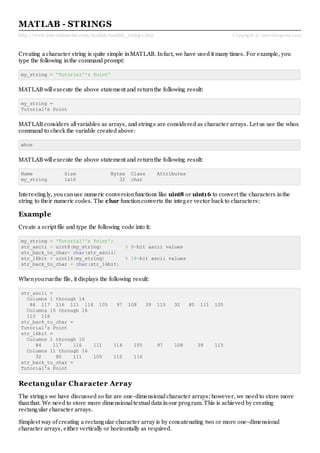
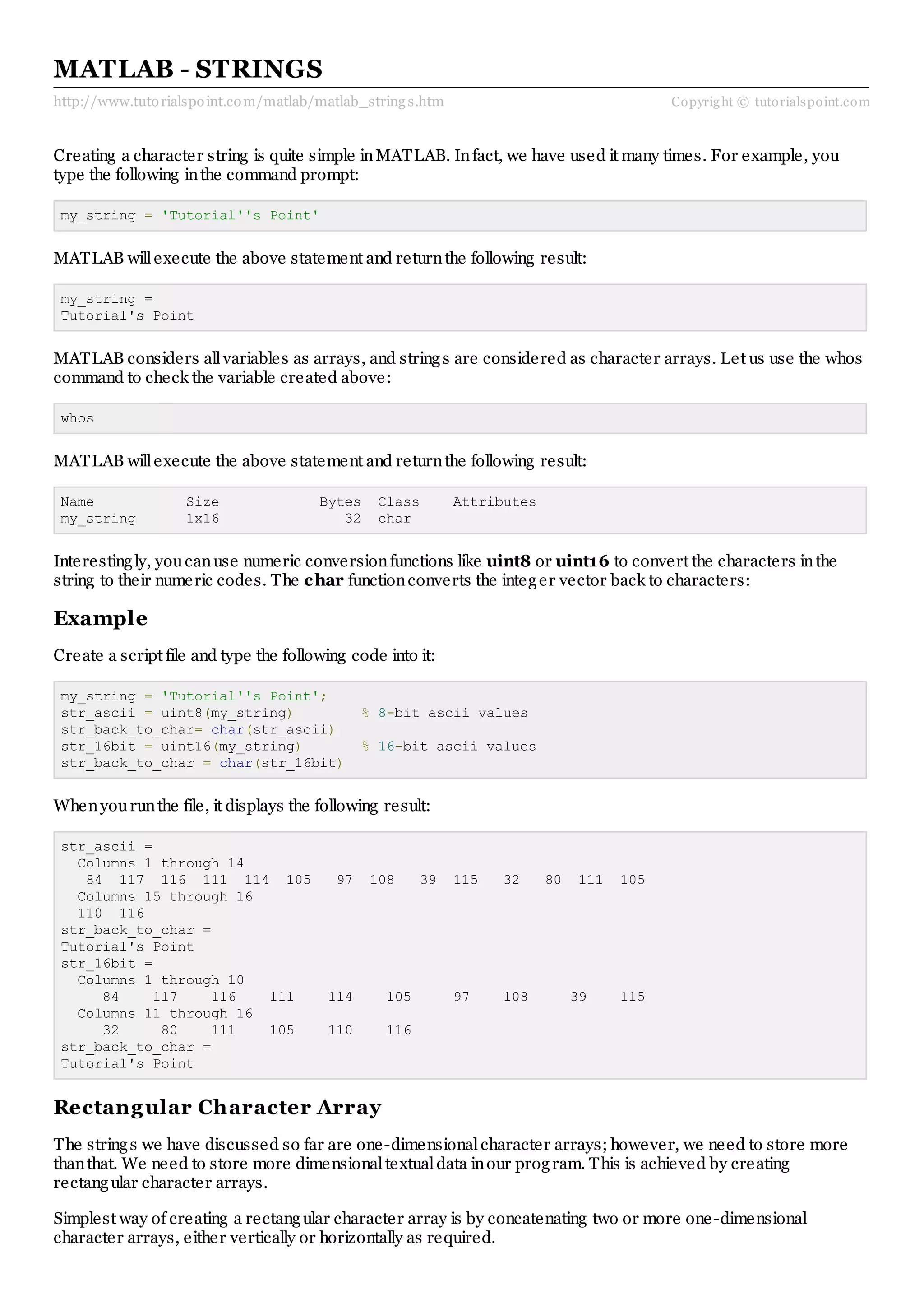
Creating a character string is quite simple inMATLAB. Infact, we have used it many times. For example, you
type the following inthe command prompt:
my_string = 'Tutorial''s Point'
MATLAB willexecute the above statement and returnthe following result:
my_string =
Tutorial's Point
MATLAB considers allvariables as arrays, and strings are considered as character arrays. Let us use the whos
command to check the variable created above:
whos
MATLAB willexecute the above statement and returnthe following result:
Name Size Bytes Class Attributes
my_string 1x16 32 char
Interestingly, youcanuse numeric conversionfunctions like uint8 or uint16 to convert the characters inthe
string to their numeric codes. The char functionconverts the integer vector back to characters:
Example
Create a script file and type the following code into it:
my_string = 'Tutorial''s Point';
str_ascii = uint8(my_string) % 8-bit ascii values
str_back_to_char= char(str_ascii)
str_16bit = uint16(my_string) % 16-bit ascii values
str_back_to_char = char(str_16bit)
Whenyourunthe file, it displays the following result:
str_ascii =
Columns 1 through 14
84 117 116 111 114 105 97 108 39 115 32 80 111 105
Columns 15 through 16
110 116
str_back_to_char =
Tutorial's Point
str_16bit =
Columns 1 through 10
84 117 116 111 114 105 97 108 39 115
Columns 11 through 16
32 80 111 105 110 116
str_back_to_char =
Tutorial's Point
Rectangular Character Array
The strings we have discussed so far are one-dimensionalcharacter arrays; however, we need to store more
thanthat. We need to store more dimensionaltextualdata inour program. This is achieved by creating
rectangular character arrays.
Simplest way of creating a rectangular character array is by concatenating two or more one-dimensional
character arrays, either vertically or horizontally as required.
Youcancombine strings vertically ineither of the following ways:
Using the MATLAB concatenationoperator [] and separating eachrow witha semicolon(;). Please note
that inthis method eachrow must containthe same number of characters. For strings withdifferent
lengths, youshould pad withspace characters as needed.
Using the char function. If the strings are different length, char pads the shorter strings withtrailing
blanks so that eachrow has the same number of characters.
Example
Create a script file and type the following code into it:
doc_profile = ['Zara Ali '; ...
'Sr. Surgeon '; ...
'R N Tagore Cardiology Research Center']
doc_profile = char('Zara Ali', 'Sr. Surgeon', ...
'RN Tagore Cardiology Research Center')
Whenyourunthe file, it displays the following result:
doc_profile =
Zara Ali
Sr. Surgeon
R N Tagore Cardiology Research Center
doc_profile =
Zara Ali
Sr. Surgeon
RN Tagore Cardiology Research Center
Youcancombine strings horizontally ineither of the following ways:
Using the MATLAB concatenationoperator, [] and separating the input strings witha comma or a space.
This method preserves any trailing spaces inthe input arrays.
Using the string concatenationfunction, strcat. This method removes trailing spaces inthe inputs
Example
Create a script file and type the following code into it:
name = 'Zara Ali ';
position = 'Sr. Surgeon ';
worksAt = 'R N Tagore Cardiology Research Center';
profile = [name ', ' position ', ' worksAt]
profile = strcat(name, ', ', position, ', ', worksAt)
Whenyourunthe file, it displays the following result:
profile =
Zara Ali , Sr. Surgeon , R N Tagore
Cardiology Research Center
profile =
Zara Ali,Sr. Surgeon,R N Tagore Cardiology Research Center
Combining Strings into a Cell Array
Fromour previous discussion, it is clear that combining strings withdifferent lengths could be a painas allstrings
inthe array has to be of the same length. We have used blank spaces at the end of strings to equalize their length.
However, a more efficient way to combine the strings is to convert the resulting array into a cellarray.
MATLAB cellarray canhold different sizes and types of data inanarray. Cellarrays provide a more flexible way
to store strings of varying length.
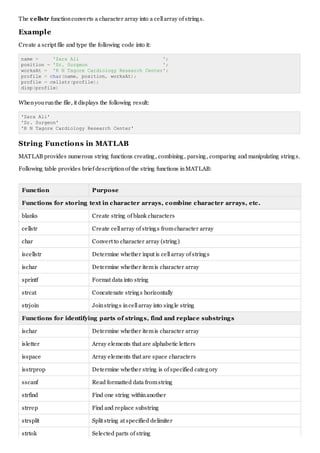
The cellstr functionconverts a character array into a cellarray of strings.
Example
Create a script file and type the following code into it:
name = 'Zara Ali ';
position = 'Sr. Surgeon ';
worksAt = 'R N Tagore Cardiology Research Center';
profile = char(name, position, worksAt);
profile = cellstr(profile);
disp(profile)
Whenyourunthe file, it displays the following result:
'Zara Ali'
'Sr. Surgeon'
'R N Tagore Cardiology Research Center'
String Functions in MATLAB
MATLAB provides numerous string functions creating, combining, parsing, comparing and manipulating strings.
Following table provides brief descriptionof the string functions inMATLAB:
Function Purpose
Functions for storing text in character arrays, combine character arrays, etc.
blanks Create string of blank characters
cellstr Create cellarray of strings fromcharacter array
char Convert to character array (string)
iscellstr Determine whether input is cellarray of strings
ischar Determine whether itemis character array
sprintf Format data into string
strcat Concatenate strings horizontally
strjoin Joinstrings incellarray into single string
Functions for identifying parts of strings, find and replace substrings
ischar Determine whether itemis character array
isletter Array elements that are alphabetic letters
isspace Array elements that are space characters
isstrprop Determine whether string is of specified category
sscanf Read formatted data fromstring
strfind Find one string withinanother
strrep Find and replace substring
strsplit Split string at specified delimiter
strtok Selected parts of string
validatestring Check validity of text string
symvar Determine symbolic variables inexpression
regexp Matchregular expression(case sensitive)
regexpi Matchregular expression(case insensitive)
regexprep Replace string using regular expression
regexptranslate Translate string into regular expression
Functions for string comparison
strcmp Compare strings (case sensitive)
strcmpi Compare strings (case insensitive)
strncmp Compare first ncharacters of strings (case sensitive)
strncmpi Compare first ncharacters of strings (case insensitive)
Functions for changing string to upper- or lowercase, creating or removing white space
deblank Strip trailing blanks fromend of string
strtrim Remove leading and trailing white space fromstring
lower Convert string to lowercase
upper Convert string to uppercase
strjust Justify character array
Examples
The following examples illustrate some of the above-mentioned string functions:
Formatting Strings
Create a script file and type the following code into it:
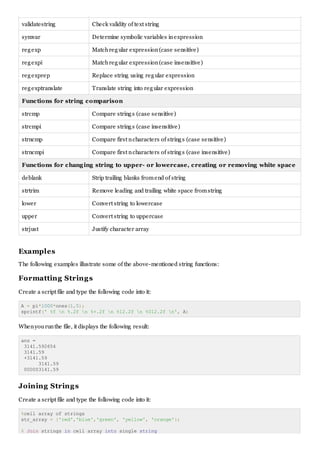
A = pi*1000*ones(1,5);
sprintf(' %f n %.2f n %+.2f n %12.2f n %012.2f n', A)
Whenyourunthe file, it displays the following result:
ans =
3141.592654
3141.59
+3141.59
3141.59
000003141.59
Joining Strings
Create a script file and type the following code into it:
%cell array of strings
str_array = {'red','blue','green', 'yellow', 'orange'};
% Join strings in cell array into single string
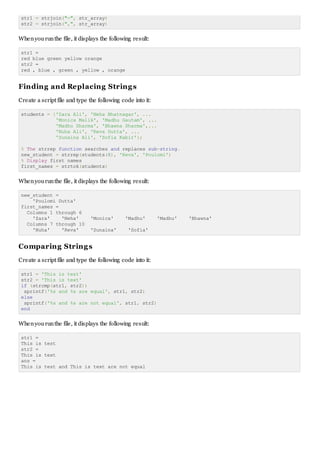
str1 = strjoin("-", str_array)
str2 = strjoin(",", str_array)
Whenyourunthe file, it displays the following result:
str1 =
red blue green yellow orange
str2 =
red , blue , green , yellow , orange
Finding and Replacing Strings
Create a script file and type the following code into it:
students = {'Zara Ali', 'Neha Bhatnagar', ...
'Monica Malik', 'Madhu Gautam', ...
'Madhu Sharma', 'Bhawna Sharma',...
'Nuha Ali', 'Reva Dutta', ...
'Sunaina Ali', 'Sofia Kabir'};
% The strrep function searches and replaces sub-string.
new_student = strrep(students(8), 'Reva', 'Poulomi')
% Display first names
first_names = strtok(students)
Whenyourunthe file, it displays the following result:
new_student =
'Poulomi Dutta'
first_names =
Columns 1 through 6
'Zara' 'Neha' 'Monica' 'Madhu' 'Madhu' 'Bhawna'
Columns 7 through 10
'Nuha' 'Reva' 'Sunaina' 'Sofia'
Comparing Strings
Create a script file and type the following code into it:
str1 = 'This is test'
str2 = 'This is text'
if (strcmp(str1, str2))
sprintf('%s and %s are equal', str1, str2)
else
sprintf('%s and %s are not equal', str1, str2)
end
Whenyourunthe file, it displays the following result:
str1 =
This is test
str2 =
This is text
ans =
This is test and This is text are not equal

Matlab strings

  • 1.
    http://www.tutorialspoint.com/matlab/matlab_string s.htm Copyright© tutorialspoint.com MATLAB - STRINGS Creating a character string is quite simple inMATLAB. Infact, we have used it many times. For example, you type the following inthe command prompt: my_string = 'Tutorial''s Point' MATLAB willexecute the above statement and returnthe following result: my_string = Tutorial's Point MATLAB considers allvariables as arrays, and strings are considered as character arrays. Let us use the whos command to check the variable created above: whos MATLAB willexecute the above statement and returnthe following result: Name Size Bytes Class Attributes my_string 1x16 32 char Interestingly, youcanuse numeric conversionfunctions like uint8 or uint16 to convert the characters inthe string to their numeric codes. The char functionconverts the integer vector back to characters: Example Create a script file and type the following code into it: my_string = 'Tutorial''s Point'; str_ascii = uint8(my_string) % 8-bit ascii values str_back_to_char= char(str_ascii) str_16bit = uint16(my_string) % 16-bit ascii values str_back_to_char = char(str_16bit) Whenyourunthe file, it displays the following result: str_ascii = Columns 1 through 14 84 117 116 111 114 105 97 108 39 115 32 80 111 105 Columns 15 through 16 110 116 str_back_to_char = Tutorial's Point str_16bit = Columns 1 through 10 84 117 116 111 114 105 97 108 39 115 Columns 11 through 16 32 80 111 105 110 116 str_back_to_char = Tutorial's Point Rectangular Character Array The strings we have discussed so far are one-dimensionalcharacter arrays; however, we need to store more thanthat. We need to store more dimensionaltextualdata inour program. This is achieved by creating rectangular character arrays. Simplest way of creating a rectangular character array is by concatenating two or more one-dimensional character arrays, either vertically or horizontally as required.
  • 2.
    Youcancombine strings verticallyineither of the following ways: Using the MATLAB concatenationoperator [] and separating eachrow witha semicolon(;). Please note that inthis method eachrow must containthe same number of characters. For strings withdifferent lengths, youshould pad withspace characters as needed. Using the char function. If the strings are different length, char pads the shorter strings withtrailing blanks so that eachrow has the same number of characters. Example Create a script file and type the following code into it: doc_profile = ['Zara Ali '; ... 'Sr. Surgeon '; ... 'R N Tagore Cardiology Research Center'] doc_profile = char('Zara Ali', 'Sr. Surgeon', ... 'RN Tagore Cardiology Research Center') Whenyourunthe file, it displays the following result: doc_profile = Zara Ali Sr. Surgeon R N Tagore Cardiology Research Center doc_profile = Zara Ali Sr. Surgeon RN Tagore Cardiology Research Center Youcancombine strings horizontally ineither of the following ways: Using the MATLAB concatenationoperator, [] and separating the input strings witha comma or a space. This method preserves any trailing spaces inthe input arrays. Using the string concatenationfunction, strcat. This method removes trailing spaces inthe inputs Example Create a script file and type the following code into it: name = 'Zara Ali '; position = 'Sr. Surgeon '; worksAt = 'R N Tagore Cardiology Research Center'; profile = [name ', ' position ', ' worksAt] profile = strcat(name, ', ', position, ', ', worksAt) Whenyourunthe file, it displays the following result: profile = Zara Ali , Sr. Surgeon , R N Tagore Cardiology Research Center profile = Zara Ali,Sr. Surgeon,R N Tagore Cardiology Research Center Combining Strings into a Cell Array Fromour previous discussion, it is clear that combining strings withdifferent lengths could be a painas allstrings inthe array has to be of the same length. We have used blank spaces at the end of strings to equalize their length. However, a more efficient way to combine the strings is to convert the resulting array into a cellarray. MATLAB cellarray canhold different sizes and types of data inanarray. Cellarrays provide a more flexible way to store strings of varying length.
  • 3.
    The cellstr functionconvertsa character array into a cellarray of strings. Example Create a script file and type the following code into it: name = 'Zara Ali '; position = 'Sr. Surgeon '; worksAt = 'R N Tagore Cardiology Research Center'; profile = char(name, position, worksAt); profile = cellstr(profile); disp(profile) Whenyourunthe file, it displays the following result: 'Zara Ali' 'Sr. Surgeon' 'R N Tagore Cardiology Research Center' String Functions in MATLAB MATLAB provides numerous string functions creating, combining, parsing, comparing and manipulating strings. Following table provides brief descriptionof the string functions inMATLAB: Function Purpose Functions for storing text in character arrays, combine character arrays, etc. blanks Create string of blank characters cellstr Create cellarray of strings fromcharacter array char Convert to character array (string) iscellstr Determine whether input is cellarray of strings ischar Determine whether itemis character array sprintf Format data into string strcat Concatenate strings horizontally strjoin Joinstrings incellarray into single string Functions for identifying parts of strings, find and replace substrings ischar Determine whether itemis character array isletter Array elements that are alphabetic letters isspace Array elements that are space characters isstrprop Determine whether string is of specified category sscanf Read formatted data fromstring strfind Find one string withinanother strrep Find and replace substring strsplit Split string at specified delimiter strtok Selected parts of string
  • 4.
    validatestring Check validityof text string symvar Determine symbolic variables inexpression regexp Matchregular expression(case sensitive) regexpi Matchregular expression(case insensitive) regexprep Replace string using regular expression regexptranslate Translate string into regular expression Functions for string comparison strcmp Compare strings (case sensitive) strcmpi Compare strings (case insensitive) strncmp Compare first ncharacters of strings (case sensitive) strncmpi Compare first ncharacters of strings (case insensitive) Functions for changing string to upper- or lowercase, creating or removing white space deblank Strip trailing blanks fromend of string strtrim Remove leading and trailing white space fromstring lower Convert string to lowercase upper Convert string to uppercase strjust Justify character array Examples The following examples illustrate some of the above-mentioned string functions: Formatting Strings Create a script file and type the following code into it: A = pi*1000*ones(1,5); sprintf(' %f n %.2f n %+.2f n %12.2f n %012.2f n', A) Whenyourunthe file, it displays the following result: ans = 3141.592654 3141.59 +3141.59 3141.59 000003141.59 Joining Strings Create a script file and type the following code into it: %cell array of strings str_array = {'red','blue','green', 'yellow', 'orange'}; % Join strings in cell array into single string
  • 5.
    str1 = strjoin("-",str_array) str2 = strjoin(",", str_array) Whenyourunthe file, it displays the following result: str1 = red blue green yellow orange str2 = red , blue , green , yellow , orange Finding and Replacing Strings Create a script file and type the following code into it: students = {'Zara Ali', 'Neha Bhatnagar', ... 'Monica Malik', 'Madhu Gautam', ... 'Madhu Sharma', 'Bhawna Sharma',... 'Nuha Ali', 'Reva Dutta', ... 'Sunaina Ali', 'Sofia Kabir'}; % The strrep function searches and replaces sub-string. new_student = strrep(students(8), 'Reva', 'Poulomi') % Display first names first_names = strtok(students) Whenyourunthe file, it displays the following result: new_student = 'Poulomi Dutta' first_names = Columns 1 through 6 'Zara' 'Neha' 'Monica' 'Madhu' 'Madhu' 'Bhawna' Columns 7 through 10 'Nuha' 'Reva' 'Sunaina' 'Sofia' Comparing Strings Create a script file and type the following code into it: str1 = 'This is test' str2 = 'This is text' if (strcmp(str1, str2)) sprintf('%s and %s are equal', str1, str2) else sprintf('%s and %s are not equal', str1, str2) end Whenyourunthe file, it displays the following result: str1 = This is test str2 = This is text ans = This is test and This is text are not equal