


Introduction to
    MATLAB
   Developed primarily by Cleve Moler in the
    1970's using FORTRAN subroutines.
   Rewritten in C in the 1980's with more
    functionality, which also include plotting
    features.
   The MathWorks Inc. was created (1984) to
    market and continue development of
    MATLAB.
   The name MATLAB stands for MATrix
    LABoratory.
   It is a package for scientific and technical
    computations and modeling.
   It was originally designed for solving linear
    algebra type problems using matrices.
   MATLAB is a high-performance language
    for technical computing. It integrates
    computation, visualization, and
    programming environment.
   The MATLAB environment is command oriented
    somewhat like UNIX. A prompt appears on the
    screen and a MATLAB statement can be entered.
    When the <ENTER> key is pressed, the statement
    is executed, and another prompt appears.
   MATLAB now has built-in functions for solving
    problems requiring data analysis, signal
    processing, optimization, and several other types
    of scientific computations.
   It also contains functions for 2-D and 3-D graphics
    and animation.
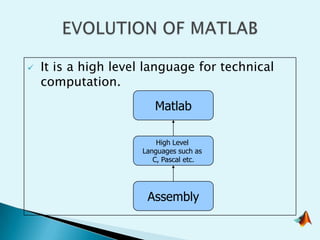
   It is a high level language for technical
    computation.
                        Matlab

                         High Level
                     Languages such as
                        C, Pascal etc.


                      Assembly
  MATLAB is case sensitive.
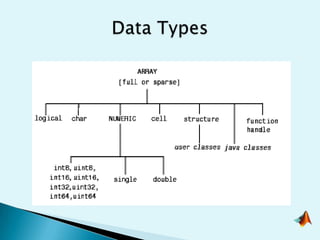
 The fundamental data type is an array.
 Has ability to make functions in command
   window in a single line.
 Can be linked to C/C++, JAVA, SQL, etc.
 Specific applications are collected in
   packages referred to as toolbox.
  It is possible to keep track of everything done
   during a MATLAB session.
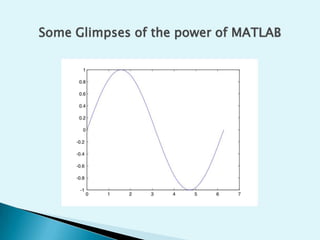
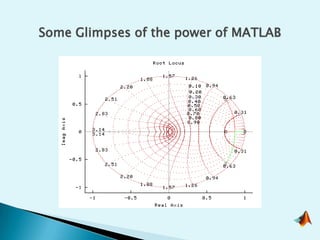
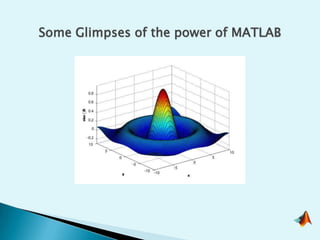
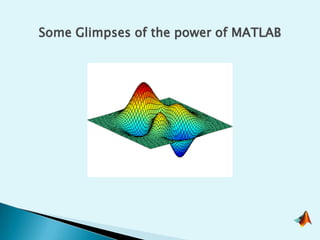
Some Glimpses of the power of MATLAB
1.   Numerical computation and symbolic
     calculations
2.   Data processing
3.   Programming
4.   Visualization
5.   GUI
6.   System modeling and simulation.
7.   Design Games
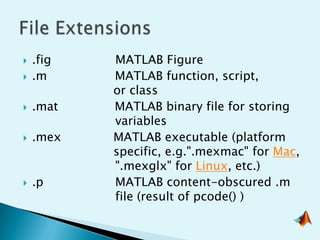
   .fig   MATLAB Figure
   .m     MATLAB function, script,
           or class
   .mat   MATLAB binary file for storing
           variables
   .mex   MATLAB executable (platform
           specific, e.g.".mexmac" for Mac,
           ".mexglx" for Linux, etc.)
   .p     MATLAB content-obscured .m
           file (result of pcode() )
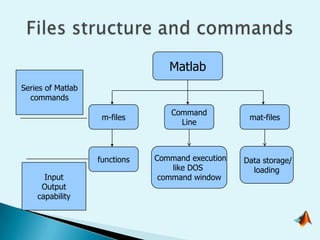
Matlab
Series of Matlab
  commands
                                  Command
                    m-files                         mat-files
                                    Line


                   functions   Command execution   Data storage/
                                   like DOS          loading
      Input                     command window
     Output
    capability
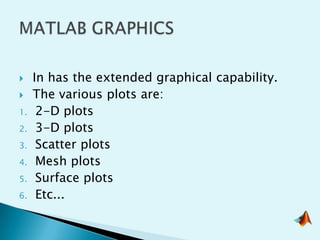
    In has the extended graphical capability.
    The various plots are:
1.    2-D plots
2.    3-D plots
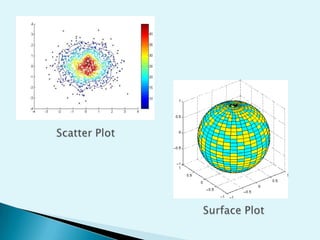
3.    Scatter plots
4.    Mesh plots
5.    Surface plots
6.    Etc...
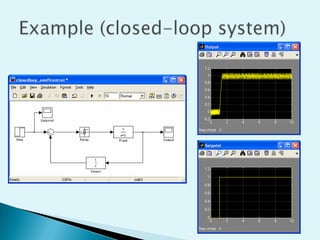
   Simulink software models, simulates, and analyzes
    dynamic systems.
   Simulink supports linear and nonlinear systems,
    modeled in continuous time, sampled time, or a
    hybrid of the two.
   Used to model and solve real problems in a variety
    of industries, including:
     • Aerospace and Defense
     • Automotive
     • Communications
     • Electronics and Signal Processing
     • Medical Instrumentation
 Control System Toolbox
 Image Processing Toolbox
 Signal Processing Toolbox
 Financial toolbox
 Statistical Toolbox
 Communication Toolbox
 Neural Network Toolbox
 Fuzzy Logic Toolbox
 Aerospace Toolbox
 Fixed Income Toolbox
   MATLAB may behave as a calculator or as a
    programming Language.
   MATLAB combines calculation and graphic plotting.
   MATLAB is relatively easy to learn.
   MATLAB is interpreted (not compiled), errors are
    easy to fix.
   MATLAB is optimized to be relatively fast when
    performing matrix operations.
   Academics and scientific research.
   Defense applications
   Space exploration
   Artificial Intelligence
   Bio-informatics and medical science
   Forecasting
   Plant modelling
   Finance
   Security Systems
   Communication & Networking
   Electronics
   Communication
   Chemical
   Biomedical
   Software industries
   Finance companies
   Instrument manufacturers
   Plant designing

Note:- It has extensive use in R&D department of
       almost all the big companies.
   MathWorks
   Intel
   Cadence
   Philips, Sony, Samsung, LG
   IBM, HP, Acer
   General Motors, Ford, Honda
   NSN, Ericsson, Tech Mahindra
   NASA
   ISRO
   CSIO, DRDO, BEL, BDL
QUESTIONS
Matlab lecture
Matlab lecture

Matlab lecture

  • 3.
  • 4.
    Developed primarily by Cleve Moler in the 1970's using FORTRAN subroutines.  Rewritten in C in the 1980's with more functionality, which also include plotting features.  The MathWorks Inc. was created (1984) to market and continue development of MATLAB.
  • 5.
    The name MATLAB stands for MATrix LABoratory.  It is a package for scientific and technical computations and modeling.  It was originally designed for solving linear algebra type problems using matrices.  MATLAB is a high-performance language for technical computing. It integrates computation, visualization, and programming environment.
  • 6.
    The MATLAB environment is command oriented somewhat like UNIX. A prompt appears on the screen and a MATLAB statement can be entered. When the <ENTER> key is pressed, the statement is executed, and another prompt appears.  MATLAB now has built-in functions for solving problems requiring data analysis, signal processing, optimization, and several other types of scientific computations.  It also contains functions for 2-D and 3-D graphics and animation.
  • 7.
    It is a high level language for technical computation. Matlab High Level Languages such as C, Pascal etc. Assembly
  • 8.
     MATLABis case sensitive.  The fundamental data type is an array.  Has ability to make functions in command window in a single line.  Can be linked to C/C++, JAVA, SQL, etc.  Specific applications are collected in packages referred to as toolbox.  It is possible to keep track of everything done during a MATLAB session.
  • 9.
    Some Glimpses ofthe power of MATLAB
  • 10.
    Some Glimpses ofthe power of MATLAB
  • 11.
    Some Glimpses ofthe power of MATLAB
  • 12.
    Some Glimpses ofthe power of MATLAB
  • 13.
    1. Numerical computation and symbolic calculations 2. Data processing 3. Programming 4. Visualization 5. GUI 6. System modeling and simulation. 7. Design Games
  • 15.
    .fig MATLAB Figure  .m MATLAB function, script, or class  .mat MATLAB binary file for storing variables  .mex MATLAB executable (platform specific, e.g.".mexmac" for Mac, ".mexglx" for Linux, etc.)  .p MATLAB content-obscured .m file (result of pcode() )
  • 16.
    Matlab Series of Matlab commands Command m-files mat-files Line functions Command execution Data storage/ like DOS loading Input command window Output capability
  • 17.
    In has the extended graphical capability.  The various plots are: 1. 2-D plots 2. 3-D plots 3. Scatter plots 4. Mesh plots 5. Surface plots 6. Etc...
  • 19.
    Simulink software models, simulates, and analyzes dynamic systems.  Simulink supports linear and nonlinear systems, modeled in continuous time, sampled time, or a hybrid of the two.  Used to model and solve real problems in a variety of industries, including: • Aerospace and Defense • Automotive • Communications • Electronics and Signal Processing • Medical Instrumentation
  • 21.
     Control SystemToolbox  Image Processing Toolbox  Signal Processing Toolbox  Financial toolbox  Statistical Toolbox  Communication Toolbox  Neural Network Toolbox  Fuzzy Logic Toolbox  Aerospace Toolbox  Fixed Income Toolbox
  • 22.
    MATLAB may behave as a calculator or as a programming Language.  MATLAB combines calculation and graphic plotting.  MATLAB is relatively easy to learn.  MATLAB is interpreted (not compiled), errors are easy to fix.  MATLAB is optimized to be relatively fast when performing matrix operations.
  • 23.
    Academics and scientific research.  Defense applications  Space exploration  Artificial Intelligence  Bio-informatics and medical science  Forecasting  Plant modelling  Finance  Security Systems  Communication & Networking
  • 24.
    Electronics  Communication  Chemical  Biomedical  Software industries  Finance companies  Instrument manufacturers  Plant designing Note:- It has extensive use in R&D department of almost all the big companies.
  • 25.
    MathWorks  Intel  Cadence  Philips, Sony, Samsung, LG  IBM, HP, Acer  General Motors, Ford, Honda  NSN, Ericsson, Tech Mahindra  NASA  ISRO  CSIO, DRDO, BEL, BDL
  • 26.