Contents
1 Anti-Spam Techniques 3
1.1 Email Architecture . . . . . . . . . . . . . . . . . . . . . . . . . . . . . . . . . . . . . 3
1.2 Sender Authentication Protocols . . . . . . . . . . . . . . . . . . . . . . . . . . . . . 4
1.3 Sender Policy Framework . . . . . . . . . . . . . . . . . . . . . . . . . . . . . . . . . 5
1.3.1 Publishing Authorization . . . . . . . . . . . . . . . . . . . . . . . . . . . . . 6
1.3.2 SPF Record Syntax . . . . . . . . . . . . . . . . . . . . . . . . . . . . . . . . 6
1.3.3 Checking SPF . . . . . . . . . . . . . . . . . . . . . . . . . . . . . . . . . . . 8
1.3.4 An Example Policy . . . . . . . . . . . . . . . . . . . . . . . . . . . . . . . . . 9
1.3.5 The Received-SPF Header Field . . . . . . . . . . . . . . . . . . . . . . . . . 9
1.3.6 Security Considerations . . . . . . . . . . . . . . . . . . . . . . . . . . . . . . 10
1.3.7 Tools . . . . . . . . . . . . . . . . . . . . . . . . . . . . . . . . . . . . . . . . 11
1.3.8 Deployment . . . . . . . . . . . . . . . . . . . . . . . . . . . . . . . . . . . . . 12
1.4 Sender ID . . . . . . . . . . . . . . . . . . . . . . . . . . . . . . . . . . . . . . . . . . 12
1.4.1 Implementation . . . . . . . . . . . . . . . . . . . . . . . . . . . . . . . . . . . 12
1.4.2 SPF vs Sender ID . . . . . . . . . . . . . . . . . . . . . . . . . . . . . . . . . 13
1.4.3 Security Considerations . . . . . . . . . . . . . . . . . . . . . . . . . . . . . . 14
1.5 Content Authentication Protocols . . . . . . . . . . . . . . . . . . . . . . . . . . . . . 14
1.6 DomainKeys Identified Mail (DKIM) . . . . . . . . . . . . . . . . . . . . . . . . . . . 14
1.6.1 Protocol Elements . . . . . . . . . . . . . . . . . . . . . . . . . . . . . . . . . 15
1.6.2 The DKIM-Signature Header Field . . . . . . . . . . . . . . . . . . . . . . . . 16
1.6.3 Signing . . . . . . . . . . . . . . . . . . . . . . . . . . . . . . . . . . . . . . . 16
1.6.4 Verifying . . . . . . . . . . . . . . . . . . . . . . . . . . . . . . . . . . . . . . 17
1.6.5 Security Considerations . . . . . . . . . . . . . . . . . . . . . . . . . . . . . . 18
1.7 Author Domain Signing Practices (ADSP) . . . . . . . . . . . . . . . . . . . . . . . . 19
1.7.1 How set up ADSP Policy . . . . . . . . . . . . . . . . . . . . . . . . . . . . . 19
1.8 Domain-based Message Authentication, Reporting & Conformance (DMARC) . . . . 19
1.8.1 Alignment . . . . . . . . . . . . . . . . . . . . . . . . . . . . . . . . . . . . . . 21
1.8.2 DMARC Policy Record . . . . . . . . . . . . . . . . . . . . . . . . . . . . . . 21
1.8.3 Reports . . . . . . . . . . . . . . . . . . . . . . . . . . . . . . . . . . . . . . . 22
1.8.4 Security Considerations . . . . . . . . . . . . . . . . . . . . . . . . . . . . . . 23
1.8.5 How to create DMARC Record . . . . . . . . . . . . . . . . . . . . . . . . . . 23
1.9 Authenticated Received Chain . . . . . . . . . . . . . . . . . . . . . . . . . . . . . . 24
1.9.1 Implementation . . . . . . . . . . . . . . . . . . . . . . . . . . . . . . . . . . . 24
1.10 Microsoft Anti-Spam Policy . . . . . . . . . . . . . . . . . . . . . . . . . . . . . . . . 25
1.10.1 Office 365 email anti-spam protection . . . . . . . . . . . . . . . . . . . . . . 25
1.10.2 Anti-spam message headers . . . . . . . . . . . . . . . . . . . . . . . . . . . . 26
1.10.3 Personal Experience . . . . . . . . . . . . . . . . . . . . . . . . . . . . . . . . 27
1.11 Google Anti-Spam Policy . . . . . . . . . . . . . . . . . . . . . . . . . . . . . . . . . 27
1.11.1 Personal Experience . . . . . . . . . . . . . . . . . . . . . . . . . . . . . . . . 28
1.12 Yahoo Anti-Spam Policy . . . . . . . . . . . . . . . . . . . . . . . . . . . . . . . . . . 29
1.12.1 Yahoo DMARC policy . . . . . . . . . . . . . . . . . . . . . . . . . . . . . . . 30
1.12.2 Personal Experience . . . . . . . . . . . . . . . . . . . . . . . . . . . . . . . . 30
1
2 Personal Investigation for Spam 31
2.1 Spam Folder . . . . . . . . . . . . . . . . . . . . . . . . . . . . . . . . . . . . . . . . . 31
2.2 SPF neutral . . . . . . . . . . . . . . . . . . . . . . . . . . . . . . . . . . . . . . . . . 33
2.3 No Alignment . . . . . . . . . . . . . . . . . . . . . . . . . . . . . . . . . . . . . . . . 34
2.4 Two DKIM Signatures . . . . . . . . . . . . . . . . . . . . . . . . . . . . . . . . . . . 35
2.5 DKIM TempError . . . . . . . . . . . . . . . . . . . . . . . . . . . . . . . . . . . . . 36
2.6 Fake Header TO . . . . . . . . . . . . . . . . . . . . . . . . . . . . . . . . . . . . . . 37
2.7 SPF none and DKIM neutral . . . . . . . . . . . . . . . . . . . . . . . . . . . . . . . 38
2.8 SPF softfail and DKIM neutral . . . . . . . . . . . . . . . . . . . . . . . . . . . . . 38
2.9 Organization . . . . . . . . . . . . . . . . . . . . . . . . . . . . . . . . . . . . . . . . 39
2.10 Mozilla Thunderbird . . . . . . . . . . . . . . . . . . . . . . . . . . . . . . . . . . . . 40
2.11 Inbox Folder . . . . . . . . . . . . . . . . . . . . . . . . . . . . . . . . . . . . . . . . 41
2.11.1 List-Unsubscribe . . . . . . . . . . . . . . . . . . . . . . . . . . . . . . . . . . 41
3 Additional Spam Folder 43
4 Conclusions 45
2
HW: Web Security and Privacy 2016/2017
Anti-spam techniques
Tanasache Florin 1524243
Abstract
This document provides an overview of most used and effective anti-spam techniques based
on adding suitable fields in the header of an email message and additional examinations.
An electronic message is ”spam” if (A) the recipient’s personal identity and context are irrel-
evant because the message is equally applicable to many other potential recipients; and (B)
the recipient has not verifiably granted deliberate, explicit, and still-revocable permission for it
to be sent. Probably this is the most accurate and complete definition today. Spam is just a
branch of the vast domain of network security. In the real world, the question is not ”How to
suppress spam?” but ”How to limit spam without killing email?”.
Various anti-spam techniques are used to prevent email spam. No technique is a complete solu-
tion to the spam problem, and each has trade-offs between incorrectly rejecting legitimate email
(false positives) vs. not rejecting all spam (false negatives) and the associated costs in time and
effort. Anti-spam techniques can be broken into four broad categories: (1) those that require
actions by individuals, (2) those that can be automated by email administrators, (3) those that
can be automated by email senders and (4) those employed by researchers and law enforcement
officials.
1 Anti-Spam Techniques
Electronic mail is used daily by millions of people to communicate around the globe and is a mission
critical application for many businesses. Most of us using the Internet e-mail service face almost
daily unwanted messages in our mailboxes. We have never asked for these e-mails, and often do
not know the sender, and puzzle about where the sender got our e-mail address from. The type
of those messages varies: some contain advertisements, others provide winning notifications, and
sometimes we get messages with executable files, which finally emerge as malicious codes, such as
viruses and Trojan horses.
Today there are many techniques that can be implemented to identify incoming messages as spam.
These are: Whitelist/Blacklist, Bayesian analysis, Mail header analysis, Keyword checking. In the
first part of this document we will see the most used standards and non based on adding suitable
fields in the header of an email message. The principal standards are SPF and DKIM. In order to
understand better the following concepts primarily we will introduce briefly the email architecture.
1.1 Email Architecture
Email systems consist of computer servers that process and store messages on behalf of users who
connect to the email infrastructure via an email client or web interface. When someone sends
an email, the message is transferred from his or her computer to the server associated with the
recipient’s address, usually via a number of other servers (hops).
3
Figure 1: Email Architecture
Spam filters can be implemented at all layers, firewalls exist in front of email server or at
MTA(Mail Transfer Agent), Email Server to provide an integrated Anti-Spam and Anti-Virus
solution offering complete email protection at the network perimeter level, before unwanted or po-
tentially dangerous email reaches the network. At MDA (Mail Delivery Agent) level also spam
filters can be installed as a service to all of their customers. At Email client user can have per-
sonalized spam filters that then automatically filter mail according to the chosen criteria. Figure 1
shows the typical architecture of email.
1.2 Sender Authentication Protocols
Today, the most abusive e-mail messages carry fake sender addresses. The victims whose addresses
are being abused often suffer from the consequences, because their reputation gets diminished. For
instance, when a person received an error message saying that a message allegedly sent by him/her
could not be delivered to the recipient, although he/she never sent a message to that address.
Sender address forgery is a threat to users and companies similarly, and it even undermines the
e-mail medium as a whole because it erodes people’s confidence in its reliability.
There are different e-mail authentication protocols [1]. Mainly, they differ in which addresses
(identities) they authenticate and how they do it. In order to understand how the various protocols
work, firstly it’s better to understand the various parts of which e-mail messages are made. The
Figure 2 shows a message: it has an envelope that represents the SMTP transaction, a header, and
a body which contains the actual text of the message other possible attachments.
Sender authentication protocols are designed to protect against forgery of e-mail sender identities,
either in the envelope or in the header.
In the envelope, there are three identities:
• The ”HELO” identity, which names the mail server (MTA) that is sending the message.
• The ”MAIL FROM” identity that is the e-mail address that is responsible for sending the
message and where delivery errors (bounces) will eventually be reported.
• The ”RCPT TO” identity that is the message’s recipient address.
4
Figure 2: Email Structure
These envelope identities are used during the transport of the message and they are discarded upon
delivery, except the MAIL FROM that is usually retained in the message header as Return-Path.
The typical symptom of forged envelope sender identities are misdirected bounces.
The header contains another set of identities that can be other meta information about the message,
such as the subject and the sending date.
• The ”From” identity denotes the address of the message’s author.
• The ”Sender” identity is listed explicitly only if the author is not the actual sender of the
message.
• The ”To” identity is again the recipient address.
The header identities are irrelevant for message delivery and since they are what is displayed by mail
clients, are solely significant for the use by the message’s recipient. When the header sender address
is forged, the recipient’s mail client will display a misleading sender address and the recipient will
thus be deceived about the message’s real origin.
1.3 Sender Policy Framework
The Sender Policy Framework (SPF) [1] [2] [3] is an open standard specifying a technical method
to prevent sender address forgery. SPF has a long history reaching back to mid-2003 when the
first stable SPF draft was released. In April 2014 IETF publish SPF in RFC 7208 as ”proposed
standard” after a previous standard release publish in RFC 4408 in 2006.
The current version of SPF - called SPFv1 or SPF Classic - protects the envelope sender address,
which is used for the delivery of messages. Therefore SPFv1 allows the owner of a domain to specify
their mail sending policy, that is which mail servers they use to send mail from their domain. The
technology requires two sides to play together:
1. The domain owner publishes this information in an SPF record in the domain’s DNS zone,
and when someone else’s mail server receives a message claiming to come from that domain,
then
5
2. The receiving server can check if the message received complies with the domain’s stated
policy and decide consequently, that is if the message comes from an unknown server, it can
be considered a fake.
Once te receiver is confident about the authenticity of the sender address, he can finally ”take it
for real” and attach reputation to it.
1.3.1 Publishing Authorization
A domain publishes valid SPF records as described below. These records authorize the use of the
relevant domain names in the ”HELO” and ”MAIL FROM” identities by the MTAs. An SPF
record is a DNS record that declares which hosts are, and are not, authorized to use a domain
name for the ”HELO” and ”MAIL FROM” identities. The SPF record is expressed as a single
DNS TXT resource record; multiple SPF records are not permitted for the same owner name. An
example record is the following:
v = spf1 + mxa : colo.example.com/28 − all
This record has a version of ”spf1” and three directives: ”+mx”, ”a:colo.example.com/28” (the
”+” is implied), and ”-all”. We will see an example further on. Each SPF record is placed in the
DNS tree at the owner name.
SPF records must be published as a DNS TXT (type 16) Resource Record (RR) only. The charac-
ter content of the record is encoded as US-ASCII. Use of alternative DNS RR types was supported
in SPF’s experimental phase but has been discontinued. Furthermore, a domain name must not
have multiple records that would cause an authorization check to select more than one record.
However, a single text DNS record can be composed of more than one string and when a published
record contains multiple character-strings, then the record must be treated as if those strings are
concatenated together without adding spaces. TXT records that contain multiple strings are use-
ful in constructing records that would exceed the 255-octet maximum length of a character-string
within a single TXT record.
The size of an published SPF record for a given domain name should remain small enough that
the results of a query for it will fit within 512 octets. Otherwise, the solution is the possibility of
exceeding a DNS protocol limit. Moreover, it is possible the use of wildcard records for publishing
but this is discouraged, and care has to be taken if they are used.
1.3.2 SPF Record Syntax
Usually, a Record begins with a version section:
record = version terms ∗ SP
version = ”v = spf1”
The version section is terminated by either an SP character or the end of the record. For instance,
a record with a version section of ”v=spf10” does not match and is discarded. As the first step the
syntax of the record is validated, and if there are any syntax errors anywhere in the record, the
function check host() returns immediately with the result ”permerror”, without further interpreta-
tion or evaluation.
There are two types of terms: mechanisms and modifiers. Mechanisms can be used to describe
6
the set of hosts which are designated outbound mailers for the domain. When a mechanism is
evaluated, one of three things can happen: it can match, not match, or return an exception.
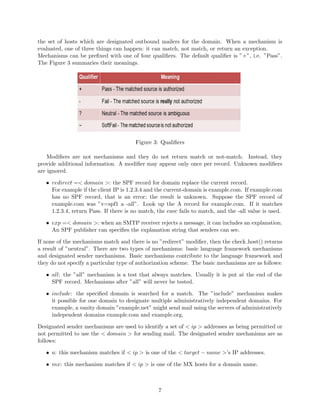
Mechanisms can be prefixed with one of four qualifiers. The default qualifier is ”+”, i.e. ”Pass”.
The Figure 3 summaries their meanings.
Figure 3: Qualifiers
Modifiers are not mechanisms and they do not return match or not-match. Instead, they
provide additional information. A modifier may appear only once per record. Unknown modifiers
are ignored.
• redirect =< domain >: the SPF record for domain replace the current record.
For example if the client IP is 1.2.3.4 and the current-domain is example.com. If example.com
has no SPF record, that is an error; the result is unknown. Suppose the SPF record of
example.com was ”v=spf1 a -all”. Look up the A record for example.com. If it matches
1.2.3.4, return Pass. If there is no match, the exec fails to match, and the -all value is used.
• exp =< domain >: when an SMTP receiver rejects a message, it can includes an explanation.
An SPF publisher can specifies the explanation string that senders can see.
If none of the mechanisms match and there is no ”redirect” modifier, then the check host() returns
a result of ”neutral”. There are two types of mechanisms: basic language framework mechanisms
and designated sender mechanisms. Basic mechanisms contribute to the language framework and
they do not specify a particular type of authorization scheme. The basic mechanisms are as follows:
• all: the ”all” mechanism is a test that always matches. Usually it is put at the end of the
SPF record. Mechanisms after ”all” will never be tested.
• include: the specified domain is searched for a match. The ”include” mechanism makes
it possible for one domain to designate multiple administratively independent domains. For
example, a vanity domain ”example.net” might send mail using the servers of administratively
independent domains example.com and example.org.
Designated sender mechanisms are used to identify a set of < ip > addresses as being permitted or
not permitted to use the < domain > for sending mail. The designated sender mechanisms are as
follows:
• a: this mechanism matches if < ip > is one of the < target − name >’s IP addresses.
• mx: this mechanism matches if < ip > is one of the MX hosts for a domain name.
7
• ptr (do not use): This mechanism tests whether the DNS reverse-mapping for < ip > exists
and correctly points to a domain name within a particular domain. This mechanism should
not be published.
• ip4 and ipv6: These mechanisms test whether < ip > is contained within a given IP network.
The < ip > is compared to the given network. If CIDR prefix length high-order bits match,
the mechanism matches.
• exists: This mechanism is used to construct an arbitrary domain name. It allows for compli-
cated schemes involving arbitrary parts of the mail envelope to determine what is permitted.
1.3.3 Checking SPF
A mail receiver can perform a set of SPF checks for each mail message that it receives. An SPF
check tests the authorization of a client host to emit mail with a given identity. Usually, such checks
are done by a receiving MTA, but can be performed elsewhere in the mail processing chain.
”HELO” identity
It is recommended that SPF verifiers and checks the ”HELO” identity and not only check the
”MAIL FROM” identity. Checking ”HELO” promotes consistency of results and can reduce DNS
resource usage. Moreover, if both are checked the checking ”HELO” before ”MAIL FROM” is the
recommended sequence .
”MAIL FROM” Identity
SPF verifiers must check the ”MAIL FROM” identity if a ”HELO” check either has not been per-
formed or has not reached a definitive policy result by applying the check host() function to the
”MAIL FROM” identity as the < sender >.
Without explicit approval, checking other identities against SPF version 1 records is not recom-
mended because there are cases that are known to give incorrect results.
Then, when a mail receiver decides to perform an SPF check, it has to use a correctly implemented
check host() function evaluated with the correct parameters. The authorization check should be
performed during the processing of the SMTP transaction that receives the mail. In this way it
reduces the complexity of determining the correct IP address and allows errors to be returned di-
rectly to the sending MTA using SMTP replies.
The check host() function fetches SPF records, parses them, and evaluates them to determine
whether a particular host is or is not permitted to send mail with a given identity. It uses some
defined inputs and the sender’s policy published in the DNS to reach a conclusion about client
authorization. The check host() function takes the following arguments:
• < ip >: the IP address of the SMTP client that is emitting the mail, either IPv4 or IPv6.
• < domain >: the domain that provides the sought-after authorization information; initially,
the domain portion of the ”MAIL FROM” or ”HELO” identity.
• < sender >: the ”MAIL FROM” or ”HELO” identity.
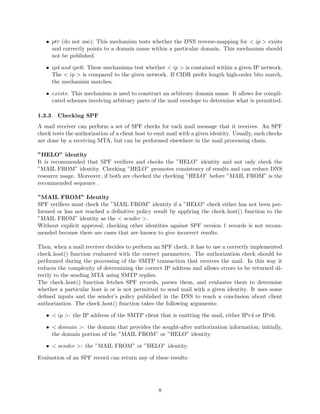
Evaluation of an SPF record can return any of these results:
8
Figure 4: Evalution of SPF record
Summarizing, if a domain has no SPF record at all, the result is ”None”. If a domain has
a temporary error during DNS processing, it will be the result ”TempError”. If some kind of
syntax or evaluation error occurs (eg. the domain specifies an unrecognized mechanism) the result
is ”PermError”.
1.3.4 An Example Policy
Now, we will see an example to understand how SPF works. Bob owns the domain example.net. He
also sometimes sends mail through his GMail account and contacted GMail’s support to identify
the correct SPF record for GMail. Since he often receives bounces about messages he didn’t send,
he decides to publish an SPF record in order to reduce the abuse of his domain in e-mail envelopes:
example.net. TXT ”v = spf1 mx a : pluto.example.net include : aspmx.googlemail.com − all”
The parts of the SPF record mean the following:
• v = spf1: SPF version 1
• mx: the incoming mail servers (MXs) of the domain are authorized to also send mail for
example.net.
• a : pluto.example.net: the machine pluto.example.net is authorized.
• include : aspmx.googlemail.com: everything considered legitimate by gmail.com is legitimate
for example.net.
• −all: all other machines are not authorized.
1.3.5 The Received-SPF Header Field
The Received-SPF header field is a trace field of the message and should be anticipated to the
existing header, above the Received: field that is generated by the SMTP receiver. When an SPF
query returns ”fail”, the MTA should reject the connection.
When an SPF query returns any other result, the MTA should add an advisory header to the
message of the form ”Received-SPF: neutral” or ”Received-SPF: pass”.
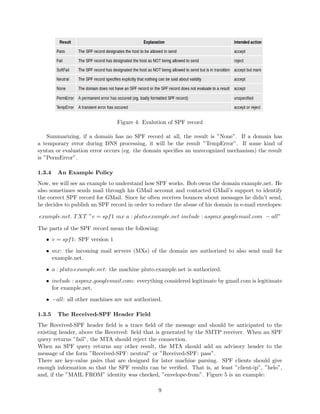
There are key-value pairs that are designed for later machine parsing. SPF clients should give
enough information so that the SPF results can be verified. That is, at least ”client-ip”, ”helo”,
and, if the ”MAIL FROM” identity was checked, ”envelope-from”. Figure 5 is an example:
9
Figure 5: Example Received-SPF
1.3.6 Security Considerations
As with most aspects of email, there are a number of ways that malicious parties could attack:
• Processing Limits: Some mechanisms and modifiers cause DNS queries at the time of eval-
uation, and some do not. The following terms cause DNS queries: the ”include”, ”a”, ”mx”,
”ptr”, and ”exists” mechanisms, and the ”redirect” modifier. SPF implementations must
limit the total number of those terms to 10 during SPF evaluation, to avoid unreasonable
load on the DNS. If this limit is exceeded, the implementation must return ”permerror”. The
other terms do not cause DNS queries at the time of SPF evaluation and their use is not
subject to this limit.
Therefore these processing limits are designed to prevent attacks such as the following:
1. A malicious party could create an SPF record with many references to a victim’s domain
and then send many emails to different SPF verifiers; those SPF verifiers would then create
a DoS attack.
2. Whereas implementations of check host() are supposed to limit the number of DNS
lookups, malicious domains could publish records that exceed these limits in an attempt
to waste computation effort at their targets when they send them mail.
3. Malicious parties could send a large volume of mail purporting to come from the intended
target to a wide variety of legitimate mail hosts. These legitimate machines would then
present a DNS load on the target as they fetched the relevant records.
4. Malicious parties could, in theory, use SPF records as a vehicle for DNS lookup amplifi-
cation for a DoS attack. In this scenario, the attacker publishes an SPF record in its own
DNS that uses ”a” and ”mx” mechanisms directed toward the intended victim, and then
distributes mail with a MAIL FROM value including its own domain in large volume to a
wide variety of destinations.
• SPF-Authorized Email May Contain Other False Identities: It’s about the ”MAIL
FROM” and the ”HELO” identity authorizations. They do not provide assurance about the
authorization/authenticity of other identities used in the message. Therefore, it is possible
for a malicious sender to inject a message using his own domain in the identities used by
SPF and have that domain’s SPF record authorize the sending host, and yet the message can
easily list other identities in its header.
Unless the user or the MUA takes care to note that the authorized identity does not match
the other more commonly presented identities, the user might be lulled into a false sense of
security.
• Spoofed DNS and IP Data: There are two aspects of this protocol that malicious parties
could exploit to undermine the validity of the check host() function:
1. The evaluation of it relies heavily on DNS. A malicious attacker could attack the DNS
infrastructure and cause check host() to see spoofed DNS data, and then return incorrect
results.
10
2. The client IP address, < ip >, is assumed to be correct but only in a modern, correctly
configured system, the risk of this not being true is zero.
• Cross-User Forgery: SPF policies just map domain names to sets of authorized MTAs, not
whole email addresses to sets of authorized users. Then, it is generally impossible to verify,
through SPF, the use of specific email addresses by individual users of the same MTA.
It is up to mail services and their MTAs to directly prevent cross-user forgery: based on
SMTP AUTH, users have to be restricted to using only those email addresses that are actually
under their control or another method to verify the identity of individual users is message
cryptography, such as Pretty Good Privacy (PGP) or S/MIME.
• External Explanations: When the authorization check fails, an explanation string could
be included in the reject response. In this case both the sender and the rejecting receiver need
to be aware that the explanation was determined by the right publisher of the SPF record
checked and, in general, not the receiver. The explanation can contain malicious URLs, or it
might be offensive or misleading.
1.3.7 Tools
There are several tools developed by OpenSPF Community.
• Form based record testers: These tools are meant to help you deploy SPF records for your
domain.
• E-mail based record testers: The Community provides an e-mail based record tester. You can
send an e-mail to spf-test@openspf.net. The message will be rejected (this is by design) and
you will get the SPF result either in your MTA mail logs or via however your MTA reports
errors to message senders. This is done to avoid the risk of backscatter from the tester. This
test tests both MAIL FROM and HELO and provides results for both.
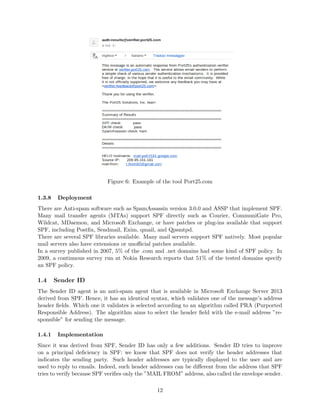
Port25.com provides another tool to test whether your SPF record is working. Send an e-
mail to check-auth@verifier.port25.com and you will receive a reply containing the results of
the SPF check. Figure 6 is a personal example with my personal Gmail account from the
web-based interface.
• Form based TXT record viewer: Using the Beveridge Hosting for DNS Lookup and SPF
checking.
• For implementors: Test Suite, not a tool like others, but useful in some cases.
11
Figure 6: Example of the tool Port25.com
1.3.8 Deployment
There are Anti-spam software such as SpamAssassin version 3.0.0 and ASSP that implement SPF.
Many mail transfer agents (MTAs) support SPF directly such as Courier, CommuniGate Pro,
Wildcat, MDaemon, and Microsoft Exchange, or have patches or plug-ins available that support
SPF, including Postfix, Sendmail, Exim, qmail, and Qpsmtpd.
There are several SPF libraries available. Many mail servers support SPF natively. Most popular
mail servers also have extensions or unofficial patches available.
In a survey published in 2007, 5% of the .com and .net domains had some kind of SPF policy. In
2009, a continuous survey run at Nokia Research reports that 51% of the tested domains specify
an SPF policy.
1.4 Sender ID
The Sender ID agent is an anti-spam agent that is available in Microsoft Exchange Server 2013
derived from SPF. Hence, it has an identical syntax, which validates one of the message’s address
header fields. Which one it validates is selected according to an algorithm called PRA (Purported
Responsible Address). The algorithm aims to select the header field with the e-mail address ”re-
sponsible” for sending the message.
1.4.1 Implementation
Since it was derived from SPF, Sender ID has only a few additions. Sender ID tries to improve
on a principal deficiency in SPF: we know that SPF does not verify the header addresses that
indicates the sending party. Such header addresses are typically displayed to the user and are
used to reply to emails. Indeed, such header addresses can be different from the address that SPF
tries to verify because SPF verifies only the ”MAIL FROM” address, also called the envelope sender.
12
Sender ID defines an algorithm called Purported Responsible Address (PRA) and a set of heuristic
rules to establish the address from the many typical headers in an email. Syntactically, Sender ID
is almost identical to SPF except that v=spf1 is replaced with one of:
• spf2.0/mfrom: meaning to verify the envelope sender address just like SPF.
• spf2.0/mfrom, pra or spf2.0/pra, mfrom: meaning to verify both the envelope sender and
the PRA.
• spf2.0/pra: meaning to verify only the PRA.
In practice, the pra scheme usually only offers protection when the email is legitimate, while offering
no real protection in the case of spam or phishing. However, in the case of phishing or spam, the
pra may be based on Resent-* header fields that are often not displayed to the user. To be an
effective anti-phishing tool, the MUA (Mail User Agent or Mail Client) will need to be modified to
display either the pra for Sender ID, or the Return-Path: header field for SPF.
The pra tries to counter the problem of phishing, while SPF or mfrom tries to counter the problem
of spam bounces and other auto-replies to forged Return-Paths. Then, two different problems with
two different proposed solutions.
1.4.2 SPF vs Sender ID
Is SPF the same thing as Sender ID? Which is better?
First of all, SPF and Sender ID are not the same. Hence, they differ in what they validate and
what ”layer” of the e-mail they work with. Sender ID is not better than SPF because it addresses
different problems. There is controversy because Sender ID is incompatible with existing specifica-
tions. Microsoft is aware of the problem and representatives of theirs have stated that they have
no plans to fix it.
We can say that both methods validate e-mail sender addresses, both use similar methods to
do so and both publish policy records in DNS. Furthermore, both use the same syntax for their
policy records. The Sender ID recommends to use SPF’s v=spf1 policies that are originated to
MAIL FROM and HELO identities only and applies them to the PRA identity. That is, it says
to consider v=spf1 as equivalent to spf2.0/mfrom, pra but this is technically wrong. Sender ID
implementors should correct this and treat v=spf1 records as equivalent to spf2.0/mfrom. Unfor-
tunately this mistake in the Sender ID specification was not corrected before his publication even
if there is an appeal from the SPF project.
This creates a problem for the Sender ID implementations. Since the Sender ID specification
is different to the SPF specification for the definition of v=spf1, and since SPF has been published
before the Sender ID, the recommendation in the Sender ID specification should be ignored by
implementors. If there is a published v=spf1 policy to protect the use of a domain in the MAIL
FROM and HELO addresses, Sender ID implementations that apply that policy to PRA will reject
that mail if it is used the domain in the ”From” header field while sending from (MAIL FROM)
another system. Therefore, if a SPF record is misinterpreted, a good thing is to contact the recip-
ient who wrongly rejected the message and explain the problem.
The Sender implementors ignore the recommendation in the Sender ID specification to treat v=spf1
equivalently to spf2.0/mfrom, pra and treat it as spf2.0/mfrom.
13
1.4.3 Security Considerations
This part describes some attacks that could be used to defeat this mechanism.
• DNS Attacks: Sende ID depends on DNS lookups, and is therefore only as secure as DNS.
An attacker that want to spoof messages could attempt to get his messages accepted by
sending forged answers to DNS queries. DNS Security (DNSSEC) may ultimately provide a
way to completely neutralize this class of attacks.
• TCP Attacks: This mechanism usually is used in combination with SMTP over TCP. A
attacker that has a lot of resources might be able to send TCP packets with forged from-
addresses, and thus execute an entire SMTP session. Then, it appears to come from some-
where other than its true origin. Such an attack requires guessing what TCP sequence
numbers an SMTP server will use. This type of attack can be ameliorated if IP gateways
refuse to forward packets when the source address is clearly fake.
• Forged Sender Attacks: This mechanism chooses an address for instance from one of a
number of message headers, and then uses that address for validation. A message with a true
Resent-From header or Return-Path, but a forged From header, will be accepted. Since many
MUAs do not display all of the headers of received messages, the message will appear to be
forged when displayed. In order to neutralize this attack, MUAs will need to start displaying
at least the address that was verified.
Today Sender ID is little used. Even Microsoft has migrated away from using Sender ID.
1.5 Content Authentication Protocols
The above authentication protocols refer to the sender. Content (or payload) authentication pro-
tocols do not care about who is the sender of a message but only about who is its author. They
authenticate the author of the message content (body) through asymmetric cryptographic methods.
The cryptographic processing is CPU intensive, and, like in sender authentication protocols that
work on header identities, it requires that the entire message has to be received before that its
validity can be decided and subsequently action can be taken.
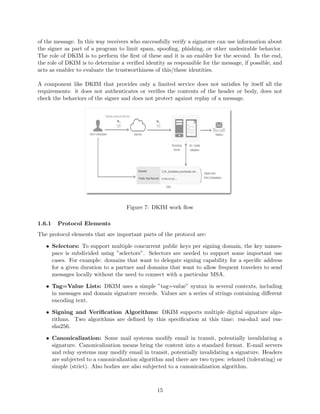
The concept of DKIM that we will se below is a hybrid of sender authentication and content
authentication.
1.6 DomainKeys Identified Mail (DKIM)
DomainKeys Identified Mail (DKIM) is an email authentication method designed to detect email
spoofing[10] [11] [12]. It allows an organization to claim responsibility for transmitting a message,
in a way that can be validated by a recipient. It is intended to prevent forged sender addresses in
emails, a technique often used in phishing and email spam.
DKIM resulted in 2004 from merging two similar efforts, ”enhanced DomainKeys” from Yahoo and
”Identified Internet Mail” from Cisco. Source code development of one common library is led by
the OpenDKIM Project.
DKIM provides for two distinct operations, signing and verifying. Either of them can be handled
by a module of a mail transfer agent (MTA). In order to refer to the identity of a responsible
person or organization DKIM uses a domain name as an identifier, it is called the Signing Domain
IDentifier (SDID) and is contained in the DKIM-Signature header fields ”d=” tag.
Therefore, given the presence of that identifier, a receiver can make decisions about further handling
14
of the message. In this way receivers who successfully verify a signature can use information about
the signer as part of a program to limit spam, spoofing, phishing, or other undesirable behavior.
The role of DKIM is to perform the first of these and it is an enabler for the second. In the end,
the role of DKIM is to determine a verified identity as responsible for the message, if possible, and
acts as enabler to evaluate the trustworthiness of this/these identities.
A component like DKIM that provides only a limited service does not satisfies by itself all the
requirements: it does not authenticates or verifies the contents of the header or body, does not
check the behaviors of the signer and does not protect against replay of a message.
Figure 7: DKIM work flow
1.6.1 Protocol Elements
The protocol elements that are important parts of the protocol are:
• Selectors: To support multiple concurrent public keys per signing domain, the key names-
pace is subdivided using ”selectors”. Selectors are needed to support some important use
cases. For example: domains that want to delegate signing capability for a specific address
for a given duration to a partner and domains that want to allow frequent travelers to send
messages locally without the need to connect with a particular MSA.
• Tag=Value Lists: DKIM uses a simple ”tag=value” syntax in several contexts, including
in messages and domain signature records. Values are a series of strings containing different
encoding text.
• Signing and Verification Algorithms: DKIM supports multiple digital signature algo-
rithms. Two algorithms are defined by this specification at this time: rsa-sha1 and rsa-
sha256.
• Canonicalization: Some mail systems modify email in transit, potentially invalidating a
signature. Canonicalization means bring the content into a standard format. E-mail servers
and relay systems may modify email in transit, potentially invalidating a signature. Headers
are subjected to a canonicalization algorithm and there are two types: relaxed (tolerating) or
simple (strict). Also bodies are also subjected to a canonicalization algorithm.
15
1.6.2 The DKIM-Signature Header Field
The signature of the email is stored in the DKIM-Signature header field. This header field contains
all of the signature and key-fetching data. The DKIM-Signature value is a tag-list. The most
relevant ones are the following:
• v = Version. This tag defines the version of this specification that applies to the signature
record.
• a = The algorithm used to generate the signature. Verifiers must support ”rsa-sha1” and
”rsa-sha256”, signers should sign using ”rsa-sha256”.
• b = The signature data.
• bh = The hash of the canonicalized body part of the message as limited by the ”l=” tag.
• c = Message canonicalization. This tag informs the Verifier of the type of canonicalization
used to prepare the message for signing.
• d = Signing Domain Identifier (SDID).The SDID must correspond to a valid DNS name
under which the DKIM key record is published.
• h = Signed header fields. A colon-separated list of header field names that identify the
header fields presented to the signing algorithm.
• i = The Agent or User Identifier (AUID) on behalf of which the SDID is taking responsibility.
• l = Body length count. This tag informs the Verifier of the number of octets in the body of
the email after canonicalization included in the cryptographic hash.
• q = A colon-separated list of query methods used to retrieve the public key.
• s = The selector subdividing the namespace for the ”d=” (domain) tag.
• t = Signature Timestamp. It is recommended, default is an unknown creation time.
• x = Signature Expiration. Default is no expiration.
• z = Copied header fields.
1.6.3 Signing
The following steps are performed in order by Signers.
1. Determine whether the Email should be signed and by whom:
A Signer can obviously only sign email for domains for which it has a private key. Moreover
the signer has to know the corresponding public key and the selector. If an email cannot be
signed for some reason, it is a local policy decision as to what to do with that email.
2. Select a private key and corresponding selector information:
This specification does not define the way that Signer should choose which private key and se-
lector information to use. Currently, the decision should largely be a matter of administrative
convenience.
16
3. Normalize the message to prevent transport conversions:
More generally, the Signer must sign the message as it is expected to be received by the
Verifier rather than in some local or internal form.
4. Determine the header fields to sign:
The From header field must be signed and that is, it must be included in the ”h=” tag of the
resulting DKIM-Signature header field. Signers should not sign an existing header field that
can be legitimately modified or removed in transit.
5. Compute the message hash and signature:
The Signer must compute the message hash and then sign it using the selected public-key
algorithm. This result will be in a DKIM-Signature header field that will include the body
hash and a signature of the header hash, where that header includes the DKIM-Signature
header field itself.
6. Insert the DKIM-Signature header field:
Finally, the Signer must insert the DKIM-Signature header field created in the previous step
prior to transmitting the email. The DKIM-Signature header field must be inserted before
any other DKIM-Signature fields in the header block.
1.6.4 Verifying
Once a Signer has signed the message the Verifier can verifies it and since the Signer may remove
or revoke a public key at any time, it is advised that verification occurs in a well-time defined. A
border or intermediate MTA may verify the message signature(s). Verifiers must produce a result
that is semantically equivalent to applying the following steps:
1. Extract signatures from the message:
The order in which Verifiers try DKIM-Signature header fields is not defined and therefore
Verifiers may try signatures in any order they like. When a signature successfully verifies, a
Verifier will either stop processing or attempt to verify any other signatures, at the discretion
of the implementation.
2. Validate the signature header field:
Implementors must meticulously validate the format and values in the DKIM-Signature
header field. Then, any inconsistency or unexpected values must cause the header field to be
completely ignored and the Verifier to return PERMFAIL (signature syntax error).
3. Get the Public Key:
The public key for a signature is needed to complete the verification process. The process
of retrieving the public key depends on the query type as defined by the ”q=” tag in the
DKIM-Signature header field.
4. Compute the verification:
Given a Signer and a public key, verifying a signature consists of some actions. The most
important are: prepare a canonicalized version of the message, compute the message hashes
from the canonical copy, verify that the hash of the canonicalized message body computed
in the previous step matches the hash value conveyed in the ”bh=” tag and verify the signa-
ture against the header hash using the mechanism appropriate for the public-key algorithm
described in the ”a=” tag.
17
5. Communicate verification results:
Verifiers wishing to communicate the results of verification to other parts of the mail system
may do so in whatever manner they see fit.
6. Interpret results/apply local policy:
Once the signature has been verified, that information must be conveyed to the identity
assessor (such as an explicit allow/whitelist and reputation system) and/or to the end user.
If the email cannot be verified, then it should be treated the same as all unverified email,
regardless of whether or not it looks like it was signed.
1.6.5 Security Considerations
It has been observed that any introduced mechanism that try to prevent the spam is subject
to intensive attack. DKIM needs to be carefully examined to identify potential attack and the
vulnerability to each.
• ASCII art attacks: When the relaxed body canonicalization algorithm may enable certain
types of extremely crude ”ASCII Art” attacks and in this case the ”simple” body canonical-
ization algorithm should be used.
• Misuse of body length limits (”l=” Tag): Using the ”l=” tag enables attacks in which
an intermediary with malicious intent can modify a message to include content that solely
benefits the attacker. In order to avoid this attack, Signers should be extremely wary of using
this tag.
• Misappropriated private key: DKIM requires caution around the handling and protection
of keys. A compromised private key or access to one means an intruder or malware can sends
mail signed by the domain that advertises the matching public key.
• Key server Denial-of-Service attacks: Since the key servers are distributed, the number
of servers that would need to be attacked to defeat this mechanism on an Internet-wide basis
is very large. However, given the low overhead of verification compared with handling of the
email message itself, such an attack would be difficult to mount.
• Attacks against the DNS: Since the DNS is a required binding for key services, specific
attacks against the DNS must be considered.
• Replay/Spam Attacks: In this type of attack, a spammer sends a piece of spam through
an MTA that signs it, banking on the reputation of the signing domain rather than its own,
and then re-sends that message to a large number of intended recipients. Partial solutions to
this problem involve the use of reputation services to convey the fact that the specific email
address is being used for spam and that messages from that Signer are likely to be spam.
This requires a real-time detection mechanism.
• Intentionally malformed key records: It is possible for an attacker to publish key records
in DNS that are intentionally malformed. The intent is cause a denial-of-service attack on a
non-robust Verifier implementation. Verifiers must verify all key records retrieved from the
DNS and be robust against malformed key records.
• RSA Attacks: An attacker could create a large RSA signing key with a small exponent,
thus requiring that the verification key have a large exponent. This will force Verifiers to use
18
considerable computing resources to verify the signature. Verifiers might avoid this attack
by refusing to verify signatures that reference selectors with public keys having unreasonable
exponents.
1.7 Author Domain Signing Practices (ADSP)
Author Domain Signing Practices (ADSP) [13] [14] is an optional extension to the DKIM E-mail
authentication scheme, whereby a domain can publish the signing practices it adopts when relaying
mail on behalf of associated authors. An ”Author Domain Signature” is a Valid Signature in which
the domain name of the DKIM signing entity, i.e., the d= tag in the DKIM-Signature header field,
is the same as the domain name in the Author Address.
There are currently is a total of three different outbound signing practices that can be set:
• all - All mail from the domain is signed with an Author Domain Signature.
• discardable - All mail from the domain is signed with an Author Domain Signature. Further-
more, if such signature is missing or invalid, the domain owners want the receiving server to
drop the message.
• unknown - The domain might sign some or all email.
Any other value than ”all” or ”discardable” is treated as ”unknown”. If we use the term ”all” or
”discardable” that means all the email that we send in the from field with ”user@domain.com”
originates from our mail servers. The main difference between ”all” and ”discardable” is that ”all”
should to be treated suspiciously (given a higher spam score) by the recieving MTA Email Server,
if the email is not signed by the users domain.
1.7.1 How set up ADSP Policy
First, we need to set up your DKIM. Next, we will need to publish a DNS TXT resouce record
type for our domain in this format.
adsp. domainkey. < sub > .domain.example
If our domain email has sub domain emails we will simply replace the < sub >.
For example ”user@blogs.domain.com” would have a key that looks like this:
adsp. domainkey.blogs.domain.com
But, most commonly, most domain owners have emails like ”users@domain.com” and that will look
like this.
adsp. domainkey.domain.com
1.8 Domain-based Message Authentication, Reporting & Conformance (DMARC)
Domain-based Message Authentication, Reporting and Conformance (DMARC) is an email-validation
system designed to detect and prevent email spoofing [16].
DMARC works with two existing mechanisms, Sender Policy Framework (SPF) and DomainKeys
Identified Mail (DKIM). With DMARC the administrative owner of a domain can publish a policy
on which mechanism (DKIM, SPF or both) is employed when sending email from that domain.
19
Furthermore, it specifies how the receiver should deal with failures. It thus coordinates the results
of DKIM and SPF and specifies under which circumstances the From: header field, which is often
visible to end users, should be considered legitimate.
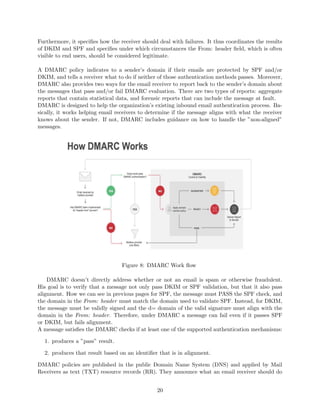
A DMARC policy indicates to a sender’s domain if their emails are protected by SPF and/or
DKIM, and tells a receiver what to do if neither of those authentication methods passes. Moreover,
DMARC also provides two ways for the email receiver to report back to the sender’s domain about
the messages that pass and/or fail DMARC evaluation. There are two types of reports: aggregate
reports that contain statistical data, and forensic reports that can include the message at fault.
DMARC is designed to help the organization’s existing inbound email authentication process. Ba-
sically, it works helping email receivers to determine if the message aligns with what the receiver
knows about the sender. If not, DMARC includes guidance on how to handle the ”non-aligned”
messages.
Figure 8: DMARC Work flow
DMARC doesn’t directly address whether or not an email is spam or otherwise fraudulent.
His goal is to verify that a message not only pass DKIM or SPF validation, but that it also pass
alignment. How we can see in previous pages for SPF, the message must PASS the SPF check, and
the domain in the From: header must match the domain used to validate SPF. Instead, for DKIM,
the message must be validly signed and the d= domain of the valid signature must align with the
domain in the From: header. Therefore, under DMARC a message can fail even if it passes SPF
or DKIM, but fails alignment.
A message satisfies the DMARC checks if at least one of the supported authentication mechanisms:
1. produces a ”pass” result.
2. produces that result based on an identifier that is in alignment.
DMARC policies are published in the public Domain Name System (DNS) and applied by Mail
Receivers as text (TXT) resource records (RR). They announce what an email receiver should do
20
with non-aligned mail it receives.
In order to ensure the sender trusts this process and knows the impact of publishing a policy
different than p=none (monitor mode), receivers send daily aggregate reports indicating to the
sender how many emails have been received and if these emails passed SPF and/or DKIM and were
aligned.
Google recommends the use of DMARC for bulk email senders.
1.8.1 Alignment
The principal function of DMARC is check that the domain in the message’s From: field is ”aligned”
with other authenticated domain names. If either SPF or DKIM alignment checks pass, then the
DMARC alignment test passes.
There are two types of alignment: strict or relaxed. For strict alignment, the domain names must
be identical. For relaxed alignment, the top-level ”Organizational Domain” must match. Then, for
example, ”a.b.c.d.example.com.au” and ”example.com.au” have the same Organizational Domain,
because there is a registrar that offers names in ”.com.au” to customers.
SPF checks that the IP address of the sending server is authorized by the owner of the domain that
appears in the SMTP MAIL FROM command. In addition to requiring that the SPF check pass,
DMARC additionally checks that MailFrom aligns with From.
Instead, DKIM allows parts of an email message to be cryptographically signed, and the signature
must cover the From field. In the DKIM-Signature mail header, the d= (domain) and s= (selector)
tags specify where in DNS to retrieve the public key for the signature. A valid signature proves
that the signer is a domain owner, and that the From field hasn’t been modified since the signature
was applied.
1.8.2 DMARC Policy Record
Domain Owner DMARC preferences are stored as DNS TXT records in subdomains named ” dmarc”.
For example, the Domain Owner of ”example.com” would post DMARC preferences in a TXT
record at ” dmarc.example.com”. DMARC records follow the extensible ”tag-value” syntax for
DNS-based.
• adkim: Indicates whether strict or relaxed DKIM Identifier Alignment mode is required by
the Domain Owner. r: relaxed modes, s: strict mode.
• aspf: Indicates whether strict or relaxed SPF Identifier Alignment mode is required by the
Domain Owner. r: relaxed modes, s: strict mode.
• fo: Failure reporting options, default is ”0”. Provides requested options for generation of
failure reports. Then, 0 if all underlying authentication mechanisms fail to produce an aligned
”pass” result, 1 if any underlying authentication mechanism produced something other than
an aligned ”pass” result, d if the message had a signature that failed evaluation and s if the
message failed SPF evaluation.
• p: Requested mail receiver policy that indicates the policy to be enacted by the Receiver
at the request of the Domain Owner. Three possibilities: none where the Domain Owner
requests no specific action be taken regarding delivery of messages. quarantine that is a sort
of mechanism that checks the messages and put them in a special folder. reject where it has
to reject email that fails the DMARC mechanism check.
21
• pct: Percentage of messages from the Domain Owner’s mail stream to which the DMARC
policy is to be applied.
• rf: Format to be used for message-specific failure reports.
• ri: Interval requested between aggregate reports.
• rua: Addresses to which aggregate feedback is to be sent.
• ruf: Addresses to which message-specific failure information is to be reported.
• sp: Requested Mail Receiver policy for all subdomains.
• v: Version. It identifies the record retrieved as a DMARC record. It must have the value of
”DMARC1”.
1.8.3 Reports
DMARC is capable of producing two separate types of reports. Aggregate reports that are
sent to the address specified under the rua tag and forensic reports that are emailed to the
address following the ruf tag. These mail addresses must be specified in URI mailto format
(e.g.mailto:worker@example.net ).
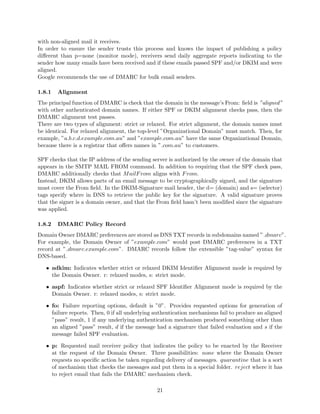
Aggregate reports: Aggregate Reports are sent as XML files, typically once per day. The
subject mentions the ”Report Domain”, which is the policy-publishing sender of the mail messages
being reported, and the ”Submitter”, which is the entity issuing the report. The payload is in an
attachment with a long filename consisting of bang-separated elements such as the report-issuing
receiver.
Figure 9: Aggregate record
Figure 9 shows an example of a relation in an aggregate record. Records can be viewed in a
tabular form. Rows are grouped by source IP. The columns, labeled SPF and DKIM show the
alignment results, pass or fail. The disposition indicates the policy published actually applied to
the messages, none, quarantine, or reject. In the Figure, the first row represents the main mail flow
from example.org.
Forensic reports: Forensic Reports are generated in real time and consist of redacted copies
of individual emails that failed SPF, DKIM or both based upon what value is specified in the fo
tag. Their format resembles that of regular bounces.
22
1.8.4 Security Considerations
This section discusses security issues and possible remediations (where available) for DMARC.
• Attacks on reporting URIs: URIs published in DNS TXT records are well-understood
possible targets for attack. For instance, MX, NS, and other records found in the DNS
advertise potential attack destinations. Thus, Domain Owners will need to harden these
addresses against various attacks.
• DNS Security: The DMARC mechanism and its underlying technologies (SPF, DKIM)
depend on the security of the DNS. Use of DNSSEC can be a solution for Mail Receivers and
Report Receivers.
• Display Name Attackss: A type of this attack can be the presentation of false information
in the display-name portion of the From field. The attack is valid because most common
MUAs will show the display name and not the email address when both are available. There
are a few possible mechanisms that can solve the problem of these attacks but generally
display name attacks are out of scope for DMARC.
1.8.5 How to create DMARC Record
In this section we can list a step by step guide that will help you to create DMARC Record to your
domain name in just 5 steps.
1. Domain Alignment Verification
The first step to create DMARC record is to open all the email headers from the emails that
you send. Next task is to identify the domain or subdomain. The domain or subdomain is
listed at:
The Envelope From (i.e.Mail − From)
The Friendly From (i.e.Headerfrom)
The d = domain in DKIM − signature
Verify if your domain names are identical. If they are, then they are aligned.
2. Email accounts identification
You will get aggregated and forensic reports on a daily basis through your DMARC. Hence,
you will need to designate an email specifically for this purpose. You will receive all your
reports in this email. You can choose to use two accounts to avoid getting messed up with
all the data.
3. Generate DMARC Text record in your DNS
For every sending domain, you must generate a DMARC record. The mail receiver policy
must be set to ’none’ to complete the process. After doing this, you can now gather all the
information on your entire email ecosystem, like who is sending emails on your brand’s behalf,
who are receiving them, and which emails are bouncing back. You must specify your email
address in the ruf and rua tags to receive the reports.
4. Implementing DMARC into DNS
This is the last step to create DMARC record. You will need to work with your DNS
administrator. Once your DMARC is added to DNS, you will start receiving reports of the
domain you choose to monitor. You will receive information on the source of email traffic
that is using that domain.
23
1.9 Authenticated Received Chain
Authenticated Received Chain (ARC) [17] is an email-authentication system designed to allow an
intermediate mail server to sign an email’s original authentication results. This system allows a
recipient to validate an email when the email’s SPF and DKIM records are invalidated by an in-
termediate server.
How we have seen, DMARC allows a sender’s domain to indicate that their emails are protected
by SPF and/or DKIM, and tells a receiver what to do if neither of those authentication methods
passes. However, a strict DMARC policy may block legitimate emails sent through a mailing list
or forwarder, as the SPF check will fail due to the unapproved sender and the DKIM signature will
be invalidated if the message is modified.
ARC solves this problem by giving the intermediate server a way to sign the original message’s
validation results. Even if the SPF and DKIM validation fail, the recipient can choose to validate
the ARC. If the ARC indicates that the original message passed the SPF and DKIM checks and the
only modifications were made by well-reputed intermediaries, the recipient may choose to ignore
the failed SPF, DKIM, or DMARC validation.
Figure 10: ARC work flow
1.9.1 Implementation
In order to understand better the headers that we will analyze, let’s see the three new mail headers
of ARC:
• ARC-Authentication-Results (abbreviated AAR): A combination of an instance number (i)
and the results of the SPF, DKIM, and DMARC validation.
• ARC-Seal (abbreviated AS): A combination of an instance number (i), a DKIM-like signature
of the previous ARC-Seal headers, and the validity of the prior ARC entries.
• ARC-Message-Signature (abbreviated AMS): A combination of an instance number (i) and a
DKIM-like signature of the entire message except the ARC-Seal headers
To sign a modification, an intermediate server performs the following steps:
24
• Copies the ”Authentication-Results” field into a new AAR field and prepends it to the mes-
sage.
• Calculates the AMS for the message (with the AAR) and prepends it to the message.
• Calculates the AS for the previous Arc-Seal headers and prepends it to the message.
To validate an ARC, the recipient performs the following steps:
• Validates the chain of ARC-Seal headers.
• Validates the newest ARC-Message-Signature.
1.10 Microsoft Anti-Spam Policy
Microsoft company has developed Microsoft Exchange Server that is a mail server and calendaring
server[7]. It runs exclusively on Windows Server operating systems. The first version of Exchange
Server to be published by Microsoft was Exchange Server 4.0. The client is Microsoft Outlook.
Microsoft Exchange Online provides built-in malware and spam filtering capabilities that help
protect inbound and outbound messages from malicious software and help protect your network
from spam transferred through email. Administrators do not need to set up or maintain the filtering
technologies, which are enabled by default. However, administrators can make company-specific
filtering customizations in the Exchange admin center (EAC).
1.10.1 Office 365 email anti-spam protection
In the last years Office 365 is the brand name Microsoft that consists of a group of software[8]. All
of Office 365’s components can be managed and configured through an online portal. The email
service Outlook is included. In Office 365, it is possible to change a protection setting to deal with
a specific issue in a specific organization. The following are some options that help to prevent spam
in Office 365:
• Connection filtering: This mechanism consists of checking the reputation of the sender
before allowing a message to get through. In order to do this it is possible to create an allow
list, or safe sender list, to be sure about the received message sent from a specific IP address
or IP address range. Furthermore, it is also possible to create a list of IP addresses from
which to block messages, called a block list.
• Spam filtering: This technique checks for message has characteristics like a spam. It is
possible to change what actions to take on messages identified as spam, and choose whether
to filter messages written in specific languages, or sent from specific countries or regions.
There are also advanced spam filtering options in order to pursue an aggressive approach to
spam filtering.
• Outbound filtering: It is used when you want that your users don’t send spam. For
instance, a user’s computer may get infected with malware that causes it to send spam
messages, so is possible to have a protection against that into the product.
• Email authentication : Techniques that use the Domain Name System (DNS) to add
verifiable information to email messages about the sender of an email message. These are:
Sender Policy Framework (SPF), DomainKeys Identified Mail (DKIM) and Domain-based
Message Authentication, Reporting, and Conformance (DMARC). Is recommended to use
SPF, DKIM, and DMARC together to help prevent spam and unwanted spoofing.
25
It is possible to change the default personal mail in Office 365 following the video of the page [8].
In order to understand better how Office 365 uses and set Sender Policy Framework (SPF) to
prevent spoofing, how uses DKIM to validate email and how configures your spam filter policies
see [9].
1.10.2 Anti-spam message headers
Exchange Online Protection (EOP) is a hosted e-mail security service, owned by Microsoft, that
filters spam and removes computer viruses from e-mail messages. The service does not require
client software installation and each customer pays for the service by means of a subscription.
When Exchange Online Protection scans an inbound email message it inserts the X-Forefront-
Antispam-Report header into each message. The fields in this header can help provide adminis-
trators with information about the message and about how it was processed. The fields in the
X-Microsoft-Antispam header provide additional information about bulk mail and phishing.
A quite useful tool provided by Office 365 is Message Header Analyzer that with a copy and paste
header from an email retrieves information about the header. Figure 7 is a personal example of the
use of this tool with my personal Outlook mail and the Figure 8 shows the two additional headers
for anti-spam.
Figure 11: Output of Message Header Analyzer
Figure 12: Forefront Antispam Report Header and Microsoft Antispam Header
From the analysis of some email sent with my personal account Microsoft (Outlook) I noticed
that it uses a lot of non-standard or custom headers. Some of these are:
• X-MS-Has-Attach: Tells whether the e-mail has an attached document with it or not. When
we send a message without any text it has a blank value.
26
• X-MS-TNEF-Correlator: a proprietary format used by the Microsoft Exchange and Outlook
e-mail clients when sending messages formatted as Rich Text Format (RTF).
• x-tmn: is an unique signature added to emails by Microsoft for identification.
However, I have investigated Message Sources for an email and though they differ in some places,
that is, there is a difference between analyze a message header viewing the source with Gmail for
instance or with Outlook Mail. Gmail shows only a few Microsoft (X-MS) non-standards headers.
Instead, using Outlook Mail message source view we had all the non-standards headers. From a
personal analysis with Microsoft Message Header Analyzer tool we have around 80 other headers.
Generally, they differ by the Tag X (custom, non-standard), MS (Microsoft) or CMM. Microsoft
compared to Gmail and Yahoo is the one that uses more non-standards header, that not always is
a good thing because in this case there may be some false negative for some emails.
1.10.3 Personal Experience
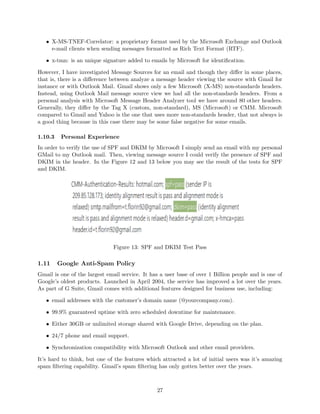
In order to verify the use of SPF and DKIM by Microsoft I simply send an email with my personal
GMail to my Outlook mail. Then, viewing message source I could verify the presence of SPF and
DKIM in the header. In the Figure 12 and 13 below you may see the result of the tests for SPF
and DKIM.
Figure 13: SPF and DKIM Test Pass
1.11 Google Anti-Spam Policy
Gmail is one of the largest email service. It has a user base of over 1 Billion people and is one of
Google’s oldest products. Launched in April 2004, the service has improved a lot over the years.
As part of G Suite, Gmail comes with additional features designed for business use, including:
• email addresses with the customer’s domain name (@yourcompany.com).
• 99.9% guaranteed uptime with zero scheduled downtime for maintenance.
• Either 30GB or unlimited storage shared with Google Drive, depending on the plan.
• 24/7 phone and email support.
• Synchronization compatibility with Microsoft Outlook and other email providers.
It’s hard to think, but one of the features which attracted a lot of initial users was it’s amazing
spam filtering capability. Gmail’s spam filtering has only gotten better over the years.
27
When you sign up for a G Suite account, you agree not to use the account to send spam, dis-
tribute viruses, or otherwise abuse the service. All users on your domain are subject to these
agreements. Mail sent to your domain is subject to Google’s spam filters. The filters auto-
matically place messages detected as spam in a user’s Gmail spam folder. It is possible to
customize the organization’s spam filters. For instance: to be more aggressive for more strin-
gent filtering of bulk email, to bypass mail sent from your domain and/or to create an ap-
proved sender list to bypass any spam filters. To the following link you can set-up a spam filter.
https://support.google.com/a/answer/2368132?hl=en.
Most of the Gmail users have an experience with the trial version of this service. That is, like
me they uses Gmail free, that is the advertising-supported email service. It is recognized by do-
main @gmail.com. Then, businesses that use the free version of Gmail can only send emails as
mybusinessname@gmail.com. Google sells an almost identical version of Gmail as part of its
online productivity suite Google Apps, which costs US $5 per user a month. The advantages are
these listed above in this section.
The trial version of Gmail uses SPF, DKIM and DMARC as protocols to avoid spams. But in only
the business with paid service can has extra services and settings. For example, the google support
provides a good help to personalize these protocols. The following links refer to them:
• Configure SPF records to work with G Suite
https://support.google.com/a/answer/178723?hl=eng
• Authenticate email with DKIM
https://support.google.com/a/answer/174124?hl=eng
• Prevent outgoing spam with DMARC https://support.google.com/a/answer/2466580?
hl=en
Google, or rather Gmail uses some non-standard headers like that used by ARC. Other headers
are:
• X-Gm-Message-State: is a custom header used by Google Mail (GM) and states that there are
two possible state of this Google message state either it will bounce back or sent successfully.
• X-Received: Received is a header defined in the standard while X-Received is a non-standard
header added by some user-agents or mail transfer agent like the google mail SMTP server.
However, its function is the same.
1.11.1 Personal Experience
Personally, I use every day Gmail as email service, both because of his simplicity and for his
security. Like my experience with Outlook mail provided by Microsoft, I verified the use of the
protocols SPF, DKIM and DMARC sending some test emails using my personal (not paid service)
accounts. Unfortunately, not all email receivers show DMARC results in the header. Of the big
three (Microsoft, Google, Yahoo), Google is the only one that does. Furthermore, by the analysis
of the headers I notice that Gmail uses Authentication Received Chain (ARC). The X − Google −
DKIM Signature : is a non-standard header for associating a domain name to an email, thereby
allowing an organization to take responsibility for a message in a way that can be validated by
a recipient. In short we can say ”Some organization (domain) has signed the message and is
responsible for it”.
28
Figure 14: SPF, DKIM and DMARC Tests
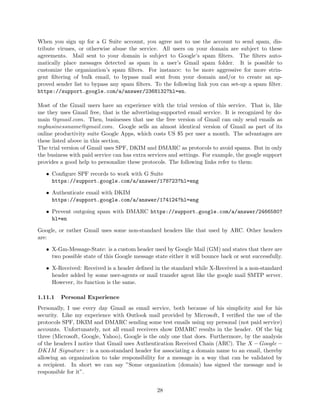
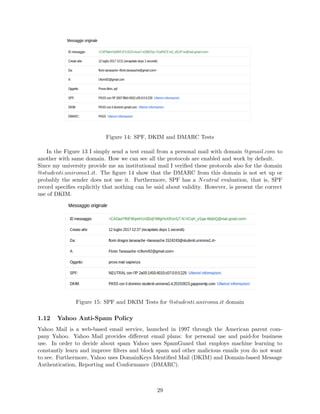
In the Figure 13 I simply send a test email from a personal mail with domain @gmail.com to
another with same domain. How we can see all the protocols are enabled and work by default.
Since my university provide me an institutional mail I verified these protocols also for the domain
@studenti.uniroma1.it. The figure 14 show that the DMARC from this domain is not set up or
probably the sender does not use it. Furthermore, SPF has a Neutral evaluation, that is, SPF
record specifies explicitly that nothing can be said about validity. However, is present the correct
use of DKIM.
Figure 15: SPF and DKIM Tests for @studenti.uniroma.it domain
1.12 Yahoo Anti-Spam Policy
Yahoo Mail is a web-based email service, launched in 1997 through the American parent com-
pany Yahoo. Yahoo Mail provides different email plans: for personal use and paid-for business
use. In order to decide about spam Yahoo uses SpamGuard that employs machine learning to
constantly learn and improve filters and block spam and other malicious emails you do not want
to see. Furthermore, Yahoo uses DomainKeys Identified Mail (DKIM) and Domain-based Message
Authentication, Reporting and Conformance (DMARC).
29
1.12.1 Yahoo DMARC policy
The Yahoo DMARC policy protects the users from increasing forged email spam. This is an im-
portant step to secure the users’ email identities from being used by unauthorized senders. Yahoo
updated the DMARC record with ”p = reject” for multiple Yahoo domains.
This means all DMARC compliant mail receivers (including Yahoo, Hotmail, and Gmail) are now
bouncing emails sent as ”@yahoo.com” addresses that aren’t sent through Yahoo servers. Any mes-
sages without a proper Domain Keys Identified Mail (DKIM) signature or Sender Policy Framework
(SPF) alignment will be rejected.
Email Service Providers (ESP) who use their customers’ ”@yahoo.com” address as the ”From”
address to send messages are impacted by this change.
Yahoo decided this choice because forged emails appear to be sent from a legitimate Yahoo email
address even though they aren’t, and are used to spread spam and other types of malicious phishing
scams. Therefore, to protect the users from these threats, Yahoo has taken the lead to secure emails
by enforcing the new DMARC policy.
By publishing a ”p = reject” record, Yahoo tells other DMARC compliant systems to reject mail
that doesn’t originate from a Yahoo server. Then, Yahoo recommends ESPs ensure all messages
can be authenticated by DKIM and/or SPF. To achieve this, ESPs should use domains that they’re
authorized to send emails from. It’s not recommended to use a customer’s personal domain.
1.12.2 Personal Experience
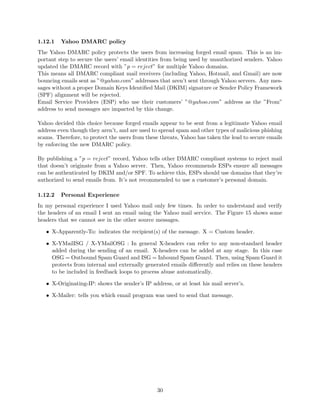
In my personal experience I used Yahoo mail only few times. In order to understand and verify
the headers of an email I sent an email using the Yahoo mail service. The Figure 15 shows some
headers that we cannot see in the other source messages.
• X-Apparently-To: indicates the recipient(s) of the message. X = Custom header.
• X-YMailISG / X-YMailOSG : In general X-headers can refer to any non-standard header
added during the sending of an email. X-headers can be added at any stage. In this case
OSG = Outbound Spam Guard and ISG = Inbound Spam Guard. Then, using Spam Guard it
protects from internal and externally generated emails differently and relies on these headers
to be included in feedback loops to process abuse automatically.
• X-Originating-IP: shows the sender’s IP address, or at least his mail server’s.
• X-Mailer: tells you which email program was used to send that message.
30
Figure 16: Particular headers of Yahoo
2 Personal Investigation for Spam
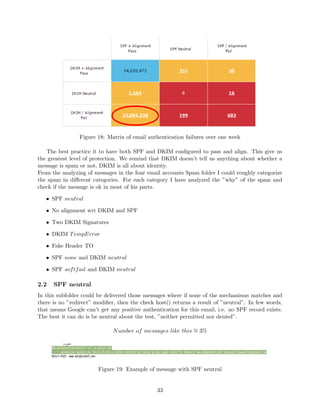
In this section I have analyzed a suitable number of message headers found both in my regular
INBOX and in the SPAM folder. Furthermore, I tried to determine a few categories/patterns of
information in the relevant header fields so that my SPAM folder can be partitioned into homo-
geneous subsets, such that most of the messages belonging to the same subset are based on the
same/similar techniques/patterns for bypassing the anti-spam measures [19].
How we have seen for my personal experience, we have analyzed some message sources from differ-
ent email services like Yahoo, Microsoft and GMail. For this experiment I used different personal
Gmail accounts and one Yahoo mail. In the Spam folder of these emails every month I receive a
lot of spam.
It’s important to specify that Gmail service automatically delete the spam emails that date back
to more than 30 days. In my personal Gmail account t.florin92@gmail.com I have a Spam folder
with 90 elements and in florin.tanasache@gmai.com only 2 elements as I was writing this report.
Furthermore, I have verified also the institutional GMail tanasache.1524243@studenti.uniroma1.it
but its Spam folder is empty. The Yahoo mail mr.boss4@yahoo.it has a Spam folder containing 23
elements.
2.1 Spam Folder
In order to understand why Gmail or Yahoo classifies some emails as spam and under which
consideration we can partition the Spam folder it is necessary to examine the headers from different
31
email in the Spam and in the Inbox folder. The Figure 16 shows a list of spam from my personal
Gmail account and how we can see that there are different senders (column From).
Figure 17: Spam from the account t.florin92@gmail.com
Email authentication is the sender’s best defense against phishing and spoofing. But ultimately,
mailbox providers like Gmail, Yahoo, and Microsoft have the final say in what gets delivered and
what does not. Sometimes, legitimate mail streams suffer based on these decisions-and senders are
left wondering why authentication failed and what to do about it.
Recently, DKIM alignment results for one of our client’s legitimate sending domains were failing
approximately 30 percent of the time, while the DKIM signature itself was passing at a rate of more
than 99 percent. It is not easy to understand why DKIM alignment was not consistently successful
when all emails were being signed in the same way.
32
Figure 18: Matrix of email authentication failures over one week
The best practice it to have both SPF and DKIM configured to pass and align. This give us
the greatest level of protection. We remind that DKIM doesn’t tell us anything about whether a
message is spam or not, DKIM is all about identity.
From the analyzing of messages in the four email accounts Spam folder I could roughly categorize
the spam in different categories. For each category I have analyzed the ”why” of the spam and
check if the message is ok in most of his parts.
• SPF neutral
• No alignment wrt DKIM and SPF
• Two DKIM Signatures
• DKIM TempError
• Fake Header TO
• SPF none and DKIM neutral
• SPF softfail and DKIM neutral
2.2 SPF neutral
In this subfolder could be delivered those messages where if none of the mechanisms matches and
there is no ”redirect” modifier, then the check host() returns a result of ”neutral”. In few words,
that means Google can’t get any positive authentication for this email, i.e. no SPF record exists.
The best it can do is be neutral about the test, ”neither permitted nor denied”.
Number of messages like this ∼= 3%
Figure 19: Example of message with SPF neutral
33
2.3 No Alignment
DMARC tests and enforces Identifier Domain Alignment. Authenticated identifier domains are
checked against Mail User Agent (MUA) visible ”RFC5322.From” domain:
• SPF: RFC5321.From domain
• DKIM: ”d=” domain
Only one authenticated identifier domain has to align for the email to be considered ”in alignment”.
How we have seen int the above sections, DMARC record publishers (domain owners) can require
strict identifier alignment (full domain matches exactly), or permit relaxed alignment (organiza-
tional domain match). Here a strict alignment example:
Figure 20: Example of strict alignment
In this case I have found two examples of messages. The first has all the three different domains.
Then, for DMARC it has not relaxed alignment (and thus strict). The 5322.From domain is
cybrary.it, the SPF domain is in.constantcontact.com and the DKIM domain is auth.ccsend.com.
34
Figure 21: No alignment
However, in the second example the message is align but it has no strict alignment. Therefore,
in this case only the relaxed alignment is allowed. Probably this email is located in the spam folder
because only the strict alignment is allowed. How we can see only DKIM is has the domain aligned.
Figure 22: No strict alignment
This type of spam messages is quite habitual.
Number of messages like this ∼= 20%
2.4 Two DKIM Signatures
In some analyzed messages I noticed that some emails are signed by two DKIM-Signature. A do-
main can have as many DKIM public keys as servers that send and sign mail. The DKIM DNS
record with the long string of gibberish is the public signing key. A domain can have many of
these as it has servers with private keys that sign emails. Each of these should have a selector
that uniquely identifies it. If there is just one, it may have no selector at all, just ” domainkey”.
Additional ones would use selectors to keep them all separated, for example ”list. domainkey” and
”bananas. domainkey”.
35
Usually, the first signature has a d= value matching the Header From domain of the email and the
second has a d= value pertaining to a domain belonging to the third party sender. In most cases
this specific is ok, however, some mailbox providers have reported an alignment fail. The culprit in
these cases was the d= value in the second signature, as it did not match the Header From address.
Figure 23: Example two DKIM
Number of messages like this ∼= 10%
2.5 DKIM TempError
Among all the messages in the my spam folder of the Gmail accounts I have noticed that most of
them are the DKIM value set to ”temperror”. This means that the message could not be verified
due to some error that is likely transient in nature, such as a temporary inability to retrieve a
public key.
Furthermore, I have noticed that all the messages of this type has as domain @moneyback.it. Then,
I checked this domain with the online service ”whois”. The organization is ”EURO MARKETING
36
SK SRO” and the Admin Contact Name is Pierluigi Madonna. After a brief search on the web I
understood that this type of mail has the goal to ”sell” commercial products.
Figure 24: Example DKIM temperror
Number of messages like this ∼= 35%
2.6 Fake Header TO
In this case we have noticed the fake string in the header To. This header shows to whom the
message was addressed and it may not contain the recipient’s address. Obviously, if a message
is for me, then my personal name or/and surname can be ”stated” before the email account. In
this case the message contains the string ”martinomichele1974” that is not absolutely my name or
surname.
Figure 25: Example fake To
37
Number of messages like this ∼= 10%
2.7 SPF none and DKIM neutral
In the spam folder of my Yahoo account I have found a message containing an SPF result =
none, that is, no policy records were published at the sender’s DNS domain. Furthermore, it
also contains a DKIM value = neutral, that means the message was signed but the signature or
signatures contained syntax errors or were not otherwise able to be processed.
Number of messages like this ∼= 12%
Figure 26: Example none and neutral
2.8 SPF softfail and DKIM neutral
Another type of message founded in the spam folder of the Yahoo mail is quite similar to the
precedent, but instead to have an SPF result = none, it has a value = softfail. This means that
the sender’s ADMD (Administrative Management Domain) believes the client was not authorized
to inject or relay mail using the sender’s DNS domain, but is unwilling to make a strong assertion
to that effect. Then, this message was considered as spam by Yahoo.
Number of messages like this ∼= 15%
38
Figure 27: Example softfail and neutral
2.9 Organization
From my personal analysis of a lot of emails in the spam folder, using the Yahoo and GMail
accounts, I could roughly organize my spam folder in different categories. These, can have the
same organization as the sections above. Moreover, for example I can simplify the classification
combining some of them. For instance, I can use a subfolder for those with a SPF value different
from pass but with a DKIM pass value and a different folder for the messages with both SPF and
DKIM with no pass values.
39
Figure 28: Example spam folder organization
Between the messages of the GMail and Yahoo spam folder I want to underline a particular
type of spam that I found only in the Yahoo spam folder. This type of spam is about ”sexual”
meetings. Usually, this type is constituted by a description of this ”proposal” and it ends with a
not secure URL.
Figure 29: Example Yahoo spam
2.10 Mozilla Thunderbird
This personal experiment has been done using the email client Mozilla Thunderbird[18]. Thunder-
bird can be configured to work seamlessly with Google’s Gmail service. Messages are synchronized
between my local version of Thunderbird and the web-based Gmail. Gmail uses a special imple-
mentation of IMAP. In this implementation, Gmail labels become Thunderbird folders. When is
applied a label to a message in Gmail, Thunderbird creates a folder with the same name as the
label and stores the message in that folder. Therefore, we have the same folders as we are using
40
the Gmail web-interface.
Thunderbird incorporates a Bayesian spam filter, a whitelist based on the included address book,
and can also understand classifications by server-based filters such as SpamAssassin. By default,
Thunderbird uses an adaptive filter that learns from your actions which messages are legitimate
and which are junk. In order for this filter to be effective, it must be trained to recognize the
messages that a person considers to be junk and the messages considers to be not junk. In my case,
I did not any actions on the messages. I simply synchronized the messages with the well-based
Gmail accounts.
2.11 Inbox Folder
The Inbox Folder contains those messages that are not identified by the spam filter as spam. With-
out a good spam filer we would have a lot of spam messages, mostly the dangerous ones. Instead,
for instance, a normal Gmail user has in his Inbox folder different ”honest” messages.
Furthermore, we can categorize them analyzing some header fields. Personally, I have a lot of
messages from sites where I am registered. Probably, I accepted those conditions which authorize
them to send me mostly ”advertising posters”. Obviously, we can unsubscribe by them, but maybe
is a good choice if we categorize them as ”Advertising” for instance, continuing to receive them.
So, we can create a folder (subset) in Spam and called it ”Advertising”. Whenever we want to read
news from our ”signed services” we go in this specific folder.
In order to determine the criterion for this categorization we have analyzed three messages re-
ceived from Unicredit (bank account), PiuVista (important glasses store) and Infojobs (online job
search). Inspecting their sources, we noticed particularly interesting the header List−Unsubscribe.
2.11.1 List-Unsubscribe
The List-Unsubscribe header is an optional piece of text that is added to the header of the emails.
It works in conjunction with options that the email client provides for unsubscribing and spam
complaints. This text provides an unsubscribe button that users can click on to effortlessly remove
themselves from the list where there are ”signed clients” of a determinate service or web-site.
The reason for this header is that including a List-Unsubscribe header in the emails will reduce
complaints, improve deliverability and improve the experience for the subscribers. It’s easy to do
and doesn’t cost anything for the email publishers.
It will reduce complaints because the recipients will be able to easily and reliably unsubscribe if they
want to. Moreover, a lot of frustrated users are likely to hit the ”Report Spam” button changing
the reputation for that sender. Then, including a List-Unsubscribe header is viewed positively by
most ISPs and spam filters. Most major providers like AOL, Hotmail, Gmail, and Yahoo! support
List-Unsubscribe functionality.
In the next Figures show the similarity between the messages from Unicredit and InfoJobs and the
List-Unsubscribe header.
41
Figure 30: Message source Unicredit
Figure 31: Message source InfoJobs
42
As we can see both pass SPF test and there is not a condition for the default spam filter to
categorize this messages as spam. In this way we can have a cleaner Inbox folder, that is with
only important messages but saving the commercial ones. Therefore, with this technique when we
receive this type of message, it will go in the subset folder called ”Advertising”.
Moreover, if I consider this header to classify the messages about advertising probably it is not
the better choice because maybe I am enrolled in an institutional group etc. Thus, also in this
case the message contains this header and it will also be in the subset folder. In order to improve
this approach I can use a filter for the header From and check if for instance it contains the
word ”sapienza”, ”lavoro”, ”ebay”,”amazon” etc. Therefore, classify these ” advertising” in sub-
categories.
3 Additional Spam Folder
In this section I will discuss about the spam messages obtained from an additional SPAM folder
provided by the Professor. The after a good inspection I checked whether the above categories of
spam messages still apply.
The folder Spam has 259 messages. I have analyzed a lot of them, searching the similarities with my
spam messages or unusual something in the headers. In most cases, the problem refers to the first
category listed at pag 33, that is, when the evaluation of SPF record is neutral. Approximately,
50% of messages refer to this type. Another, widespread case is when the messages has only SPF
mechanism but no DKIM. Therefore, there is cases that my above categories can include them and
”new” unusual cases that I have never seen in my spam messages.
Similar categories:
• SPF neutral
• No alignment wrt DKIM and SPF
• DKIM temperror
New unusual cases:
• No DKIM: only SPF mechanism is not enough to guarentee the sender authenticity.
• Sender = From: the sender domain is what the receiving email server sees when initiating
the session. The from address is what your recipients will see. For better deliverability it is
recommended to use the same from domain as the sender.
• Undisclosed recipients: normally when a person receives emails going to undisclosed recipients,
the MIME TO information will not contain a valid email address. Normally, this is the result
of an email where the recipients are all inserted in BCC. Probably, Gmail categorizes them
as spam.
The following are the screenshots of the cases seen above.
43
Figure 32: No DKIM
Figure 33: Sender = From
Figure 34: Undisclosed-recipients
44
4 Conclusions
Spam will end when it is no longer profitable. Spammers will see their profits tumble if nobody
buys from them. This because the persons don’t even see the junk emails. This is the easiest way
to fight spam, and certainly one of the best. As we have seen in this document, an email contains
a lot of information about the sender and there are different mechanisms that fight this problem
for us. Google, Yahoo, Microsoft and others invest money and resources in header forging.
Personally, I understood that our protection depends on the email service that we are using because
each of them have the use of different type of protections. Moreover, email client like Thunderbird
incorporates a quite powerful Bayesian spam filter, a whitelist based on the included address book,
and can also understand classifications by server-based filters such as SpamAssassin.
Therefore, today we have a lot of tools in order to understand and learn about this problem.
Usually, a normal user never checks his spam folder and rarely marks some messages as spam,
probably because the used email service is doing his job well. The unwanted messages that a stan-
dard user could receive are those ”advertising” messages because the user has used his email for
the registration on the site, service, etc.
A difference between my personal spam messages and those analyzed from the Professor’s folder is
not only the ”quantity” but also considering the type of the messages senders. This is due to his
public email which can be ”catch” by most of web crawler.
Summarizing, from the mechanisms like DKIM, SPF, DMARC I have understood that if these
three are working and all of them pass the checking, then with a high probability the message is
not a spam message.
I conclude by saying that this document does not cover every possible analysis of mail headers,
and do not cover all the situations in which a message can be classified as spam. It describes just
some standards for preventing/recognising spam messages, based on including suitable information
in the headers of email messages and also includes a description of a personal investigation about
it.
If variety is a spice of life, marriage is the big can of leftover spam.
45
References
[1] Sender Policy Framework. Related Solutions, Project Overview
http://www.openspf.org/
[2] RFC 4408. Sender Policy Framework, 2006
https://www.ietf.org/rfc/rfc4408.txt
[3] RFC 7208. Sender Policy Framework, 2014
https://tools.ietf.org/html/rfc7208
[4] RFC 4406. Sender ID, 2006
https://tools.ietf.org/html/rfc7208
[5] Sender ID. SPF vs Sender ID
http://www.openspf.org/SPF_vs_Sender_ID
[6] Microsoft anti-spam protection. Sender ID
https://technet.microsoft.com/en-us/library/aa996295(v=exchg.150).aspx
[7] Microsoft anti-spam policy. Anti-Spam and Anti-Malware Protection
https://technet.microsoft.com/it-it/library/exchange-online-antispam-and-antimalware-protec
aspx
[8] Microsoft Office 365. Office 365 email anti-spam protection
https://support.office.com/en-us/article/Office-365-Email-Anti-Spam-Protection-6a601501-a6a
ui=en-US&rs=en-US&ad=US
[9] Microsoft Office 365 Utilities.
How Office 365 uses Sender Policy Framework (SPF) to prevent spoofing
https://technet.microsoft.com/library/mt712724(v=exchg.150).aspx
Set up SPF in Office 365 to help prevent spoofing
https://technet.microsoft.com/library/dn789058(v=exchg.150).aspx
Use DKIM to validate outbound email sent from your custom domain in Office 365
https://technet.microsoft.com/library/mt695945(v=exchg.150).aspx
Use DMARC to validate email in Office 365
https://technet.microsoft.com/library/mt734386(v=exchg.150).aspx
Configure your spam filter policies
https://technet.microsoft.com/library/jj200684(v=exchg.150).aspx
[10] DomainKeys Identified Mail (DKIM). RFC 6376, September 2011
https://tools.ietf.org/pdf/rfc6376.pdf
[11] DKIM Community. DKIM.org
http://dkim.org/
[12] DomainKeys Identified Mail (DKIM) Service Overview. RFC 5585, June 2009
https://tools.ietf.org/html/rfc5585
[13] Author Domain Signing Practices (ADSP). Wikipedia page
https://en.wikipedia.org/wiki/Author_Domain_Signing_Practices
46
[14] Author Domain Signing Practices (ADSP). RFC 5617, August 2009
https://tools.ietf.org/html/rfc5617
[15] Domain-based Message Authentication, Reporting, and Conformance (DMARC). RFC 7489,
March 2015
https://tools.ietf.org/html/rfc7489
[16] Domain-based Message Authentication, Reporting, and Conformance (DMARC). Wikipedia
page
https://en.wikipedia.org/wiki/DMARC
[17] Authenticated Received Chain. ARC Specification for Email
arc-spec.org
[18] Moziella Thunderbird. Thunderbird and Junk/Spam Messages
https://support.mozilla.org/en-US/kb/thunderbird-and-junk-spam-messages
[19] ReturnPath Blog. Discover Where, When, and How Subscribers are Interacting With Email
https://blog.returnpath.com
47

Anti-spam techniques

  • 1.
    Contents 1 Anti-Spam Techniques3 1.1 Email Architecture . . . . . . . . . . . . . . . . . . . . . . . . . . . . . . . . . . . . . 3 1.2 Sender Authentication Protocols . . . . . . . . . . . . . . . . . . . . . . . . . . . . . 4 1.3 Sender Policy Framework . . . . . . . . . . . . . . . . . . . . . . . . . . . . . . . . . 5 1.3.1 Publishing Authorization . . . . . . . . . . . . . . . . . . . . . . . . . . . . . 6 1.3.2 SPF Record Syntax . . . . . . . . . . . . . . . . . . . . . . . . . . . . . . . . 6 1.3.3 Checking SPF . . . . . . . . . . . . . . . . . . . . . . . . . . . . . . . . . . . 8 1.3.4 An Example Policy . . . . . . . . . . . . . . . . . . . . . . . . . . . . . . . . . 9 1.3.5 The Received-SPF Header Field . . . . . . . . . . . . . . . . . . . . . . . . . 9 1.3.6 Security Considerations . . . . . . . . . . . . . . . . . . . . . . . . . . . . . . 10 1.3.7 Tools . . . . . . . . . . . . . . . . . . . . . . . . . . . . . . . . . . . . . . . . 11 1.3.8 Deployment . . . . . . . . . . . . . . . . . . . . . . . . . . . . . . . . . . . . . 12 1.4 Sender ID . . . . . . . . . . . . . . . . . . . . . . . . . . . . . . . . . . . . . . . . . . 12 1.4.1 Implementation . . . . . . . . . . . . . . . . . . . . . . . . . . . . . . . . . . . 12 1.4.2 SPF vs Sender ID . . . . . . . . . . . . . . . . . . . . . . . . . . . . . . . . . 13 1.4.3 Security Considerations . . . . . . . . . . . . . . . . . . . . . . . . . . . . . . 14 1.5 Content Authentication Protocols . . . . . . . . . . . . . . . . . . . . . . . . . . . . . 14 1.6 DomainKeys Identified Mail (DKIM) . . . . . . . . . . . . . . . . . . . . . . . . . . . 14 1.6.1 Protocol Elements . . . . . . . . . . . . . . . . . . . . . . . . . . . . . . . . . 15 1.6.2 The DKIM-Signature Header Field . . . . . . . . . . . . . . . . . . . . . . . . 16 1.6.3 Signing . . . . . . . . . . . . . . . . . . . . . . . . . . . . . . . . . . . . . . . 16 1.6.4 Verifying . . . . . . . . . . . . . . . . . . . . . . . . . . . . . . . . . . . . . . 17 1.6.5 Security Considerations . . . . . . . . . . . . . . . . . . . . . . . . . . . . . . 18 1.7 Author Domain Signing Practices (ADSP) . . . . . . . . . . . . . . . . . . . . . . . . 19 1.7.1 How set up ADSP Policy . . . . . . . . . . . . . . . . . . . . . . . . . . . . . 19 1.8 Domain-based Message Authentication, Reporting & Conformance (DMARC) . . . . 19 1.8.1 Alignment . . . . . . . . . . . . . . . . . . . . . . . . . . . . . . . . . . . . . . 21 1.8.2 DMARC Policy Record . . . . . . . . . . . . . . . . . . . . . . . . . . . . . . 21 1.8.3 Reports . . . . . . . . . . . . . . . . . . . . . . . . . . . . . . . . . . . . . . . 22 1.8.4 Security Considerations . . . . . . . . . . . . . . . . . . . . . . . . . . . . . . 23 1.8.5 How to create DMARC Record . . . . . . . . . . . . . . . . . . . . . . . . . . 23 1.9 Authenticated Received Chain . . . . . . . . . . . . . . . . . . . . . . . . . . . . . . 24 1.9.1 Implementation . . . . . . . . . . . . . . . . . . . . . . . . . . . . . . . . . . . 24 1.10 Microsoft Anti-Spam Policy . . . . . . . . . . . . . . . . . . . . . . . . . . . . . . . . 25 1.10.1 Office 365 email anti-spam protection . . . . . . . . . . . . . . . . . . . . . . 25 1.10.2 Anti-spam message headers . . . . . . . . . . . . . . . . . . . . . . . . . . . . 26 1.10.3 Personal Experience . . . . . . . . . . . . . . . . . . . . . . . . . . . . . . . . 27 1.11 Google Anti-Spam Policy . . . . . . . . . . . . . . . . . . . . . . . . . . . . . . . . . 27 1.11.1 Personal Experience . . . . . . . . . . . . . . . . . . . . . . . . . . . . . . . . 28 1.12 Yahoo Anti-Spam Policy . . . . . . . . . . . . . . . . . . . . . . . . . . . . . . . . . . 29 1.12.1 Yahoo DMARC policy . . . . . . . . . . . . . . . . . . . . . . . . . . . . . . . 30 1.12.2 Personal Experience . . . . . . . . . . . . . . . . . . . . . . . . . . . . . . . . 30 1
  • 2.
    2 Personal Investigationfor Spam 31 2.1 Spam Folder . . . . . . . . . . . . . . . . . . . . . . . . . . . . . . . . . . . . . . . . . 31 2.2 SPF neutral . . . . . . . . . . . . . . . . . . . . . . . . . . . . . . . . . . . . . . . . . 33 2.3 No Alignment . . . . . . . . . . . . . . . . . . . . . . . . . . . . . . . . . . . . . . . . 34 2.4 Two DKIM Signatures . . . . . . . . . . . . . . . . . . . . . . . . . . . . . . . . . . . 35 2.5 DKIM TempError . . . . . . . . . . . . . . . . . . . . . . . . . . . . . . . . . . . . . 36 2.6 Fake Header TO . . . . . . . . . . . . . . . . . . . . . . . . . . . . . . . . . . . . . . 37 2.7 SPF none and DKIM neutral . . . . . . . . . . . . . . . . . . . . . . . . . . . . . . . 38 2.8 SPF softfail and DKIM neutral . . . . . . . . . . . . . . . . . . . . . . . . . . . . . 38 2.9 Organization . . . . . . . . . . . . . . . . . . . . . . . . . . . . . . . . . . . . . . . . 39 2.10 Mozilla Thunderbird . . . . . . . . . . . . . . . . . . . . . . . . . . . . . . . . . . . . 40 2.11 Inbox Folder . . . . . . . . . . . . . . . . . . . . . . . . . . . . . . . . . . . . . . . . 41 2.11.1 List-Unsubscribe . . . . . . . . . . . . . . . . . . . . . . . . . . . . . . . . . . 41 3 Additional Spam Folder 43 4 Conclusions 45 2
  • 3.
    HW: Web Securityand Privacy 2016/2017 Anti-spam techniques Tanasache Florin 1524243 Abstract This document provides an overview of most used and effective anti-spam techniques based on adding suitable fields in the header of an email message and additional examinations. An electronic message is ”spam” if (A) the recipient’s personal identity and context are irrel- evant because the message is equally applicable to many other potential recipients; and (B) the recipient has not verifiably granted deliberate, explicit, and still-revocable permission for it to be sent. Probably this is the most accurate and complete definition today. Spam is just a branch of the vast domain of network security. In the real world, the question is not ”How to suppress spam?” but ”How to limit spam without killing email?”. Various anti-spam techniques are used to prevent email spam. No technique is a complete solu- tion to the spam problem, and each has trade-offs between incorrectly rejecting legitimate email (false positives) vs. not rejecting all spam (false negatives) and the associated costs in time and effort. Anti-spam techniques can be broken into four broad categories: (1) those that require actions by individuals, (2) those that can be automated by email administrators, (3) those that can be automated by email senders and (4) those employed by researchers and law enforcement officials. 1 Anti-Spam Techniques Electronic mail is used daily by millions of people to communicate around the globe and is a mission critical application for many businesses. Most of us using the Internet e-mail service face almost daily unwanted messages in our mailboxes. We have never asked for these e-mails, and often do not know the sender, and puzzle about where the sender got our e-mail address from. The type of those messages varies: some contain advertisements, others provide winning notifications, and sometimes we get messages with executable files, which finally emerge as malicious codes, such as viruses and Trojan horses. Today there are many techniques that can be implemented to identify incoming messages as spam. These are: Whitelist/Blacklist, Bayesian analysis, Mail header analysis, Keyword checking. In the first part of this document we will see the most used standards and non based on adding suitable fields in the header of an email message. The principal standards are SPF and DKIM. In order to understand better the following concepts primarily we will introduce briefly the email architecture. 1.1 Email Architecture Email systems consist of computer servers that process and store messages on behalf of users who connect to the email infrastructure via an email client or web interface. When someone sends an email, the message is transferred from his or her computer to the server associated with the recipient’s address, usually via a number of other servers (hops). 3
  • 4.
    Figure 1: EmailArchitecture Spam filters can be implemented at all layers, firewalls exist in front of email server or at MTA(Mail Transfer Agent), Email Server to provide an integrated Anti-Spam and Anti-Virus solution offering complete email protection at the network perimeter level, before unwanted or po- tentially dangerous email reaches the network. At MDA (Mail Delivery Agent) level also spam filters can be installed as a service to all of their customers. At Email client user can have per- sonalized spam filters that then automatically filter mail according to the chosen criteria. Figure 1 shows the typical architecture of email. 1.2 Sender Authentication Protocols Today, the most abusive e-mail messages carry fake sender addresses. The victims whose addresses are being abused often suffer from the consequences, because their reputation gets diminished. For instance, when a person received an error message saying that a message allegedly sent by him/her could not be delivered to the recipient, although he/she never sent a message to that address. Sender address forgery is a threat to users and companies similarly, and it even undermines the e-mail medium as a whole because it erodes people’s confidence in its reliability. There are different e-mail authentication protocols [1]. Mainly, they differ in which addresses (identities) they authenticate and how they do it. In order to understand how the various protocols work, firstly it’s better to understand the various parts of which e-mail messages are made. The Figure 2 shows a message: it has an envelope that represents the SMTP transaction, a header, and a body which contains the actual text of the message other possible attachments. Sender authentication protocols are designed to protect against forgery of e-mail sender identities, either in the envelope or in the header. In the envelope, there are three identities: • The ”HELO” identity, which names the mail server (MTA) that is sending the message. • The ”MAIL FROM” identity that is the e-mail address that is responsible for sending the message and where delivery errors (bounces) will eventually be reported. • The ”RCPT TO” identity that is the message’s recipient address. 4
  • 5.
    Figure 2: EmailStructure These envelope identities are used during the transport of the message and they are discarded upon delivery, except the MAIL FROM that is usually retained in the message header as Return-Path. The typical symptom of forged envelope sender identities are misdirected bounces. The header contains another set of identities that can be other meta information about the message, such as the subject and the sending date. • The ”From” identity denotes the address of the message’s author. • The ”Sender” identity is listed explicitly only if the author is not the actual sender of the message. • The ”To” identity is again the recipient address. The header identities are irrelevant for message delivery and since they are what is displayed by mail clients, are solely significant for the use by the message’s recipient. When the header sender address is forged, the recipient’s mail client will display a misleading sender address and the recipient will thus be deceived about the message’s real origin. 1.3 Sender Policy Framework The Sender Policy Framework (SPF) [1] [2] [3] is an open standard specifying a technical method to prevent sender address forgery. SPF has a long history reaching back to mid-2003 when the first stable SPF draft was released. In April 2014 IETF publish SPF in RFC 7208 as ”proposed standard” after a previous standard release publish in RFC 4408 in 2006. The current version of SPF - called SPFv1 or SPF Classic - protects the envelope sender address, which is used for the delivery of messages. Therefore SPFv1 allows the owner of a domain to specify their mail sending policy, that is which mail servers they use to send mail from their domain. The technology requires two sides to play together: 1. The domain owner publishes this information in an SPF record in the domain’s DNS zone, and when someone else’s mail server receives a message claiming to come from that domain, then 5
  • 6.
    2. The receivingserver can check if the message received complies with the domain’s stated policy and decide consequently, that is if the message comes from an unknown server, it can be considered a fake. Once te receiver is confident about the authenticity of the sender address, he can finally ”take it for real” and attach reputation to it. 1.3.1 Publishing Authorization A domain publishes valid SPF records as described below. These records authorize the use of the relevant domain names in the ”HELO” and ”MAIL FROM” identities by the MTAs. An SPF record is a DNS record that declares which hosts are, and are not, authorized to use a domain name for the ”HELO” and ”MAIL FROM” identities. The SPF record is expressed as a single DNS TXT resource record; multiple SPF records are not permitted for the same owner name. An example record is the following: v = spf1 + mxa : colo.example.com/28 − all This record has a version of ”spf1” and three directives: ”+mx”, ”a:colo.example.com/28” (the ”+” is implied), and ”-all”. We will see an example further on. Each SPF record is placed in the DNS tree at the owner name. SPF records must be published as a DNS TXT (type 16) Resource Record (RR) only. The charac- ter content of the record is encoded as US-ASCII. Use of alternative DNS RR types was supported in SPF’s experimental phase but has been discontinued. Furthermore, a domain name must not have multiple records that would cause an authorization check to select more than one record. However, a single text DNS record can be composed of more than one string and when a published record contains multiple character-strings, then the record must be treated as if those strings are concatenated together without adding spaces. TXT records that contain multiple strings are use- ful in constructing records that would exceed the 255-octet maximum length of a character-string within a single TXT record. The size of an published SPF record for a given domain name should remain small enough that the results of a query for it will fit within 512 octets. Otherwise, the solution is the possibility of exceeding a DNS protocol limit. Moreover, it is possible the use of wildcard records for publishing but this is discouraged, and care has to be taken if they are used. 1.3.2 SPF Record Syntax Usually, a Record begins with a version section: record = version terms ∗ SP version = ”v = spf1” The version section is terminated by either an SP character or the end of the record. For instance, a record with a version section of ”v=spf10” does not match and is discarded. As the first step the syntax of the record is validated, and if there are any syntax errors anywhere in the record, the function check host() returns immediately with the result ”permerror”, without further interpreta- tion or evaluation. There are two types of terms: mechanisms and modifiers. Mechanisms can be used to describe 6
  • 7.
    the set ofhosts which are designated outbound mailers for the domain. When a mechanism is evaluated, one of three things can happen: it can match, not match, or return an exception. Mechanisms can be prefixed with one of four qualifiers. The default qualifier is ”+”, i.e. ”Pass”. The Figure 3 summaries their meanings. Figure 3: Qualifiers Modifiers are not mechanisms and they do not return match or not-match. Instead, they provide additional information. A modifier may appear only once per record. Unknown modifiers are ignored. • redirect =< domain >: the SPF record for domain replace the current record. For example if the client IP is 1.2.3.4 and the current-domain is example.com. If example.com has no SPF record, that is an error; the result is unknown. Suppose the SPF record of example.com was ”v=spf1 a -all”. Look up the A record for example.com. If it matches 1.2.3.4, return Pass. If there is no match, the exec fails to match, and the -all value is used. • exp =< domain >: when an SMTP receiver rejects a message, it can includes an explanation. An SPF publisher can specifies the explanation string that senders can see. If none of the mechanisms match and there is no ”redirect” modifier, then the check host() returns a result of ”neutral”. There are two types of mechanisms: basic language framework mechanisms and designated sender mechanisms. Basic mechanisms contribute to the language framework and they do not specify a particular type of authorization scheme. The basic mechanisms are as follows: • all: the ”all” mechanism is a test that always matches. Usually it is put at the end of the SPF record. Mechanisms after ”all” will never be tested. • include: the specified domain is searched for a match. The ”include” mechanism makes it possible for one domain to designate multiple administratively independent domains. For example, a vanity domain ”example.net” might send mail using the servers of administratively independent domains example.com and example.org. Designated sender mechanisms are used to identify a set of < ip > addresses as being permitted or not permitted to use the < domain > for sending mail. The designated sender mechanisms are as follows: • a: this mechanism matches if < ip > is one of the < target − name >’s IP addresses. • mx: this mechanism matches if < ip > is one of the MX hosts for a domain name. 7
  • 8.
    • ptr (donot use): This mechanism tests whether the DNS reverse-mapping for < ip > exists and correctly points to a domain name within a particular domain. This mechanism should not be published. • ip4 and ipv6: These mechanisms test whether < ip > is contained within a given IP network. The < ip > is compared to the given network. If CIDR prefix length high-order bits match, the mechanism matches. • exists: This mechanism is used to construct an arbitrary domain name. It allows for compli- cated schemes involving arbitrary parts of the mail envelope to determine what is permitted. 1.3.3 Checking SPF A mail receiver can perform a set of SPF checks for each mail message that it receives. An SPF check tests the authorization of a client host to emit mail with a given identity. Usually, such checks are done by a receiving MTA, but can be performed elsewhere in the mail processing chain. ”HELO” identity It is recommended that SPF verifiers and checks the ”HELO” identity and not only check the ”MAIL FROM” identity. Checking ”HELO” promotes consistency of results and can reduce DNS resource usage. Moreover, if both are checked the checking ”HELO” before ”MAIL FROM” is the recommended sequence . ”MAIL FROM” Identity SPF verifiers must check the ”MAIL FROM” identity if a ”HELO” check either has not been per- formed or has not reached a definitive policy result by applying the check host() function to the ”MAIL FROM” identity as the < sender >. Without explicit approval, checking other identities against SPF version 1 records is not recom- mended because there are cases that are known to give incorrect results. Then, when a mail receiver decides to perform an SPF check, it has to use a correctly implemented check host() function evaluated with the correct parameters. The authorization check should be performed during the processing of the SMTP transaction that receives the mail. In this way it reduces the complexity of determining the correct IP address and allows errors to be returned di- rectly to the sending MTA using SMTP replies. The check host() function fetches SPF records, parses them, and evaluates them to determine whether a particular host is or is not permitted to send mail with a given identity. It uses some defined inputs and the sender’s policy published in the DNS to reach a conclusion about client authorization. The check host() function takes the following arguments: • < ip >: the IP address of the SMTP client that is emitting the mail, either IPv4 or IPv6. • < domain >: the domain that provides the sought-after authorization information; initially, the domain portion of the ”MAIL FROM” or ”HELO” identity. • < sender >: the ”MAIL FROM” or ”HELO” identity. Evaluation of an SPF record can return any of these results: 8
  • 9.
    Figure 4: Evalutionof SPF record Summarizing, if a domain has no SPF record at all, the result is ”None”. If a domain has a temporary error during DNS processing, it will be the result ”TempError”. If some kind of syntax or evaluation error occurs (eg. the domain specifies an unrecognized mechanism) the result is ”PermError”. 1.3.4 An Example Policy Now, we will see an example to understand how SPF works. Bob owns the domain example.net. He also sometimes sends mail through his GMail account and contacted GMail’s support to identify the correct SPF record for GMail. Since he often receives bounces about messages he didn’t send, he decides to publish an SPF record in order to reduce the abuse of his domain in e-mail envelopes: example.net. TXT ”v = spf1 mx a : pluto.example.net include : aspmx.googlemail.com − all” The parts of the SPF record mean the following: • v = spf1: SPF version 1 • mx: the incoming mail servers (MXs) of the domain are authorized to also send mail for example.net. • a : pluto.example.net: the machine pluto.example.net is authorized. • include : aspmx.googlemail.com: everything considered legitimate by gmail.com is legitimate for example.net. • −all: all other machines are not authorized. 1.3.5 The Received-SPF Header Field The Received-SPF header field is a trace field of the message and should be anticipated to the existing header, above the Received: field that is generated by the SMTP receiver. When an SPF query returns ”fail”, the MTA should reject the connection. When an SPF query returns any other result, the MTA should add an advisory header to the message of the form ”Received-SPF: neutral” or ”Received-SPF: pass”. There are key-value pairs that are designed for later machine parsing. SPF clients should give enough information so that the SPF results can be verified. That is, at least ”client-ip”, ”helo”, and, if the ”MAIL FROM” identity was checked, ”envelope-from”. Figure 5 is an example: 9
  • 10.
    Figure 5: ExampleReceived-SPF 1.3.6 Security Considerations As with most aspects of email, there are a number of ways that malicious parties could attack: • Processing Limits: Some mechanisms and modifiers cause DNS queries at the time of eval- uation, and some do not. The following terms cause DNS queries: the ”include”, ”a”, ”mx”, ”ptr”, and ”exists” mechanisms, and the ”redirect” modifier. SPF implementations must limit the total number of those terms to 10 during SPF evaluation, to avoid unreasonable load on the DNS. If this limit is exceeded, the implementation must return ”permerror”. The other terms do not cause DNS queries at the time of SPF evaluation and their use is not subject to this limit. Therefore these processing limits are designed to prevent attacks such as the following: 1. A malicious party could create an SPF record with many references to a victim’s domain and then send many emails to different SPF verifiers; those SPF verifiers would then create a DoS attack. 2. Whereas implementations of check host() are supposed to limit the number of DNS lookups, malicious domains could publish records that exceed these limits in an attempt to waste computation effort at their targets when they send them mail. 3. Malicious parties could send a large volume of mail purporting to come from the intended target to a wide variety of legitimate mail hosts. These legitimate machines would then present a DNS load on the target as they fetched the relevant records. 4. Malicious parties could, in theory, use SPF records as a vehicle for DNS lookup amplifi- cation for a DoS attack. In this scenario, the attacker publishes an SPF record in its own DNS that uses ”a” and ”mx” mechanisms directed toward the intended victim, and then distributes mail with a MAIL FROM value including its own domain in large volume to a wide variety of destinations. • SPF-Authorized Email May Contain Other False Identities: It’s about the ”MAIL FROM” and the ”HELO” identity authorizations. They do not provide assurance about the authorization/authenticity of other identities used in the message. Therefore, it is possible for a malicious sender to inject a message using his own domain in the identities used by SPF and have that domain’s SPF record authorize the sending host, and yet the message can easily list other identities in its header. Unless the user or the MUA takes care to note that the authorized identity does not match the other more commonly presented identities, the user might be lulled into a false sense of security. • Spoofed DNS and IP Data: There are two aspects of this protocol that malicious parties could exploit to undermine the validity of the check host() function: 1. The evaluation of it relies heavily on DNS. A malicious attacker could attack the DNS infrastructure and cause check host() to see spoofed DNS data, and then return incorrect results. 10
  • 11.
    2. The clientIP address, < ip >, is assumed to be correct but only in a modern, correctly configured system, the risk of this not being true is zero. • Cross-User Forgery: SPF policies just map domain names to sets of authorized MTAs, not whole email addresses to sets of authorized users. Then, it is generally impossible to verify, through SPF, the use of specific email addresses by individual users of the same MTA. It is up to mail services and their MTAs to directly prevent cross-user forgery: based on SMTP AUTH, users have to be restricted to using only those email addresses that are actually under their control or another method to verify the identity of individual users is message cryptography, such as Pretty Good Privacy (PGP) or S/MIME. • External Explanations: When the authorization check fails, an explanation string could be included in the reject response. In this case both the sender and the rejecting receiver need to be aware that the explanation was determined by the right publisher of the SPF record checked and, in general, not the receiver. The explanation can contain malicious URLs, or it might be offensive or misleading. 1.3.7 Tools There are several tools developed by OpenSPF Community. • Form based record testers: These tools are meant to help you deploy SPF records for your domain. • E-mail based record testers: The Community provides an e-mail based record tester. You can send an e-mail to spf-test@openspf.net. The message will be rejected (this is by design) and you will get the SPF result either in your MTA mail logs or via however your MTA reports errors to message senders. This is done to avoid the risk of backscatter from the tester. This test tests both MAIL FROM and HELO and provides results for both. Port25.com provides another tool to test whether your SPF record is working. Send an e- mail to check-auth@verifier.port25.com and you will receive a reply containing the results of the SPF check. Figure 6 is a personal example with my personal Gmail account from the web-based interface. • Form based TXT record viewer: Using the Beveridge Hosting for DNS Lookup and SPF checking. • For implementors: Test Suite, not a tool like others, but useful in some cases. 11
  • 12.
    Figure 6: Exampleof the tool Port25.com 1.3.8 Deployment There are Anti-spam software such as SpamAssassin version 3.0.0 and ASSP that implement SPF. Many mail transfer agents (MTAs) support SPF directly such as Courier, CommuniGate Pro, Wildcat, MDaemon, and Microsoft Exchange, or have patches or plug-ins available that support SPF, including Postfix, Sendmail, Exim, qmail, and Qpsmtpd. There are several SPF libraries available. Many mail servers support SPF natively. Most popular mail servers also have extensions or unofficial patches available. In a survey published in 2007, 5% of the .com and .net domains had some kind of SPF policy. In 2009, a continuous survey run at Nokia Research reports that 51% of the tested domains specify an SPF policy. 1.4 Sender ID The Sender ID agent is an anti-spam agent that is available in Microsoft Exchange Server 2013 derived from SPF. Hence, it has an identical syntax, which validates one of the message’s address header fields. Which one it validates is selected according to an algorithm called PRA (Purported Responsible Address). The algorithm aims to select the header field with the e-mail address ”re- sponsible” for sending the message. 1.4.1 Implementation Since it was derived from SPF, Sender ID has only a few additions. Sender ID tries to improve on a principal deficiency in SPF: we know that SPF does not verify the header addresses that indicates the sending party. Such header addresses are typically displayed to the user and are used to reply to emails. Indeed, such header addresses can be different from the address that SPF tries to verify because SPF verifies only the ”MAIL FROM” address, also called the envelope sender. 12
  • 13.
    Sender ID definesan algorithm called Purported Responsible Address (PRA) and a set of heuristic rules to establish the address from the many typical headers in an email. Syntactically, Sender ID is almost identical to SPF except that v=spf1 is replaced with one of: • spf2.0/mfrom: meaning to verify the envelope sender address just like SPF. • spf2.0/mfrom, pra or spf2.0/pra, mfrom: meaning to verify both the envelope sender and the PRA. • spf2.0/pra: meaning to verify only the PRA. In practice, the pra scheme usually only offers protection when the email is legitimate, while offering no real protection in the case of spam or phishing. However, in the case of phishing or spam, the pra may be based on Resent-* header fields that are often not displayed to the user. To be an effective anti-phishing tool, the MUA (Mail User Agent or Mail Client) will need to be modified to display either the pra for Sender ID, or the Return-Path: header field for SPF. The pra tries to counter the problem of phishing, while SPF or mfrom tries to counter the problem of spam bounces and other auto-replies to forged Return-Paths. Then, two different problems with two different proposed solutions. 1.4.2 SPF vs Sender ID Is SPF the same thing as Sender ID? Which is better? First of all, SPF and Sender ID are not the same. Hence, they differ in what they validate and what ”layer” of the e-mail they work with. Sender ID is not better than SPF because it addresses different problems. There is controversy because Sender ID is incompatible with existing specifica- tions. Microsoft is aware of the problem and representatives of theirs have stated that they have no plans to fix it. We can say that both methods validate e-mail sender addresses, both use similar methods to do so and both publish policy records in DNS. Furthermore, both use the same syntax for their policy records. The Sender ID recommends to use SPF’s v=spf1 policies that are originated to MAIL FROM and HELO identities only and applies them to the PRA identity. That is, it says to consider v=spf1 as equivalent to spf2.0/mfrom, pra but this is technically wrong. Sender ID implementors should correct this and treat v=spf1 records as equivalent to spf2.0/mfrom. Unfor- tunately this mistake in the Sender ID specification was not corrected before his publication even if there is an appeal from the SPF project. This creates a problem for the Sender ID implementations. Since the Sender ID specification is different to the SPF specification for the definition of v=spf1, and since SPF has been published before the Sender ID, the recommendation in the Sender ID specification should be ignored by implementors. If there is a published v=spf1 policy to protect the use of a domain in the MAIL FROM and HELO addresses, Sender ID implementations that apply that policy to PRA will reject that mail if it is used the domain in the ”From” header field while sending from (MAIL FROM) another system. Therefore, if a SPF record is misinterpreted, a good thing is to contact the recip- ient who wrongly rejected the message and explain the problem. The Sender implementors ignore the recommendation in the Sender ID specification to treat v=spf1 equivalently to spf2.0/mfrom, pra and treat it as spf2.0/mfrom. 13
  • 14.
    1.4.3 Security Considerations Thispart describes some attacks that could be used to defeat this mechanism. • DNS Attacks: Sende ID depends on DNS lookups, and is therefore only as secure as DNS. An attacker that want to spoof messages could attempt to get his messages accepted by sending forged answers to DNS queries. DNS Security (DNSSEC) may ultimately provide a way to completely neutralize this class of attacks. • TCP Attacks: This mechanism usually is used in combination with SMTP over TCP. A attacker that has a lot of resources might be able to send TCP packets with forged from- addresses, and thus execute an entire SMTP session. Then, it appears to come from some- where other than its true origin. Such an attack requires guessing what TCP sequence numbers an SMTP server will use. This type of attack can be ameliorated if IP gateways refuse to forward packets when the source address is clearly fake. • Forged Sender Attacks: This mechanism chooses an address for instance from one of a number of message headers, and then uses that address for validation. A message with a true Resent-From header or Return-Path, but a forged From header, will be accepted. Since many MUAs do not display all of the headers of received messages, the message will appear to be forged when displayed. In order to neutralize this attack, MUAs will need to start displaying at least the address that was verified. Today Sender ID is little used. Even Microsoft has migrated away from using Sender ID. 1.5 Content Authentication Protocols The above authentication protocols refer to the sender. Content (or payload) authentication pro- tocols do not care about who is the sender of a message but only about who is its author. They authenticate the author of the message content (body) through asymmetric cryptographic methods. The cryptographic processing is CPU intensive, and, like in sender authentication protocols that work on header identities, it requires that the entire message has to be received before that its validity can be decided and subsequently action can be taken. The concept of DKIM that we will se below is a hybrid of sender authentication and content authentication. 1.6 DomainKeys Identified Mail (DKIM) DomainKeys Identified Mail (DKIM) is an email authentication method designed to detect email spoofing[10] [11] [12]. It allows an organization to claim responsibility for transmitting a message, in a way that can be validated by a recipient. It is intended to prevent forged sender addresses in emails, a technique often used in phishing and email spam. DKIM resulted in 2004 from merging two similar efforts, ”enhanced DomainKeys” from Yahoo and ”Identified Internet Mail” from Cisco. Source code development of one common library is led by the OpenDKIM Project. DKIM provides for two distinct operations, signing and verifying. Either of them can be handled by a module of a mail transfer agent (MTA). In order to refer to the identity of a responsible person or organization DKIM uses a domain name as an identifier, it is called the Signing Domain IDentifier (SDID) and is contained in the DKIM-Signature header fields ”d=” tag. Therefore, given the presence of that identifier, a receiver can make decisions about further handling 14
  • 15.
    of the message.In this way receivers who successfully verify a signature can use information about the signer as part of a program to limit spam, spoofing, phishing, or other undesirable behavior. The role of DKIM is to perform the first of these and it is an enabler for the second. In the end, the role of DKIM is to determine a verified identity as responsible for the message, if possible, and acts as enabler to evaluate the trustworthiness of this/these identities. A component like DKIM that provides only a limited service does not satisfies by itself all the requirements: it does not authenticates or verifies the contents of the header or body, does not check the behaviors of the signer and does not protect against replay of a message. Figure 7: DKIM work flow 1.6.1 Protocol Elements The protocol elements that are important parts of the protocol are: • Selectors: To support multiple concurrent public keys per signing domain, the key names- pace is subdivided using ”selectors”. Selectors are needed to support some important use cases. For example: domains that want to delegate signing capability for a specific address for a given duration to a partner and domains that want to allow frequent travelers to send messages locally without the need to connect with a particular MSA. • Tag=Value Lists: DKIM uses a simple ”tag=value” syntax in several contexts, including in messages and domain signature records. Values are a series of strings containing different encoding text. • Signing and Verification Algorithms: DKIM supports multiple digital signature algo- rithms. Two algorithms are defined by this specification at this time: rsa-sha1 and rsa- sha256. • Canonicalization: Some mail systems modify email in transit, potentially invalidating a signature. Canonicalization means bring the content into a standard format. E-mail servers and relay systems may modify email in transit, potentially invalidating a signature. Headers are subjected to a canonicalization algorithm and there are two types: relaxed (tolerating) or simple (strict). Also bodies are also subjected to a canonicalization algorithm. 15
  • 16.
    1.6.2 The DKIM-SignatureHeader Field The signature of the email is stored in the DKIM-Signature header field. This header field contains all of the signature and key-fetching data. The DKIM-Signature value is a tag-list. The most relevant ones are the following: • v = Version. This tag defines the version of this specification that applies to the signature record. • a = The algorithm used to generate the signature. Verifiers must support ”rsa-sha1” and ”rsa-sha256”, signers should sign using ”rsa-sha256”. • b = The signature data. • bh = The hash of the canonicalized body part of the message as limited by the ”l=” tag. • c = Message canonicalization. This tag informs the Verifier of the type of canonicalization used to prepare the message for signing. • d = Signing Domain Identifier (SDID).The SDID must correspond to a valid DNS name under which the DKIM key record is published. • h = Signed header fields. A colon-separated list of header field names that identify the header fields presented to the signing algorithm. • i = The Agent or User Identifier (AUID) on behalf of which the SDID is taking responsibility. • l = Body length count. This tag informs the Verifier of the number of octets in the body of the email after canonicalization included in the cryptographic hash. • q = A colon-separated list of query methods used to retrieve the public key. • s = The selector subdividing the namespace for the ”d=” (domain) tag. • t = Signature Timestamp. It is recommended, default is an unknown creation time. • x = Signature Expiration. Default is no expiration. • z = Copied header fields. 1.6.3 Signing The following steps are performed in order by Signers. 1. Determine whether the Email should be signed and by whom: A Signer can obviously only sign email for domains for which it has a private key. Moreover the signer has to know the corresponding public key and the selector. If an email cannot be signed for some reason, it is a local policy decision as to what to do with that email. 2. Select a private key and corresponding selector information: This specification does not define the way that Signer should choose which private key and se- lector information to use. Currently, the decision should largely be a matter of administrative convenience. 16
  • 17.
    3. Normalize themessage to prevent transport conversions: More generally, the Signer must sign the message as it is expected to be received by the Verifier rather than in some local or internal form. 4. Determine the header fields to sign: The From header field must be signed and that is, it must be included in the ”h=” tag of the resulting DKIM-Signature header field. Signers should not sign an existing header field that can be legitimately modified or removed in transit. 5. Compute the message hash and signature: The Signer must compute the message hash and then sign it using the selected public-key algorithm. This result will be in a DKIM-Signature header field that will include the body hash and a signature of the header hash, where that header includes the DKIM-Signature header field itself. 6. Insert the DKIM-Signature header field: Finally, the Signer must insert the DKIM-Signature header field created in the previous step prior to transmitting the email. The DKIM-Signature header field must be inserted before any other DKIM-Signature fields in the header block. 1.6.4 Verifying Once a Signer has signed the message the Verifier can verifies it and since the Signer may remove or revoke a public key at any time, it is advised that verification occurs in a well-time defined. A border or intermediate MTA may verify the message signature(s). Verifiers must produce a result that is semantically equivalent to applying the following steps: 1. Extract signatures from the message: The order in which Verifiers try DKIM-Signature header fields is not defined and therefore Verifiers may try signatures in any order they like. When a signature successfully verifies, a Verifier will either stop processing or attempt to verify any other signatures, at the discretion of the implementation. 2. Validate the signature header field: Implementors must meticulously validate the format and values in the DKIM-Signature header field. Then, any inconsistency or unexpected values must cause the header field to be completely ignored and the Verifier to return PERMFAIL (signature syntax error). 3. Get the Public Key: The public key for a signature is needed to complete the verification process. The process of retrieving the public key depends on the query type as defined by the ”q=” tag in the DKIM-Signature header field. 4. Compute the verification: Given a Signer and a public key, verifying a signature consists of some actions. The most important are: prepare a canonicalized version of the message, compute the message hashes from the canonical copy, verify that the hash of the canonicalized message body computed in the previous step matches the hash value conveyed in the ”bh=” tag and verify the signa- ture against the header hash using the mechanism appropriate for the public-key algorithm described in the ”a=” tag. 17
  • 18.
    5. Communicate verificationresults: Verifiers wishing to communicate the results of verification to other parts of the mail system may do so in whatever manner they see fit. 6. Interpret results/apply local policy: Once the signature has been verified, that information must be conveyed to the identity assessor (such as an explicit allow/whitelist and reputation system) and/or to the end user. If the email cannot be verified, then it should be treated the same as all unverified email, regardless of whether or not it looks like it was signed. 1.6.5 Security Considerations It has been observed that any introduced mechanism that try to prevent the spam is subject to intensive attack. DKIM needs to be carefully examined to identify potential attack and the vulnerability to each. • ASCII art attacks: When the relaxed body canonicalization algorithm may enable certain types of extremely crude ”ASCII Art” attacks and in this case the ”simple” body canonical- ization algorithm should be used. • Misuse of body length limits (”l=” Tag): Using the ”l=” tag enables attacks in which an intermediary with malicious intent can modify a message to include content that solely benefits the attacker. In order to avoid this attack, Signers should be extremely wary of using this tag. • Misappropriated private key: DKIM requires caution around the handling and protection of keys. A compromised private key or access to one means an intruder or malware can sends mail signed by the domain that advertises the matching public key. • Key server Denial-of-Service attacks: Since the key servers are distributed, the number of servers that would need to be attacked to defeat this mechanism on an Internet-wide basis is very large. However, given the low overhead of verification compared with handling of the email message itself, such an attack would be difficult to mount. • Attacks against the DNS: Since the DNS is a required binding for key services, specific attacks against the DNS must be considered. • Replay/Spam Attacks: In this type of attack, a spammer sends a piece of spam through an MTA that signs it, banking on the reputation of the signing domain rather than its own, and then re-sends that message to a large number of intended recipients. Partial solutions to this problem involve the use of reputation services to convey the fact that the specific email address is being used for spam and that messages from that Signer are likely to be spam. This requires a real-time detection mechanism. • Intentionally malformed key records: It is possible for an attacker to publish key records in DNS that are intentionally malformed. The intent is cause a denial-of-service attack on a non-robust Verifier implementation. Verifiers must verify all key records retrieved from the DNS and be robust against malformed key records. • RSA Attacks: An attacker could create a large RSA signing key with a small exponent, thus requiring that the verification key have a large exponent. This will force Verifiers to use 18
  • 19.
    considerable computing resourcesto verify the signature. Verifiers might avoid this attack by refusing to verify signatures that reference selectors with public keys having unreasonable exponents. 1.7 Author Domain Signing Practices (ADSP) Author Domain Signing Practices (ADSP) [13] [14] is an optional extension to the DKIM E-mail authentication scheme, whereby a domain can publish the signing practices it adopts when relaying mail on behalf of associated authors. An ”Author Domain Signature” is a Valid Signature in which the domain name of the DKIM signing entity, i.e., the d= tag in the DKIM-Signature header field, is the same as the domain name in the Author Address. There are currently is a total of three different outbound signing practices that can be set: • all - All mail from the domain is signed with an Author Domain Signature. • discardable - All mail from the domain is signed with an Author Domain Signature. Further- more, if such signature is missing or invalid, the domain owners want the receiving server to drop the message. • unknown - The domain might sign some or all email. Any other value than ”all” or ”discardable” is treated as ”unknown”. If we use the term ”all” or ”discardable” that means all the email that we send in the from field with ”user@domain.com” originates from our mail servers. The main difference between ”all” and ”discardable” is that ”all” should to be treated suspiciously (given a higher spam score) by the recieving MTA Email Server, if the email is not signed by the users domain. 1.7.1 How set up ADSP Policy First, we need to set up your DKIM. Next, we will need to publish a DNS TXT resouce record type for our domain in this format. adsp. domainkey. < sub > .domain.example If our domain email has sub domain emails we will simply replace the < sub >. For example ”user@blogs.domain.com” would have a key that looks like this: adsp. domainkey.blogs.domain.com But, most commonly, most domain owners have emails like ”users@domain.com” and that will look like this. adsp. domainkey.domain.com 1.8 Domain-based Message Authentication, Reporting & Conformance (DMARC) Domain-based Message Authentication, Reporting and Conformance (DMARC) is an email-validation system designed to detect and prevent email spoofing [16]. DMARC works with two existing mechanisms, Sender Policy Framework (SPF) and DomainKeys Identified Mail (DKIM). With DMARC the administrative owner of a domain can publish a policy on which mechanism (DKIM, SPF or both) is employed when sending email from that domain. 19
  • 20.
    Furthermore, it specifieshow the receiver should deal with failures. It thus coordinates the results of DKIM and SPF and specifies under which circumstances the From: header field, which is often visible to end users, should be considered legitimate. A DMARC policy indicates to a sender’s domain if their emails are protected by SPF and/or DKIM, and tells a receiver what to do if neither of those authentication methods passes. Moreover, DMARC also provides two ways for the email receiver to report back to the sender’s domain about the messages that pass and/or fail DMARC evaluation. There are two types of reports: aggregate reports that contain statistical data, and forensic reports that can include the message at fault. DMARC is designed to help the organization’s existing inbound email authentication process. Ba- sically, it works helping email receivers to determine if the message aligns with what the receiver knows about the sender. If not, DMARC includes guidance on how to handle the ”non-aligned” messages. Figure 8: DMARC Work flow DMARC doesn’t directly address whether or not an email is spam or otherwise fraudulent. His goal is to verify that a message not only pass DKIM or SPF validation, but that it also pass alignment. How we can see in previous pages for SPF, the message must PASS the SPF check, and the domain in the From: header must match the domain used to validate SPF. Instead, for DKIM, the message must be validly signed and the d= domain of the valid signature must align with the domain in the From: header. Therefore, under DMARC a message can fail even if it passes SPF or DKIM, but fails alignment. A message satisfies the DMARC checks if at least one of the supported authentication mechanisms: 1. produces a ”pass” result. 2. produces that result based on an identifier that is in alignment. DMARC policies are published in the public Domain Name System (DNS) and applied by Mail Receivers as text (TXT) resource records (RR). They announce what an email receiver should do 20
  • 21.
    with non-aligned mailit receives. In order to ensure the sender trusts this process and knows the impact of publishing a policy different than p=none (monitor mode), receivers send daily aggregate reports indicating to the sender how many emails have been received and if these emails passed SPF and/or DKIM and were aligned. Google recommends the use of DMARC for bulk email senders. 1.8.1 Alignment The principal function of DMARC is check that the domain in the message’s From: field is ”aligned” with other authenticated domain names. If either SPF or DKIM alignment checks pass, then the DMARC alignment test passes. There are two types of alignment: strict or relaxed. For strict alignment, the domain names must be identical. For relaxed alignment, the top-level ”Organizational Domain” must match. Then, for example, ”a.b.c.d.example.com.au” and ”example.com.au” have the same Organizational Domain, because there is a registrar that offers names in ”.com.au” to customers. SPF checks that the IP address of the sending server is authorized by the owner of the domain that appears in the SMTP MAIL FROM command. In addition to requiring that the SPF check pass, DMARC additionally checks that MailFrom aligns with From. Instead, DKIM allows parts of an email message to be cryptographically signed, and the signature must cover the From field. In the DKIM-Signature mail header, the d= (domain) and s= (selector) tags specify where in DNS to retrieve the public key for the signature. A valid signature proves that the signer is a domain owner, and that the From field hasn’t been modified since the signature was applied. 1.8.2 DMARC Policy Record Domain Owner DMARC preferences are stored as DNS TXT records in subdomains named ” dmarc”. For example, the Domain Owner of ”example.com” would post DMARC preferences in a TXT record at ” dmarc.example.com”. DMARC records follow the extensible ”tag-value” syntax for DNS-based. • adkim: Indicates whether strict or relaxed DKIM Identifier Alignment mode is required by the Domain Owner. r: relaxed modes, s: strict mode. • aspf: Indicates whether strict or relaxed SPF Identifier Alignment mode is required by the Domain Owner. r: relaxed modes, s: strict mode. • fo: Failure reporting options, default is ”0”. Provides requested options for generation of failure reports. Then, 0 if all underlying authentication mechanisms fail to produce an aligned ”pass” result, 1 if any underlying authentication mechanism produced something other than an aligned ”pass” result, d if the message had a signature that failed evaluation and s if the message failed SPF evaluation. • p: Requested mail receiver policy that indicates the policy to be enacted by the Receiver at the request of the Domain Owner. Three possibilities: none where the Domain Owner requests no specific action be taken regarding delivery of messages. quarantine that is a sort of mechanism that checks the messages and put them in a special folder. reject where it has to reject email that fails the DMARC mechanism check. 21
  • 22.
    • pct: Percentageof messages from the Domain Owner’s mail stream to which the DMARC policy is to be applied. • rf: Format to be used for message-specific failure reports. • ri: Interval requested between aggregate reports. • rua: Addresses to which aggregate feedback is to be sent. • ruf: Addresses to which message-specific failure information is to be reported. • sp: Requested Mail Receiver policy for all subdomains. • v: Version. It identifies the record retrieved as a DMARC record. It must have the value of ”DMARC1”. 1.8.3 Reports DMARC is capable of producing two separate types of reports. Aggregate reports that are sent to the address specified under the rua tag and forensic reports that are emailed to the address following the ruf tag. These mail addresses must be specified in URI mailto format (e.g.mailto:worker@example.net ). Aggregate reports: Aggregate Reports are sent as XML files, typically once per day. The subject mentions the ”Report Domain”, which is the policy-publishing sender of the mail messages being reported, and the ”Submitter”, which is the entity issuing the report. The payload is in an attachment with a long filename consisting of bang-separated elements such as the report-issuing receiver. Figure 9: Aggregate record Figure 9 shows an example of a relation in an aggregate record. Records can be viewed in a tabular form. Rows are grouped by source IP. The columns, labeled SPF and DKIM show the alignment results, pass or fail. The disposition indicates the policy published actually applied to the messages, none, quarantine, or reject. In the Figure, the first row represents the main mail flow from example.org. Forensic reports: Forensic Reports are generated in real time and consist of redacted copies of individual emails that failed SPF, DKIM or both based upon what value is specified in the fo tag. Their format resembles that of regular bounces. 22
  • 23.
    1.8.4 Security Considerations Thissection discusses security issues and possible remediations (where available) for DMARC. • Attacks on reporting URIs: URIs published in DNS TXT records are well-understood possible targets for attack. For instance, MX, NS, and other records found in the DNS advertise potential attack destinations. Thus, Domain Owners will need to harden these addresses against various attacks. • DNS Security: The DMARC mechanism and its underlying technologies (SPF, DKIM) depend on the security of the DNS. Use of DNSSEC can be a solution for Mail Receivers and Report Receivers. • Display Name Attackss: A type of this attack can be the presentation of false information in the display-name portion of the From field. The attack is valid because most common MUAs will show the display name and not the email address when both are available. There are a few possible mechanisms that can solve the problem of these attacks but generally display name attacks are out of scope for DMARC. 1.8.5 How to create DMARC Record In this section we can list a step by step guide that will help you to create DMARC Record to your domain name in just 5 steps. 1. Domain Alignment Verification The first step to create DMARC record is to open all the email headers from the emails that you send. Next task is to identify the domain or subdomain. The domain or subdomain is listed at: The Envelope From (i.e.Mail − From) The Friendly From (i.e.Headerfrom) The d = domain in DKIM − signature Verify if your domain names are identical. If they are, then they are aligned. 2. Email accounts identification You will get aggregated and forensic reports on a daily basis through your DMARC. Hence, you will need to designate an email specifically for this purpose. You will receive all your reports in this email. You can choose to use two accounts to avoid getting messed up with all the data. 3. Generate DMARC Text record in your DNS For every sending domain, you must generate a DMARC record. The mail receiver policy must be set to ’none’ to complete the process. After doing this, you can now gather all the information on your entire email ecosystem, like who is sending emails on your brand’s behalf, who are receiving them, and which emails are bouncing back. You must specify your email address in the ruf and rua tags to receive the reports. 4. Implementing DMARC into DNS This is the last step to create DMARC record. You will need to work with your DNS administrator. Once your DMARC is added to DNS, you will start receiving reports of the domain you choose to monitor. You will receive information on the source of email traffic that is using that domain. 23
  • 24.
    1.9 Authenticated ReceivedChain Authenticated Received Chain (ARC) [17] is an email-authentication system designed to allow an intermediate mail server to sign an email’s original authentication results. This system allows a recipient to validate an email when the email’s SPF and DKIM records are invalidated by an in- termediate server. How we have seen, DMARC allows a sender’s domain to indicate that their emails are protected by SPF and/or DKIM, and tells a receiver what to do if neither of those authentication methods passes. However, a strict DMARC policy may block legitimate emails sent through a mailing list or forwarder, as the SPF check will fail due to the unapproved sender and the DKIM signature will be invalidated if the message is modified. ARC solves this problem by giving the intermediate server a way to sign the original message’s validation results. Even if the SPF and DKIM validation fail, the recipient can choose to validate the ARC. If the ARC indicates that the original message passed the SPF and DKIM checks and the only modifications were made by well-reputed intermediaries, the recipient may choose to ignore the failed SPF, DKIM, or DMARC validation. Figure 10: ARC work flow 1.9.1 Implementation In order to understand better the headers that we will analyze, let’s see the three new mail headers of ARC: • ARC-Authentication-Results (abbreviated AAR): A combination of an instance number (i) and the results of the SPF, DKIM, and DMARC validation. • ARC-Seal (abbreviated AS): A combination of an instance number (i), a DKIM-like signature of the previous ARC-Seal headers, and the validity of the prior ARC entries. • ARC-Message-Signature (abbreviated AMS): A combination of an instance number (i) and a DKIM-like signature of the entire message except the ARC-Seal headers To sign a modification, an intermediate server performs the following steps: 24
  • 25.
    • Copies the”Authentication-Results” field into a new AAR field and prepends it to the mes- sage. • Calculates the AMS for the message (with the AAR) and prepends it to the message. • Calculates the AS for the previous Arc-Seal headers and prepends it to the message. To validate an ARC, the recipient performs the following steps: • Validates the chain of ARC-Seal headers. • Validates the newest ARC-Message-Signature. 1.10 Microsoft Anti-Spam Policy Microsoft company has developed Microsoft Exchange Server that is a mail server and calendaring server[7]. It runs exclusively on Windows Server operating systems. The first version of Exchange Server to be published by Microsoft was Exchange Server 4.0. The client is Microsoft Outlook. Microsoft Exchange Online provides built-in malware and spam filtering capabilities that help protect inbound and outbound messages from malicious software and help protect your network from spam transferred through email. Administrators do not need to set up or maintain the filtering technologies, which are enabled by default. However, administrators can make company-specific filtering customizations in the Exchange admin center (EAC). 1.10.1 Office 365 email anti-spam protection In the last years Office 365 is the brand name Microsoft that consists of a group of software[8]. All of Office 365’s components can be managed and configured through an online portal. The email service Outlook is included. In Office 365, it is possible to change a protection setting to deal with a specific issue in a specific organization. The following are some options that help to prevent spam in Office 365: • Connection filtering: This mechanism consists of checking the reputation of the sender before allowing a message to get through. In order to do this it is possible to create an allow list, or safe sender list, to be sure about the received message sent from a specific IP address or IP address range. Furthermore, it is also possible to create a list of IP addresses from which to block messages, called a block list. • Spam filtering: This technique checks for message has characteristics like a spam. It is possible to change what actions to take on messages identified as spam, and choose whether to filter messages written in specific languages, or sent from specific countries or regions. There are also advanced spam filtering options in order to pursue an aggressive approach to spam filtering. • Outbound filtering: It is used when you want that your users don’t send spam. For instance, a user’s computer may get infected with malware that causes it to send spam messages, so is possible to have a protection against that into the product. • Email authentication : Techniques that use the Domain Name System (DNS) to add verifiable information to email messages about the sender of an email message. These are: Sender Policy Framework (SPF), DomainKeys Identified Mail (DKIM) and Domain-based Message Authentication, Reporting, and Conformance (DMARC). Is recommended to use SPF, DKIM, and DMARC together to help prevent spam and unwanted spoofing. 25
  • 26.
    It is possibleto change the default personal mail in Office 365 following the video of the page [8]. In order to understand better how Office 365 uses and set Sender Policy Framework (SPF) to prevent spoofing, how uses DKIM to validate email and how configures your spam filter policies see [9]. 1.10.2 Anti-spam message headers Exchange Online Protection (EOP) is a hosted e-mail security service, owned by Microsoft, that filters spam and removes computer viruses from e-mail messages. The service does not require client software installation and each customer pays for the service by means of a subscription. When Exchange Online Protection scans an inbound email message it inserts the X-Forefront- Antispam-Report header into each message. The fields in this header can help provide adminis- trators with information about the message and about how it was processed. The fields in the X-Microsoft-Antispam header provide additional information about bulk mail and phishing. A quite useful tool provided by Office 365 is Message Header Analyzer that with a copy and paste header from an email retrieves information about the header. Figure 7 is a personal example of the use of this tool with my personal Outlook mail and the Figure 8 shows the two additional headers for anti-spam. Figure 11: Output of Message Header Analyzer Figure 12: Forefront Antispam Report Header and Microsoft Antispam Header From the analysis of some email sent with my personal account Microsoft (Outlook) I noticed that it uses a lot of non-standard or custom headers. Some of these are: • X-MS-Has-Attach: Tells whether the e-mail has an attached document with it or not. When we send a message without any text it has a blank value. 26
  • 27.
    • X-MS-TNEF-Correlator: aproprietary format used by the Microsoft Exchange and Outlook e-mail clients when sending messages formatted as Rich Text Format (RTF). • x-tmn: is an unique signature added to emails by Microsoft for identification. However, I have investigated Message Sources for an email and though they differ in some places, that is, there is a difference between analyze a message header viewing the source with Gmail for instance or with Outlook Mail. Gmail shows only a few Microsoft (X-MS) non-standards headers. Instead, using Outlook Mail message source view we had all the non-standards headers. From a personal analysis with Microsoft Message Header Analyzer tool we have around 80 other headers. Generally, they differ by the Tag X (custom, non-standard), MS (Microsoft) or CMM. Microsoft compared to Gmail and Yahoo is the one that uses more non-standards header, that not always is a good thing because in this case there may be some false negative for some emails. 1.10.3 Personal Experience In order to verify the use of SPF and DKIM by Microsoft I simply send an email with my personal GMail to my Outlook mail. Then, viewing message source I could verify the presence of SPF and DKIM in the header. In the Figure 12 and 13 below you may see the result of the tests for SPF and DKIM. Figure 13: SPF and DKIM Test Pass 1.11 Google Anti-Spam Policy Gmail is one of the largest email service. It has a user base of over 1 Billion people and is one of Google’s oldest products. Launched in April 2004, the service has improved a lot over the years. As part of G Suite, Gmail comes with additional features designed for business use, including: • email addresses with the customer’s domain name (@yourcompany.com). • 99.9% guaranteed uptime with zero scheduled downtime for maintenance. • Either 30GB or unlimited storage shared with Google Drive, depending on the plan. • 24/7 phone and email support. • Synchronization compatibility with Microsoft Outlook and other email providers. It’s hard to think, but one of the features which attracted a lot of initial users was it’s amazing spam filtering capability. Gmail’s spam filtering has only gotten better over the years. 27
  • 28.
    When you signup for a G Suite account, you agree not to use the account to send spam, dis- tribute viruses, or otherwise abuse the service. All users on your domain are subject to these agreements. Mail sent to your domain is subject to Google’s spam filters. The filters auto- matically place messages detected as spam in a user’s Gmail spam folder. It is possible to customize the organization’s spam filters. For instance: to be more aggressive for more strin- gent filtering of bulk email, to bypass mail sent from your domain and/or to create an ap- proved sender list to bypass any spam filters. To the following link you can set-up a spam filter. https://support.google.com/a/answer/2368132?hl=en. Most of the Gmail users have an experience with the trial version of this service. That is, like me they uses Gmail free, that is the advertising-supported email service. It is recognized by do- main @gmail.com. Then, businesses that use the free version of Gmail can only send emails as mybusinessname@gmail.com. Google sells an almost identical version of Gmail as part of its online productivity suite Google Apps, which costs US $5 per user a month. The advantages are these listed above in this section. The trial version of Gmail uses SPF, DKIM and DMARC as protocols to avoid spams. But in only the business with paid service can has extra services and settings. For example, the google support provides a good help to personalize these protocols. The following links refer to them: • Configure SPF records to work with G Suite https://support.google.com/a/answer/178723?hl=eng • Authenticate email with DKIM https://support.google.com/a/answer/174124?hl=eng • Prevent outgoing spam with DMARC https://support.google.com/a/answer/2466580? hl=en Google, or rather Gmail uses some non-standard headers like that used by ARC. Other headers are: • X-Gm-Message-State: is a custom header used by Google Mail (GM) and states that there are two possible state of this Google message state either it will bounce back or sent successfully. • X-Received: Received is a header defined in the standard while X-Received is a non-standard header added by some user-agents or mail transfer agent like the google mail SMTP server. However, its function is the same. 1.11.1 Personal Experience Personally, I use every day Gmail as email service, both because of his simplicity and for his security. Like my experience with Outlook mail provided by Microsoft, I verified the use of the protocols SPF, DKIM and DMARC sending some test emails using my personal (not paid service) accounts. Unfortunately, not all email receivers show DMARC results in the header. Of the big three (Microsoft, Google, Yahoo), Google is the only one that does. Furthermore, by the analysis of the headers I notice that Gmail uses Authentication Received Chain (ARC). The X − Google − DKIM Signature : is a non-standard header for associating a domain name to an email, thereby allowing an organization to take responsibility for a message in a way that can be validated by a recipient. In short we can say ”Some organization (domain) has signed the message and is responsible for it”. 28
  • 29.
    Figure 14: SPF,DKIM and DMARC Tests In the Figure 13 I simply send a test email from a personal mail with domain @gmail.com to another with same domain. How we can see all the protocols are enabled and work by default. Since my university provide me an institutional mail I verified these protocols also for the domain @studenti.uniroma1.it. The figure 14 show that the DMARC from this domain is not set up or probably the sender does not use it. Furthermore, SPF has a Neutral evaluation, that is, SPF record specifies explicitly that nothing can be said about validity. However, is present the correct use of DKIM. Figure 15: SPF and DKIM Tests for @studenti.uniroma.it domain 1.12 Yahoo Anti-Spam Policy Yahoo Mail is a web-based email service, launched in 1997 through the American parent com- pany Yahoo. Yahoo Mail provides different email plans: for personal use and paid-for business use. In order to decide about spam Yahoo uses SpamGuard that employs machine learning to constantly learn and improve filters and block spam and other malicious emails you do not want to see. Furthermore, Yahoo uses DomainKeys Identified Mail (DKIM) and Domain-based Message Authentication, Reporting and Conformance (DMARC). 29
  • 30.
    1.12.1 Yahoo DMARCpolicy The Yahoo DMARC policy protects the users from increasing forged email spam. This is an im- portant step to secure the users’ email identities from being used by unauthorized senders. Yahoo updated the DMARC record with ”p = reject” for multiple Yahoo domains. This means all DMARC compliant mail receivers (including Yahoo, Hotmail, and Gmail) are now bouncing emails sent as ”@yahoo.com” addresses that aren’t sent through Yahoo servers. Any mes- sages without a proper Domain Keys Identified Mail (DKIM) signature or Sender Policy Framework (SPF) alignment will be rejected. Email Service Providers (ESP) who use their customers’ ”@yahoo.com” address as the ”From” address to send messages are impacted by this change. Yahoo decided this choice because forged emails appear to be sent from a legitimate Yahoo email address even though they aren’t, and are used to spread spam and other types of malicious phishing scams. Therefore, to protect the users from these threats, Yahoo has taken the lead to secure emails by enforcing the new DMARC policy. By publishing a ”p = reject” record, Yahoo tells other DMARC compliant systems to reject mail that doesn’t originate from a Yahoo server. Then, Yahoo recommends ESPs ensure all messages can be authenticated by DKIM and/or SPF. To achieve this, ESPs should use domains that they’re authorized to send emails from. It’s not recommended to use a customer’s personal domain. 1.12.2 Personal Experience In my personal experience I used Yahoo mail only few times. In order to understand and verify the headers of an email I sent an email using the Yahoo mail service. The Figure 15 shows some headers that we cannot see in the other source messages. • X-Apparently-To: indicates the recipient(s) of the message. X = Custom header. • X-YMailISG / X-YMailOSG : In general X-headers can refer to any non-standard header added during the sending of an email. X-headers can be added at any stage. In this case OSG = Outbound Spam Guard and ISG = Inbound Spam Guard. Then, using Spam Guard it protects from internal and externally generated emails differently and relies on these headers to be included in feedback loops to process abuse automatically. • X-Originating-IP: shows the sender’s IP address, or at least his mail server’s. • X-Mailer: tells you which email program was used to send that message. 30
  • 31.
    Figure 16: Particularheaders of Yahoo 2 Personal Investigation for Spam In this section I have analyzed a suitable number of message headers found both in my regular INBOX and in the SPAM folder. Furthermore, I tried to determine a few categories/patterns of information in the relevant header fields so that my SPAM folder can be partitioned into homo- geneous subsets, such that most of the messages belonging to the same subset are based on the same/similar techniques/patterns for bypassing the anti-spam measures [19]. How we have seen for my personal experience, we have analyzed some message sources from differ- ent email services like Yahoo, Microsoft and GMail. For this experiment I used different personal Gmail accounts and one Yahoo mail. In the Spam folder of these emails every month I receive a lot of spam. It’s important to specify that Gmail service automatically delete the spam emails that date back to more than 30 days. In my personal Gmail account t.florin92@gmail.com I have a Spam folder with 90 elements and in florin.tanasache@gmai.com only 2 elements as I was writing this report. Furthermore, I have verified also the institutional GMail tanasache.1524243@studenti.uniroma1.it but its Spam folder is empty. The Yahoo mail mr.boss4@yahoo.it has a Spam folder containing 23 elements. 2.1 Spam Folder In order to understand why Gmail or Yahoo classifies some emails as spam and under which consideration we can partition the Spam folder it is necessary to examine the headers from different 31
  • 32.
    email in theSpam and in the Inbox folder. The Figure 16 shows a list of spam from my personal Gmail account and how we can see that there are different senders (column From). Figure 17: Spam from the account t.florin92@gmail.com Email authentication is the sender’s best defense against phishing and spoofing. But ultimately, mailbox providers like Gmail, Yahoo, and Microsoft have the final say in what gets delivered and what does not. Sometimes, legitimate mail streams suffer based on these decisions-and senders are left wondering why authentication failed and what to do about it. Recently, DKIM alignment results for one of our client’s legitimate sending domains were failing approximately 30 percent of the time, while the DKIM signature itself was passing at a rate of more than 99 percent. It is not easy to understand why DKIM alignment was not consistently successful when all emails were being signed in the same way. 32
  • 33.
    Figure 18: Matrixof email authentication failures over one week The best practice it to have both SPF and DKIM configured to pass and align. This give us the greatest level of protection. We remind that DKIM doesn’t tell us anything about whether a message is spam or not, DKIM is all about identity. From the analyzing of messages in the four email accounts Spam folder I could roughly categorize the spam in different categories. For each category I have analyzed the ”why” of the spam and check if the message is ok in most of his parts. • SPF neutral • No alignment wrt DKIM and SPF • Two DKIM Signatures • DKIM TempError • Fake Header TO • SPF none and DKIM neutral • SPF softfail and DKIM neutral 2.2 SPF neutral In this subfolder could be delivered those messages where if none of the mechanisms matches and there is no ”redirect” modifier, then the check host() returns a result of ”neutral”. In few words, that means Google can’t get any positive authentication for this email, i.e. no SPF record exists. The best it can do is be neutral about the test, ”neither permitted nor denied”. Number of messages like this ∼= 3% Figure 19: Example of message with SPF neutral 33
  • 34.
    2.3 No Alignment DMARCtests and enforces Identifier Domain Alignment. Authenticated identifier domains are checked against Mail User Agent (MUA) visible ”RFC5322.From” domain: • SPF: RFC5321.From domain • DKIM: ”d=” domain Only one authenticated identifier domain has to align for the email to be considered ”in alignment”. How we have seen int the above sections, DMARC record publishers (domain owners) can require strict identifier alignment (full domain matches exactly), or permit relaxed alignment (organiza- tional domain match). Here a strict alignment example: Figure 20: Example of strict alignment In this case I have found two examples of messages. The first has all the three different domains. Then, for DMARC it has not relaxed alignment (and thus strict). The 5322.From domain is cybrary.it, the SPF domain is in.constantcontact.com and the DKIM domain is auth.ccsend.com. 34
  • 35.
    Figure 21: Noalignment However, in the second example the message is align but it has no strict alignment. Therefore, in this case only the relaxed alignment is allowed. Probably this email is located in the spam folder because only the strict alignment is allowed. How we can see only DKIM is has the domain aligned. Figure 22: No strict alignment This type of spam messages is quite habitual. Number of messages like this ∼= 20% 2.4 Two DKIM Signatures In some analyzed messages I noticed that some emails are signed by two DKIM-Signature. A do- main can have as many DKIM public keys as servers that send and sign mail. The DKIM DNS record with the long string of gibberish is the public signing key. A domain can have many of these as it has servers with private keys that sign emails. Each of these should have a selector that uniquely identifies it. If there is just one, it may have no selector at all, just ” domainkey”. Additional ones would use selectors to keep them all separated, for example ”list. domainkey” and ”bananas. domainkey”. 35
  • 36.
    Usually, the firstsignature has a d= value matching the Header From domain of the email and the second has a d= value pertaining to a domain belonging to the third party sender. In most cases this specific is ok, however, some mailbox providers have reported an alignment fail. The culprit in these cases was the d= value in the second signature, as it did not match the Header From address. Figure 23: Example two DKIM Number of messages like this ∼= 10% 2.5 DKIM TempError Among all the messages in the my spam folder of the Gmail accounts I have noticed that most of them are the DKIM value set to ”temperror”. This means that the message could not be verified due to some error that is likely transient in nature, such as a temporary inability to retrieve a public key. Furthermore, I have noticed that all the messages of this type has as domain @moneyback.it. Then, I checked this domain with the online service ”whois”. The organization is ”EURO MARKETING 36
  • 37.
    SK SRO” andthe Admin Contact Name is Pierluigi Madonna. After a brief search on the web I understood that this type of mail has the goal to ”sell” commercial products. Figure 24: Example DKIM temperror Number of messages like this ∼= 35% 2.6 Fake Header TO In this case we have noticed the fake string in the header To. This header shows to whom the message was addressed and it may not contain the recipient’s address. Obviously, if a message is for me, then my personal name or/and surname can be ”stated” before the email account. In this case the message contains the string ”martinomichele1974” that is not absolutely my name or surname. Figure 25: Example fake To 37
  • 38.
    Number of messageslike this ∼= 10% 2.7 SPF none and DKIM neutral In the spam folder of my Yahoo account I have found a message containing an SPF result = none, that is, no policy records were published at the sender’s DNS domain. Furthermore, it also contains a DKIM value = neutral, that means the message was signed but the signature or signatures contained syntax errors or were not otherwise able to be processed. Number of messages like this ∼= 12% Figure 26: Example none and neutral 2.8 SPF softfail and DKIM neutral Another type of message founded in the spam folder of the Yahoo mail is quite similar to the precedent, but instead to have an SPF result = none, it has a value = softfail. This means that the sender’s ADMD (Administrative Management Domain) believes the client was not authorized to inject or relay mail using the sender’s DNS domain, but is unwilling to make a strong assertion to that effect. Then, this message was considered as spam by Yahoo. Number of messages like this ∼= 15% 38
  • 39.
    Figure 27: Examplesoftfail and neutral 2.9 Organization From my personal analysis of a lot of emails in the spam folder, using the Yahoo and GMail accounts, I could roughly organize my spam folder in different categories. These, can have the same organization as the sections above. Moreover, for example I can simplify the classification combining some of them. For instance, I can use a subfolder for those with a SPF value different from pass but with a DKIM pass value and a different folder for the messages with both SPF and DKIM with no pass values. 39
  • 40.
    Figure 28: Examplespam folder organization Between the messages of the GMail and Yahoo spam folder I want to underline a particular type of spam that I found only in the Yahoo spam folder. This type of spam is about ”sexual” meetings. Usually, this type is constituted by a description of this ”proposal” and it ends with a not secure URL. Figure 29: Example Yahoo spam 2.10 Mozilla Thunderbird This personal experiment has been done using the email client Mozilla Thunderbird[18]. Thunder- bird can be configured to work seamlessly with Google’s Gmail service. Messages are synchronized between my local version of Thunderbird and the web-based Gmail. Gmail uses a special imple- mentation of IMAP. In this implementation, Gmail labels become Thunderbird folders. When is applied a label to a message in Gmail, Thunderbird creates a folder with the same name as the label and stores the message in that folder. Therefore, we have the same folders as we are using 40
  • 41.
    the Gmail web-interface. Thunderbirdincorporates a Bayesian spam filter, a whitelist based on the included address book, and can also understand classifications by server-based filters such as SpamAssassin. By default, Thunderbird uses an adaptive filter that learns from your actions which messages are legitimate and which are junk. In order for this filter to be effective, it must be trained to recognize the messages that a person considers to be junk and the messages considers to be not junk. In my case, I did not any actions on the messages. I simply synchronized the messages with the well-based Gmail accounts. 2.11 Inbox Folder The Inbox Folder contains those messages that are not identified by the spam filter as spam. With- out a good spam filer we would have a lot of spam messages, mostly the dangerous ones. Instead, for instance, a normal Gmail user has in his Inbox folder different ”honest” messages. Furthermore, we can categorize them analyzing some header fields. Personally, I have a lot of messages from sites where I am registered. Probably, I accepted those conditions which authorize them to send me mostly ”advertising posters”. Obviously, we can unsubscribe by them, but maybe is a good choice if we categorize them as ”Advertising” for instance, continuing to receive them. So, we can create a folder (subset) in Spam and called it ”Advertising”. Whenever we want to read news from our ”signed services” we go in this specific folder. In order to determine the criterion for this categorization we have analyzed three messages re- ceived from Unicredit (bank account), PiuVista (important glasses store) and Infojobs (online job search). Inspecting their sources, we noticed particularly interesting the header List−Unsubscribe. 2.11.1 List-Unsubscribe The List-Unsubscribe header is an optional piece of text that is added to the header of the emails. It works in conjunction with options that the email client provides for unsubscribing and spam complaints. This text provides an unsubscribe button that users can click on to effortlessly remove themselves from the list where there are ”signed clients” of a determinate service or web-site. The reason for this header is that including a List-Unsubscribe header in the emails will reduce complaints, improve deliverability and improve the experience for the subscribers. It’s easy to do and doesn’t cost anything for the email publishers. It will reduce complaints because the recipients will be able to easily and reliably unsubscribe if they want to. Moreover, a lot of frustrated users are likely to hit the ”Report Spam” button changing the reputation for that sender. Then, including a List-Unsubscribe header is viewed positively by most ISPs and spam filters. Most major providers like AOL, Hotmail, Gmail, and Yahoo! support List-Unsubscribe functionality. In the next Figures show the similarity between the messages from Unicredit and InfoJobs and the List-Unsubscribe header. 41
  • 42.
    Figure 30: Messagesource Unicredit Figure 31: Message source InfoJobs 42
  • 43.
    As we cansee both pass SPF test and there is not a condition for the default spam filter to categorize this messages as spam. In this way we can have a cleaner Inbox folder, that is with only important messages but saving the commercial ones. Therefore, with this technique when we receive this type of message, it will go in the subset folder called ”Advertising”. Moreover, if I consider this header to classify the messages about advertising probably it is not the better choice because maybe I am enrolled in an institutional group etc. Thus, also in this case the message contains this header and it will also be in the subset folder. In order to improve this approach I can use a filter for the header From and check if for instance it contains the word ”sapienza”, ”lavoro”, ”ebay”,”amazon” etc. Therefore, classify these ” advertising” in sub- categories. 3 Additional Spam Folder In this section I will discuss about the spam messages obtained from an additional SPAM folder provided by the Professor. The after a good inspection I checked whether the above categories of spam messages still apply. The folder Spam has 259 messages. I have analyzed a lot of them, searching the similarities with my spam messages or unusual something in the headers. In most cases, the problem refers to the first category listed at pag 33, that is, when the evaluation of SPF record is neutral. Approximately, 50% of messages refer to this type. Another, widespread case is when the messages has only SPF mechanism but no DKIM. Therefore, there is cases that my above categories can include them and ”new” unusual cases that I have never seen in my spam messages. Similar categories: • SPF neutral • No alignment wrt DKIM and SPF • DKIM temperror New unusual cases: • No DKIM: only SPF mechanism is not enough to guarentee the sender authenticity. • Sender = From: the sender domain is what the receiving email server sees when initiating the session. The from address is what your recipients will see. For better deliverability it is recommended to use the same from domain as the sender. • Undisclosed recipients: normally when a person receives emails going to undisclosed recipients, the MIME TO information will not contain a valid email address. Normally, this is the result of an email where the recipients are all inserted in BCC. Probably, Gmail categorizes them as spam. The following are the screenshots of the cases seen above. 43
  • 44.
    Figure 32: NoDKIM Figure 33: Sender = From Figure 34: Undisclosed-recipients 44
  • 45.
    4 Conclusions Spam willend when it is no longer profitable. Spammers will see their profits tumble if nobody buys from them. This because the persons don’t even see the junk emails. This is the easiest way to fight spam, and certainly one of the best. As we have seen in this document, an email contains a lot of information about the sender and there are different mechanisms that fight this problem for us. Google, Yahoo, Microsoft and others invest money and resources in header forging. Personally, I understood that our protection depends on the email service that we are using because each of them have the use of different type of protections. Moreover, email client like Thunderbird incorporates a quite powerful Bayesian spam filter, a whitelist based on the included address book, and can also understand classifications by server-based filters such as SpamAssassin. Therefore, today we have a lot of tools in order to understand and learn about this problem. Usually, a normal user never checks his spam folder and rarely marks some messages as spam, probably because the used email service is doing his job well. The unwanted messages that a stan- dard user could receive are those ”advertising” messages because the user has used his email for the registration on the site, service, etc. A difference between my personal spam messages and those analyzed from the Professor’s folder is not only the ”quantity” but also considering the type of the messages senders. This is due to his public email which can be ”catch” by most of web crawler. Summarizing, from the mechanisms like DKIM, SPF, DMARC I have understood that if these three are working and all of them pass the checking, then with a high probability the message is not a spam message. I conclude by saying that this document does not cover every possible analysis of mail headers, and do not cover all the situations in which a message can be classified as spam. It describes just some standards for preventing/recognising spam messages, based on including suitable information in the headers of email messages and also includes a description of a personal investigation about it. If variety is a spice of life, marriage is the big can of leftover spam. 45
  • 46.
    References [1] Sender PolicyFramework. Related Solutions, Project Overview http://www.openspf.org/ [2] RFC 4408. Sender Policy Framework, 2006 https://www.ietf.org/rfc/rfc4408.txt [3] RFC 7208. Sender Policy Framework, 2014 https://tools.ietf.org/html/rfc7208 [4] RFC 4406. Sender ID, 2006 https://tools.ietf.org/html/rfc7208 [5] Sender ID. SPF vs Sender ID http://www.openspf.org/SPF_vs_Sender_ID [6] Microsoft anti-spam protection. Sender ID https://technet.microsoft.com/en-us/library/aa996295(v=exchg.150).aspx [7] Microsoft anti-spam policy. Anti-Spam and Anti-Malware Protection https://technet.microsoft.com/it-it/library/exchange-online-antispam-and-antimalware-protec aspx [8] Microsoft Office 365. Office 365 email anti-spam protection https://support.office.com/en-us/article/Office-365-Email-Anti-Spam-Protection-6a601501-a6a ui=en-US&rs=en-US&ad=US [9] Microsoft Office 365 Utilities. How Office 365 uses Sender Policy Framework (SPF) to prevent spoofing https://technet.microsoft.com/library/mt712724(v=exchg.150).aspx Set up SPF in Office 365 to help prevent spoofing https://technet.microsoft.com/library/dn789058(v=exchg.150).aspx Use DKIM to validate outbound email sent from your custom domain in Office 365 https://technet.microsoft.com/library/mt695945(v=exchg.150).aspx Use DMARC to validate email in Office 365 https://technet.microsoft.com/library/mt734386(v=exchg.150).aspx Configure your spam filter policies https://technet.microsoft.com/library/jj200684(v=exchg.150).aspx [10] DomainKeys Identified Mail (DKIM). RFC 6376, September 2011 https://tools.ietf.org/pdf/rfc6376.pdf [11] DKIM Community. DKIM.org http://dkim.org/ [12] DomainKeys Identified Mail (DKIM) Service Overview. RFC 5585, June 2009 https://tools.ietf.org/html/rfc5585 [13] Author Domain Signing Practices (ADSP). Wikipedia page https://en.wikipedia.org/wiki/Author_Domain_Signing_Practices 46
  • 47.
    [14] Author DomainSigning Practices (ADSP). RFC 5617, August 2009 https://tools.ietf.org/html/rfc5617 [15] Domain-based Message Authentication, Reporting, and Conformance (DMARC). RFC 7489, March 2015 https://tools.ietf.org/html/rfc7489 [16] Domain-based Message Authentication, Reporting, and Conformance (DMARC). Wikipedia page https://en.wikipedia.org/wiki/DMARC [17] Authenticated Received Chain. ARC Specification for Email arc-spec.org [18] Moziella Thunderbird. Thunderbird and Junk/Spam Messages https://support.mozilla.org/en-US/kb/thunderbird-and-junk-spam-messages [19] ReturnPath Blog. Discover Where, When, and How Subscribers are Interacting With Email https://blog.returnpath.com 47