Microsoft dynamics NAV as a
premier ERP Solution.
Q Solution Team
www.que-solutions.com
Prepared by :
Isra’a Abu Rumman
Isra@que-solutions.com
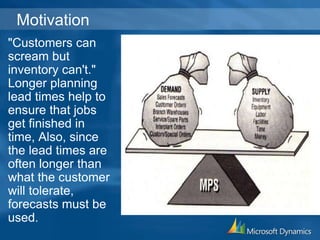
Motivation
"Customers can
scream but
inventory can't."
Longer planning
lead times help to
ensure that jobs
get finished in
time, Also, since
the lead times are
often longer than
what the customer
will tolerate,
forecasts must be
used.
AGENDA
• Orders Processing.
• Planning and Forecasting.
• Multiple views for Item availability .
• Manufacturing Solution.
• BOM & Capacity Management.
• Reporting tools.
Purchase Order Management
• Manage partial receipts.
• Receive and invoice separately and create
prepayment
• invoices for the purchase order.
• Use quotes and blanket orders in the purchase
phase.
 (Quotes and blanket orders don’t affect inventory
figures.)
• Create a purchase return order in order to
compensate your own company for wrong or
damaged items.
Sales Order Management
• Manage partial shipments.
• Ship and invoice separately.
• Create prepayment invoices for the sales order.
• Use quotes and blanket orders in the sales
phase.
 (Quotes and blanket orders do not affect
inventory figures.)
Production Orders
• Create and manage production orders, and post
consumption and output to the production orders.
Production Orders includes a manual supply
planning tool as an alternative to automatic
planning.
• The Order Planning window provides the visibility
and tools you need to manually plan for demand
from sales lines and then to create different types
of supply orders directly.
Planning
&
Forecasting
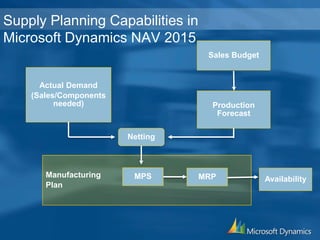
Sales Budget
Production
Forecast
Actual Demand
(Sales/Components
needed)
Netting
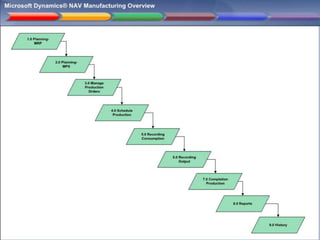
Manufacturing
Plan
MPS MRP Availability
Supply Planning Capabilities in
Microsoft Dynamics NAV 2015
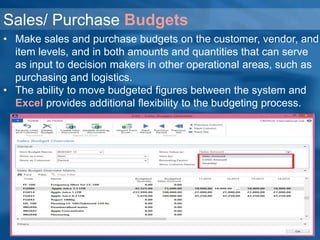
Sales/ Purchase Budgets
• Make sales and purchase budgets on the customer, vendor, and
item levels, and in both amounts and quantities that can serve
as input to decision makers in other operational areas, such as
purchasing and logistics.
• The ability to move budgeted figures between the system and
Excel provides additional flexibility to the budgeting process.
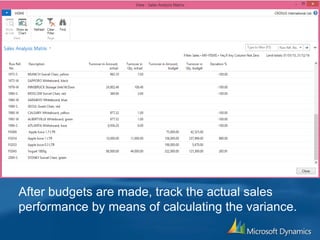
After budgets are made, track the actual sales
performance by means of calculating the variance.
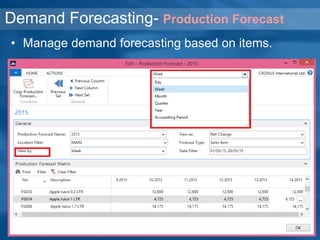
Demand Forecasting- Production Forecast
• Manage demand forecasting based on items.
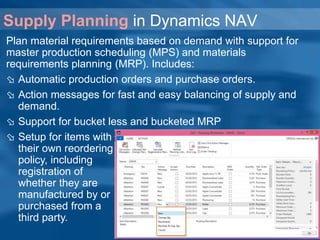
Supply Planning in Dynamics NAV
Plan material requirements based on demand with support for
master production scheduling (MPS) and materials
requirements planning (MRP). Includes:
 Automatic production orders and purchase orders.
 Action messages for fast and easy balancing of supply and
demand.
 Support for bucket less and bucketed MRP
 Setup for items with
their own reordering
policy, including
registration of
whether they are
manufactured by or
purchased from a
third party.
Sales
Orders
Sales
Forecast
On-Hand
Inventory
Item
Planning
Parameters
Request Plan
to be
Calculated
New
Change
Qty
Resched. &
Chg. Qty.
Reschedule Cancel
Accept
Message?
Planned
Production
Order
Created
Qty
Changed
on existing
Planned
Production
Order
Reschedule
Due Date
on existing
Planned
Production
Order
Reschedule
Due Date
and change
Qty on
existing
Planned
Production
Order
Cancel an
existing
Planned
Production
Order
Accept
Message?
Accept
Message?
Accept
Message?
Accept
Message?
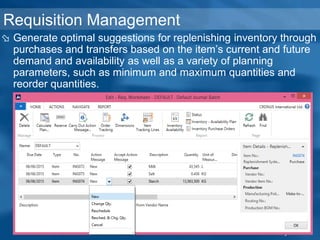
Requisition Management
 Generate optimal suggestions for replenishing inventory through
purchases and transfers based on the item’s current and future
demand and availability as well as a variety of planning
parameters, such as minimum and maximum quantities and
reorder quantities.
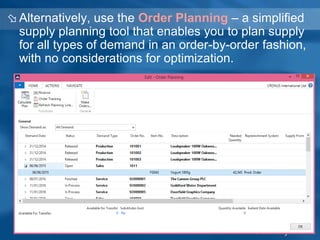
 Alternatively, use the Order Planning – a simplified
supply planning tool that enables you to plan supply
for all types of demand in an order-by-order fashion,
with no considerations for optimization.
Order Promising
• Promise accurate order shipment and delivery
dates to customers as based on item current and
future availability.
• When items are not available to meet a
customer’s requested delivery date, calculate the
earliest shipment date as either an available to
promise date that is based on upcoming
uncommitted supply or a capable-to-promise date
- a date when items can become available should
they be replenished.
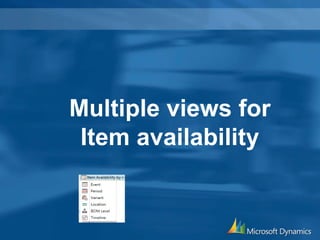
Multiple views for
Item availability
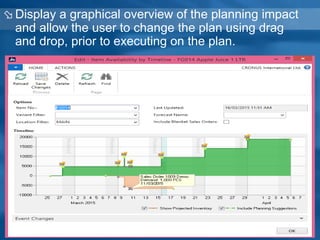
 Display a graphical overview of the planning impact
and allow the user to change the plan using drag
and drop, prior to executing on the plan.
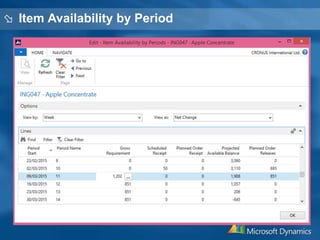
 Item Availability by Period
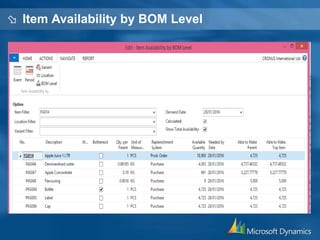
 Item Availability by BOM Level
Manufacturing
Solutions
Production Bill of Materials
• Create bills of materials and calculate standard cost.
Required for configuration of all other Manufacturing
granules.
• Set up calendars with working and non-working days.
Assign a base calendar to customers ,vendors, locations,
companies, shipping agent services, and the service
management setup and make changes to each as
necessary.
• Calendar entries will be used in date calculations on sales
orders, purchase orders, transfer orders, production orders,
service orders, and requisition and planning worksheets.
Calendars
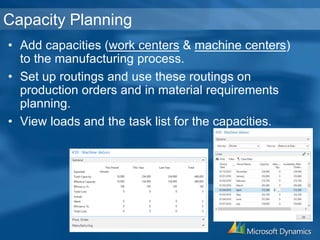
Capacity Planning
• Add capacities (work centers & machine centers)
to the manufacturing process.
• Set up routings and use these routings on
production orders and in material requirements
planning.
• View loads and the task list for the capacities.
Production Orders
• Create and manage production orders, and post
consumption and output to the production orders.
Production Orders includes a manual supply
planning tool as an alternative to automatic
planning.
• The Order Planning window provides the visibility
and tools you need to manually plan for demand
from sales lines and then to create different types
of supply orders directly.
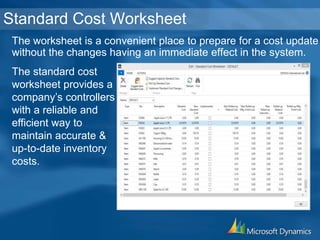
The worksheet is a convenient place to prepare for a cost update
without the changes having an immediate effect in the system.
Standard Cost Worksheet
The standard cost
worksheet provides a
company’s controllers
with a reliable and
efficient way to
maintain accurate &
up-to-date inventory
costs.
Reporting Tool
Put your people in command of your business.
Provide better access to better information, and you will
empower your people to control your future.
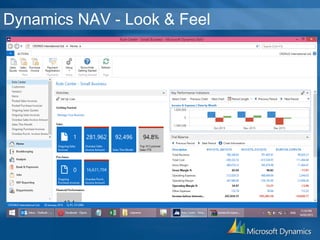
Dynamics NAV - Look & Feel
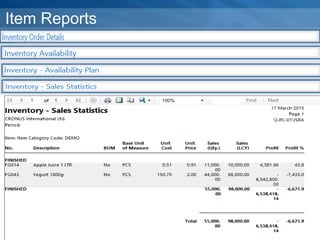
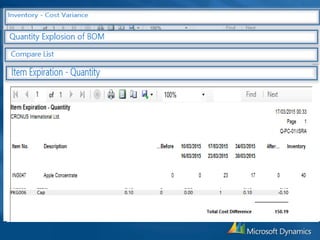
Item Reports
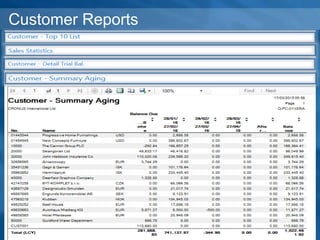
Customer Reports
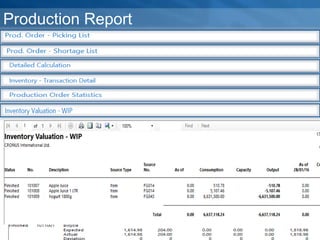
Production Report
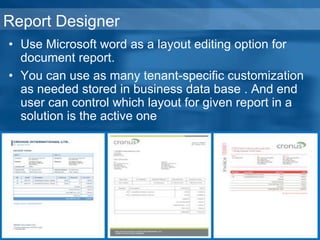
Report Designer
• Use Microsoft word as a layout editing option for
document report.
• You can use as many tenant-specific customization
as needed stored in business data base . And end
user can control which layout for given report in a
solution is the active one
THANK U

Microsoft Dynamics NAV - as ERP Solution for Manufacturing Process

  • 1.
    Microsoft dynamics NAVas a premier ERP Solution. Q Solution Team www.que-solutions.com Prepared by : Isra’a Abu Rumman Isra@que-solutions.com
  • 2.
    Motivation "Customers can scream but inventorycan't." Longer planning lead times help to ensure that jobs get finished in time, Also, since the lead times are often longer than what the customer will tolerate, forecasts must be used.
  • 3.
    AGENDA • Orders Processing. •Planning and Forecasting. • Multiple views for Item availability . • Manufacturing Solution. • BOM & Capacity Management. • Reporting tools.
  • 5.
    Purchase Order Management •Manage partial receipts. • Receive and invoice separately and create prepayment • invoices for the purchase order. • Use quotes and blanket orders in the purchase phase.  (Quotes and blanket orders don’t affect inventory figures.) • Create a purchase return order in order to compensate your own company for wrong or damaged items.
  • 6.
    Sales Order Management •Manage partial shipments. • Ship and invoice separately. • Create prepayment invoices for the sales order. • Use quotes and blanket orders in the sales phase.  (Quotes and blanket orders do not affect inventory figures.)
  • 7.
    Production Orders • Createand manage production orders, and post consumption and output to the production orders. Production Orders includes a manual supply planning tool as an alternative to automatic planning. • The Order Planning window provides the visibility and tools you need to manually plan for demand from sales lines and then to create different types of supply orders directly.
  • 8.
  • 9.
    Sales Budget Production Forecast Actual Demand (Sales/Components needed) Netting Manufacturing Plan MPSMRP Availability Supply Planning Capabilities in Microsoft Dynamics NAV 2015
  • 10.
    Sales/ Purchase Budgets •Make sales and purchase budgets on the customer, vendor, and item levels, and in both amounts and quantities that can serve as input to decision makers in other operational areas, such as purchasing and logistics. • The ability to move budgeted figures between the system and Excel provides additional flexibility to the budgeting process.
  • 11.
    After budgets aremade, track the actual sales performance by means of calculating the variance.
  • 12.
    Demand Forecasting- ProductionForecast • Manage demand forecasting based on items.
  • 13.
    Supply Planning inDynamics NAV Plan material requirements based on demand with support for master production scheduling (MPS) and materials requirements planning (MRP). Includes:  Automatic production orders and purchase orders.  Action messages for fast and easy balancing of supply and demand.  Support for bucket less and bucketed MRP  Setup for items with their own reordering policy, including registration of whether they are manufactured by or purchased from a third party.
  • 14.
    Sales Orders Sales Forecast On-Hand Inventory Item Planning Parameters Request Plan to be Calculated New Change Qty Resched.& Chg. Qty. Reschedule Cancel Accept Message? Planned Production Order Created Qty Changed on existing Planned Production Order Reschedule Due Date on existing Planned Production Order Reschedule Due Date and change Qty on existing Planned Production Order Cancel an existing Planned Production Order Accept Message? Accept Message? Accept Message? Accept Message?
  • 15.
    Requisition Management  Generateoptimal suggestions for replenishing inventory through purchases and transfers based on the item’s current and future demand and availability as well as a variety of planning parameters, such as minimum and maximum quantities and reorder quantities.
  • 16.
     Alternatively, usethe Order Planning – a simplified supply planning tool that enables you to plan supply for all types of demand in an order-by-order fashion, with no considerations for optimization.
  • 17.
    Order Promising • Promiseaccurate order shipment and delivery dates to customers as based on item current and future availability. • When items are not available to meet a customer’s requested delivery date, calculate the earliest shipment date as either an available to promise date that is based on upcoming uncommitted supply or a capable-to-promise date - a date when items can become available should they be replenished.
  • 18.
  • 19.
     Display agraphical overview of the planning impact and allow the user to change the plan using drag and drop, prior to executing on the plan.
  • 20.
  • 21.
  • 22.
  • 24.
    Production Bill ofMaterials • Create bills of materials and calculate standard cost. Required for configuration of all other Manufacturing granules. • Set up calendars with working and non-working days. Assign a base calendar to customers ,vendors, locations, companies, shipping agent services, and the service management setup and make changes to each as necessary. • Calendar entries will be used in date calculations on sales orders, purchase orders, transfer orders, production orders, service orders, and requisition and planning worksheets. Calendars
  • 25.
    Capacity Planning • Addcapacities (work centers & machine centers) to the manufacturing process. • Set up routings and use these routings on production orders and in material requirements planning. • View loads and the task list for the capacities.
  • 26.
    Production Orders • Createand manage production orders, and post consumption and output to the production orders. Production Orders includes a manual supply planning tool as an alternative to automatic planning. • The Order Planning window provides the visibility and tools you need to manually plan for demand from sales lines and then to create different types of supply orders directly.
  • 27.
    The worksheet isa convenient place to prepare for a cost update without the changes having an immediate effect in the system. Standard Cost Worksheet The standard cost worksheet provides a company’s controllers with a reliable and efficient way to maintain accurate & up-to-date inventory costs.
  • 28.
  • 29.
    Put your peoplein command of your business. Provide better access to better information, and you will empower your people to control your future.
  • 30.
    Dynamics NAV -Look & Feel
  • 31.
  • 33.
  • 34.
  • 35.
    Report Designer • UseMicrosoft word as a layout editing option for document report. • You can use as many tenant-specific customization as needed stored in business data base . And end user can control which layout for given report in a solution is the active one
  • 36.