


Microsoft Dynamics 365 for Operations
| 1
Manufacturing
Factsheet
Microsoft Dynamics for Operations
| 2
Microsoft Dynamics 365 for Operations
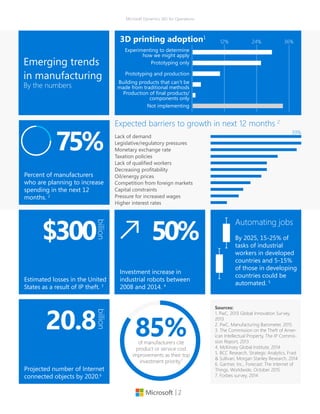
Percent of manufacturers
who are planning to increase
spending in the next 12
months. 2
25+75+V75%
Emerging trends
in manufacturing
By the numbers
Sources:
1. PwC, 2013 Global Innovation Survey,
2013
2. PwC, Manufacturing Barometer, 2015
3. The Commission on the Theft of Amer-
ican Intellectual Property, The IP Commis-
sion Report, 2013
4. McKinsey Global Institute, 2014
5. BCC Research, Strategic Analytics, Frast
& Sullivan, Morgan Stanley Research, 2014
6. Gartner, Inc., Forecast: The Internet of
Things, Worldwide, October 2015
7. Forbes survey, 2014
36%12% 24%
29+25+10+3+1+33Experimenting to determine
how we might apply
Prototyping only
Prototyping and production
Building products that can’t be
made from traditional methods
Production of final products/
components only
Not implementing
3D printing adoption1
Projected number of Internet
connected objects by 2020.6
20.8
billion
Estimated losses in the United
States as a result of IP theft. 3
$300
billion
100+100+95+74+62+62+56+44+36+31+18
Lack of demand
Legislative/regulatory pressures
Monetary exchange rate
Taxation policies
Lack of qualified workers
Decreasing profitability
Oil/energy prices
Competition from foreign markets
Capital constraints
Pressure for increased wages
Higher interest rates
Expected barriers to growth in next 12 months 2
39%
Investment increase in
industrial robots between
2008 and 2014. 4
50%
Automating jobs
By 2025, 15-25% of
tasks of industrial
workers in developed
countries and 5-15%
of those in developing
countries could be
automated. 5
85+15+U85%of manufacturers cite
product or service cost
improvements as their top
investment priority.7
| 3
Microsoft Dynamics 365 for Operations
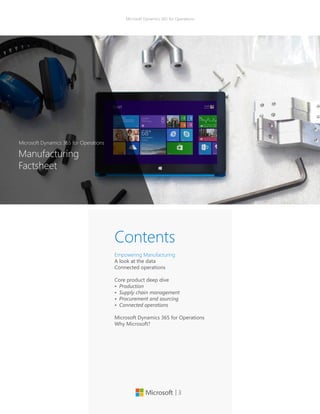
Contents
Empowering Manufacturing
A look at the data
Connected operations
Core product deep dive
•	 Production
•	 Supply chain management
•	 Procurement and sourcing
•	 Connected operations
Microsoft Dynamics 365 for Operations
Why Microsoft?
Manufacturing
Factsheet
Microsoft Dynamics 365 for Operations
| 4
Better manufacturing
through connected
operations
Whether it’s through faster response
times, higher quality products, or ex-
ceptional customer service and rela-
tionship building–manufacturers are
being asked to show a higher value
proposition to their markets than ever
before. To maintain a competitive ad-
vantage, manufacturers require flexibil-
ity in their operations and must contin-
ually drive innovation—not only in the
marketplace but also in how they do
business.
Microsoft Dynamics 365 for Operations
provides manufacturers a solution that
is architected with flexibility and change
in mind, built with operational excel-
lence at its core, and focused on allow-
ing you to drive innovation and be the
market leader. It also gives business-
es the flexibility to grow at their pace
through the choice and flexibility of the
Microsoft Cloud, allowing them to scale
their operations globally to meet busi-
ness needs.
| 5
Microsoft Dynamics 365 for Operations
Better manufacturing through
connected operations
Accelerate product introductions
Engineering and marketing can reduce
risk and rapidly validate new product
ideas with simulation models and 3D
printed prototypes, increasingly confi-
dent in their ability to fulfill demand us-
ing insights from their smart connected
products, intelligent automation and
digital manufacturing. Don’t let your
enterprise software be the critical bar-
rier to new product introductions. Rap-
idly model, cost, and release new prod-
ucts to production and procurement,
with guided experiences and workspac-
es for discrete, lean and process manu-
facturing and replenishment.
Agile shop floor execution
Manufacturers are facing significant
skills shortages on the shop floor, and
yet are expected to produce more
product variants with shorter ramp up
times. It’s your workforce that has to
operate and fill the gaps between ma-
chines. Manage your production floor
with workspaces, task guides, and work
instructions tailored for operators and
supervisors, that can adapt to the dis-
play on any device, enhancing local
productivity and global visibility with
operational insights.
Intelligent order fulfillment
Even if you invest in the latest intelli-
gent automation and digital manufac-
turing on the shop floor, supply and
demand exceptions can threaten your
ability to meet promised delivery dates
to customers. With global visibility of
inventory, manufacturing and logistics,
and a role tailored workspace accessed
anywhere, on any device, your custom-
ers’ service representatives can proac-
tively explore production, warehouse
and transportation options for your
customers.
| 6
Microsoft Dynamics 365 for Operations
Core product deep dive
Production
Minimize lead times, fulfill customer
demand, and manage your resources
to get greater efficiency from your dis-
crete, process, and lean manufacturing
operations. Use real-time data to track
production progress, get more accu-
rate delivery dates, and reduce costs.
Execute multiple production strate-
gies, including configure-to-order, as-
semble-to-order, make-to-stock, and
make-to-order. Use both push and pull
production control mechanisms. In this
new release, and taking advantage of
the new enhanced UI, we are introduc-
ing a new concept called “Workspac-
es” with the goal of connecting people
with data and processes to make better
decisions.
The new Production floor management
workspace will allow the production
supervisor to check whether materials
for scheduled production orders are
available on the required date. In the
workspace, the production supervi-
sor is informed how many production
orders are in the scheduled state and
are pending release. Based on the dy-
namic master plan, information about
material availability is updated if mate-
rial requirements are met by on-hand
inventory for actual orders, or planned
orders. Based on the information about
material availability, the supervisor
can release the orders on the Materi-
al availability page. During the process
of releasing production orders to the
shop floor, the feature helps the pro-
duction supervisor make correct deci-
sions about the allocation of materials
to orders.
Supply chain management
Connect sales and purchasing pro-
cesses with logistics, production, and
warehouse management to provide
visibility and management throughout
the supply chain. Manage distributed
organizations with inter-company and
multi-site capabilities.
Procurement and sourcing
Facilitate direct and indirect procure-
ment of goods and services and es-
tablish a centralized buyer capability
across your organization to support
procurement policies and processes. In
this area, we are adding two new work-
spaces to provide better access to the
information required to manage during
the purchase order preparation and the
order receipt and follow-up.
The Purchase order preparation work-
space provides an overview of orders
from the time when they are created as a
draft and traced, through workflow ap-
proval states, and onward toward con-
firmation. Your purchasing department
no longer has to seek information from
multiple pages but benefits from the
overview that the workspace provides.
The Purchase order receipt and fol-
low-up workspace provides an over-
view of confirmed purchase orders that
have pending receipts or shipments.
This workspace includes lists of post-
due receipts and pending receipts to
help with proactive review and fol-
low-up by the supplier. Purchase orders
for which arrival registration has oc-
curred in the warehouse are also listed
to help ensure that the receipt is post-
ed. Purchase order returns that haven’t
yet been shipped are also available for
review. Your purchasing department
benefits from the overview that the
workspace provides. Relevant informa-
tion is put together to guide follow-up
and help improve productivity.
| 7
Microsoft Dynamics 365 for Operations
In this new release, and taking ad-
vantage of the new enhanced UI,
we are introducing a new concept
called “Workspaces” with the goal
of connecting people with data and
processes to make better decisions.
The newly added workspaces include
Environmental Manager, Operations
Manager, Production Manager, and
Shop Supervisor.
Workspaces
Use finite or infinite scheduling, for-
ward and backward from various
dates. Quickly (re)schedule jobs and
simulate alternatives by dragging
Gantt chart items. Resolve scheduling
overloads by reassigning operations
to alternate work centers. Optimize
scheduling across the organization
with a unified resource model and
scheduling engine. Improve machine
utilization by combining similar prod-
ucts while letting customers request
multiple quality specifications per
product (product batch sequencing).
Production scheduling and
sequencing
Production
Schedule and track material, shop,
and manpower resources. Plan re-
sources based on production activ-
ities and capabilities of resources.
Types of resources can be tool, ma-
chine, vendor, location, and human
resource. Resource allocation prin-
ciples include resource requirement
types: resource (group), type, capabil-
ity, skill, course, certificate, and title.
Resource management
Material and capacity planning
Optimize production and materials
planning, forecasting, and sched-
uling. Simultaneously schedule
materials and capacity. Calculate
available-to-promise (ATP) and capa-
ble-to-promise (CTP) deliveries. Plan
and execute routing and operations.
Use finite or infinite planning.
Manage various ways of partnering
with subcontractors, including out-
sourcing of route operations, ven-
dor-supplied items, and item pro-
visioning to subcontractors. Link
subcontractor purchase order (PO) to
production order.
Subcontracting
Create a bill of materials for pro-
duction including phantoms using
a graphical BOM designer. Modify
and track individual line items. Man-
age multilevel formulas or recipes,
co-products, and byproducts. Use
version control to release the right
BOM and electronic signatures to
track changes.
Production Bill of Materials
(BOM, formulas, recipes)
| 8
Microsoft Dynamics 365 for Operations
Configure custom products with a
unique bill of materials and routing
by using the product configurator.
The product configuration models
are based on constraints and can be
used from sales order, sales quota-
tion, purchase order, and production
order.
Product configuration
Manage routing: Plan simple, se-
quential, and complex networks; use
simultaneous routes in the same net-
work. Use rough-cut capacity and
detailed scheduling capabilities. Or-
ganize the shop floor into logical pro-
duction units at individual sites.
Routing
Create, schedule, view, track, split,
roll back, or categorize production
orders to maximize efficiency. Create
production orders from sales orders.
Follow production through creation,
estimation, schedule, release, start-
ed, finished, and cost. Use scrap on
BOM, resource, and route. Trace
products and components through
the entire manufacturing process
and enable bi-directional traceability
from customers back to vendors, and
vice-versa.
Production orders
Production
Define multiple inventory dimen-
sions, including dual units of mea-
sure, catch-weight calculations, pack-
aging codes, variations to the main
item and lots.
Inventory dimensions for
process manufacturing
Manage the concentration of an ac-
tive ingredient through the entire
manufacturing process. Enable man-
ufacturers to model potency at each
and every step of their manufacturing
processes, which allows them to meet
their industry-specific requirements
while giving them a significant com-
petitive advantage.
Potency management
Gain insight with predefined KPIs in
the SQL Server analysis data cube for
production.
Production reporting
| 9
Microsoft Dynamics 365 for Operations
Model manufacturing and logistics
processes as production flows. Use
kanbans and kanban boards to signal
demand requirements.
Lean manufacturing
Understand work in progress (WIP)
and actual cost through production
tracking and reporting. Track detailed
resource and throughput costs, in-
cluding work center costs. Report
production variances to standard
costs.
Production costing
Production
Effectively manage product changes
through a formal product changes
methodology. With the new function-
ality you’ll be able to have a defined
process to initiate, document, ap-
prove and release changes to product
during the planning and production
cycles.
Product change management
Manage and track shop floor opera-
tions. Register products and resourc-
es and items for operations and jobs
including a touch-enabled data entry.
Provide shop floor workers visibility
with an overview of the production
jobs that need attention. Quickly
perform daily production tasks such
starting jobs, reporting jobs as fin-
ished, and registering breaks and ab-
sence.
Shop floor control
Updates have been made to the new
Job card device page. Although the
new Job card device page is designed
with simplicity, it’s also designed for
touch. The page fits well on mobile
devices, such as tablets and phones.
The shop floor worker will find less in-
formation overload and more intuitive
ease of use. The worker can perform
the traditional tasks, such as starting,
ending, and reporting progress on
a job. Besides working on the actual
job, or logging and clocking out, the
worker can view attachments, break
for lunch, and perform other activi-
ties. Jobs will be queued to the work-
er in a planned sequence, but they
can also be picked by the worker. The
page is primarily targeted at discrete
manufacturing operations, where ma-
terials are prepared for production.
Job card device page
| 10
Microsoft Dynamics 365 for Operations
Supply chain management
Track items by inventory dimensions,
including site, warehouse, pallet, lo-
cation, batch, and serial number. Take
advantage of multiple inventory con-
trol systems and inventory valuation
methods including first in/first out
(FIFO), last in/first out (LIFO), standard
cost, moving, and weighted average.
Reduce inventory costs and elimi-
nate waste by using the ABC-analysis
and by pulling inventory in optimal
sequence using “best-before” man-
agement and first expired/first out
(FEFO) or first in/first out (FIFO) pick-
ing guidance.
Lower inventory costs and improve
turn-over with advanced inventory
allocation. Replenish inventory based
on picking, min/max, and transporta-
tion load-based replenishment. Use
flexible location directives to organize
your warehouse layout and zones.
Improve your customer service level
with real-time visibility into inventory
using the inventory dimensions in-
cluding license plates. Account for in-
ventory with multiple cycle counting
strategies including threshold cycle
counting for picking, cycle counting
plans, zero quantity on hand cycle
counting, and ad-hoc cycle count-
ing using filtering. Advanced prop-
erty control for warehouse locations,
control of mixed items, mixed batch
numbers, mixed inventory status-
es, thresholds, advanced volume or
amount based multi-unit setup for
put-away limits calculations and loca-
tion allocations.
Inventory management
Manage storage locations and ma-
terial handling within warehouses.
Apply advanced inbound algorithms
using multiple warehouse zones
and replenishment strategies. Opti-
mize picking with a choice of picking
methods. Track inventory on hand
per warehouse. This capability is for
customers who are looking for a ba-
sic warehouse management solution.
For customers looking for a more
complex warehouse management
solution, see next module.
Provide customers with choice and
flexibility of delivery with agile in-
bound and outbound processes to
meet customer demands with ad-
vanced picking strategies such as
cluster picking. Efficiently put away
inbound goods with advanced put
away strategies and increase flexibil-
ity by configuring simple workflows
without coding for put-away and
picking activities. Use filter capabil-
ities to determine the custom work-
flow. Provide warehouse workers with
material handling instructions based
on the system or directed by the user
(task interleaving).
Process waves: automatic, manual,
batch-time scheduled, filtering and
grouping, and container calculations
packaging. Support for cross-dock-
ing, and pick/pack, and improve
tracking and tracing of goods with
registration of serial numbers in pick-
ing process and batch number sup-
port with picking strategies and put-
away, based on expiry date.
Multi-site warehouse
management
Also, in this version of Dynamics 365
for Operations, a stand-alone installer
can be downloaded directly through
a menu item in Warehouse manage-
ment instead of the standard Dynam-
ics 365 for Operations setup process.
It’s designed for self-driven on-prem-
ises deployment and configuration.
During the enabling process of the
Warehouse management module to
use the mobile device functionality,
you need to install and configure the
Warehouse Mobile Devices Portal lo-
cally and get a connection to the Mi-
crosoft Dynamics 365 for Operations
program in the cloud.
Collect, track and trace inventory and
tracking dimensions throughout the
end to end logistic processes of the
supply chain throughout inventory,
warehouse, production and transport
processes. Track back batch or serial
numbers for quality incidents, regis-
ter and monitor batch attributes, ex-
piry and shelf life dates.
Tracking and tracing
| 11
Microsoft Dynamics 365 for Operations
Supply chain management
Demand Forecasting is a lightweight,
yet powerful demand forecasting tool
that enables organizations to forecast
demand based on historical data us-
ing Microsoft SQL Server forecasting
algorithms, adjust the forecasted
demand using the familiar environ-
ment of Microsoft Excel, and import
the values into Microsoft Dynamics
365 for Operations forecast models.
Demand Forecasting will help organi-
zations improve the accuracy of fore-
casts and therefore improve product
availability, and minimize inventory
costs.
In this new release, we are providing
very important updates in the de-
mand forecasting area, specifically
around integration with Microsoft Ex-
cel and Azure Machine Learning.
Now you can use Microsoft Excel to
update your demand forecast, help-
ing you to increase efficiency and
productivity by accelerating the
process of updating directly from a
spreadsheet. You can now take ad-
vantage of the integration with Excel
when working on your demand fore-
cast. Update, delete directly from Mi-
crosoft Excel before submitting it to
Dynamics 365 for Operations.
Scenario: During your demand fore-
casting process, you originally could
export your historical data to Excel.
With the new updates, you will now
be able to update and edit your de-
mand forecast based on your analy-
sis and additional variables based on
Demand forecasting
exceptions or market conditions and
upload it back to Dynamics 365 for
Operations.
With regards to the Azure Machine
Learning integration, you could po-
tentially estimate future demand by
using the power and extensibility of
a Microsoft Azure Machine Learning
cloud service. The service performs
best-match model selection and
offers key performance indicators
(KPIs) for calculating forecast accura-
cy. Generate more accurate forecasts
by using the machine learning tech-
niques and tools to estimate future
demands forecast based on historical
transactions.
Scenario: Based on historical data
and defined variables based on your
requirements such as weather, traffic
conditions you can integrate Azure
ML into your demand forecasting
process to help you better predict
and anticipate potential issues that
could impact your product delivery
or availability to customers.
Automatically transfer information re-
ceived from shipping carriers (FedEx,
UPS, and Kewill), including freight
charges and tracking numbers, to Mi-
crosoft Dynamics 365 for Operations.
Shipping carrier interface
Manage the return order process.
Control who can return items and
which items can be returned. Catego-
rize returns according to reason code
or method of disposition.
Returns management
| 12
Microsoft Dynamics 365 for Operations
Improve business processes for qual-
ity assurance, quality control, and lot
traceability. Manage the test process.
Set aside items in quarantine using
quarantine orders.
Quality management
Centralize management of products
and services across the organization
including BOM, formulas, and recipes.
Product management of goods
and services
Supply chain management
Increase quality of material handling
with Radio Frequency (RF) support.
Support material handling within
the warehouse with browser-based
mobile handheld RF-devices. Create
mobile handheld device menus from
within Microsoft Dynamics 365 for
Operations including creation of new
menus for each user or user groups,
change layout and colors, and error
log and actions. Last but not least,
use warehouse operation in manu-
facturing organizations for raw ma-
terial picking and report-as-finished
support.
Material handling
Forecast delivery dates using op-
erations or bottleneck scheduling.
Calculate available-to-promise (ATP)
and capable-to-promise (CTP). Plan
across multiple sites.
Additionally, in this release we are
adding a Master Planning Workspace
to offer at-a-glance information
about when the last master planning
run was completed, whether it had
any errors, what the urgent planned
orders are, and which planned orders
cause delays. Gain quick insight into
the status of a master planning run,
the urgent planned orders, and the
planned orders that cause delays.
Master planning, including order
promising (ATP/CTP)
Automate trade between subsidiaries
or distribution centers. Sales and pur-
chase orders can be generated man-
ually or automatically across your
subsidiaries.
Intercompany
| 13
Microsoft Dynamics 365 for Operations
Procurement and sourcing
Improve decision-making by defin-
ing evaluation criteria upfront and
improve management of Request for
Information (RFIs), Request for Pro-
posal (RFPs) and Request for Quote
(RFQ) from solicitation to award. Im-
prove the vendor/government con-
tractor experience and help vendors
operate more efficiently by providing
the ability to view and respond to
open RFQs, allowing the proposal of
item or services substitutes or no bid,
and providing visibility into the status
and results of a solicitation (for Public
Sector). This includes a publicly avail-
able vendor portal and open bidding.
Increase sourcing efficiencies through
well-defined scoring criteria and rank
vendor response based on multiple
criteria. Manage solicitations includ-
ing specification of solicitation types,
methods, scoring criteria, and track
and communicate changes to the
RFQ. Utilize sealed bid methodology
on RFQs and provide questionnaires
to qualify vendors to bid on specific
items or services. Improved the user
experience of the Vendor self-ser-
vice portal. Bid scoring, valuation and
ranking based on user-defined evalu-
ation criteria.
eProcurement
Manage purchase requisitions of in-
direct goods and services using a
catalog-based or non-catalog-based
procurement process. The procure-
ment process is supported by an ap-
proval workflow using the organiza-
tional hierarchy.
A Microsoft SharePoint®-based cata-
log can easily be created from prod-
ucts defined in product information
management. The catalog also sup-
ports punch-out capabilities to exter-
nal vendor sites. Sophisticated bud-
get check is included.
Indirect procurement (catalog
and non-catalog)
Enforce purchasing policies with a
collection of purchasing policy rules
that control the procurement pro-
cess. A centralized procurement desk
defines policy rules to support global
policies and processes, and applies
them to purchase requisitions and
purchase orders based on the legal
buying entity and operating unit. For
procurement and sourcing there are
six policy rules: catalog, catalog ac-
cess, category, purchase requisition
RFQ, purchase requisition control,
and purchase order creation and de-
mand consolidation. In addition to
policy rules, Dynamics 365 for Opera-
tions provides expenditure reviewers
and signing limits.
Purchasing policies and signing
limits
Provides category managers the abil-
ity to define different category hier-
archies that are independent of, but
still related to, commodity codes or
catalog/item hierarchies in order to
easily manage the overall spending
based on categories.
Category management
| 14
Microsoft Dynamics 365 for Operations
Manage the entire lifecycle of pro-
curement from planned purchase
order to confirming and changing
a purchase order. This cycle also in-
cludes returned orders. This mod-
ule also supports direct deliveries,
pro-forma purchase orders, and land-
ed-cost charges to purchase orders
such as freight, insurance, and unre-
coverable taxes.
Direct procurement
Manage price and multifaceted dis-
count policies in all currencies. The
price revision process can be gov-
erned by workflows to ensure com-
pliance with internal policies. The
generic currency agreement allows
prices to be set up in a single curren-
cy and automatically converted to the
vendor’s currency.
Trade agreements (vendor)
Vendor management includes ven-
dor search, vendor maintenance, and
support for requesting and approv-
ing a new vendor via the Enterprise
Portal supported by workflow. Take
advantage of Sites Services* to ex-
tend the vendor onboarding process
with a cloud-based service facilitating
the dialog with new vendors.
Vendor management
Procurement and sourcing
Enable vendors to update profile
data, upload catalog content, and re-
view invoices and payments. Vendors
can receive notifications from the
organization, respond to RFQs, and
view vendor performance.
Vendor self-service portal
Automate administration, tracking
and claiming process of vendor re-
bates and reduce administrative bur-
den and errors associated with pro-
motion performance monitoring and
claim processing and improve cash
flow forecasts through accruing for
future receivables. Have a quantified
basis for ongoing and future negotia-
tions on rebates with the vendor.
Vendor rebate management
Manage payment of fees to brokers
for the service of facilitating sales
with broker contract management.
Control usage-based payments for
the right to the ongoing use of an
asset or an intellectual property with
royalty management. This module
will reduce the administrative bur-
den of managing royalties and broker
payments.
Broker and royalty contract
management
| 15
Microsoft Dynamics 365 for Operations
Gain insight into the organization’s
procurement performance using
transactional reports, analytical re-
ports (such as vendor and procure-
ment spend analysis, top 100 ven-
dors, vendor performance), and KPIs.
A predefined data cube for purchas-
ing is included.
Procurement reporting
Procurement operations can be driv-
en and governed by workflows. With
the flexible and visual workflow en-
gine, procurement managers are
able to set up workflows that make
the procurement cycle more efficient
and enforce purchasing policy com-
pliance.
Procurement workflows
Procurement and sourcing
In this new release, and taking ad-
vantage of the new enhanced UI,
we are introducing a new concept
called “Workspaces” with the goal
of connecting people with data and
processes to make better decisions.
The newly added workspaces include
Environmental Manager, Operations
Manager, Production Manager, and
Shop Supervisor.
Workspaces
One Microsoft
Build. Deploy. Operate.
Microsoft Dynamics
365 for Operations
| 16
Microsoft Dynamics 365 for Operations
Connected operations
For manufacturers with heavy distri-
bution needs, operational efficiency
and effectiveness is a must, but simply
being able to move product cost ef-
fectively is not enough. Complexities
abound in distributing product, with
challenges in effective inventory con-
trol, changing regulations, and how
to best leverage technology. These
challenges force manufacturers to
change and adapt how they manage
operations and how they do busi-
ness with partners. They must identify
new, faster (yet less costly) transpor-
tation modes and then find a way
to extend those cost savings back to
the customer. Plus, warehousing and
transportation capabilities have to be
world-class. Dynamics 365 for Oper-
ations provides manufacturers with
distribution needs a solution built to
provide operations and logistics ex-
cellence while also offering 360-de-
gree visibility and control throughout
the entire supply chain.
Distribution
New technologies within the consum-
er market have deeply affected the
manufacturing industry. Now, with
access to information wherever cus-
tomers are—24 hours a day, 7 days a
week—the meaning of customer ser-
vice has changed. Customers expect
quality, personalized service, on their
terms, across the web, social, mobile,
and phone. With Dynamics 365 for
Operations, you can earn customers
for life by providing relevant, person-
alized service—at any time and via
any channel. You can empower your
customer service agents with every-
thing they need at their fingertips to
deliver amazing customer service.
Service
With today’s technology and the
highly educated consumer, custom-
ers know more than ever before. They
have more buying options on how
and where to buy things. And they
are making buying decisions long be-
fore you even engage with them. It’s
crucial that manufacturers are ready
to engage with customers to build
deeper relationships while personaliz-
ing every interaction. With Microsoft
Dynamics 365 for Operations, we help
you focus on what’s most important
to your customers, win faster with the
right tools and information, and sell
more with a toolset that effectively
manages and enhances your sales ef-
forts. Your sales reps can zero in and
focus on the most impactful activities.
You can win faster by making every
customer conversation more relevant,
valuable, and productive. And you
can sell more with better insight, un-
derstanding, and pipeline confidence.
Sales
| 17
Microsoft Dynamics 365 for Operations
Connected operations
Manufacturers have traditionally just
focused on operational efficiencies.
Although this is still very important,
these organizations now realize that
producing and distributing products
cost effectively is simply not enough,
since they can’t cut enough costs to
get to desired profitability goals. They
now need to focus more on the mar-
ketplace itself, and this means get-
ting better at marketing. Marketing
is changing faster than ever before.
Marketers own more of the customer
journey and must engage customers
in new ways across new channels to
deliver amazing experiences, while
tracking the results of their market-
ing investments. With the marketing
functionality in Dynamics 365 for
Operations, we can help you unleash
your marketing potential. You can
easily plan, execute, and measure
campaigns from start to finish. Bring
your marketing vision to life—engage
customers across channels, build
pipeline, and demonstrate the impact
of your marketing.
Marketing
| 18
Microsoft Dynamics 365 for Operations
What’s new?
Microsoft Dynamics 365 for Operations
Manufacturing
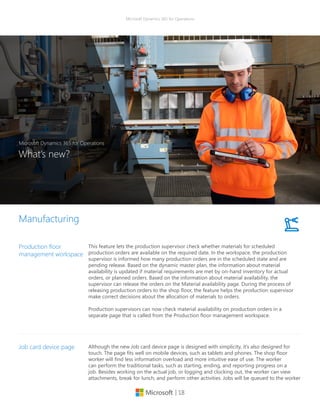
This feature lets the production supervisor check whether materials for scheduled
production orders are available on the required date. In the workspace, the production
supervisor is informed how many production orders are in the scheduled state and are
pending release. Based on the dynamic master plan, the information about material
availability is updated if material requirements are met by on-hand inventory for actual
orders, or planned orders. Based on the information about material availability, the
supervisor can release the orders on the Material availability page. During the process of
releasing production orders to the shop floor, the feature helps the production supervisor
make correct decisions about the allocation of materials to orders.
Production supervisors can now check material availability on production orders in a
separate page that is called from the Production floor management workspace.
Production floor
management workspace
Although the new Job card device page is designed with simplicity, it’s also designed for
touch. The page fits well on mobile devices, such as tablets and phones. The shop floor
worker will find less information overload and more intuitive ease of use. The worker
can perform the traditional tasks, such as starting, ending, and reporting progress on a
job. Besides working on the actual job, or logging and clocking out, the worker can view
attachments, break for lunch, and perform other activities. Jobs will be queued to the worker
Job card device page
| 19
Microsoft Dynamics 365 for Operations
Manufacturing
in a planned sequence, but they can also be picked by the worker. The page is primarily
targeted at discrete manufacturing operations, where materials are prepared for production.
This is particularly useful in scenarios that are related to reporting of co-products and
by-products, and materials picking by tracing dimensions using the Job registration page.
Also, by introducing an alternative UI that is designed for touch and can be accessed from
all types of devices, such as terminal screens and mobile devices, this feature could help to
reduce the implementation costs for a traditional rollout of shop floor registrations.
The action graph provides a better overview, and has options to show only applied and
directly related actions. When actions are applied, they appear dimmed but are still
displayed to keep the overview. Additional information is added to the action graph to
display the data on one page.
Using this new action graphic you could potentially optimize the order date and quantity
based on a visual overview of related actions that are pulled from the master planning run,
letting you focus only on the relevant actions.
Action graph
Master planning
The Master planning workspace offers at-a-glance information about when the last master
planning run was completed, whether it had any errors, what the urgent planned orders
are, and which planned orders cause delays. Gain quick insight into the status of a master
planning run, the urgent planned orders, and the planned orders that cause delays.
Master Planning
Workspace
Demand forecasting
Now you can use Microsoft Excel to update your demand forecast, helping you to increase
efficiency and productivity by accelerating the process of updating directly from a
spreadsheet. You can now take advantage of the integration with Excel when working on
your demand forecast. Update, delete directly from Microsoft Excel before submitting it to
Microsoft Dynamics 365 for Operations.
During your demand forecasting process, you originally could export your historical data to
Excel. With the new updates, you will now be able to update and edit your demand forecast
based on your analysis and additional variables based on exceptions or market conditions
and upload it back to Dynamics 365 for Operations.
Microsoft Excel
Integration
| 20
Microsoft Dynamics 365 for Operations
Demand forecasting
Estimate future demand by using the power and extensibility of a Microsoft Azure
Machine Learning cloud service. The service performs best-match model selection and
offers key performance indicators (KPIs) for calculating forecast accuracy. Generate more
accurate forecasts by using the machine learning techniques and tools to estimate future
demands forecast based on historical transactions.
Based on historical data and defined variables based on your requirements such as
weather or traffic conditions you can integrate Azure ML into your demand forecasting
process to help you better predict and anticipate potential issues that could impact your
product delivery or availability to customers.
Azure Machine Learning
integration
The Purchase order receipt and follow-up workspace provides an overview of confirmed
purchase orders that have pending receipts or shipments. This workspace includes lists of
post-due receipts and pending receipts to help with proactive review and follow-up by the
supplier. Purchase orders for which arrival registration has occurred in the warehouse are
also listed to help ensure that the receipt is posted. Purchase order returns that haven’t
yet been shipped are also available for review. Your purchasing department benefits from
the overview that the workspace provides. Relevant information is put together to guide
follow-up and help improve productivity.
Use the Purchase order receipt and follow-up workspace to gain quick insight into
purchase orders that are pending receipt, to help with follow-up.
Purchase order receipt
and follow-up workspace
Procurement and sourcing
The Purchase order preparation workspace provides an overview of orders from the
time when they are created as a draft and traced, through workflow approval states,
and onward toward confirmation. Your purchasing department no longer has to seek
information from multiple pages but benefits from the overview that the workspace
provides.
Use the Purchase order preparation workspace to gain quick insight into the status of
purchase orders that are being prepared.
Purchase order
preparation workspace
| 21
Microsoft Dynamics 365 for Operations
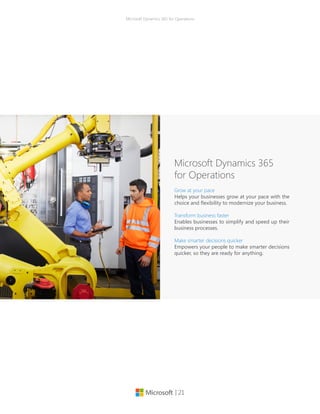
Microsoft Dynamics 365
for Operations
Grow at your pace
Helps your businesses grow at your pace with the
choice and flexibility to modernize your business.
Transform business faster
Enables businesses to simplify and speed up their
business processes.
Make smarter decisions quicker
Empowers your people to make smarter decisions
quicker, so they are ready for anything.
| 22
Microsoft Dynamics 365 for Operations
Grow at your pace
•	 Easily set up segregation of duty
with minimal maintenance of user
accounts with a simple single sign-
on through Azure Active directory
in the cloud and federation to
your people using an on-premises
deployment.
•	 Get the peace of mind with Azure
SLA for uptime, disaster recovery
in the cloud across both public and
private cloud deployments.
•	 Get the security and compliance
of the Microsoft Azure cloud
with adherence to WW security
standards.
Get peace of mind with trusted
cloud
•	 With the same code base, data
model and technical infrastructure
across deployments, you can easily
deploy and/ or move from private
to public cloud when your business
requires you to do so.
•	 Get the flexibility, speed and cost
benefits of running your ERP
solution private cloud (on-premises)
and your development, test and DR
in the public cloud.
•	 Keep your business running while
taking advantage of cutting edge
technology as you help your
business migrate from and connect
with existing/ legacy systems
in heterogeneous landscapes
integrated with the cloud through a
modern integration platform.
Evolve your business with the
choice & flexibility of the cloud
•	 Get the flexibility to deploy or
expand your business operations
globally with Microsoft Azure
availability in 140 countries,
including China, all backed by
Microsoft’s $15 billion investment in
global data center infrastructure.
•	 Match your business growth by
easily adding users and business
scenarios in a “pay as you go”
model.
Scale your business operations
globally
| 23
Microsoft Dynamics 365 for Operations
Transform business faster
•	 Support your end-to-end
application lifecycle through an
extension of Lifecycle Services
with new methodologies and
best practices driven tool sets for
implementation, updates and
support.
•	 Support your business in the cloud
with Microsoft Lifecycle Services
(LCS).
•	 Reduce risk to your organization
with a flexible solution architecture
that enables incremental
implementations, changes, or
updates.
•	 Use telemetry and diagnostics to
improve product usage and identify
issues so you can proactively
minimize downtime.
Improve business planning with
predictable implementations
•	 Easily validate predefined and
automated deployment of business
processes and data to get your
business up and running faster.
•	 Enable business analysts to
streamline business processes
and respond rapidly to changing
business conditions.
•	 Simplify and accelerate your
updates through predefined
methodologies, automated testing
and code merge while minimizing
business disruption.
•	 Provide self-service learning
and resources to your people
to optimize system usage and
ultimately streamline business
processes.
Faster time to value from
technology investments
•	 With newly added support for
Visual Studio in the cloud your
people can use their existing skill
set to optimize processes to meet
your business needs.
Readily available resources and
solutions
| 24
Microsoft Dynamics 365 for Operations
Make smarter decisions quicker
•	 A new guided user experience gets
your people up to speed quickly
with an easy-to-use, and familiar
solution that looks and works like
Microsoft Office 365.
•	 Enable your people to be more
productive with activity-based
workspaces to provide a task
specific experience, new user task
guide, and integration with O365
productivity and collaboration
applications.
•	 Work faster, enable collaboration
and get insights by seamlessly
sharing information between
Dynamics 365 for Operations,
other Microsoft Dynamics 365
applications, Office 365 and
Power BI.
Empower people to work and
collaborate faster
•	 A fully browser based, new HTML5
client that runs across browsers,
devices and platforms gives your
people access to their business
application regardless of the device
or platform.
•	 Give your business the capability to
extend and build business specific
mobile apps through a mobile
SDK and make them available to
your employees through a private
marketplace.
Access your information nearly
anywhere on any device
•	 Dynamics 365 for Operations uses
in-memory BI to give your people
real time operational insights so
they can make informed decisions.
•	 Enable people to find, sort,
visualize, and use information
easily with an intuitive user
interface that provides contextual
insights through Power BI.
•	 Plan and anticipate customer needs
through the use of Azure machine
learning capabilities.
Enable people to quickly get
operational insights
| 25
Microsoft Dynamics 365 for Operations
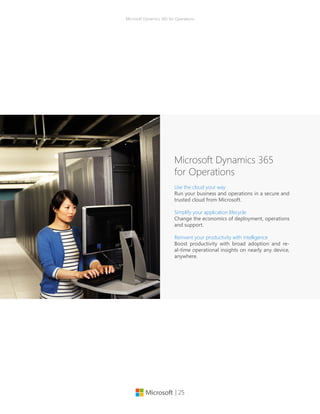
Microsoft Dynamics 365
for Operations
Use the cloud your way
Run your business and operations in a secure and
trusted cloud from Microsoft.
Simplify your application lifecycle
Change the economics of deployment, operations
and support.
Reinvent your productivity with intelligence
Boost productivity with broad adoption and re-
al-time operational insights on nearly any device,
anywhere.
| 26
Microsoft Dynamics 365 for Operations
Use the cloud your way
Easily set up segregation of duty with
minimal maintenance of user ac-
counts with a simple single sign-on
through Azure Active directory in the
cloud and federation to your people
using an on-premises deployment.
Get the peace of mind with Azure SLA
for uptime, disaster recovery in the
cloud across both public and private
cloud deployments
Get the security and compliance of
the Microsoft Azure cloud with ad-
herence to WW security standards.
Get the peace of mind with
trusted cloud
With the same code base, data mod-
el and technical infrastructure across
deployments, you can easily deploy
and/ or move from private to public
cloud when your business requires
you to do so.
Get the flexibility, speed and cost
benefits of running your ERP solution
private cloud and your development,
test and DR in the public cloud.
Keep your business running while
taking advantage of cutting edge
technology as you help your busi-
ness migrate from and connect with
existing/ legacy systems in heteroge-
neous landscapes integrated with the
cloud through a modern integration
platform.
Gain the choice and flexibility of
hybrid cloud
Get the flexibility to deploy or ex-
pand your business operations glob-
ally with Microsoft Azure availability
in 140 countries, including China, all
backed by Microsoft’s $15 billion in-
vestment in global data center infra-
structure.
Match your business growth by easily
adding users and business scenarios
in a “pay as you go” model.
Match your business growth
with a single global solution
| 27
Microsoft Dynamics 365 for Operations
Simplify your application lifecycle
Support your end-to-end application
lifecycle through an extension of Life-
cycle Services with new methodol-
ogies and best practices driven tool
sets for implementation, updates and
support.
Support your business in the cloud
and with Microsoft Lifecycle Services
(LCS).
Reduce risk to your organization with
a flexible solution architecture that
enables incremental implementa-
tions, changes, or updates.
Predictable implementations
and updates
Easily validate predefined and auto-
mated deployment of business pro-
cesses and data to get your business
up and running faster.
Enable business analysts to stream-
line business processes and respond
rapidly to changing business condi-
tions.
With newly added support for Visu-
al Studio or in the cloud your people
can use their existing skill set to opti-
mize processes to meet your business
needs.
Get from planning to production
faster than ever
Simplify and accelerate your updates
through predefined methodologies,
automated testing and code merge
while minimizing business disruption.
Use telemetry and diagnostics, to im-
prove product usage and identify is-
sues so you can proactively minimize
downtime.
Provide self-service learning and re-
sources to your people to optimize
system usage and ultimately stream-
line business processes.
Lower the cost of maintaining
by automating processes
| 28
Microsoft Dynamics 365 for Operations
Reinvent your productivity with intelligence
A new guided user experience gets
your people up to speed quickly with
an easy-to-use, and familiar solution
that looks and works like Microsoft
Office 365.
Enable your people to be more pro-
ductive with activity-based work-
spaces to provide a task specific ex-
perience, new user task guide), and
integration with O365 productivity
and collaboration applications.
Work faster, enable collaboration and
get insights by seamlessly sharing in-
formation between Dynamics 365 for
Operations, all other Microsoft Dy-
namics 365 applications, Office 365
and Power BI.
Greater user adoption and
collaboration
Microsoft Dynamics 365 for Opera-
tions uses in-memory BI to give your
people real time operational insights
so they can make informed decisions.
Enable people to find, sort, visualize,
and use information easily with an
intuitive user interface that provides
contextual insights through Power BI.
Plan and anticipate customer needs
through the use of Azure machine
learning capabilities.
Real-time access to analytics to
drive intelligent operations
A fully browser based, new HTML5
client that runs across browsers, de-
vices and platforms gives your people
access to their business application
regardless of the device or platform.
Giveyourbusinessthecapabilitytoex-
tend and build business specific mo-
bile apps through a mobile SDK and
make them available to your employ-
ees through a private marketplace.
Access to business info on
nearly any device, anywhere
| 29
Microsoft Dynamics 365 for Operations
Why Microsoft?
Dynamics 365 for Operations is Microsoft’s
business solution for enterprises that enables
people to make smarter decisions faster with
access to real-time insights and intelligence on
nearly any device, anywhere. It enables busi-
nesses to redesign processes faster and inno-
vate ahead of the competition, with the added
flexibility, scalability, and global support of the
cloud.
| 30
Microsoft Dynamics 365 for Operations
© 2016 Microsoft Corporation.  All rights reserved. This document is provided "as-is."
Information and views expressed in this document, including URL and other Internet Web site
references, may change without notice. You bear the risk of using it. Some examples are for
illustration only and are fictitious. No real association is intended or inferred.
 
This document does not provide you with any legal rights to any intellectual property in any
Microsoft product. You may copy and use this document for your internal, reference purposes.
Manufacturing
Factsheet
Microsoft Dynamics 365 for Operations

microsoft-dynamics-365-for-operations-factsheet

  • 1.
    Microsoft Dynamics 365for Operations | 1 Manufacturing Factsheet Microsoft Dynamics for Operations
  • 2.
    | 2 Microsoft Dynamics365 for Operations Percent of manufacturers who are planning to increase spending in the next 12 months. 2 25+75+V75% Emerging trends in manufacturing By the numbers Sources: 1. PwC, 2013 Global Innovation Survey, 2013 2. PwC, Manufacturing Barometer, 2015 3. The Commission on the Theft of Amer- ican Intellectual Property, The IP Commis- sion Report, 2013 4. McKinsey Global Institute, 2014 5. BCC Research, Strategic Analytics, Frast & Sullivan, Morgan Stanley Research, 2014 6. Gartner, Inc., Forecast: The Internet of Things, Worldwide, October 2015 7. Forbes survey, 2014 36%12% 24% 29+25+10+3+1+33Experimenting to determine how we might apply Prototyping only Prototyping and production Building products that can’t be made from traditional methods Production of final products/ components only Not implementing 3D printing adoption1 Projected number of Internet connected objects by 2020.6 20.8 billion Estimated losses in the United States as a result of IP theft. 3 $300 billion 100+100+95+74+62+62+56+44+36+31+18 Lack of demand Legislative/regulatory pressures Monetary exchange rate Taxation policies Lack of qualified workers Decreasing profitability Oil/energy prices Competition from foreign markets Capital constraints Pressure for increased wages Higher interest rates Expected barriers to growth in next 12 months 2 39% Investment increase in industrial robots between 2008 and 2014. 4 50% Automating jobs By 2025, 15-25% of tasks of industrial workers in developed countries and 5-15% of those in developing countries could be automated. 5 85+15+U85%of manufacturers cite product or service cost improvements as their top investment priority.7
  • 3.
    | 3 Microsoft Dynamics365 for Operations Contents Empowering Manufacturing A look at the data Connected operations Core product deep dive • Production • Supply chain management • Procurement and sourcing • Connected operations Microsoft Dynamics 365 for Operations Why Microsoft? Manufacturing Factsheet Microsoft Dynamics 365 for Operations
  • 4.
    Microsoft Dynamics 365for Operations | 4 Better manufacturing through connected operations Whether it’s through faster response times, higher quality products, or ex- ceptional customer service and rela- tionship building–manufacturers are being asked to show a higher value proposition to their markets than ever before. To maintain a competitive ad- vantage, manufacturers require flexibil- ity in their operations and must contin- ually drive innovation—not only in the marketplace but also in how they do business. Microsoft Dynamics 365 for Operations provides manufacturers a solution that is architected with flexibility and change in mind, built with operational excel- lence at its core, and focused on allow- ing you to drive innovation and be the market leader. It also gives business- es the flexibility to grow at their pace through the choice and flexibility of the Microsoft Cloud, allowing them to scale their operations globally to meet busi- ness needs.
  • 5.
    | 5 Microsoft Dynamics365 for Operations Better manufacturing through connected operations Accelerate product introductions Engineering and marketing can reduce risk and rapidly validate new product ideas with simulation models and 3D printed prototypes, increasingly confi- dent in their ability to fulfill demand us- ing insights from their smart connected products, intelligent automation and digital manufacturing. Don’t let your enterprise software be the critical bar- rier to new product introductions. Rap- idly model, cost, and release new prod- ucts to production and procurement, with guided experiences and workspac- es for discrete, lean and process manu- facturing and replenishment. Agile shop floor execution Manufacturers are facing significant skills shortages on the shop floor, and yet are expected to produce more product variants with shorter ramp up times. It’s your workforce that has to operate and fill the gaps between ma- chines. Manage your production floor with workspaces, task guides, and work instructions tailored for operators and supervisors, that can adapt to the dis- play on any device, enhancing local productivity and global visibility with operational insights. Intelligent order fulfillment Even if you invest in the latest intelli- gent automation and digital manufac- turing on the shop floor, supply and demand exceptions can threaten your ability to meet promised delivery dates to customers. With global visibility of inventory, manufacturing and logistics, and a role tailored workspace accessed anywhere, on any device, your custom- ers’ service representatives can proac- tively explore production, warehouse and transportation options for your customers.
  • 6.
    | 6 Microsoft Dynamics365 for Operations Core product deep dive Production Minimize lead times, fulfill customer demand, and manage your resources to get greater efficiency from your dis- crete, process, and lean manufacturing operations. Use real-time data to track production progress, get more accu- rate delivery dates, and reduce costs. Execute multiple production strate- gies, including configure-to-order, as- semble-to-order, make-to-stock, and make-to-order. Use both push and pull production control mechanisms. In this new release, and taking advantage of the new enhanced UI, we are introduc- ing a new concept called “Workspac- es” with the goal of connecting people with data and processes to make better decisions. The new Production floor management workspace will allow the production supervisor to check whether materials for scheduled production orders are available on the required date. In the workspace, the production supervi- sor is informed how many production orders are in the scheduled state and are pending release. Based on the dy- namic master plan, information about material availability is updated if mate- rial requirements are met by on-hand inventory for actual orders, or planned orders. Based on the information about material availability, the supervisor can release the orders on the Materi- al availability page. During the process of releasing production orders to the shop floor, the feature helps the pro- duction supervisor make correct deci- sions about the allocation of materials to orders. Supply chain management Connect sales and purchasing pro- cesses with logistics, production, and warehouse management to provide visibility and management throughout the supply chain. Manage distributed organizations with inter-company and multi-site capabilities. Procurement and sourcing Facilitate direct and indirect procure- ment of goods and services and es- tablish a centralized buyer capability across your organization to support procurement policies and processes. In this area, we are adding two new work- spaces to provide better access to the information required to manage during the purchase order preparation and the order receipt and follow-up. The Purchase order preparation work- space provides an overview of orders from the time when they are created as a draft and traced, through workflow ap- proval states, and onward toward con- firmation. Your purchasing department no longer has to seek information from multiple pages but benefits from the overview that the workspace provides. The Purchase order receipt and fol- low-up workspace provides an over- view of confirmed purchase orders that have pending receipts or shipments. This workspace includes lists of post- due receipts and pending receipts to help with proactive review and fol- low-up by the supplier. Purchase orders for which arrival registration has oc- curred in the warehouse are also listed to help ensure that the receipt is post- ed. Purchase order returns that haven’t yet been shipped are also available for review. Your purchasing department benefits from the overview that the workspace provides. Relevant informa- tion is put together to guide follow-up and help improve productivity.
  • 7.
    | 7 Microsoft Dynamics365 for Operations In this new release, and taking ad- vantage of the new enhanced UI, we are introducing a new concept called “Workspaces” with the goal of connecting people with data and processes to make better decisions. The newly added workspaces include Environmental Manager, Operations Manager, Production Manager, and Shop Supervisor. Workspaces Use finite or infinite scheduling, for- ward and backward from various dates. Quickly (re)schedule jobs and simulate alternatives by dragging Gantt chart items. Resolve scheduling overloads by reassigning operations to alternate work centers. Optimize scheduling across the organization with a unified resource model and scheduling engine. Improve machine utilization by combining similar prod- ucts while letting customers request multiple quality specifications per product (product batch sequencing). Production scheduling and sequencing Production Schedule and track material, shop, and manpower resources. Plan re- sources based on production activ- ities and capabilities of resources. Types of resources can be tool, ma- chine, vendor, location, and human resource. Resource allocation prin- ciples include resource requirement types: resource (group), type, capabil- ity, skill, course, certificate, and title. Resource management Material and capacity planning Optimize production and materials planning, forecasting, and sched- uling. Simultaneously schedule materials and capacity. Calculate available-to-promise (ATP) and capa- ble-to-promise (CTP) deliveries. Plan and execute routing and operations. Use finite or infinite planning. Manage various ways of partnering with subcontractors, including out- sourcing of route operations, ven- dor-supplied items, and item pro- visioning to subcontractors. Link subcontractor purchase order (PO) to production order. Subcontracting Create a bill of materials for pro- duction including phantoms using a graphical BOM designer. Modify and track individual line items. Man- age multilevel formulas or recipes, co-products, and byproducts. Use version control to release the right BOM and electronic signatures to track changes. Production Bill of Materials (BOM, formulas, recipes)
  • 8.
    | 8 Microsoft Dynamics365 for Operations Configure custom products with a unique bill of materials and routing by using the product configurator. The product configuration models are based on constraints and can be used from sales order, sales quota- tion, purchase order, and production order. Product configuration Manage routing: Plan simple, se- quential, and complex networks; use simultaneous routes in the same net- work. Use rough-cut capacity and detailed scheduling capabilities. Or- ganize the shop floor into logical pro- duction units at individual sites. Routing Create, schedule, view, track, split, roll back, or categorize production orders to maximize efficiency. Create production orders from sales orders. Follow production through creation, estimation, schedule, release, start- ed, finished, and cost. Use scrap on BOM, resource, and route. Trace products and components through the entire manufacturing process and enable bi-directional traceability from customers back to vendors, and vice-versa. Production orders Production Define multiple inventory dimen- sions, including dual units of mea- sure, catch-weight calculations, pack- aging codes, variations to the main item and lots. Inventory dimensions for process manufacturing Manage the concentration of an ac- tive ingredient through the entire manufacturing process. Enable man- ufacturers to model potency at each and every step of their manufacturing processes, which allows them to meet their industry-specific requirements while giving them a significant com- petitive advantage. Potency management Gain insight with predefined KPIs in the SQL Server analysis data cube for production. Production reporting
  • 9.
    | 9 Microsoft Dynamics365 for Operations Model manufacturing and logistics processes as production flows. Use kanbans and kanban boards to signal demand requirements. Lean manufacturing Understand work in progress (WIP) and actual cost through production tracking and reporting. Track detailed resource and throughput costs, in- cluding work center costs. Report production variances to standard costs. Production costing Production Effectively manage product changes through a formal product changes methodology. With the new function- ality you’ll be able to have a defined process to initiate, document, ap- prove and release changes to product during the planning and production cycles. Product change management Manage and track shop floor opera- tions. Register products and resourc- es and items for operations and jobs including a touch-enabled data entry. Provide shop floor workers visibility with an overview of the production jobs that need attention. Quickly perform daily production tasks such starting jobs, reporting jobs as fin- ished, and registering breaks and ab- sence. Shop floor control Updates have been made to the new Job card device page. Although the new Job card device page is designed with simplicity, it’s also designed for touch. The page fits well on mobile devices, such as tablets and phones. The shop floor worker will find less in- formation overload and more intuitive ease of use. The worker can perform the traditional tasks, such as starting, ending, and reporting progress on a job. Besides working on the actual job, or logging and clocking out, the worker can view attachments, break for lunch, and perform other activi- ties. Jobs will be queued to the work- er in a planned sequence, but they can also be picked by the worker. The page is primarily targeted at discrete manufacturing operations, where ma- terials are prepared for production. Job card device page
  • 10.
    | 10 Microsoft Dynamics365 for Operations Supply chain management Track items by inventory dimensions, including site, warehouse, pallet, lo- cation, batch, and serial number. Take advantage of multiple inventory con- trol systems and inventory valuation methods including first in/first out (FIFO), last in/first out (LIFO), standard cost, moving, and weighted average. Reduce inventory costs and elimi- nate waste by using the ABC-analysis and by pulling inventory in optimal sequence using “best-before” man- agement and first expired/first out (FEFO) or first in/first out (FIFO) pick- ing guidance. Lower inventory costs and improve turn-over with advanced inventory allocation. Replenish inventory based on picking, min/max, and transporta- tion load-based replenishment. Use flexible location directives to organize your warehouse layout and zones. Improve your customer service level with real-time visibility into inventory using the inventory dimensions in- cluding license plates. Account for in- ventory with multiple cycle counting strategies including threshold cycle counting for picking, cycle counting plans, zero quantity on hand cycle counting, and ad-hoc cycle count- ing using filtering. Advanced prop- erty control for warehouse locations, control of mixed items, mixed batch numbers, mixed inventory status- es, thresholds, advanced volume or amount based multi-unit setup for put-away limits calculations and loca- tion allocations. Inventory management Manage storage locations and ma- terial handling within warehouses. Apply advanced inbound algorithms using multiple warehouse zones and replenishment strategies. Opti- mize picking with a choice of picking methods. Track inventory on hand per warehouse. This capability is for customers who are looking for a ba- sic warehouse management solution. For customers looking for a more complex warehouse management solution, see next module. Provide customers with choice and flexibility of delivery with agile in- bound and outbound processes to meet customer demands with ad- vanced picking strategies such as cluster picking. Efficiently put away inbound goods with advanced put away strategies and increase flexibil- ity by configuring simple workflows without coding for put-away and picking activities. Use filter capabil- ities to determine the custom work- flow. Provide warehouse workers with material handling instructions based on the system or directed by the user (task interleaving). Process waves: automatic, manual, batch-time scheduled, filtering and grouping, and container calculations packaging. Support for cross-dock- ing, and pick/pack, and improve tracking and tracing of goods with registration of serial numbers in pick- ing process and batch number sup- port with picking strategies and put- away, based on expiry date. Multi-site warehouse management Also, in this version of Dynamics 365 for Operations, a stand-alone installer can be downloaded directly through a menu item in Warehouse manage- ment instead of the standard Dynam- ics 365 for Operations setup process. It’s designed for self-driven on-prem- ises deployment and configuration. During the enabling process of the Warehouse management module to use the mobile device functionality, you need to install and configure the Warehouse Mobile Devices Portal lo- cally and get a connection to the Mi- crosoft Dynamics 365 for Operations program in the cloud. Collect, track and trace inventory and tracking dimensions throughout the end to end logistic processes of the supply chain throughout inventory, warehouse, production and transport processes. Track back batch or serial numbers for quality incidents, regis- ter and monitor batch attributes, ex- piry and shelf life dates. Tracking and tracing
  • 11.
    | 11 Microsoft Dynamics365 for Operations Supply chain management Demand Forecasting is a lightweight, yet powerful demand forecasting tool that enables organizations to forecast demand based on historical data us- ing Microsoft SQL Server forecasting algorithms, adjust the forecasted demand using the familiar environ- ment of Microsoft Excel, and import the values into Microsoft Dynamics 365 for Operations forecast models. Demand Forecasting will help organi- zations improve the accuracy of fore- casts and therefore improve product availability, and minimize inventory costs. In this new release, we are providing very important updates in the de- mand forecasting area, specifically around integration with Microsoft Ex- cel and Azure Machine Learning. Now you can use Microsoft Excel to update your demand forecast, help- ing you to increase efficiency and productivity by accelerating the process of updating directly from a spreadsheet. You can now take ad- vantage of the integration with Excel when working on your demand fore- cast. Update, delete directly from Mi- crosoft Excel before submitting it to Dynamics 365 for Operations. Scenario: During your demand fore- casting process, you originally could export your historical data to Excel. With the new updates, you will now be able to update and edit your de- mand forecast based on your analy- sis and additional variables based on Demand forecasting exceptions or market conditions and upload it back to Dynamics 365 for Operations. With regards to the Azure Machine Learning integration, you could po- tentially estimate future demand by using the power and extensibility of a Microsoft Azure Machine Learning cloud service. The service performs best-match model selection and offers key performance indicators (KPIs) for calculating forecast accura- cy. Generate more accurate forecasts by using the machine learning tech- niques and tools to estimate future demands forecast based on historical transactions. Scenario: Based on historical data and defined variables based on your requirements such as weather, traffic conditions you can integrate Azure ML into your demand forecasting process to help you better predict and anticipate potential issues that could impact your product delivery or availability to customers. Automatically transfer information re- ceived from shipping carriers (FedEx, UPS, and Kewill), including freight charges and tracking numbers, to Mi- crosoft Dynamics 365 for Operations. Shipping carrier interface Manage the return order process. Control who can return items and which items can be returned. Catego- rize returns according to reason code or method of disposition. Returns management
  • 12.
    | 12 Microsoft Dynamics365 for Operations Improve business processes for qual- ity assurance, quality control, and lot traceability. Manage the test process. Set aside items in quarantine using quarantine orders. Quality management Centralize management of products and services across the organization including BOM, formulas, and recipes. Product management of goods and services Supply chain management Increase quality of material handling with Radio Frequency (RF) support. Support material handling within the warehouse with browser-based mobile handheld RF-devices. Create mobile handheld device menus from within Microsoft Dynamics 365 for Operations including creation of new menus for each user or user groups, change layout and colors, and error log and actions. Last but not least, use warehouse operation in manu- facturing organizations for raw ma- terial picking and report-as-finished support. Material handling Forecast delivery dates using op- erations or bottleneck scheduling. Calculate available-to-promise (ATP) and capable-to-promise (CTP). Plan across multiple sites. Additionally, in this release we are adding a Master Planning Workspace to offer at-a-glance information about when the last master planning run was completed, whether it had any errors, what the urgent planned orders are, and which planned orders cause delays. Gain quick insight into the status of a master planning run, the urgent planned orders, and the planned orders that cause delays. Master planning, including order promising (ATP/CTP) Automate trade between subsidiaries or distribution centers. Sales and pur- chase orders can be generated man- ually or automatically across your subsidiaries. Intercompany
  • 13.
    | 13 Microsoft Dynamics365 for Operations Procurement and sourcing Improve decision-making by defin- ing evaluation criteria upfront and improve management of Request for Information (RFIs), Request for Pro- posal (RFPs) and Request for Quote (RFQ) from solicitation to award. Im- prove the vendor/government con- tractor experience and help vendors operate more efficiently by providing the ability to view and respond to open RFQs, allowing the proposal of item or services substitutes or no bid, and providing visibility into the status and results of a solicitation (for Public Sector). This includes a publicly avail- able vendor portal and open bidding. Increase sourcing efficiencies through well-defined scoring criteria and rank vendor response based on multiple criteria. Manage solicitations includ- ing specification of solicitation types, methods, scoring criteria, and track and communicate changes to the RFQ. Utilize sealed bid methodology on RFQs and provide questionnaires to qualify vendors to bid on specific items or services. Improved the user experience of the Vendor self-ser- vice portal. Bid scoring, valuation and ranking based on user-defined evalu- ation criteria. eProcurement Manage purchase requisitions of in- direct goods and services using a catalog-based or non-catalog-based procurement process. The procure- ment process is supported by an ap- proval workflow using the organiza- tional hierarchy. A Microsoft SharePoint®-based cata- log can easily be created from prod- ucts defined in product information management. The catalog also sup- ports punch-out capabilities to exter- nal vendor sites. Sophisticated bud- get check is included. Indirect procurement (catalog and non-catalog) Enforce purchasing policies with a collection of purchasing policy rules that control the procurement pro- cess. A centralized procurement desk defines policy rules to support global policies and processes, and applies them to purchase requisitions and purchase orders based on the legal buying entity and operating unit. For procurement and sourcing there are six policy rules: catalog, catalog ac- cess, category, purchase requisition RFQ, purchase requisition control, and purchase order creation and de- mand consolidation. In addition to policy rules, Dynamics 365 for Opera- tions provides expenditure reviewers and signing limits. Purchasing policies and signing limits Provides category managers the abil- ity to define different category hier- archies that are independent of, but still related to, commodity codes or catalog/item hierarchies in order to easily manage the overall spending based on categories. Category management
  • 14.
    | 14 Microsoft Dynamics365 for Operations Manage the entire lifecycle of pro- curement from planned purchase order to confirming and changing a purchase order. This cycle also in- cludes returned orders. This mod- ule also supports direct deliveries, pro-forma purchase orders, and land- ed-cost charges to purchase orders such as freight, insurance, and unre- coverable taxes. Direct procurement Manage price and multifaceted dis- count policies in all currencies. The price revision process can be gov- erned by workflows to ensure com- pliance with internal policies. The generic currency agreement allows prices to be set up in a single curren- cy and automatically converted to the vendor’s currency. Trade agreements (vendor) Vendor management includes ven- dor search, vendor maintenance, and support for requesting and approv- ing a new vendor via the Enterprise Portal supported by workflow. Take advantage of Sites Services* to ex- tend the vendor onboarding process with a cloud-based service facilitating the dialog with new vendors. Vendor management Procurement and sourcing Enable vendors to update profile data, upload catalog content, and re- view invoices and payments. Vendors can receive notifications from the organization, respond to RFQs, and view vendor performance. Vendor self-service portal Automate administration, tracking and claiming process of vendor re- bates and reduce administrative bur- den and errors associated with pro- motion performance monitoring and claim processing and improve cash flow forecasts through accruing for future receivables. Have a quantified basis for ongoing and future negotia- tions on rebates with the vendor. Vendor rebate management Manage payment of fees to brokers for the service of facilitating sales with broker contract management. Control usage-based payments for the right to the ongoing use of an asset or an intellectual property with royalty management. This module will reduce the administrative bur- den of managing royalties and broker payments. Broker and royalty contract management
  • 15.
    | 15 Microsoft Dynamics365 for Operations Gain insight into the organization’s procurement performance using transactional reports, analytical re- ports (such as vendor and procure- ment spend analysis, top 100 ven- dors, vendor performance), and KPIs. A predefined data cube for purchas- ing is included. Procurement reporting Procurement operations can be driv- en and governed by workflows. With the flexible and visual workflow en- gine, procurement managers are able to set up workflows that make the procurement cycle more efficient and enforce purchasing policy com- pliance. Procurement workflows Procurement and sourcing In this new release, and taking ad- vantage of the new enhanced UI, we are introducing a new concept called “Workspaces” with the goal of connecting people with data and processes to make better decisions. The newly added workspaces include Environmental Manager, Operations Manager, Production Manager, and Shop Supervisor. Workspaces One Microsoft Build. Deploy. Operate. Microsoft Dynamics 365 for Operations
  • 16.
    | 16 Microsoft Dynamics365 for Operations Connected operations For manufacturers with heavy distri- bution needs, operational efficiency and effectiveness is a must, but simply being able to move product cost ef- fectively is not enough. Complexities abound in distributing product, with challenges in effective inventory con- trol, changing regulations, and how to best leverage technology. These challenges force manufacturers to change and adapt how they manage operations and how they do busi- ness with partners. They must identify new, faster (yet less costly) transpor- tation modes and then find a way to extend those cost savings back to the customer. Plus, warehousing and transportation capabilities have to be world-class. Dynamics 365 for Oper- ations provides manufacturers with distribution needs a solution built to provide operations and logistics ex- cellence while also offering 360-de- gree visibility and control throughout the entire supply chain. Distribution New technologies within the consum- er market have deeply affected the manufacturing industry. Now, with access to information wherever cus- tomers are—24 hours a day, 7 days a week—the meaning of customer ser- vice has changed. Customers expect quality, personalized service, on their terms, across the web, social, mobile, and phone. With Dynamics 365 for Operations, you can earn customers for life by providing relevant, person- alized service—at any time and via any channel. You can empower your customer service agents with every- thing they need at their fingertips to deliver amazing customer service. Service With today’s technology and the highly educated consumer, custom- ers know more than ever before. They have more buying options on how and where to buy things. And they are making buying decisions long be- fore you even engage with them. It’s crucial that manufacturers are ready to engage with customers to build deeper relationships while personaliz- ing every interaction. With Microsoft Dynamics 365 for Operations, we help you focus on what’s most important to your customers, win faster with the right tools and information, and sell more with a toolset that effectively manages and enhances your sales ef- forts. Your sales reps can zero in and focus on the most impactful activities. You can win faster by making every customer conversation more relevant, valuable, and productive. And you can sell more with better insight, un- derstanding, and pipeline confidence. Sales
  • 17.
    | 17 Microsoft Dynamics365 for Operations Connected operations Manufacturers have traditionally just focused on operational efficiencies. Although this is still very important, these organizations now realize that producing and distributing products cost effectively is simply not enough, since they can’t cut enough costs to get to desired profitability goals. They now need to focus more on the mar- ketplace itself, and this means get- ting better at marketing. Marketing is changing faster than ever before. Marketers own more of the customer journey and must engage customers in new ways across new channels to deliver amazing experiences, while tracking the results of their market- ing investments. With the marketing functionality in Dynamics 365 for Operations, we can help you unleash your marketing potential. You can easily plan, execute, and measure campaigns from start to finish. Bring your marketing vision to life—engage customers across channels, build pipeline, and demonstrate the impact of your marketing. Marketing
  • 18.
    | 18 Microsoft Dynamics365 for Operations What’s new? Microsoft Dynamics 365 for Operations Manufacturing This feature lets the production supervisor check whether materials for scheduled production orders are available on the required date. In the workspace, the production supervisor is informed how many production orders are in the scheduled state and are pending release. Based on the dynamic master plan, the information about material availability is updated if material requirements are met by on-hand inventory for actual orders, or planned orders. Based on the information about material availability, the supervisor can release the orders on the Material availability page. During the process of releasing production orders to the shop floor, the feature helps the production supervisor make correct decisions about the allocation of materials to orders. Production supervisors can now check material availability on production orders in a separate page that is called from the Production floor management workspace. Production floor management workspace Although the new Job card device page is designed with simplicity, it’s also designed for touch. The page fits well on mobile devices, such as tablets and phones. The shop floor worker will find less information overload and more intuitive ease of use. The worker can perform the traditional tasks, such as starting, ending, and reporting progress on a job. Besides working on the actual job, or logging and clocking out, the worker can view attachments, break for lunch, and perform other activities. Jobs will be queued to the worker Job card device page
  • 19.
    | 19 Microsoft Dynamics365 for Operations Manufacturing in a planned sequence, but they can also be picked by the worker. The page is primarily targeted at discrete manufacturing operations, where materials are prepared for production. This is particularly useful in scenarios that are related to reporting of co-products and by-products, and materials picking by tracing dimensions using the Job registration page. Also, by introducing an alternative UI that is designed for touch and can be accessed from all types of devices, such as terminal screens and mobile devices, this feature could help to reduce the implementation costs for a traditional rollout of shop floor registrations. The action graph provides a better overview, and has options to show only applied and directly related actions. When actions are applied, they appear dimmed but are still displayed to keep the overview. Additional information is added to the action graph to display the data on one page. Using this new action graphic you could potentially optimize the order date and quantity based on a visual overview of related actions that are pulled from the master planning run, letting you focus only on the relevant actions. Action graph Master planning The Master planning workspace offers at-a-glance information about when the last master planning run was completed, whether it had any errors, what the urgent planned orders are, and which planned orders cause delays. Gain quick insight into the status of a master planning run, the urgent planned orders, and the planned orders that cause delays. Master Planning Workspace Demand forecasting Now you can use Microsoft Excel to update your demand forecast, helping you to increase efficiency and productivity by accelerating the process of updating directly from a spreadsheet. You can now take advantage of the integration with Excel when working on your demand forecast. Update, delete directly from Microsoft Excel before submitting it to Microsoft Dynamics 365 for Operations. During your demand forecasting process, you originally could export your historical data to Excel. With the new updates, you will now be able to update and edit your demand forecast based on your analysis and additional variables based on exceptions or market conditions and upload it back to Dynamics 365 for Operations. Microsoft Excel Integration
  • 20.
    | 20 Microsoft Dynamics365 for Operations Demand forecasting Estimate future demand by using the power and extensibility of a Microsoft Azure Machine Learning cloud service. The service performs best-match model selection and offers key performance indicators (KPIs) for calculating forecast accuracy. Generate more accurate forecasts by using the machine learning techniques and tools to estimate future demands forecast based on historical transactions. Based on historical data and defined variables based on your requirements such as weather or traffic conditions you can integrate Azure ML into your demand forecasting process to help you better predict and anticipate potential issues that could impact your product delivery or availability to customers. Azure Machine Learning integration The Purchase order receipt and follow-up workspace provides an overview of confirmed purchase orders that have pending receipts or shipments. This workspace includes lists of post-due receipts and pending receipts to help with proactive review and follow-up by the supplier. Purchase orders for which arrival registration has occurred in the warehouse are also listed to help ensure that the receipt is posted. Purchase order returns that haven’t yet been shipped are also available for review. Your purchasing department benefits from the overview that the workspace provides. Relevant information is put together to guide follow-up and help improve productivity. Use the Purchase order receipt and follow-up workspace to gain quick insight into purchase orders that are pending receipt, to help with follow-up. Purchase order receipt and follow-up workspace Procurement and sourcing The Purchase order preparation workspace provides an overview of orders from the time when they are created as a draft and traced, through workflow approval states, and onward toward confirmation. Your purchasing department no longer has to seek information from multiple pages but benefits from the overview that the workspace provides. Use the Purchase order preparation workspace to gain quick insight into the status of purchase orders that are being prepared. Purchase order preparation workspace
  • 21.
    | 21 Microsoft Dynamics365 for Operations Microsoft Dynamics 365 for Operations Grow at your pace Helps your businesses grow at your pace with the choice and flexibility to modernize your business. Transform business faster Enables businesses to simplify and speed up their business processes. Make smarter decisions quicker Empowers your people to make smarter decisions quicker, so they are ready for anything.
  • 22.
    | 22 Microsoft Dynamics365 for Operations Grow at your pace • Easily set up segregation of duty with minimal maintenance of user accounts with a simple single sign- on through Azure Active directory in the cloud and federation to your people using an on-premises deployment. • Get the peace of mind with Azure SLA for uptime, disaster recovery in the cloud across both public and private cloud deployments. • Get the security and compliance of the Microsoft Azure cloud with adherence to WW security standards. Get peace of mind with trusted cloud • With the same code base, data model and technical infrastructure across deployments, you can easily deploy and/ or move from private to public cloud when your business requires you to do so. • Get the flexibility, speed and cost benefits of running your ERP solution private cloud (on-premises) and your development, test and DR in the public cloud. • Keep your business running while taking advantage of cutting edge technology as you help your business migrate from and connect with existing/ legacy systems in heterogeneous landscapes integrated with the cloud through a modern integration platform. Evolve your business with the choice & flexibility of the cloud • Get the flexibility to deploy or expand your business operations globally with Microsoft Azure availability in 140 countries, including China, all backed by Microsoft’s $15 billion investment in global data center infrastructure. • Match your business growth by easily adding users and business scenarios in a “pay as you go” model. Scale your business operations globally
  • 23.
    | 23 Microsoft Dynamics365 for Operations Transform business faster • Support your end-to-end application lifecycle through an extension of Lifecycle Services with new methodologies and best practices driven tool sets for implementation, updates and support. • Support your business in the cloud with Microsoft Lifecycle Services (LCS). • Reduce risk to your organization with a flexible solution architecture that enables incremental implementations, changes, or updates. • Use telemetry and diagnostics to improve product usage and identify issues so you can proactively minimize downtime. Improve business planning with predictable implementations • Easily validate predefined and automated deployment of business processes and data to get your business up and running faster. • Enable business analysts to streamline business processes and respond rapidly to changing business conditions. • Simplify and accelerate your updates through predefined methodologies, automated testing and code merge while minimizing business disruption. • Provide self-service learning and resources to your people to optimize system usage and ultimately streamline business processes. Faster time to value from technology investments • With newly added support for Visual Studio in the cloud your people can use their existing skill set to optimize processes to meet your business needs. Readily available resources and solutions
  • 24.
    | 24 Microsoft Dynamics365 for Operations Make smarter decisions quicker • A new guided user experience gets your people up to speed quickly with an easy-to-use, and familiar solution that looks and works like Microsoft Office 365. • Enable your people to be more productive with activity-based workspaces to provide a task specific experience, new user task guide, and integration with O365 productivity and collaboration applications. • Work faster, enable collaboration and get insights by seamlessly sharing information between Dynamics 365 for Operations, other Microsoft Dynamics 365 applications, Office 365 and Power BI. Empower people to work and collaborate faster • A fully browser based, new HTML5 client that runs across browsers, devices and platforms gives your people access to their business application regardless of the device or platform. • Give your business the capability to extend and build business specific mobile apps through a mobile SDK and make them available to your employees through a private marketplace. Access your information nearly anywhere on any device • Dynamics 365 for Operations uses in-memory BI to give your people real time operational insights so they can make informed decisions. • Enable people to find, sort, visualize, and use information easily with an intuitive user interface that provides contextual insights through Power BI. • Plan and anticipate customer needs through the use of Azure machine learning capabilities. Enable people to quickly get operational insights
  • 25.
    | 25 Microsoft Dynamics365 for Operations Microsoft Dynamics 365 for Operations Use the cloud your way Run your business and operations in a secure and trusted cloud from Microsoft. Simplify your application lifecycle Change the economics of deployment, operations and support. Reinvent your productivity with intelligence Boost productivity with broad adoption and re- al-time operational insights on nearly any device, anywhere.
  • 26.
    | 26 Microsoft Dynamics365 for Operations Use the cloud your way Easily set up segregation of duty with minimal maintenance of user ac- counts with a simple single sign-on through Azure Active directory in the cloud and federation to your people using an on-premises deployment. Get the peace of mind with Azure SLA for uptime, disaster recovery in the cloud across both public and private cloud deployments Get the security and compliance of the Microsoft Azure cloud with ad- herence to WW security standards. Get the peace of mind with trusted cloud With the same code base, data mod- el and technical infrastructure across deployments, you can easily deploy and/ or move from private to public cloud when your business requires you to do so. Get the flexibility, speed and cost benefits of running your ERP solution private cloud and your development, test and DR in the public cloud. Keep your business running while taking advantage of cutting edge technology as you help your busi- ness migrate from and connect with existing/ legacy systems in heteroge- neous landscapes integrated with the cloud through a modern integration platform. Gain the choice and flexibility of hybrid cloud Get the flexibility to deploy or ex- pand your business operations glob- ally with Microsoft Azure availability in 140 countries, including China, all backed by Microsoft’s $15 billion in- vestment in global data center infra- structure. Match your business growth by easily adding users and business scenarios in a “pay as you go” model. Match your business growth with a single global solution
  • 27.
    | 27 Microsoft Dynamics365 for Operations Simplify your application lifecycle Support your end-to-end application lifecycle through an extension of Life- cycle Services with new methodol- ogies and best practices driven tool sets for implementation, updates and support. Support your business in the cloud and with Microsoft Lifecycle Services (LCS). Reduce risk to your organization with a flexible solution architecture that enables incremental implementa- tions, changes, or updates. Predictable implementations and updates Easily validate predefined and auto- mated deployment of business pro- cesses and data to get your business up and running faster. Enable business analysts to stream- line business processes and respond rapidly to changing business condi- tions. With newly added support for Visu- al Studio or in the cloud your people can use their existing skill set to opti- mize processes to meet your business needs. Get from planning to production faster than ever Simplify and accelerate your updates through predefined methodologies, automated testing and code merge while minimizing business disruption. Use telemetry and diagnostics, to im- prove product usage and identify is- sues so you can proactively minimize downtime. Provide self-service learning and re- sources to your people to optimize system usage and ultimately stream- line business processes. Lower the cost of maintaining by automating processes
  • 28.
    | 28 Microsoft Dynamics365 for Operations Reinvent your productivity with intelligence A new guided user experience gets your people up to speed quickly with an easy-to-use, and familiar solution that looks and works like Microsoft Office 365. Enable your people to be more pro- ductive with activity-based work- spaces to provide a task specific ex- perience, new user task guide), and integration with O365 productivity and collaboration applications. Work faster, enable collaboration and get insights by seamlessly sharing in- formation between Dynamics 365 for Operations, all other Microsoft Dy- namics 365 applications, Office 365 and Power BI. Greater user adoption and collaboration Microsoft Dynamics 365 for Opera- tions uses in-memory BI to give your people real time operational insights so they can make informed decisions. Enable people to find, sort, visualize, and use information easily with an intuitive user interface that provides contextual insights through Power BI. Plan and anticipate customer needs through the use of Azure machine learning capabilities. Real-time access to analytics to drive intelligent operations A fully browser based, new HTML5 client that runs across browsers, de- vices and platforms gives your people access to their business application regardless of the device or platform. Giveyourbusinessthecapabilitytoex- tend and build business specific mo- bile apps through a mobile SDK and make them available to your employ- ees through a private marketplace. Access to business info on nearly any device, anywhere
  • 29.
    | 29 Microsoft Dynamics365 for Operations Why Microsoft? Dynamics 365 for Operations is Microsoft’s business solution for enterprises that enables people to make smarter decisions faster with access to real-time insights and intelligence on nearly any device, anywhere. It enables busi- nesses to redesign processes faster and inno- vate ahead of the competition, with the added flexibility, scalability, and global support of the cloud.
  • 30.
    | 30 Microsoft Dynamics365 for Operations © 2016 Microsoft Corporation.  All rights reserved. This document is provided "as-is." Information and views expressed in this document, including URL and other Internet Web site references, may change without notice. You bear the risk of using it. Some examples are for illustration only and are fictitious. No real association is intended or inferred.   This document does not provide you with any legal rights to any intellectual property in any Microsoft product. You may copy and use this document for your internal, reference purposes.
  • 31.