Downloaded 342 times
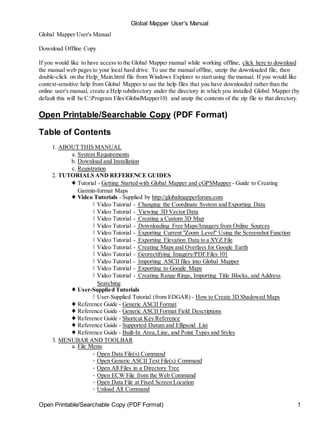
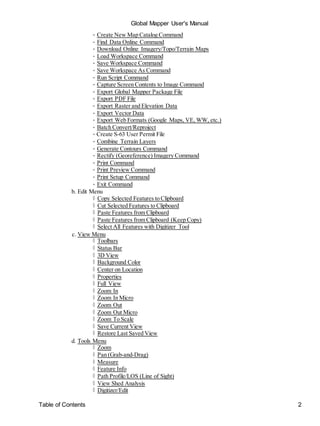
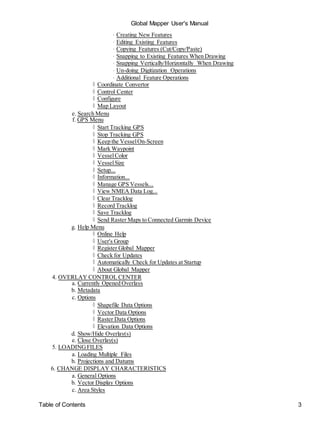
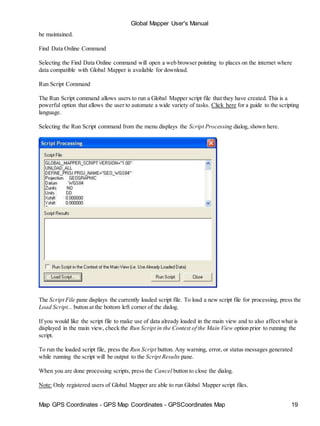
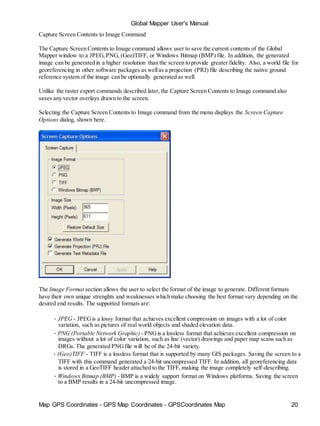
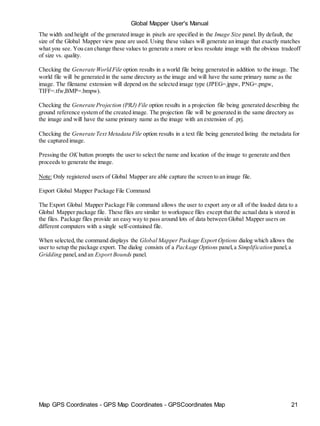
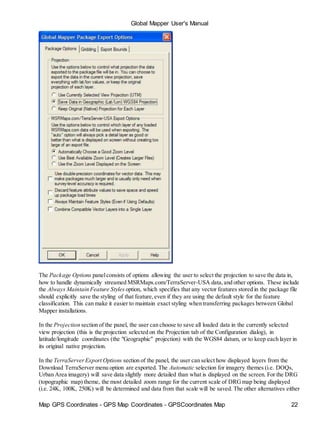
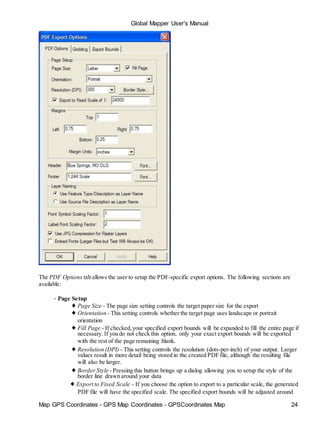
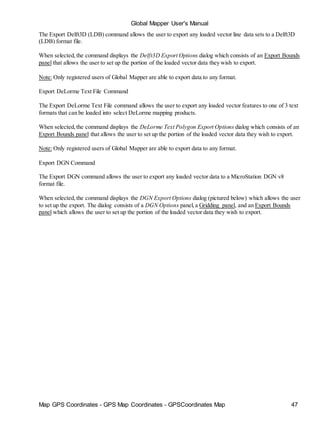
![Global Mapper User's Manual
Map GPS Coordinates - GPS Map Coordinates - GPSCoordinates Map 5
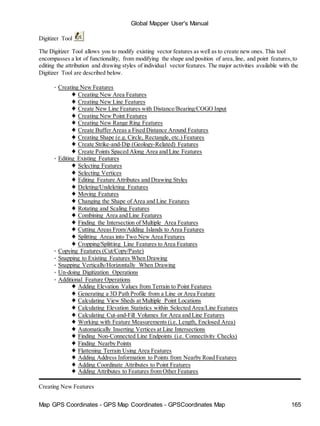
ABOUT THIS MANUAL
This manual is for Global Mapper v11.02. Earlier versions of the software may not contain all the features
documented here. Later versions may contain additional features,or behave differently. To see the version of
your software,select [Help/About Global Mapper] from the Menu Bar. The demo version contains some but
not all of the features available through a registered version of Global Mapper.
The Global Mapper Web Site found at: http://www.globalmapper.com maintains a list of changes and
supported formats, features,links to sample data as well as current information about the Global Mapper
software. Please refer to this site to obtain the latest copy of the software.
Earlier versions of the software should be uninstalled [Start/Settings/Control Panel/Add, Remove Programs]
before installing later versions.
System Requirements
Global Mapper software is compatible with Windows 98, Windows NT, Windows 2000, Windows ME,
Windows XP (32 and 64-bit versions), Windows Vista (32 and 64-bit versions), Windows 7 (32 and 64-bit
versions), and Windows Server 2003. You may also be able to run Global Mapper on a Macintosh computer
using an emulator like VirtualPC, Parallels, or Boot Camp, or on a Linux OS under WINE. The minimum
system requirements are 64 MB of RAM and 40 MB of hard drive space for the installation. Space
requirements for the data are typically higher depending upon the size of the dataset.
Download
Step 1: Download the Global Mapper software (latest version) from the Global Mapper website:
http://www.globalmapper.com by following the Download link on the left side of the main page.
Step 2: Go to the directory in which you saved the viewer in Step 1 and select the global_mapper11_setup.exe
icon
Step 3: Double click the icon. Select "YES" to install the program. Allow the installation to progress normally
and select any defaults it asked for.
Registration
You can freely download the latest version of Global Mapper by following the instructions above. However,
without a valid username and registration key, several significant functions will be unavailable. In particular,
if you do not obtain a valid registration key for your copy of Global Mapper you will be subject to the
following limitations:
• You will be unable to export data to any format.
• You will be limited to loading a maximum of 4 data files at a time. With the full version, you can load
any number of data files simultaneously.
• You will be unable to view loaded elevation data in 3D.
• You will be unable to load workspaces.
• You will be unable to do line of sight calculations using loaded elevation data.
• You will be unable to perform view shed analysis using loaded elevation data.
• You will be unable to perform cut-and-fill volume calculations using loaded elevation data.
• You will be unable to work with map catalogs.
• You will be unable to download data from WMS map servers.](https://image.slidesharecdn.com/58011508-manual-global-mapper-150324142509-conversion-gate01/85/manual-global-mapper-5-320.jpg)
![Global Mapper User's Manual
Map GPS Coordinates - GPS Map Coordinates - GPSCoordinates Map 12
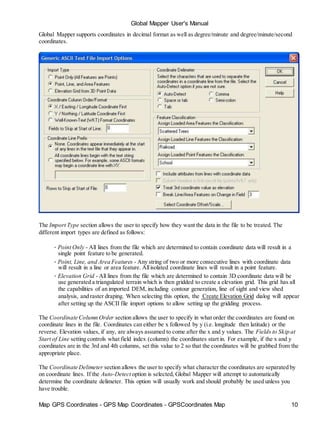
These attribute names are ignored for line features. You can also specify custom dot and square
symbol colors and sizes without having to add your own custom bitmaps for those symbols. Use
names of the form DOT_CUSTOM_[SIZE]_[RED]_[GREEN]_[BLUE]and
SQUARE_CUSTOM_[SIZE]_[RED]_[GREEN]_[BLUE] where the [SIZE] value is the radius in
pixels of the dot or square,and the [RED],[GREEN], and [BLUE] values represent the color to use.
For example, to specify a dot symbol of radius 10 pixels with a color or green, you would use a
symbol name of DOT_CUSTOM_10_0_255_0.
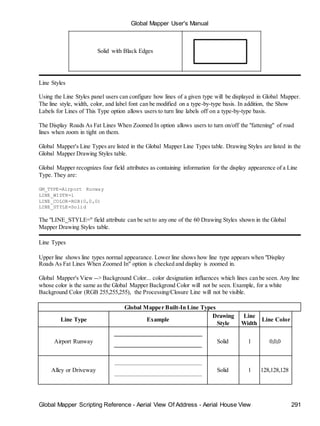
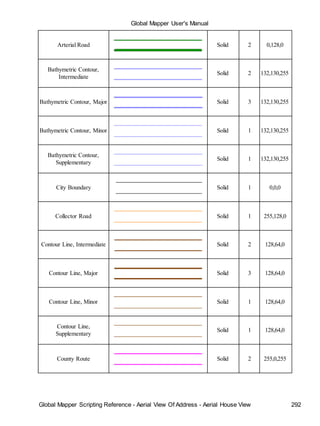
• COLOR - the COLOR attribute should be formatted as RGB(red,green,blue). In the absence of a
specific fill or line color, it will be used.
• LINE COLOR,LINE_COLOR,BORDER COLOR,BORDER_COLOR,PEN COLOR,or
PEN_COLOR - the values associated with an attribute of any of these names will be used as the color
for the pen used to draw line features. The values must be formatted according to the guidelines layed
out for the COLOR attribute in order to be recognized.
• LINE WIDTH, LINE_WIDTH,BORDER WIDTH,BORDER_WIDTH,PEN WIDTH,or
PEN_WIDTH - the values associated with an attribute of any of these names will be used as the width
for the pen used to draw line features.
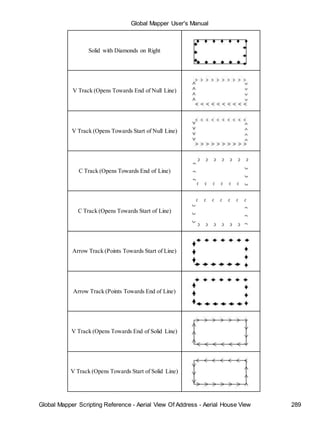
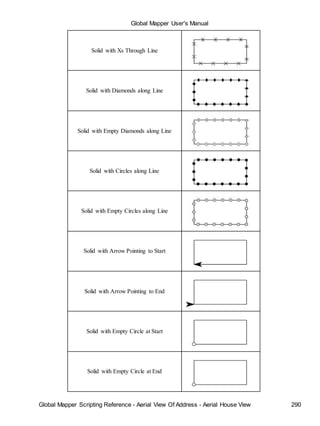
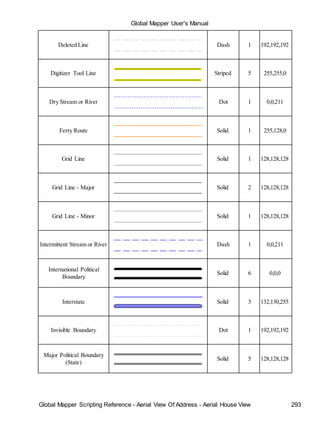
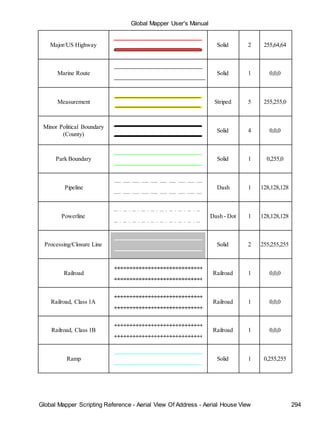
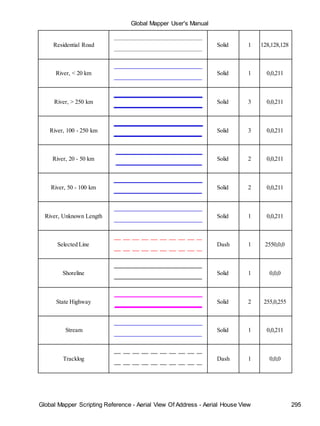
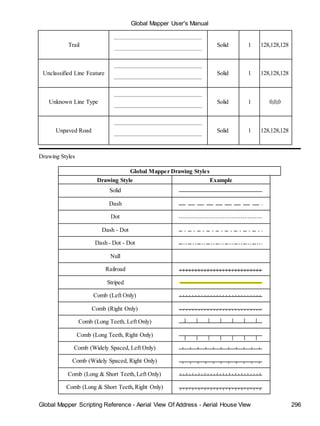
• LINE STYLE, LINE_STYLE,BORDER STYLE,BORDER_STYLE,PEN STYLE,or PEN_STYLE
- the values associated with an attribute of any of these names will be used as the style for the pen
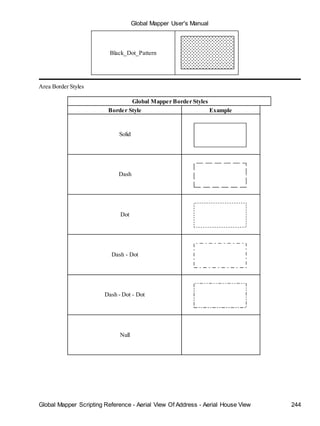
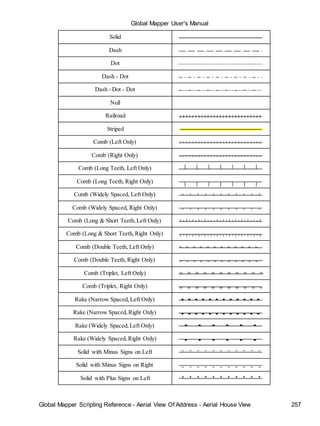
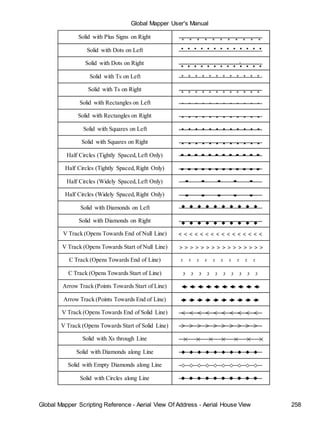
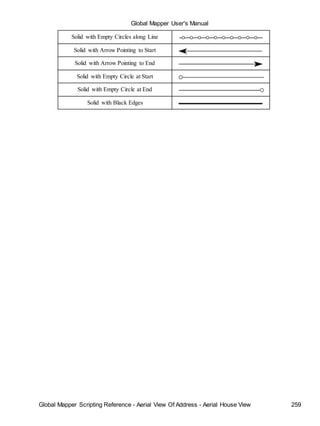
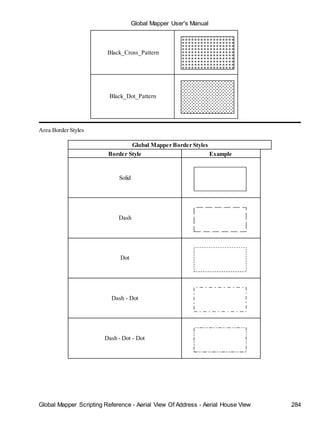
used to draw line features. Valid values are Solid, Dash, Dot, Dash - Dot, Dash - Dot - Dot, and Null.
Only the Solid value is valid for lines with a width greater than 1
• LABEL_ON_LINE - if this is set to "YES" or "TRUE", the label (if any) for this line feature should
be rendered centered on the line
• CLOSED - if this is set to "YES" or "TRUE", the feature will be treated as a closed area feature if it
has at least three vertices.
• ISLAND - if this is set to "YES" or "TRUE", the feature will be treated as an island of the previous
closed parent area feature if it has at least three vertices. If there are no previous parent areas,this
attribute will be ignored.
• FONT_NAME - specifies the name (e.g. Arial, Times New Roman, etc.) of the font to use when
displaying the display label, if any, for this feature.
• FONT_COLOR - specifies the color of the font to use when displaying the display label, if any, for
this feature. The values must be formatted according to the guidelines layed out for the COLOR
attribute in order to be recognized.
• FONT_ANGLE - specifies the angle in degrees of the font to use when displaying the display label, if
any, for this point feature.
• FONT_SIZE - specifies the point size of the font to use when displaying the display label, if any, for
this feature.
• FONT_HEIGHT_METERS - specifies the height in meters of the font to use when displaying the
display label, if any, for this feature. Using this causes the actual point size of the font to vary as you
zoom in and out.
• FONT_CHARSET - specifies the numeric character set of the font to use when displaying the display
label, if any, for this feature. These correspond to the Windows character set enumeration.
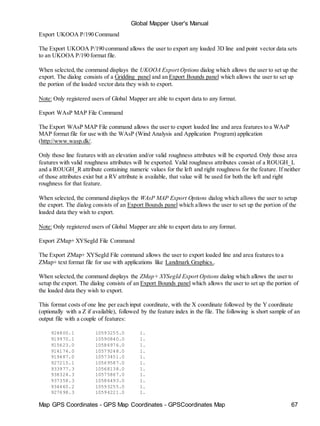
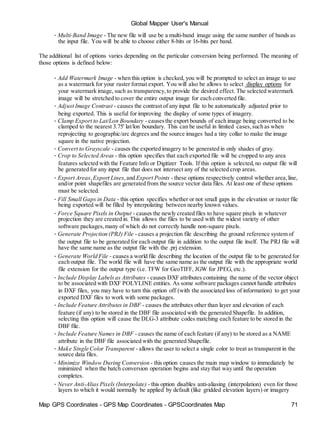
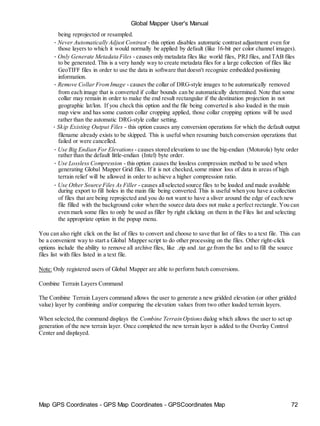
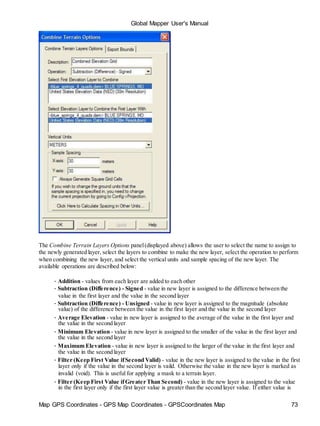
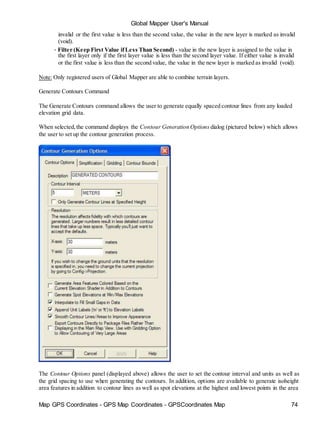
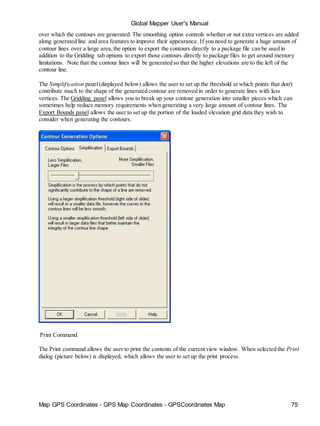
Click here for more instructions on creating generic ASCII data files with features of various types and click
here for more documentation on the supported fields.
Download Online Imagery/Topo/Terrain Maps
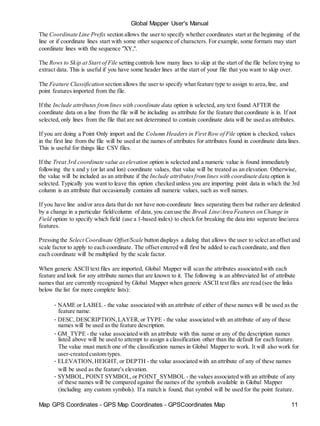
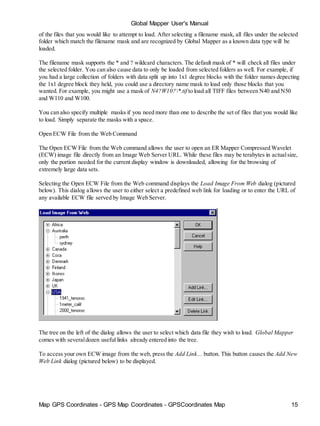
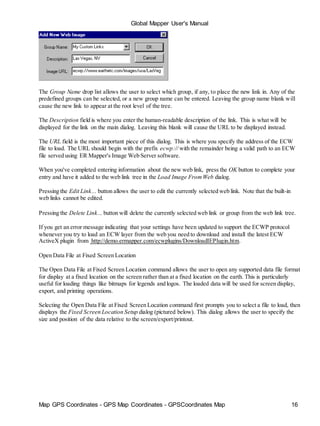
The Download Online Imagery/Topo/Terrain Maps command allows the user to download mapping data from
numerous built-in and user-supplied sources. This includes premium access to high resolution color imagery
for the entire world from DigitalGlobe, worldwide street maps from OpenStreetMap.org, as well as seamless
USGS topographic maps and satellite imagery for the entire United States from](https://image.slidesharecdn.com/58011508-manual-global-mapper-150324142509-conversion-gate01/85/manual-global-mapper-12-320.jpg)
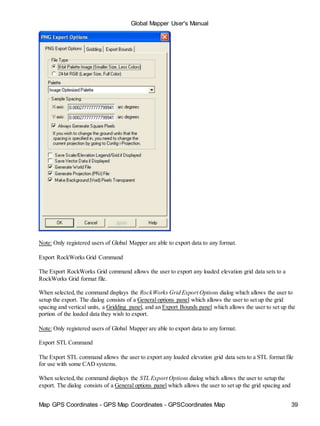
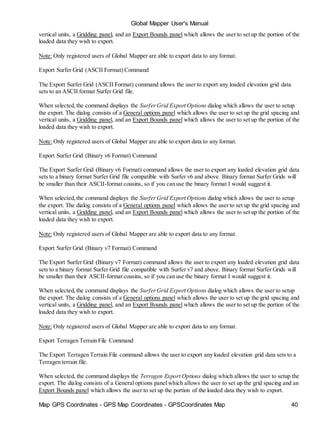
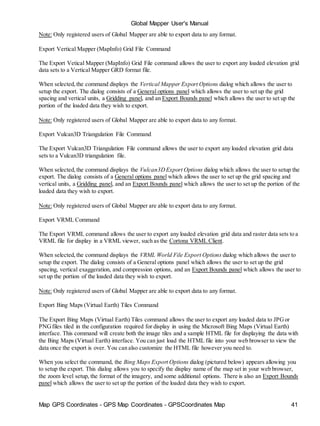
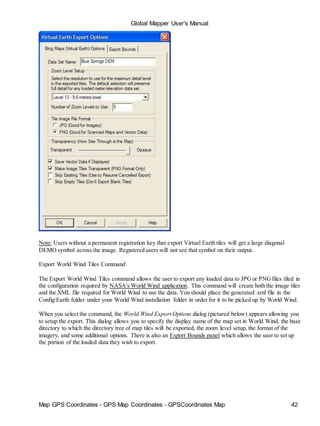
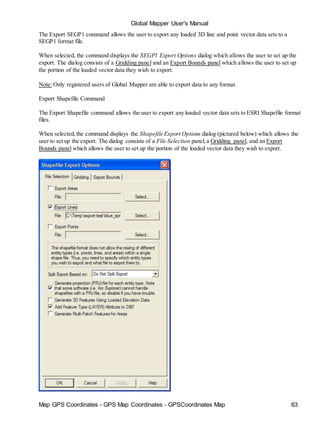
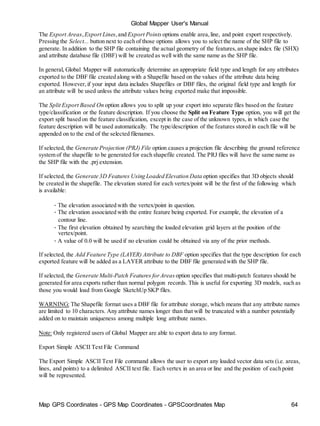
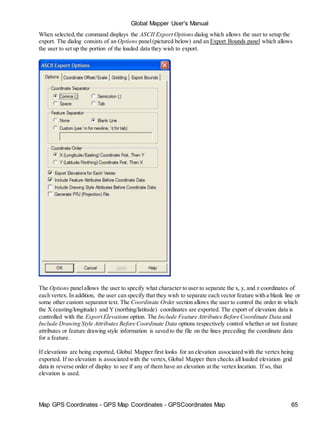
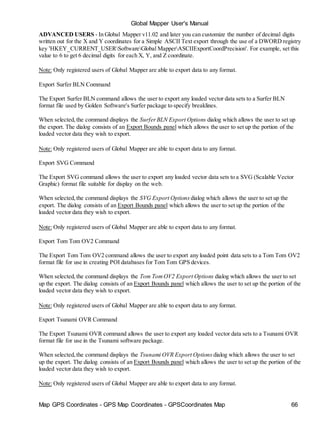
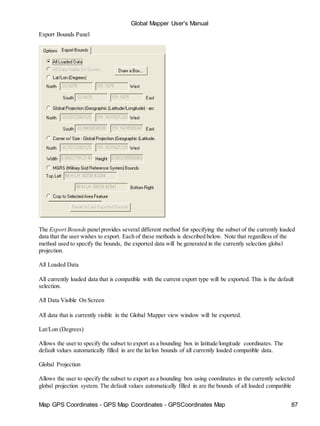
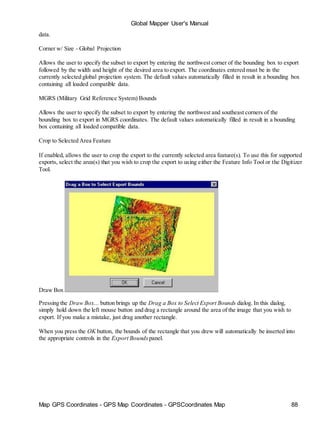
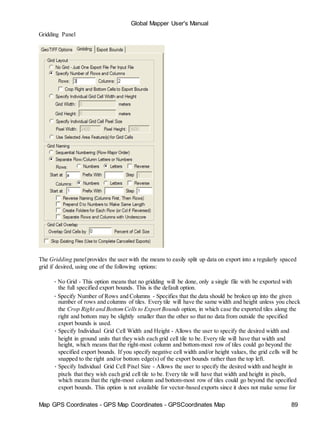
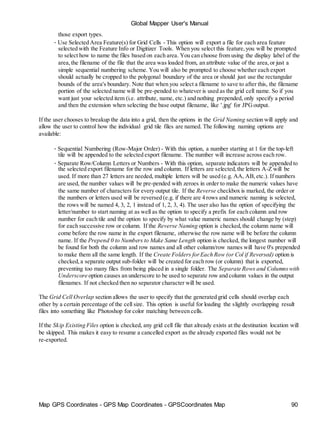
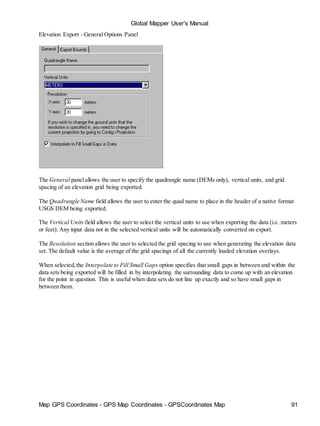
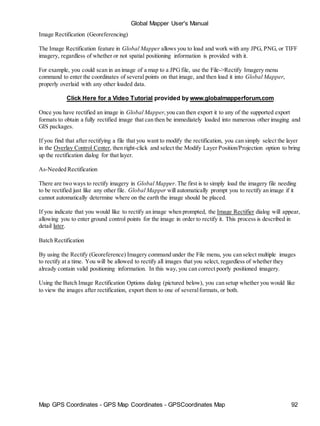
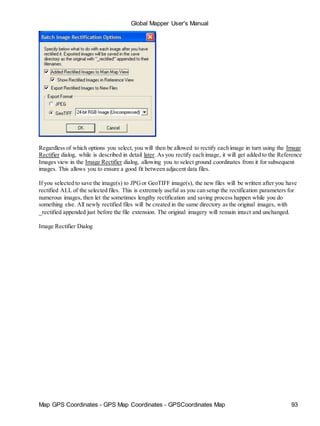
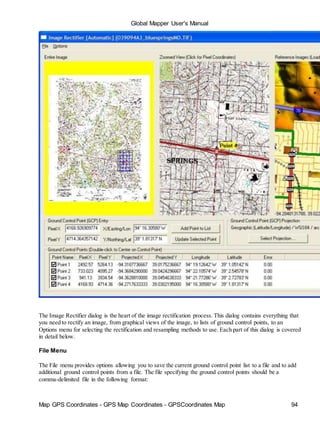
![Map GPS Coordinates - GPS Map Coordinates - GPSCoordinates Map 99
Global Mapper User's Manual
4 LOADINGFILES
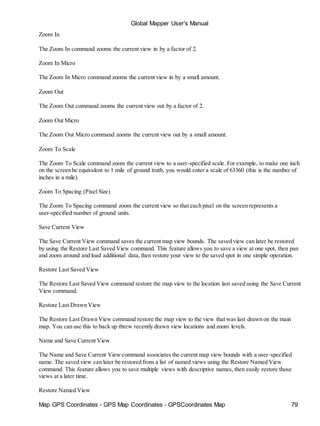
Choose [Open as New] icon from the Toolbar. An open window will appear. This window can be set to
display only files of selected types with the "Files of Type:" subwindow.
There is support for opening USGS DLG-O, DEM, and severalother file types directly from gzipped
archives. In addition, SDTS DLG, SDTS DEM, and most other file types can be opened directly from .tar.gz,
.tgz, and .zip archive files. This means that you no longer need to extract all of those SDTS files to their own
directory before opening them. Global Mapper will do that automatically.
Loading Multiple Files
Global Mapper will display multiple data sets in correct geospatial positions; that is, adjacent data sets can be
mosaicked, and vector data can be displayed on top of raster and elevation data.
Choose [Open Data Files] icon from the Toolbar and select files. The registered version Global Mapper has no
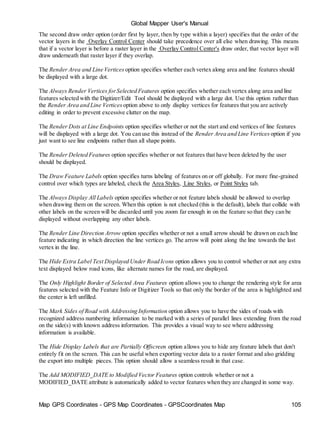
limit on the number of overlays that can be viewed simultaneously. A maximum of four files of any type may
be viewed simultaneously in the unregistered version of Global Mapper.
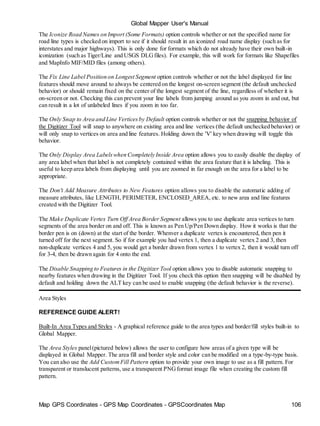
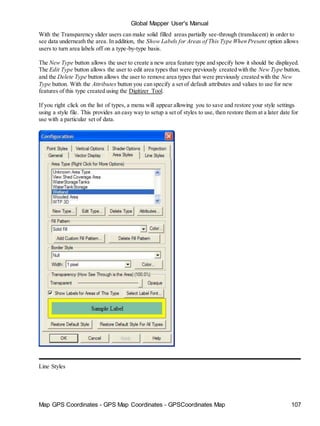
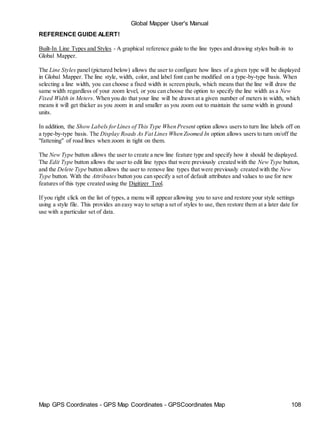
You can also load all of the files under a directory and all subdirectories under that directory that match a
specified filename mask. You can do this using the [Open All Files in a Directory Tree] File menu command.
Projections and Datums
The Global Mapper display space adopts the coordinate system of the first data set opened. Subsequent data
sets will be transformed to the coordinate system of the first data set loaded or the display projection
subsequently selected from the configuration dialog.
This is a very powerful feature; it makes differences in projections and datums transparent to the user. This
also means that the order in which data sets are loaded can have a significant impact on the appearance of the
display. This is the most obvious when working with data sets of widely varying scales.](https://image.slidesharecdn.com/58011508-manual-global-mapper-150324142509-conversion-gate01/85/manual-global-mapper-99-320.jpg)
![Map GPS Coordinates - GPS Map Coordinates - GPSCoordinates Map 100
Global Mapper User's Manual
5 CHANGE DISPLAY CHARACTERISTICS
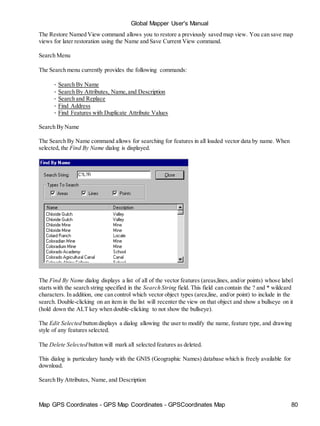
Selecting the [Tools/Configuration] menu item or toolbar button displays the Configuration dialog. This
dialog provides for general setup of Global Mapper display options.
The Configuration dialog provides the following panels allowing the modification of display options:
• General - Scale, Units, and Position Display Setup
• Vector Display - Vector Display Setup
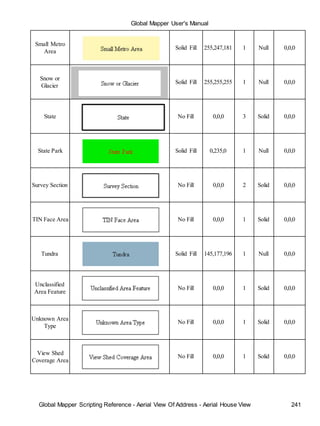
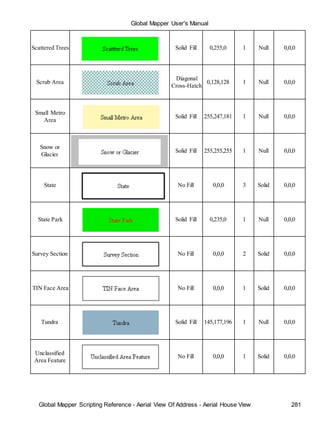
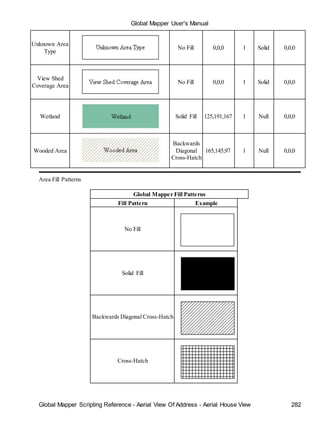
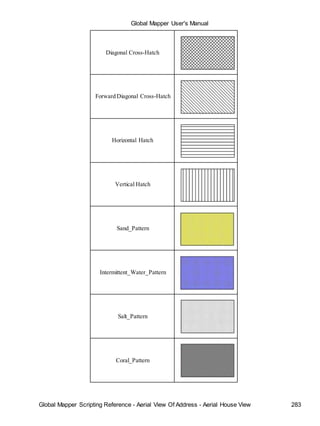
• Area Styles - Area Type Color/Fill/Border Settings
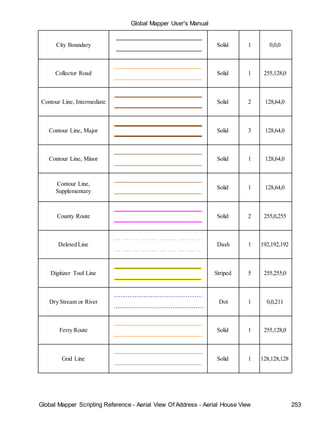
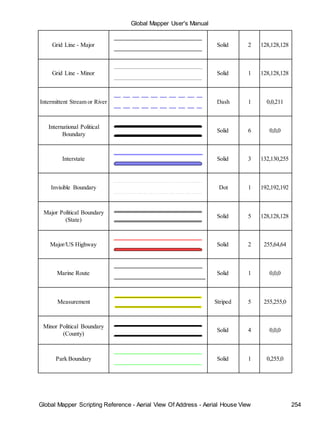
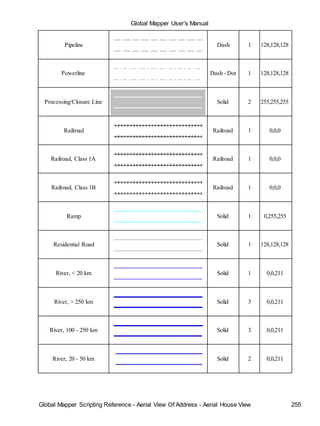
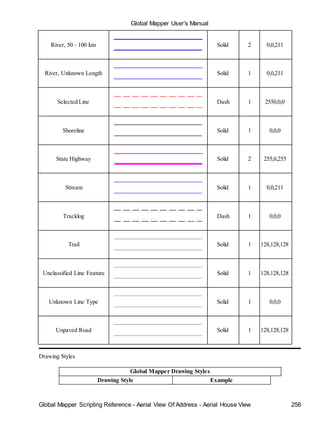
• Line Styles - Line Type Color/Width/Style Settings
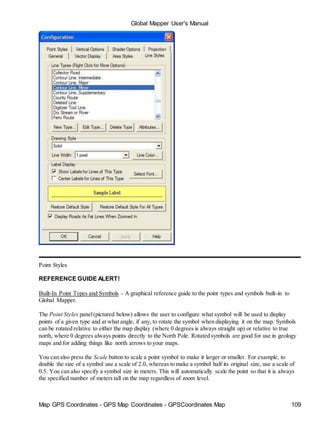
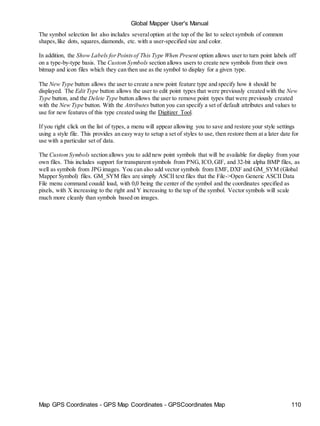
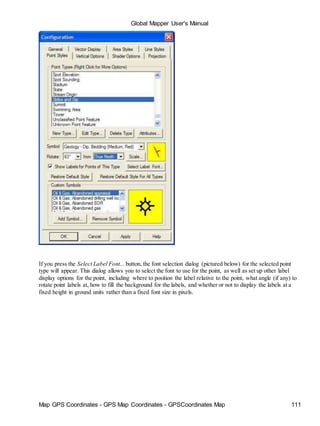
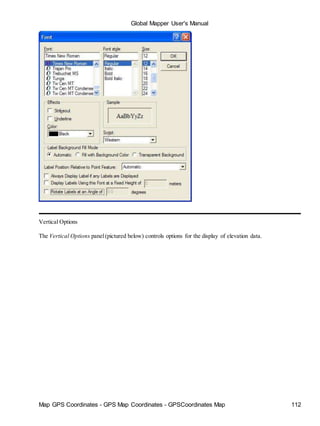
• Point Styles - Point Type Symbol Settings / Custom Symbols
• Vertical - Elevation Display Setup
• Shader - Shader-Specific Setup
• Projection - Select Display Projection/Datum
General Options
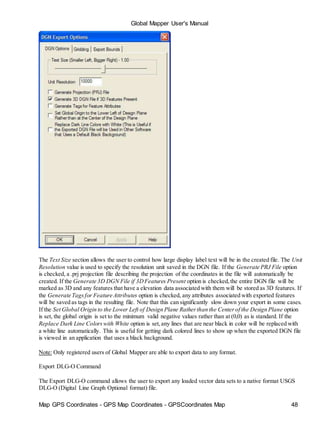
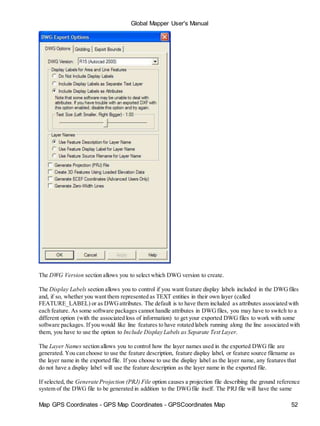
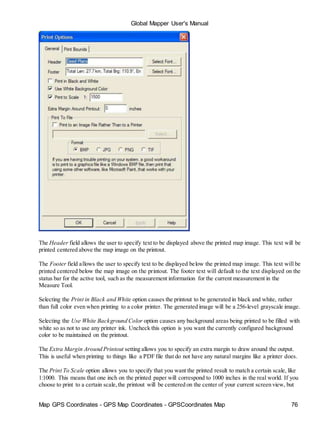
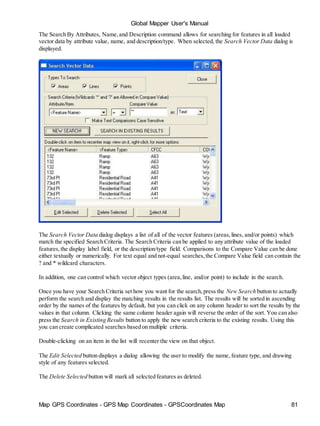
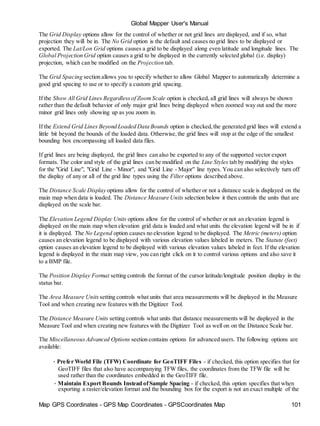
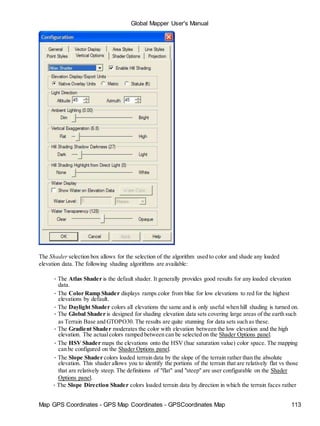
The General panel(pictured below) controls options for the display of vector data (areas,lines, and points) as
well as position format on the status bar.](https://image.slidesharecdn.com/58011508-manual-global-mapper-150324142509-conversion-gate01/85/manual-global-mapper-100-320.jpg)
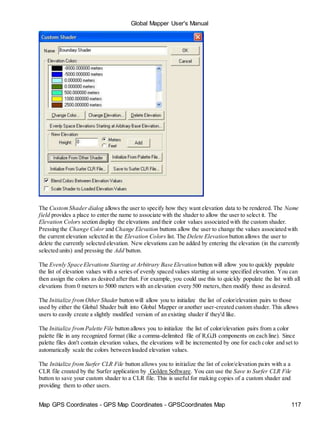
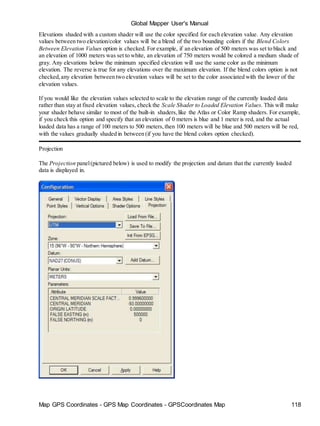
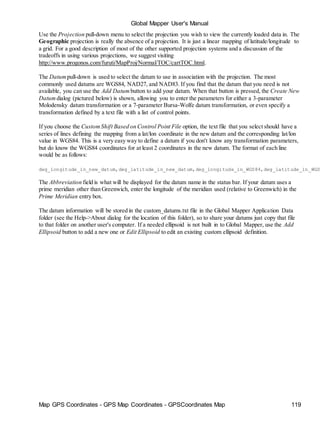
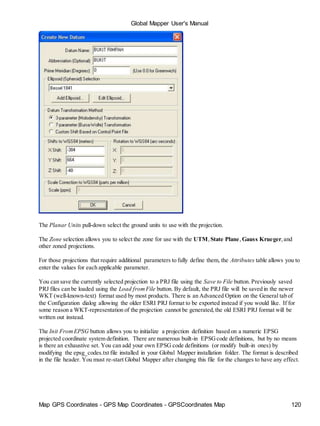
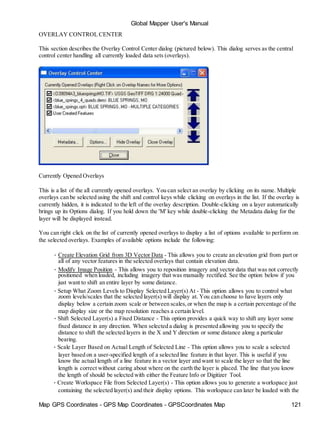
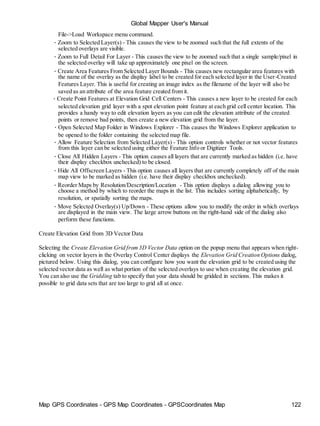
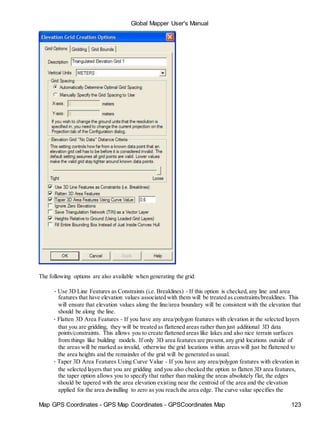
![Map GPS Coordinates - GPS Map Coordinates - GPSCoordinates Map 129
Global Mapper User's Manual
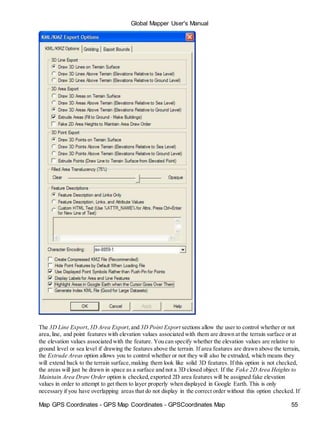
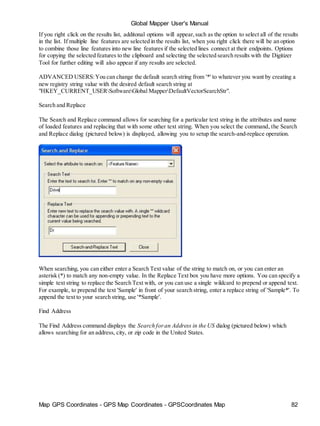
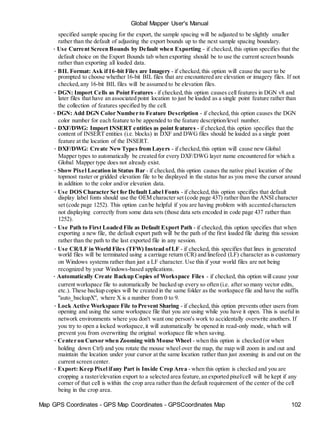
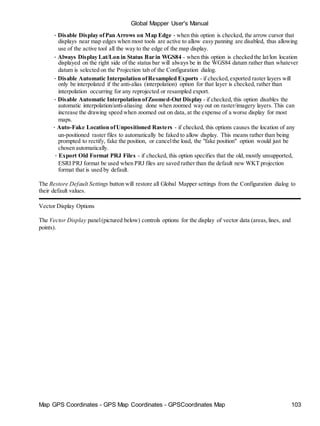
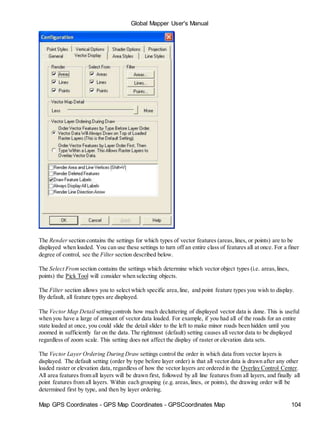
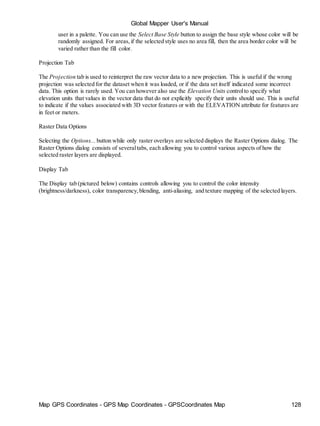
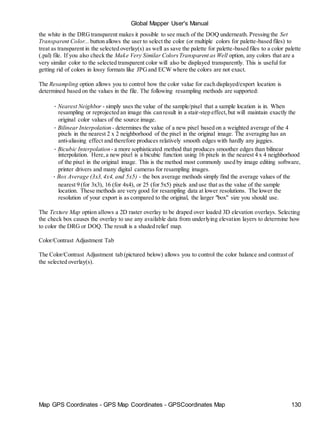
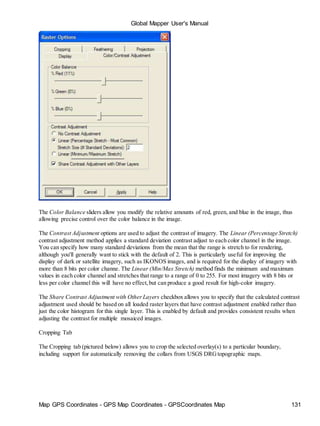
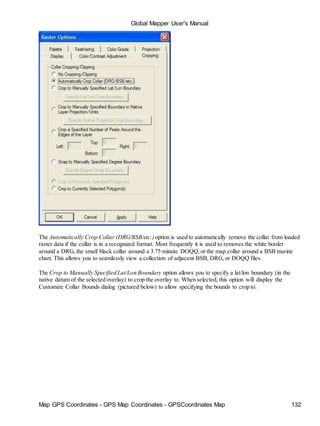
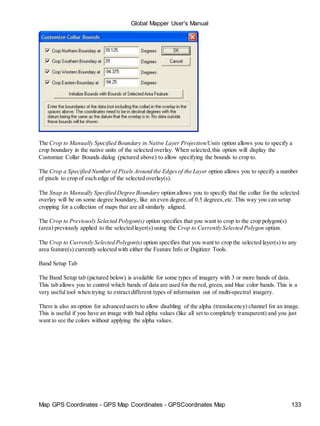
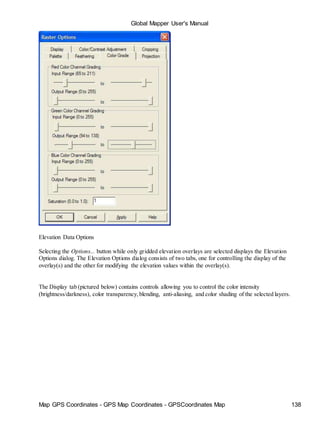
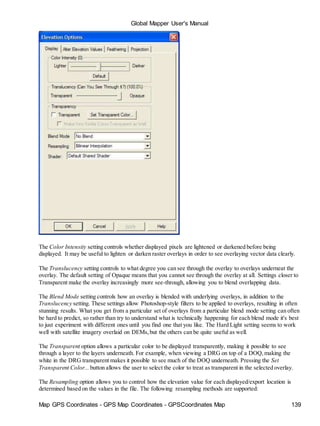
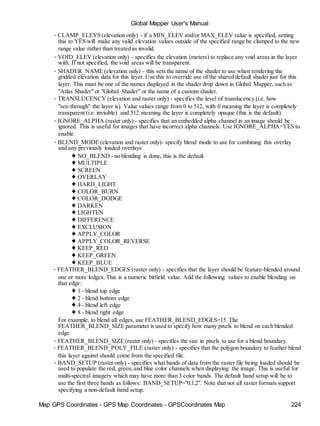
The Color Intensity setting controls whether displayed pixels are lightened or darkened before being
displayed. It may be useful to lighten or darken raster overlays in order to see overlaying vector data clearly.
The Translucency setting controls to what degree you can see through the overlay to overlays underneath the
overlay. The default setting of Opaque means that you cannot see through the overlay at all. Settings closer to
Transparent make the overlay increasingly more see-through, allowing you to blend overlapping data.
The Blend Mode setting controls how an overlay is blended with underlying overlays, in addition to the
Translucency setting. These settings allow Photoshop-style filters to be applied to overlays, resulting in often
stunning results. What you get from a particular set of overlays from a particular blend mode setting can often
be hard to predict, so rather than try to understand what is technically happening for each blend mode it's best
to just experiment with different ones until you find one that you like. The Hard Light setting seems to work
well with satellite imagery overlaid on DEMs,but the others can be quite useful as well. For example, the
Apply Color setting is useful for applying color to a grayscale overlay, such as using a low-resolution color
LANDSAT image to colorize a high-resolution grayscale satellite image. The SPOT Natural Color blend
mode combines the color channels in the topmost layer using the common algorithm for generating natural
color imagery from images from the SPOT HRV multi-spectral sensor [Red = B2; Green = ( 3 * B1 + B3 ) / 4;
Blue = ( 3 * B1 - B3 ) / 4]. The Pseudo Natural Color blend mode combines the color channels within a
single image using a common algorithm for generating natural color imagery from CIR imagery.
The Transparent option allows a particular color (or colors) to be displayed transparently, making it possible
to see through a layer to the layers underneath. For example, when viewing a DRGon top of a DOQ,making](https://image.slidesharecdn.com/58011508-manual-global-mapper-150324142509-conversion-gate01/85/manual-global-mapper-129-320.jpg)
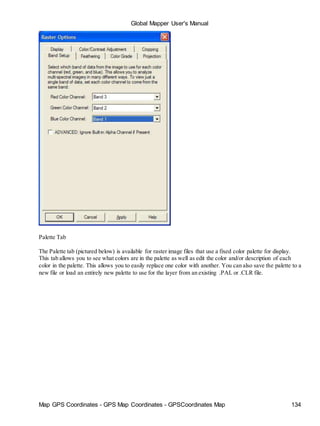
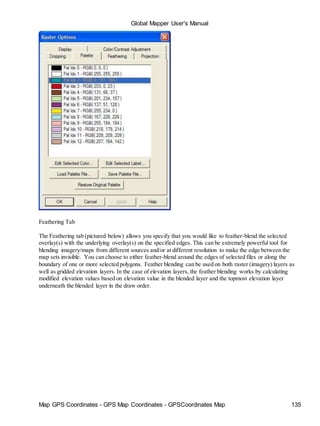
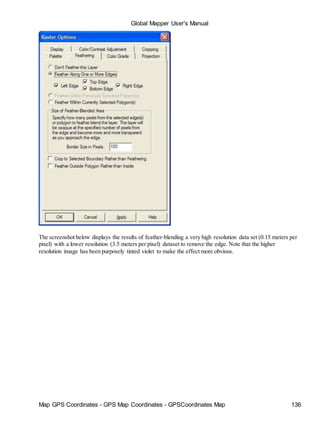
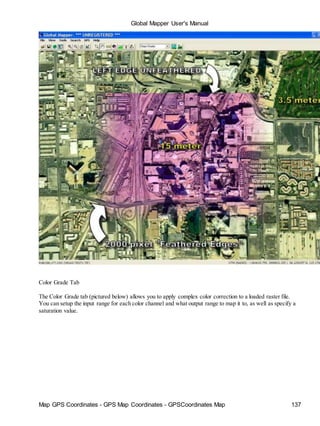
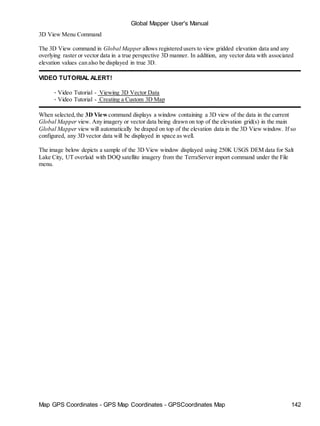
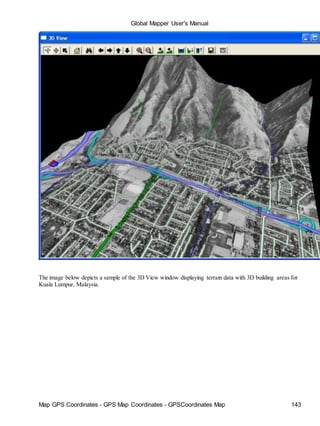
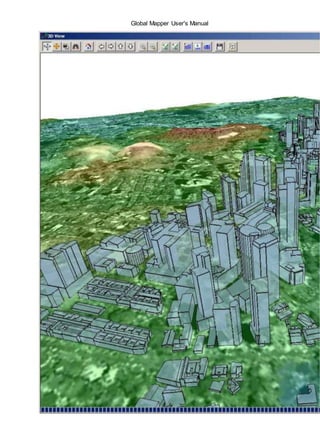
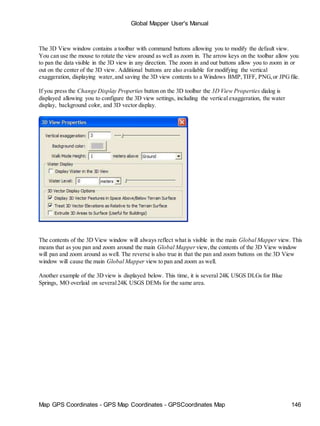
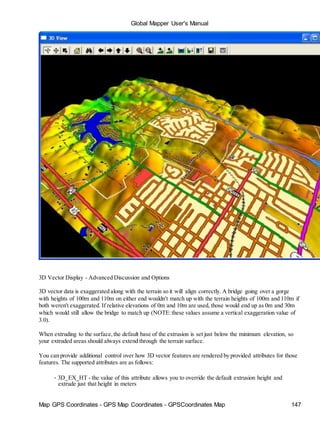
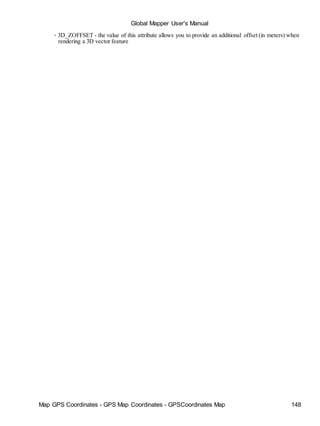
![Global Mapper User's Manual
Map GPS Coordinates - GPS Map Coordinates - GPSCoordinates Map 149
Tools Menu
The Tools Menu offers the following commands:
• Zoom - Allows the user to zoom in on a specific point in the display.
• Pan (Grab-and-Drag) - Drag the view to a new location.
• Measure - Measures length as well as an enclosed area.
• Feature Info - Chooses an object to display its attributes.
• Path Profile/LOS - Generate 3D path profile and perform line of sight (LOS) calculations
• View Shed Analysis - Perform view shed analysis using loaded elevation grid data
• Digitizer - Modify existing vector features and create new ones.
• Coordinate Convertor - Easy reprojection/conversion of coordinates
• Control Center - Central control for all loaded overlays.
• Configure - General Global Mapper setup.
• Map Layout - Setup Map Layout Display (scale bar, margins, north arrow, etc.)
Zoom Tool
The Zoom command selects the zoom tool as the current tool.
To zoom in on a specific point, choose the [Zoom tool] from the toolbar or, [Tool/Zoom] from menu bar. A
magnifying glass icon should appear on the screen. To zoom in, left click without dragging the mouse. The
view is centered on where the mouse was clicked and will zoom in by a factor of two. To zoom out, right click
without dragging the mouse. The view will zoom out by a factor of two, centered on where the mouse was
clicked. You can also hold down the Ctrl key while right clicking to restore the view to the last zoomed view.
Alternately, one can zoom in to a user-defined rectangle by left clicking and then draging a box while holding
down the left mouse button.
If your mouse has a middle button, you can hold it down and drag the map similar to the behavior of the Pan
(Grab-and-Drag) tool.
Pan (Grab-and-Drag) Tool
The Pan (Grab-and-Drag) command selects the Pan tool as the current tool.
To change the center point of the image without changing the magnification, depress the left mouse button,
drag the view to the desired location, then release the left mouse button to redraw the view at the new
location.
If you just want to recenter on a new location without dragging, just click the left mouse button at the new
desired location and the view will be recentered on that location (this provides the functionality of the old
Recenter Tool).
Measure Tool
The Measure command selects the measure tool as the current tool.](https://image.slidesharecdn.com/58011508-manual-global-mapper-150324142509-conversion-gate01/85/manual-global-mapper-149-320.jpg)
![Global Mapper User's Manual
Map GPS Coordinates - GPS Map Coordinates - GPSCoordinates Map 150
To find the distance between along a path on the display or the enclosed area of a set of points, choose the
[Measure Tool] icon from the toolbar or select [Tools/Measure] from the menu bar.
1. Left click on the point to begin the measurement. Move the mouse, which will draw a line, to the
point where the measurement should stop.
2. Repeat step 1 until you have defined the entire path or area that you wish to measure.
3. Right click the right mouse button and select "Stop Measuring" from the list using a left click. Notice
that "Stop Measuring" and "Close polygon" choices are now grayed out. The measurement(s) will be
displayed on the left side of the status bar below.
4. In order to change measurements right click and choose a new unit using a left click. You may
continue to change the measurement display by selecting different units. The distance will be
displayed in kilometers, meters, miles or feet for a line, and in square feet,square meters, square
miles, acres,or hectares for areas.
Note that if you place a point along your measurement that you do not want you can press Ctrl+Z to remove
the last placed point in the measurement.
You can also save a measurement to a separate feature by right clicking and selecting "Save Measurement"
from the list that pops up. You can then export these measurements to new vector files, such as Shapefiles or
DXF, or modify them with the Digitizer Tool. There is also an option to copy the measurement text to the
clipboard when you right-click.
If you have gridded elevation data loaded under the measurement, you can also calculate the Cut-and-Fill
volume either within the measurement area or within some distance of the measurement line. To do this,
simply right click then select the "Measure Volume (Cut-and-Fill)" option that appears. Selecting this option
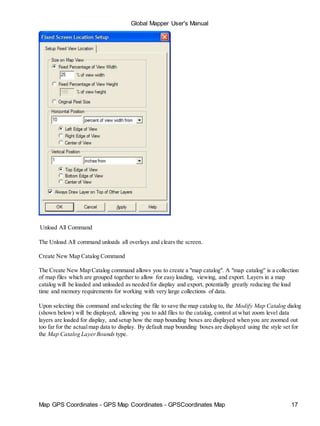
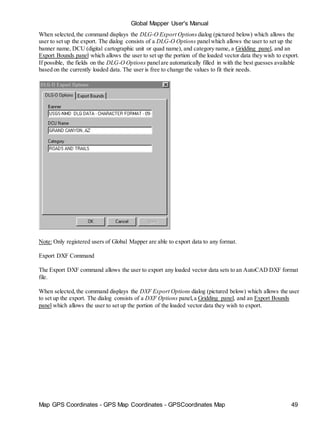
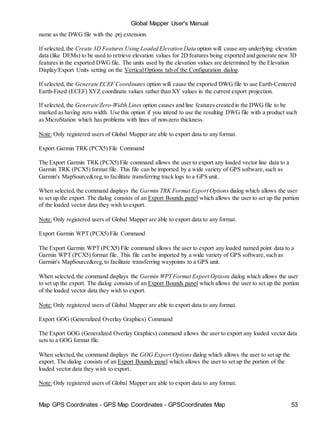
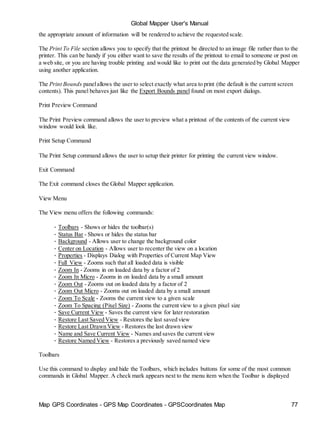
will display the Setup Volume Calculation Parameters dialog (pictured below), which allows you to set up the
volume measurement.](https://image.slidesharecdn.com/58011508-manual-global-mapper-150324142509-conversion-gate01/85/manual-global-mapper-150-320.jpg)
![Global Mapper User's Manual
Map GPS Coordinates - GPS Map Coordinates - GPSCoordinates Map 151
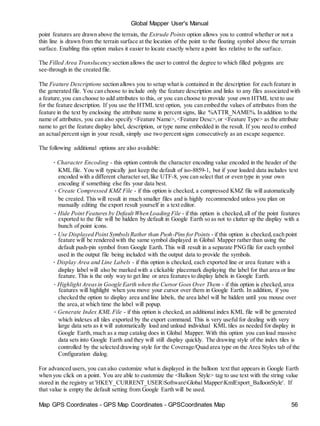
On the Setup Volume Calculate Parameters you can select whether to measure cut-and-fill volumes within
some specified distance of the selected line or within the specified area. If you are measuring along a line, you
can specify the cut heights to use at each vertex individually or use the same cut (base) height for each vertex
relative either to the ground at each vertex or relative to sea level. Whichever option you choose, the heights
will be interpolated between line vertices to get a smoothly varying cut height.
Once you have your volume calculation setup and you press ok to calculate it, the volume of earth that would
be needed to fill any space below the cut surface (fill volume) is reported along with the volume of earth that
is above the cut surface (cut volume). After viewing the reported volumes, you have the option to save a new
feature with the measurement values.
Feature Info Tool
The Feature Info command selects the Feature Information tool as the current tool. This tool allows you to
select vector features (areas,lines, and points) by clicking on or near them. Once selected, a dialog displaying
information about the selected item appears.
To pick objects, select the [Feature Info] icon from the Toolbar or select [Tools/Feature Info] from the menu
bar. Press and release the left mouse button near the objects(s) to be picked. Holding down the 'P' key when
left clicking causes only area features at the clicked location to be considered. If left-clicking on a picture
point with an associated image, by default just the image will be displayed, but holding the Ctrl key when
clicking will cause the normal feature info dialog to be displayed. When an object is picked, it will be
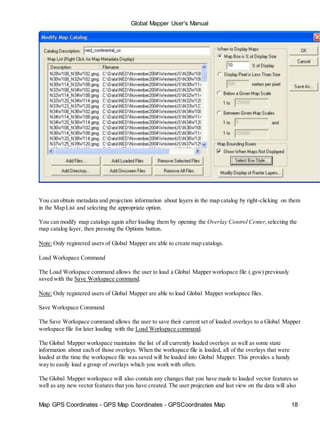
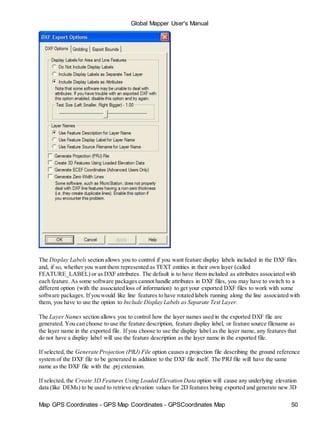
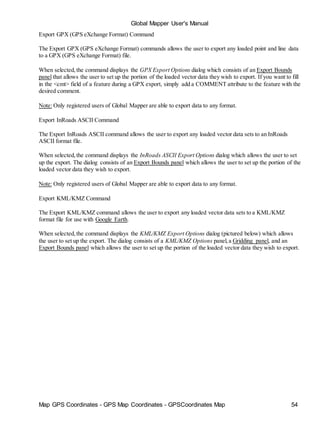
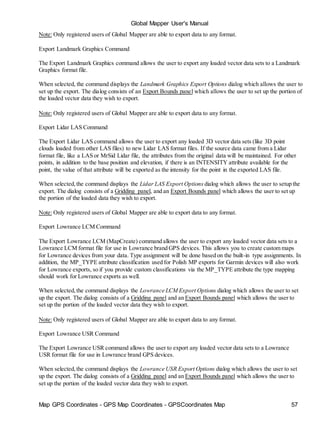
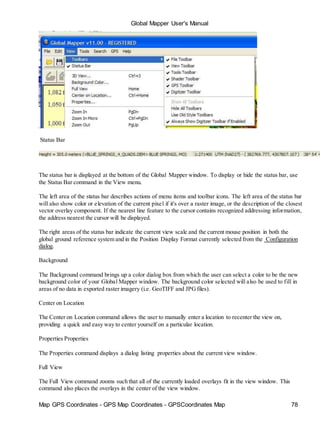
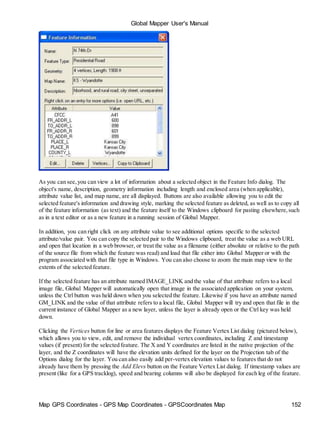
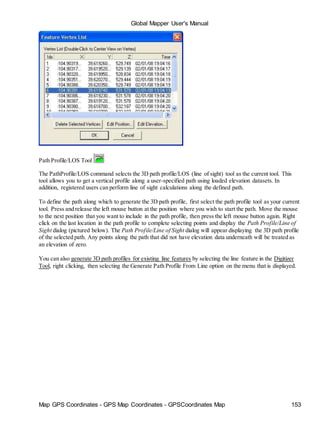
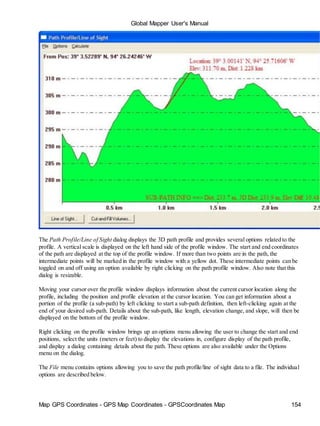
highlighted and a feature info dialog (picture below) will be displayed. Right clicking the mouse button cycles
through each of the elements located near the selection point, displaying the information in the dialog box.](https://image.slidesharecdn.com/58011508-manual-global-mapper-150324142509-conversion-gate01/85/manual-global-mapper-151-320.jpg)
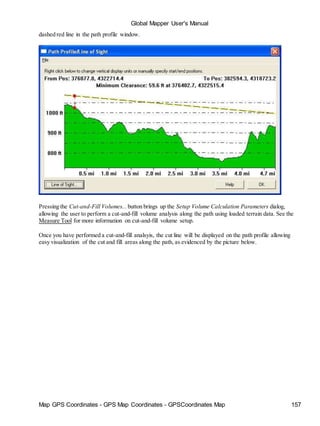
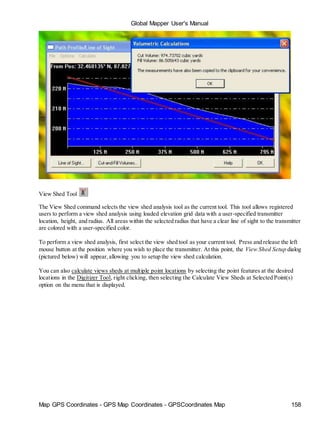
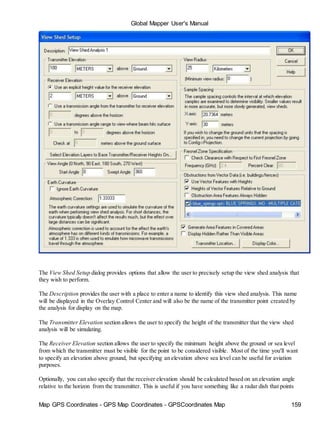
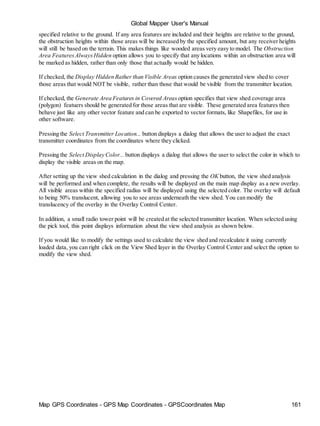
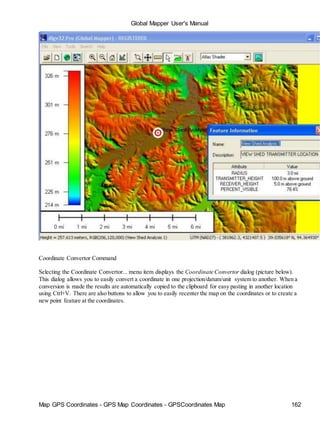
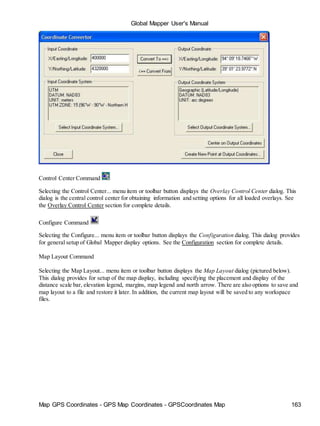
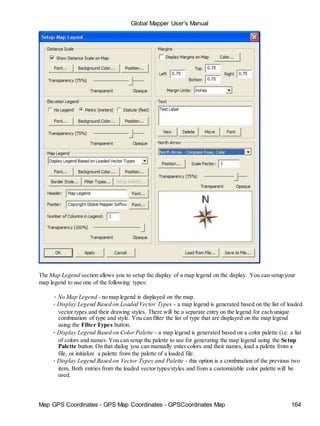
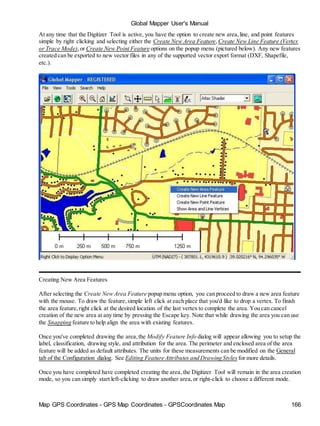
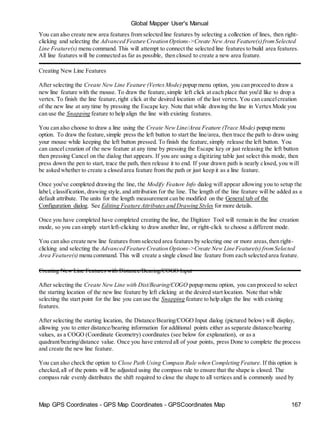
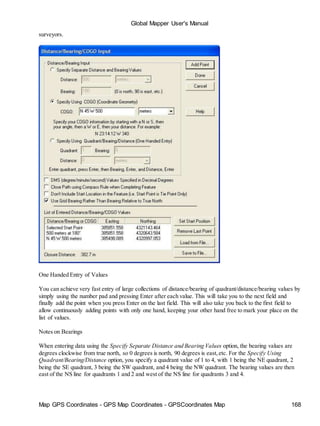
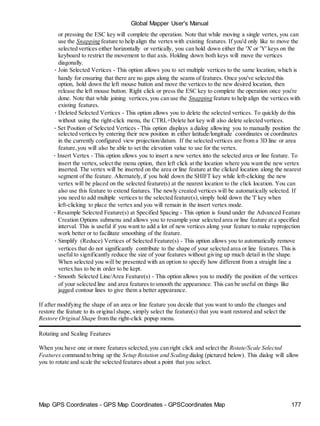
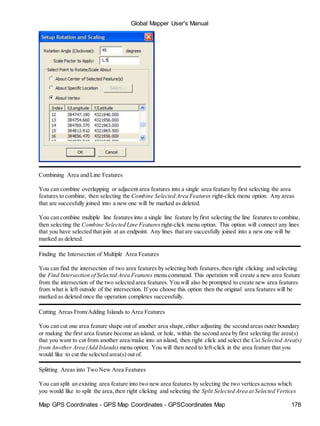
![Global Mapper User's Manual
Map GPS Coordinates - GPS Map Coordinates - GPSCoordinates Map 179
menu option. This will generate two new area features by splitting the selected area feature across the segment
between the two selected vertices. Note in some situations you will get invalid areas or no result at all, so be
carefulto select vertices for which the connected segment does not cross outside of the area or intersect any
island areas.
Cropping Line Features to Area Features
You can crop or split selected line features to a selected area feature by right-clicking and selecting the option
to Crop/Split Selected Lines to Selected Areas. This will delete any portion of the line feature that lies outside
of the selected areas unless you select the Split option, in which case separate lines will be created for the
parts inside and outside the selected area feature(s). Note that the original line will remain available as a
deleted feature,so you can recover the original line if needed.
Copying Features (Cut/Copy/Paste)
Occasionally you may wish to make copies of existing features or perhaps move features from one instance of
Global Mapper to another. You can easily do this by first selecting the features,then either making a copy of
those features (use Edit->Copy Selected Features to Clipboard menu command or Ctrl+C shortcut) or cutting
those features to the clipboard (use Edit->Cut Selected Features to Clipboard menu command or Ctrl+X
shortcut). Then, simply paste those features into any running instance of Global Mapper using either the
Edit->Paste Features from Clipboard [Ctrl+V shortcut] or Edit->Paste Features from Clipboard (Keep Copy)
[Ctrl+Shift+V shortcut], the latter of which keeps the features on the clipboard for additional pasting rather
than wiping the clipboard clearn.
Snapping to Existing Features When Drawing
During some operations (i.e. drawing new area or line features or graphically placing a new point feature),the
cursor can automatically snap to existing features when you move it near them to facilitate lining up features.
This happens by default unless the ALT or V keys are depressed. Pressing the ALT key causes no automatic
snapping to occur, while pressing the V key causes only vertices on existing features to be snapped to.
Holding down the P key causes only nearby point features to be snapped to.
Note that you can reverse the automatic snapping behavior so that snapping is disabled by default and holding
down the ALT key enables snapping on the Vector Display tab of the Configuration dialog.
ADVANCED USERS:You can customize the pixel radius used when looking for a location on existing
features to snap to using the DWORD registry key 'HKEY_CURRENT_USERSoftwareGlobal
MapperSnapToPixelRadius'. The default value is 10 pixels. Just create that registry key and provide the
distance (in pixels) to search from the cursor location for a location to snap to.
Snapping Vertically/Horizontally When Drawing
When drawing new area or line features or moving existing features,you can use the CTRL and SHIFT keys
to cause the next vertex to be snapped vertically or horizontally relative to the last vertex or moved vertically
or horiztonally compared to the features current location. Hold down the CTRL key to snap vertically, the
SHIFT key to snap horizontally, or both the CTRL and SHIFT keys to snap diagonally.
Un-doing Digitization Operations
During some operations, like drawing new features,you can undo your last placed point by pressing Ctrl+Z.](https://image.slidesharecdn.com/58011508-manual-global-mapper-150324142509-conversion-gate01/85/manual-global-mapper-179-320.jpg)
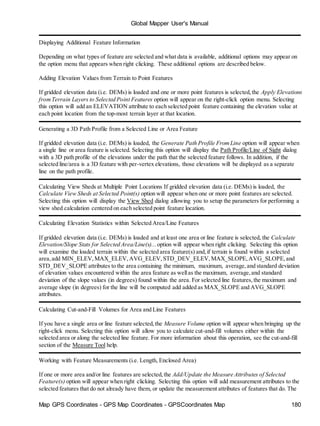
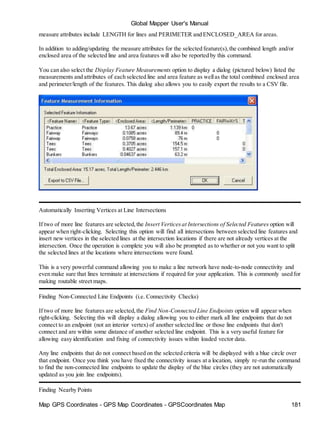
![Map GPS Coordinates - GPS Map Coordinates - GPSCoordinates Map 214
Global Mapper User's Manual
• TEMPLATE_FILENAME (POLISH_MP only) - specifies the full path and filename for another MP
file to use for the settings for the new MP file being exported.
• MP_EXPORT_TEMPLATE_FILES (POLISH_MP only) - if a TEMPLATE_FILENAME value is
provided, this controls whether or not the [FILES] section(s) from the template file will be copied to
the new file.
• MP_COPY_ENTIRE_TEMPLATE (POLISH_MP only) - specifies that the entire contents of a
specified template file should be copied to the new file rather than just the header portion of the
template file.
• MP_IMAGE_ID (POLISH_MP only) - specifies the image ID value that should be stored in the
resultant .mp file. If you don't specify this value or you specify a value of 0 a new value that has not
been used before will automatically be generated.
• DGN_UNIT_RESOLUTION (DGNonly) - specifies the unit resolution to use in an exported DGN
file. The default is 10000.0.
• DGN_GLOBAL_ORIGIN_LL (DGNonly) - specifies whether the global origin of the exported DGN
file should be set to the lower left of the design plane rather than at the center of the design plane. Use
DGN_GLOBAL_ORIGIN_LL=YES to move the global origin to the lower left.
• DGN_REPLACE_DARK_COLORS (DGNonly) - specifies whether the color of dark lines should
automatically be replaced with white on export to make them more visible on a dark background. Use
DGN_REPLACE_DARK_COLORS=YES to enable this option.
• OVERWRITE_EXISTING - specifies that existing files should be overwritten. The default is
OVERWRITE_EXISTING=YES,so use OVERWRITE_EXISTING=NO to skip exporting files that
already exist.
• SPLIT_BY_LAYER(SHAPEFILE only) - specifies that the export should generate a separate
Shapefile for each layer/type in the input data
• SPLIT_BY_ATTR - specifies that the export should generate a separate file for each set of attributes
values in the input data. Use the FILENAME_ATTR_LIST and
FILENAME_INCLUDE_ATTR_NAME parameters to control which attributes are compared to and
in what order and how the filename is generated from those attributes and their values. Use
SPLIT_BY_ATTR=YES to split your export so that all features with the same values for each of the
specified attributes is in the same file.
• FILENAME_ATTR_LIST - contains a comma-delimited list of attributes to use when naming files
exported when using the SPLIT_BY_ATTR=YES parameter.
• FILENAME_INCLUDE_ATTR_NAME - specifies that the attribute name specified in the
FILENAME_ATTR_LIST parametershould be included as part of the filename when using
SPLIT_BY_ATTR=YES to split your export into a separate file for each set of attributes.
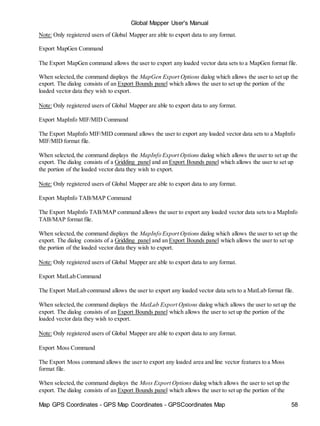
• KML_AREA_DISPLAY_ABOVE_TERRAIN(KML only) - specifies that area features with
associated elevation value should be displayed at height above the terrain surface in Google Earth.
Use KML_AREA_DISPLAY_ABOVE_TERRAIN=YES to enable.
• KML_AREA_ELEVS_RELATIVE (KML only) - specifies that the elevation values associated with
3D area features are relative to the terrain surface rather than relative to sea level. Use
KML_AREA_ELEVS_RELATIVE=YES to enable.
• KML_AREA_EXTRUDE (KML only) - specifies that 3D area features displayed in Google Earth
should be extruded from the surface to create volumetric objects like buildings. Use
KML_AREA_EXTRUDE=YES to enable.
• KML_AREA_FAKE_HEIGHTS (KML only) - specifies that fake elevation values should be assigned
to area features exported to ensure that the draw order remains correct in Google Earth. This may be
necessary to keep overlapping area features drawing correctly. Use
KML_AREA_FAKE_HEIGHTS=YES to enable.
• KML_AREA_TRANSLUCENCY (KML only) - specifies how see-through filled area features will be
in the generated KML file. The values should range from 1 to 100 and represent a opacity percentage,
with 100 being completely opaque and 1 being almost completely transparent. The default value is](https://image.slidesharecdn.com/58011508-manual-global-mapper-150324142509-conversion-gate01/85/manual-global-mapper-214-320.jpg)
![Map GPS Coordinates - GPS Map Coordinates - GPSCoordinates Map 221
Global Mapper User's Manual
♦ MAPTECH - a MapTech BSB,Topo, or Aerial format file.
♦ MICRODEM_DEM - a MicroDEM-created DEM file
♦ MICROPATH_DEM - a Micropath DEM file
♦ MRSID - a LizardTech MrSID image file.
♦ NetCDF - a NetCDF format file.
♦ NIMA_GNS - a NIMA GNS format file.
♦ NITF - NITF format imagery
♦ NOS_GEO - a NOS/GEO format chart file.
♦ NTF_GRID - a NTF grid format file.
♦ OPTIMI_GRID - an Optimi terrain or clutter grid format file.
♦ OZI - an OziExplorer format waypoint (WPT) or track (PLT) file.
♦ PCX - a PC Paintbrush PCXformat file.
♦ PCX5 - a Garmin PCX5 format waypoint (WPT) or track (TRK) file.
♦ ROCKWORKS_GRID - a RockWorks Grid format file.
♦ RPF - Raster Product Format database,like CADRG.
♦ RPF_FRAME - single frame from a Raster Product Format database,like CADRG.
♦ S57 - a S-57 chart file
♦ SDTS - a SDTS transfer
♦ SEGP1 - a SEGP1 seismic shotpoint file.
♦ SHAPEFILE - an ESRI Shapefile.
♦ SURFERGRID - a Surfer grid format file.
♦ SWEDISHDEMGRID - a Swedish DEM grid format file.
♦ TERRASCAN - a TerraScan LIDAR format file.
♦ TIGER_LINE - a Tiger/Line format file.
♦ USGS_DEM - a native format USGS DEM file.
♦ VPF - a Vector Product Format file such as VMAP or DNC data
♦ VULCAN_3D - a Vulcan3D triangulation file
♦ ZMAP_PLUS - a Geographix Zmap Plus+ format file.
• PROMPT_IF_TYPE_UNKNOWN - set to NO if you don't want the user to be prompted to select a
file type if the type cannot automatically be determined (useful when looping).
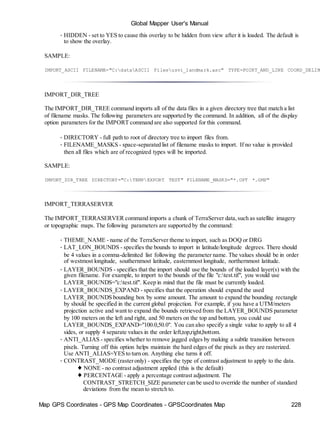
• HIDDEN - set to YES to cause this overlay to be hidden from view after it is loaded. The default is to
show the overlay.
• SAMPLING_METHOD (elevation and raster only) - specifies the sampling method to use when
resampling this layer. The following values are supported:
♦ NEAREST_NEIGHBOR - use the nearest neighbor sampling method
♦ BILINEAR - use bilinear interpolation
♦ BICUBIC - use bicubic interpolation
♦ BOX_3X3 - use a 3x3 box average
♦ BOX_4X4 - use a 4x4 box average
♦ BOX_5X5 - use a 5x5 box average
• ANTI_ALIAS [DEPRECATED - use SAMPLING_METHOD instead] (elevation and raster only) -
specifies whether to remove jagged edges by making a subtle transition between pixels. Turning off
this option helps maintain the hard edges of the pixels as they are rasterized. Use ANTI_ALIAS=YES
to turn on. Anything else turns it off.
• CONTRAST_MODE (rasteronly) - specifies the type of contrast adjustment to apply to the data.
♦ NONE - no contrast adjustment applied (this is the default)
♦ PERCENTAGE - apply a percentage contrast adjustment. The
CONTRAST_STRETCH_SIZE parameter can be used to override the number of standard
deviations from the mean to stretch to.
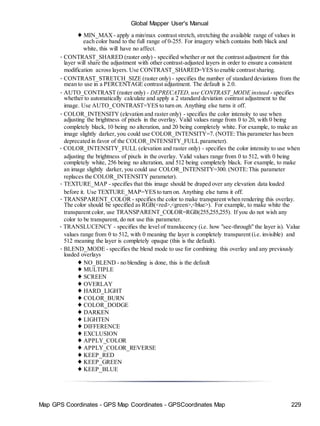
♦ MIN_MAX - apply a min/max contrast stretch, stretching the available range of values in
each color band to the full range of 0-255. For imagery which contains both black and white,](https://image.slidesharecdn.com/58011508-manual-global-mapper-150324142509-conversion-gate01/85/manual-global-mapper-221-320.jpg)
![Map GPS Coordinates - GPS Map Coordinates - GPSCoordinates Map 232
Global Mapper User's Manual
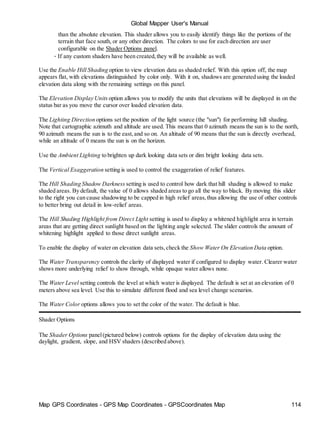
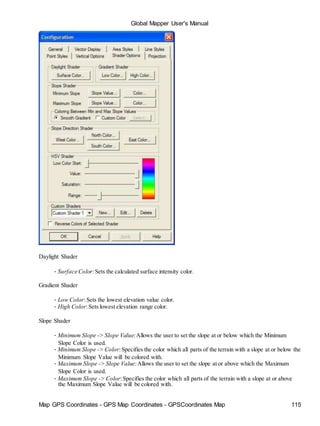
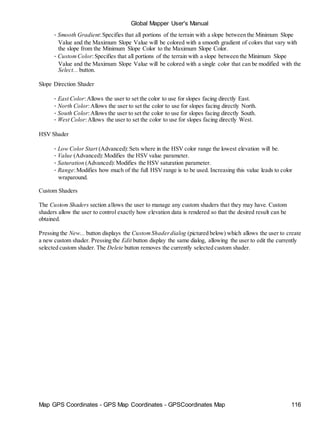
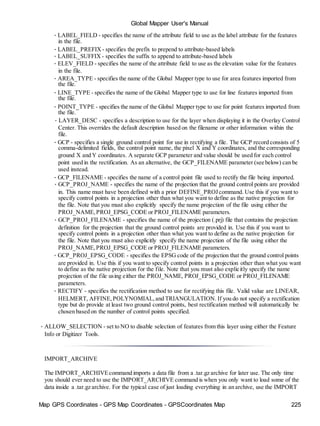
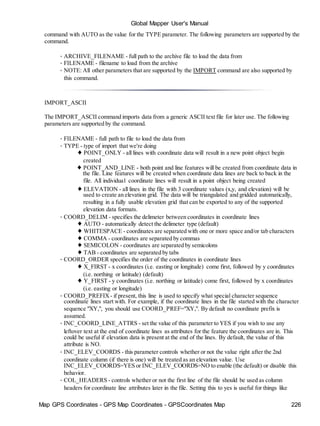
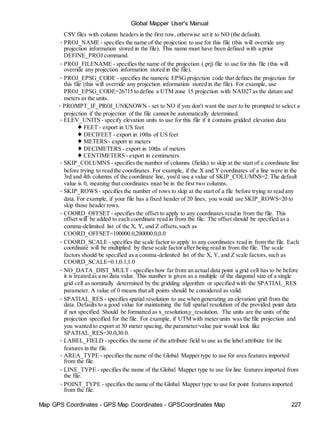
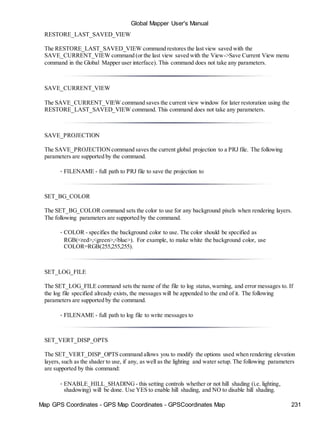
• SHADER_NAME - this sets the name of the shader to use when rendering elevation data. This
must be one of the names displayed in the shader drop down in Global Mapper, such as "Atlas
Shader" or "Global Shader" or the name of a custom shader.
• AMBIENT_LIGHT_LEVEL - this sets the ambient lighting level. The valid range of values is [0.0,
1.0], with smaller numbers meaning completely black (i.e. no light) and 1.0 being full lighting.
• VERT_EXAG - this sets the vertical exaggeration to use when rendering elevation overlays. This
effects the hill shading. The valid range of values is (0.0, 100.0].
• LIGHT_ALTITUDE - this sets the altitude angle of the light source that creates shadows on
elevation data. The valid range of values is [0.0, 90.0], with 0.0 meaning a light source at the
horizon and 90.0 meaning a light source directly overhead.
• LIGHT_AZIMUTH - this sets the direction angle of the light source that creates shadows on
elevation data. The valid range of values is [0.0, 360.0), with 0.0 meaning a light source from the
top of the screen (i.e. north), 90.0 meaning from the right (i.e. east),etc.
• SHADE_DARKNESS - this sets the minimum black level that a shadow can create. The valid
range of values is [0,255], with 0 allowing complete blackness from a shadow, and 255 allowing no
shadow at all.
• SHADE_HIGHLIGHT - this sets the level of white highlight applied to terrain areas directly facing
the sun/light angle. The valid range of values is [0,255], with 0 applying no highlight and 255
making the direct areas always brightened completely to white.
• ENABLE_WATER - this setting controls whether or not water will be displayed on top of
elevation values at or below the currently configured water level. Use YES to enable water display,
and NO to disable water display.
• WATER_COLOR - this setting controls the color that water drawn on top of elevation data is
rendered in. The format of this value is RGB(<red>,<green>,<blue>). For example, to use a water
color of blue, use WATER_COLOR=RGB(0,0,255).
• WATER_LEVEL - this setting specifies the height (in meters) below which water should be
displayed if enabled.
• WATER_ALPHA - this setting controls how "see through" the water is when displayed. The valid
range of values is [0,255], with 0 meaning the water is completely "see through", i.e. invisible, and
255 meaning that the water color is completely opaque such that you can't see any of the shaded
relief below it.
SHOW_3D_VIEW
The SHOW_3D_VIEW command displays the 3D view window with the loaded data.
The following parameters are supported by the command:
• MAXIMIZE - specifies whether or not the 3D view window should be maximized or not. Use
MAXIMIZE=YES to force the window to be maximized when displayed.
UNLOAD_ALL
The UNLOAD_ALL command unloads all currently loaded data. This command takes no parameters.
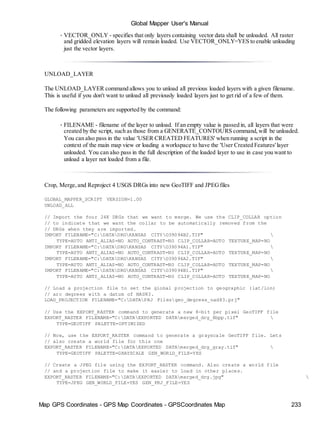
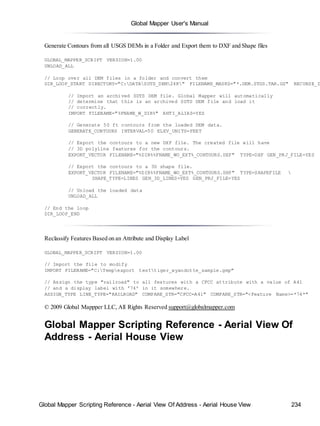
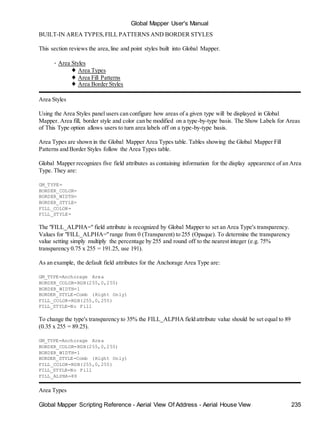
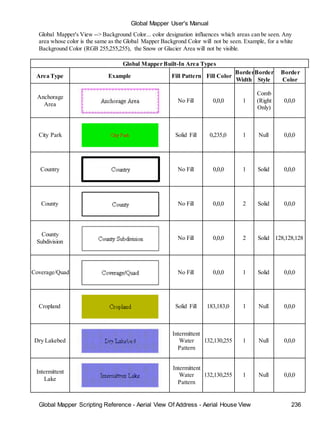
The following parameters are supported by the command:](https://image.slidesharecdn.com/58011508-manual-global-mapper-150324142509-conversion-gate01/85/manual-global-mapper-232-320.jpg)
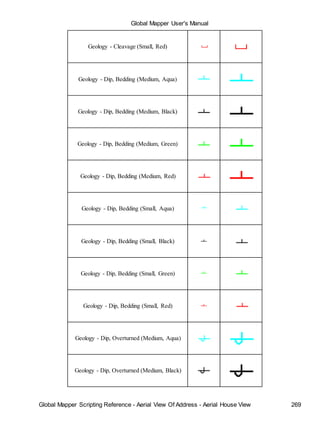
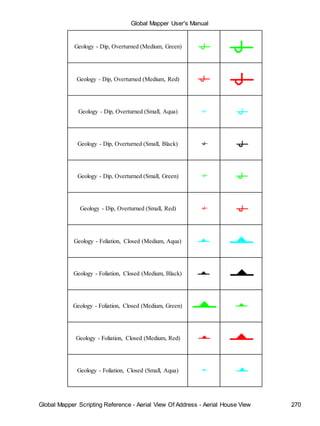
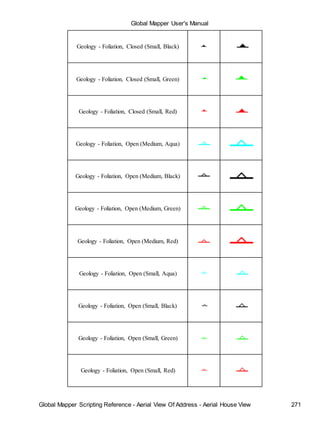
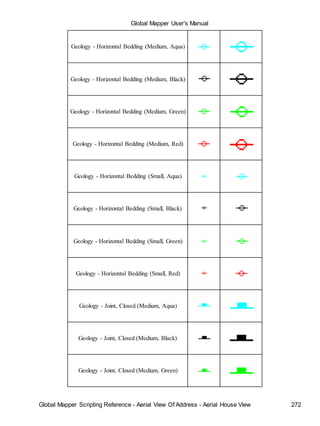
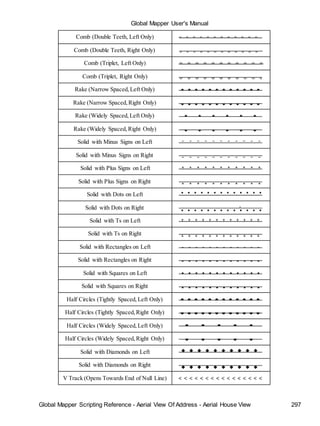
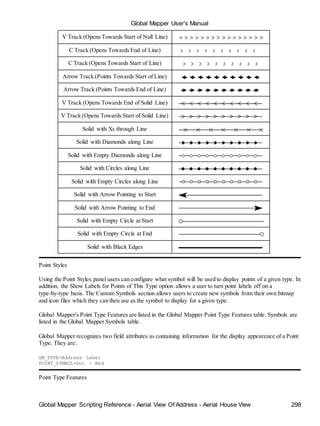
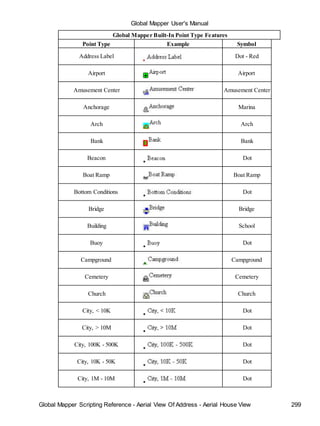
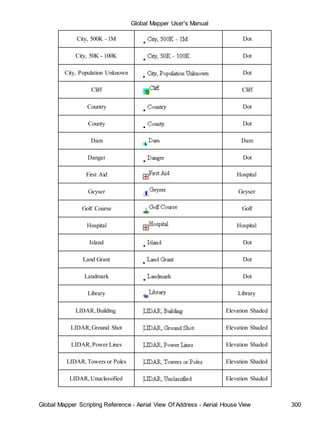
![Global Mapper User's Manual
Built-in Datums 314
Datum Name EPSG Code Ellipsoid Name d
ADINDAN 6201 Clarke 1880 -1
AIN EL ABD (BAHRAIN) 6204 International 1909 (Hayford/Intl 1924) -1
AIN EL ABD (SAUDI ARABIA) 6204 International 1909 (Hayford/Intl 1924) -1
ARATU (BRAZIL) 6208 International 1909 (Hayford/Intl 1924) -1
ARC1950 6209 Clarke 1880 -1
ARC1960 6210 Clarke 1880 -1
ASTRO B4 (SOROL ATOLL) Unknown International 1909 (Hayford/Intl 1924) 1
ASTRO BEACON Unknown International 1909 (Hayford/Intl 1924) 1
ASTRO DOS 71/4 Unknown International 1909 (Hayford/Intl 1924) -3
ASTRONOMIC STATION 1952 Unknown International 1909 (Hayford/Intl 1924) 1
ATS77 (NOVA SCOTIA) 6122 ATS77
AUSTRALIAN GEODETIC 1966 6202 Australian National
AUSTRALIAN GEODETIC 1984 6203 Australian National
BD72 (BELGIUM 1972) 6313 International 1909 (Hayford/Intl 1924) -
BEIJING1954 6214 Krassovsky
BESSEL 1841 (ITALY) [Castanea d. F.] Unknown Bessel1841
BESSEL 1841 (ITALY) [Genova] Unknown Bessel1841
BESSEL 1841 (ITALY) [Monte Mario] Unknown Bessel1841
BESSEL 1841 [GREENWICH] Unknown Bessel1841
BOGOTA OBSERVATORY 6218 International 1909 (Hayford/Intl 1924) 3
BUKIT RIMPAH 6219 Bessel1841 -3
CAMACUPA 6220 Clarke 1880 (RGS) -
CAMP AREA ASTRO 6715 International 1909 (Hayford/Intl 1924) -1
CAMPO INCHAUSPE (ARGENTINA) 6221 International 1909 (Hayford/Intl 1924) -1
CAPE 6222 Clarke 1880 -1
CARTHAGE 6223 Clarke 1880 -2
CHAD (WG1998) Unknown WGS72
CLARKE 1866 AUTHALIC SPHERE Unknown Sphere Radius 6370997 m
CORREGO ALEGRE (BRAZIL) 6225 International 1909 (Hayford/Intl 1924) -2
D-48 SLOVENIA Unknown Bessel1841 6
DEALUL PISCULUI 1970 6317 Krassovsky
DEIR EZ ZOR (SYRIA) 6227 Clarke 1880 (IGN) -
DUTCH (RD) 6289 Bessel1841 5
EASTER ISLAND 1967 6719 International 1909 (Hayford/Intl 1924) 2
ED50 6230 International 1909 (Hayford/Intl 1924) -
Built-in Datums
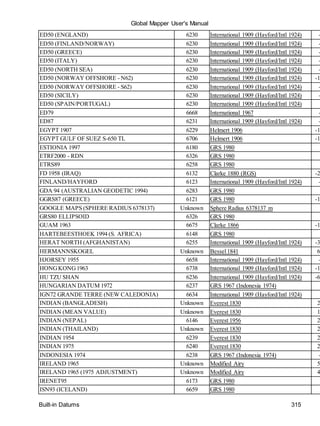
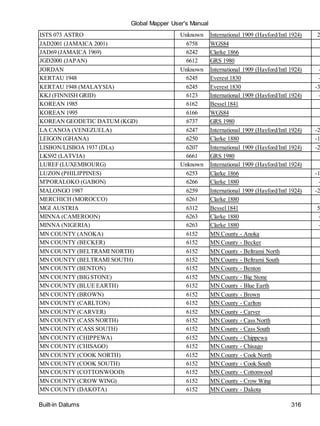
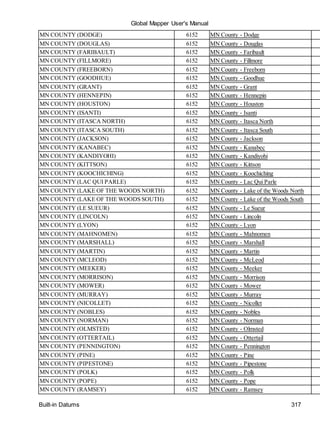
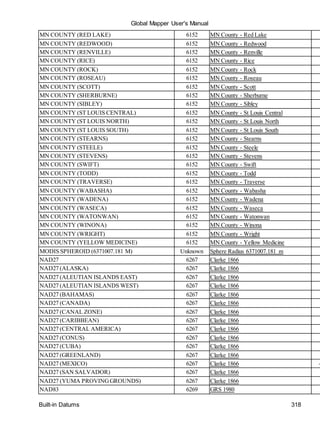
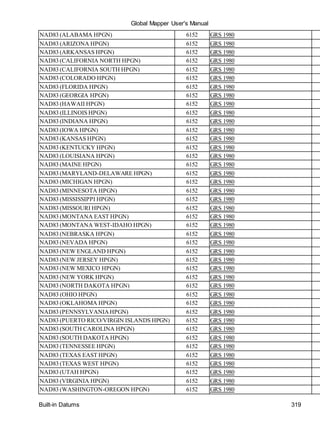
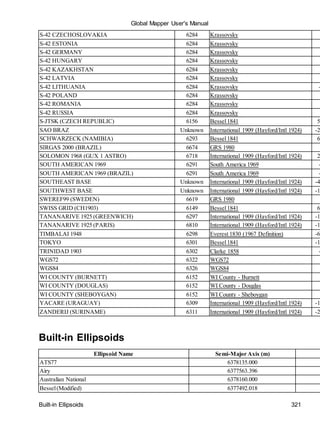
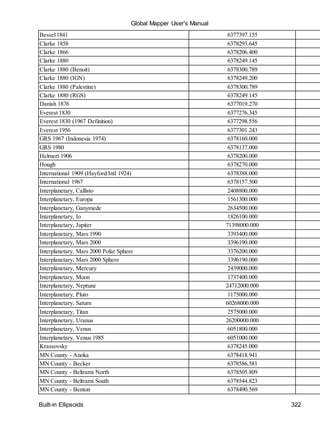
The following is a list of the datums built in to Global Mapper and the transformation parameters used to
convert those datums. All parameters are given with respect to transforming from the given datum to
WGS-84.
X](https://image.slidesharecdn.com/58011508-manual-global-mapper-150324142509-conversion-gate01/85/manual-global-mapper-314-320.jpg)
![Global Mapper User's Manual
Built-in Datums 320
NAD83 (WEST VIRGINIA HPGN) 6152 GRS 1980
NAD83 (WISCONSIN HPGN) 6152 GRS 1980
NAD83 (WYOMINGHPGN) 6152 GRS 1980
NAHRWAN (UAE) 6270 Clarke 1880 (RGS) -2
NAPARIMA 1972 (TRINIDAD & TOBAGO) 6271 International 1909 (Hayford/Intl 1924)
NEW ISRAELI DATUM (NID) 6141 GRS 1980 -
NGO 1948 (GREENWICH MERIDIAN) 6273 Bessel(Modified) 2
NGO 1948 (OSLO MERIDIAN) 6817 Bessel(Modified) 2
NORTH SAHARA 1959 6307 Clarke 1880 -1
NORTH SAHARA 1959 (HASSI MESSAOUD) 6307 Clarke 1880 -1
NTF FRANCE (GREENWICH MERIDIAN) 6275 Clarke 1880 (IGN)
NTF FRANCE (PARIS MERIDIAN) 6807 Clarke 1880 (IGN)
NZGD2000 6167 GRS 1980
NZGD49 6272 International 1909 (Hayford/Intl 1924)
OBSERVATORIO 1966 Unknown International 1909 (Hayford/Intl 1924) -4
OCOTEPEQUE (COSTA RICA) Unknown Clarke 1866 2
OLD HAWAIIAN MEAN 6267 Clarke 1866
OLD ISRAELI DATUM (OID) 6281 Clarke 1880 (Palestine) -2
OMAN Unknown Clarke 1880 -3
ORDNANCE SURVEY 1936 (OSGB36) 6277 Airy
PICO DE LAS NIEVES 6728 International 1909 (Hayford/Intl 1924) -3
POINTE NOIRE 1948 (CONGO) 6282 Clarke 1880 -1
PORTUGESE 1973 (DATUM 73) 6274 International 1909 (Hayford/Intl 1924) -2
POSGAR94 (ARGENTINA) 6694 GRS 1980
POTSDAM/DHDN (GERMANY) 6314 Bessel1841 5
PROVISIONAL SOUTHCHILEAN Unknown International 1909 (Hayford/Intl 1924)
PRS92 (PHILIPPINES) 6683 Clarke 1866 -1
PSAD56 (PROV. S. AMERICAN 1956) 6248 International 1909 (Hayford/Intl 1924) -2
PSD93 (OMAN) 6134 Clarke 1880 -1
PUERTO RICO 6139 Clarke 1866
QND95 (QATAR) 6614 International 1909 (Hayford/Intl 1924) -1
QORNOQ 6287 International 1909 (Hayford/Intl 1924) 1
REUNION ISLAND 6626 International 1909 (Hayford/Intl 1924)
REYKJAVIK 1900 6659 Danish 1876 -
RGF-93 6171 GRS 1980
RGNC91-93 (NEW CALEDONIA) 6749 GRS 1980
ROME 1940 [MONTE MARIO] (GREENWICH) 6265 International 1909 (Hayford/Intl 1924) -1
ROME 1940 [MONTE MARIO] (ROME) 6806 International 1909 (Hayford/Intl 1924) -1
RT90 6124 Bessel1841 4
S-42 (PULKOVO 1942) 6284 Krassovsky
S-42 ALBANIA 6284 Krassovsky
S-42 AZERBAIJAN/GEORGIA 6284 Krassovsky 6](https://image.slidesharecdn.com/58011508-manual-global-mapper-150324142509-conversion-gate01/85/manual-global-mapper-320-320.jpg)

The document is the user manual for Global Mapper software. It provides instructions on downloading and installing the software, registering for full access to features, and an overview of the program menus and tools. The File menu allows opening and importing data, loading workspaces, exporting data to various formats, and saving screenshots. The View and Tools menus control map display and analysis tools. Registration is required for advanced mapping, analysis, and exporting functions.


