Making
MarcEdit Work
For You
TERRY REESE
HEAD OF DIGITAL INITIATIVES
THE OHIO STATE UNIVERSITY
REESE.2179@OSU.EDU
Topics
Working With MARC Data
◦ Breaking/Making
◦ Processing in Batch
◦ Handling Character Conversions
◦ Dealing with Errors
Working with Non-MARC Data
◦ Understanding MarcEdit’s XML Framework
◦ Adding New XML Functions
◦ Dealing with Delimited Data
Editing MARC Records
◦ Global Editing Functions
◦ Automated Tasks
◦ OAI Harvesting
Topics
Integrating MarcEdit with OCLC
◦ Batch Holdings Edits
◦ Working with Local Bibliographic Data Records
◦ Editing WorldCat in Real-Time
MarcEdit and RDA
◦ Understanding the RDA Helper
Getting Help
Working with MARC data
What is the MARC Tools section
• Access to the Making and Breaking
functionality
• Characterset processing
• Access to the XML Sub-routines
Marc Tools
Built-in functions
◦ MarcBreaker – Tool used to convert MARC records to the MarcEdit
mnemonic format
◦ MarcMaker – Tool used to convert MarcEdit mnemonic format to MARC
◦ MARC=>MARC21XML – converts MARC to MARC21XML
◦ Automatically converts data from MARC-8 to UTF8
◦ MARC21XML=>MARC – converts MARC21XML to MARC
◦ Doesn’t automatically convert data from UTF8 to MARC8 – will leave data in UTF8
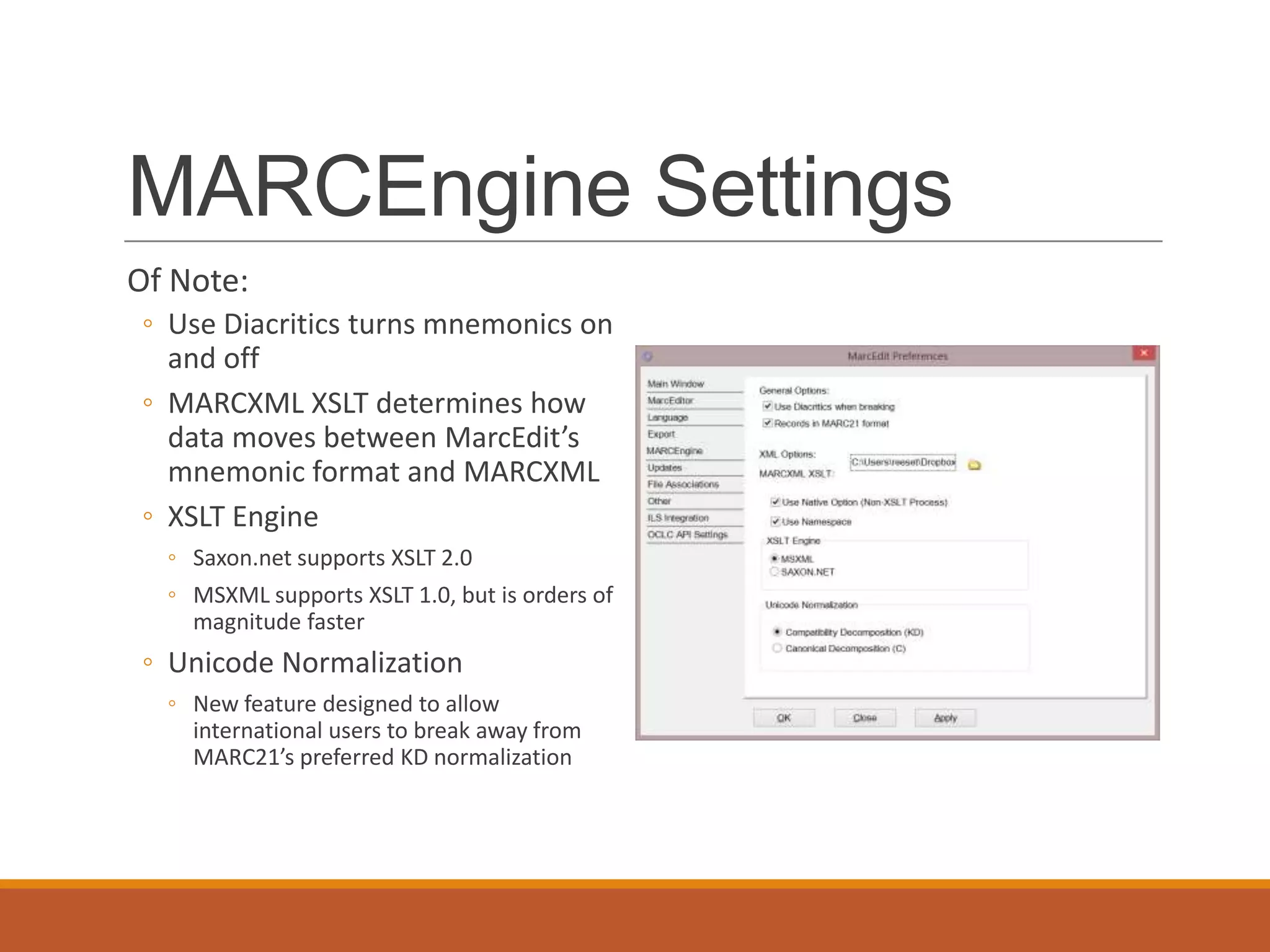
MARCEngine Settings
Of Note:
◦ Use Diacritics turns mnemonics on
and off
◦ MARCXML XSLT determines how
data moves between MarcEdit’s
mnemonic format and MARCXML
◦ XSLT Engine
◦ Saxon.net supports XSLT 2.0
◦ MSXML supports XSLT 1.0, but is orders of
magnitude faster
◦ Unicode Normalization
◦ New feature designed to allow
international users to break away from
MARC21’s preferred KD normalization
MARC Character
Conversions
Supports moving between any
known Windows Characterset
and MARC8.
Can be run from the
Breaker/Maker – or as its own
standalone utility
MarcEdit and bad records
Two MARC breaking algorithms
◦ Strict MARC algorithm
◦ Loose breaking algorithm
Loose algorithm can heal MARC records (sometimes)
◦ Structural errors
◦ Missing field or record markers
Working with XML Data
MarcEdit: crosswalking
design
MarcEdit model:
◦ So long as a schema has been mapped to MARCXML, any
metadata combination could be utilized. This means that
no more than two transformations will ever take place.
Example: MODS  MARCXML  EAD
MarcEdit Crosswalking
model
MARC21XML
EAD
FGDC
MODSMARC
Dublin
Core
Registering XML Crosswalks in
MarcEdit
Automatic Crosswalk Operations
What’s MarcEdit doing?
Facilitates the crosswalk by:
1. Performing character translations (MARC8-UTF8)
2. Facilitates interaction between binary and XML formats.
Editing MARC Records
MarcEditor
◦ Specialized TextPad designed specifically for MARC records.
◦ Is UTF8 aware – can be used to generate records in MARC8 (though
mnemonics) or UTF8 charactersets.
MarcEditor Properties
Templates
Fonts
Encodings
Preview Settings
MarcEdit Templates
Templates work much like Microsoft Word Templates
◦ Define a set of default data that will appear on a screen
◦ Templates exist for all material formats
◦ Can be customized to suit your needs.
Paging Methods
Why not just open the entire file?
◦ Memory limitations; while theoretical limits can reach into the 16 GBs,
practical limits due to available RAM, etc. limit the application to displaying
~150-250 MB of text.
What are the Paging Methods?
◦ MarcEdit has two:
◦ Preview Mode (disabled by default): Preview mode opens a snapshot of the file, and is best used
for large (150-200 MB+) to remove any file loading penalties.
◦ Paging Mode (enabled by default): Loads files in “pages” showing nth number of records in each
page. Changes made are made globally, but this allows users to jump between pages, and view
all data in the file. Best if used on files 150-200 MB- as the program much create a memory map
of all the records in the file.
Editing MARC
MarcEditor
◦ Supports a number of global editing functions:
◦ Find/Replace functionality
◦ Globally Add/Delete MARC fields
◦ Globally Edit Subfield data
◦ Conditionally add/remove field data
◦ Globally Edit Indicator data
◦ Globally Swap field data
◦ Record Deduplication
◦ Record Sorting
◦ Call Number Generator
◦ Automation
Specialized Tools
Edit Subsets of Records:
◦ Tool allows users to extract subsets of a file, make changes, and save them
back into the original file.
Edit Shortcuts:
◦ Edit shortcuts represent tools that answer specialized questions, that don’t
rise to the level of having complete global editing functions. Examples, case
conversion, Find records missing a field or subfield, etc.
Moving data between MarcEdit and the Web
◦ MarcEdit can convert clipboard content into MARC8 or UTF8 so data can be
moved between different applications.
Editing MARC –
Find/Replace
Works like a normal
Find/Replace in most Textpad
utilities.
Unlike most Textpads,
Replace supports UTF-8
(when working with UTF-8
files) and regular
expressions.
Editing MARC – Find All
Find all function was
designed for use with the
Paging mode
Allows users to find any text
across all pages
Generates a jump list that
can be used to find individual
records for edit
Jump List
Find All
Editing MARC – Global
Add/Delete Field
Globally add fields to all MARC records
◦ Allows users to set insertion position.
Globally delete fields
◦ Allows global delete
◦ Allows conditional delete
Supports Regular Expressions
Editing MARC – Modifying
subfield data
Allows for the modification of variable MARC field
subfield data (MARC fields >10)
Allows for the modification of control field data by
position or range of positions
Allows users to prepend and append data to
subfields.
Allows users to change subfield tagging.
Editing MARC – Modifying
subfield data
Allows users to insert new subfields and define subfield placement.
Allows users to move field data from one field to another.
Supports:
◦ UTF-8 with UTF-8 files
◦ Regular Expressions
◦ Adding new subfields.
Editing MARC – Modifying subfield data
Editing MARC –
Swapping Fields
Swap parts of MARC Fields or
entire MARC fields
◦ Define field, indicator and
subfields to move.
◦ Can move field data and
delete the original field or
clone the field data and move
the clone to the new
location.
◦ Can add data to an existing
field.
Character Conversions
within the MarcEditor
MarcEditor allows users to convert
character data between different
charactersets.
Fixing Boo-boos
MarcEdit’s Special Undo
◦ Allows you to step back one global change.
Sorting Fields
MarcEdit provides multiple sorting types:
◦ Control Number
◦ Sorts record position within the file
◦ Title
◦ Sorts record position within the file
◦ Author
◦ Sorts record position within the file
◦ Call Number
◦ Sorts record position within the file
◦ 0xx Fields
◦ Sorts the 0xx fields within individual records (does
*not* change record position within a file)
◦ All Fields
◦ Sorts all fields within individual records (does
*not* change record position within a file)
◦ Custom Sort
◦ Sorts all defined fields within individual records
(does *not* change record position within a file)
Field Counts
Field Count
◦ Provides a quick count of fields
◦ Report of subfields used within a
particular field
◦ Detailed reports of all
fields/subfields used within a
fileset.
Material Type Report
◦ Reports number of records by
material type
◦ Breaks down material type by sub-
types
◦ Utilizes the Leader, 008 and GMD
to determine format types
In-Line Validation
MarcValidator-lite
◦ Can access MarcValidator for quick
validation of data elements found
in the file set
◦ Validation can use any defined
rules set.
Harvesting Metadata
MarcEdit includes a
builtin OAI harvester
Allows for direct
XML=>MARC
translations
Allows for custom
modification of XSLT
translation tables.
Integrating with OCLC
OCLC Classify Service
MarcEdit can leverage OCLC WorldCat to generate call numbers
automatically for files
◦ Fields used:
◦ 001
◦ 010$a$z
◦ 020$a$z
◦ 022$a$z
◦ 024$a$z
◦ 1xx$a
◦ 776$w$z
OCLC Classify Service
Working with OCLC’s
Metadata API
MarcEdit can work directly with WorldCat via the Metadata API.
MarcEdit and WorldCat
Available Operations:
◦ Create/Read/Update Bibliographic Records
◦ Update/Delete Institutional Holdings
◦ Retrieve Holding Code information about an Institution
◦ Create/Read/Update Local Bibliographic Data
MarcEdit and WorldCat
A Word of Caution -- there is no net
MarcEdit and WorldCat
But this is really cool because:
◦ Further automate traditional technical services processes
◦ Specifically holdings management
◦ Batch record ingestion
◦ Build pipelines between our repository systems and WorldCat
◦ Develop localized interfaces for metadata entry outside the library
◦ Opens up the opportunity for tool builders to interact with the OCLC
member community
MarcEdit: Batch WorldCat
Holdings Management
MarcEdit: Batch
Bibliographic Record
Upload
MarcEdit and WorldCat
Don’t forget – these functions are available in the MarcEditor as well
MarcEdit and WorldCat
What’s not there:
◦ Record Validation
◦ Anything to do with authority data
◦ Record Locking (for record editing)
◦ Service Status
◦ User Validation (for permission validation)
MarcEdit and WorldCat
How do I use this?
◦ You need to get a key from OCLC
◦ OCLC’s Developer Network: http://oclc.org/developer/
◦ OCLC Metadata API Documentation: http://oclc.org/developer/services/worldcat-metadata-api
◦ Notes on MarcEdit Integration: http://blog.reeset.net/archives/1245
◦ C# OCLC API Library: https://github.com/reeset/oclc_api
MarcEdit and RDA
In Dec. 2012, I introduced the RDA Helper into MarcEdit
Purpose:
◦ Provide automated conversion between AACR2 and RDA
◦ Provide an automated process to update provisional RDA records to current
practice
◦ Address concerns from librarians that still relied on the GMD, by providing an
automated method for regenerating the data.
MarcEdit’s RDA Helper
Troubleshooting
Occasionally, errors can occur during install or with the configuration
file.
◦ If configuration settings are not being saved, you can reset your
configuration data.
Troubleshooting
Installation issues:
◦ Sometimes, the windows installer can get stuck making it so you cannot
install or uninstall the program.
◦ Use the MSI Cleaner: http://marcedit.reeset.net/software/msi_cleaner.zip
Getting Help
Youtube videos (just search for marcedit)
You can ask me: reese.2179@osu.edu or reeset@gmail.com
MarcEdit Website: http://marcedit.reeset.net
MarcEdit Listserv: http://www.lsoft.com/scripts/wl.exe?SL1=MARCEDIT-
L&H=MAIL04.GMU.EDU
Questions

Make MarcEdit Work For You: OLC Technical Services Retreat

  • 1.
    Making MarcEdit Work For You TERRYREESE HEAD OF DIGITAL INITIATIVES THE OHIO STATE UNIVERSITY REESE.2179@OSU.EDU
  • 2.
    Topics Working With MARCData ◦ Breaking/Making ◦ Processing in Batch ◦ Handling Character Conversions ◦ Dealing with Errors Working with Non-MARC Data ◦ Understanding MarcEdit’s XML Framework ◦ Adding New XML Functions ◦ Dealing with Delimited Data Editing MARC Records ◦ Global Editing Functions ◦ Automated Tasks ◦ OAI Harvesting
  • 3.
    Topics Integrating MarcEdit withOCLC ◦ Batch Holdings Edits ◦ Working with Local Bibliographic Data Records ◦ Editing WorldCat in Real-Time MarcEdit and RDA ◦ Understanding the RDA Helper Getting Help
  • 4.
    Working with MARCdata What is the MARC Tools section • Access to the Making and Breaking functionality • Characterset processing • Access to the XML Sub-routines
  • 5.
    Marc Tools Built-in functions ◦MarcBreaker – Tool used to convert MARC records to the MarcEdit mnemonic format ◦ MarcMaker – Tool used to convert MarcEdit mnemonic format to MARC ◦ MARC=>MARC21XML – converts MARC to MARC21XML ◦ Automatically converts data from MARC-8 to UTF8 ◦ MARC21XML=>MARC – converts MARC21XML to MARC ◦ Doesn’t automatically convert data from UTF8 to MARC8 – will leave data in UTF8
  • 6.
    MARCEngine Settings Of Note: ◦Use Diacritics turns mnemonics on and off ◦ MARCXML XSLT determines how data moves between MarcEdit’s mnemonic format and MARCXML ◦ XSLT Engine ◦ Saxon.net supports XSLT 2.0 ◦ MSXML supports XSLT 1.0, but is orders of magnitude faster ◦ Unicode Normalization ◦ New feature designed to allow international users to break away from MARC21’s preferred KD normalization
  • 7.
    MARC Character Conversions Supports movingbetween any known Windows Characterset and MARC8. Can be run from the Breaker/Maker – or as its own standalone utility
  • 8.
    MarcEdit and badrecords Two MARC breaking algorithms ◦ Strict MARC algorithm ◦ Loose breaking algorithm Loose algorithm can heal MARC records (sometimes) ◦ Structural errors ◦ Missing field or record markers
  • 9.
  • 10.
    MarcEdit: crosswalking design MarcEdit model: ◦So long as a schema has been mapped to MARCXML, any metadata combination could be utilized. This means that no more than two transformations will ever take place. Example: MODS  MARCXML  EAD
  • 11.
  • 12.
  • 13.
    Automatic Crosswalk Operations What’sMarcEdit doing? Facilitates the crosswalk by: 1. Performing character translations (MARC8-UTF8) 2. Facilitates interaction between binary and XML formats.
  • 14.
    Editing MARC Records MarcEditor ◦Specialized TextPad designed specifically for MARC records. ◦ Is UTF8 aware – can be used to generate records in MARC8 (though mnemonics) or UTF8 charactersets.
  • 15.
  • 16.
    MarcEdit Templates Templates workmuch like Microsoft Word Templates ◦ Define a set of default data that will appear on a screen ◦ Templates exist for all material formats ◦ Can be customized to suit your needs.
  • 17.
    Paging Methods Why notjust open the entire file? ◦ Memory limitations; while theoretical limits can reach into the 16 GBs, practical limits due to available RAM, etc. limit the application to displaying ~150-250 MB of text. What are the Paging Methods? ◦ MarcEdit has two: ◦ Preview Mode (disabled by default): Preview mode opens a snapshot of the file, and is best used for large (150-200 MB+) to remove any file loading penalties. ◦ Paging Mode (enabled by default): Loads files in “pages” showing nth number of records in each page. Changes made are made globally, but this allows users to jump between pages, and view all data in the file. Best if used on files 150-200 MB- as the program much create a memory map of all the records in the file.
  • 18.
    Editing MARC MarcEditor ◦ Supportsa number of global editing functions: ◦ Find/Replace functionality ◦ Globally Add/Delete MARC fields ◦ Globally Edit Subfield data ◦ Conditionally add/remove field data ◦ Globally Edit Indicator data ◦ Globally Swap field data ◦ Record Deduplication ◦ Record Sorting ◦ Call Number Generator ◦ Automation
  • 19.
    Specialized Tools Edit Subsetsof Records: ◦ Tool allows users to extract subsets of a file, make changes, and save them back into the original file. Edit Shortcuts: ◦ Edit shortcuts represent tools that answer specialized questions, that don’t rise to the level of having complete global editing functions. Examples, case conversion, Find records missing a field or subfield, etc. Moving data between MarcEdit and the Web ◦ MarcEdit can convert clipboard content into MARC8 or UTF8 so data can be moved between different applications.
  • 20.
    Editing MARC – Find/Replace Workslike a normal Find/Replace in most Textpad utilities. Unlike most Textpads, Replace supports UTF-8 (when working with UTF-8 files) and regular expressions.
  • 21.
    Editing MARC –Find All Find all function was designed for use with the Paging mode Allows users to find any text across all pages Generates a jump list that can be used to find individual records for edit
  • 22.
  • 23.
    Editing MARC –Global Add/Delete Field Globally add fields to all MARC records ◦ Allows users to set insertion position. Globally delete fields ◦ Allows global delete ◦ Allows conditional delete Supports Regular Expressions
  • 24.
    Editing MARC –Modifying subfield data Allows for the modification of variable MARC field subfield data (MARC fields >10) Allows for the modification of control field data by position or range of positions Allows users to prepend and append data to subfields. Allows users to change subfield tagging.
  • 25.
    Editing MARC –Modifying subfield data Allows users to insert new subfields and define subfield placement. Allows users to move field data from one field to another. Supports: ◦ UTF-8 with UTF-8 files ◦ Regular Expressions ◦ Adding new subfields.
  • 26.
    Editing MARC –Modifying subfield data
  • 27.
    Editing MARC – SwappingFields Swap parts of MARC Fields or entire MARC fields ◦ Define field, indicator and subfields to move. ◦ Can move field data and delete the original field or clone the field data and move the clone to the new location. ◦ Can add data to an existing field.
  • 28.
    Character Conversions within theMarcEditor MarcEditor allows users to convert character data between different charactersets.
  • 29.
    Fixing Boo-boos MarcEdit’s SpecialUndo ◦ Allows you to step back one global change.
  • 30.
    Sorting Fields MarcEdit providesmultiple sorting types: ◦ Control Number ◦ Sorts record position within the file ◦ Title ◦ Sorts record position within the file ◦ Author ◦ Sorts record position within the file ◦ Call Number ◦ Sorts record position within the file ◦ 0xx Fields ◦ Sorts the 0xx fields within individual records (does *not* change record position within a file) ◦ All Fields ◦ Sorts all fields within individual records (does *not* change record position within a file) ◦ Custom Sort ◦ Sorts all defined fields within individual records (does *not* change record position within a file)
  • 31.
    Field Counts Field Count ◦Provides a quick count of fields ◦ Report of subfields used within a particular field ◦ Detailed reports of all fields/subfields used within a fileset.
  • 32.
    Material Type Report MaterialType Report ◦ Reports number of records by material type ◦ Breaks down material type by sub- types ◦ Utilizes the Leader, 008 and GMD to determine format types
  • 33.
    In-Line Validation MarcValidator-lite ◦ Canaccess MarcValidator for quick validation of data elements found in the file set ◦ Validation can use any defined rules set.
  • 34.
    Harvesting Metadata MarcEdit includesa builtin OAI harvester Allows for direct XML=>MARC translations Allows for custom modification of XSLT translation tables.
  • 35.
  • 36.
    OCLC Classify Service MarcEditcan leverage OCLC WorldCat to generate call numbers automatically for files ◦ Fields used: ◦ 001 ◦ 010$a$z ◦ 020$a$z ◦ 022$a$z ◦ 024$a$z ◦ 1xx$a ◦ 776$w$z
  • 37.
  • 38.
    Working with OCLC’s MetadataAPI MarcEdit can work directly with WorldCat via the Metadata API.
  • 39.
    MarcEdit and WorldCat AvailableOperations: ◦ Create/Read/Update Bibliographic Records ◦ Update/Delete Institutional Holdings ◦ Retrieve Holding Code information about an Institution ◦ Create/Read/Update Local Bibliographic Data
  • 40.
    MarcEdit and WorldCat AWord of Caution -- there is no net
  • 41.
    MarcEdit and WorldCat Butthis is really cool because: ◦ Further automate traditional technical services processes ◦ Specifically holdings management ◦ Batch record ingestion ◦ Build pipelines between our repository systems and WorldCat ◦ Develop localized interfaces for metadata entry outside the library ◦ Opens up the opportunity for tool builders to interact with the OCLC member community
  • 42.
  • 43.
  • 44.
    MarcEdit and WorldCat Don’tforget – these functions are available in the MarcEditor as well
  • 45.
    MarcEdit and WorldCat What’snot there: ◦ Record Validation ◦ Anything to do with authority data ◦ Record Locking (for record editing) ◦ Service Status ◦ User Validation (for permission validation)
  • 46.
    MarcEdit and WorldCat Howdo I use this? ◦ You need to get a key from OCLC ◦ OCLC’s Developer Network: http://oclc.org/developer/ ◦ OCLC Metadata API Documentation: http://oclc.org/developer/services/worldcat-metadata-api ◦ Notes on MarcEdit Integration: http://blog.reeset.net/archives/1245 ◦ C# OCLC API Library: https://github.com/reeset/oclc_api
  • 47.
    MarcEdit and RDA InDec. 2012, I introduced the RDA Helper into MarcEdit Purpose: ◦ Provide automated conversion between AACR2 and RDA ◦ Provide an automated process to update provisional RDA records to current practice ◦ Address concerns from librarians that still relied on the GMD, by providing an automated method for regenerating the data.
  • 48.
  • 49.
    Troubleshooting Occasionally, errors canoccur during install or with the configuration file. ◦ If configuration settings are not being saved, you can reset your configuration data.
  • 50.
    Troubleshooting Installation issues: ◦ Sometimes,the windows installer can get stuck making it so you cannot install or uninstall the program. ◦ Use the MSI Cleaner: http://marcedit.reeset.net/software/msi_cleaner.zip
  • 51.
    Getting Help Youtube videos(just search for marcedit) You can ask me: reese.2179@osu.edu or reeset@gmail.com MarcEdit Website: http://marcedit.reeset.net MarcEdit Listserv: http://www.lsoft.com/scripts/wl.exe?SL1=MARCEDIT- L&H=MAIL04.GMU.EDU Questions