

Working With the
Editor
What can I use
MarcEdit for?
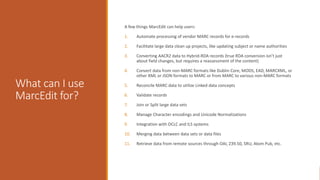
A few things MarcEdit can help users:
1. Automate processing of vendor MARC records for e-records
2. Facilitate large data clean up projects, like updating subject or name authorities
3. Converting AACR2 data to Hybrid-RDA records (true RDA conversion isn’t just
about field changes, but requires a reassessment of the content)
4. Convert data from non-MARC formats like Dublin Core, MODS, EAD, MARCXML, or
other XML or JSON formats to MARC or from MARC to various non-MARC formats
5. Reconcile MARC data to utilize Linked data concepts
6. Validate records
7. Join or Split large data sets
8. Manage Character encodings and Unicode Normalizations
9. Integration with OCLC and ILS systems
10. Merging data between data sets or data files
11. Retrieve data from remote sources through OAI, Z39.50, SRU, Atom Pub, etc.
I have
Records….
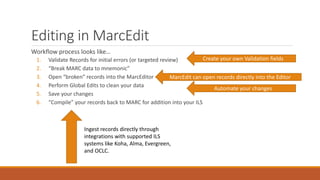
Editing in MarcEdit
Workflow process looks like…
1. Validate Records for initial errors (or targeted review)
2. “Break MARC data to mnemonic”
3. Open “broken” records into the MarcEditor
4. Perform Global Edits to clean your data
5. Save your changes
6. “Compile” your records back to MARC for addition into your ILS
Create your own Validation fields
MarcEdit can open records directly into the Editor
Automate your changes
Ingest records directly through
integrations with supported ILS
systems like Koha, Alma, Evergreen,
and OCLC.
Demonstration
How do I get
started?
1. MarcEdit 101 Webinar Series:
marcedit.reeset.net/marcedit-101-workshop
2. Knowledge-base Items:
marcedit.reeset.net/archives/category/knowledge_base
3. Tutorials: marcedit.reeset.net/tutorials
4. Sample Lesson Plan (In development):
github.com/reeset/marcedit_sample_lesson_plan
How do I get
help?
MarcEdit Listserv
URL: http://listserv.gmu.edu/cgi-bin/wa?A0=marcedit-l
The MarcEdit Listserv is hosted by George Mason University and
provides users an opportunity to send questions to the MarcEdit
user community. What’s more, the list includes a searchable archive.
Contact the Author:
URL: reeset@gmail.com
I’m always open to people contacting me and asking questions.
Built-in Help
Preferences
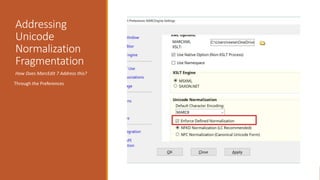
Addressing
Unicode
Normalization
Fragmentation
How Does MarcEdit 7 Address this?
Through the Preferences
Edit Shortcuts
Edit Shortcuts tend to have the following characteristics:
◦ Could be MARC21 Specific
◦ Represent items that could be written as regular expressions, but expressions that are difficult to write
◦ Require mathematical or data conversions
◦ Are more one-off functions than “global tools”
◦ Often can be added to tasks.
Editing MARC –
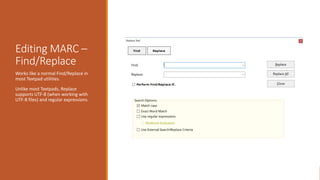
Find/Replace
Works like a normal Find/Replace in
most Textpad utilities.
Unlike most Textpads, Replace
supports UTF-8 (when working with
UTF-8 files) and regular expressions.
Conditional
Replacements
Editing MARC –
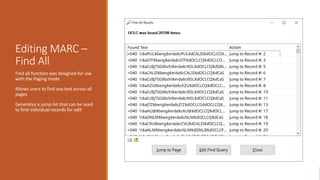
Find All
Find all function was designed for use
with the Paging mode
Allows users to find any text across all
pages
Generates a jump list that can be used
to find individual records for edit
Miscellaneous
Tools
Generate Cutters (sanborn and other)
Generate Record from URL (one a website, one from LC)
Editing MARC –
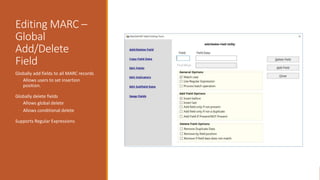
Global
Add/Delete
Field
Globally add fields to all MARC records
◦ Allows users to set insertion
position.
Globally delete fields
◦ Allows global delete
◦ Allows conditional delete
Supports Regular Expressions
Editing MARC – Modifying subfield data
Allows for the modification
of variable MARC field
subfield data (MARC fields
>10)
Allows for the modification
of control field data by
position or range of positions
Allows users to prepend and
append data to subfields.
Allows users to change
subfield tagging.
Editing MARC –
Modifying
subfield data
Allows users to insert new subfields
and define subfield placement.
Allows users to move field data from
one field to another.
Supports:
• UTF-8 with UTF-8 files
• Regular Expressions
• Adding new subfields.
Editing MARC –
Modifying
subfield data
Specify insertion position: https://marcedit.reeset.net/set-
subfield-insert-position
Editing MARC –
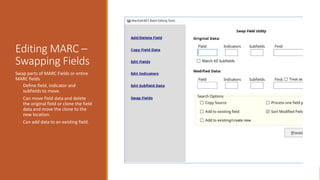
Swapping Fields
Swap parts of MARC Fields or entire
MARC fields
◦ Define field, indicator and
subfields to move.
◦ Can move field data and delete
the original field or clone the field
data and move the clone to the
new location.
◦ Can add data to an existing field.
Build New Field
Tool
Build New Field Tool
This method works well when needing
to build complex proxy statements
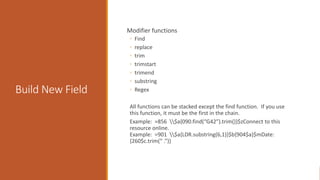
Build New Field
Modifier functions
◦ Find
◦ replace
◦ trim
◦ trimstart
◦ trimend
◦ substring
◦ Regex
All functions can be stacked except the find function. If you use
this function, it must be the first in the chain.
Example: =856 $a{090.find(“G42”).trim()}$zConnect to this
resource online.
Example: =901 $a{LDR.substring(6,1)}$b{904$a}$mDate:
{260$c.trim(“ .”)}
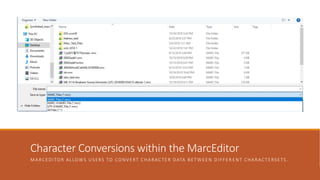
Character Conversions within the MarcEditor
MARCEDITOR ALLOWS USERS TO CONVERT CHARACTER DATA BETWEEN DIFFER ENT CHARACTERSETS.
Fixing Boo-boos
MarcEdit’s Special Undo
◦ Allows you to step back one global
change.
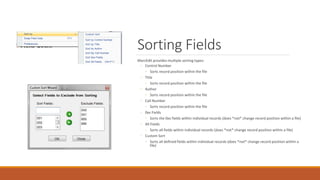
Sorting Fields
MarcEdit provides multiple sorting types:
◦ Control Number
◦ Sorts record position within the file
◦ Title
◦ Sorts record position within the file
◦ Author
◦ Sorts record position within the file
◦ Call Number
◦ Sorts record position within the file
◦ 0xx Fields
◦ Sorts the 0xx fields within individual records (does *not* change record position within a file)
◦ All Fields
◦ Sorts all fields within individual records (does *not* change record position within a file)
◦ Custom Sort
◦ Sorts all defined fields within individual records (does *not* change record position within a
file)
MARC Data
Reports
MarcEdit includes a number of validation/information
reports:
§ Field Count Reports
§ Including information related to indicator/subfield usage
§ Material Type Reports
§ Generate Reports and pull together records for each material type
§ Validate ISBN/ISSN Reports
§ Mathematically validates check digit
§ Validate Headings *NEW*
§ Validates all access points against LCSH and LC NAF
Field Counts
Field Count
◦ Provides a quick count of fields
◦ Report of subfields used within a
particular field
◦ Detailed reports of all
fields/subfields used within a
fileset.
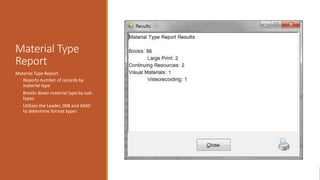
Material Type
Report
Material Type Report
◦ Reports number of records by
material type
◦ Breaks down material type by sub-
types
◦ Utilizes the Leader, 008 and GMD
to determine format types
Validate ISSN/ISBN/Headings
In-Line
Validation
MarcValidator-lite
◦ Can access MarcValidator for quick
validation of data elements found
in the file set
◦ Validation can use any defined
rules set.
Change logging
MarcEdit provides the ability to log
changes made during global edits.
Logging isn’t enabled by default, and
is turned on via the Preferences
Once enabled, logs can be viewed,
managed, and enhanced.
Your Questions

Working with the MarcEditor

  • 1.
  • 3.
    What can Iuse MarcEdit for? A few things MarcEdit can help users: 1. Automate processing of vendor MARC records for e-records 2. Facilitate large data clean up projects, like updating subject or name authorities 3. Converting AACR2 data to Hybrid-RDA records (true RDA conversion isn’t just about field changes, but requires a reassessment of the content) 4. Convert data from non-MARC formats like Dublin Core, MODS, EAD, MARCXML, or other XML or JSON formats to MARC or from MARC to various non-MARC formats 5. Reconcile MARC data to utilize Linked data concepts 6. Validate records 7. Join or Split large data sets 8. Manage Character encodings and Unicode Normalizations 9. Integration with OCLC and ILS systems 10. Merging data between data sets or data files 11. Retrieve data from remote sources through OAI, Z39.50, SRU, Atom Pub, etc.
  • 4.
  • 5.
    Editing in MarcEdit Workflowprocess looks like… 1. Validate Records for initial errors (or targeted review) 2. “Break MARC data to mnemonic” 3. Open “broken” records into the MarcEditor 4. Perform Global Edits to clean your data 5. Save your changes 6. “Compile” your records back to MARC for addition into your ILS Create your own Validation fields MarcEdit can open records directly into the Editor Automate your changes Ingest records directly through integrations with supported ILS systems like Koha, Alma, Evergreen, and OCLC.
  • 6.
  • 7.
    How do Iget started? 1. MarcEdit 101 Webinar Series: marcedit.reeset.net/marcedit-101-workshop 2. Knowledge-base Items: marcedit.reeset.net/archives/category/knowledge_base 3. Tutorials: marcedit.reeset.net/tutorials 4. Sample Lesson Plan (In development): github.com/reeset/marcedit_sample_lesson_plan
  • 8.
    How do Iget help? MarcEdit Listserv URL: http://listserv.gmu.edu/cgi-bin/wa?A0=marcedit-l The MarcEdit Listserv is hosted by George Mason University and provides users an opportunity to send questions to the MarcEdit user community. What’s more, the list includes a searchable archive. Contact the Author: URL: reeset@gmail.com I’m always open to people contacting me and asking questions. Built-in Help
  • 9.
  • 10.
  • 11.
    Edit Shortcuts Edit Shortcutstend to have the following characteristics: ◦ Could be MARC21 Specific ◦ Represent items that could be written as regular expressions, but expressions that are difficult to write ◦ Require mathematical or data conversions ◦ Are more one-off functions than “global tools” ◦ Often can be added to tasks.
  • 13.
    Editing MARC – Find/Replace Workslike a normal Find/Replace in most Textpad utilities. Unlike most Textpads, Replace supports UTF-8 (when working with UTF-8 files) and regular expressions.
  • 14.
  • 15.
    Editing MARC – FindAll Find all function was designed for use with the Paging mode Allows users to find any text across all pages Generates a jump list that can be used to find individual records for edit
  • 16.
    Miscellaneous Tools Generate Cutters (sanbornand other) Generate Record from URL (one a website, one from LC)
  • 17.
    Editing MARC – Global Add/Delete Field Globallyadd fields to all MARC records ◦ Allows users to set insertion position. Globally delete fields ◦ Allows global delete ◦ Allows conditional delete Supports Regular Expressions
  • 18.
    Editing MARC –Modifying subfield data Allows for the modification of variable MARC field subfield data (MARC fields >10) Allows for the modification of control field data by position or range of positions Allows users to prepend and append data to subfields. Allows users to change subfield tagging.
  • 19.
    Editing MARC – Modifying subfielddata Allows users to insert new subfields and define subfield placement. Allows users to move field data from one field to another. Supports: • UTF-8 with UTF-8 files • Regular Expressions • Adding new subfields.
  • 20.
    Editing MARC – Modifying subfielddata Specify insertion position: https://marcedit.reeset.net/set- subfield-insert-position
  • 21.
    Editing MARC – SwappingFields Swap parts of MARC Fields or entire MARC fields ◦ Define field, indicator and subfields to move. ◦ Can move field data and delete the original field or clone the field data and move the clone to the new location. ◦ Can add data to an existing field.
  • 22.
    Build New Field Tool BuildNew Field Tool This method works well when needing to build complex proxy statements
  • 23.
    Build New Field Modifierfunctions ◦ Find ◦ replace ◦ trim ◦ trimstart ◦ trimend ◦ substring ◦ Regex All functions can be stacked except the find function. If you use this function, it must be the first in the chain. Example: =856 $a{090.find(“G42”).trim()}$zConnect to this resource online. Example: =901 $a{LDR.substring(6,1)}$b{904$a}$mDate: {260$c.trim(“ .”)}
  • 24.
    Character Conversions withinthe MarcEditor MARCEDITOR ALLOWS USERS TO CONVERT CHARACTER DATA BETWEEN DIFFER ENT CHARACTERSETS.
  • 25.
    Fixing Boo-boos MarcEdit’s SpecialUndo ◦ Allows you to step back one global change.
  • 26.
    Sorting Fields MarcEdit providesmultiple sorting types: ◦ Control Number ◦ Sorts record position within the file ◦ Title ◦ Sorts record position within the file ◦ Author ◦ Sorts record position within the file ◦ Call Number ◦ Sorts record position within the file ◦ 0xx Fields ◦ Sorts the 0xx fields within individual records (does *not* change record position within a file) ◦ All Fields ◦ Sorts all fields within individual records (does *not* change record position within a file) ◦ Custom Sort ◦ Sorts all defined fields within individual records (does *not* change record position within a file)
  • 27.
    MARC Data Reports MarcEdit includesa number of validation/information reports: § Field Count Reports § Including information related to indicator/subfield usage § Material Type Reports § Generate Reports and pull together records for each material type § Validate ISBN/ISSN Reports § Mathematically validates check digit § Validate Headings *NEW* § Validates all access points against LCSH and LC NAF
  • 28.
    Field Counts Field Count ◦Provides a quick count of fields ◦ Report of subfields used within a particular field ◦ Detailed reports of all fields/subfields used within a fileset.
  • 29.
    Material Type Report Material TypeReport ◦ Reports number of records by material type ◦ Breaks down material type by sub- types ◦ Utilizes the Leader, 008 and GMD to determine format types
  • 30.
  • 31.
    In-Line Validation MarcValidator-lite ◦ Can accessMarcValidator for quick validation of data elements found in the file set ◦ Validation can use any defined rules set.
  • 32.
    Change logging MarcEdit providesthe ability to log changes made during global edits. Logging isn’t enabled by default, and is turned on via the Preferences Once enabled, logs can be viewed, managed, and enhanced.
  • 33.