





MarcEdit: Doing more, but
faster
Terry Reese
Gray Family Chair for Innovative Library Services
Terry.reese@oregonstate.edu
• Making your metadata work for you
• Finding ways to use MarcEdit to merge and manipulate existing
metadata in various formats
• i.e., working with XML formats, delimited formats, Excel, Access
• Dealing with data in multiple charactersets as we transition to a
Unicode world
• Learning how to automate repetitive tasks, and understand what
editing functions are available to you
• Leveraging webservices like OCLC WorldCat to provide automatic
classifications
METADATA MANIPULATION
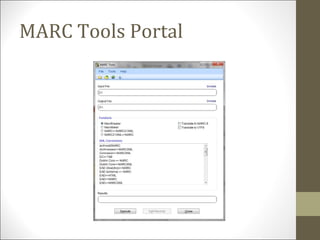
MARC Tools Portal
Marc Tools
• Built-in functions
• MarcBreaker – Tool used to convert MARC records to the
MarcEdit mnemonic format
• MarcMaker – Tool used to convert MarcEdit mnemonic format to
MARC
• MARC=>MARC21XML – converts MARC to MARC21XML
• Automatically converts data from MARC-8 to UTF8
• MARC21XML=>MARC – converts MARC21XML to MARC
• Doesn’t automatically convert data from UTF8 to MARC8 – will leave
data in UTF8
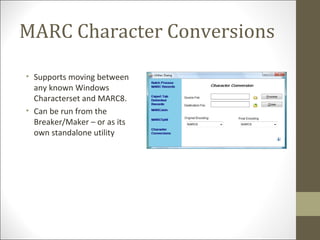
MARC Character Conversions
• Supports moving between
any known Windows
Characterset and MARC8.
• Can be run from the
Breaker/Maker – or as its
own standalone utility
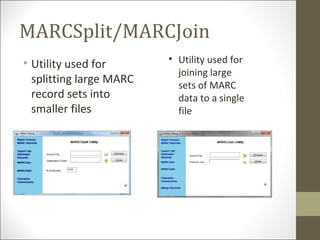
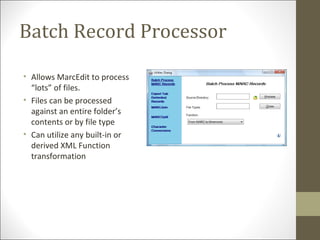
MARCSplit/MARCJoin
• Utility used for
splitting large MARC
record sets into
smaller files
• Utility used for
joining large
sets of MARC
data to a single
file
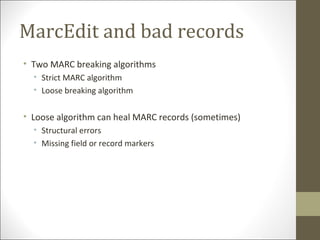
Batch Record Processor
• Allows MarcEdit to process
“lots” of files.
• Files can be processed
against an entire folder’s
contents or by file type
• Can utilize any built-in or
derived XML Function
transformation
MarcEdit and bad records
• Two MARC breaking algorithms
• Strict MARC algorithm
• Loose breaking algorithm
• Loose algorithm can heal MARC records (sometimes)
• Structural errors
• Missing field or record markers
Delimited text translator
• Delimited Text Translator
• Translates Tab, comma, pipe, Excel (Office 2000-2007), Access
(Office 2000-2007) files into MARC
• Can save translation maps
• Can create constant data
Delimited text translator Options
• Wizard-like interface
• Supports Unicode data (in excel or delimited file)
• Joining (relating) fields
• Editing global 008/LDR
Delimited Text Translator: Mapping
format
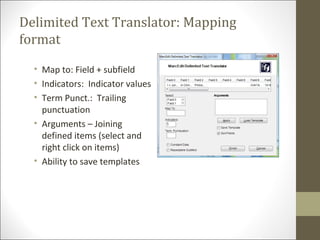
• Map to: Field + subfield
• Indicators: Indicator values
• Term Punct.: Trailing
punctuation
• Arguments – Joining
defined items (select and
right click on items)
• Ability to save templates
Common Joining techniques
• When would I mark a field as repeatable?
• By default, when the Delimited Text translator encounters two
like subfields on the same field, it creates a new field. For
example:
column 1: This is a note
column 2: This is a note 2
if I mapped column 1 500$a and column 2 to 500$a, by default,
MarcEdit would generate the following output:
=500 $aThis is a note
=500 $aThis is a note 2
• However….
Common Joining techniques
• When would I mark a field as repeatable?
• If I need to have multiple, like subfields on the same field, for
example, like a subject field – we would mark the field as
repeatable:
column 1: Geology
column 2: Oregon
column 3: Corvallis
If these fields were not marked as repeatable, the output would
look like:
=650 0$aGeology$zOregon
=650 0$zCorvallis
However, if these fields were marked as repeatable, the output
would look like:
=650 0$aGeology$zOregon$zCorvallis
MARC Conversions
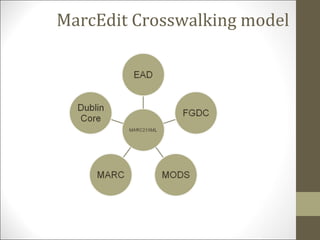
MarcEdit Crosswalking model
Finding and Contributing
Crosswalks
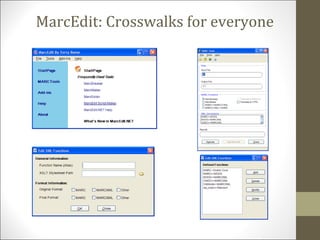
• In MarcEdit 5.6, an option was added to allow users to search
for crosswalks
• Currently, these are crosswalks I or LC have created
• Hopefully, community members will submit crosswalks for
inclusion into the registry
MarcEdit: Crosswalks for everyone
Harvesting Metadata
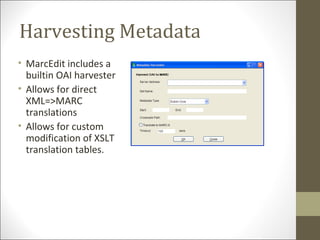
• MarcEdit includes a
builtin OAI harvester
• Allows for direct
XML=>MARC
translations
• Allows for custom
modification of XSLT
translation tables.
Harvesting Metadata
• Required data
• Host name: i.e., http://ir.library.oregonstate.edu/request/oai
• Metadata Type
• Natively supports MARCXML, Dublin Core, OAIMARC and MODS
• Options to support conditional harvests, raw data harvests, and
resumptive harvests.
RECORD EDITING
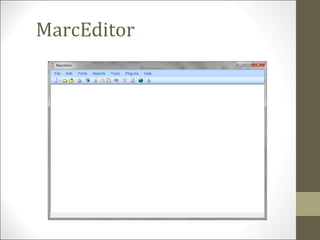
MarcEditor
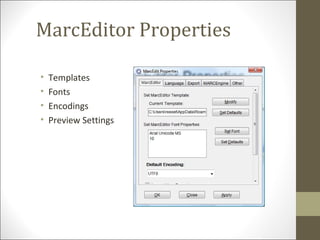
MarcEditor Properties
• Templates
• Fonts
• Encodings
• Preview Settings
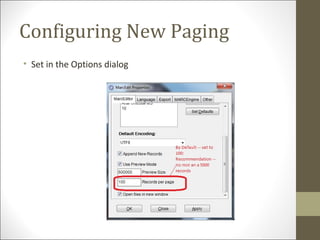
Configuring New Paging
• Set in the Options dialog
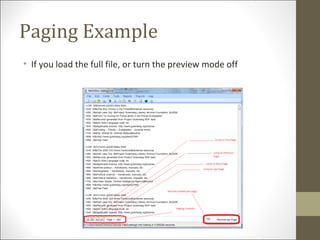
Paging Example
• If you load the full file, or turn the preview mode off
Editing MARC
• MarcEditor
• Supports a number of global editing functions:
• Edit Subsets of records
• Find/Replace functionality
• Globally Add/Delete MARC fields
• Globally Edit Subfield data
• Conditionally add/remove field data
• Globally Edit Indicator data
• Globally Swap field data
• Record Deduplication
• Record Sorting
• Call Number Generator
• Macros
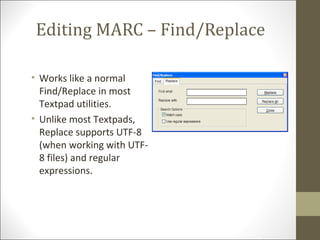
Editing MARC – Find/Replace
• Works like a normal
Find/Replace in most
Textpad utilities.
• Unlike most Textpads,
Replace supports UTF-8
(when working with UTF-
8 files) and regular
expressions.
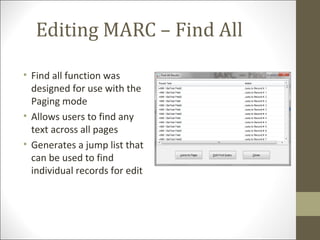
Editing MARC – Find All
• Find all function was
designed for use with the
Paging mode
• Allows users to find any
text across all pages
• Generates a jump list that
can be used to find
individual records for edit
Jump to
• Jump to…record:
• Allows you to jump to any records
• Jump to…page:
• Allows you to jump to any page
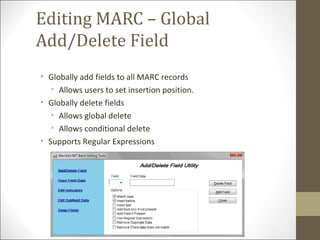
Editing MARC – Global
Add/Delete Field
• Globally add fields to all MARC records
• Allows users to set insertion position.
• Globally delete fields
• Allows global delete
• Allows conditional delete
• Supports Regular Expressions
Editing MARC – Modifying
subfield data
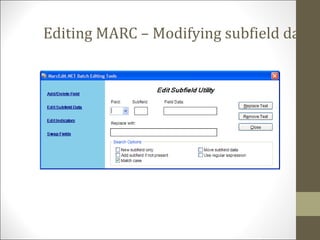
• Allows for the modification of variable MARC
field subfield data (MARC fields >10)
• Allows for the modification of control field data
by position or range of positions
• Allows users to prepend and append data to
subfields.
• Allows users to change subfield tagging.
Editing MARC – Modifying
subfield data
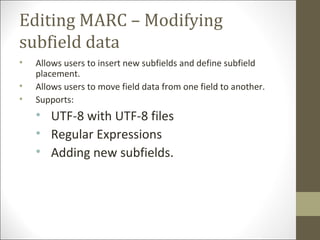
• Allows users to insert new subfields and define subfield
placement.
• Allows users to move field data from one field to another.
• Supports:
• UTF-8 with UTF-8 files
• Regular Expressions
• Adding new subfields.
Editing MARC – Modifying subfield data
Editing MARC – Swapping
Fields
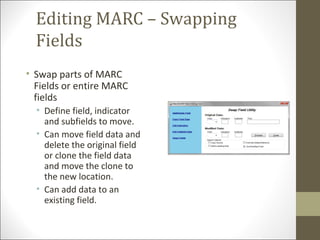
• Swap parts of MARC
Fields or entire MARC
fields
• Define field, indicator
and subfields to move.
• Can move field data and
delete the original field
or clone the field data
and move the clone to
the new location.
• Can add data to an
existing field.
Character Conversions within
the MarcEditor
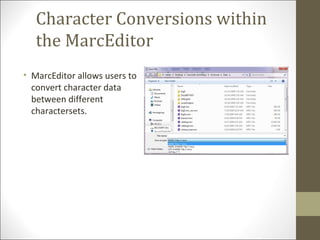
• MarcEditor allows users to
convert character data
between different
charactersets.
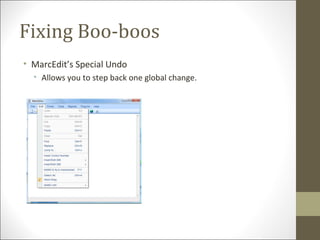
Fixing Boo-boos
• MarcEdit’s Special Undo
• Allows you to step back one global change.
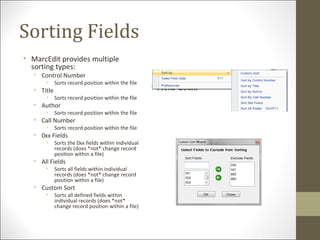
Sorting Fields
• MarcEdit provides multiple
sorting types:
• Control Number
• Sorts record position within the file
• Title
• Sorts record position within the file
• Author
• Sorts record position within the file
• Call Number
• Sorts record position within the file
• 0xx Fields
• Sorts the 0xx fields within individual
records (does *not* change record
position within a file)
• All Fields
• Sorts all fields within individual
records (does *not* change record
position within a file)
• Custom Sort
• Sorts all defined fields within
individual records (does *not*
change record position within a file)
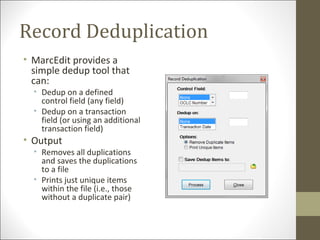
Record Deduplication
• MarcEdit provides a
simple dedup tool that
can:
• Dedup on a defined
control field (any field)
• Dedup on a transaction
field (or using an additional
transaction field)
• Output
• Removes all duplications
and saves the duplications
to a file
• Prints just unique items
within the file (i.e., those
without a duplicate pair)
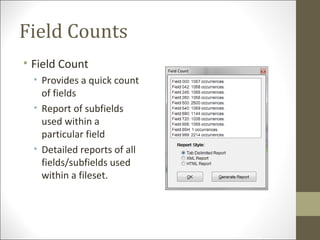
Field Counts
• Field Count
• Provides a quick count
of fields
• Report of subfields
used within a
particular field
• Detailed reports of all
fields/subfields used
within a fileset.
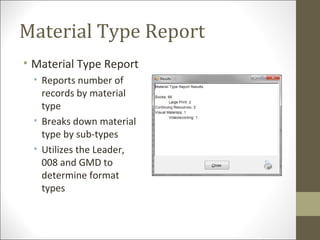
Material Type Report
• Material Type Report
• Reports number of
records by material
type
• Breaks down material
type by sub-types
• Utilizes the Leader,
008 and GMD to
determine format
types
Task Automation Tool
• Stacking Operations
• Task automation provides a way for non-programmers to create
defined task lists that can then be executed automatically
• The different between a task and a macro is that MarcEdit tasks
essentially function like the user was calling specific functions
within MarcEdit.
• Anything that you can do in the MarcEditor, you can automate as
a task.
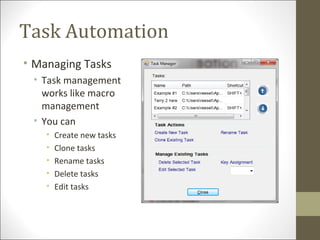
Task Automation
• Managing Tasks
• Task management
works like macro
management
• You can
• Create new tasks
• Clone tasks
• Rename tasks
• Delete tasks
• Edit tasks
Task Automation Demo
• Additional Information:
• Youtube:
• Introduction to task automation: http://www.youtube.com/watch?
v=gmqTGfTubU4
• Introduction to new task automation functions:
http://www.youtube.com/watch?v=fnorN0MFFN0
• MarcEdit can leverage OCLC WorldCat to generate call
numbers automatically for files
• Fields used:
• 001
• 010$a$z
• 020$a$z
• 022$a$z
• 024$a$z
• 1xx$a
• 776$w$z
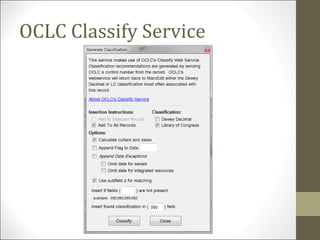
OCLC Classify Service
FUTURE DEVELOPMENT
MarcEdit 5.9+
• AACR2->RDA macros
• Low-hanging conversions to support batch data processing
• Merge Record Enhancements
• Adding more data points and customized merge fields
• More Automation support
• Ability to turn Edit shortcuts into Automation tasks
• Batch OAI Harvesting
• Create jobs that you can schedule and have automatically run for you
• Batch Set Holdings
• Using either crappy z39.50 or OCLC’s yet to be publically released API
for holdings settings.
Getting Help
• Call/write me:
• terry.reese@oregonstate.edu
• Ask the list:
• MarcEdit ListServ
• http://listserv.gmu.edu/cgi-bin/wa?A0=marcedit-l
Questions

Marc edit and_nonmarc_data (1)

  • 1.
    MarcEdit: Doing more,but faster Terry Reese Gray Family Chair for Innovative Library Services Terry.reese@oregonstate.edu
  • 2.
    • Making yourmetadata work for you • Finding ways to use MarcEdit to merge and manipulate existing metadata in various formats • i.e., working with XML formats, delimited formats, Excel, Access • Dealing with data in multiple charactersets as we transition to a Unicode world • Learning how to automate repetitive tasks, and understand what editing functions are available to you • Leveraging webservices like OCLC WorldCat to provide automatic classifications
  • 3.
  • 4.
  • 5.
    Marc Tools • Built-infunctions • MarcBreaker – Tool used to convert MARC records to the MarcEdit mnemonic format • MarcMaker – Tool used to convert MarcEdit mnemonic format to MARC • MARC=>MARC21XML – converts MARC to MARC21XML • Automatically converts data from MARC-8 to UTF8 • MARC21XML=>MARC – converts MARC21XML to MARC • Doesn’t automatically convert data from UTF8 to MARC8 – will leave data in UTF8
  • 6.
    MARC Character Conversions •Supports moving between any known Windows Characterset and MARC8. • Can be run from the Breaker/Maker – or as its own standalone utility
  • 7.
    MARCSplit/MARCJoin • Utility usedfor splitting large MARC record sets into smaller files • Utility used for joining large sets of MARC data to a single file
  • 8.
    Batch Record Processor •Allows MarcEdit to process “lots” of files. • Files can be processed against an entire folder’s contents or by file type • Can utilize any built-in or derived XML Function transformation
  • 9.
    MarcEdit and badrecords • Two MARC breaking algorithms • Strict MARC algorithm • Loose breaking algorithm • Loose algorithm can heal MARC records (sometimes) • Structural errors • Missing field or record markers
  • 10.
    Delimited text translator •Delimited Text Translator • Translates Tab, comma, pipe, Excel (Office 2000-2007), Access (Office 2000-2007) files into MARC • Can save translation maps • Can create constant data
  • 11.
    Delimited text translatorOptions • Wizard-like interface • Supports Unicode data (in excel or delimited file) • Joining (relating) fields • Editing global 008/LDR
  • 12.
    Delimited Text Translator:Mapping format • Map to: Field + subfield • Indicators: Indicator values • Term Punct.: Trailing punctuation • Arguments – Joining defined items (select and right click on items) • Ability to save templates
  • 13.
    Common Joining techniques •When would I mark a field as repeatable? • By default, when the Delimited Text translator encounters two like subfields on the same field, it creates a new field. For example: column 1: This is a note column 2: This is a note 2 if I mapped column 1 500$a and column 2 to 500$a, by default, MarcEdit would generate the following output: =500 $aThis is a note =500 $aThis is a note 2 • However….
  • 14.
    Common Joining techniques •When would I mark a field as repeatable? • If I need to have multiple, like subfields on the same field, for example, like a subject field – we would mark the field as repeatable: column 1: Geology column 2: Oregon column 3: Corvallis If these fields were not marked as repeatable, the output would look like: =650 0$aGeology$zOregon =650 0$zCorvallis However, if these fields were marked as repeatable, the output would look like: =650 0$aGeology$zOregon$zCorvallis
  • 15.
  • 16.
  • 17.
    Finding and Contributing Crosswalks •In MarcEdit 5.6, an option was added to allow users to search for crosswalks • Currently, these are crosswalks I or LC have created • Hopefully, community members will submit crosswalks for inclusion into the registry
  • 18.
  • 19.
    Harvesting Metadata • MarcEditincludes a builtin OAI harvester • Allows for direct XML=>MARC translations • Allows for custom modification of XSLT translation tables.
  • 20.
    Harvesting Metadata • Requireddata • Host name: i.e., http://ir.library.oregonstate.edu/request/oai • Metadata Type • Natively supports MARCXML, Dublin Core, OAIMARC and MODS • Options to support conditional harvests, raw data harvests, and resumptive harvests.
  • 21.
  • 22.
  • 23.
    MarcEditor Properties • Templates •Fonts • Encodings • Preview Settings
  • 24.
    Configuring New Paging •Set in the Options dialog
  • 25.
    Paging Example • Ifyou load the full file, or turn the preview mode off
  • 26.
    Editing MARC • MarcEditor •Supports a number of global editing functions: • Edit Subsets of records • Find/Replace functionality • Globally Add/Delete MARC fields • Globally Edit Subfield data • Conditionally add/remove field data • Globally Edit Indicator data • Globally Swap field data • Record Deduplication • Record Sorting • Call Number Generator • Macros
  • 27.
    Editing MARC –Find/Replace • Works like a normal Find/Replace in most Textpad utilities. • Unlike most Textpads, Replace supports UTF-8 (when working with UTF- 8 files) and regular expressions.
  • 28.
    Editing MARC –Find All • Find all function was designed for use with the Paging mode • Allows users to find any text across all pages • Generates a jump list that can be used to find individual records for edit
  • 29.
    Jump to • Jumpto…record: • Allows you to jump to any records • Jump to…page: • Allows you to jump to any page
  • 30.
    Editing MARC –Global Add/Delete Field • Globally add fields to all MARC records • Allows users to set insertion position. • Globally delete fields • Allows global delete • Allows conditional delete • Supports Regular Expressions
  • 31.
    Editing MARC –Modifying subfield data • Allows for the modification of variable MARC field subfield data (MARC fields >10) • Allows for the modification of control field data by position or range of positions • Allows users to prepend and append data to subfields. • Allows users to change subfield tagging.
  • 32.
    Editing MARC –Modifying subfield data • Allows users to insert new subfields and define subfield placement. • Allows users to move field data from one field to another. • Supports: • UTF-8 with UTF-8 files • Regular Expressions • Adding new subfields.
  • 33.
    Editing MARC –Modifying subfield data
  • 34.
    Editing MARC –Swapping Fields • Swap parts of MARC Fields or entire MARC fields • Define field, indicator and subfields to move. • Can move field data and delete the original field or clone the field data and move the clone to the new location. • Can add data to an existing field.
  • 35.
    Character Conversions within theMarcEditor • MarcEditor allows users to convert character data between different charactersets.
  • 36.
    Fixing Boo-boos • MarcEdit’sSpecial Undo • Allows you to step back one global change.
  • 37.
    Sorting Fields • MarcEditprovides multiple sorting types: • Control Number • Sorts record position within the file • Title • Sorts record position within the file • Author • Sorts record position within the file • Call Number • Sorts record position within the file • 0xx Fields • Sorts the 0xx fields within individual records (does *not* change record position within a file) • All Fields • Sorts all fields within individual records (does *not* change record position within a file) • Custom Sort • Sorts all defined fields within individual records (does *not* change record position within a file)
  • 38.
    Record Deduplication • MarcEditprovides a simple dedup tool that can: • Dedup on a defined control field (any field) • Dedup on a transaction field (or using an additional transaction field) • Output • Removes all duplications and saves the duplications to a file • Prints just unique items within the file (i.e., those without a duplicate pair)
  • 39.
    Field Counts • FieldCount • Provides a quick count of fields • Report of subfields used within a particular field • Detailed reports of all fields/subfields used within a fileset.
  • 40.
    Material Type Report •Material Type Report • Reports number of records by material type • Breaks down material type by sub-types • Utilizes the Leader, 008 and GMD to determine format types
  • 41.
    Task Automation Tool •Stacking Operations • Task automation provides a way for non-programmers to create defined task lists that can then be executed automatically • The different between a task and a macro is that MarcEdit tasks essentially function like the user was calling specific functions within MarcEdit. • Anything that you can do in the MarcEditor, you can automate as a task.
  • 42.
    Task Automation • ManagingTasks • Task management works like macro management • You can • Create new tasks • Clone tasks • Rename tasks • Delete tasks • Edit tasks
  • 43.
    Task Automation Demo •Additional Information: • Youtube: • Introduction to task automation: http://www.youtube.com/watch? v=gmqTGfTubU4 • Introduction to new task automation functions: http://www.youtube.com/watch?v=fnorN0MFFN0
  • 44.
    • MarcEdit canleverage OCLC WorldCat to generate call numbers automatically for files • Fields used: • 001 • 010$a$z • 020$a$z • 022$a$z • 024$a$z • 1xx$a • 776$w$z OCLC Classify Service
  • 45.
  • 46.
  • 47.
    MarcEdit 5.9+ • AACR2->RDAmacros • Low-hanging conversions to support batch data processing • Merge Record Enhancements • Adding more data points and customized merge fields • More Automation support • Ability to turn Edit shortcuts into Automation tasks • Batch OAI Harvesting • Create jobs that you can schedule and have automatically run for you • Batch Set Holdings • Using either crappy z39.50 or OCLC’s yet to be publically released API for holdings settings.
  • 48.
    Getting Help • Call/writeme: • terry.reese@oregonstate.edu • Ask the list: • MarcEdit ListServ • http://listserv.gmu.edu/cgi-bin/wa?A0=marcedit-l
  • 49.

Editor's Notes

  • #16 This is really the heart of MarcEdit All utilities and functions interact with the MARCEngine in some fashion.
  • #27 Best way to think of the MarcEditor is like notepad for MARC. It has been designed to work specifically with MARC data.
  • #28 Replace all works great for handling regular find/replace operations but can also be used to: Change field tags Using regular expressions to move subfield information from on subfield to another Using regular expressions to do complex find/replace operations.
  • #29 Replace all works great for handling regular find/replace operations but can also be used to: Change field tags Using regular expressions to move subfield information from on subfield to another Using regular expressions to do complex find/replace operations.
  • #31 The function is primarily useful if you have a field that needs to go into every record. For example, OSU receives aggregator records for EBSCOHost and we insert a text string into every record so that we can easily identify these records using listing tools within our ILS system. Another example: in our ILS system, we use a 949 field to pass command-line options to the MARC loader. When doing database maintenance operations, I can automatically add a single 949 field to all records to define the load table and common arguments to be used when loading the record.