












The Now and
Future MarcEdit: A
Day-long Workshop
TERRY REESE
THE OHIO STATE
UNIVERSITY
REESET@GMAIL.COM
Workshop format
Let’s find out what you want to learn
Let’s talk about changes to MarcEdit 7
Oh, remember that we all learn differently -- so please follow along, participate, engage in way
that makes the most sense for you
◦ I have examples, and I’m inviting folks to practice with me – but please follow along and engage in a way
that makes the most sense for you.
Schedule
8-10: Content
10-10:15: Break
10:15-noon Content
Noon – 1: Lunch
1-2:30: Content
2:30-2:45: Break
2:45 – 4:15: Content
4:15-5:00: Questions
Questions from
Attendees
Topics folks were interested in learning about:
◦ Fonts
◦ Unicode Processing
◦ RDA Processing
◦ Automation (more info about tasks)
◦ XML Processing
◦ Regular Expressions
◦ New MarcEdit 7 Features
◦ Merging Data from one record to another
Any other topics folks might be interested in?
Important notes
• Download from: http://marcedit.reeset.net/downloads/
Installation notes
• Any version of Windows that supports .NET 4.6.1+
• Fully supported on Linux (using Mono)
• Mac Version (native)
System Requirements MarcEdit 7.x
• No regular update cycle -- but generally, at least one
update per month
• I answer nearly every question I get about MarcEdit.
• MarcEdit Listserv (http://metis3.gmu.edu/cgi-
bin/wa?A0=MARCEDIT-L) is available for questions.
Upgrade/Support
THE ROADMAP
Some important changes coming to MarcEdit 7/MarcEdit Mac
◦ Continuing of deeper integrations with ILS vendors and OCLC
◦ Expansion of the Clustering toolset to enable more light-weight open
refine functionality like ingest from external web sources
◦ Continued parity between the Windows/MacOS versions
◦ Continued local help expansion
◦ Continued sharing options within the community (sharing expressions,
expertise)
◦ Expansion of Excel processing/creation
◦ Considering IOS support through the new MacOS bridge (though, this
would limit MacOS support to High Sierra and Mojave…so need to do
more research)
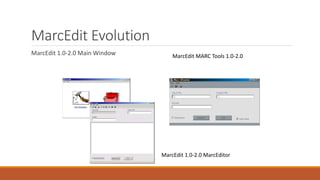
MarcEdit Evolution
MarcEdit 1.0-2.0 Main Window MarcEdit MARC Tools 1.0-2.0
MarcEdit 1.0-2.0 MarcEditor
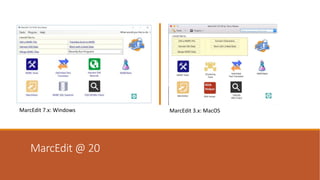
MarcEdit @ 20
MarcEdit 7.x: Windows MarcEdit 3.x: MacOS
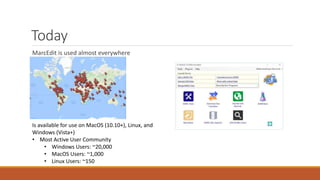
Today
MarcEdit is used almost everywhere
Is available for use on MacOS (10.10+), Linux, and
Windows (Vista+)
• Most Active User Community
• Windows Users: ~20,000
• MacOS Users: ~1,000
• Linux Users: ~150
MarcEdit 7
highlights
Lite-weight cluster has
been added directly into
the program
New way to process
XML/JSON data
A new linked data engine,
with support for locally
defined rdf vocabularies in
reconcillation
New task processing
Consolidated Z39.50/SRU
client
Added Editing Functions
•New Add/Delete Field Tools
(deduplication)
•Expanded Regular Expression
options
•Updated OCLC Integrations
Integrated Help
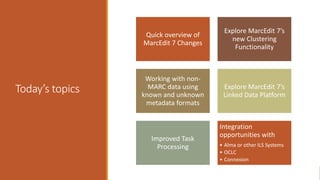
Today’s topics
Quick overview of
MarcEdit 7 Changes
Explore MarcEdit 7’s
new Clustering
Functionality
Working with non-
MARC data using
known and unknown
metadata formats
Explore MarcEdit 7’s
Linked Data Platform
Improved Task
Processing
Integration
opportunities with
• Alma or other ILS Systems
• OCLC
• Connexion
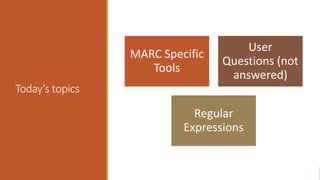
Today’s topics
MARC Specific
Tools
User
Questions (not
answered)
Regular
Expressions
Project
Fluffy
Muppet
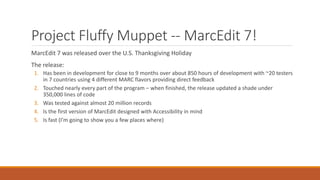
Project Fluffy Muppet -- MarcEdit 7!
MarcEdit 7 was released over the U.S. Thanksgiving Holiday
The release:
1. Has been in development for close to 9 months over about 850 hours of development with ~20 testers
in 7 countries using 4 different MARC flavors providing direct feedback
2. Touched nearly every part of the program – when finished, the release updated a shade under
350,000 lines of code
3. Was tested against almost 20 million records
4. Is the first version of MarcEdit designed with Accessibility in mind
5. Is fast (I’m going to show you a few places where)
Let’s look at
what’s new
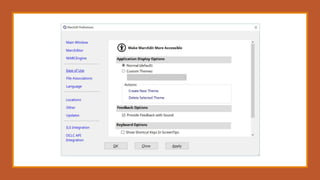
•Accessibility
•MarcEdit 7 includes an improved
font/sizing engine for improved
layout on different screen sizes
and resolutions
•All images are tagged with text
and accessibility via screen
readers or using the operating
system’s accessibility tooling
•Availability of themes, to allow
you to customize windowing and
contracts to ease eye strain
•Keyboard shortcuts (everywhere)
•Sound cues
•Window transparency
User
Center
Design
Let’s look at what’s new
More International
◦ MarcEdit 7 uses an intelligent machine translation service, providing an interface in close to 26
languages at this point
It’s Faster
◦ Lists have been virtualized (lower overhead)
◦ Pages load quicker
◦ Tasks have been super-charged
It’s leaner – in part because Windows XP support is no longer provided
Let’s look at what’s new
Program is easier to manage
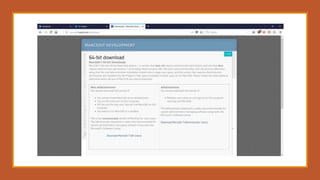
◦ The program has 4 installation modes
◦ 32-bit Administrator and non-Administrator installation modes
◦ 64-bit Administrator and non-Administrator installation modes
◦ How do I choose?
◦ Depends on your needs:
◦ http://marcedit.reeset.net/downloads
MarcEdit 7’s new installer agent
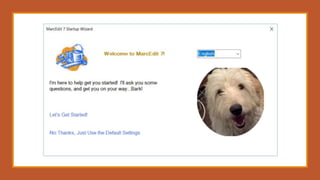
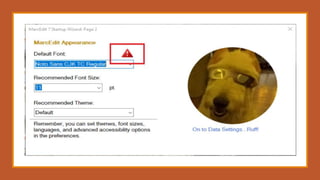
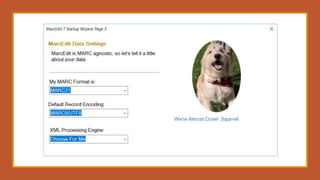
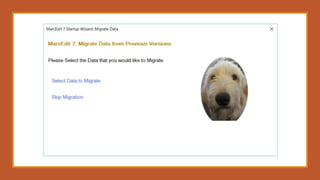
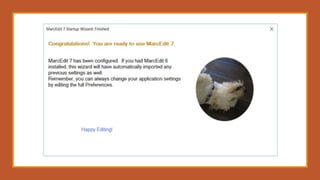
Welcome to Project Fluffy Muppet, your friendly (and sometimes helpful) installation agent
◦ Hazel is there to help highlight important options, and make sure you can work with Unicode data by
making sure you have a Unicode font.
◦ Helps users migration data from previous versions
◦ Set important options
◦ Is Fun!
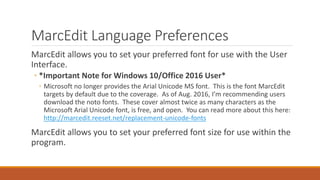
MarcEdit Language Preferences
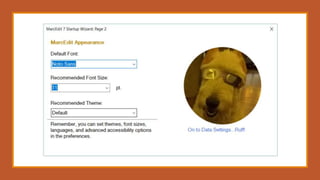
MarcEdit allows you to set your preferred font for use with the User
Interface.
◦ *Important Note for Windows 10/Office 2016 User*
◦ Microsoft no longer provides the Arial Unicode MS font. This is the font MarcEdit
targets by default due to the coverage. As of Aug. 2016, I’m recommending users
download the noto fonts. These cover almost twice as many characters as the
Microsoft Arial Unicode font, is free, and open. You can read more about this here:
http://marcedit.reeset.net/replacement-unicode-fonts
MarcEdit allows you to set your preferred font size for use within the
program.
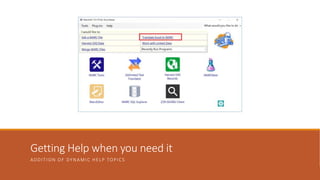
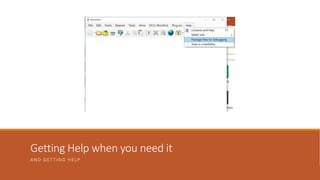
Getting Help when you need it
ADDITION OF DYNAMIC HELP TOPICS
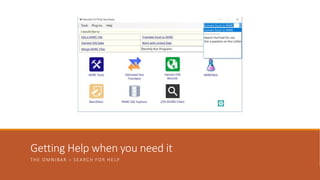
Getting Help when you need it
THE OMNIBAR – SEARCH FOR HELP
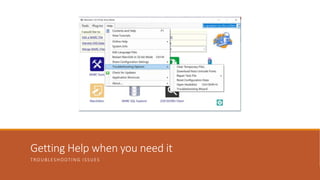
Getting Help when you need it
TROUBLESHOOTING ISSUES
Getting Help when you need it
AND GETTING HELP
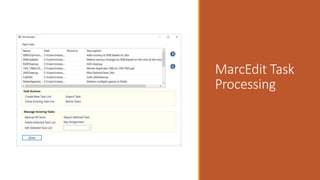
MarcEdit Task
Processing
Task Processing changes
Introduction of a Task Broker
Introduction of Task Debugger
New Functions can be added to tasks
Ability to add Comments
Ability to turn off Task Broker
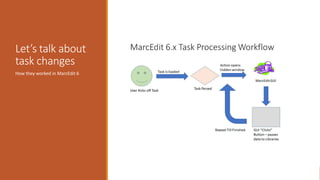
Let’s talk about
task changes
How they worked in MarcEdit 6
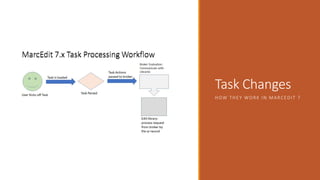
Task Changes
HOW THEY WORK IN MARCEDIT 7
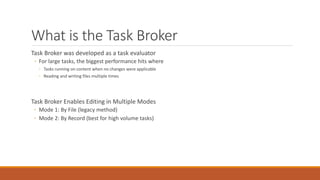
What is the Task Broker
Task Broker was developed as a task evaluator
◦ For large tasks, the biggest performance hits where
◦ Tasks running on content when no changes were applicable
◦ Reading and writing files multiple times
Task Broker Enables Editing in Multiple Modes
◦ Mode 1: By File (legacy method)
◦ Mode 2: By Record (best for high volume tasks)
When you might override the task broker
Tasks with over 70 items and nearly all 70 items will edit every record – by file will be faster
Tasks when behavior is different between MarcEdit 6 and 7
◦ When this happens, it sometimes means your task isn’t constructed corrected; MarcEdit 7 is very strict
for processing sake and performance
◦ However, By File will put you back into the legacy mode, which should allow most older tasks to work in
cases where there are small incompatibilities
Are there many incompatibilities?
◦ There shouldn’t be. Mostly, these show up when users didn’t enter data and the interface in the older
method would automatically put default information in for the user. That doesn’t happen in the by
record approach.
So what does that mean to me?
In MarcEdit 6, the optimal task size was ~20 operations or lower. Once the operation count
began to get higher, the time that it would take to process data would become exponentially
slower. In MarcEdit 7, that performance line actually goes the other direction. The tool
processes records faster, and handles more records per second, the more task actions
completed.
Real-World Example
Library in Greece has a task list with over 1000 task actions. They would use this task to clean up
large portions of their database in one pass. Generally, this would mean processing ~300,000-
500,000 records at a time. In MarcEdit 6, this process would take as many as 10 hours to
complete. Using the MarcEdit 7 task processing, this process now takes less than 20 minutes.
But is it really faster?
Let’s compare processing using one record, but with a task list that uses north of 100 task
actions in MarcEdit 6 and MarcEdit 7.
Other
comparisons
•Comparing the
Extract Selected
Records Tooling
Virtual
Lists
•Loading large
data files
Loading
Files
MarcEdit 7 continues growing
Near term planned additions
◦ Continuing to wrap up some features in the MarcEdit MacOS 3 update
◦ Currently, the only missing functionality is related to some pre-and post processing of tasks when using ILS integrations
◦ New XML Profiling Wizard
◦ New plugins for individual record creation templates
◦ Support for HDT and linked data fragments (this is awesome stuff)
◦ Additional clustering algorithms
Addressing Unicode Normalization Fragmentation
Myth: Once our data is in UTF8, most of our encoding problems will be solved.
Reality is much more complicated. UTF8 comes in different normalizations, and those
normalizations impact how a character is represented. This has indexing implications, display
implications, and potentially, editing implications. And these problems can come from
anywhere. From OCLC (where search is normalized, but data isn’t), when editing (Operating
systems default to canonical normalizations), from data downloaded from other sources.
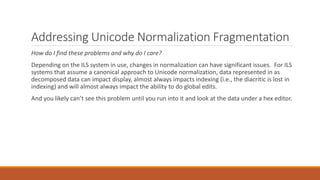
Addressing Unicode Normalization Fragmentation
How do I find these problems and why do I care?
Depending on the ILS system in use, changes in normalization can have significant issues. For ILS
systems that assume a canonical approach to Unicode normalization, data represented in as
decomposed data can impact display, almost always impacts indexing (i.e., the diacritic is lost in
indexing) and will almost always impact the ability to do global edits.
And you likely can’t see this problem until you run into it and look at the data under a hex editor.
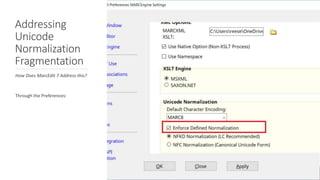
Addressing
Unicode
Normalization
Fragmentation
How Does MarcEdit 7 Address this?
Through the Preferences:
Clustering in MarcEdit 7
How people clustered MARC data in the past
1. Export the fields considered for investigation into a tabbed delimited format
2. Import into OpenRefine
3. Cluster the data
4. Make Edits
5. Export the delimited data out of OpenRefine
6. Develop a process to merge the changed data back into MARC
If you need to have your data start or end up in MARC, working with OpenRefine can be challenging
because there isn’t a natural process to move between these two formats
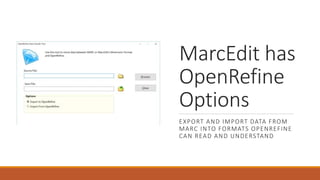
MarcEdit has
OpenRefine
Options
EXPORT AND IMPORT DATA FROM
MARC INTO FORMATS OPENREFINE
CAN READ AND UNDERSTAND
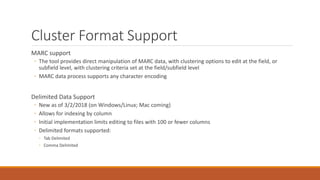
Cluster Format Support
MARC support
◦ The tool provides direct manipulation of MARC data, with clustering options to edit at the field, or
subfield level, with clustering criteria set at the field/subfield level
◦ MARC data process supports any character encoding
Delimited Data Support
◦ New as of 3/2/2018 (on Windows/Linux; Mac coming)
◦ Allows for indexing by column
◦ Initial implementation limits editing to files with 100 or fewer columns
◦ Delimited formats supported:
◦ Tab Delimited
◦ Comma Delimited
Why not just use OpenRefine?
If you know how to use OpenRefine, please use it
◦ OpenRefine provides a much wider and rich set of functionality and designed specifically to help users
deal with data issues found within largely unstructured data
But MARC is a pain
◦ While OpenRefine has some MARC importing tools, the tooling specifically to MARC isn’t particularly
good or intuitive
◦ OpenRefine has some practical data (file size) limits when run on a desktop/client
MarcEdit’s clustering support was built with catalogers in mind
◦ To make working with library formats easy
◦ To minimize the need to migrate data between different formats (and risk losing information in the
conversion processes)
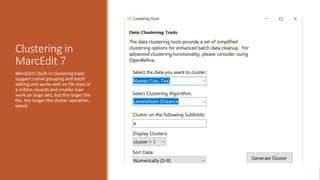
Clustering in
MarcEdit 7
MarcEdit’s built-in clustering tools
support native grouping and batch
editing and works well on file sizes of
a million records and smaller (can
work on large sets, but the larger the
file, the longer the cluster operation
takes)
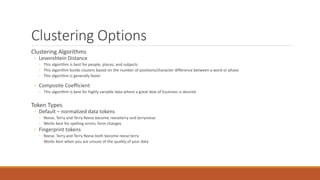
Clustering Options
Clustering Algorithms
◦ Levenshtein Distance
◦ This algorithm is best for people, places, and subjects
◦ This algorithm builds clusters based on the number of positions/character difference between a word or phase
◦ This algorithm is generally faster
◦ Composite Coefficient
◦ This algorithm is best for highly variable data where a great deal of fuzziness is desired.
Token Types
◦ Default – normalized data tokens
◦ Reese, Terry and Terry Reese become reeseterry and terryreese
◦ Works best for spelling errors, form changes
◦ Fingerprint tokens
◦ Reese, Terry and Terry Reese both become reese terry
Works best when you are unsure of the quality of your data
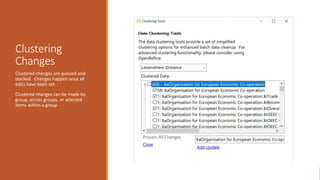
Clustering
Changes
Clustered changes are queued and
stacked. Changes happen once all
edits have been set.
Clustered changes can be made by
group, across groups, or selected
items within a group
Additional Clustering Enhancements
Clustering support works on non-MARC data as well
◦ Specifically, tab delimited formatted data
◦ Supports the extraction of data based on the clusters selected (rather than changing data)
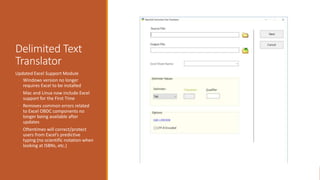
Delimited Text
Translator
Updated Excel Support Module
◦ Windows version no longer
requires Excel to be installed
◦ Mac and Linux now include Excel
support for the First Time
◦ Removes common errors related
to Excel OBDC components no
longer being available after
updates
◦ Oftentimes will correct/protect
users from Excel’s predictive
typing (no scientific notation when
looking at ISBNs, etc.)
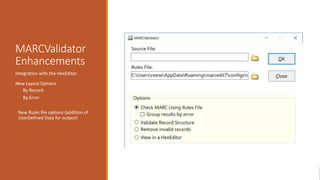
MARCValidator
Enhancements
Integration with the HexEditor
New Layout Options
◦ By Record
◦ By Error
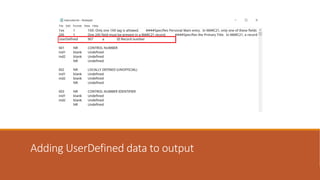
New Rules file options (addition of
UserDefined Data for output)
Adding UserDefined data to output
Auto Catalog
A new experimental tool (you are the first to see an hear about it) that allows the user to take a
picture of the publication data in a book, or a catalog card and generate a MARC record. The
tool will
1. Currently the data will look up the info in the U.S. Library of Congress or WorldCat if you have the
metadata api enabled
2. If it cannot find a record, it will auto generate one by OCR’ing your image, and developing a
MARC21 record.
3. If you have a collection of Cataloging Cards – you can process this data in batch
Processing MARC Data
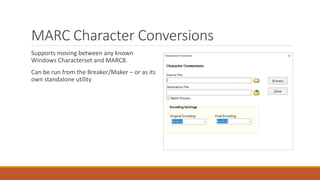
MARC Character Conversions
Supports moving between any known
Windows Characterset and MARC8.
Can be run from the Breaker/Maker – or as its
own standalone utility
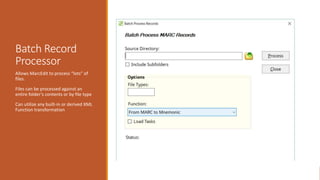
Batch Record
Processor
Allows MarcEdit to process “lots” of
files.
Files can be processed against an
entire folder’s contents or by file type
Can utilize any built-in or derived XML
Function transformation
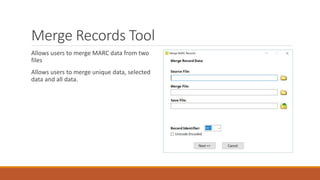
Merge Records Tool
Allows users to merge MARC data from two
files
Allows users to merge unique data, selected
data and all data.
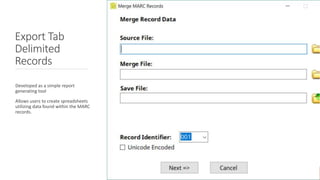
Export Tab
Delimited
Records
Developed as a simple report
generating tool
Allows users to create spreadsheets
utilizing data found within the MARC
records.
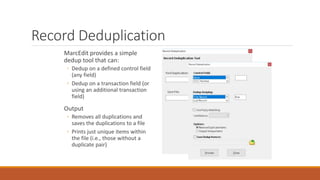
Record Deduplication
MarcEdit provides a simple
dedup tool that can:
◦ Dedup on a defined control field
(any field)
◦ Dedup on a transaction field (or
using an additional transaction
field)
Output
◦ Removes all duplications and
saves the duplications to a file
◦ Prints just unique items within
the file (i.e., those without a
duplicate pair)
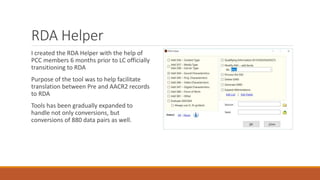
RDA Helper
I created the RDA Helper with the help of
PCC members 6 months prior to LC officially
transitioning to RDA
Purpose of the tool was to help facilitate
translation between Pre and AACR2 records
to RDA
Tools has been gradually expanded to
handle not only conversions, but
conversions of 880 data pairs as well.
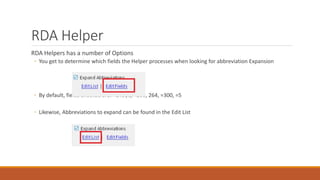
RDA Helper
RDA Helpers has a number of Options
◦ You get to determine which fields the Helper processes when looking for abbreviation Expansion
◦ By default, fields checked are: =245$c, =260, 264, =300, =5
◦ Likewise, Abbreviations to expand can be found in the Edit List
RDA Helper
Special Instructions:
• 380 – Because this isn’t a controlled field, MarcEdit makes use a genre list at
the Library of Congress. This means that these values can be more general
than if done by a cataloger.
• 260/264 – Handles many different forms of the field. When the tool is
always set to generate a symbol, the tool will utilize MARC8 or UTF8
encoding based on the data.
• Qualifying information – moved qualifiers into a $q. Example: 020
$a02312123 (electronic) to 020 $a02312123$qelectronic
• Process the 502 – converts a dissertation note into a delimited format.
Example: 502 $aThesis (M.A.)--University College, London, 1969. to: 502 502
$gThesis$bM.A.$cUniversity College, London$d1969.
• Generate GMD (works on AACR2 encoded data or RDA Encoded data)
• Abbreviation expansion can be customized (using regular expressions) and
fields where abbreviations are run can be customized.
Don’t forget
MARC SQL Explorer
Merge Records
Dedup Records
XML Conversions
MarcEdit:
crosswalking
design
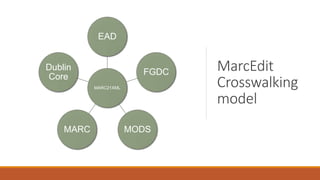
MarcEdit model:
◦ So long as a schema has been mapped to MARCXML, any
metadata combination could be utilized. This means that no
more than two tranformations will ever take place. Example:
MODS  MARCXML  EAD
MarcEdit
Crosswalking
model
MARC21XML
EAD
FGDC
MODSMARC
Dublin
Core
MarcEdit: Crosswalks
for everyone
What’s MarcEdit doing?
◦ Facilitates the crosswalk by:
1. Performing character translations
(MARC8-UTF8)
2. Facilitates interaction between binary
and XML formats.
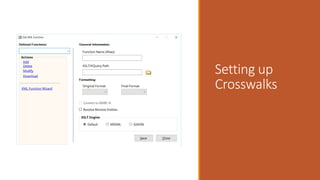
Setting up
Crosswalks
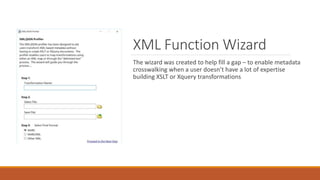
XML Function Wizard
The wizard was created to help fill a gap – to enable metadata
crosswalking when a user doesn’t have a lot of expertise
building XSLT or Xquery transformations
OAI Harvesting
MarcEdit’s OAI Harvester can run in two modes
◦ User Initiated
◦ Scheduled
Let’s look at both!
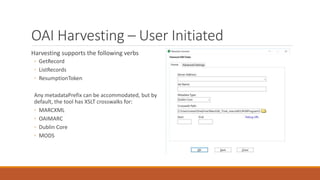
OAI Harvesting – User Initiated
Harvesting supports the following verbs
◦ GetRecord
◦ ListRecords
◦ ResumptionToken
Any metadataPrefix can be accommodated, but by
default, the tool has XSLT crosswalks for:
◦ MARCXML
◦ OAIMARC
◦ Dublin Core
◦ MODS
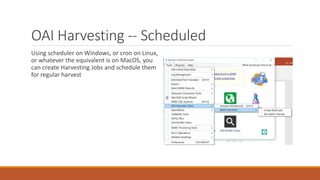
OAI Harvesting -- Scheduled
Using scheduler on Windows, or cron on Linux,
or whatever the equivalent is on MacOS, you
can create Harvesting Jobs and schedule them
for regular harvest
Changes to the
MarcEditor
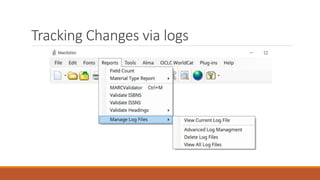
Tracking Changes via logs
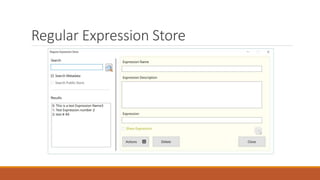
Regular Expression Store
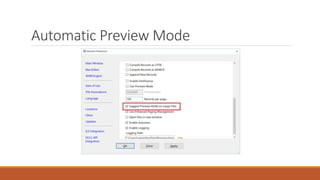
Automatic Preview Mode
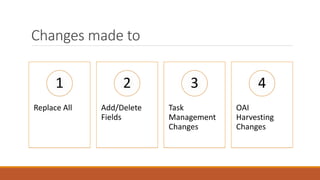
Changes made to
Replace All
1
Add/Delete
Fields
2
Task
Management
Changes
3
OAI
Harvesting
Changes
4
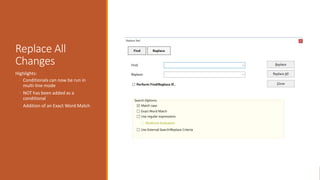
Replace All
Changes
Highlights:
◦ Conditionals can now be run in
multi-line mode
◦ NOT has been added as a
conditional
◦ Addition of an Exact Word Match
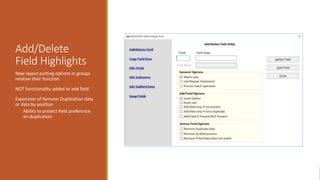
Add/Delete
Field Highlights
New layout putting options in groups
relative their function
NOT functionality added to add field
Expansion of Remove Duplication data
or data by position
◦ Ability to protect field preference
on duplication
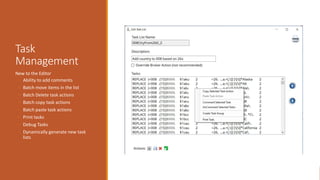
Task
Management
New to the Editor
◦ Ability to add comments
◦ Batch move items in the list
◦ Batch Delete task actions
◦ Batch copy task actions
◦ Batch paste task actions
◦ Print tasks
◦ Debug Tasks
◦ Dynamically generate new task
lists
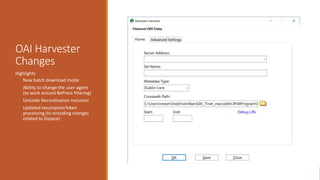
OAI Harvester
Changes
Highlights
◦ New batch download mode
◦ Ability to change the user-agent
(to work around BePress filtering)
◦ Unicode Normalization inclusion
◦ Updated resumptionToken
processing (to encoding changes
related to Dspace)
Working with
Linked Data
In MarcEdit
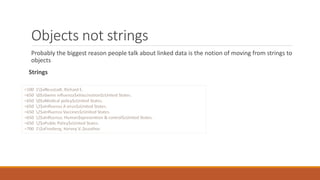
Objects not strings
Probably the biggest reason people talk about linked data is the notion of moving from strings to
objects
Strings
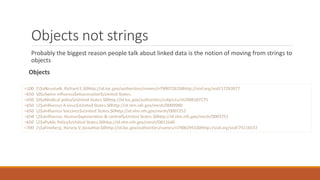
Objects not strings
Probably the biggest reason people talk about linked data is the notion of moving from strings to
objects
Objects
Objects Not Strings
URIs provide actionable data
◦ Controlled terms can be updated without user intervention (generally)
◦ And URIs can provide access to more information
◦ I.E. – a URI to VIAF provides access not just to author information, but to all their related works and collaborators as well.
So why aren’t
we doing this
already?
1
Changing Strings to Objects is
hard and expensive
2
We have some folks, like
OCLC, that could be in a
position to help us, but our
current systems are not setup
to use (and in some cases)
store the data.
3
Many of our controlled
vocabularies are not designed
to support reconciliation
work
•And those that are aren’t
production ready
•Or – are proprietary
So what can we do right now?
A lot –
◦ Many of the large national services are making resources and infrastructure available to enable libraries
to begin doing this work
◦ OCLC has been largely supportive, and provides their own tools with output linked data content
◦ We can start lobbying our systems to not just store the data, but make use of the information when
provided
◦ We can start the reconciliation process (because this process takes time)
MarcEdit and Linked Data
MarcEdit 6 and 7 include a linked data plaftform -- this is an integration platform that enables
MarcEdit to work with various linked data services, and provides a way to build new services
around this functionality
◦ Designed to support RDF, JSON-LD, SPARQL – and a wide range of library specific services currently
providing one off access to controlled data
◦ The framework has been utilized in MarcEdit for the development of a toolset called MARCNext
MARCNext
These are Experimental services that allow catalogers to play with their data and visualize it
through the BibFrame lens – as well as begin the process of turning strings to objects.
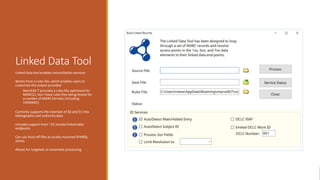
Linked Data Tool
Linked data tool enables reconciliation services
Works from a rules file, which enables users to
customize the output provided
◦ MarcEdit 7 provides a rules file optimized for
MARC21, but I have rules files being tested for
a number of MARC formats (including
UNIMARC)
Currently supports the insertion of $0 and $1 into
bibliographic and authority data
Includes support from ~25 remote linked data
endpoints
Can use local rdf files as locally mounted SPARQL
stores
Allows for targeted, or automatic processing
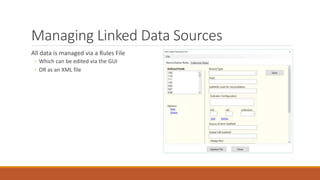
Managing Linked Data Sources
All data is managed via a Rules File
◦ Which can be edited via the GUI
◦ OR as an XML file
Does this currently scale?
I get asked this question, because the Library of Congress actively throttles data request made
against their service. So too do many other service providers. They have to, it’s a method of self
preservation. When I test reconciled Ohio State’s entire database (~6 million records), I
estimated that I would end up making on the low end, 48,000,000 requests, just to the Library of
Congress. Over a very short period – that’s a lot of requests, and can overwhelm their services.
However…
◦ I work closely with many of the large data providers, and they give MarcEdit some leeway because:
◦ MarcEdit follows some established patterns…in LCs case, they can provide an HTTP status code that let’s the application know that
their service is under load, and MarcEdit will start slowing down requests for a specified time period.
◦ MarcEdit does its own internal caching – this way an item is only retrieved once per reconciliation session. Using this method, I can
likely cut the number of requests to a service like LC by over a 1/3 or more. In fact, the more data that’s processed, the faster it
goes and the less requests it has to make to the source vocabulary
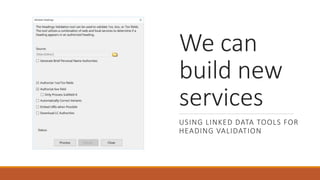
We can
build new
services
USING LINKED DATA TOOLS FOR
HEADING VALIDATION
Validate Headings
How it works
◦ Working directly with the U.S. Library of Congress – MarcEdit queries the NACO and SACO headings
directly
◦ Returning information about URIs and variants/changes
◦ MarcEdit then generates a report, automatically corrects headings (when possible) and can generate
brief authority records or downloads the existing authority record
Using
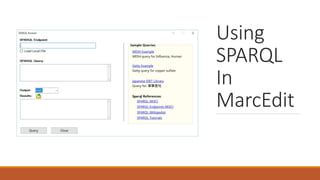
SPARQL
In
MarcEdit
SPARQL Functionality
SPARQL Searches can:
◦ be run against remote servers
◦ Return multiple formats
◦ Save Results
◦ Be run against local repositories
Local SPARQL Query
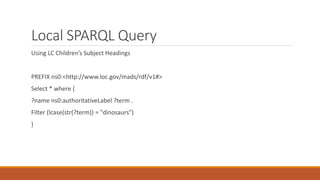
Using LC Children’s Subject Headings
PREFIX ns0:<http://www.loc.gov/mads/rdf/v1#>
Select * where {
?name ns0:authoritativeLabel ?term .
Filter (lcase(str(?term)) = "dinosaurs")
}
Questions
Again – I would like to hear from you?
I’ve been working with members of the
PCC task force looking at how we embed
linked data into MARC records (and
outside of MARC records), and I’ve been
actively building these tools into
MarcEdit (both for research and
production).
How would you like to work with linked
data recordset in your library?
What could MarcEdit do to make this
easier for you?
Integrations
ILS Integration
ILS Integration currently supports direct integration with
Koha, Alma, and a local option.
Are other integrations possible?
◦ http://blog.reeset.net/archives/2133
Let’s talk about ALMA
Integration
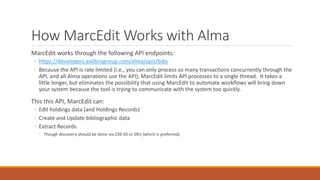
How MarcEdit Works with Alma
MarcEdit works through the following API endpoints:
◦ https://developers.exlibrisgroup.com/alma/apis/bibs
◦ Because the API is rate limited (i.e., you can only process so many transactions concurrently through the
API, and all Alma operations use the API), MarcEdit limits API processes to a single thread. It takes a
little longer, but eliminates the possibility that using MarcEdit to automate workflows will bring down
your system because the tool is trying to communicate with the system too quickly.
This this API, MarcEdit can:
◦ Edit holdings data (and Holdings Records)
◦ Create and Update bibliographic data
◦ Extract Records
◦ Though discovery should be done via Z39.50 or SRU (which is preferred)
Working with OCLC Connexion
https://youtu.be/a7Cen0gxFCw?list=PLrHRsJ91nVFScJLS91SWR5awtFfpewMWg
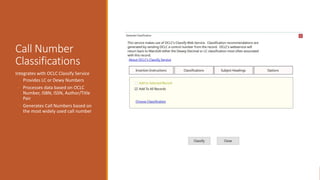
Call Number
Classifications
Integrates with OCLC Classify Service
◦ Provides LC or Dewy Numbers
◦ Processes data based on OCLC
Number, ISBN, ISSN, Author/Title
Pair
◦ Generates Call Numbers based on
the most widely used call number
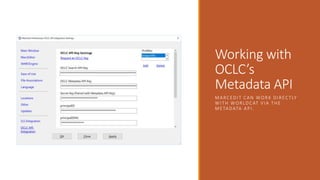
Working with
OCLC’s
Metadata API
MARCEDIT CAN WORK DIRECTLY
WITH WORLDCAT VIA THE
METADATA API.
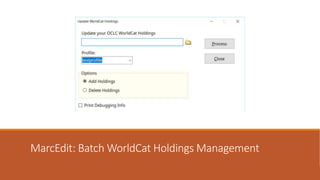
MarcEdit: Batch WorldCat Holdings Management
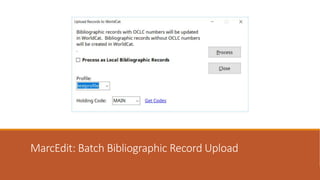
MarcEdit: Batch Bibliographic Record Upload
More
Information
OCLC’s Developer Network:
◦ http://oclc.org/developer/
OCLC Metadata API Documentation:
◦ http://oclc.org/developer/services/worldcat-metadata-api
Notes on MarcEdit Integration:
◦ http://blog.reeset.net/archives/1245
C# OCLC API Library
◦ https://github.com/reeset/oclc_api
Break?
MarcEdit Regular
Expression Primer
MarcEdit Regular Expression Support
Functions that presently support regular expressions
◦ Delete Field
◦ Edit Field
◦ Copy Field
◦ Swap Field
◦ Build New Field
◦ Validation
◦ Extract/Delete Selected Records
Expression Scope
Deciding which function to use depends on the scope of data needing to be evaluated
◦ Add/Delete Field – Regular Expressions have access to the entire field (from the “=“ to the end of line
(eol)
◦ Edit Subfield – Regular Expressions have access to the subfield code, to the end of the subfield
◦ Edit Field – Regular Expression has access to all subfield data, but *not* indicator data
◦ Edit Indicators – only access to indicator data
◦ Copy Field – Regular Expression has access to indicator data + all subfield data
◦ Replace Function – Regular Expression has access to all record data
Microsoft’s Regular Expression language
Concepts:
◦ Character escapes
◦ Anchors
◦ Character classes
◦ Grouping
◦ Qualifiers
◦ Substitutions
Let’s open Regular Expression Language - Quick Reference.html or
https://msdn.microsoft.com/en-us/library/az24scfc(v=vs.110).aspx
How we use Regular Expressions in
MarcEdit
Your most important parts of the regular expression language are:
1. Character escapes: dwrn$
2. Character Classes [] & [^]
3. Grouping Elements ()
4. Anchors: ^$
5. Quantifiers: *?+{#}
6. Substitutions: $#
Examples
Looking at regex_example.mrk using the replace function:
◦ Add a period to the 500 if it is missing
◦ Update the 300 to reflect electronic information
◦ Split the 856 into two fields, breaking on the $u.
Examples 1
◦ Add a period to the 500 if it is missing
◦ Find What: (=500 ..)(.*[^W]$)
◦ Replace With: $1$2.
Explanation:
◦ (=500 ..)
◦ Searches for the 500 field. We leave two blanks because there are always 2 blank characters as part of the mnemonic format. The
two periods which stand for any character. If we want to search for exact indicators, you’d place those values rather than the
periods.
◦ (.*[^W.]$)
◦ Take any characters, and match on a field where the last character in the field isn’t a period.
Examples 2
Add online resource information to the 300 field
Example:
◦ Change: 300 $a 32 p.
◦ To: 300 $a1 online resource (32 p.)
Explanation:
◦ (=500 ..)
◦ Searches for the 500 field. We leave two blanks because there are always 2 blank characters as part of the mnemonic format. The
two periods which stand for any character. If we want to search for exact indicators, you’d place those values rather than the
periods.
◦ (?<one>$a)([^$]*)
◦ Capture the $a and then all data in the subfield until you get to the next subfield (if there is one)
Example 3
Split the 856 into two fields, breaking on the $u.
◦ Find What: (=856.{4})($u.*[^$])($u.*)
◦ (=856.{4})
◦ Matches the 856 field
◦ ($u.*[^$])
◦ Match $u, but stop at the end of the subfield
◦ ($u.*)
◦ Match reminder of field
◦ Replace With: $1$2n=856 41$3
lcase/ucase
MarcEdit’s regular expression engine includes to extension functions for dealing with case
switching of characters.
◦ lcase & ucase
◦ Usage: (=450.{4})($a.)(.*)
◦ $1$2lcase($3)
◦ Example: Find the 500 with all upper case characters and convert the case of all values but the first
letter in the sentence to lower case.
Example (lcase)
Find the 500 with all upper case characters and convert the case of all values but the first letter
in the sentence to lower case.
◦ Find What: (=500.{4})($a.)([A-Z .]*)
◦ Replace With: $1$2lcase($3)
Multi-Field Replacements
By default, MarcEdit handles one field at a time when doing regular expressions.
◦ However, when you need to do evaluations against multiple fields, you can by adding /m to the end of
your replacement in the Replace Function in the MarcEditor
◦ This is a special function added to the MarcEdit regular expression engine
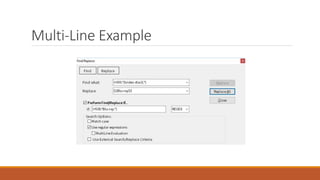
Example
Using regex_example.mrk
Changing video disc to blue-ray in the 300 if the 538 is marked as blue-ray
Multi-Line Example
Placeholder
Are there specific editing tasks that folks are interested in?
We can talk about these now
Questions

Slides from the NASIG 2018 Preconference

  • 1.
    The Now and FutureMarcEdit: A Day-long Workshop TERRY REESE THE OHIO STATE UNIVERSITY REESET@GMAIL.COM
  • 2.
    Workshop format Let’s findout what you want to learn Let’s talk about changes to MarcEdit 7 Oh, remember that we all learn differently -- so please follow along, participate, engage in way that makes the most sense for you ◦ I have examples, and I’m inviting folks to practice with me – but please follow along and engage in a way that makes the most sense for you.
  • 3.
    Schedule 8-10: Content 10-10:15: Break 10:15-noonContent Noon – 1: Lunch 1-2:30: Content 2:30-2:45: Break 2:45 – 4:15: Content 4:15-5:00: Questions
  • 4.
    Questions from Attendees Topics folkswere interested in learning about: ◦ Fonts ◦ Unicode Processing ◦ RDA Processing ◦ Automation (more info about tasks) ◦ XML Processing ◦ Regular Expressions ◦ New MarcEdit 7 Features ◦ Merging Data from one record to another Any other topics folks might be interested in?
  • 5.
    Important notes • Downloadfrom: http://marcedit.reeset.net/downloads/ Installation notes • Any version of Windows that supports .NET 4.6.1+ • Fully supported on Linux (using Mono) • Mac Version (native) System Requirements MarcEdit 7.x • No regular update cycle -- but generally, at least one update per month • I answer nearly every question I get about MarcEdit. • MarcEdit Listserv (http://metis3.gmu.edu/cgi- bin/wa?A0=MARCEDIT-L) is available for questions. Upgrade/Support
  • 6.
    THE ROADMAP Some importantchanges coming to MarcEdit 7/MarcEdit Mac ◦ Continuing of deeper integrations with ILS vendors and OCLC ◦ Expansion of the Clustering toolset to enable more light-weight open refine functionality like ingest from external web sources ◦ Continued parity between the Windows/MacOS versions ◦ Continued local help expansion ◦ Continued sharing options within the community (sharing expressions, expertise) ◦ Expansion of Excel processing/creation ◦ Considering IOS support through the new MacOS bridge (though, this would limit MacOS support to High Sierra and Mojave…so need to do more research)
  • 7.
    MarcEdit Evolution MarcEdit 1.0-2.0Main Window MarcEdit MARC Tools 1.0-2.0 MarcEdit 1.0-2.0 MarcEditor
  • 8.
    MarcEdit @ 20 MarcEdit7.x: Windows MarcEdit 3.x: MacOS
  • 9.
    Today MarcEdit is usedalmost everywhere Is available for use on MacOS (10.10+), Linux, and Windows (Vista+) • Most Active User Community • Windows Users: ~20,000 • MacOS Users: ~1,000 • Linux Users: ~150
  • 10.
    MarcEdit 7 highlights Lite-weight clusterhas been added directly into the program New way to process XML/JSON data A new linked data engine, with support for locally defined rdf vocabularies in reconcillation New task processing Consolidated Z39.50/SRU client Added Editing Functions •New Add/Delete Field Tools (deduplication) •Expanded Regular Expression options •Updated OCLC Integrations Integrated Help
  • 11.
    Today’s topics Quick overviewof MarcEdit 7 Changes Explore MarcEdit 7’s new Clustering Functionality Working with non- MARC data using known and unknown metadata formats Explore MarcEdit 7’s Linked Data Platform Improved Task Processing Integration opportunities with • Alma or other ILS Systems • OCLC • Connexion
  • 12.
    Today’s topics MARC Specific Tools User Questions(not answered) Regular Expressions
  • 13.
  • 14.
    Project Fluffy Muppet-- MarcEdit 7! MarcEdit 7 was released over the U.S. Thanksgiving Holiday The release: 1. Has been in development for close to 9 months over about 850 hours of development with ~20 testers in 7 countries using 4 different MARC flavors providing direct feedback 2. Touched nearly every part of the program – when finished, the release updated a shade under 350,000 lines of code 3. Was tested against almost 20 million records 4. Is the first version of MarcEdit designed with Accessibility in mind 5. Is fast (I’m going to show you a few places where)
  • 15.
    Let’s look at what’snew •Accessibility •MarcEdit 7 includes an improved font/sizing engine for improved layout on different screen sizes and resolutions •All images are tagged with text and accessibility via screen readers or using the operating system’s accessibility tooling •Availability of themes, to allow you to customize windowing and contracts to ease eye strain •Keyboard shortcuts (everywhere) •Sound cues •Window transparency User Center Design
  • 17.
    Let’s look atwhat’s new More International ◦ MarcEdit 7 uses an intelligent machine translation service, providing an interface in close to 26 languages at this point It’s Faster ◦ Lists have been virtualized (lower overhead) ◦ Pages load quicker ◦ Tasks have been super-charged It’s leaner – in part because Windows XP support is no longer provided
  • 18.
    Let’s look atwhat’s new Program is easier to manage ◦ The program has 4 installation modes ◦ 32-bit Administrator and non-Administrator installation modes ◦ 64-bit Administrator and non-Administrator installation modes ◦ How do I choose? ◦ Depends on your needs: ◦ http://marcedit.reeset.net/downloads
  • 20.
    MarcEdit 7’s newinstaller agent Welcome to Project Fluffy Muppet, your friendly (and sometimes helpful) installation agent ◦ Hazel is there to help highlight important options, and make sure you can work with Unicode data by making sure you have a Unicode font. ◦ Helps users migration data from previous versions ◦ Set important options ◦ Is Fun!
  • 24.
    MarcEdit Language Preferences MarcEditallows you to set your preferred font for use with the User Interface. ◦ *Important Note for Windows 10/Office 2016 User* ◦ Microsoft no longer provides the Arial Unicode MS font. This is the font MarcEdit targets by default due to the coverage. As of Aug. 2016, I’m recommending users download the noto fonts. These cover almost twice as many characters as the Microsoft Arial Unicode font, is free, and open. You can read more about this here: http://marcedit.reeset.net/replacement-unicode-fonts MarcEdit allows you to set your preferred font size for use within the program.
  • 28.
    Getting Help whenyou need it ADDITION OF DYNAMIC HELP TOPICS
  • 29.
    Getting Help whenyou need it THE OMNIBAR – SEARCH FOR HELP
  • 30.
    Getting Help whenyou need it TROUBLESHOOTING ISSUES
  • 31.
    Getting Help whenyou need it AND GETTING HELP
  • 32.
  • 33.
    Task Processing changes Introductionof a Task Broker Introduction of Task Debugger New Functions can be added to tasks Ability to add Comments Ability to turn off Task Broker
  • 34.
    Let’s talk about taskchanges How they worked in MarcEdit 6
  • 35.
    Task Changes HOW THEYWORK IN MARCEDIT 7
  • 36.
    What is theTask Broker Task Broker was developed as a task evaluator ◦ For large tasks, the biggest performance hits where ◦ Tasks running on content when no changes were applicable ◦ Reading and writing files multiple times Task Broker Enables Editing in Multiple Modes ◦ Mode 1: By File (legacy method) ◦ Mode 2: By Record (best for high volume tasks)
  • 37.
    When you mightoverride the task broker Tasks with over 70 items and nearly all 70 items will edit every record – by file will be faster Tasks when behavior is different between MarcEdit 6 and 7 ◦ When this happens, it sometimes means your task isn’t constructed corrected; MarcEdit 7 is very strict for processing sake and performance ◦ However, By File will put you back into the legacy mode, which should allow most older tasks to work in cases where there are small incompatibilities Are there many incompatibilities? ◦ There shouldn’t be. Mostly, these show up when users didn’t enter data and the interface in the older method would automatically put default information in for the user. That doesn’t happen in the by record approach.
  • 38.
    So what doesthat mean to me? In MarcEdit 6, the optimal task size was ~20 operations or lower. Once the operation count began to get higher, the time that it would take to process data would become exponentially slower. In MarcEdit 7, that performance line actually goes the other direction. The tool processes records faster, and handles more records per second, the more task actions completed. Real-World Example Library in Greece has a task list with over 1000 task actions. They would use this task to clean up large portions of their database in one pass. Generally, this would mean processing ~300,000- 500,000 records at a time. In MarcEdit 6, this process would take as many as 10 hours to complete. Using the MarcEdit 7 task processing, this process now takes less than 20 minutes.
  • 39.
    But is itreally faster? Let’s compare processing using one record, but with a task list that uses north of 100 task actions in MarcEdit 6 and MarcEdit 7.
  • 40.
    Other comparisons •Comparing the Extract Selected RecordsTooling Virtual Lists •Loading large data files Loading Files
  • 41.
    MarcEdit 7 continuesgrowing Near term planned additions ◦ Continuing to wrap up some features in the MarcEdit MacOS 3 update ◦ Currently, the only missing functionality is related to some pre-and post processing of tasks when using ILS integrations ◦ New XML Profiling Wizard ◦ New plugins for individual record creation templates ◦ Support for HDT and linked data fragments (this is awesome stuff) ◦ Additional clustering algorithms
  • 42.
    Addressing Unicode NormalizationFragmentation Myth: Once our data is in UTF8, most of our encoding problems will be solved. Reality is much more complicated. UTF8 comes in different normalizations, and those normalizations impact how a character is represented. This has indexing implications, display implications, and potentially, editing implications. And these problems can come from anywhere. From OCLC (where search is normalized, but data isn’t), when editing (Operating systems default to canonical normalizations), from data downloaded from other sources.
  • 43.
    Addressing Unicode NormalizationFragmentation How do I find these problems and why do I care? Depending on the ILS system in use, changes in normalization can have significant issues. For ILS systems that assume a canonical approach to Unicode normalization, data represented in as decomposed data can impact display, almost always impacts indexing (i.e., the diacritic is lost in indexing) and will almost always impact the ability to do global edits. And you likely can’t see this problem until you run into it and look at the data under a hex editor.
  • 44.
  • 45.
    Clustering in MarcEdit7 How people clustered MARC data in the past 1. Export the fields considered for investigation into a tabbed delimited format 2. Import into OpenRefine 3. Cluster the data 4. Make Edits 5. Export the delimited data out of OpenRefine 6. Develop a process to merge the changed data back into MARC If you need to have your data start or end up in MARC, working with OpenRefine can be challenging because there isn’t a natural process to move between these two formats
  • 46.
    MarcEdit has OpenRefine Options EXPORT ANDIMPORT DATA FROM MARC INTO FORMATS OPENREFINE CAN READ AND UNDERSTAND
  • 47.
    Cluster Format Support MARCsupport ◦ The tool provides direct manipulation of MARC data, with clustering options to edit at the field, or subfield level, with clustering criteria set at the field/subfield level ◦ MARC data process supports any character encoding Delimited Data Support ◦ New as of 3/2/2018 (on Windows/Linux; Mac coming) ◦ Allows for indexing by column ◦ Initial implementation limits editing to files with 100 or fewer columns ◦ Delimited formats supported: ◦ Tab Delimited ◦ Comma Delimited
  • 48.
    Why not justuse OpenRefine? If you know how to use OpenRefine, please use it ◦ OpenRefine provides a much wider and rich set of functionality and designed specifically to help users deal with data issues found within largely unstructured data But MARC is a pain ◦ While OpenRefine has some MARC importing tools, the tooling specifically to MARC isn’t particularly good or intuitive ◦ OpenRefine has some practical data (file size) limits when run on a desktop/client MarcEdit’s clustering support was built with catalogers in mind ◦ To make working with library formats easy ◦ To minimize the need to migrate data between different formats (and risk losing information in the conversion processes)
  • 49.
    Clustering in MarcEdit 7 MarcEdit’sbuilt-in clustering tools support native grouping and batch editing and works well on file sizes of a million records and smaller (can work on large sets, but the larger the file, the longer the cluster operation takes)
  • 50.
    Clustering Options Clustering Algorithms ◦Levenshtein Distance ◦ This algorithm is best for people, places, and subjects ◦ This algorithm builds clusters based on the number of positions/character difference between a word or phase ◦ This algorithm is generally faster ◦ Composite Coefficient ◦ This algorithm is best for highly variable data where a great deal of fuzziness is desired. Token Types ◦ Default – normalized data tokens ◦ Reese, Terry and Terry Reese become reeseterry and terryreese ◦ Works best for spelling errors, form changes ◦ Fingerprint tokens ◦ Reese, Terry and Terry Reese both become reese terry Works best when you are unsure of the quality of your data
  • 51.
    Clustering Changes Clustered changes arequeued and stacked. Changes happen once all edits have been set. Clustered changes can be made by group, across groups, or selected items within a group
  • 52.
    Additional Clustering Enhancements Clusteringsupport works on non-MARC data as well ◦ Specifically, tab delimited formatted data ◦ Supports the extraction of data based on the clusters selected (rather than changing data)
  • 53.
    Delimited Text Translator Updated ExcelSupport Module ◦ Windows version no longer requires Excel to be installed ◦ Mac and Linux now include Excel support for the First Time ◦ Removes common errors related to Excel OBDC components no longer being available after updates ◦ Oftentimes will correct/protect users from Excel’s predictive typing (no scientific notation when looking at ISBNs, etc.)
  • 54.
    MARCValidator Enhancements Integration with theHexEditor New Layout Options ◦ By Record ◦ By Error New Rules file options (addition of UserDefined Data for output)
  • 55.
  • 56.
    Auto Catalog A newexperimental tool (you are the first to see an hear about it) that allows the user to take a picture of the publication data in a book, or a catalog card and generate a MARC record. The tool will 1. Currently the data will look up the info in the U.S. Library of Congress or WorldCat if you have the metadata api enabled 2. If it cannot find a record, it will auto generate one by OCR’ing your image, and developing a MARC21 record. 3. If you have a collection of Cataloging Cards – you can process this data in batch
  • 57.
  • 58.
    MARC Character Conversions Supportsmoving between any known Windows Characterset and MARC8. Can be run from the Breaker/Maker – or as its own standalone utility
  • 59.
    Batch Record Processor Allows MarcEditto process “lots” of files. Files can be processed against an entire folder’s contents or by file type Can utilize any built-in or derived XML Function transformation
  • 60.
    Merge Records Tool Allowsusers to merge MARC data from two files Allows users to merge unique data, selected data and all data.
  • 61.
    Export Tab Delimited Records Developed asa simple report generating tool Allows users to create spreadsheets utilizing data found within the MARC records.
  • 62.
    Record Deduplication MarcEdit providesa simple dedup tool that can: ◦ Dedup on a defined control field (any field) ◦ Dedup on a transaction field (or using an additional transaction field) Output ◦ Removes all duplications and saves the duplications to a file ◦ Prints just unique items within the file (i.e., those without a duplicate pair)
  • 63.
    RDA Helper I createdthe RDA Helper with the help of PCC members 6 months prior to LC officially transitioning to RDA Purpose of the tool was to help facilitate translation between Pre and AACR2 records to RDA Tools has been gradually expanded to handle not only conversions, but conversions of 880 data pairs as well.
  • 64.
    RDA Helper RDA Helpershas a number of Options ◦ You get to determine which fields the Helper processes when looking for abbreviation Expansion ◦ By default, fields checked are: =245$c, =260, 264, =300, =5 ◦ Likewise, Abbreviations to expand can be found in the Edit List
  • 65.
    RDA Helper Special Instructions: •380 – Because this isn’t a controlled field, MarcEdit makes use a genre list at the Library of Congress. This means that these values can be more general than if done by a cataloger. • 260/264 – Handles many different forms of the field. When the tool is always set to generate a symbol, the tool will utilize MARC8 or UTF8 encoding based on the data. • Qualifying information – moved qualifiers into a $q. Example: 020 $a02312123 (electronic) to 020 $a02312123$qelectronic • Process the 502 – converts a dissertation note into a delimited format. Example: 502 $aThesis (M.A.)--University College, London, 1969. to: 502 502 $gThesis$bM.A.$cUniversity College, London$d1969. • Generate GMD (works on AACR2 encoded data or RDA Encoded data) • Abbreviation expansion can be customized (using regular expressions) and fields where abbreviations are run can be customized.
  • 66.
    Don’t forget MARC SQLExplorer Merge Records Dedup Records
  • 67.
  • 68.
    MarcEdit: crosswalking design MarcEdit model: ◦ Solong as a schema has been mapped to MARCXML, any metadata combination could be utilized. This means that no more than two tranformations will ever take place. Example: MODS  MARCXML  EAD
  • 69.
  • 70.
    MarcEdit: Crosswalks for everyone What’sMarcEdit doing? ◦ Facilitates the crosswalk by: 1. Performing character translations (MARC8-UTF8) 2. Facilitates interaction between binary and XML formats.
  • 71.
  • 72.
    XML Function Wizard Thewizard was created to help fill a gap – to enable metadata crosswalking when a user doesn’t have a lot of expertise building XSLT or Xquery transformations
  • 73.
    OAI Harvesting MarcEdit’s OAIHarvester can run in two modes ◦ User Initiated ◦ Scheduled Let’s look at both!
  • 74.
    OAI Harvesting –User Initiated Harvesting supports the following verbs ◦ GetRecord ◦ ListRecords ◦ ResumptionToken Any metadataPrefix can be accommodated, but by default, the tool has XSLT crosswalks for: ◦ MARCXML ◦ OAIMARC ◦ Dublin Core ◦ MODS
  • 75.
    OAI Harvesting --Scheduled Using scheduler on Windows, or cron on Linux, or whatever the equivalent is on MacOS, you can create Harvesting Jobs and schedule them for regular harvest
  • 76.
  • 77.
  • 78.
  • 79.
  • 80.
    Changes made to ReplaceAll 1 Add/Delete Fields 2 Task Management Changes 3 OAI Harvesting Changes 4
  • 81.
    Replace All Changes Highlights: ◦ Conditionalscan now be run in multi-line mode ◦ NOT has been added as a conditional ◦ Addition of an Exact Word Match
  • 82.
    Add/Delete Field Highlights New layoutputting options in groups relative their function NOT functionality added to add field Expansion of Remove Duplication data or data by position ◦ Ability to protect field preference on duplication
  • 83.
    Task Management New to theEditor ◦ Ability to add comments ◦ Batch move items in the list ◦ Batch Delete task actions ◦ Batch copy task actions ◦ Batch paste task actions ◦ Print tasks ◦ Debug Tasks ◦ Dynamically generate new task lists
  • 84.
    OAI Harvester Changes Highlights ◦ Newbatch download mode ◦ Ability to change the user-agent (to work around BePress filtering) ◦ Unicode Normalization inclusion ◦ Updated resumptionToken processing (to encoding changes related to Dspace)
  • 85.
  • 86.
    Objects not strings Probablythe biggest reason people talk about linked data is the notion of moving from strings to objects Strings
  • 87.
    Objects not strings Probablythe biggest reason people talk about linked data is the notion of moving from strings to objects Objects
  • 88.
    Objects Not Strings URIsprovide actionable data ◦ Controlled terms can be updated without user intervention (generally) ◦ And URIs can provide access to more information ◦ I.E. – a URI to VIAF provides access not just to author information, but to all their related works and collaborators as well.
  • 89.
    So why aren’t wedoing this already? 1 Changing Strings to Objects is hard and expensive 2 We have some folks, like OCLC, that could be in a position to help us, but our current systems are not setup to use (and in some cases) store the data. 3 Many of our controlled vocabularies are not designed to support reconciliation work •And those that are aren’t production ready •Or – are proprietary
  • 90.
    So what canwe do right now? A lot – ◦ Many of the large national services are making resources and infrastructure available to enable libraries to begin doing this work ◦ OCLC has been largely supportive, and provides their own tools with output linked data content ◦ We can start lobbying our systems to not just store the data, but make use of the information when provided ◦ We can start the reconciliation process (because this process takes time)
  • 91.
    MarcEdit and LinkedData MarcEdit 6 and 7 include a linked data plaftform -- this is an integration platform that enables MarcEdit to work with various linked data services, and provides a way to build new services around this functionality ◦ Designed to support RDF, JSON-LD, SPARQL – and a wide range of library specific services currently providing one off access to controlled data ◦ The framework has been utilized in MarcEdit for the development of a toolset called MARCNext
  • 92.
    MARCNext These are Experimentalservices that allow catalogers to play with their data and visualize it through the BibFrame lens – as well as begin the process of turning strings to objects.
  • 93.
    Linked Data Tool Linkeddata tool enables reconciliation services Works from a rules file, which enables users to customize the output provided ◦ MarcEdit 7 provides a rules file optimized for MARC21, but I have rules files being tested for a number of MARC formats (including UNIMARC) Currently supports the insertion of $0 and $1 into bibliographic and authority data Includes support from ~25 remote linked data endpoints Can use local rdf files as locally mounted SPARQL stores Allows for targeted, or automatic processing
  • 94.
    Managing Linked DataSources All data is managed via a Rules File ◦ Which can be edited via the GUI ◦ OR as an XML file
  • 95.
    Does this currentlyscale? I get asked this question, because the Library of Congress actively throttles data request made against their service. So too do many other service providers. They have to, it’s a method of self preservation. When I test reconciled Ohio State’s entire database (~6 million records), I estimated that I would end up making on the low end, 48,000,000 requests, just to the Library of Congress. Over a very short period – that’s a lot of requests, and can overwhelm their services. However… ◦ I work closely with many of the large data providers, and they give MarcEdit some leeway because: ◦ MarcEdit follows some established patterns…in LCs case, they can provide an HTTP status code that let’s the application know that their service is under load, and MarcEdit will start slowing down requests for a specified time period. ◦ MarcEdit does its own internal caching – this way an item is only retrieved once per reconciliation session. Using this method, I can likely cut the number of requests to a service like LC by over a 1/3 or more. In fact, the more data that’s processed, the faster it goes and the less requests it has to make to the source vocabulary
  • 96.
    We can build new services USINGLINKED DATA TOOLS FOR HEADING VALIDATION
  • 97.
    Validate Headings How itworks ◦ Working directly with the U.S. Library of Congress – MarcEdit queries the NACO and SACO headings directly ◦ Returning information about URIs and variants/changes ◦ MarcEdit then generates a report, automatically corrects headings (when possible) and can generate brief authority records or downloads the existing authority record
  • 98.
  • 99.
    SPARQL Functionality SPARQL Searchescan: ◦ be run against remote servers ◦ Return multiple formats ◦ Save Results ◦ Be run against local repositories
  • 100.
    Local SPARQL Query UsingLC Children’s Subject Headings PREFIX ns0:<http://www.loc.gov/mads/rdf/v1#> Select * where { ?name ns0:authoritativeLabel ?term . Filter (lcase(str(?term)) = "dinosaurs") }
  • 101.
    Questions Again – Iwould like to hear from you? I’ve been working with members of the PCC task force looking at how we embed linked data into MARC records (and outside of MARC records), and I’ve been actively building these tools into MarcEdit (both for research and production). How would you like to work with linked data recordset in your library? What could MarcEdit do to make this easier for you?
  • 102.
  • 103.
    ILS Integration ILS Integrationcurrently supports direct integration with Koha, Alma, and a local option. Are other integrations possible? ◦ http://blog.reeset.net/archives/2133
  • 104.
    Let’s talk aboutALMA Integration
  • 105.
    How MarcEdit Workswith Alma MarcEdit works through the following API endpoints: ◦ https://developers.exlibrisgroup.com/alma/apis/bibs ◦ Because the API is rate limited (i.e., you can only process so many transactions concurrently through the API, and all Alma operations use the API), MarcEdit limits API processes to a single thread. It takes a little longer, but eliminates the possibility that using MarcEdit to automate workflows will bring down your system because the tool is trying to communicate with the system too quickly. This this API, MarcEdit can: ◦ Edit holdings data (and Holdings Records) ◦ Create and Update bibliographic data ◦ Extract Records ◦ Though discovery should be done via Z39.50 or SRU (which is preferred)
  • 106.
    Working with OCLCConnexion https://youtu.be/a7Cen0gxFCw?list=PLrHRsJ91nVFScJLS91SWR5awtFfpewMWg
  • 107.
    Call Number Classifications Integrates withOCLC Classify Service ◦ Provides LC or Dewy Numbers ◦ Processes data based on OCLC Number, ISBN, ISSN, Author/Title Pair ◦ Generates Call Numbers based on the most widely used call number
  • 108.
    Working with OCLC’s Metadata API MARCEDITCAN WORK DIRECTLY WITH WORLDCAT VIA THE METADATA API.
  • 109.
    MarcEdit: Batch WorldCatHoldings Management
  • 110.
  • 111.
    More Information OCLC’s Developer Network: ◦http://oclc.org/developer/ OCLC Metadata API Documentation: ◦ http://oclc.org/developer/services/worldcat-metadata-api Notes on MarcEdit Integration: ◦ http://blog.reeset.net/archives/1245 C# OCLC API Library ◦ https://github.com/reeset/oclc_api
  • 112.
  • 113.
  • 114.
    MarcEdit Regular ExpressionSupport Functions that presently support regular expressions ◦ Delete Field ◦ Edit Field ◦ Copy Field ◦ Swap Field ◦ Build New Field ◦ Validation ◦ Extract/Delete Selected Records
  • 115.
    Expression Scope Deciding whichfunction to use depends on the scope of data needing to be evaluated ◦ Add/Delete Field – Regular Expressions have access to the entire field (from the “=“ to the end of line (eol) ◦ Edit Subfield – Regular Expressions have access to the subfield code, to the end of the subfield ◦ Edit Field – Regular Expression has access to all subfield data, but *not* indicator data ◦ Edit Indicators – only access to indicator data ◦ Copy Field – Regular Expression has access to indicator data + all subfield data ◦ Replace Function – Regular Expression has access to all record data
  • 116.
    Microsoft’s Regular Expressionlanguage Concepts: ◦ Character escapes ◦ Anchors ◦ Character classes ◦ Grouping ◦ Qualifiers ◦ Substitutions Let’s open Regular Expression Language - Quick Reference.html or https://msdn.microsoft.com/en-us/library/az24scfc(v=vs.110).aspx
  • 117.
    How we useRegular Expressions in MarcEdit Your most important parts of the regular expression language are: 1. Character escapes: dwrn$ 2. Character Classes [] & [^] 3. Grouping Elements () 4. Anchors: ^$ 5. Quantifiers: *?+{#} 6. Substitutions: $#
  • 118.
    Examples Looking at regex_example.mrkusing the replace function: ◦ Add a period to the 500 if it is missing ◦ Update the 300 to reflect electronic information ◦ Split the 856 into two fields, breaking on the $u.
  • 119.
    Examples 1 ◦ Adda period to the 500 if it is missing ◦ Find What: (=500 ..)(.*[^W]$) ◦ Replace With: $1$2. Explanation: ◦ (=500 ..) ◦ Searches for the 500 field. We leave two blanks because there are always 2 blank characters as part of the mnemonic format. The two periods which stand for any character. If we want to search for exact indicators, you’d place those values rather than the periods. ◦ (.*[^W.]$) ◦ Take any characters, and match on a field where the last character in the field isn’t a period.
  • 120.
    Examples 2 Add onlineresource information to the 300 field Example: ◦ Change: 300 $a 32 p. ◦ To: 300 $a1 online resource (32 p.) Explanation: ◦ (=500 ..) ◦ Searches for the 500 field. We leave two blanks because there are always 2 blank characters as part of the mnemonic format. The two periods which stand for any character. If we want to search for exact indicators, you’d place those values rather than the periods. ◦ (?<one>$a)([^$]*) ◦ Capture the $a and then all data in the subfield until you get to the next subfield (if there is one)
  • 121.
    Example 3 Split the856 into two fields, breaking on the $u. ◦ Find What: (=856.{4})($u.*[^$])($u.*) ◦ (=856.{4}) ◦ Matches the 856 field ◦ ($u.*[^$]) ◦ Match $u, but stop at the end of the subfield ◦ ($u.*) ◦ Match reminder of field ◦ Replace With: $1$2n=856 41$3
  • 122.
    lcase/ucase MarcEdit’s regular expressionengine includes to extension functions for dealing with case switching of characters. ◦ lcase & ucase ◦ Usage: (=450.{4})($a.)(.*) ◦ $1$2lcase($3) ◦ Example: Find the 500 with all upper case characters and convert the case of all values but the first letter in the sentence to lower case.
  • 123.
    Example (lcase) Find the500 with all upper case characters and convert the case of all values but the first letter in the sentence to lower case. ◦ Find What: (=500.{4})($a.)([A-Z .]*) ◦ Replace With: $1$2lcase($3)
  • 124.
    Multi-Field Replacements By default,MarcEdit handles one field at a time when doing regular expressions. ◦ However, when you need to do evaluations against multiple fields, you can by adding /m to the end of your replacement in the Replace Function in the MarcEditor ◦ This is a special function added to the MarcEdit regular expression engine
  • 125.
    Example Using regex_example.mrk Changing videodisc to blue-ray in the 300 if the 538 is marked as blue-ray
  • 126.
  • 127.
    Placeholder Are there specificediting tasks that folks are interested in? We can talk about these now
  • 128.