
Magelis HMI, iPC,
and software briefing
Property of Schneider Electric
Simply reliable. Simply available.
December 2017
• Introduction to HMI offer
• HMI offer overview – Magelis
 HMI key offers
 HMI software
• Appendix
• iPC segmentation and application
• Where to find further details
• Quiz
Table of content
Property of Schneider Electric | Page 2
Human machine interface (HMI) is the main
visible automation part, which manages all vital
machine features, including visualization,
control, supervision, diagnostics, monitoring,
and data logging.
• Easy to use for stand-alone machines
• Innovative advanced technologies for
manufacturing lines
• Advanced PC-based panel for complete
process monitoring and control
HMI
Magelis range
Page 3Property of Schneider Electric |
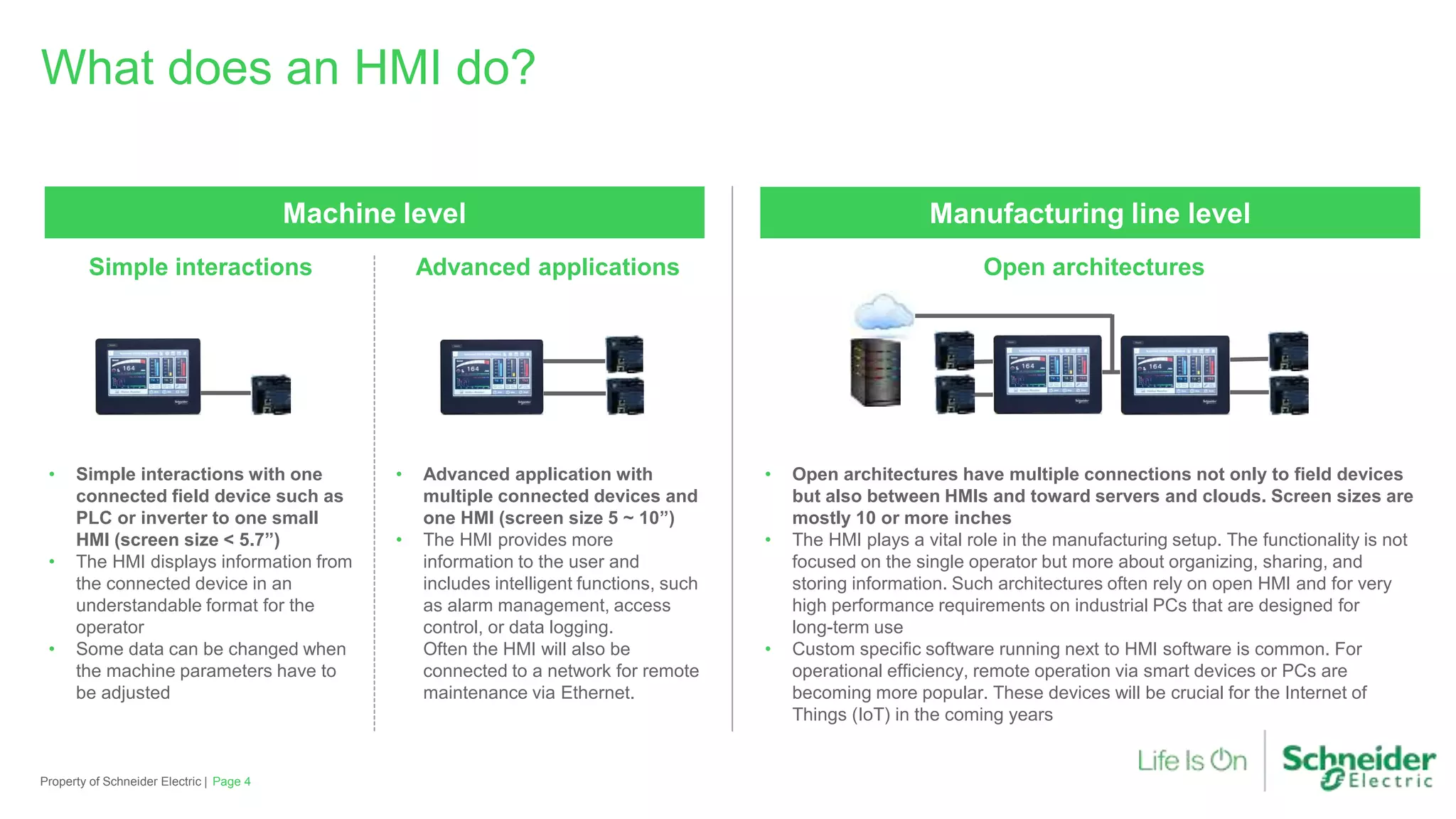
What does an HMI do?
Page 4Property of Schneider Electric |
Simple interactions Advanced applications Open architectures
Machine level
• Simple interactions with one
connected field device such as
PLC or inverter to one small
HMI (screen size < 5.7”)
• The HMI displays information from
the connected device in an
understandable format for the
operator
• Some data can be changed when
the machine parameters have to
be adjusted
• Advanced application with
multiple connected devices and
one HMI (screen size 5 ~ 10”)
• The HMI provides more
information to the user and
includes intelligent functions, such
as alarm management, access
control, or data logging.
Often the HMI will also be
connected to a network for remote
maintenance via Ethernet.
Manufacturing line level
• Open architectures have multiple connections not only to field devices
but also between HMIs and toward servers and clouds. Screen sizes are
mostly 10 or more inches
• The HMI plays a vital role in the manufacturing setup. The functionality is not
focused on the single operator but more about organizing, sharing, and
storing information. Such architectures often rely on open HMI and for very
high performance requirements on industrial PCs that are designed for
long-term use
• Custom specific software running next to HMI software is common. For
operational efficiency, remote operation via smart devices or PCs are
becoming more popular. These devices will be crucial for the Internet of
Things (IoT) in the coming years
What are the main components of an HMI?
Page 5Property of Schneider Electric |
For operators For devices and IT
Interfaces
• All modern HMIs consist of a
color TFT display with an input
function, mostly touch, keys,
or both
• The display is used to show the
operator information about the
machine and give him or her the
ability to interact by changing
data. This is mostly done on
resistive touch screens. For
dedicated requirements, HMIs
with keys are available
• For data exchange with field
devices or PCs, the HMI is
equipped with various
communication ports
• Ethernet-based communication is
standard and available in all
product classes. The serial
communication still remains
popular for simple communication
• For the PC connection USB ports
are available along with the
Ethernet port
Others
CPU and memory Software
• CPU and memory are used in
any HMI. In most HMIs these
are not directly accessible
• The memory holds the user
project that is written by the
screen editor. The CPU executes
the project and allows the HMI
to operate
• A DC 24 V power supply is
standard for HMIs. Some HMIs
feature a battery for data backup
• The HMI project is made in a
software tailored for screen
design and communication
• Modern tools integrate with the
PLC SW for effortless system
design. The next generation SW
is focused on gestures that are
common on smartphones or
tablets. IoT requires more
security features
Rearside
Frontside
A typical HMI (Magelis STO)
Page 6Property of Schneider Electric |
MagelisTM HMI can be
configured using VijeoTM
Designer/Vijeo XD* software in
a Windows® environment.
This HMI software has an
advanced user interface with
many configurable windows,
enabling projects to be
developed quickly and easily
including modern operation
concepts based
on gestures.
64k color screen with
resistive touch function
USB type mini-B device connector
for application transfer
Communication port to field
devices (such as PLC or INV),
depending on the model: Ethernet
and/or serial communication
A removable screw
terminal block for
24 V power supply
*Vijeo XD: Coming in Q2 2016
USB type A host
connector for:
• Connection of a
peripheral device
• Connection of a USB
memory stick
HMI offer overview — Magelis
Page 7Property of Schneider Electric |
Process and utilitiesManufacturing linesMachine
Mono/color Modular offer
22 mm mounting
Industrial PCPerformance panelOptimized panel
Combo
HMI + PLC
Modular combo
Touch panel
3.5” to 12”
STO
(USB accessories)
STU
GTO
SCU
XBT GH XBT GK
GTU
iDisplay
HMIDID
BOX PC & Display
HMI BM + DM
Rack PC
HMIRS
Simple PC
HMIBS/PS/PE
Control and design
software (Vijeo designer Vijeo Citect
Vijeo design
Air/Air+
Vijeo XD*
*Vijeo XD: Coming in Q2 2016
The most compact touch panelCut-out free small panels
HMI key offers
Optimized HMI
Page 8Property of Schneider Electric |
Magelis STU
• Standard definition color screen TFT QVGA 3.5’’ and 5.7”
• Innovative tool-free mounting via 22.5 mm hole
• Ethernet port RJ45 10/100 Base T
• Separated mounted via 3 m or 5 m cable with
mounting adapter
Magelis STO
• High definition 4.3” color screen TFT screen with
480 x 272 pixels
• Patented mounting adapter to mount in 3.5” STO panel
cut outs
• Highest screen to full size ratio in the 4.3” class
• Removable logo stickers
• 3 version for various communication types
HMI key offers (cont’d)
Optimized HMI
Page 9Property of Schneider Electric |
Magelis GTO
The optimized terminal that doesn’t compromise
features and performances
• Standard displays ranging from 3.5” to 12.1”
• Stainless steel panel for food and beverage
applications
• Optimized communication
• Easy to install and sustainable offer
• Full range of international certifications
• No-logo and full conformal coating versions
available
Advanced optimum panels
USB keyboardIlluminated switch
HMI key offers
USB accessories
Page 10Property of Schneider Electric |
Magelis HMIZ
• 5 tactile switches with configurable LED
(red/green/yellow/white/blue)
• Dynamical light changes and flashing to visualize
machine status
• Easy mounting one-cable connection and 22.5 mm hole
• User-friendly setting dialogs in Vijeo Designer
Magelis HMIZ
• Keyboard with 12 tactile function keys
• Support of alphanumerical and numerical input
• Easy mounting one-cable connection and 22.5 mm hole
• User-friendly setting dialogs in Vijeo Designer
Tower lightBiometric switch
HMI key offers (cont’d)
USB accessories
Page 11Property of Schneider Electric |
XB5S
• Access control via biometric fingerprint detection
• Information securely stored on device for data protection
• User level definition directly on the HMI
• Easy mounting with 22.5 mm hole
• User-friendly setting dialogs in Vijeo Designer
XVGU
• USB powered tower light with 3 LED light elements
• Multicolor with red, orange, green, or blue
• 85 dB buzzer with for 4 configurable sound pattern
• Easy mounting with single USB cable
• User-friendly setting dialogs in Vijeo Designer and
HMI screen
Unique software values on the marketA single configuration software for the complete
HMI range
HMI Software
Page 12Property of Schneider Electric |
Vijeo Designer
• Multiplatform: From optimized panels to iPCs
• Multi panel communication: Automatic data sharing up to
different panels
• Multilanguage: 15 languages in runtime and 38 alphabets
• Multiprotocol: On COM and Ethernet ports
• Multi access: Local or remote visualization with WEB Gate, VJD Air,
and Air Plus
• Multimedia: Video/sound record/replay capability
Vijeo XD *
• Improved HMI design
‒ Predefined navigation templates
‒ Upgrade without downloading
‒ Extend your standardization with themes
• Improved HMI operation
‒ Intuitive multi gesture recognition experience
‒ Large access: More information without increasing the size of your screen
‒ Finely detailed graphics in zoom-in (vector mode)
*Vijeo XD: Q2 2016
Get a fully operable view of your application
from wherever you are
Connect to your HMI remotely for an interactive
mirror-view of your application
Do more with your HMI software
Mobility Apps
Page 13Property of Schneider Electric |
Vijeo Design’Air
• HMI auto-detect: Scans and detects available HMI terminals on a
nearby network
• Remote monitoring: Connects tablets and smartphones to HMI
terminals, and allows remote viewing and controlling of HMI projects
at runtime
• Smartphone-like enhanced data display brought to automation industry
• Available in iOS AppStore and Google Play
Vijeo Design’Air Plus
• HMI project design: Enables an HMI designer to create a
tablet/smartphone project of the automation process using enhanced
drawing tools
• Remote access and control: Allows control automation processes and
provides the ability to view and monitor data, change variable values,
and monitor and acknowledge alarms
• Smartphone-like enhanced data display brought to automation industry
• Available in iOS AppStore and Google Play
Appendix
Page 14Property of Schneider Electric |
HMI key offers
Combo HMI
Page 15Property of Schneider Electric |
Magelis SCU
The all-in-one solution for compact requirements
• Innovative tool-free mounting via 22.5 mm hole
• Standard 3.5” and 5.7” TFT displays
• Digital version with 16 digital inputs and 10 digital outputs (relay outputs with 2 A)
• Analog version with 8 digital and 4 analog inputs as well as 8 digital
(V, A, PT100, TC) and 2 analog outputs
• Positioning functions with high speed counter and pulse train outputs on all units
• Embedded CANopen® port for field networking
HMI controller for small machine and simple process control
HMI key offers
Performance HMI
Page 16Property of Schneider Electric |
Magelis GTU
The state-of-the-art HMI that adapts to your needs
• 6 sizes of high resolution displays ranging from 7” to 15”, either with modern 16:9 or standard 4:3 ratio
• 2 boxes, one with Real Time OS and one with fully open WES7
• Up to 2 separate Ethernet ports plus serial communication ports and field bus options suiting IoT
• Industrial multi touch
• All memory removable for PC-free box replacements
• Wireless LAN enabled display
• Easy to install with integrated mounting fastener and antidrop lock, as well as fully coated offer
Premium modular panel
Box Display Tool-free
mounting
Complete
HMI
X  =
iPC segmentation and application
The right industrial PC for each environment
Page 17Property of Schneider Electric |
Simple iPC
S-Box and S-Panel PC
Rack PC
Modular iPC
Box PC and Panel PC
Infrastructure
SoMachine
Vijeo Designer
SoMachine
Vijeo Designer Intelligent
Data Service*
Vijeo XD
Vijeo Citect
Vijeo Citect
Industry PC
Magelis iPC
Page 18Property of Schneider Electric |
Targeted application
• Engineering and SCADA server in PlantStruxture™ for the Rack PC
• Line management and local work station in SCADA systems for Panel PC
• Local visualization and batch management with Box PC
Rack PC
Up to Quad core XEON CPUs,
tested and validated PES Server.
Box PC
From simple Atom up to iCore7 CPUs
and connectable to various field buses.
Panel PC
Wide-screen and multi touch up to 21”
with modular/simple structure
including enclosed types.
• Click here to find info on SE.com
• Click here to find Magelis HMI on
SE.com
• Click here to access our Digicat
• Click here to access to CAD files
• Click on the link below for FAQs
(frequently asked question)
Where to find details
Page 19Property of Schneider Electric |
Property of Schneider Electric |
Quiz
Based on what
you’ve learned so
far, try to answer to
this quiz
?
Page 20
HMI can manage visualization and control of a machine?
Q1
What are the main components of an HMI?
Q2
What are the software of configuration for Magelis?
Q3
How to install Magelis STU?
Q4
For compact requirements what is the best solution?
Q5
Property of Schneider Electric |
Quiz answers
HMI can manage visualization and control of a machine?
Q1 Yes but also supervision, diagnostics, monitoring, and data logging.
Page 21
Answers
What are the main components of an HMI?
Q2
Interfaces for operators, devices and IT
CPU and memory, Software
What are the software of configuration for Magelis?
Q3
Magelis HMI can be configured using Vijeo Designer/Vijeo XD software in
a Windows® environment.
How to install Magelis STU?
Q4
Innovative tool-free mounting via 22.5 mm hole. No panel cut-out is
required to install a Magelis STU small panel
For compact requirements what is the best solution?
Q5
Magelis SCU is the all-in-one HMI controller for small machine and simple
process control
Property of Schneider Electric |
Thank you
Page 22Property of Schneider Electric |
Magelis HMI, iPC and software Briefing

Magelis HMI, iPC and software Briefing

  • 1.
    Magelis HMI, iPC, andsoftware briefing Property of Schneider Electric Simply reliable. Simply available. December 2017
  • 2.
    • Introduction toHMI offer • HMI offer overview – Magelis  HMI key offers  HMI software • Appendix • iPC segmentation and application • Where to find further details • Quiz Table of content Property of Schneider Electric | Page 2
  • 3.
    Human machine interface(HMI) is the main visible automation part, which manages all vital machine features, including visualization, control, supervision, diagnostics, monitoring, and data logging. • Easy to use for stand-alone machines • Innovative advanced technologies for manufacturing lines • Advanced PC-based panel for complete process monitoring and control HMI Magelis range Page 3Property of Schneider Electric |
  • 4.
    What does anHMI do? Page 4Property of Schneider Electric | Simple interactions Advanced applications Open architectures Machine level • Simple interactions with one connected field device such as PLC or inverter to one small HMI (screen size < 5.7”) • The HMI displays information from the connected device in an understandable format for the operator • Some data can be changed when the machine parameters have to be adjusted • Advanced application with multiple connected devices and one HMI (screen size 5 ~ 10”) • The HMI provides more information to the user and includes intelligent functions, such as alarm management, access control, or data logging. Often the HMI will also be connected to a network for remote maintenance via Ethernet. Manufacturing line level • Open architectures have multiple connections not only to field devices but also between HMIs and toward servers and clouds. Screen sizes are mostly 10 or more inches • The HMI plays a vital role in the manufacturing setup. The functionality is not focused on the single operator but more about organizing, sharing, and storing information. Such architectures often rely on open HMI and for very high performance requirements on industrial PCs that are designed for long-term use • Custom specific software running next to HMI software is common. For operational efficiency, remote operation via smart devices or PCs are becoming more popular. These devices will be crucial for the Internet of Things (IoT) in the coming years
  • 5.
    What are themain components of an HMI? Page 5Property of Schneider Electric | For operators For devices and IT Interfaces • All modern HMIs consist of a color TFT display with an input function, mostly touch, keys, or both • The display is used to show the operator information about the machine and give him or her the ability to interact by changing data. This is mostly done on resistive touch screens. For dedicated requirements, HMIs with keys are available • For data exchange with field devices or PCs, the HMI is equipped with various communication ports • Ethernet-based communication is standard and available in all product classes. The serial communication still remains popular for simple communication • For the PC connection USB ports are available along with the Ethernet port Others CPU and memory Software • CPU and memory are used in any HMI. In most HMIs these are not directly accessible • The memory holds the user project that is written by the screen editor. The CPU executes the project and allows the HMI to operate • A DC 24 V power supply is standard for HMIs. Some HMIs feature a battery for data backup • The HMI project is made in a software tailored for screen design and communication • Modern tools integrate with the PLC SW for effortless system design. The next generation SW is focused on gestures that are common on smartphones or tablets. IoT requires more security features Rearside Frontside
  • 6.
    A typical HMI(Magelis STO) Page 6Property of Schneider Electric | MagelisTM HMI can be configured using VijeoTM Designer/Vijeo XD* software in a Windows® environment. This HMI software has an advanced user interface with many configurable windows, enabling projects to be developed quickly and easily including modern operation concepts based on gestures. 64k color screen with resistive touch function USB type mini-B device connector for application transfer Communication port to field devices (such as PLC or INV), depending on the model: Ethernet and/or serial communication A removable screw terminal block for 24 V power supply *Vijeo XD: Coming in Q2 2016 USB type A host connector for: • Connection of a peripheral device • Connection of a USB memory stick
  • 7.
    HMI offer overview— Magelis Page 7Property of Schneider Electric | Process and utilitiesManufacturing linesMachine Mono/color Modular offer 22 mm mounting Industrial PCPerformance panelOptimized panel Combo HMI + PLC Modular combo Touch panel 3.5” to 12” STO (USB accessories) STU GTO SCU XBT GH XBT GK GTU iDisplay HMIDID BOX PC & Display HMI BM + DM Rack PC HMIRS Simple PC HMIBS/PS/PE Control and design software (Vijeo designer Vijeo Citect Vijeo design Air/Air+ Vijeo XD* *Vijeo XD: Coming in Q2 2016
  • 8.
    The most compacttouch panelCut-out free small panels HMI key offers Optimized HMI Page 8Property of Schneider Electric | Magelis STU • Standard definition color screen TFT QVGA 3.5’’ and 5.7” • Innovative tool-free mounting via 22.5 mm hole • Ethernet port RJ45 10/100 Base T • Separated mounted via 3 m or 5 m cable with mounting adapter Magelis STO • High definition 4.3” color screen TFT screen with 480 x 272 pixels • Patented mounting adapter to mount in 3.5” STO panel cut outs • Highest screen to full size ratio in the 4.3” class • Removable logo stickers • 3 version for various communication types
  • 9.
    HMI key offers(cont’d) Optimized HMI Page 9Property of Schneider Electric | Magelis GTO The optimized terminal that doesn’t compromise features and performances • Standard displays ranging from 3.5” to 12.1” • Stainless steel panel for food and beverage applications • Optimized communication • Easy to install and sustainable offer • Full range of international certifications • No-logo and full conformal coating versions available Advanced optimum panels
  • 10.
    USB keyboardIlluminated switch HMIkey offers USB accessories Page 10Property of Schneider Electric | Magelis HMIZ • 5 tactile switches with configurable LED (red/green/yellow/white/blue) • Dynamical light changes and flashing to visualize machine status • Easy mounting one-cable connection and 22.5 mm hole • User-friendly setting dialogs in Vijeo Designer Magelis HMIZ • Keyboard with 12 tactile function keys • Support of alphanumerical and numerical input • Easy mounting one-cable connection and 22.5 mm hole • User-friendly setting dialogs in Vijeo Designer
  • 11.
    Tower lightBiometric switch HMIkey offers (cont’d) USB accessories Page 11Property of Schneider Electric | XB5S • Access control via biometric fingerprint detection • Information securely stored on device for data protection • User level definition directly on the HMI • Easy mounting with 22.5 mm hole • User-friendly setting dialogs in Vijeo Designer XVGU • USB powered tower light with 3 LED light elements • Multicolor with red, orange, green, or blue • 85 dB buzzer with for 4 configurable sound pattern • Easy mounting with single USB cable • User-friendly setting dialogs in Vijeo Designer and HMI screen
  • 12.
    Unique software valueson the marketA single configuration software for the complete HMI range HMI Software Page 12Property of Schneider Electric | Vijeo Designer • Multiplatform: From optimized panels to iPCs • Multi panel communication: Automatic data sharing up to different panels • Multilanguage: 15 languages in runtime and 38 alphabets • Multiprotocol: On COM and Ethernet ports • Multi access: Local or remote visualization with WEB Gate, VJD Air, and Air Plus • Multimedia: Video/sound record/replay capability Vijeo XD * • Improved HMI design ‒ Predefined navigation templates ‒ Upgrade without downloading ‒ Extend your standardization with themes • Improved HMI operation ‒ Intuitive multi gesture recognition experience ‒ Large access: More information without increasing the size of your screen ‒ Finely detailed graphics in zoom-in (vector mode) *Vijeo XD: Q2 2016
  • 13.
    Get a fullyoperable view of your application from wherever you are Connect to your HMI remotely for an interactive mirror-view of your application Do more with your HMI software Mobility Apps Page 13Property of Schneider Electric | Vijeo Design’Air • HMI auto-detect: Scans and detects available HMI terminals on a nearby network • Remote monitoring: Connects tablets and smartphones to HMI terminals, and allows remote viewing and controlling of HMI projects at runtime • Smartphone-like enhanced data display brought to automation industry • Available in iOS AppStore and Google Play Vijeo Design’Air Plus • HMI project design: Enables an HMI designer to create a tablet/smartphone project of the automation process using enhanced drawing tools • Remote access and control: Allows control automation processes and provides the ability to view and monitor data, change variable values, and monitor and acknowledge alarms • Smartphone-like enhanced data display brought to automation industry • Available in iOS AppStore and Google Play
  • 14.
    Appendix Page 14Property ofSchneider Electric |
  • 15.
    HMI key offers ComboHMI Page 15Property of Schneider Electric | Magelis SCU The all-in-one solution for compact requirements • Innovative tool-free mounting via 22.5 mm hole • Standard 3.5” and 5.7” TFT displays • Digital version with 16 digital inputs and 10 digital outputs (relay outputs with 2 A) • Analog version with 8 digital and 4 analog inputs as well as 8 digital (V, A, PT100, TC) and 2 analog outputs • Positioning functions with high speed counter and pulse train outputs on all units • Embedded CANopen® port for field networking HMI controller for small machine and simple process control
  • 16.
    HMI key offers PerformanceHMI Page 16Property of Schneider Electric | Magelis GTU The state-of-the-art HMI that adapts to your needs • 6 sizes of high resolution displays ranging from 7” to 15”, either with modern 16:9 or standard 4:3 ratio • 2 boxes, one with Real Time OS and one with fully open WES7 • Up to 2 separate Ethernet ports plus serial communication ports and field bus options suiting IoT • Industrial multi touch • All memory removable for PC-free box replacements • Wireless LAN enabled display • Easy to install with integrated mounting fastener and antidrop lock, as well as fully coated offer Premium modular panel Box Display Tool-free mounting Complete HMI X  =
  • 17.
    iPC segmentation andapplication The right industrial PC for each environment Page 17Property of Schneider Electric | Simple iPC S-Box and S-Panel PC Rack PC Modular iPC Box PC and Panel PC Infrastructure SoMachine Vijeo Designer SoMachine Vijeo Designer Intelligent Data Service* Vijeo XD Vijeo Citect Vijeo Citect
  • 18.
    Industry PC Magelis iPC Page18Property of Schneider Electric | Targeted application • Engineering and SCADA server in PlantStruxture™ for the Rack PC • Line management and local work station in SCADA systems for Panel PC • Local visualization and batch management with Box PC Rack PC Up to Quad core XEON CPUs, tested and validated PES Server. Box PC From simple Atom up to iCore7 CPUs and connectable to various field buses. Panel PC Wide-screen and multi touch up to 21” with modular/simple structure including enclosed types.
  • 19.
    • Click hereto find info on SE.com • Click here to find Magelis HMI on SE.com • Click here to access our Digicat • Click here to access to CAD files • Click on the link below for FAQs (frequently asked question) Where to find details Page 19Property of Schneider Electric |
  • 20.
    Property of SchneiderElectric | Quiz Based on what you’ve learned so far, try to answer to this quiz ? Page 20 HMI can manage visualization and control of a machine? Q1 What are the main components of an HMI? Q2 What are the software of configuration for Magelis? Q3 How to install Magelis STU? Q4 For compact requirements what is the best solution? Q5
  • 21.
    Property of SchneiderElectric | Quiz answers HMI can manage visualization and control of a machine? Q1 Yes but also supervision, diagnostics, monitoring, and data logging. Page 21 Answers What are the main components of an HMI? Q2 Interfaces for operators, devices and IT CPU and memory, Software What are the software of configuration for Magelis? Q3 Magelis HMI can be configured using Vijeo Designer/Vijeo XD software in a Windows® environment. How to install Magelis STU? Q4 Innovative tool-free mounting via 22.5 mm hole. No panel cut-out is required to install a Magelis STU small panel For compact requirements what is the best solution? Q5 Magelis SCU is the all-in-one HMI controller for small machine and simple process control
  • 22.
    Property of SchneiderElectric | Thank you Page 22Property of Schneider Electric |