Social Media Management
LIS 4380
Casey Yu
Fall 2013
Week 3
9/10-12/13
FSU SLIS – Florida’s iSchool -- Florida State University, College of Communication & Information
Social Media Management
Today's topics:
• Attendance
• 2:10: FIELD TRIP!!
• News
• Wiki, last time!
• Blogging 101, how to do it!
• The Visual Landscape
Work time!
• Start working on your first blog post!
• Explore Pinterest
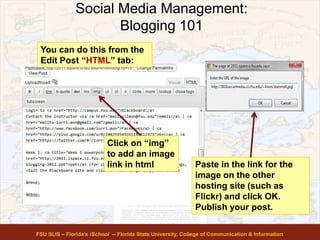
FSU SLIS – Florida’s iSchool -- Florida State University, College of Communication & Information
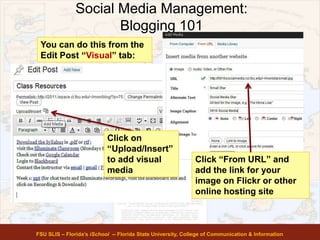
Social Media Management
All the news you can use…
• I've been HACKED!
• The Hash-hole
• The multifaceted problem of twerking and social media
• Apple iPhone 5C
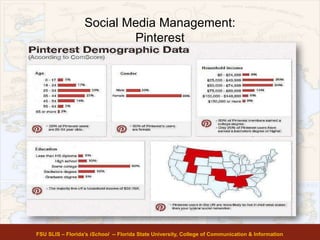
Thursday:
• Waffle falling over
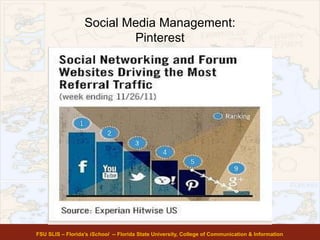
• Never Forget AT&T
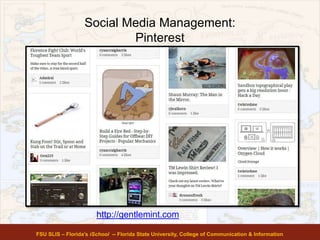
FSU SLIS – Florida’s iSchool -- Florida State University, College of Communication & Information
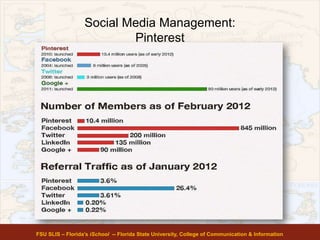
Social Media Management
ATTENDANCE
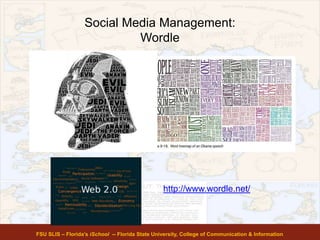
• Go to the blog and complete the form before 2:30 to be counted on
time!
• Questions about attendance – see Blake (email him today)
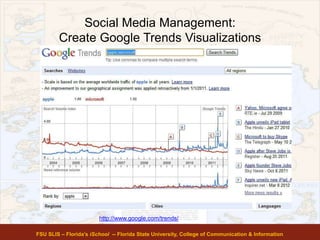
FSU SLIS – Florida’s iSchool -- Florida State University, College of Communication & Information
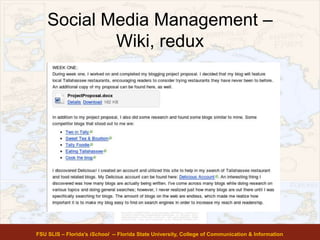
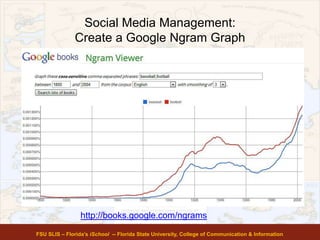
Social Media Management –
Wiki, redux
• First, let's look at Canvas, the syllabus, and
the course outline
• Second – wiki wiki wiki.
1. Append new week's information at the TOP
of YOUR page's old information. Click edit
to add your info, then "save" to save it.
2. Copy and paste the URL to your page (this
will not change weekly!) and submit it in
Canvas. Go to assignments, look for the
right week number and due date.
FSU SLIS – Florida’s iSchool -- Florida State University, College of Communication & Information
Social Media Management –
Wiki, redux
FSU SLIS – Florida’s iSchool -- Florida State University, College of Communication & Information
Social Media Management:
Blogging 101
FSU SLIS – Florida’s iSchool -- Florida State University, College of Communication & Information
• Write your first blog post. THEN before you
submit your first blog post, schedule an
appointment with the RWC for them to review
your blog post and offer feedback.
• Have your tutor send us an email confirming
your attendance.
– If your surname begins with A-M, send to Casey
(cy09g@my.fsu.edu)
– If your surname begins with N-Z, send to Blake
(bar08@my.fsu.edu)
• See blog for more info
Social Media Management:
Blogging 101
FSU SLIS – Florida’s iSchool -- Florida State University, College of Communication & Information
Explore Themes for look of new
blog. Suggestion – look for widget-
friendly themes
Social Media Management:
Blogging 101
FSU SLIS – Florida’s iSchool -- Florida State University, College of Communication & Information
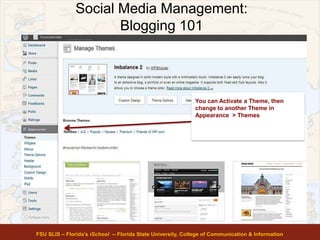
You can Activate a Theme, then
change to another Theme in
Appearance > Themes
Social Media Management:
Blogging 101
FSU SLIS – Florida’s iSchool -- Florida State University, College of Communication & Information
You can Activate a Theme, then
change to another Theme in
Appearance > Themes
Social Media Management:
Blogging 101
FSU SLIS – Florida’s iSchool -- Florida State University, College of Communication & Information
Click on Pages and
Add New
Social Media Management:
Blogging 101
FSU SLIS – Florida’s iSchool -- Florida State University, College of Communication & Information
Name the page About and add some text (e.g.
from your blog proposal). When finished,
click Publish
Social Media Management:
Blogging 101
FSU SLIS – Florida’s iSchool -- Florida State University, College of Communication & Information
Depending on your chosen Theme, the About
page link may show up automatically on your
homepage, or you may have to add a link to
it.
Social Media Management:
Blogging 101
FSU SLIS – Florida’s iSchool -- Florida State University, College of Communication & Information
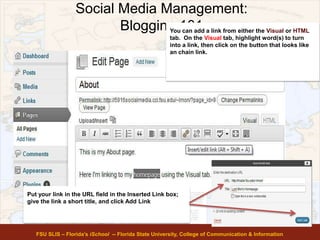
You can add a link from either the Visual or HTML
tab. On the Visual tab, highlight word(s) to turn
into a link, then click on the button that looks like
an chain link.
Put your link in the URL field in the Inserted Link box;
give the link a short title, and click Add Link
Social Media Management:
Blogging 101
FSU SLIS – Florida’s iSchool -- Florida State University, College of Communication & Information
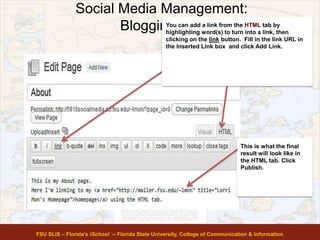
You can add a link from the HTML tab by
highlighting word(s) to turn into a link, then
clicking on the link button. Fill in the link URL in
the Inserted Link box and click Add Link.
This is what the final
result will look like in
the HTML tab. Click
Publish.
Social Media Management:
Blogging 101
FSU SLIS – Florida’s iSchool -- Florida State University, College of Communication & Information
Using Images on Flickr, Pinterest, or
elsewhere
• You may need an image to be on the web
so you can link to it in a post or on your
page
• Flickr.com – http://www.flickr.com/ -
requires Yahoo! email address/account
• Pinterest.com – http://www.pinterest.com
Social Media Management:
Blogging 101
FSU SLIS – Florida’s iSchool -- Florida State University, College of Communication & Information
Linking Images From Other Hosts
• You can link to images hosted elsewhere on the
web; for example, you can make a Flickr account
http://www.flickr.com and link to a picture hosted
there, if you first figure out the URL web link of the
picture’s location on Flickr.
• Finding URL of an online image
– PC: rightclick the image & choose “copy image URL”;
then CTRL V or right-click & paste the URL
– Mac: either click & hold, or CTRL-click & Copy Image
Address, then CTRL-click and Paste
Social Media Management:
Blogging 101
FSU SLIS – Florida’s iSchool -- Florida State University, College of Communication & Information
You can do this from the
Edit Post “HTML” tab:
Click on “img”
to add an image
link in html Paste in the link for the
image on the other
hosting site (such as
Flickr) and click OK.
Publish your post.
Social Media Management:
Blogging 101
FSU SLIS – Florida’s iSchool -- Florida State University, College of Communication & Information
You can do this from the
Edit Post “Visual” tab:
Click on
“Upload/Insert”
to add visual
media
Click “From URL” and
add the link for your
image on Flickr or other
online hosting site
Social Media Management:
Blogging 101
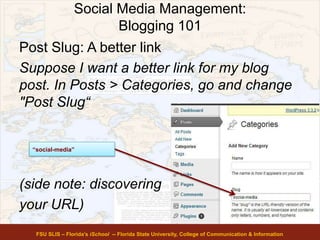
Post Slug: A better link
Suppose I want a better link for my blog
post. In Posts > Categories, go and change
"Post Slug“
(side note: discovering
your URL)
FSU SLIS – Florida’s iSchool -- Florida State University, College of Communication & Information
“social-media”
Social Media Management:
The Visual Landscape –
Social Media Photo Posting Etiquette
If it is a photo you did NOT
create or own:
• Do you have permission to
post this? Check licensing
rules.
• Did you follow Creative
Commons license rules
properly in posting?
• Did you give credit to the
creator of the image?
(creator's name, link back to
creator site)
• Are you hotlinking without
permission? DON'T.
If you created/own the photo
or image:
• Before posting a photo of
yourself or others, ask
yourself how you'd feel if a
friend posted a similar
photo of you, or if your mom
or boss saw a similar photo
of you;
• If others are in the
photo, obtain permission to
use their likeness!!
• Do not tag a friend in a
photo if s/he is not actually
in the photo!
FSU SLIS – Florida’s iSchool -- Florida State University, College of Communication & Information
http://trib.in/KbZm8W
Social Media Management:
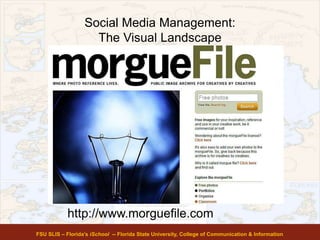
The Visual Landscape
FSU SLIS – Florida’s iSchool -- Florida State University, College of Communication & Information
http://www.morguefile.com
Social Media Management:
The Visual Landscape
FSU SLIS – Florida’s iSchool -- Florida State University, College of Communication & Information
http://commons.wikimedia.org/wiki/Main_Page
Social Media Management:
The Visual Landscape
FSU SLIS – Florida’s iSchool -- Florida State University, College of Communication & Information
http://www.flickr.com/photos/45624627@N02/
Social Media Management:
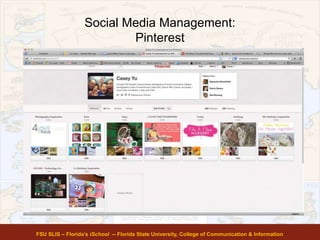
Pinterest
FSU SLIS – Florida’s iSchool -- Florida State University, College of Communication & Information
Social Media Management:
Pinterest
FSU SLIS – Florida’s iSchool -- Florida State University, College of Communication & Information
Social Media Management:
Pinterest
FSU SLIS – Florida’s iSchool -- Florida State University, College of Communication & Information
Social Media Management:
Pinterest
FSU SLIS – Florida’s iSchool -- Florida State University, College of Communication & Information
http://gentlemint.com
Social Media Management:
Pinterest
FSU SLIS – Florida’s iSchool -- Florida State University, College of Communication & Information
Social Media Management:
Pinterest
FSU SLIS – Florida’s iSchool -- Florida State University, College of Communication & Information
Social Media Management:
Wordle
FSU SLIS – Florida’s iSchool -- Florida State University, College of Communication & Information
http://www.wordle.net/
Social Media Management:
Tagxedo
FSU SLIS – Florida’s iSchool -- Florida State University, College of Communication & Information
http://www.tagxedo.com/
Social Media Management:
Create Infographics
FSU SLIS – Florida’s iSchool -- Florida State University, College of Communication & Information
http://visual.ly/
Social Media Management:
Create Google Trends Visualizations
FSU SLIS – Florida’s iSchool -- Florida State University, College of Communication & Information
http://www.google.com/trends/
Social Media Management:
Create a Google Ngram Graph
FSU SLIS – Florida’s iSchool -- Florida State University, College of Communication & Information
http://books.google.com/ngrams
Social Media Management:
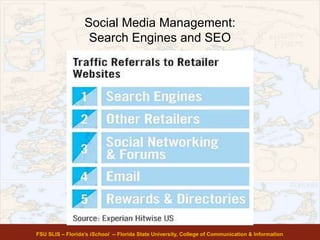
Search Engines and SEO
FSU SLIS – Florida’s iSchool -- Florida State University, College of Communication & Information
Social Media Management:
Search Engines and SEO
• Using the right keywords
• Using the right words and phrases for your
blog pages, blog post titles, subtitles , links
and anchor links
• Using tool tips / “alt” text to make images
findable by search engines
• Don’t OVERUSE a keyword; you want it to
take people to the right page, not
necessarily to ALL your pages equally.
FSU SLIS – Florida’s iSchool -- Florida State University, College of Communication & Information
http://mz.cm/JQ5X91
Social Media Management:
Keyword Density Analysis
Keyword density is the percentage of times
a keyword or phrase appears on a web page
compared to the total number of words on
the page. In the context of search engine
optimization keyword density can be used
as a factor in determining whether a web
page is relevant to a specified keyword or
keyword phrase.
FSU SLIS – Florida’s iSchool -- Florida State University, College of Communication & Information
Social Media Management:
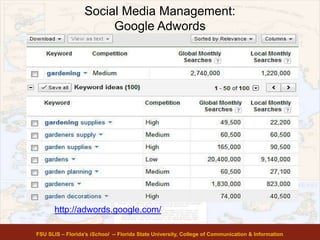
Google Adwords
FSU SLIS – Florida’s iSchool -- Florida State University, College of Communication & Information
http://adwords.google.com/
Social Media Management:
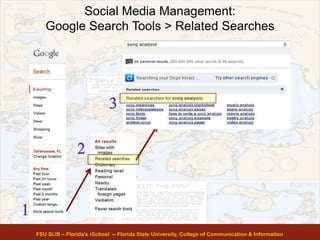
Google Search Tools > Related Searches
FSU SLIS – Florida’s iSchool -- Florida State University, College of Communication & Information

Lis4380 f13-w3

  • 1.
    Social Media Management LIS4380 Casey Yu Fall 2013 Week 3 9/10-12/13 FSU SLIS – Florida’s iSchool -- Florida State University, College of Communication & Information
  • 2.
    Social Media Management Today'stopics: • Attendance • 2:10: FIELD TRIP!! • News • Wiki, last time! • Blogging 101, how to do it! • The Visual Landscape Work time! • Start working on your first blog post! • Explore Pinterest FSU SLIS – Florida’s iSchool -- Florida State University, College of Communication & Information
  • 3.
    Social Media Management Allthe news you can use… • I've been HACKED! • The Hash-hole • The multifaceted problem of twerking and social media • Apple iPhone 5C Thursday: • Waffle falling over • Never Forget AT&T FSU SLIS – Florida’s iSchool -- Florida State University, College of Communication & Information
  • 4.
    Social Media Management ATTENDANCE •Go to the blog and complete the form before 2:30 to be counted on time! • Questions about attendance – see Blake (email him today) FSU SLIS – Florida’s iSchool -- Florida State University, College of Communication & Information
  • 5.
    Social Media Management– Wiki, redux • First, let's look at Canvas, the syllabus, and the course outline • Second – wiki wiki wiki. 1. Append new week's information at the TOP of YOUR page's old information. Click edit to add your info, then "save" to save it. 2. Copy and paste the URL to your page (this will not change weekly!) and submit it in Canvas. Go to assignments, look for the right week number and due date. FSU SLIS – Florida’s iSchool -- Florida State University, College of Communication & Information
  • 6.
    Social Media Management– Wiki, redux FSU SLIS – Florida’s iSchool -- Florida State University, College of Communication & Information
  • 7.
    Social Media Management: Blogging101 FSU SLIS – Florida’s iSchool -- Florida State University, College of Communication & Information • Write your first blog post. THEN before you submit your first blog post, schedule an appointment with the RWC for them to review your blog post and offer feedback. • Have your tutor send us an email confirming your attendance. – If your surname begins with A-M, send to Casey (cy09g@my.fsu.edu) – If your surname begins with N-Z, send to Blake (bar08@my.fsu.edu) • See blog for more info
  • 8.
    Social Media Management: Blogging101 FSU SLIS – Florida’s iSchool -- Florida State University, College of Communication & Information Explore Themes for look of new blog. Suggestion – look for widget- friendly themes
  • 9.
    Social Media Management: Blogging101 FSU SLIS – Florida’s iSchool -- Florida State University, College of Communication & Information You can Activate a Theme, then change to another Theme in Appearance > Themes
  • 10.
    Social Media Management: Blogging101 FSU SLIS – Florida’s iSchool -- Florida State University, College of Communication & Information You can Activate a Theme, then change to another Theme in Appearance > Themes
  • 11.
    Social Media Management: Blogging101 FSU SLIS – Florida’s iSchool -- Florida State University, College of Communication & Information Click on Pages and Add New
  • 12.
    Social Media Management: Blogging101 FSU SLIS – Florida’s iSchool -- Florida State University, College of Communication & Information Name the page About and add some text (e.g. from your blog proposal). When finished, click Publish
  • 13.
    Social Media Management: Blogging101 FSU SLIS – Florida’s iSchool -- Florida State University, College of Communication & Information Depending on your chosen Theme, the About page link may show up automatically on your homepage, or you may have to add a link to it.
  • 14.
    Social Media Management: Blogging101 FSU SLIS – Florida’s iSchool -- Florida State University, College of Communication & Information You can add a link from either the Visual or HTML tab. On the Visual tab, highlight word(s) to turn into a link, then click on the button that looks like an chain link. Put your link in the URL field in the Inserted Link box; give the link a short title, and click Add Link
  • 15.
    Social Media Management: Blogging101 FSU SLIS – Florida’s iSchool -- Florida State University, College of Communication & Information You can add a link from the HTML tab by highlighting word(s) to turn into a link, then clicking on the link button. Fill in the link URL in the Inserted Link box and click Add Link. This is what the final result will look like in the HTML tab. Click Publish.
  • 16.
    Social Media Management: Blogging101 FSU SLIS – Florida’s iSchool -- Florida State University, College of Communication & Information Using Images on Flickr, Pinterest, or elsewhere • You may need an image to be on the web so you can link to it in a post or on your page • Flickr.com – http://www.flickr.com/ - requires Yahoo! email address/account • Pinterest.com – http://www.pinterest.com
  • 17.
    Social Media Management: Blogging101 FSU SLIS – Florida’s iSchool -- Florida State University, College of Communication & Information Linking Images From Other Hosts • You can link to images hosted elsewhere on the web; for example, you can make a Flickr account http://www.flickr.com and link to a picture hosted there, if you first figure out the URL web link of the picture’s location on Flickr. • Finding URL of an online image – PC: rightclick the image & choose “copy image URL”; then CTRL V or right-click & paste the URL – Mac: either click & hold, or CTRL-click & Copy Image Address, then CTRL-click and Paste
  • 18.
    Social Media Management: Blogging101 FSU SLIS – Florida’s iSchool -- Florida State University, College of Communication & Information You can do this from the Edit Post “HTML” tab: Click on “img” to add an image link in html Paste in the link for the image on the other hosting site (such as Flickr) and click OK. Publish your post.
  • 19.
    Social Media Management: Blogging101 FSU SLIS – Florida’s iSchool -- Florida State University, College of Communication & Information You can do this from the Edit Post “Visual” tab: Click on “Upload/Insert” to add visual media Click “From URL” and add the link for your image on Flickr or other online hosting site
  • 20.
    Social Media Management: Blogging101 Post Slug: A better link Suppose I want a better link for my blog post. In Posts > Categories, go and change "Post Slug“ (side note: discovering your URL) FSU SLIS – Florida’s iSchool -- Florida State University, College of Communication & Information “social-media”
  • 21.
    Social Media Management: TheVisual Landscape – Social Media Photo Posting Etiquette If it is a photo you did NOT create or own: • Do you have permission to post this? Check licensing rules. • Did you follow Creative Commons license rules properly in posting? • Did you give credit to the creator of the image? (creator's name, link back to creator site) • Are you hotlinking without permission? DON'T. If you created/own the photo or image: • Before posting a photo of yourself or others, ask yourself how you'd feel if a friend posted a similar photo of you, or if your mom or boss saw a similar photo of you; • If others are in the photo, obtain permission to use their likeness!! • Do not tag a friend in a photo if s/he is not actually in the photo! FSU SLIS – Florida’s iSchool -- Florida State University, College of Communication & Information http://trib.in/KbZm8W
  • 22.
    Social Media Management: TheVisual Landscape FSU SLIS – Florida’s iSchool -- Florida State University, College of Communication & Information http://www.morguefile.com
  • 23.
    Social Media Management: TheVisual Landscape FSU SLIS – Florida’s iSchool -- Florida State University, College of Communication & Information http://commons.wikimedia.org/wiki/Main_Page
  • 24.
    Social Media Management: TheVisual Landscape FSU SLIS – Florida’s iSchool -- Florida State University, College of Communication & Information http://www.flickr.com/photos/45624627@N02/
  • 25.
    Social Media Management: Pinterest FSUSLIS – Florida’s iSchool -- Florida State University, College of Communication & Information
  • 26.
    Social Media Management: Pinterest FSUSLIS – Florida’s iSchool -- Florida State University, College of Communication & Information
  • 27.
    Social Media Management: Pinterest FSUSLIS – Florida’s iSchool -- Florida State University, College of Communication & Information
  • 28.
    Social Media Management: Pinterest FSUSLIS – Florida’s iSchool -- Florida State University, College of Communication & Information http://gentlemint.com
  • 29.
    Social Media Management: Pinterest FSUSLIS – Florida’s iSchool -- Florida State University, College of Communication & Information
  • 30.
    Social Media Management: Pinterest FSUSLIS – Florida’s iSchool -- Florida State University, College of Communication & Information
  • 31.
    Social Media Management: Wordle FSUSLIS – Florida’s iSchool -- Florida State University, College of Communication & Information http://www.wordle.net/
  • 32.
    Social Media Management: Tagxedo FSUSLIS – Florida’s iSchool -- Florida State University, College of Communication & Information http://www.tagxedo.com/
  • 33.
    Social Media Management: CreateInfographics FSU SLIS – Florida’s iSchool -- Florida State University, College of Communication & Information http://visual.ly/
  • 34.
    Social Media Management: CreateGoogle Trends Visualizations FSU SLIS – Florida’s iSchool -- Florida State University, College of Communication & Information http://www.google.com/trends/
  • 35.
    Social Media Management: Createa Google Ngram Graph FSU SLIS – Florida’s iSchool -- Florida State University, College of Communication & Information http://books.google.com/ngrams
  • 36.
    Social Media Management: SearchEngines and SEO FSU SLIS – Florida’s iSchool -- Florida State University, College of Communication & Information
  • 37.
    Social Media Management: SearchEngines and SEO • Using the right keywords • Using the right words and phrases for your blog pages, blog post titles, subtitles , links and anchor links • Using tool tips / “alt” text to make images findable by search engines • Don’t OVERUSE a keyword; you want it to take people to the right page, not necessarily to ALL your pages equally. FSU SLIS – Florida’s iSchool -- Florida State University, College of Communication & Information http://mz.cm/JQ5X91
  • 38.
    Social Media Management: KeywordDensity Analysis Keyword density is the percentage of times a keyword or phrase appears on a web page compared to the total number of words on the page. In the context of search engine optimization keyword density can be used as a factor in determining whether a web page is relevant to a specified keyword or keyword phrase. FSU SLIS – Florida’s iSchool -- Florida State University, College of Communication & Information
  • 39.
    Social Media Management: GoogleAdwords FSU SLIS – Florida’s iSchool -- Florida State University, College of Communication & Information http://adwords.google.com/
  • 40.
    Social Media Management: GoogleSearch Tools > Related Searches FSU SLIS – Florida’s iSchool -- Florida State University, College of Communication & Information

Editor's Notes

  • #22 http://www.chicagotribune.com/features/tribu/sc-fam-0424-online-photo-rules-20120424,0,2427140.storyBefore posting a photo, ask yourself if you would be comfortable with your boss or your mom, or a future employer seeing the photo you are planning to post. If it's an unflattering photo of someone else , ask yourself how you would feel if a friend posted a similar photo of you. Remember that prospective employers routinely search applicants on Facebook and other social media, looking for anything that might suggest the job applicant should not be hired.
  • #38 What keywords are your prospective readers customers using when they search?What topics interest your audience, directly and indirectly related to your blog? Think of a search request as a question - can you provide useful answers?http://www.contentmarketinginstitute.com/2010/08/content-creation-and-promotion-is-more-effective-with-seo/http://www.seomoz.org/beginners-guide-to-seo/basics-of-search-engine-friendly-design-and-development
  • #39 What keywords are your prospective readers customers using when they search?What topics interest your audience, directly and indirectly related to your blog? Think of a search request as a question - can you provide useful answers?http://www.contentmarketinginstitute.com/2010/08/content-creation-and-promotion-is-more-effective-with-seo/http://www.seomoz.org/beginners-guide-to-seo/basics-of-search-engine-friendly-design-and-development