1 | P a g e
Linux notes:
What is Linux?
 Linux is UNIX like open source operating system written by Linus Torvalds in 1991
History of UNIX
 UNIX is an Operating System (OS), was developed about 44 years ago i.e., 1969 at AT&T
Bell Labs by Ken Thompson and Dennis Ritchie.
 It is a Command Line Interpreter.
 It was d developed for the Mini -Computers as a time sharing system.
 UNIX was the predecessor of LINUX.
 1957: Bell Labs found they needed an operating system which at the time was running
various batch jobs.
 1965: Bell Labs create Multics (Multiplexed Information and Computing Service)
 1969: Summer 1969 UNIX was developed by AT&T
 1975: Sixth edition of UNIX released May 1975
Many of the proprietary flavors have been designed to run only (or mainly) on
proprietary hardware sold by the same company that has developed them. Examples
include:
 AIX - developed by IBM for use on its mainframe computers
 BSD/OS - a commercial version of BSD developed by Wind River for
Intel processors
 HP-UX - developed by Hewlett-Packard for its HP 9000 series of
business servers
 IRIX - developed by SGI for applications that use 3-D visualization and
virtual reality
 QNX - a real time operating system developed by QNX Software
Systems primarily for use in embedded systems
 Solaris - developed by Sun Microsystems for the SPARC platform and
the most widely used proprietary flavor for web servers
 Tru64 - developed by Compaq for the Alpha processor
 SCO UNIX by the Santa Cruz Operation Inc.
2 | P a g e
History of LINUX
 LINUX was created by Linus Torvalds in 1991.
 LINUX is a open source.
 LINUX is a variant of UNIX.
 1985: GNU project started
 1991: Linux is introduced by Linus Benedict Torvalds who was a second year student of
Computer Science at the University of Helsinki
 1993: NetBSD & FreeBSD released
 1994: Red Hat Linux is introduced
Others are developed by groups of volunteers who make them available for free.
Among them are:
 Linux - the most popular and fastest growing of all the Unix-like operating
systems
 FreeBSD - the most popular of the BSD systems (all of which are direct
descendants of BSD UNIX, which was developed at the University of
California at Berkeley)
 NetBSD - features the ability to run on more than 50 platforms, ranging from
acorn26 to x68k
 OpenBSD - may have already attained its goal of becoming the most secure of
all computer operating systems
 Darwin - the new version of BSD that serves as the core for the Mac OS X
Why LINUX/UNIX?
 LINUX is free.
 Can view and edit the source code of OS
 It i s fully customizable.
 Most Important Feature is Stability
 30 Years to get the bugs
 Important in shared environments and critical applications
 LINUX has better security structure.
 High Portability
 Easy to port new H/W Platform
 Written in C which is highly portable
 LINUX has better security structure.
 High Portability
 Easy to port new H/W Platform
 Written in C which is highly portable
3 | P a g e
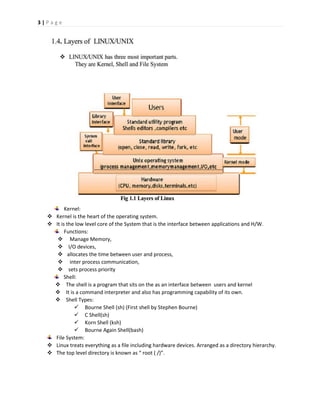
Kernel:
 Kernel is the heart of the operating system.
 It is the low level core of the System that is the interface between applications and H/W.
Functions:
 Manage Memory,
 I/O devices,
 allocates the time between user and process,
 inter process communication,
 sets process priority
Shell:
 The shell is a program that sits on the as an interface between users and kernel
 It is a command interpreter and also has programming capability of its own.
 Shell Types:
 Bourne Shell (sh) (First shell by Stephen Bourne)
 C Shell(sh)
 Korn Shell (ksh)
 Bourne Again Shell(bash)
File System:
 Linux treats everything as a file including hardware devices. Arranged as a directory hierarchy.
 The top level directory is known as “ root ( /)”.
4 | P a g e
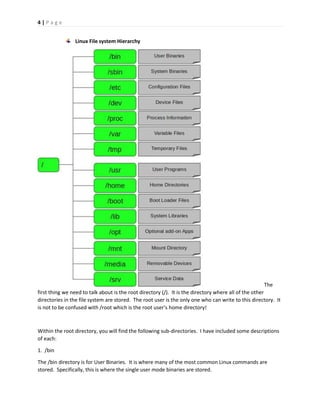
Linux File system Hierarchy
The
first thing we need to talk about is the root directory (/). It is the directory where all of the other
directories in the file system are stored. The root user is the only one who can write to this directory. It
is not to be confused with /root which is the root user’s home directory!
Within the root directory, you will find the following sub-directories. I have included some descriptions
of each:
1. /bin
The /bin directory is for User Binaries. It is where many of the most common Linux commands are
stored. Specifically, this is where the single user mode binaries are stored.
5 | P a g e
2. /sbin
This directory is almost exactly like the /bin directory, with one exception. The binaries here are
primarily used by Administrators for system maintenance.
3. /etc
The configuration files for your programs and operating system are stored in /etc.
4. /dev
This is where all of the device files are located. For example, this is the directory that you would call to
in order to mount a drive with a command like: mount /dev/sda2 /mnt/backup
5. /proc
The /proc directory is one of the most interesting in the whole Linux File System. It is actually its own
virtual file system with a massive amount of text information about system processes.
6. /var
This is where all of the variable files are stored. Most commonly, this is where log files and web server
files are stored.
7. /tmp
These are simply temporary files.
8. /usr
Programs installed by single users get stored here.
9. /home
This is where all of the user home directories are except for the root user’s home directory which is
/root.
10. /boot
The files that make up the boot loader go in /boot. Everything from boot loader menus, to the actual
kernel files are stored here.
11. /lib
All of the binary files that are located in /bin and /sbin are supported by the library files located in /lib.
12. /opt
/opt is short for “optional”. It is the directory where individual vendors can install optional add-on
software for the operating system.
13. /mnt
The /mnt directory is the mount point that system administrators can use to mount file systems
temporarily.
6 | P a g e
14. /media
The /media directory serves the same purpose as the /mnt directory except it is specifically for
removable devices and can be used by non administrators.
15. /srv
The /srv directory contains server specific service files.
Getting Help:
In LINUX/UNIX whenever you need help with a command type “ man” followed by
the command name.
The Syntax is
man [options] command
Common options are
- M > Keyword path to man pages.
- k > Keyword list command for all keyword matches.
We can use help command also.
command - - help

Linux notes

  • 1.
    1 | Pa g e Linux notes: What is Linux?  Linux is UNIX like open source operating system written by Linus Torvalds in 1991 History of UNIX  UNIX is an Operating System (OS), was developed about 44 years ago i.e., 1969 at AT&T Bell Labs by Ken Thompson and Dennis Ritchie.  It is a Command Line Interpreter.  It was d developed for the Mini -Computers as a time sharing system.  UNIX was the predecessor of LINUX.  1957: Bell Labs found they needed an operating system which at the time was running various batch jobs.  1965: Bell Labs create Multics (Multiplexed Information and Computing Service)  1969: Summer 1969 UNIX was developed by AT&T  1975: Sixth edition of UNIX released May 1975 Many of the proprietary flavors have been designed to run only (or mainly) on proprietary hardware sold by the same company that has developed them. Examples include:  AIX - developed by IBM for use on its mainframe computers  BSD/OS - a commercial version of BSD developed by Wind River for Intel processors  HP-UX - developed by Hewlett-Packard for its HP 9000 series of business servers  IRIX - developed by SGI for applications that use 3-D visualization and virtual reality  QNX - a real time operating system developed by QNX Software Systems primarily for use in embedded systems  Solaris - developed by Sun Microsystems for the SPARC platform and the most widely used proprietary flavor for web servers  Tru64 - developed by Compaq for the Alpha processor  SCO UNIX by the Santa Cruz Operation Inc.
  • 2.
    2 | Pa g e History of LINUX  LINUX was created by Linus Torvalds in 1991.  LINUX is a open source.  LINUX is a variant of UNIX.  1985: GNU project started  1991: Linux is introduced by Linus Benedict Torvalds who was a second year student of Computer Science at the University of Helsinki  1993: NetBSD & FreeBSD released  1994: Red Hat Linux is introduced Others are developed by groups of volunteers who make them available for free. Among them are:  Linux - the most popular and fastest growing of all the Unix-like operating systems  FreeBSD - the most popular of the BSD systems (all of which are direct descendants of BSD UNIX, which was developed at the University of California at Berkeley)  NetBSD - features the ability to run on more than 50 platforms, ranging from acorn26 to x68k  OpenBSD - may have already attained its goal of becoming the most secure of all computer operating systems  Darwin - the new version of BSD that serves as the core for the Mac OS X Why LINUX/UNIX?  LINUX is free.  Can view and edit the source code of OS  It i s fully customizable.  Most Important Feature is Stability  30 Years to get the bugs  Important in shared environments and critical applications  LINUX has better security structure.  High Portability  Easy to port new H/W Platform  Written in C which is highly portable  LINUX has better security structure.  High Portability  Easy to port new H/W Platform  Written in C which is highly portable
  • 3.
    3 | Pa g e Kernel:  Kernel is the heart of the operating system.  It is the low level core of the System that is the interface between applications and H/W. Functions:  Manage Memory,  I/O devices,  allocates the time between user and process,  inter process communication,  sets process priority Shell:  The shell is a program that sits on the as an interface between users and kernel  It is a command interpreter and also has programming capability of its own.  Shell Types:  Bourne Shell (sh) (First shell by Stephen Bourne)  C Shell(sh)  Korn Shell (ksh)  Bourne Again Shell(bash) File System:  Linux treats everything as a file including hardware devices. Arranged as a directory hierarchy.  The top level directory is known as “ root ( /)”.
  • 4.
    4 | Pa g e Linux File system Hierarchy The first thing we need to talk about is the root directory (/). It is the directory where all of the other directories in the file system are stored. The root user is the only one who can write to this directory. It is not to be confused with /root which is the root user’s home directory! Within the root directory, you will find the following sub-directories. I have included some descriptions of each: 1. /bin The /bin directory is for User Binaries. It is where many of the most common Linux commands are stored. Specifically, this is where the single user mode binaries are stored.
  • 5.
    5 | Pa g e 2. /sbin This directory is almost exactly like the /bin directory, with one exception. The binaries here are primarily used by Administrators for system maintenance. 3. /etc The configuration files for your programs and operating system are stored in /etc. 4. /dev This is where all of the device files are located. For example, this is the directory that you would call to in order to mount a drive with a command like: mount /dev/sda2 /mnt/backup 5. /proc The /proc directory is one of the most interesting in the whole Linux File System. It is actually its own virtual file system with a massive amount of text information about system processes. 6. /var This is where all of the variable files are stored. Most commonly, this is where log files and web server files are stored. 7. /tmp These are simply temporary files. 8. /usr Programs installed by single users get stored here. 9. /home This is where all of the user home directories are except for the root user’s home directory which is /root. 10. /boot The files that make up the boot loader go in /boot. Everything from boot loader menus, to the actual kernel files are stored here. 11. /lib All of the binary files that are located in /bin and /sbin are supported by the library files located in /lib. 12. /opt /opt is short for “optional”. It is the directory where individual vendors can install optional add-on software for the operating system. 13. /mnt The /mnt directory is the mount point that system administrators can use to mount file systems temporarily.
  • 6.
    6 | Pa g e 14. /media The /media directory serves the same purpose as the /mnt directory except it is specifically for removable devices and can be used by non administrators. 15. /srv The /srv directory contains server specific service files. Getting Help: In LINUX/UNIX whenever you need help with a command type “ man” followed by the command name. The Syntax is man [options] command Common options are - M > Keyword path to man pages. - k > Keyword list command for all keyword matches. We can use help command also. command - - help