Linux History & Features
Roadmap

   What is Unix?
   What is Linux?
   Which Linux Distribution is better?
   Linux : Advantages & Disadvantages
   Basic Commands
   Vi and Emacs
   Available Software
   Web Server
What is Unix?

   A multi-task and multi-user Operating System
   Developed in 1969 at AT&T’s Bell Labs by
       Ken Thompson (Unix)
       Dennis Ritchie (C)
       Douglas Mcllroy
   Some other variants: System V, Solaris, SCO
    Unix, SunOS, 4.4BSD, FreeBSD, NetBSD,
    OpenBSD, BSDI
Before Linux: UNIX

   Many difficulties in Multics development
   1969
       AT&T pulled out of Multics
       Ken Thompson
         A simplified version of Multics  UNIX

       Dennis Ritchie
         Rewrite the UNIX in C

   AT&T cannot sell the UNIX
       UNIX is the first free Operating System
What is Linux?
   A clone of Unix
   Developed in 25 August 1991 by Linus Torvalds, a
    Finish graduate student
   Inspired by and replacement of Minix
   Linus' Minix became Linux
   Consist of
       Linux Kernel
       GNU (GNU is Not Unix) Software
       Software Package management
       Others
What is Linux?
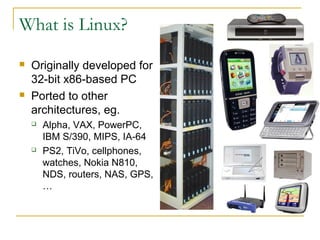
   Originally developed for
    32-bit x86-based PC
   Ported to other
    architectures, eg.
       Alpha, VAX, PowerPC,
        IBM S/390, MIPS, IA-64
       PS2, TiVo, cellphones,
        watches, Nokia N810,
        NDS, routers, NAS, GPS,
        …
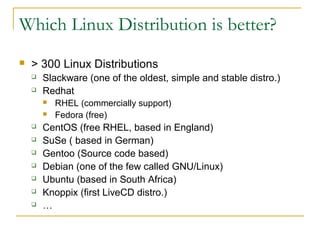
Which Linux Distribution is better?
   > 300 Linux Distributions
       Slackware (one of the oldest, simple and stable distro.)
       Redhat
           RHEL (commercially support)
           Fedora (free)
       CentOS (free RHEL, based in England)
       SuSe ( based in German)
       Gentoo (Source code based)
       Debian (one of the few called GNU/Linux)
       Ubuntu (based in South Africa)
       Knoppix (first LiveCD distro.)
       …
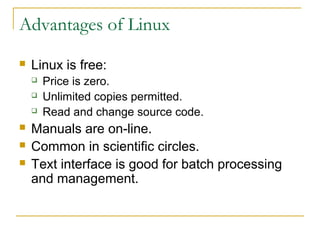
Advantages of Linux
   Linux is free:
       Price is zero.
       Unlimited copies permitted.
       Read and change source code.
   Manuals are on-line.
   Common in scientific circles.
   Text interface is good for batch processing
    and management.
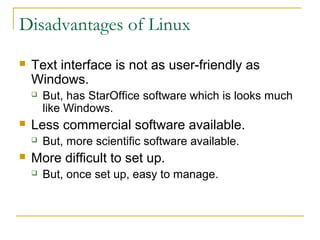
Disadvantages of Linux
   Text interface is not as user-friendly as
    Windows.
       But, has StarOffice software which is looks much
        like Windows.
   Less commercial software available.
       But, more scientific software available.
   More difficult to set up.
       But, once set up, easy to manage.
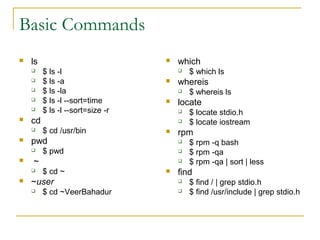
Basic Commands
   ls                               which
        $ ls -l                         $ which ls
        $ ls -a                     whereis
        $ ls -la                        $ whereis ls
        $ ls -l --sort=time         locate
        $ ls -l --sort=size -r          $ locate stdio.h
   cd                                   $ locate iostream
        $ cd /usr/bin               rpm
   pwd                                  $ rpm -q bash
        $ pwd                           $ rpm -qa
   ~                                    $ rpm -qa | sort | less
        $ cd ~                      find
   ~user                                $ find / | grep stdio.h
        $ cd ~VeerBahadur               $ find /usr/include | grep stdio.h
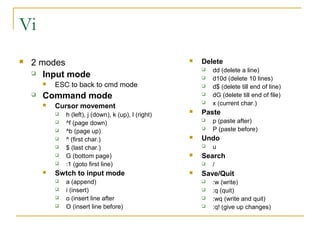
Vi
   2 modes                                                Delete
     Input mode
                                                               dd (delete a line)
                                                               d10d (delete 10 lines)
           ESC to back to cmd mode                            d$ (delete till end of line)
       Command mode                                           dG (delete till end of file)
           Cursor movement
                                                               x (current char.)
               h (left), j (down), k (up), l (right)
                                                           Paste
               ^f (page down)
                                                               p (paste after)
               ^b (page up)
                                                               P (paste before)
               ^ (first char.)                            Undo
               $ (last char.)                                 u
               G (bottom page)                            Search
               :1 (goto first line)                           /
           Swtch to input mode                            Save/Quit
               a (append)                                     :w (write)
               i (insert)                                     :q (quit)
               o (insert line after                           :wq (write and quit)
               O (insert line before)                         :q! (give up changes)
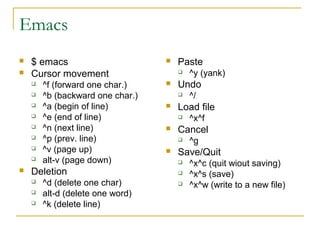
Emacs
   $ emacs                          Paste
   Cursor movement                      ^y (yank)
       ^f (forward one char.)       Undo
       ^b (backward one char.)          ^/
       ^a (begin of line)           Load file
       ^e (end of line)                 ^x^f
       ^n (next line)               Cancel
       ^p (prev. line)                  ^g
       ^v (page up)                 Save/Quit
       alt-v (page down)                ^x^c (quit wiout saving)
   Deletion                             ^x^s (save)
       ^d (delete one char)             ^x^w (write to a new file)
       alt-d (delete one word)
       ^k (delete line)
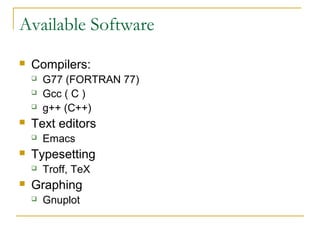
Available Software
   Compilers:
       G77 (FORTRAN 77)
       Gcc ( C )
       g++ (C++)
   Text editors
       Emacs
   Typesetting
       Troff, TeX
   Graphing
       Gnuplot
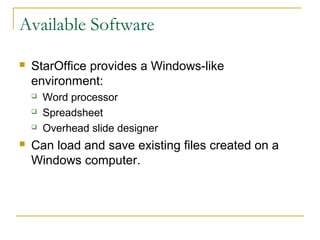
Available Software

   StarOffice provides a Windows-like
    environment:
       Word processor
       Spreadsheet
       Overhead slide designer
   Can load and save existing files created on a
    Windows computer.
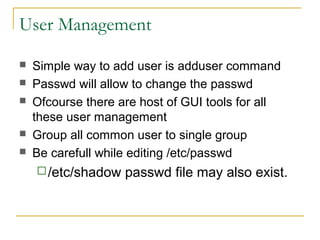
User Management

   Simple way to add user is adduser command
   Passwd will allow to change the passwd
   Ofcourse there are host of GUI tools for all
    these user management
   Group all common user to single group
   Be carefull while editing /etc/passwd
     /etc/shadow   passwd file may also exist.
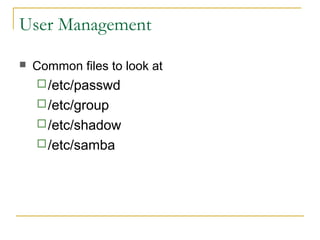
User Management

   Common files to look at
     /etc/passwd
     /etc/group
     /etc/shadow
     /etc/samba
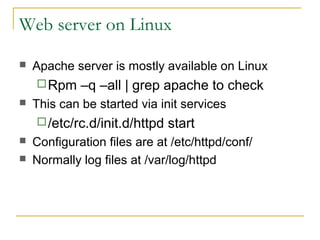
Web server on Linux

   Apache server is mostly available on Linux
     Rpm    –q –all | grep apache to check
   This can be started via init services
     /etc/rc.d/init.d/httpd   start
   Configuration files are at /etc/httpd/conf/
   Normally log files at /var/log/httpd
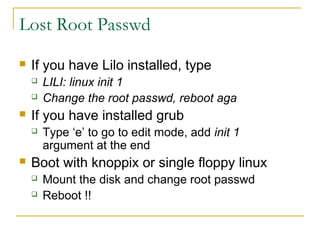
Lost Root Passwd
   If you have Lilo installed, type
       LILI: linux init 1
       Change the root passwd, reboot aga
   If you have installed grub
       Type ‘e’ to go to edit mode, add init 1
        argument at the end
   Boot with knoppix or single floppy linux
       Mount the disk and change root passwd
       Reboot !!
GNU/Linux & You (Computer Engineer)

   Ok! ! !
       Windows is more popular
       90% of Desktop computers run Windows
   But!
       The 90% contains children, officers, …
       How many CEs do use the Windows?
       How many professional applications
        (supercomputing) do use the Linux?
GNU/Linux & CEs
   Linux is NOT for dummies
       Linux is for CEs
   Linux does NOT hide anything
       In details boot message
       Kernel messages
       No registry  All config files are text files
   Using Linux needs computer knowledge
       You have the knowledge
GNU/Linux & You
   If you target PhD in Computer Science
       You must learn Linux
       Most tools, simulators, protocols, … are
        implemented & tested in Linux
   If you target Engineering in Iran
       Linux Administrator
       Linux Application developer
       Embedded Linux Developer
Presented By : Beer Bahadur Singh
Designation : Asst. S/W Engineer(Trainee)
Id No         : VGT 153 T

Linux history & features

  • 1.
  • 2.
    Roadmap  What is Unix?  What is Linux?  Which Linux Distribution is better?  Linux : Advantages & Disadvantages  Basic Commands  Vi and Emacs  Available Software  Web Server
  • 3.
    What is Unix?  A multi-task and multi-user Operating System  Developed in 1969 at AT&T’s Bell Labs by  Ken Thompson (Unix)  Dennis Ritchie (C)  Douglas Mcllroy  Some other variants: System V, Solaris, SCO Unix, SunOS, 4.4BSD, FreeBSD, NetBSD, OpenBSD, BSDI
  • 4.
    Before Linux: UNIX  Many difficulties in Multics development  1969  AT&T pulled out of Multics  Ken Thompson  A simplified version of Multics  UNIX  Dennis Ritchie  Rewrite the UNIX in C  AT&T cannot sell the UNIX  UNIX is the first free Operating System
  • 5.
    What is Linux?  A clone of Unix  Developed in 25 August 1991 by Linus Torvalds, a Finish graduate student  Inspired by and replacement of Minix  Linus' Minix became Linux  Consist of  Linux Kernel  GNU (GNU is Not Unix) Software  Software Package management  Others
  • 6.
    What is Linux?  Originally developed for 32-bit x86-based PC  Ported to other architectures, eg.  Alpha, VAX, PowerPC, IBM S/390, MIPS, IA-64  PS2, TiVo, cellphones, watches, Nokia N810, NDS, routers, NAS, GPS, …
  • 7.
    Which Linux Distributionis better?  > 300 Linux Distributions  Slackware (one of the oldest, simple and stable distro.)  Redhat  RHEL (commercially support)  Fedora (free)  CentOS (free RHEL, based in England)  SuSe ( based in German)  Gentoo (Source code based)  Debian (one of the few called GNU/Linux)  Ubuntu (based in South Africa)  Knoppix (first LiveCD distro.)  …
  • 8.
    Advantages of Linux  Linux is free:  Price is zero.  Unlimited copies permitted.  Read and change source code.  Manuals are on-line.  Common in scientific circles.  Text interface is good for batch processing and management.
  • 9.
    Disadvantages of Linux  Text interface is not as user-friendly as Windows.  But, has StarOffice software which is looks much like Windows.  Less commercial software available.  But, more scientific software available.  More difficult to set up.  But, once set up, easy to manage.
  • 10.
    Basic Commands  ls  which  $ ls -l  $ which ls  $ ls -a  whereis  $ ls -la  $ whereis ls  $ ls -l --sort=time  locate  $ ls -l --sort=size -r  $ locate stdio.h  cd  $ locate iostream  $ cd /usr/bin  rpm  pwd  $ rpm -q bash  $ pwd  $ rpm -qa  ~  $ rpm -qa | sort | less  $ cd ~  find  ~user  $ find / | grep stdio.h  $ cd ~VeerBahadur  $ find /usr/include | grep stdio.h
  • 11.
    Vi  2 modes  Delete  Input mode  dd (delete a line)  d10d (delete 10 lines)  ESC to back to cmd mode  d$ (delete till end of line)  Command mode  dG (delete till end of file)  Cursor movement  x (current char.)  h (left), j (down), k (up), l (right)  Paste  ^f (page down)  p (paste after)  ^b (page up)  P (paste before)  ^ (first char.)  Undo  $ (last char.)  u  G (bottom page)  Search  :1 (goto first line)  /  Swtch to input mode  Save/Quit  a (append)  :w (write)  i (insert)  :q (quit)  o (insert line after  :wq (write and quit)  O (insert line before)  :q! (give up changes)
  • 12.
    Emacs  $ emacs  Paste  Cursor movement  ^y (yank)  ^f (forward one char.)  Undo  ^b (backward one char.)  ^/  ^a (begin of line)  Load file  ^e (end of line)  ^x^f  ^n (next line)  Cancel  ^p (prev. line)  ^g  ^v (page up)  Save/Quit  alt-v (page down)  ^x^c (quit wiout saving)  Deletion  ^x^s (save)  ^d (delete one char)  ^x^w (write to a new file)  alt-d (delete one word)  ^k (delete line)
  • 13.
    Available Software  Compilers:  G77 (FORTRAN 77)  Gcc ( C )  g++ (C++)  Text editors  Emacs  Typesetting  Troff, TeX  Graphing  Gnuplot
  • 14.
    Available Software  StarOffice provides a Windows-like environment:  Word processor  Spreadsheet  Overhead slide designer  Can load and save existing files created on a Windows computer.
  • 15.
    User Management  Simple way to add user is adduser command  Passwd will allow to change the passwd  Ofcourse there are host of GUI tools for all these user management  Group all common user to single group  Be carefull while editing /etc/passwd  /etc/shadow passwd file may also exist.
  • 16.
    User Management  Common files to look at  /etc/passwd  /etc/group  /etc/shadow  /etc/samba
  • 17.
    Web server onLinux  Apache server is mostly available on Linux  Rpm –q –all | grep apache to check  This can be started via init services  /etc/rc.d/init.d/httpd start  Configuration files are at /etc/httpd/conf/  Normally log files at /var/log/httpd
  • 18.
    Lost Root Passwd  If you have Lilo installed, type  LILI: linux init 1  Change the root passwd, reboot aga  If you have installed grub  Type ‘e’ to go to edit mode, add init 1 argument at the end  Boot with knoppix or single floppy linux  Mount the disk and change root passwd  Reboot !!
  • 19.
    GNU/Linux & You(Computer Engineer)  Ok! ! !  Windows is more popular  90% of Desktop computers run Windows  But!  The 90% contains children, officers, …  How many CEs do use the Windows?  How many professional applications (supercomputing) do use the Linux?
  • 20.
    GNU/Linux & CEs  Linux is NOT for dummies  Linux is for CEs  Linux does NOT hide anything  In details boot message  Kernel messages  No registry  All config files are text files  Using Linux needs computer knowledge  You have the knowledge
  • 21.
    GNU/Linux & You  If you target PhD in Computer Science  You must learn Linux  Most tools, simulators, protocols, … are implemented & tested in Linux  If you target Engineering in Iran  Linux Administrator  Linux Application developer  Embedded Linux Developer
  • 22.
    Presented By :Beer Bahadur Singh Designation : Asst. S/W Engineer(Trainee) Id No : VGT 153 T