



Introduction to Linker
Prepared by:-
Name - Rahul Dhiman
Rollno - 14508
Sem - 4th sem ( 2nd year)
Branch - Computer Science & Engg.
WHAT IS LINKER ?
 Linker is a system software.
 Linker is also referred as link editor.
 It links the object (.obj) files generated by the assembler.
 It combines those object files into single excecutable file , library file, or
another object file.
WHY WE NEED LINKERS ?
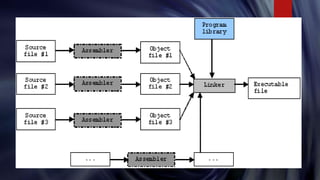
 Often in a large program , you will separate out the code into multiple files
to keep related functions together.
 Each of these multiple files can be compiled into object code.
 But our final goal is to create a single executable file.
 There must be a way to combine each of these object files into a single
executable .We call this linking.
 Linking is process that is carried out by the linker.
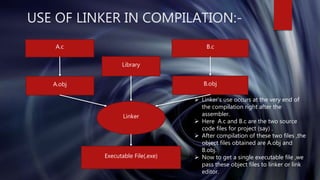
USE OF LINKER IN COMPILATION:-
A.c B.c
A.obj B.obj
Linker
Executable File(.exe)
 Linker’s use occurs at the very end of
the compilation right after the
assembler.
 Here A.c and B.c are the two source
code files for project (say) .
 After compilation of these two files ,the
object files obtained are A.obj and
B.obj.
 Now to get a single executable file ,we
pass these object files to linker or link
editor.
Library
TYPES OF LINKING:-
 Linker takes the object code generated by the compiler/assembler ,and
links it against a c library (and /or libgcc.a or whatever link library you
provide).This can be done in two ways :-
a) Static linking
b) Dynamic linking
STATIC LINKING:-
 When linking statically , linker invocation is done during the build process
i.e just after the compiler/assembler run.
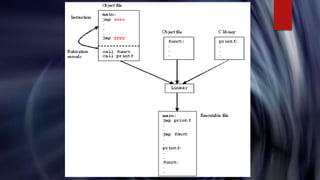
 linker takes the object code and checks it for unresolved references
if any.
 Linker checks if it can resolve these unresolved refrences from the available
libraries (including user created libraries also).
 It adds the binary code from these libraries to the executable. After this
executable is complete.
 In this linking ,executable file is quiet large both on disk and memory
because the code from the libraries is duplicated over and over.
DYNAMIC LINKING:-
 When linking dynamically, linker is invoked during the loading of an
executable.
 It also checks the object code for unresolved references.
 The unresolved references are resolved against the libraries currently
present in the system.
 In dynamic linking , the on-disk executable file is smaller in size and allows
for in-memory space saving strategies such as shared libraries.
 Executable depends on the presence of libraries it references . If a system
doesn’t have those libraries executable can’t run.
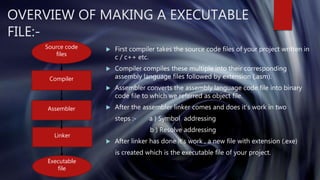
OVERVIEW OF MAKING A EXECUTABLE
FILE:-
 First compiler takes the source code files of your project written in
c / c++ etc.
 Compiler compiles these multiple into their corresponding
assembly language files followed by extension (.asm).
 Assembler converts the assembly language code file into binary
code file to which we referred as object file.
 After the assembler linker comes and does it’s work in two
steps :- a ) Symbol addressing
b ) Resolve addressing
 After linker has done it’s work , a new file with extension (.exe)
is created which is the executable file of your project.
Compiler
Source code
files
Assembler
Linker
Executable
file
LINKER USED IN OPERATING SYSTEM:-
 In computing , a dynamic linker is the part of an operating system.
 It loads and links the shared libraries needed by an executable when it is
executed.
 Dynamic linker functionality and implementation depends upon two
factors : -
 Specific operating system ( like windows , linux , Mac etc. )
 Executable format
 In Ubuntu operating system linker used is a standalone linker and also
referred via “ld”. On Unix-like systems, the linker is typically invoked with
the ld command.
HOW TO SAVE INTERMEDIATE FILES IN BETWEEN
COMPILATION OF A PROGRAM ?
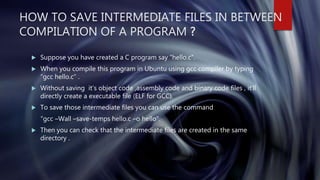
 Suppose you have created a C program say “hello.c”.
 When you compile this program in Ubuntu using gcc compiler by typing
“gcc hello.c” .
 Without saving it’s object code ,assembly code and binary code files , it’ll
directly create a executable file (ELF for GCC).
 To save those intermediate files you can use the command
“gcc –Wall –save-temps hello.c –o hello”.
 Then you can check that the intermediate files are created in the same
directory .
THANK YOU ALL

Linkers

  • 1.
    Introduction to Linker Preparedby:- Name - Rahul Dhiman Rollno - 14508 Sem - 4th sem ( 2nd year) Branch - Computer Science & Engg.
  • 2.
    WHAT IS LINKER?  Linker is a system software.  Linker is also referred as link editor.  It links the object (.obj) files generated by the assembler.  It combines those object files into single excecutable file , library file, or another object file.
  • 3.
    WHY WE NEEDLINKERS ?  Often in a large program , you will separate out the code into multiple files to keep related functions together.  Each of these multiple files can be compiled into object code.  But our final goal is to create a single executable file.  There must be a way to combine each of these object files into a single executable .We call this linking.  Linking is process that is carried out by the linker.
  • 4.
    USE OF LINKERIN COMPILATION:- A.c B.c A.obj B.obj Linker Executable File(.exe)  Linker’s use occurs at the very end of the compilation right after the assembler.  Here A.c and B.c are the two source code files for project (say) .  After compilation of these two files ,the object files obtained are A.obj and B.obj.  Now to get a single executable file ,we pass these object files to linker or link editor. Library
  • 5.
    TYPES OF LINKING:- Linker takes the object code generated by the compiler/assembler ,and links it against a c library (and /or libgcc.a or whatever link library you provide).This can be done in two ways :- a) Static linking b) Dynamic linking
  • 6.
    STATIC LINKING:-  Whenlinking statically , linker invocation is done during the build process i.e just after the compiler/assembler run.  linker takes the object code and checks it for unresolved references if any.  Linker checks if it can resolve these unresolved refrences from the available libraries (including user created libraries also).  It adds the binary code from these libraries to the executable. After this executable is complete.  In this linking ,executable file is quiet large both on disk and memory because the code from the libraries is duplicated over and over.
  • 7.
    DYNAMIC LINKING:-  Whenlinking dynamically, linker is invoked during the loading of an executable.  It also checks the object code for unresolved references.  The unresolved references are resolved against the libraries currently present in the system.  In dynamic linking , the on-disk executable file is smaller in size and allows for in-memory space saving strategies such as shared libraries.  Executable depends on the presence of libraries it references . If a system doesn’t have those libraries executable can’t run.
  • 8.
    OVERVIEW OF MAKINGA EXECUTABLE FILE:-  First compiler takes the source code files of your project written in c / c++ etc.  Compiler compiles these multiple into their corresponding assembly language files followed by extension (.asm).  Assembler converts the assembly language code file into binary code file to which we referred as object file.  After the assembler linker comes and does it’s work in two steps :- a ) Symbol addressing b ) Resolve addressing  After linker has done it’s work , a new file with extension (.exe) is created which is the executable file of your project. Compiler Source code files Assembler Linker Executable file
  • 11.
    LINKER USED INOPERATING SYSTEM:-  In computing , a dynamic linker is the part of an operating system.  It loads and links the shared libraries needed by an executable when it is executed.  Dynamic linker functionality and implementation depends upon two factors : -  Specific operating system ( like windows , linux , Mac etc. )  Executable format  In Ubuntu operating system linker used is a standalone linker and also referred via “ld”. On Unix-like systems, the linker is typically invoked with the ld command.
  • 12.
    HOW TO SAVEINTERMEDIATE FILES IN BETWEEN COMPILATION OF A PROGRAM ?  Suppose you have created a C program say “hello.c”.  When you compile this program in Ubuntu using gcc compiler by typing “gcc hello.c” .  Without saving it’s object code ,assembly code and binary code files , it’ll directly create a executable file (ELF for GCC).  To save those intermediate files you can use the command “gcc –Wall –save-temps hello.c –o hello”.  Then you can check that the intermediate files are created in the same directory .
  • 13.