COMPILATION PROCESS IN C
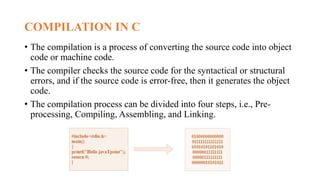
COMPILATION IN C
• The compilation is a process of converting the source code into object
code or machine code.
• The compiler checks the source code for the syntactical or structural
errors, and if the source code is error-free, then it generates the object
code.
• The compilation process can be divided into four steps, i.e., Pre-
processing, Compiling, Assembling, and Linking.
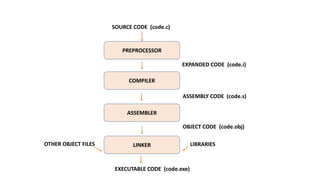
PREPROCESSOR
COMPILER
ASSEMBLER
LINKER
SOURCE CODE (code.c)
EXECUTABLE CODE (code.exe)
EXPANDED CODE (code.i)
ASSEMBLY CODE (code.s)
OBJECT CODE (code.obj)
LIBRARIES
OTHER OBJECT FILES
PREPROCESSOR
• This is the first phase through which source code is passed. This phase
include:
1. Removal of Comments
2. Expansion of Macros
3. Expansion of the included files.
4. Conditional compilation
• The preprocessed output is stored in the filename.i.
COMPILER
• The code which is expanded by the preprocessor is passed to the
compiler.
• The compiler converts this code into assembly code.
• Or we can say that the C compiler converts the pre-processed code
into assembly code.
• The next step is to compile filename.i and produce an; intermediate
compiled output file filename.s.
ASSEMBLER
• The assembly code is converted into object code by using an
assembler.
• The name of the object file generated by the assembler is the same as
the source file.
• The extension of the object file in DOS is '.obj,' and in UNIX, the
extension is 'o'.
• If the name of the source file is 'hello.c', then the name of the object
file would be 'hello.obj'.
LINKER
• The main working of the linker is to combine the object code of library
files with the object code of our program.
• Sometimes the situation arises when our program refers to the functions
defined in other files; then linker plays a very important role in this.
• It links the object code of these files to our program.
• The name of the executable file is the same as the source file but differs
only in their extensions.
• In DOS, the extension of the executable file is '.exe', and in UNIX, the
executable file can be named as 'a.out'.

COMPILATION PROCESS IN C.pptx

  • 1.
  • 2.
    COMPILATION IN C •The compilation is a process of converting the source code into object code or machine code. • The compiler checks the source code for the syntactical or structural errors, and if the source code is error-free, then it generates the object code. • The compilation process can be divided into four steps, i.e., Pre- processing, Compiling, Assembling, and Linking.
  • 3.
    PREPROCESSOR COMPILER ASSEMBLER LINKER SOURCE CODE (code.c) EXECUTABLECODE (code.exe) EXPANDED CODE (code.i) ASSEMBLY CODE (code.s) OBJECT CODE (code.obj) LIBRARIES OTHER OBJECT FILES
  • 4.
    PREPROCESSOR • This isthe first phase through which source code is passed. This phase include: 1. Removal of Comments 2. Expansion of Macros 3. Expansion of the included files. 4. Conditional compilation • The preprocessed output is stored in the filename.i.
  • 5.
    COMPILER • The codewhich is expanded by the preprocessor is passed to the compiler. • The compiler converts this code into assembly code. • Or we can say that the C compiler converts the pre-processed code into assembly code. • The next step is to compile filename.i and produce an; intermediate compiled output file filename.s.
  • 6.
    ASSEMBLER • The assemblycode is converted into object code by using an assembler. • The name of the object file generated by the assembler is the same as the source file. • The extension of the object file in DOS is '.obj,' and in UNIX, the extension is 'o'. • If the name of the source file is 'hello.c', then the name of the object file would be 'hello.obj'.
  • 7.
    LINKER • The mainworking of the linker is to combine the object code of library files with the object code of our program. • Sometimes the situation arises when our program refers to the functions defined in other files; then linker plays a very important role in this. • It links the object code of these files to our program. • The name of the executable file is the same as the source file but differs only in their extensions. • In DOS, the extension of the executable file is '.exe', and in UNIX, the executable file can be named as 'a.out'.