Linkers
Introduction to linkers

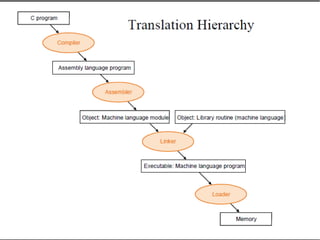
A linker is a computer program that takes one or
more object files generated by a compiler and
combines them into a single executable file.

This process is called linking.

Linker is also called as link editor.

Linkers can take objects from a collection called a
library.

Linking can be done at compile time, i.e. when the
source code is translated or, at load time, i.e. whenwhen
the program is loaded into memory or, even at runthe program is loaded into memory or, even at run
time.time.
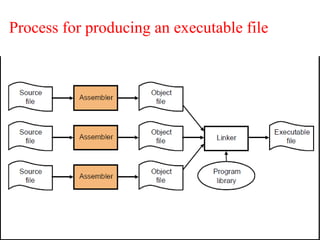
Process for producing an executable file
Why Linkers ??
ModularityModularity

Program can be written as a collection of smaller source files.

Can build libraries of common functions.

e.g., Math library, standard C library.
EfficiencyEfficiency
Time:

Change one source file, compile, and then relink.

No need to recompile other source files.
Space:

Libraries of common functions can be aggregated into a single file.

Executable files and running memory images contain only code for
the functions they actually use.
Types of linkers
Static LinkerStatic Linker

Performs the linking at compile time.

Takes a collection of relocatable object files and command line
arguments and generate a fully linked executable object file that can
be loaded and run.

Performs two main tasks.

Symbol resolution: associate each symbol reference with exactly one
symbol definition.

Relocation: relocate code and data sections and modify symbol
references to the relocated memory locations.
Dynamic LinkerDynamic Linker

Performs the linking at load time or at run time.
Static linking

Static linking is the process of copying all library
modules used in the program into the final executable
image.

This is performed by the linker and it is done as the
last step of the compilation process.

The linker combines library routines with the program
code in order to resolve external references, and to
generate an executable image suitable for loading into
memory.

This statically linked file includes both the calling
program and the called program.
Advantages

Programs that use statically-linked libraries are
usually faster than those that use shared libraries.

Statically linked program takes constant load time
every time it is loaded into the memory for
execution.
Disadvantages

Statically linked files are significantly larger in size
because external programs are built into the
executable files.

In static linking if any of the external programs has
changed then they have to be recompiled and re-
linked again else the changes won't reflect in
existing executable file.
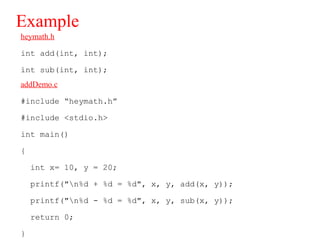
Example
heymath.h
int add(int, int);
int sub(int, int);
addDemo.c
#include “heymath.h”
#include <stdio.h>
int main()
{
int x= 10, y = 20;
printf("n%d + %d = %d", x, y, add(x, y));
printf("n%d - %d = %d", x, y, sub(x, y));
return 0;
}
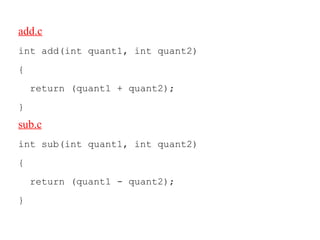
add.c
int add(int quant1, int quant2)
{
return (quant1 + quant2);
}
sub.c
int sub(int quant1, int quant2)
{
return (quant1 - quant2);
}
Creating object files

Object code or an object file is the representation of code
that a compiler or assembler generates by pre-processing a
source code file.

Object files contain compact code called binaries.

A linker is used to generate an executable file by linking
object files together. The only essential element in an
object file is machine code.

Object files also contain data for use by the code at
runtime, relocation information, program symbols(names
of variables and functions) for linking and/or debugging
purposes, and another debugging information.

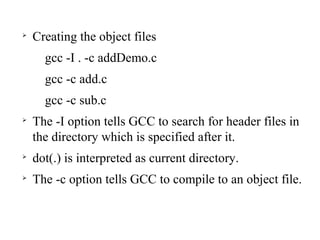
Creating the object files
gcc -I . -c addDemo.c
gcc -c add.c
gcc -c sub.c

The -I option tells GCC to search for header files in
the directory which is specified after it.

dot(.) is interpreted as current directory.

The -c option tells GCC to compile to an object file.

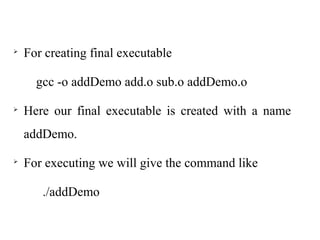
For creating final executable
gcc -o addDemo add.o sub.o addDemo.o

Here our final executable is created with a name
addDemo.

For executing we will give the command like
./addDemo
Static libraries

Static libraries are simply collections of binary
object files they help during linking.

A library is a collection of object files.

A library contains hundreds or thousands of object
files.

Static libraries are end with an extension of .a
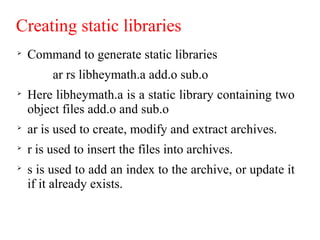
Creating static libraries

Command to generate static libraries
ar rs libheymath.a add.o sub.o

Here libheymath.a is a static library containing two
object files add.o and sub.o

ar is used to create, modify and extract archives.

r is used to insert the files into archives.

s is used to add an index to the archive, or update it
if it already exists.

Creating an executable
gcc -o addDemo addDemo.o libheymath.a

For executing
./addDemo
Dynamic linking and shared libraries

The process of linking shared libraries with
multiple programs is called dynamic linking.

A shared library is a dynamic link library (dll).

Dynamic linking is performed at run time by the
operating system.

Dynamic libraries are ending with an extension
of .so
Advantages

In dynamic linking only one copy of shared library
is kept in memory. This significantly reduces the
size of executable programs, thereby saving
memory and disk space.

Individual shared modules can be updated and
recompiled.

In dynamic linking load time might be reduced if
the shared library code is already present in
memory.
Disadvantages

Programs that use shared libraries are usually
slower than those that use statically-linked
libraries.

Dynamically linked programs are dependent on
having a compatible library.
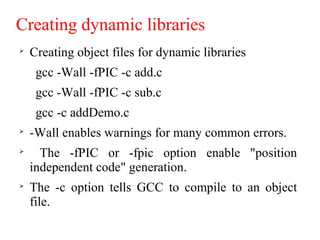
Creating dynamic libraries

Creating object files for dynamic libraries
gcc -Wall -fPIC -c add.c
gcc -Wall -fPIC -c sub.c
gcc -c addDemo.c

-Wall enables warnings for many common errors.

The -fPIC or -fpic option enable "position
independent code" generation.

The -c option tells GCC to compile to an object
file.

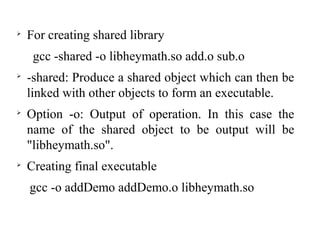
For creating shared library
gcc -shared -o libheymath.so add.o sub.o

-shared: Produce a shared object which can then be
linked with other objects to form an executable.

Option -o: Output of operation. In this case the
name of the shared object to be output will be
"libheymath.so".

Creating final executable
gcc -o addDemo addDemo.o libheymath.so

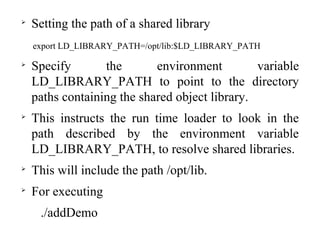
Setting the path of a shared library
export LD_LIBRARY_PATH=/opt/lib:$LD_LIBRARY_PATH

Specify the environment variable
LD_LIBRARY_PATH to point to the directory
paths containing the shared object library.

This instructs the run time loader to look in the
path described by the environment variable
LD_LIBRARY_PATH, to resolve shared libraries.

This will include the path /opt/lib.

For executing
./addDemo
Linkers

Linkers

  • 1.
  • 3.
    Introduction to linkers  Alinker is a computer program that takes one or more object files generated by a compiler and combines them into a single executable file.  This process is called linking.  Linker is also called as link editor.  Linkers can take objects from a collection called a library.  Linking can be done at compile time, i.e. when the source code is translated or, at load time, i.e. whenwhen the program is loaded into memory or, even at runthe program is loaded into memory or, even at run time.time.
  • 4.
    Process for producingan executable file
  • 5.
    Why Linkers ?? ModularityModularity  Programcan be written as a collection of smaller source files.  Can build libraries of common functions.  e.g., Math library, standard C library. EfficiencyEfficiency Time:  Change one source file, compile, and then relink.  No need to recompile other source files. Space:  Libraries of common functions can be aggregated into a single file.  Executable files and running memory images contain only code for the functions they actually use.
  • 6.
    Types of linkers StaticLinkerStatic Linker  Performs the linking at compile time.  Takes a collection of relocatable object files and command line arguments and generate a fully linked executable object file that can be loaded and run.  Performs two main tasks.  Symbol resolution: associate each symbol reference with exactly one symbol definition.  Relocation: relocate code and data sections and modify symbol references to the relocated memory locations. Dynamic LinkerDynamic Linker  Performs the linking at load time or at run time.
  • 7.
    Static linking  Static linkingis the process of copying all library modules used in the program into the final executable image.  This is performed by the linker and it is done as the last step of the compilation process.  The linker combines library routines with the program code in order to resolve external references, and to generate an executable image suitable for loading into memory.  This statically linked file includes both the calling program and the called program.
  • 8.
    Advantages  Programs that usestatically-linked libraries are usually faster than those that use shared libraries.  Statically linked program takes constant load time every time it is loaded into the memory for execution.
  • 9.
    Disadvantages  Statically linked filesare significantly larger in size because external programs are built into the executable files.  In static linking if any of the external programs has changed then they have to be recompiled and re- linked again else the changes won't reflect in existing executable file.
  • 10.
    Example heymath.h int add(int, int); intsub(int, int); addDemo.c #include “heymath.h” #include <stdio.h> int main() { int x= 10, y = 20; printf("n%d + %d = %d", x, y, add(x, y)); printf("n%d - %d = %d", x, y, sub(x, y)); return 0; }
  • 11.
    add.c int add(int quant1,int quant2) { return (quant1 + quant2); } sub.c int sub(int quant1, int quant2) { return (quant1 - quant2); }
  • 12.
    Creating object files  Objectcode or an object file is the representation of code that a compiler or assembler generates by pre-processing a source code file.  Object files contain compact code called binaries.  A linker is used to generate an executable file by linking object files together. The only essential element in an object file is machine code.  Object files also contain data for use by the code at runtime, relocation information, program symbols(names of variables and functions) for linking and/or debugging purposes, and another debugging information.
  • 13.
     Creating the objectfiles gcc -I . -c addDemo.c gcc -c add.c gcc -c sub.c  The -I option tells GCC to search for header files in the directory which is specified after it.  dot(.) is interpreted as current directory.  The -c option tells GCC to compile to an object file.
  • 14.
     For creating finalexecutable gcc -o addDemo add.o sub.o addDemo.o  Here our final executable is created with a name addDemo.  For executing we will give the command like ./addDemo
  • 15.
    Static libraries  Static librariesare simply collections of binary object files they help during linking.  A library is a collection of object files.  A library contains hundreds or thousands of object files.  Static libraries are end with an extension of .a
  • 16.
    Creating static libraries  Commandto generate static libraries ar rs libheymath.a add.o sub.o  Here libheymath.a is a static library containing two object files add.o and sub.o  ar is used to create, modify and extract archives.  r is used to insert the files into archives.  s is used to add an index to the archive, or update it if it already exists.
  • 17.
     Creating an executable gcc-o addDemo addDemo.o libheymath.a  For executing ./addDemo
  • 18.
    Dynamic linking andshared libraries  The process of linking shared libraries with multiple programs is called dynamic linking.  A shared library is a dynamic link library (dll).  Dynamic linking is performed at run time by the operating system.  Dynamic libraries are ending with an extension of .so
  • 19.
    Advantages  In dynamic linkingonly one copy of shared library is kept in memory. This significantly reduces the size of executable programs, thereby saving memory and disk space.  Individual shared modules can be updated and recompiled.  In dynamic linking load time might be reduced if the shared library code is already present in memory.
  • 20.
    Disadvantages  Programs that useshared libraries are usually slower than those that use statically-linked libraries.  Dynamically linked programs are dependent on having a compatible library.
  • 21.
    Creating dynamic libraries  Creatingobject files for dynamic libraries gcc -Wall -fPIC -c add.c gcc -Wall -fPIC -c sub.c gcc -c addDemo.c  -Wall enables warnings for many common errors.  The -fPIC or -fpic option enable "position independent code" generation.  The -c option tells GCC to compile to an object file.
  • 22.
     For creating sharedlibrary gcc -shared -o libheymath.so add.o sub.o  -shared: Produce a shared object which can then be linked with other objects to form an executable.  Option -o: Output of operation. In this case the name of the shared object to be output will be "libheymath.so".  Creating final executable gcc -o addDemo addDemo.o libheymath.so
  • 23.
     Setting the pathof a shared library export LD_LIBRARY_PATH=/opt/lib:$LD_LIBRARY_PATH  Specify the environment variable LD_LIBRARY_PATH to point to the directory paths containing the shared object library.  This instructs the run time loader to look in the path described by the environment variable LD_LIBRARY_PATH, to resolve shared libraries.  This will include the path /opt/lib.  For executing ./addDemo