Shared Libraries
and
Dynamic Loading
1. Object Files
2. Library
3. Static Library
4. Shared Library
5. Library Loading
6. Dynamic Loading
7. Construct & Linking Static Library
8. Construct & Linking Dynamic Library
Topics
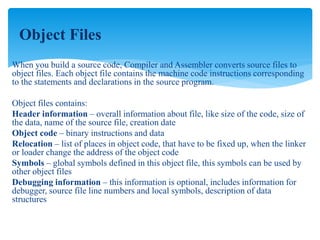
When you build a source code, Compiler and Assembler converts source files to
object files. Each object file contains the machine code instructions corresponding
to the statements and declarations in the source program.
Object files contains:
Header information – overall information about file, like size of the code, size of
the data, name of the source file, creation date
Object code – binary instructions and data
Relocation – list of places in object code, that have to be fixed up, when the linker
or loader change the address of the object code
Symbols – global symbols defined in this object file, this symbols can be used by
other object files
Debugging information – this information is optional, includes information for
debugger, source file line numbers and local symbols, description of data
structures
Object Files
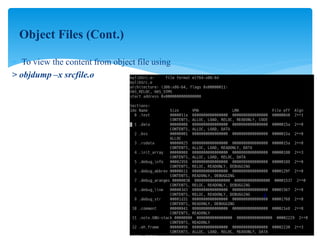
 To view the content from object file using
> objdump –x srcfile.o
Object Files (Cont.)
Library is sequence of object modules. To build an executable file, the linker (for example, ld) collects
object files and libraries. The linker’s primary function is to bind symbolic names to memory
addresses. To do this, it first scans the object files and concatenates the object file sections to form one
large file.
ELF (Executable and Library File Format)
Structure for object and executable programs for most UNIX/LINUX systems
ELF structure is common for relocatable format (object files), executable format (program from
objects), shared libraries and core image (core image is created if program fails)
ELF can be interpreted as a set of sections for linker or set of segments for loader
ELF contains:
ELF header – magic string 177ELF, attributes - 32/64 bit, little-endian/big-endian, type –
relocatable/executable/shared/core image, architecture SPARC/x86/68K,….
Data – list of sections and segments depending on ELF type
Library
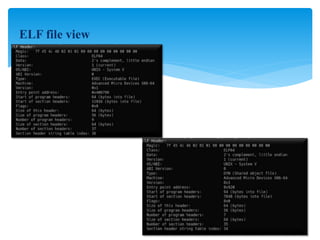
ELF file view
To improve modularity and reusability, programming libraries usually include commonly
used functions. The traditional library is an archive (.a file), created like this:
$ ar cr libfoo.a foo.o bar.o spam.o...
The resulting libfoo.a file is known as a static library. An archive’s structure is
nothing more than a collection of raw object files strung together along with a table of
contents for fast symbol access.
When a static library is included during program linking, the linker makes a pass through
the library and adds all the code and data corresponding to symbols used in the source
program.
Static Library
Static libraries Issues
It is difficult for software maintenance and make inefficient resource utilization.
Rebuilt is required to take changes to effect.
Copying library contents into the target program wastes disk space and memory if it used
by N number of process.
Static Library (cont.)
To address the maintenance and resource problems with static libraries, most modern
systems now use shared libraries or dynamic link libraries (DLLs).
Shared libraries delays the actual task of linking to runtime, where it is performed by a
special dynamic linker–loader.
Runtime linking allows easier library maintenance.
Patch and update the library without recompiling or relinking any applications. New library
can be used when application next time execute.
Shared libraries are loaded by OS in read only memory region, and share among process
using page-sharing or other virtual memory techniques.
Shared library
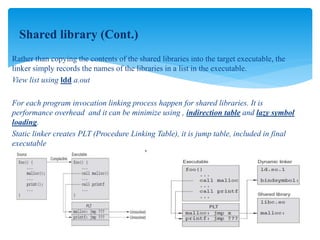
Rather than copying the contents of the shared libraries into the target executable, the
linker simply records the names of the libraries in a list in the executable.
View list using ldd a.out
For each program invocation linking process happen for shared libraries. It is
performance overhead and it can be minimize using , indirection table and lazy symbol
loading.
Static linker creates PLT (Procedure Linking Table), it is jump table, included in final
executable
Shared library (Cont.)
When a program linked with shared libraries runs, program execution does not
immediately start with that program’s first statement. Instead, the operating system loads
and executes the dynamic linker (usually called ld.so), which then scans the list of library
names embedded in the executable.
Path where linker search for shared libraries during program execution
OS configured path : /etc/ld.so.conf
User Specific path during linking operation : LD_LIBRARY_PATH
Loader now always search file in directory path define above but cache in below path
/etc/ld.so.cache
To reload cache if new library added config path using command : ldconfig
Library Loading
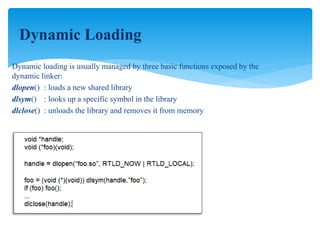
Dynamic loading is usually managed by three basic functions exposed by the
dynamic linker:
dlopen() : loads a new shared library
dlsym() : looks up a specific symbol in the library
dlclose() : unloads the library and removes it from memory
Dynamic Loading
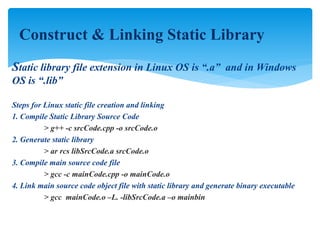
Static library file extension in Linux OS is “.a” and in Windows
OS is “.lib”
Steps for Linux static file creation and linking
1. Compile Static Library Source Code
> g++ -c srcCode.cpp -o srcCode.o
2. Generate static library
> ar rcs libSrcCode.a srcCode.o
3. Compile main source code file
> gcc -c mainCode.cpp -o mainCode.o
4. Link main source code object file with static library and generate binary executable
> gcc mainCode.o –L. -libSrcCode.a –o mainbin
Construct & Linking Static Library
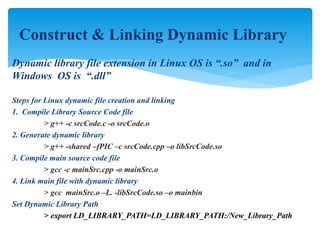
Dynamic library file extension in Linux OS is “.so” and in
Windows OS is “.dll”
Steps for Linux dynamic file creation and linking
1. Compile Library Source Code file
> g++ -c srcCode.c -o srcCode.o
2. Generate dynamic library
> g++ -shared –fPIC –c srcCode.cpp –o libSrcCode.so
3. Compile main source code file
> gcc -c mainSrc.cpp -o mainSrc.o
4. Link main file with dynamic library
> gcc mainSrc.o –L. -libSrcCode.so –o mainbin
Set Dynamic Library Path
> export LD_LIBRARY_PATH=LD_LIBRARY_PATH:/New_Library_Path
Construct & Linking Dynamic Library
Questions ?

C++ shared libraries and loading

  • 1.
  • 2.
    1. Object Files 2.Library 3. Static Library 4. Shared Library 5. Library Loading 6. Dynamic Loading 7. Construct & Linking Static Library 8. Construct & Linking Dynamic Library Topics
  • 3.
    When you builda source code, Compiler and Assembler converts source files to object files. Each object file contains the machine code instructions corresponding to the statements and declarations in the source program. Object files contains: Header information – overall information about file, like size of the code, size of the data, name of the source file, creation date Object code – binary instructions and data Relocation – list of places in object code, that have to be fixed up, when the linker or loader change the address of the object code Symbols – global symbols defined in this object file, this symbols can be used by other object files Debugging information – this information is optional, includes information for debugger, source file line numbers and local symbols, description of data structures Object Files
  • 4.
     To viewthe content from object file using > objdump –x srcfile.o Object Files (Cont.)
  • 5.
    Library is sequenceof object modules. To build an executable file, the linker (for example, ld) collects object files and libraries. The linker’s primary function is to bind symbolic names to memory addresses. To do this, it first scans the object files and concatenates the object file sections to form one large file. ELF (Executable and Library File Format) Structure for object and executable programs for most UNIX/LINUX systems ELF structure is common for relocatable format (object files), executable format (program from objects), shared libraries and core image (core image is created if program fails) ELF can be interpreted as a set of sections for linker or set of segments for loader ELF contains: ELF header – magic string 177ELF, attributes - 32/64 bit, little-endian/big-endian, type – relocatable/executable/shared/core image, architecture SPARC/x86/68K,…. Data – list of sections and segments depending on ELF type Library
  • 6.
  • 7.
    To improve modularityand reusability, programming libraries usually include commonly used functions. The traditional library is an archive (.a file), created like this: $ ar cr libfoo.a foo.o bar.o spam.o... The resulting libfoo.a file is known as a static library. An archive’s structure is nothing more than a collection of raw object files strung together along with a table of contents for fast symbol access. When a static library is included during program linking, the linker makes a pass through the library and adds all the code and data corresponding to symbols used in the source program. Static Library
  • 8.
    Static libraries Issues Itis difficult for software maintenance and make inefficient resource utilization. Rebuilt is required to take changes to effect. Copying library contents into the target program wastes disk space and memory if it used by N number of process. Static Library (cont.)
  • 9.
    To address themaintenance and resource problems with static libraries, most modern systems now use shared libraries or dynamic link libraries (DLLs). Shared libraries delays the actual task of linking to runtime, where it is performed by a special dynamic linker–loader. Runtime linking allows easier library maintenance. Patch and update the library without recompiling or relinking any applications. New library can be used when application next time execute. Shared libraries are loaded by OS in read only memory region, and share among process using page-sharing or other virtual memory techniques. Shared library
  • 10.
    Rather than copyingthe contents of the shared libraries into the target executable, the linker simply records the names of the libraries in a list in the executable. View list using ldd a.out For each program invocation linking process happen for shared libraries. It is performance overhead and it can be minimize using , indirection table and lazy symbol loading. Static linker creates PLT (Procedure Linking Table), it is jump table, included in final executable Shared library (Cont.)
  • 11.
    When a programlinked with shared libraries runs, program execution does not immediately start with that program’s first statement. Instead, the operating system loads and executes the dynamic linker (usually called ld.so), which then scans the list of library names embedded in the executable. Path where linker search for shared libraries during program execution OS configured path : /etc/ld.so.conf User Specific path during linking operation : LD_LIBRARY_PATH Loader now always search file in directory path define above but cache in below path /etc/ld.so.cache To reload cache if new library added config path using command : ldconfig Library Loading
  • 12.
    Dynamic loading isusually managed by three basic functions exposed by the dynamic linker: dlopen() : loads a new shared library dlsym() : looks up a specific symbol in the library dlclose() : unloads the library and removes it from memory Dynamic Loading
  • 13.
    Static library fileextension in Linux OS is “.a” and in Windows OS is “.lib” Steps for Linux static file creation and linking 1. Compile Static Library Source Code > g++ -c srcCode.cpp -o srcCode.o 2. Generate static library > ar rcs libSrcCode.a srcCode.o 3. Compile main source code file > gcc -c mainCode.cpp -o mainCode.o 4. Link main source code object file with static library and generate binary executable > gcc mainCode.o –L. -libSrcCode.a –o mainbin Construct & Linking Static Library
  • 14.
    Dynamic library fileextension in Linux OS is “.so” and in Windows OS is “.dll” Steps for Linux dynamic file creation and linking 1. Compile Library Source Code file > g++ -c srcCode.c -o srcCode.o 2. Generate dynamic library > g++ -shared –fPIC –c srcCode.cpp –o libSrcCode.so 3. Compile main source code file > gcc -c mainSrc.cpp -o mainSrc.o 4. Link main file with dynamic library > gcc mainSrc.o –L. -libSrcCode.so –o mainbin Set Dynamic Library Path > export LD_LIBRARY_PATH=LD_LIBRARY_PATH:/New_Library_Path Construct & Linking Dynamic Library
  • 15.