Introducing the Linked Classroom Model 
in a Synchromodal Learning Environment 
John Bell  William Cain  Sandra Sawaya 
SITE 2014 
1
Synchromodal Learning Environment 
• A Synchromodal Learning Environment is one in 
which online and face-to-face individuals (both 
students and instructors) interact with one another 
in real-time learning sessions (i.e., classes). 
• Comparable partners in the same learning 
experience 
2
Our Context 
• Ph.D. in Ed Psych & Ed Tech www.edutech.msu.edu 
– Face-to-Face (F2F) and Hybrid 
 Provide access to mid-career people 
• Challenges 
– Two groups integrated — a challenge and a strength 
– Practice what we preach 
• CEPSE/COE Design Studio 
– Do what we’re doing … better 
– Learn from what we’re doing 
– Doctoral students as central contributors 
3
Our Big Idea 
Leading with a solution rather than a problem 
only succeeds by chance 
• What primary problem are you trying to solve? 
– E.g., Learning, access, productivity, constraint, 
demand, … 
• Our primary problem: 
– Increased access with undiminished effect 
4
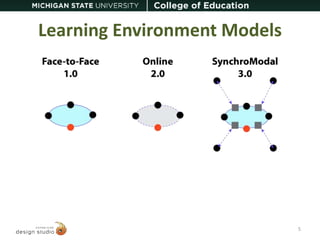
Learning Environment Models 
5
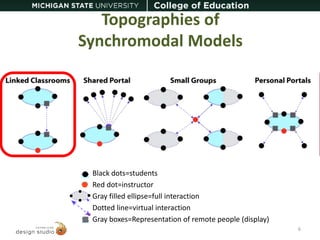
Topographies of 
Synchromodal Models 
Black dots=students 
Red dot=instructor 
Gray filled ellipse=full interaction 
Dotted line=virtual interaction 
Gray boxes=Representation of remote people (display) 
6
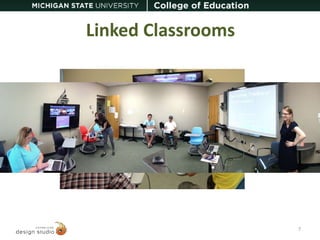
Linked Classrooms 
7
Technological Setup 
1 
3 2 
3 
4 
[1] GoToMeeting as the video conferencing platform 
[2] Omni-directional speaker/microphone 
[3] Two cameras 
[4] Two displays 
4 
8
Design Considerations 
• Two cameras = viewing angles 
1. Camera pointed at instructor 
2. Camera pointed at local group of students 
• Two displays 
1. Viewing the class lecture 
2. Viewing the remote group of students 
9
Problems Faced 
• In the beginning, there was PolyCom 
• Camera placement 
– Facing the front of the group of students 
– Local teacher talking directly to both local and 
remote students 
10
Lessons Learned 
• Side-by-side displays 
• Importance of considering viewing angles 
– Eye level 
• Technology Navigators at both locations 
11
Lessons Learned: Tech Navigator 
Tech Navigator 
– Someone whose primary responsibility is to keep 
the technology working and effective 
– A fading need as technology becomes more 
transparent 
• Technology gets more reliable and simpler 
• Instructors get more skilled with technology and 
modified pedagogy 
12
Contact Informatio 
CEPSE/COE Design Studio 
www.designstudio.educ.msu.edu 
John Bell johnbell@msu.edu 
William Cain cainwil1@msu.edu 
Sandra Sawaya sawayasa@msu.edu 
13

Linked Classrooms Model. SITE 2014

  • 1.
    Introducing the LinkedClassroom Model in a Synchromodal Learning Environment John Bell  William Cain  Sandra Sawaya SITE 2014 1
  • 2.
    Synchromodal Learning Environment • A Synchromodal Learning Environment is one in which online and face-to-face individuals (both students and instructors) interact with one another in real-time learning sessions (i.e., classes). • Comparable partners in the same learning experience 2
  • 3.
    Our Context •Ph.D. in Ed Psych & Ed Tech www.edutech.msu.edu – Face-to-Face (F2F) and Hybrid  Provide access to mid-career people • Challenges – Two groups integrated — a challenge and a strength – Practice what we preach • CEPSE/COE Design Studio – Do what we’re doing … better – Learn from what we’re doing – Doctoral students as central contributors 3
  • 4.
    Our Big Idea Leading with a solution rather than a problem only succeeds by chance • What primary problem are you trying to solve? – E.g., Learning, access, productivity, constraint, demand, … • Our primary problem: – Increased access with undiminished effect 4
  • 5.
  • 6.
    Topographies of SynchromodalModels Black dots=students Red dot=instructor Gray filled ellipse=full interaction Dotted line=virtual interaction Gray boxes=Representation of remote people (display) 6
  • 7.
  • 8.
    Technological Setup 1 3 2 3 4 [1] GoToMeeting as the video conferencing platform [2] Omni-directional speaker/microphone [3] Two cameras [4] Two displays 4 8
  • 9.
    Design Considerations •Two cameras = viewing angles 1. Camera pointed at instructor 2. Camera pointed at local group of students • Two displays 1. Viewing the class lecture 2. Viewing the remote group of students 9
  • 10.
    Problems Faced •In the beginning, there was PolyCom • Camera placement – Facing the front of the group of students – Local teacher talking directly to both local and remote students 10
  • 11.
    Lessons Learned •Side-by-side displays • Importance of considering viewing angles – Eye level • Technology Navigators at both locations 11
  • 12.
    Lessons Learned: TechNavigator Tech Navigator – Someone whose primary responsibility is to keep the technology working and effective – A fading need as technology becomes more transparent • Technology gets more reliable and simpler • Instructors get more skilled with technology and modified pedagogy 12
  • 13.
    Contact Informatio CEPSE/COEDesign Studio www.designstudio.educ.msu.edu John Bell johnbell@msu.edu William Cain cainwil1@msu.edu Sandra Sawaya sawayasa@msu.edu 13

Editor's Notes

  • #5 Learning: Give students personal help when they most need personal help (flipped classroom) Access: EPET Hybrid Productivity: Hybrid: Need more students for special classes Constraints: MOOCS: reach more people Demand: students want convenience, and they can get it