© Robin Emig 2015, 2016
Laboratory Information
Management Systems (LIMS)
What is a LIMS How and when to implement them The most important features to look for
Robin Emig
Medium Deck
© Robin Emig 2015, 2016
What LIMS are for?
© Robin Emig 2015, 2016
LIMS Manages Data
● Could be build using Excel, word etc
○ Many initial iterations are
○ These tools start to break down as requirements change
■ People Scale
● Think 3 people all trying to edit the same Excel Doc
■ Data Scale
● Excel can handle many rows, but finding what you want gets harder
■ Auditing and Security Required
■ Data types change
● Imaging, massspec, sequencing files
© Robin Emig 2015, 2016
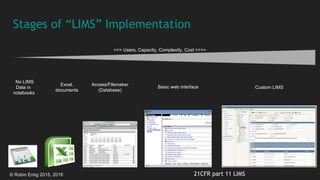
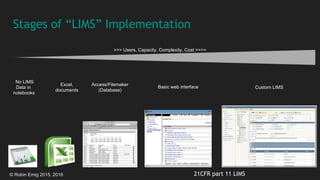
Stages of “LIMS” Implementation
No LIMS
Data in
notebooks
Excel,
documents
Access/Filemaker
(Database)
Basic web interface Custom LIMS
21CFR part 11 LIMS
>>> Users, Capacity, Complexity, Cost >>>>
© Robin Emig 2015, 2016
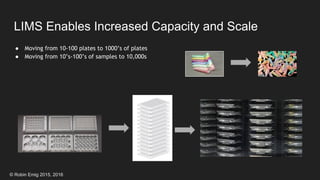
LIMS Enables Increased Capacity and Scale
● Moving from 10-100 plates to 1000’s of plates
● Moving from 10’s-100’s of samples to 10,000s
© Robin Emig 2015, 2016
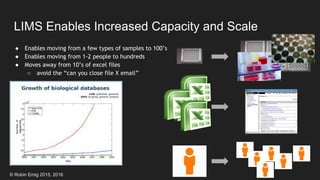
LIMS Enables Increased Capacity and Scale
● Enables moving from a few types of samples to 100’s
● Enables moving from 1-2 people to hundreds
● Moves away from 10’s of excel files
○ avoid the “can you close file X email”
© Robin Emig 2015, 2016
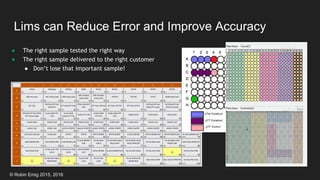
Lims can Reduce Error and Improve Accuracy
● The right sample tested the right way
● The right sample delivered to the right customer
● Don’t lose that important sample!
© Robin Emig 2015, 2016
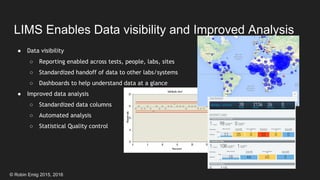
LIMS Enables Data visibility and Improved Analysis
● Data visibility
○ Reporting enabled across tests, people, labs, sites
○ Standardized handoff of data to other labs/systems
○ Dashboards to help understand data at a glance
● Improved data analysis
○ Standardized data columns
○ Automated analysis
○ Statistical Quality control
© Robin Emig 2015, 2016
FDA Requires Data Auditing
● Must implement data access controls and audits
○ system validations
○ audit trails
○ electronic signatures
○ documentation for software and systems
● Hard to audit Excel documents [because modifications must be signed and time-stamped]
● Many LIMS have these features built-in from the get-go
● for more Info see: https://en.wikipedia.org/wiki/Title_21_CFR_Part_11
© Robin Emig 2015, 2016
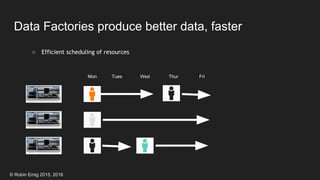
Data Factories produce better data, faster
○ Efficient scheduling of resources
Mon ThurTues FriWed
© Robin Emig 2015, 2016
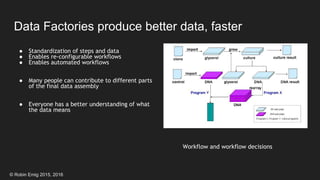
Data Factories produce better data, faster
Workflow and workflow decisions
● Standardization of steps and data
● Enables re-configurable workflows
● Enables automated workflows
● Many people can contribute to different parts
of the final data assembly
● Everyone has a better understanding of what
the data means
© Robin Emig 2015, 2016
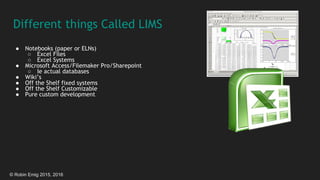
Different things Called LIMS
● Notebooks (paper or ELNs)
○ Excel Files
○ Excel Systems
● Microsoft Access/Filemaker Pro/Sharepoint
○ Ie actual databases
● Wiki’s
● Off the Shelf fixed systems
● Off the Shelf Customizable
● Pure custom development
© Robin Emig 2015, 2016
Implementing LIMS
© Robin Emig 2015, 2016
Stages of “LIMS” Implementation
No LIMS
Data in
notebooks
Excel,
documents
Access/Filemaker
(Database)
Basic web interface Custom LIMS
21CFR part 11 LIMS
>>> Users, Capacity, Complexity, Cost >>>>
© Robin Emig 2015, 2016
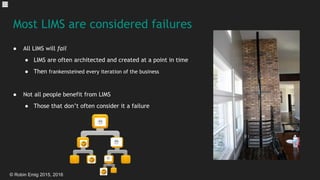
Most LIMS are considered failures
● All LIMS will fail
● LIMS are often architected and created at a point in time
● Then frankensteined every iteration of the business
● Not all people benefit from LIMS
● Those that don’t often consider it a failure
© Robin Emig 2015, 2016
LIMS Implementation Process
● Determine need for a LIMS
○ GLP/GMP/etc
○ Throughput
● Determine who needs what data
○ What questions will they have
○ How will they need to see it
● Determine any Value proposals
○ Ie mislabeling means we lost FDA approval vs 1 lost day of work
○ Everyone is X% more efficient because they don’t have to spend all day looking through freezers
○ Samples last X% longer because the freezers are accessed more quickly
© Robin Emig 2015, 2016
Prevent a LIMS disaster
● Figure out your lab process first
○ Know what aspects of the lab work are tracked in the LIMS.
○ Code/modify/debug as you go will be costly and possibly dangerous to data integrity
● LIMS will not help you figure out your process
○ Out of the box solution may force you into best practices
■ Is this the best way forward for you?
● Involve someone who understands what LIMS brings to the table
© Robin Emig 2015, 2016
Hiring the Right People for LIMS Implementation
● Hire people with LIMS experience
● Highly technical (IT) Lab personnel are good for BA/Testing/Configuration
○ can also do minor coding
● Need workflow? Hire people with workflow system experience.
○ can be LIMS workflow or CRM/etc
© Robin Emig 2015, 2016
Hiring the Right People for LIMS Implementation
● Hire people with experience with the LIMS you are implementing
○ Especially true for customization
○ They can help you choose the LIMS as well
● Consider a mix of contractors and FTE
○ Builds in house talent, and system is delivered sooner
● Build a relationship with LIMS contractors
○ Enables you to bring them on for short projects over the years
○ Helps to have a consultant for the next version, or other LIMS systems
© Robin Emig 2015, 2016
Important Considerations for LIMS Evaluations
● What will be configuration? ie barcode label formats
○ Simple to do, usually looks like a settings dialog
● What will be customization? ie new entities, business logic
○ More involved, there may be a “tool” or “development environment”
● Understanding the difference will reduce costs and time to release
© Robin Emig 2015, 2016
What to ask about “User Configurable” LIMS
● Usually this means no programming required, mostly settings changes
○ Many will say their system is “fully configurable”
○ Pick your most complex request and ask them to demo it
● More configurable = harder to understand raw data model
○ User sees: ID, Name, Volume, Site, Trashed
○ Database has: ID, Name, Volume, customField1, customField2 or
○ Entity-Tag-Value ie {S00285, Name, “InitialSample”} {S00285, Site, “PaloAlto”}
© Robin Emig 2015, 2016
What to ask about Customizable LIMS
● Usually this means at least some programming (Scripting, 4g, or other)
● Can you do the work, or just the LIMS company?
● Is the customization done through their “development tools” or standards (ie Visual Studio)
● Look for Inheritance or “user” tables to help isolate your work from core
● Can it be on a Dev system and then moved to QA/Prod?
© Robin Emig 2015, 2016
Customizable LIMS Upgrades and Releases
● How are releases done?
○ same as install?
○ custom scripts?
● If the LIMS company upgrades, will your custom code still work?
● Beware of data model changes locking you into a version
● Look for Inheritance or “user” tables to help isolate your work from core
© Robin Emig 2015, 2016
Determine Business Entities Early on
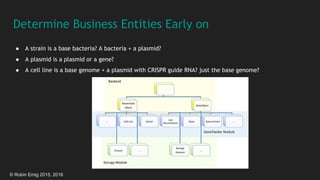
● A strain is a base bacteria? A bacteria + a plasmid?
● A plasmid is a plasmid or a gene?
● A cell line is a base genome + a plasmid with CRISPR guide RNA? just the base genome?
© Robin Emig 2015, 2016
People are more Important than Software
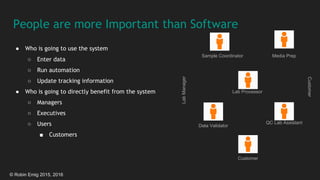
● Who is going to use the system
○ Enter data
○ Run automation
○ Update tracking information
● Who is going to directly benefit from the system
○ Managers
○ Executives
○ Users
■ Customers
Sample Coordinator
Customer
QC Lab Assistant
Data Validator
Lab Processor
Media Prep
LabManager
Customer
© Robin Emig 2015, 2016
SuperUsers are Important for Success
● They know the systems
● They benefit
○ Get a promotion, bonus, etc.
○ Experience on resume
© Robin Emig 2015, 2016
LIMS Licensing and Customization Costs
● Depends on licensing
● More customization = More Co$t
● Software rules…
○ Don’t build anything you can buy
○ Don’t buy anything you can get for “free”
○ Keep in mind “free” may cost you more than building it
© Robin Emig 2015, 2016
LIMS Licensing Costs
● Per concurrent user
○ usually more expensive ($1.5K- 15K/ year)
○ good for a large number of infrequent users
● Per user
○ usually less expensive ($200-$2000/year)
○ watch out for per user/per computer
○ and auditing (ie 50 people using the same account)
○ good for a few frequent users
○ many cloud companies are now per user/month ($20-$200/month)
● Enterprise
○ Usually expensive ($250K-$600K/year)
○ good for large installations (25 - 250 users)
○ watch out for “data units” or “function unit” charges
○ not a bad thing, but something to be aware of
© Robin Emig 2015, 2016
Initial Costs of LIMS Startup
● Usually license fee (see prior slides)
● An onsite install fee
● $2K-$10K/day
● A Spin up fee (for cloud or simple installs)
● $1K-$10K
● Customization
● “Non programming” $100/hour
● Developer Required $150-$250/hour
● For a large system, plan on 2-6000 hours
● Building your own from scratch?
● plan on 3-5FTE years for a mid size
● 5-10 FTE years for a large system
© Robin Emig 2015, 2016
Key LIMS
Functionality
© Robin Emig 2015, 2016
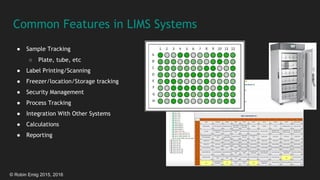
Common Features in LIMS Systems
● Sample Tracking
○ Plate, tube, etc
● Label Printing/Scanning
● Freezer/location/Storage tracking
● Security Management
● Process Tracking
● Integration With Other Systems
● Calculations
● Reporting
© Robin Emig 2015, 2016
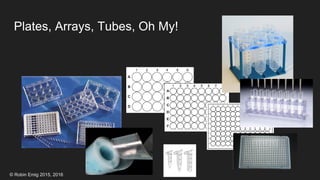
Plates, Arrays, Tubes, Oh My!
© Robin Emig 2015, 2016
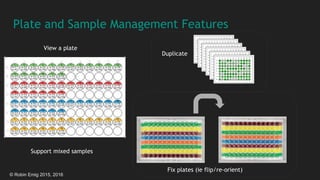
Plate and Sample Management Features
View a plate
Fix plates (ie flip/re-orient)
Duplicate
Support mixed samples
© Robin Emig 2015, 2016
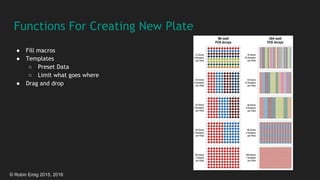
Functions For Creating New Plate
● Fill macros
● Templates
○ Preset Data
○ Limit what goes where
● Drag and drop
© Robin Emig 2015, 2016
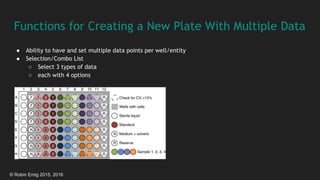
Functions for Creating a New Plate With Multiple Data
● Ability to have and set multiple data points per well/entity
● Selection/Combo List
○ Select 3 types of data
○ each with 4 options
© Robin Emig 2015, 2016
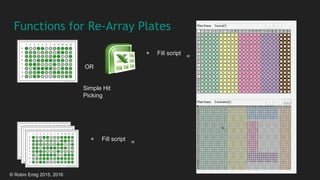
Functions for Re-Array Plates
Simple Hit
Picking
OR
+ Fill script
=
+ Fill script
=
© Robin Emig 2015, 2016
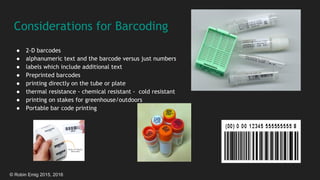
Considerations for Barcoding
● 2-D barcodes
● alphanumeric text and the barcode versus just numbers
● labels which include additional text
● Preprinted barcodes
● printing directly on the tube or plate
● thermal resistance - chemical resistant - cold resistant
● printing on stakes for greenhouse/outdoors
● Portable bar code printing
© Robin Emig 2015, 2016
Considerations for Barcode Scanners
● wireless
● wireless Internet accessible with display
● to the tube scanners scanning from underneath
● keyboard wedge style
● scanning into a webpage
© Robin Emig 2015, 2016
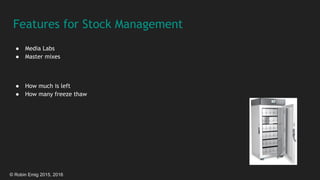
Features for Stock Management
● Media Labs
● Master mixes
● How much is left
● How many freeze thaw
© Robin Emig 2015, 2016
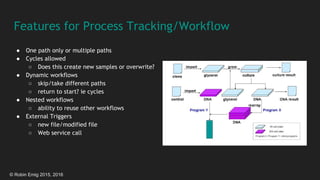
Features for Process Tracking/Workflow
● One path only or multiple paths
● Cycles allowed
○ Does this create new samples or overwrite?
● Dynamic workflows
○ skip/take different paths
○ return to start? ie cycles
● Nested workflows
○ ability to reuse other workflows
● External Triggers
○ new file/modified file
○ Web service call
© Robin Emig 2015, 2016
Features for Security Management
● Login
○ Windows Authentication
○ LDAP/Active directory integration
○ Single signon?
○ Sign on/Impersonation of another user
● Group management - ie DNA Lab
● Role Management - ie Lab Admins
● Electronic signatures
© Robin Emig 2015, 2016
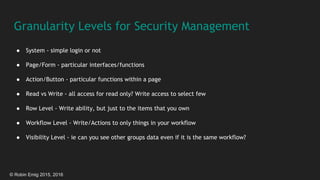
Granularity Levels for Security Management
● System - simple login or not
● Page/Form - particular interfaces/functions
● Action/Button - particular functions within a page
● Read vs Write - all access for read only? Write access to select few
● Row Level - Write ability, but just to the items that you own
● Workflow Level - Write/Actions to only things in your workflow
● Visibility Level - ie can you see other groups data even if it is the same workflow?
© Robin Emig 2015, 2016
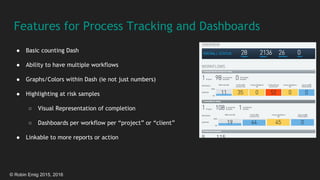
Features for Process Tracking and Dashboards
● Basic counting Dash
● Ability to have multiple workflows
● Graphs/Colors within Dash (ie not just numbers)
● Highlighting at risk samples
○ Visual Representation of completion
○ Dashboards per workflow per “project” or “client”
● Linkable to more reports or action
© Robin Emig 2015, 2016
Considerations for Integration With Other Systems
● What is the integration path
● Direct database access
○ Beware no-sql or document databases
● Webservices
○ Canned or configurable?
○ Same business logic and security?
© Robin Emig 2015, 2016
Integration With Calculation and Statistics Engines
● Make it easier to build dashboards for monitoring capacity or workflow, etc.
● Make it easier for scientists to extract the data they need for an analysis without coding
● R/Matlab/Sas Integration
● IPython/Jupyter Notebooks Integration
© Robin Emig 2015, 2016
Integrating With External Reporting Systems
● Spotfire
○ Integrated reporting (embed in web page)
○ Combined with webservice to writeback?
● Tableau
● Datawarehouses
○ Talend
© Robin Emig 2015, 2016
Acknowledgements
Some images shown from:
EnvironmentalQA
ClarityLIMS
GoogleMaps API
http://www.esoft.co.za/CaseStudies/CaseStudy-LIMS.aspx
http://www.labcyte.com/
bikalims
www.bioxing.com
© Robin Emig 2015, 2016
End
Contact Robin Emig @ robinemig@gmail.com or on LinkedIn

LIMS Implementation

  • 1.
    © Robin Emig2015, 2016 Laboratory Information Management Systems (LIMS) What is a LIMS How and when to implement them The most important features to look for Robin Emig Medium Deck
  • 2.
    © Robin Emig2015, 2016 What LIMS are for?
  • 3.
    © Robin Emig2015, 2016 LIMS Manages Data ● Could be build using Excel, word etc ○ Many initial iterations are ○ These tools start to break down as requirements change ■ People Scale ● Think 3 people all trying to edit the same Excel Doc ■ Data Scale ● Excel can handle many rows, but finding what you want gets harder ■ Auditing and Security Required ■ Data types change ● Imaging, massspec, sequencing files
  • 4.
    © Robin Emig2015, 2016 Stages of “LIMS” Implementation No LIMS Data in notebooks Excel, documents Access/Filemaker (Database) Basic web interface Custom LIMS 21CFR part 11 LIMS >>> Users, Capacity, Complexity, Cost >>>>
  • 5.
    © Robin Emig2015, 2016 LIMS Enables Increased Capacity and Scale ● Moving from 10-100 plates to 1000’s of plates ● Moving from 10’s-100’s of samples to 10,000s
  • 6.
    © Robin Emig2015, 2016 LIMS Enables Increased Capacity and Scale ● Enables moving from a few types of samples to 100’s ● Enables moving from 1-2 people to hundreds ● Moves away from 10’s of excel files ○ avoid the “can you close file X email”
  • 7.
    © Robin Emig2015, 2016 Lims can Reduce Error and Improve Accuracy ● The right sample tested the right way ● The right sample delivered to the right customer ● Don’t lose that important sample!
  • 8.
    © Robin Emig2015, 2016 LIMS Enables Data visibility and Improved Analysis ● Data visibility ○ Reporting enabled across tests, people, labs, sites ○ Standardized handoff of data to other labs/systems ○ Dashboards to help understand data at a glance ● Improved data analysis ○ Standardized data columns ○ Automated analysis ○ Statistical Quality control
  • 9.
    © Robin Emig2015, 2016 FDA Requires Data Auditing ● Must implement data access controls and audits ○ system validations ○ audit trails ○ electronic signatures ○ documentation for software and systems ● Hard to audit Excel documents [because modifications must be signed and time-stamped] ● Many LIMS have these features built-in from the get-go ● for more Info see: https://en.wikipedia.org/wiki/Title_21_CFR_Part_11
  • 10.
    © Robin Emig2015, 2016 Data Factories produce better data, faster ○ Efficient scheduling of resources Mon ThurTues FriWed
  • 11.
    © Robin Emig2015, 2016 Data Factories produce better data, faster Workflow and workflow decisions ● Standardization of steps and data ● Enables re-configurable workflows ● Enables automated workflows ● Many people can contribute to different parts of the final data assembly ● Everyone has a better understanding of what the data means
  • 12.
    © Robin Emig2015, 2016 Different things Called LIMS ● Notebooks (paper or ELNs) ○ Excel Files ○ Excel Systems ● Microsoft Access/Filemaker Pro/Sharepoint ○ Ie actual databases ● Wiki’s ● Off the Shelf fixed systems ● Off the Shelf Customizable ● Pure custom development
  • 13.
    © Robin Emig2015, 2016 Implementing LIMS
  • 14.
    © Robin Emig2015, 2016 Stages of “LIMS” Implementation No LIMS Data in notebooks Excel, documents Access/Filemaker (Database) Basic web interface Custom LIMS 21CFR part 11 LIMS >>> Users, Capacity, Complexity, Cost >>>>
  • 15.
    © Robin Emig2015, 2016 Most LIMS are considered failures ● All LIMS will fail ● LIMS are often architected and created at a point in time ● Then frankensteined every iteration of the business ● Not all people benefit from LIMS ● Those that don’t often consider it a failure
  • 16.
    © Robin Emig2015, 2016 LIMS Implementation Process ● Determine need for a LIMS ○ GLP/GMP/etc ○ Throughput ● Determine who needs what data ○ What questions will they have ○ How will they need to see it ● Determine any Value proposals ○ Ie mislabeling means we lost FDA approval vs 1 lost day of work ○ Everyone is X% more efficient because they don’t have to spend all day looking through freezers ○ Samples last X% longer because the freezers are accessed more quickly
  • 17.
    © Robin Emig2015, 2016 Prevent a LIMS disaster ● Figure out your lab process first ○ Know what aspects of the lab work are tracked in the LIMS. ○ Code/modify/debug as you go will be costly and possibly dangerous to data integrity ● LIMS will not help you figure out your process ○ Out of the box solution may force you into best practices ■ Is this the best way forward for you? ● Involve someone who understands what LIMS brings to the table
  • 18.
    © Robin Emig2015, 2016 Hiring the Right People for LIMS Implementation ● Hire people with LIMS experience ● Highly technical (IT) Lab personnel are good for BA/Testing/Configuration ○ can also do minor coding ● Need workflow? Hire people with workflow system experience. ○ can be LIMS workflow or CRM/etc
  • 19.
    © Robin Emig2015, 2016 Hiring the Right People for LIMS Implementation ● Hire people with experience with the LIMS you are implementing ○ Especially true for customization ○ They can help you choose the LIMS as well ● Consider a mix of contractors and FTE ○ Builds in house talent, and system is delivered sooner ● Build a relationship with LIMS contractors ○ Enables you to bring them on for short projects over the years ○ Helps to have a consultant for the next version, or other LIMS systems
  • 20.
    © Robin Emig2015, 2016 Important Considerations for LIMS Evaluations ● What will be configuration? ie barcode label formats ○ Simple to do, usually looks like a settings dialog ● What will be customization? ie new entities, business logic ○ More involved, there may be a “tool” or “development environment” ● Understanding the difference will reduce costs and time to release
  • 21.
    © Robin Emig2015, 2016 What to ask about “User Configurable” LIMS ● Usually this means no programming required, mostly settings changes ○ Many will say their system is “fully configurable” ○ Pick your most complex request and ask them to demo it ● More configurable = harder to understand raw data model ○ User sees: ID, Name, Volume, Site, Trashed ○ Database has: ID, Name, Volume, customField1, customField2 or ○ Entity-Tag-Value ie {S00285, Name, “InitialSample”} {S00285, Site, “PaloAlto”}
  • 22.
    © Robin Emig2015, 2016 What to ask about Customizable LIMS ● Usually this means at least some programming (Scripting, 4g, or other) ● Can you do the work, or just the LIMS company? ● Is the customization done through their “development tools” or standards (ie Visual Studio) ● Look for Inheritance or “user” tables to help isolate your work from core ● Can it be on a Dev system and then moved to QA/Prod?
  • 23.
    © Robin Emig2015, 2016 Customizable LIMS Upgrades and Releases ● How are releases done? ○ same as install? ○ custom scripts? ● If the LIMS company upgrades, will your custom code still work? ● Beware of data model changes locking you into a version ● Look for Inheritance or “user” tables to help isolate your work from core
  • 24.
    © Robin Emig2015, 2016 Determine Business Entities Early on ● A strain is a base bacteria? A bacteria + a plasmid? ● A plasmid is a plasmid or a gene? ● A cell line is a base genome + a plasmid with CRISPR guide RNA? just the base genome?
  • 25.
    © Robin Emig2015, 2016 People are more Important than Software ● Who is going to use the system ○ Enter data ○ Run automation ○ Update tracking information ● Who is going to directly benefit from the system ○ Managers ○ Executives ○ Users ■ Customers Sample Coordinator Customer QC Lab Assistant Data Validator Lab Processor Media Prep LabManager Customer
  • 26.
    © Robin Emig2015, 2016 SuperUsers are Important for Success ● They know the systems ● They benefit ○ Get a promotion, bonus, etc. ○ Experience on resume
  • 27.
    © Robin Emig2015, 2016 LIMS Licensing and Customization Costs ● Depends on licensing ● More customization = More Co$t ● Software rules… ○ Don’t build anything you can buy ○ Don’t buy anything you can get for “free” ○ Keep in mind “free” may cost you more than building it
  • 28.
    © Robin Emig2015, 2016 LIMS Licensing Costs ● Per concurrent user ○ usually more expensive ($1.5K- 15K/ year) ○ good for a large number of infrequent users ● Per user ○ usually less expensive ($200-$2000/year) ○ watch out for per user/per computer ○ and auditing (ie 50 people using the same account) ○ good for a few frequent users ○ many cloud companies are now per user/month ($20-$200/month) ● Enterprise ○ Usually expensive ($250K-$600K/year) ○ good for large installations (25 - 250 users) ○ watch out for “data units” or “function unit” charges ○ not a bad thing, but something to be aware of
  • 29.
    © Robin Emig2015, 2016 Initial Costs of LIMS Startup ● Usually license fee (see prior slides) ● An onsite install fee ● $2K-$10K/day ● A Spin up fee (for cloud or simple installs) ● $1K-$10K ● Customization ● “Non programming” $100/hour ● Developer Required $150-$250/hour ● For a large system, plan on 2-6000 hours ● Building your own from scratch? ● plan on 3-5FTE years for a mid size ● 5-10 FTE years for a large system
  • 30.
    © Robin Emig2015, 2016 Key LIMS Functionality
  • 31.
    © Robin Emig2015, 2016 Common Features in LIMS Systems ● Sample Tracking ○ Plate, tube, etc ● Label Printing/Scanning ● Freezer/location/Storage tracking ● Security Management ● Process Tracking ● Integration With Other Systems ● Calculations ● Reporting
  • 32.
    © Robin Emig2015, 2016 Plates, Arrays, Tubes, Oh My!
  • 33.
    © Robin Emig2015, 2016 Plate and Sample Management Features View a plate Fix plates (ie flip/re-orient) Duplicate Support mixed samples
  • 34.
    © Robin Emig2015, 2016 Functions For Creating New Plate ● Fill macros ● Templates ○ Preset Data ○ Limit what goes where ● Drag and drop
  • 35.
    © Robin Emig2015, 2016 Functions for Creating a New Plate With Multiple Data ● Ability to have and set multiple data points per well/entity ● Selection/Combo List ○ Select 3 types of data ○ each with 4 options
  • 36.
    © Robin Emig2015, 2016 Functions for Re-Array Plates Simple Hit Picking OR + Fill script = + Fill script =
  • 37.
    © Robin Emig2015, 2016 Considerations for Barcoding ● 2-D barcodes ● alphanumeric text and the barcode versus just numbers ● labels which include additional text ● Preprinted barcodes ● printing directly on the tube or plate ● thermal resistance - chemical resistant - cold resistant ● printing on stakes for greenhouse/outdoors ● Portable bar code printing
  • 38.
    © Robin Emig2015, 2016 Considerations for Barcode Scanners ● wireless ● wireless Internet accessible with display ● to the tube scanners scanning from underneath ● keyboard wedge style ● scanning into a webpage
  • 39.
    © Robin Emig2015, 2016 Features for Stock Management ● Media Labs ● Master mixes ● How much is left ● How many freeze thaw
  • 40.
    © Robin Emig2015, 2016 Features for Process Tracking/Workflow ● One path only or multiple paths ● Cycles allowed ○ Does this create new samples or overwrite? ● Dynamic workflows ○ skip/take different paths ○ return to start? ie cycles ● Nested workflows ○ ability to reuse other workflows ● External Triggers ○ new file/modified file ○ Web service call
  • 41.
    © Robin Emig2015, 2016 Features for Security Management ● Login ○ Windows Authentication ○ LDAP/Active directory integration ○ Single signon? ○ Sign on/Impersonation of another user ● Group management - ie DNA Lab ● Role Management - ie Lab Admins ● Electronic signatures
  • 42.
    © Robin Emig2015, 2016 Granularity Levels for Security Management ● System - simple login or not ● Page/Form - particular interfaces/functions ● Action/Button - particular functions within a page ● Read vs Write - all access for read only? Write access to select few ● Row Level - Write ability, but just to the items that you own ● Workflow Level - Write/Actions to only things in your workflow ● Visibility Level - ie can you see other groups data even if it is the same workflow?
  • 43.
    © Robin Emig2015, 2016 Features for Process Tracking and Dashboards ● Basic counting Dash ● Ability to have multiple workflows ● Graphs/Colors within Dash (ie not just numbers) ● Highlighting at risk samples ○ Visual Representation of completion ○ Dashboards per workflow per “project” or “client” ● Linkable to more reports or action
  • 44.
    © Robin Emig2015, 2016 Considerations for Integration With Other Systems ● What is the integration path ● Direct database access ○ Beware no-sql or document databases ● Webservices ○ Canned or configurable? ○ Same business logic and security?
  • 45.
    © Robin Emig2015, 2016 Integration With Calculation and Statistics Engines ● Make it easier to build dashboards for monitoring capacity or workflow, etc. ● Make it easier for scientists to extract the data they need for an analysis without coding ● R/Matlab/Sas Integration ● IPython/Jupyter Notebooks Integration
  • 46.
    © Robin Emig2015, 2016 Integrating With External Reporting Systems ● Spotfire ○ Integrated reporting (embed in web page) ○ Combined with webservice to writeback? ● Tableau ● Datawarehouses ○ Talend
  • 47.
    © Robin Emig2015, 2016 Acknowledgements Some images shown from: EnvironmentalQA ClarityLIMS GoogleMaps API http://www.esoft.co.za/CaseStudies/CaseStudy-LIMS.aspx http://www.labcyte.com/ bikalims www.bioxing.com
  • 48.
    © Robin Emig2015, 2016 End Contact Robin Emig @ robinemig@gmail.com or on LinkedIn