ELAB ARCHITECTURE LESSON LCE GENERAL
SUMMARY INTRODUCTION DESIGN OF ELAB Pyramid  architecture The valence system
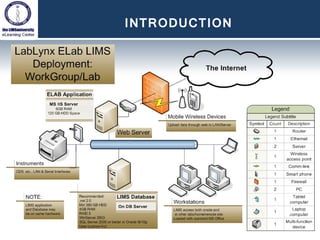
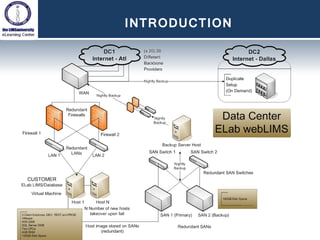
INTRODUCTION The LabLynx ELab application was the first 100% true browser-based LIMS (Laboratory Information Management System) to be introduced, in 1997. Workstations require Internet Explorer browser. No other software is required on the user’s computer.  Can be deployed on customer site or cloud-hosted at LabLynx Data Center
INTRODUCTION
INTRODUCTION
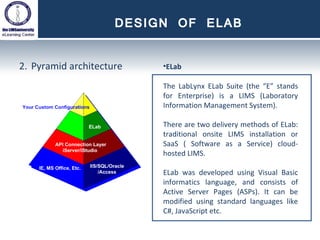
DESIGN OF ELAB Pyramid architecture ELab T he LabLynx ELab Suite (the “E” stands for Enterprise) is a LIMS (Laboratory Information Management System). There are two delivery methods of ELab: traditional onsite LIMS installation or SaaS ( Software as a Service) cloud-hosted  LIMS . ELab was developed using Visual Basic informatics language, and consists of Active Server Pages (ASPs). It can be modified using standard languages like C#, JavaScript etc.
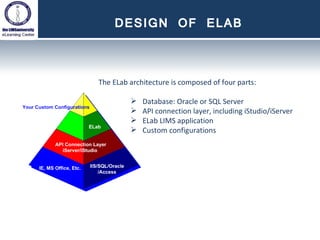
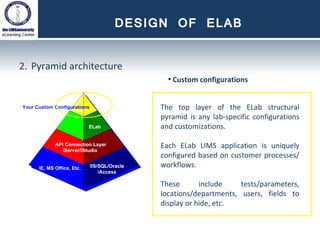
DESIGN OF ELAB The ELab architecture is composed of four parts: Database: Oracle or SQL Server API connection layer, including iStudio/iServer ELab LIMS application Custom configurations
DESIGN OF ELAB Pyramid architecture ELab’s bottom layer is the environment foundation: MS IIS, .NET Framework, Windows Server MS Office software on Workstations (to open and edit customer files in those formats, and use Excel import/export functions in ELab).  Database connection is via native API
DESIGN OF ELAB Pyramid architecture iServer/iStudio iServer is the communication engine for ELab, using API to link databases to the LIMS. iStudio is its user interface, providing a LIMS developer tool for customizing the ELab LIMS to your exact needs. Although 99% of tailoring ELab to the lab is  configuration  (done within ELab itself), iStudio provides the interface to the customization engine, iServer. iStudio allows you to further customize every aspect of ELab, including: Screens  Reports  Business Logic  Database Objects such as Tables, Fields, Stored Procs, etc.
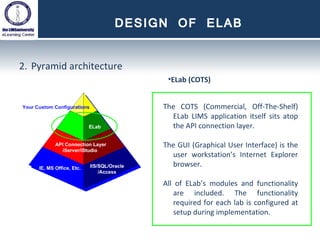
DESIGN OF ELAB Pyramid architecture ELab (COTS) The COTS (Commercial, Off-The-Shelf) ELab LIMS application itself sits atop the API connection layer. The GUI (Graphical User Interface) is the user workstation’s Internet Explorer browser. All of ELab’s modules and functionality are included. The functionality required for each lab is configured at setup during implementation.
DESIGN OF ELAB Pyramid architecture Custom configurations The top layer of the ELab structural pyramid is any lab-specific configurations and customizations. Each ELab LIMS application is uniquely configured based on customer processes/workflows. These include tests/parameters, locations/departments, users, fields to display or hide, etc.
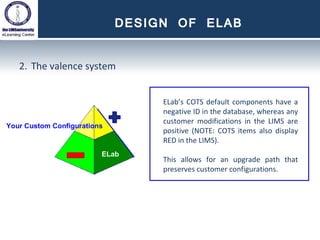
DESIGN OF ELAB The valence system ELab’s COTS default components have a negative ID in the database, whereas any customer modifications in the LIMS are positive (NOTE: COTS items also display RED in the LIMS). This allows for an upgrade path that preserves customer configurations.

LCE: Elab Architecture

  • 1.
  • 2.
    SUMMARY INTRODUCTION DESIGNOF ELAB Pyramid architecture The valence system
  • 3.
    INTRODUCTION The LabLynxELab application was the first 100% true browser-based LIMS (Laboratory Information Management System) to be introduced, in 1997. Workstations require Internet Explorer browser. No other software is required on the user’s computer. Can be deployed on customer site or cloud-hosted at LabLynx Data Center
  • 4.
  • 5.
  • 6.
    DESIGN OF ELABPyramid architecture ELab T he LabLynx ELab Suite (the “E” stands for Enterprise) is a LIMS (Laboratory Information Management System). There are two delivery methods of ELab: traditional onsite LIMS installation or SaaS ( Software as a Service) cloud-hosted LIMS . ELab was developed using Visual Basic informatics language, and consists of Active Server Pages (ASPs). It can be modified using standard languages like C#, JavaScript etc.
  • 7.
    DESIGN OF ELABThe ELab architecture is composed of four parts: Database: Oracle or SQL Server API connection layer, including iStudio/iServer ELab LIMS application Custom configurations
  • 8.
    DESIGN OF ELABPyramid architecture ELab’s bottom layer is the environment foundation: MS IIS, .NET Framework, Windows Server MS Office software on Workstations (to open and edit customer files in those formats, and use Excel import/export functions in ELab). Database connection is via native API
  • 9.
    DESIGN OF ELABPyramid architecture iServer/iStudio iServer is the communication engine for ELab, using API to link databases to the LIMS. iStudio is its user interface, providing a LIMS developer tool for customizing the ELab LIMS to your exact needs. Although 99% of tailoring ELab to the lab is configuration (done within ELab itself), iStudio provides the interface to the customization engine, iServer. iStudio allows you to further customize every aspect of ELab, including: Screens Reports Business Logic Database Objects such as Tables, Fields, Stored Procs, etc.
  • 10.
    DESIGN OF ELABPyramid architecture ELab (COTS) The COTS (Commercial, Off-The-Shelf) ELab LIMS application itself sits atop the API connection layer. The GUI (Graphical User Interface) is the user workstation’s Internet Explorer browser. All of ELab’s modules and functionality are included. The functionality required for each lab is configured at setup during implementation.
  • 11.
    DESIGN OF ELABPyramid architecture Custom configurations The top layer of the ELab structural pyramid is any lab-specific configurations and customizations. Each ELab LIMS application is uniquely configured based on customer processes/workflows. These include tests/parameters, locations/departments, users, fields to display or hide, etc.
  • 12.
    DESIGN OF ELABThe valence system ELab’s COTS default components have a negative ID in the database, whereas any customer modifications in the LIMS are positive (NOTE: COTS items also display RED in the LIMS). This allows for an upgrade path that preserves customer configurations.