Lightning Components
Components, Actions and Events
Durgesh Dhoot
ddurgesh28@gmail.com
@ddurgesh28
Durgesh Dhoot
Technical Consultant @ Appirio
6x Certified Salesforce Developer
Forward-Looking Statements
Statement under the Private Securities Litigation Reform Act of 1995:
This presentation may contain forward-looking statements that involve risks, uncertainties, and assumptions. If any such uncertainties materialize or if any
of the assumptions proves incorrect, the results of salesforce.com, inc. could differ materially from the results expressed or implied by the forward-looking
statements we make. All statements other than statements of historical fact could be deemed forward-looking, including any projections of product or
service availability, subscriber growth, earnings, revenues, or other financial items and any statements regarding strategies or plans of management for
future operations, statements of belief, any statements concerning new, planned, or upgraded services or technology developments and customer
contracts or use of our services.
The risks and uncertainties referred to above include – but are not limited to – risks associated with developing and delivering new functionality for our
service, new products and services, our new business model, our past operating losses, possible fluctuations in our operating results and rate of growth,
interruptions or delays in our Web hosting, breach of our security measures, the outcome of any litigation, risks associated with completed and any possible
mergers and acquisitions, the immature market in which we operate, our relatively limited operating history, our ability to expand, retain, and motivate our
employees and manage our growth, new releases of our service and successful customer deployment, our limited history reselling non-salesforce.com
products, and utilization and selling to larger enterprise customers. Further information on potential factors that could affect the financial results of
salesforce.com, inc. is included in our annual report on Form 10-K for the most recent fiscal year and in our quarterly report on Form 10-Q for the most
recent fiscal quarter. These documents and others containing important disclosures are available on the SEC Filings section of the Investor Information
section of our Web site.
Any unreleased services or features referenced in this or other presentations, press releases or public statements are not currently available and may not
be delivered on time or at all. Customers who purchase our services should make the purchase decisions based upon features that are currently available.
Salesforce.com, inc. assumes no obligation and does not intend to update these forward-looking statements.
Quick Recap
● What are Lightning Components - based on aura, resuable unit, uses HTML, CSS & JS
● Benefits of Component Driven Approach - Car & Bumbble-Bee both
● Lightning Components & Aura - how Ltng Components and aura are realted
● Architecture & Lifecycle - partioned multi tier system
● Artifacts - how compartmentalized code in differnt files
● Where Do They Run ? - at which all places you can run Ltng Components
● Tools For Development - tools and IDEs to develop
● Logging & Debugging - ways to log and debug
Agenda
● Component Markup
● Inside Component Markup - Attributes, Facets, Expressions, aura:method
● Data Exchange & Calling Methods
● OOB Components
● Lightning Data Service
● Action & Events
● Lightning Action Service
m: model
• Undocumented
• No more supported
v: view
• {!v.dateValue}
• {!v.format}
c: controller
• Inside Component Markup it refers JS
Controller eg: {!c.doInit}
• But Inside a JS file it refers your apex
controller e.g.
component.get("c.findAll");
e: event
• Inside JS file to get events e.g.
$A.get("e.c:aeEvent");
Before Starting to Code...
Skeleton - Component Markup
8
1. HTML
2. CSS
3. Attributes
4. Facets
5. Expressions
6. Standard or Custom Components
a. Static Resources (ltng:require)
b. Event Handlers (aura:handler)
c. Event Registers (aura:registerEvent)
d. Dependency declaration in case of dynamic creation
(aura:dependency)
7. aura:method
Inside Component Markup
1. Very similar like member variables on a class in Apex.
2. Help you to make components more dynamic.
3. Referenced via expressions in markup and via get/set in js
Attributes
Attribute Name Type Description
access String Indicates whether the attribute can be used outside of its own namespace. Possible values are public (default), and
global, and private.
name String Required. The name of the attribute.
type String Required. The type of the attribute. For a list of basic types supported, see Basic Types.
default String The default value for the attribute, which can be overwritten as needed. When setting a default value, expressions
using the $Label, $Locale, and $Browser global value providers are supported. Alternatively, to set a dynamic
default, use an init event. See Invoking Actions on Component Initialization.
required Boolean Determines if the attribute is required. The default is false.
description String A summary of the attribute and its usage.
Attributes that participate in the rendering cycle, of type Aura.Component[]
Facets
Component Definition Component Usage
Output
Expressions
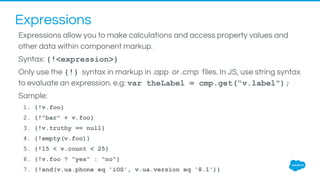
Expressions allow you to make calculations and access property values and
other data within component markup.
Syntax: {!<expression>}
Only use the {!} syntax in markup in .app or .cmp files. In JS, use string syntax
to evaluate an expression. e.g: var theLabel = cmp.get("v.label");
Sample:
1. {!v.foo}
2. {!"bar" + v.foo}
3. {!v.truthy == null}
4. {!empty(v.foo)}
5. {!15 < v.count < 25}
6. {!v.foo ? "yes" : "no"}
7. {!and(v.ua.phone eq 'iOS', v.ua.version eq '8.1')}
Expressions
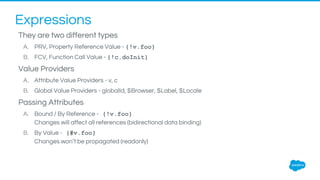
They are two different types
A. PRV, Property Reference Value - {!v.foo}
B. FCV, Function Call Value - {!c.doInit}
Value Providers
A. Attribute Value Providers - v, c
B. Global Value Providers - globalId, $Browser, $Label, $Locale
Passing Attributes
A. Bound / By Reference - {!v.foo}
Changes will affect all references (bidirectional data binding)
B. By Value - {#v.foo}
Changes won’t be propagated (readonly)
Expressions
Try to avoid Bi-directional data binding as much as possible
aura:method
1
2
3
4
5
6
7
8
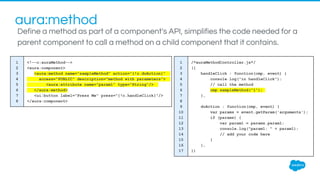
<!--c:auraMethod-->
<aura:component>
<aura:method name="sampleMethod" action="{!c.doAction}"
access="PUBLIC" description="method with parameters">
<aura:attribute name="param1" type="String"/>
</aura:method>
<ui:button label="Press Me" press="{!c.handleClick}"/>
</aura:component>
1
2
3
4
5
6
7
8
9
10
11
12
13
14
15
16
17
/*auraMethodController.js*/
({
handleClick : function(cmp, event) {
console.log("in handleClick");
// call the method
cmp.sampleMethod("1");
},
doAction : function(cmp, event) {
var params = event.getParam('arguments');
if (params) {
var param1 = params.param1;
console.log("param1: " + param1);
// add your code here
}
},
})
Define a method as part of a component's API, simplifies the code needed for a
parent component to call a method on a child component that it contains.
Data Exchange & Calling Methods
Different ways to exchange data in between components.
Before starting let’s create most common scenarios
Parent
Child
1.Parent to Child
Parent
Child
2.Child to Parent
Parent
Child 2
Child 1
2.Child to Child
Data Exchange & Calling Methods
1. Parent to Child
• Data Exchange: Pass the data directly using attributes, use bounded expressions.
• Calling Methods: Use aura:method to call child methods from parent
2. Child to Parent
• Data Exchange: Update child attributes, and access it in parent controller actions.
• Calling Methods: Pass action as attribute (type: Aura.Action) to child
3. Child to Child (Peer to Peer)
• Data Exchange & Calling Methods: Events
Out of the Box Components by framework
There are many out of the box components provided by Salesforce and they are
categorized under following namespace:
1. aura
2. ui
3. force & forceChatter
4. ltng
Best way to learn about them is by accessing your org’s aura documents is via
https://{Your-Org-Instance}.lightning.force.com/auradocs
Lot more will gonna come in near future
Lightning Data Service
Eliminate Your Need to Load Records Through Controllers
Data re-use across components
Multiple SOQL calls for the same data
Automatic record loading
<force:record> handles loading records
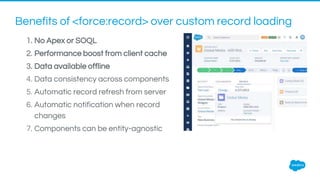
1. No Apex or SOQL
2. Performance boost from client cache
3. Data available offline
4. Data consistency across components
5. Automatic record refresh from server
6. Automatic notification when record
changes
7. Components can be entity-agnostic
Benefits of <force:record> over custom record loading
Events & Actions
The framework uses events to relay data between components, which are
usually triggered by user actions
Events
1. Data Communication Methodology
2. Fired from browser, system, JS controller actions,
Actions
1. User interaction with an element on a component or app
2. Trigger events
Events fired by browser like
onClick, onBlur etc.
Custom Component &
Application Events you have
wrote
OOB Events provided by
framework like aura:waiting,
force:navigateToSObject etc.
Browser Events Custom Events System Events
Events & Different Types
Component Events
A component event is fired from an instance of a component. It can be handled
by the component that fired the event or by a component in the containment
hierarchy that receives the bubbled event.
Steps:
1. Create Custom Component Event
2. Register Component Event
3. Fire Component Event using event.fire()
4. Assign Actions Directly, or Use Handlers
5. Get the Source using event.getSource()
Note: The name attribute in <aura:handler> must match the name attribute in the <aura:registerEvent>
tag in the component that fires the event.
Application Events
Application events follow a traditional publish-
subscribe model. It is fired from an instance of a
component. All components that provide a
handler for the event are notified.
Steps:
1. Create Custom Application Event
2. Register Component Event
3. Fire Component Event using $A.get(<event>)
4. Handle Event
5. event.getSource() will not work, need to pass whole
component as source
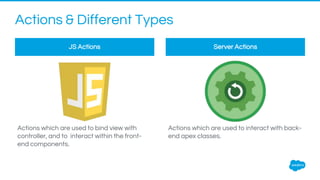
Actions & Different Types
Actions which are used to bind view with
controller, and to interact within the front-
end components.
Actions which are used to interact with back-
end apex classes.
JS Actions Server Actions
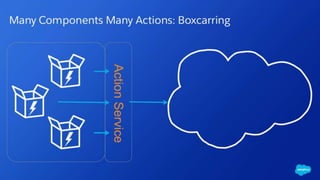
Lightning Action Service
Simplified and robust server interactions
Apex Interaction using Actions
1. To make the Apex Class visible, ‘controller’ attribute has to be set with the name of the class.
2. component.get("c.myMethod”); for calling Apex Methods from controllers
3. @AuraEnabled - Declares the public method to be call from a Javascript Controller
4. All REST APIs must be consumed ONLY from an Apex Class, and not from JS the controller.
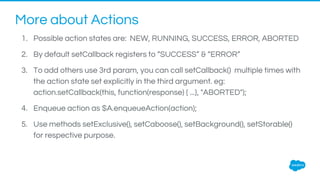
More about Actions
1. Possible action states are: NEW, RUNNING, SUCCESS, ERROR, ABORTED
2. By default setCallback registers to “SUCCESS” & “ERROR”
3. To add others use 3rd param, you can call setCallback() multiple times with
the action state set explicitly in the third argument. eg:
action.setCallback(this, function(response) { ...}, "ABORTED");
4. Enqueue action as $A.enqueueAction(action);
5. Use methods setExclusive(), setCaboose(), setBackground(), setStorable()
for respective purpose.
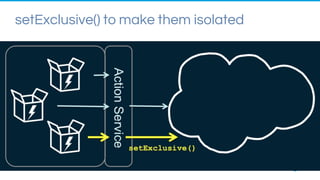
setExclusive() to make them isolated
setCaboose() for Defer High-Volume Actions
Similarly there are 3 more Action Types
1. Background:
a. Use action.setBackground() to run it in background.
b. Useful when you want your app to remain responsive to a user while it executes a low
priority, long-running action.
c. Like You can use a background action if it takes more than five seconds for the response to
return from the server.
2. Abortable:
a. Use action.setAbortable() to mark an action as abortable
b. An abortable action is sent to the server and executed normally unless the component that
created the action is invalid before the action is sent to the server. If the component that
created the action is invalid, the action state is set to ABORTED.
3. Storable:
a. Use action.setStorable() to mark an action storable and to have its response stored in the
Learn More about Lightning Components
●Trailhead Module: Lightning Component
●Trailhead Project: Quick Start: Lightning Components
●Trailhead Project: Build an Account Geolocation App
●Lightning Components Developer's Guide
References
●Lightning Component Developer Guide
●Slideshare: Salesforce Developer Group
●Lightning Data Services
●Lightning Action Service Dreamforce Session & Video
●Lightning Component Action Service Blog Series By Peter Chittum
●Lightning's "Boxcarred Action" and Its Behavior
thank y u

Lightning Component - Components, Actions and Events

  • 1.
    Lightning Components Components, Actionsand Events Durgesh Dhoot ddurgesh28@gmail.com @ddurgesh28
  • 2.
    Durgesh Dhoot Technical Consultant@ Appirio 6x Certified Salesforce Developer
  • 3.
    Forward-Looking Statements Statement underthe Private Securities Litigation Reform Act of 1995: This presentation may contain forward-looking statements that involve risks, uncertainties, and assumptions. If any such uncertainties materialize or if any of the assumptions proves incorrect, the results of salesforce.com, inc. could differ materially from the results expressed or implied by the forward-looking statements we make. All statements other than statements of historical fact could be deemed forward-looking, including any projections of product or service availability, subscriber growth, earnings, revenues, or other financial items and any statements regarding strategies or plans of management for future operations, statements of belief, any statements concerning new, planned, or upgraded services or technology developments and customer contracts or use of our services. The risks and uncertainties referred to above include – but are not limited to – risks associated with developing and delivering new functionality for our service, new products and services, our new business model, our past operating losses, possible fluctuations in our operating results and rate of growth, interruptions or delays in our Web hosting, breach of our security measures, the outcome of any litigation, risks associated with completed and any possible mergers and acquisitions, the immature market in which we operate, our relatively limited operating history, our ability to expand, retain, and motivate our employees and manage our growth, new releases of our service and successful customer deployment, our limited history reselling non-salesforce.com products, and utilization and selling to larger enterprise customers. Further information on potential factors that could affect the financial results of salesforce.com, inc. is included in our annual report on Form 10-K for the most recent fiscal year and in our quarterly report on Form 10-Q for the most recent fiscal quarter. These documents and others containing important disclosures are available on the SEC Filings section of the Investor Information section of our Web site. Any unreleased services or features referenced in this or other presentations, press releases or public statements are not currently available and may not be delivered on time or at all. Customers who purchase our services should make the purchase decisions based upon features that are currently available. Salesforce.com, inc. assumes no obligation and does not intend to update these forward-looking statements.
  • 4.
    Quick Recap ● Whatare Lightning Components - based on aura, resuable unit, uses HTML, CSS & JS ● Benefits of Component Driven Approach - Car & Bumbble-Bee both ● Lightning Components & Aura - how Ltng Components and aura are realted ● Architecture & Lifecycle - partioned multi tier system ● Artifacts - how compartmentalized code in differnt files ● Where Do They Run ? - at which all places you can run Ltng Components ● Tools For Development - tools and IDEs to develop ● Logging & Debugging - ways to log and debug
  • 5.
    Agenda ● Component Markup ●Inside Component Markup - Attributes, Facets, Expressions, aura:method ● Data Exchange & Calling Methods ● OOB Components ● Lightning Data Service ● Action & Events ● Lightning Action Service
  • 6.
    m: model • Undocumented •No more supported v: view • {!v.dateValue} • {!v.format} c: controller • Inside Component Markup it refers JS Controller eg: {!c.doInit} • But Inside a JS file it refers your apex controller e.g. component.get("c.findAll"); e: event • Inside JS file to get events e.g. $A.get("e.c:aeEvent"); Before Starting to Code...
  • 7.
  • 8.
    8 1. HTML 2. CSS 3.Attributes 4. Facets 5. Expressions 6. Standard or Custom Components a. Static Resources (ltng:require) b. Event Handlers (aura:handler) c. Event Registers (aura:registerEvent) d. Dependency declaration in case of dynamic creation (aura:dependency) 7. aura:method Inside Component Markup
  • 9.
    1. Very similarlike member variables on a class in Apex. 2. Help you to make components more dynamic. 3. Referenced via expressions in markup and via get/set in js Attributes Attribute Name Type Description access String Indicates whether the attribute can be used outside of its own namespace. Possible values are public (default), and global, and private. name String Required. The name of the attribute. type String Required. The type of the attribute. For a list of basic types supported, see Basic Types. default String The default value for the attribute, which can be overwritten as needed. When setting a default value, expressions using the $Label, $Locale, and $Browser global value providers are supported. Alternatively, to set a dynamic default, use an init event. See Invoking Actions on Component Initialization. required Boolean Determines if the attribute is required. The default is false. description String A summary of the attribute and its usage.
  • 10.
    Attributes that participatein the rendering cycle, of type Aura.Component[] Facets Component Definition Component Usage Output
  • 11.
    Expressions Expressions allow youto make calculations and access property values and other data within component markup. Syntax: {!<expression>} Only use the {!} syntax in markup in .app or .cmp files. In JS, use string syntax to evaluate an expression. e.g: var theLabel = cmp.get("v.label"); Sample: 1. {!v.foo} 2. {!"bar" + v.foo} 3. {!v.truthy == null} 4. {!empty(v.foo)} 5. {!15 < v.count < 25} 6. {!v.foo ? "yes" : "no"} 7. {!and(v.ua.phone eq 'iOS', v.ua.version eq '8.1')}
  • 12.
    Expressions They are twodifferent types A. PRV, Property Reference Value - {!v.foo} B. FCV, Function Call Value - {!c.doInit} Value Providers A. Attribute Value Providers - v, c B. Global Value Providers - globalId, $Browser, $Label, $Locale Passing Attributes A. Bound / By Reference - {!v.foo} Changes will affect all references (bidirectional data binding) B. By Value - {#v.foo} Changes won’t be propagated (readonly)
  • 13.
    Expressions Try to avoidBi-directional data binding as much as possible
  • 15.
    aura:method 1 2 3 4 5 6 7 8 <!--c:auraMethod--> <aura:component> <aura:method name="sampleMethod" action="{!c.doAction}" access="PUBLIC"description="method with parameters"> <aura:attribute name="param1" type="String"/> </aura:method> <ui:button label="Press Me" press="{!c.handleClick}"/> </aura:component> 1 2 3 4 5 6 7 8 9 10 11 12 13 14 15 16 17 /*auraMethodController.js*/ ({ handleClick : function(cmp, event) { console.log("in handleClick"); // call the method cmp.sampleMethod("1"); }, doAction : function(cmp, event) { var params = event.getParam('arguments'); if (params) { var param1 = params.param1; console.log("param1: " + param1); // add your code here } }, }) Define a method as part of a component's API, simplifies the code needed for a parent component to call a method on a child component that it contains.
  • 16.
    Data Exchange &Calling Methods Different ways to exchange data in between components. Before starting let’s create most common scenarios Parent Child 1.Parent to Child Parent Child 2.Child to Parent Parent Child 2 Child 1 2.Child to Child
  • 17.
    Data Exchange &Calling Methods 1. Parent to Child • Data Exchange: Pass the data directly using attributes, use bounded expressions. • Calling Methods: Use aura:method to call child methods from parent 2. Child to Parent • Data Exchange: Update child attributes, and access it in parent controller actions. • Calling Methods: Pass action as attribute (type: Aura.Action) to child 3. Child to Child (Peer to Peer) • Data Exchange & Calling Methods: Events
  • 18.
    Out of theBox Components by framework There are many out of the box components provided by Salesforce and they are categorized under following namespace: 1. aura 2. ui 3. force & forceChatter 4. ltng Best way to learn about them is by accessing your org’s aura documents is via https://{Your-Org-Instance}.lightning.force.com/auradocs
  • 19.
    Lot more willgonna come in near future
  • 20.
    Lightning Data Service EliminateYour Need to Load Records Through Controllers
  • 21.
  • 22.
    Multiple SOQL callsfor the same data
  • 24.
  • 25.
  • 26.
    1. No Apexor SOQL 2. Performance boost from client cache 3. Data available offline 4. Data consistency across components 5. Automatic record refresh from server 6. Automatic notification when record changes 7. Components can be entity-agnostic Benefits of <force:record> over custom record loading
  • 27.
    Events & Actions Theframework uses events to relay data between components, which are usually triggered by user actions Events 1. Data Communication Methodology 2. Fired from browser, system, JS controller actions, Actions 1. User interaction with an element on a component or app 2. Trigger events
  • 28.
    Events fired bybrowser like onClick, onBlur etc. Custom Component & Application Events you have wrote OOB Events provided by framework like aura:waiting, force:navigateToSObject etc. Browser Events Custom Events System Events Events & Different Types
  • 29.
    Component Events A componentevent is fired from an instance of a component. It can be handled by the component that fired the event or by a component in the containment hierarchy that receives the bubbled event. Steps: 1. Create Custom Component Event 2. Register Component Event 3. Fire Component Event using event.fire() 4. Assign Actions Directly, or Use Handlers 5. Get the Source using event.getSource() Note: The name attribute in <aura:handler> must match the name attribute in the <aura:registerEvent> tag in the component that fires the event.
  • 30.
    Application Events Application eventsfollow a traditional publish- subscribe model. It is fired from an instance of a component. All components that provide a handler for the event are notified. Steps: 1. Create Custom Application Event 2. Register Component Event 3. Fire Component Event using $A.get(<event>) 4. Handle Event 5. event.getSource() will not work, need to pass whole component as source
  • 31.
    Actions & DifferentTypes Actions which are used to bind view with controller, and to interact within the front- end components. Actions which are used to interact with back- end apex classes. JS Actions Server Actions
  • 32.
    Lightning Action Service Simplifiedand robust server interactions
  • 33.
    Apex Interaction usingActions 1. To make the Apex Class visible, ‘controller’ attribute has to be set with the name of the class. 2. component.get("c.myMethod”); for calling Apex Methods from controllers 3. @AuraEnabled - Declares the public method to be call from a Javascript Controller 4. All REST APIs must be consumed ONLY from an Apex Class, and not from JS the controller.
  • 36.
    More about Actions 1.Possible action states are: NEW, RUNNING, SUCCESS, ERROR, ABORTED 2. By default setCallback registers to “SUCCESS” & “ERROR” 3. To add others use 3rd param, you can call setCallback() multiple times with the action state set explicitly in the third argument. eg: action.setCallback(this, function(response) { ...}, "ABORTED"); 4. Enqueue action as $A.enqueueAction(action); 5. Use methods setExclusive(), setCaboose(), setBackground(), setStorable() for respective purpose.
  • 37.
  • 38.
    setCaboose() for DeferHigh-Volume Actions
  • 39.
    Similarly there are3 more Action Types 1. Background: a. Use action.setBackground() to run it in background. b. Useful when you want your app to remain responsive to a user while it executes a low priority, long-running action. c. Like You can use a background action if it takes more than five seconds for the response to return from the server. 2. Abortable: a. Use action.setAbortable() to mark an action as abortable b. An abortable action is sent to the server and executed normally unless the component that created the action is invalid before the action is sent to the server. If the component that created the action is invalid, the action state is set to ABORTED. 3. Storable: a. Use action.setStorable() to mark an action storable and to have its response stored in the
  • 40.
    Learn More aboutLightning Components ●Trailhead Module: Lightning Component ●Trailhead Project: Quick Start: Lightning Components ●Trailhead Project: Build an Account Geolocation App ●Lightning Components Developer's Guide
  • 41.
    References ●Lightning Component DeveloperGuide ●Slideshare: Salesforce Developer Group ●Lightning Data Services ●Lightning Action Service Dreamforce Session & Video ●Lightning Component Action Service Blog Series By Peter Chittum ●Lightning's "Boxcarred Action" and Its Behavior
  • 42.