Introduction to
Lightning Web
Component
Kitchener, CA Developer Group
Speaker
Date
Venue/Link
Mohith Shrivastava
January 19th, 2019 @ 9:00 AM EST
https://www.gotomeet.me/Sudipta-Deb
Meeting Sponsor
Who Am I? Salesforce Technical Architect
Appirio Inc., a Wipro Company
www.sudipta-deb.in
8x Salesforce Certified Application Architect
Group Leader of Kitchener, CA Developer
Group
311 Badges
@sudipta_1984
Who Am I?
Salesforce Technical Architect @codescience
Salesforce MVP , Author - Learning Salesforce
Application Development
Medium blogs
@msrivastav13
▪ Introduction To Web Components
▪ Difference between Web Components and
Lightning Web Components
▪ Tooling Support for LWC
▪ Demo Lightning Web Component
▪ Compare and Contrast Lightning Web
Components with Aura Components
▪ Explore LWC Properties and Lightning Data
Services
▪ Q & A
Agenda
Introduction To Web Components
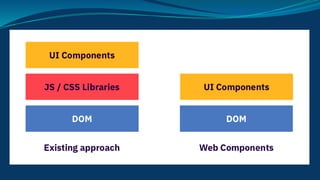
Why Web Components ?
● Reusability - Imports , Exports and Templates allow us
to reuse the components
● Composition - Breaking components to smaller chunks
● Encapsulation - Using the shadow DOM
● Standardization - Part of W3C specs and supported by
majority of browsers
Core Elements Of Web Components
★ HTML Templates
★ Custom Elements
★ Shadow DOM
★ ES Modules
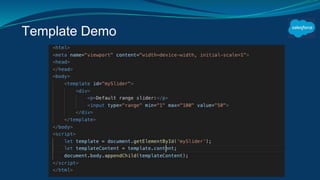
Templates and Slots
★ Templates allow us to load HTML tags without
rendering them on initial load.
★ Write once and reuse in multiple pages or multiple
apps.
★ Attach them to Shadow DOM or DOM .
★ Slots are placeholders in template that allow you to
insert your own HTML markup
Template Demo
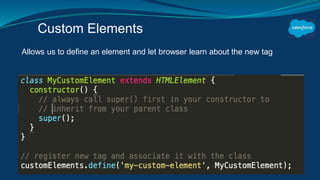
Custom Elements
Allows us to define an element and let browser learn about the new tag
Shadow DOM
1. Shadow DOM allows the web browser to render DOM
elements without putting them into the main document
DOM tree
2. One can attach shadow DOM to an element using the
API Element.attachShadow({mode:open}).
3. You can attach the Shadow to the custom element .
4. Offers encapsulation (CSS in outer DOM cannot bleed
into the shadow DOM)
Demo
Lightning Web Components (LWC)
➢ Lightning Components used aura framework and its
renamed as Aura Components .
➢ Components built using Web Components standard
now are referred as lightning web components
➢ Lightning Web Components(LWC) adheres closely to
the web components standards.
➢ Modules for Data services , UI API and provides
reactive properties
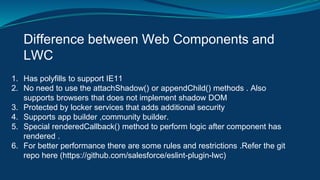
Difference between Web Components and
LWC
1. Has polyfills to support IE11
2. No need to use the attachShadow() or appendChild() methods . Also
supports browsers that does not implement shadow DOM
3. Protected by locker services that adds additional security
4. Supports app builder ,community builder.
5. Special renderedCallback() method to perform logic after component has
rendered .
6. For better performance there are some rules and restrictions .Refer the git
repo here (https://github.com/salesforce/eslint-plugin-lwc)
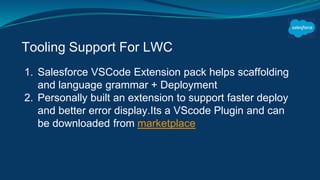
Tooling Support For LWC
1. Salesforce VSCode Extension pack helps scaffolding
and language grammar + Deployment
2. Personally built an extension to support faster deploy
and better error display.Its a VScode Plugin and can
be downloaded from marketplace
Demo
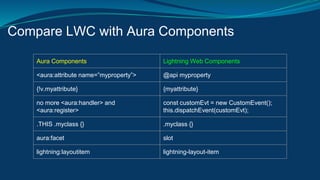
Compare LWC with Aura Components
Aura Components Lightning Web Components
<aura:attribute name=”myproperty”> @api myproperty
{!v.myattribute} {myattribute}
no more <aura:handler> and
<aura:register>
const customEvt = new CustomEvent();
this.dispatchEvent(customEvt);
.THIS .myclass {} .myclass {}
aura:facet slot
lightning:layoutitem lightning-layout-item
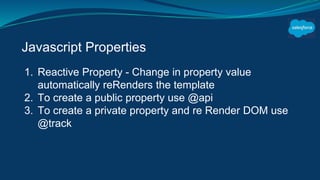
Javascript Properties
1. Reactive Property - Change in property value
automatically reRenders the template
2. To create a public property use @api
3. To create a private property and re Render DOM use
@track
Lightning Data Service
1. Mark the property with @wire if you want the property
to recieve the change when data change happens to
record
2. LWC supports UI APIs and Metadata describes
References
1. Googles Dev blog
2. LWC Recipes
3. Salesforce Dev blog
4. Salesforce Official docs
Upcoming Salesforce Webinar
https://www.salesforce.com/form/event/lightning-web-
components-launch-event
Demo Resources
1. slider web component demo
2. salesforce lwc demo
Q & A
Thank You

Introduction to lightning Web Component

  • 1.
    Introduction to Lightning Web Component Kitchener,CA Developer Group Speaker Date Venue/Link Mohith Shrivastava January 19th, 2019 @ 9:00 AM EST https://www.gotomeet.me/Sudipta-Deb
  • 2.
  • 3.
    Who Am I?Salesforce Technical Architect Appirio Inc., a Wipro Company www.sudipta-deb.in 8x Salesforce Certified Application Architect Group Leader of Kitchener, CA Developer Group 311 Badges @sudipta_1984
  • 4.
    Who Am I? SalesforceTechnical Architect @codescience Salesforce MVP , Author - Learning Salesforce Application Development Medium blogs @msrivastav13
  • 5.
    ▪ Introduction ToWeb Components ▪ Difference between Web Components and Lightning Web Components ▪ Tooling Support for LWC ▪ Demo Lightning Web Component ▪ Compare and Contrast Lightning Web Components with Aura Components ▪ Explore LWC Properties and Lightning Data Services ▪ Q & A Agenda
  • 6.
  • 7.
    Why Web Components? ● Reusability - Imports , Exports and Templates allow us to reuse the components ● Composition - Breaking components to smaller chunks ● Encapsulation - Using the shadow DOM ● Standardization - Part of W3C specs and supported by majority of browsers
  • 9.
    Core Elements OfWeb Components ★ HTML Templates ★ Custom Elements ★ Shadow DOM ★ ES Modules
  • 10.
    Templates and Slots ★Templates allow us to load HTML tags without rendering them on initial load. ★ Write once and reuse in multiple pages or multiple apps. ★ Attach them to Shadow DOM or DOM . ★ Slots are placeholders in template that allow you to insert your own HTML markup
  • 11.
  • 12.
    Custom Elements Allows usto define an element and let browser learn about the new tag
  • 13.
    Shadow DOM 1. ShadowDOM allows the web browser to render DOM elements without putting them into the main document DOM tree 2. One can attach shadow DOM to an element using the API Element.attachShadow({mode:open}). 3. You can attach the Shadow to the custom element . 4. Offers encapsulation (CSS in outer DOM cannot bleed into the shadow DOM)
  • 14.
  • 15.
    Lightning Web Components(LWC) ➢ Lightning Components used aura framework and its renamed as Aura Components . ➢ Components built using Web Components standard now are referred as lightning web components ➢ Lightning Web Components(LWC) adheres closely to the web components standards. ➢ Modules for Data services , UI API and provides reactive properties
  • 16.
    Difference between WebComponents and LWC 1. Has polyfills to support IE11 2. No need to use the attachShadow() or appendChild() methods . Also supports browsers that does not implement shadow DOM 3. Protected by locker services that adds additional security 4. Supports app builder ,community builder. 5. Special renderedCallback() method to perform logic after component has rendered . 6. For better performance there are some rules and restrictions .Refer the git repo here (https://github.com/salesforce/eslint-plugin-lwc)
  • 17.
    Tooling Support ForLWC 1. Salesforce VSCode Extension pack helps scaffolding and language grammar + Deployment 2. Personally built an extension to support faster deploy and better error display.Its a VScode Plugin and can be downloaded from marketplace
  • 18.
  • 19.
    Compare LWC withAura Components Aura Components Lightning Web Components <aura:attribute name=”myproperty”> @api myproperty {!v.myattribute} {myattribute} no more <aura:handler> and <aura:register> const customEvt = new CustomEvent(); this.dispatchEvent(customEvt); .THIS .myclass {} .myclass {} aura:facet slot lightning:layoutitem lightning-layout-item
  • 20.
    Javascript Properties 1. ReactiveProperty - Change in property value automatically reRenders the template 2. To create a public property use @api 3. To create a private property and re Render DOM use @track
  • 21.
    Lightning Data Service 1.Mark the property with @wire if you want the property to recieve the change when data change happens to record 2. LWC supports UI APIs and Metadata describes
  • 22.
    References 1. Googles Devblog 2. LWC Recipes 3. Salesforce Dev blog 4. Salesforce Official docs Upcoming Salesforce Webinar https://www.salesforce.com/form/event/lightning-web- components-launch-event
  • 23.
    Demo Resources 1. sliderweb component demo 2. salesforce lwc demo
  • 24.
  • 25.