Lightning
Josep Vall-llovera - CTO at Clapps
18/09/2015
@valnavjo Valnavjo in/jvn84 Valnavjo
Introduction
2
Index of contents
3
1. What is Lightning?
2. Getting started
3. Lightning App Builder
4. Lightning Components
5. Demo
6. What a nice surprise!
7. Code resources
8. Q&A
1. What is Lightning?
4
● Salesforce1 Lightning
● Aura framework
● Lightning Component Framework
● Lightning Process Builder
● Lightning App Builder
● Lightning Schema Builder
● Lightning Community Builder
● Lightning Connect
1. What is Lightning?
5
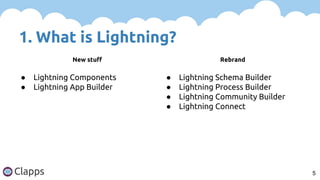
New stuff Rebrand
● Lightning Components
● Lightning App Builder
● Lightning Schema Builder
● Lightning Process Builder
● Lightning Community Builder
● Lightning Connect
2. Getting started
6
1. Create a DEV org
2. Set up a namespace
3. Enable Lightning Components
a. Setup - Develop - Lightning Components - Check
"Enable Lightning Components in Salesforce1
(BETA)"
b. Click Save
3. Lightning App Builder
7
1. Setup - Build - Lightning App Builder
2. Click New and follow the steps
3. Hands-on!
4. Lightning Components
8
1. Setup - Build - Develop - Lightning Components
2. List of Lightning Components
3. No UI editor… yet.
4. Lightning Components
9
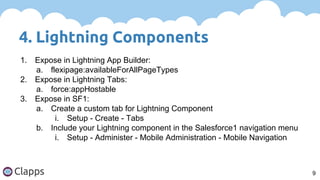
1. Expose in Lightning App Builder:
a. flexipage:availableForAllPageTypes
2. Expose in Lightning Tabs:
a. force:appHostable
3. Expose in SF1:
a. Create a custom tab for Lightning Component
i. Setup - Create - Tabs
b. Include your Lightning component in the Salesforce1 navigation menu
i. Setup - Administer - Mobile Administration - Mobile Navigation
4.1. App
10
1. They can include Lightning components and regular
HTML markup.
2. They can’t be included in SF1. You have to create a
master component and expose it.
4.1. App
11
<aura:application>
<!-- App code here -->
</aura:application>
4.2. Component
12
1. They can use Apex Controller.
a. static methods annotated with @AuraEnabled
2. They can share information.
3. They can listen client-side events.
4. Wrapper classes are supported, but not inner classes.
5. Three main components:
a. aura
b. ui
c. force
4.2. Component
13
aura ui force
● aura:application
● aura:component
● aura:renderIf
● aura:unescapedHtml
● ui:inputText
● ui:outputDateTime
● ui:button
● ui:menu
● force:inputField
● force:outputField
4.2. Component
14
<aura:component>
<!-- Optional coponent attributes here -->
<!-- Optional HTML markup -->
<div class="container">
Hello world!
<!-- Other components -->
</div>
</aura:component>
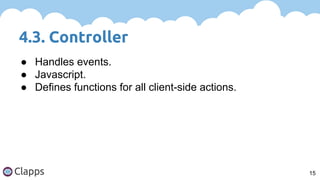
4.3. Controller
15
● Handles events.
● Javascript.
● Defines functions for all client-side actions.
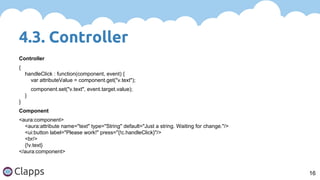
4.3. Controller
16
Controller
{
handleClick : function(component, event) {
var attributeValue = component.get("v.text");
component.set("v.text", event.target.value);
}
}
Component
<aura:component>
<aura:attribute name="text" type="String" default="Just a string. Waiting for change."/>
<ui:button label="Please work!" press="{!c.handleClick}"/>
<br/>
{!v.text}
</aura:component>
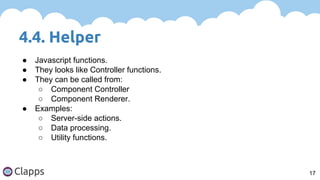
4.4. Helper
17
● Javascript functions.
● They looks like Controller functions.
● They can be called from:
○ Component Controller
○ Component Renderer.
● Examples:
○ Server-side actions.
○ Data processing.
○ Utility functions.
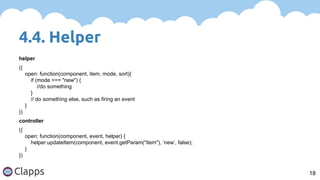
4.4. Helper
18
helper
({
open: function(component, item, mode, sort){
if (mode === "new") {
//do something
}
// do something else, such as firing an event
}
})
controller
({
open: function(component, event, helper) {
helper.updateItem(component, event.getParam("item"), ‘new’, false);
}
})
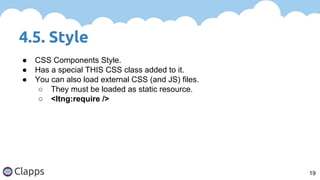
4.5. Style
19
● CSS Components Style.
● Has a special THIS CSS class added to it.
● You can also load external CSS (and JS) files.
○ They must be loaded as static resource.
○ <ltng:require />
4.5. Style
20
CSS
.THIS {
background-color: grey;
}
.THIS.white {
background-color: white;
}
External css and js
<ltng:require scripts="/resource/your_js_resource" styles="/resource/your_css_resource"
afterScriptsLoaded="{!c.yourJsFunction}"/>
4.6. Documentation
21
● Provides a way to define documentation for a component.
● Two ways:
○ DocDef
■ Full documentation: description, sample code, reference to
example
■ HTML
○ Inline
■ One or two sentences
■ Plan text
4.6. Documentation
22
<aura:documentation>
<aura:description>
<p>An <code>np:myComponent</code> component represents an element that executes
an action defined by a controller.</p>
</aura:description>
<aura:example name="myComponentExample" ref="np:myComponentExample" label="Using
the np:myComponent Component">
<p>This example shows a simple setup of <code>myComponent</code>.</p>
</aura:example>
</aura:documentation>
● See documentation
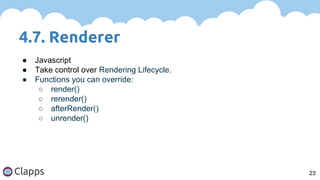
4.7. Renderer
23
● Javascript
● Take control over Rendering Lifecycle.
● Functions you can override:
○ render()
○ rerender()
○ afterRender()
○ unrender()
4.7. Renderer
24
renderer
({
render : function(cmp, helper) {
var ret = this.superRender();
console.log(‘Do something man!’);
return ret;
}
})
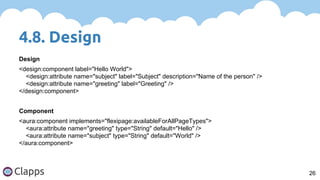
4.8. Design
25
1. Only Boolean, Integer or String attributes can be
exposed in design files.
2. Use ‘datasource’ attribute to render a field as a picklist
in the App Builder.
a. Use String for a picklist.
b. Use String[] for a multi-picklist.
i. This never worked for me. Any ideas?
4.8. Design
26
Design
<design:component label="Hello World">
<design:attribute name="subject" label="Subject" description="Name of the person" />
<design:attribute name="greeting" label="Greeting" />
</design:component>
Component
<aura:component implements="flexipage:availableForAllPageTypes">
<aura:attribute name="greeting" type="String" default="Hello" />
<aura:attribute name="subject" type="String" default="World" />
</aura:component>
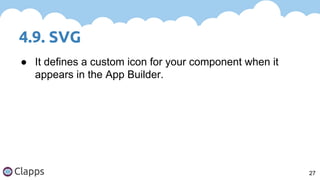
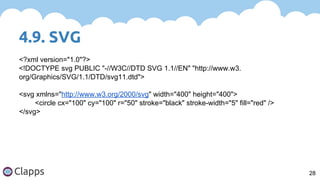
4.9. SVG
27
● It defines a custom icon for your component when it
appears in the App Builder.
4.9. SVG
28
<?xml version="1.0"?>
<!DOCTYPE svg PUBLIC "-//W3C//DTD SVG 1.1//EN" "http://www.w3.
org/Graphics/SVG/1.1/DTD/svg11.dtd">
<svg xmlns="http://www.w3.org/2000/svg" width="400" height="400">
<circle cx="100" cy="100" r="50" stroke="black" stroke-width="5" fill="red" />
</svg>
Demo
29
● Salesforce1 Meetup Lightning app.
Code resources
https://github.com/Valnavjo/sdgbarcelona.git
30
Useful links
1. Lightning Components Developer’s Guide
2. Aura framework
3. Lightning Process Builder
4. Lightning App Builder
5. Lightning Community Builder
6. Lightning Connect
31
Thanks!
Q&A
32

September SDG - Lightning

  • 1.
    Lightning Josep Vall-llovera -CTO at Clapps 18/09/2015 @valnavjo Valnavjo in/jvn84 Valnavjo
  • 2.
  • 3.
    Index of contents 3 1.What is Lightning? 2. Getting started 3. Lightning App Builder 4. Lightning Components 5. Demo 6. What a nice surprise! 7. Code resources 8. Q&A
  • 4.
    1. What isLightning? 4 ● Salesforce1 Lightning ● Aura framework ● Lightning Component Framework ● Lightning Process Builder ● Lightning App Builder ● Lightning Schema Builder ● Lightning Community Builder ● Lightning Connect
  • 5.
    1. What isLightning? 5 New stuff Rebrand ● Lightning Components ● Lightning App Builder ● Lightning Schema Builder ● Lightning Process Builder ● Lightning Community Builder ● Lightning Connect
  • 6.
    2. Getting started 6 1.Create a DEV org 2. Set up a namespace 3. Enable Lightning Components a. Setup - Develop - Lightning Components - Check "Enable Lightning Components in Salesforce1 (BETA)" b. Click Save
  • 7.
    3. Lightning AppBuilder 7 1. Setup - Build - Lightning App Builder 2. Click New and follow the steps 3. Hands-on!
  • 8.
    4. Lightning Components 8 1.Setup - Build - Develop - Lightning Components 2. List of Lightning Components 3. No UI editor… yet.
  • 9.
    4. Lightning Components 9 1.Expose in Lightning App Builder: a. flexipage:availableForAllPageTypes 2. Expose in Lightning Tabs: a. force:appHostable 3. Expose in SF1: a. Create a custom tab for Lightning Component i. Setup - Create - Tabs b. Include your Lightning component in the Salesforce1 navigation menu i. Setup - Administer - Mobile Administration - Mobile Navigation
  • 10.
    4.1. App 10 1. Theycan include Lightning components and regular HTML markup. 2. They can’t be included in SF1. You have to create a master component and expose it.
  • 11.
    4.1. App 11 <aura:application> <!-- Appcode here --> </aura:application>
  • 12.
    4.2. Component 12 1. Theycan use Apex Controller. a. static methods annotated with @AuraEnabled 2. They can share information. 3. They can listen client-side events. 4. Wrapper classes are supported, but not inner classes. 5. Three main components: a. aura b. ui c. force
  • 13.
    4.2. Component 13 aura uiforce ● aura:application ● aura:component ● aura:renderIf ● aura:unescapedHtml ● ui:inputText ● ui:outputDateTime ● ui:button ● ui:menu ● force:inputField ● force:outputField
  • 14.
    4.2. Component 14 <aura:component> <!-- Optionalcoponent attributes here --> <!-- Optional HTML markup --> <div class="container"> Hello world! <!-- Other components --> </div> </aura:component>
  • 15.
    4.3. Controller 15 ● Handlesevents. ● Javascript. ● Defines functions for all client-side actions.
  • 16.
    4.3. Controller 16 Controller { handleClick :function(component, event) { var attributeValue = component.get("v.text"); component.set("v.text", event.target.value); } } Component <aura:component> <aura:attribute name="text" type="String" default="Just a string. Waiting for change."/> <ui:button label="Please work!" press="{!c.handleClick}"/> <br/> {!v.text} </aura:component>
  • 17.
    4.4. Helper 17 ● Javascriptfunctions. ● They looks like Controller functions. ● They can be called from: ○ Component Controller ○ Component Renderer. ● Examples: ○ Server-side actions. ○ Data processing. ○ Utility functions.
  • 18.
    4.4. Helper 18 helper ({ open: function(component,item, mode, sort){ if (mode === "new") { //do something } // do something else, such as firing an event } }) controller ({ open: function(component, event, helper) { helper.updateItem(component, event.getParam("item"), ‘new’, false); } })
  • 19.
    4.5. Style 19 ● CSSComponents Style. ● Has a special THIS CSS class added to it. ● You can also load external CSS (and JS) files. ○ They must be loaded as static resource. ○ <ltng:require />
  • 20.
    4.5. Style 20 CSS .THIS { background-color:grey; } .THIS.white { background-color: white; } External css and js <ltng:require scripts="/resource/your_js_resource" styles="/resource/your_css_resource" afterScriptsLoaded="{!c.yourJsFunction}"/>
  • 21.
    4.6. Documentation 21 ● Providesa way to define documentation for a component. ● Two ways: ○ DocDef ■ Full documentation: description, sample code, reference to example ■ HTML ○ Inline ■ One or two sentences ■ Plan text
  • 22.
    4.6. Documentation 22 <aura:documentation> <aura:description> <p>An <code>np:myComponent</code>component represents an element that executes an action defined by a controller.</p> </aura:description> <aura:example name="myComponentExample" ref="np:myComponentExample" label="Using the np:myComponent Component"> <p>This example shows a simple setup of <code>myComponent</code>.</p> </aura:example> </aura:documentation> ● See documentation
  • 23.
    4.7. Renderer 23 ● Javascript ●Take control over Rendering Lifecycle. ● Functions you can override: ○ render() ○ rerender() ○ afterRender() ○ unrender()
  • 24.
    4.7. Renderer 24 renderer ({ render :function(cmp, helper) { var ret = this.superRender(); console.log(‘Do something man!’); return ret; } })
  • 25.
    4.8. Design 25 1. OnlyBoolean, Integer or String attributes can be exposed in design files. 2. Use ‘datasource’ attribute to render a field as a picklist in the App Builder. a. Use String for a picklist. b. Use String[] for a multi-picklist. i. This never worked for me. Any ideas?
  • 26.
    4.8. Design 26 Design <design:component label="HelloWorld"> <design:attribute name="subject" label="Subject" description="Name of the person" /> <design:attribute name="greeting" label="Greeting" /> </design:component> Component <aura:component implements="flexipage:availableForAllPageTypes"> <aura:attribute name="greeting" type="String" default="Hello" /> <aura:attribute name="subject" type="String" default="World" /> </aura:component>
  • 27.
    4.9. SVG 27 ● Itdefines a custom icon for your component when it appears in the App Builder.
  • 28.
    4.9. SVG 28 <?xml version="1.0"?> <!DOCTYPEsvg PUBLIC "-//W3C//DTD SVG 1.1//EN" "http://www.w3. org/Graphics/SVG/1.1/DTD/svg11.dtd"> <svg xmlns="http://www.w3.org/2000/svg" width="400" height="400"> <circle cx="100" cy="100" r="50" stroke="black" stroke-width="5" fill="red" /> </svg>
  • 29.
  • 30.
  • 31.
    Useful links 1. LightningComponents Developer’s Guide 2. Aura framework 3. Lightning Process Builder 4. Lightning App Builder 5. Lightning Community Builder 6. Lightning Connect 31
  • 32.