Developing Components for
Communities
Tips and Tricks
jamesl@demandchainsystems.com, @dancinllama
James Loghry, Technical Architect and Salesforce MVP
dvinnik@salesforce.com, @dmitryvinnik
Dmitry Vinnik, Senior Software Engineer at Salesforce
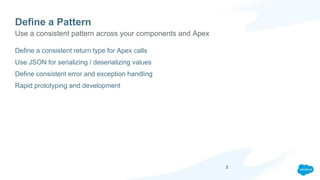
Define a Pattern
Define a consistent return type for Apex calls
Use JSON for serializing / deserializing values
Define consistent error and exception handling
Rapid prototyping and development
Use a consistent pattern across your components and Apex
2
Define a Pattern
public with sharing class MyLightningCtrl{
@AuraEnabled
public static LightningResponse doAction() {
LightningResponse response = new LightningResponse();
try{
//do stuff, perhaps throw an exception.
User u = [Select Id From User];
response.jsonResponse = JSON.serialize(u);
}catch(Exception e){
response = new LightningResponse(e);
}
return response;
}
}
Use a consistent pattern across Apex and Lightning
public class LightningResponse{
@AuraEnabled public String jsonResponse {get;set;}
@AuraEnabled public String errorMessage {get;set;}
@AuraEnabled public String state {get;set;}
public LightningResponse() {
this.state = 'SUCCESS';
}
public LightningResponse(Exception e){
this();
if(e != null){
this.state = 'ERROR';
this.errorMessage = e.getMessage();
//Log error to a custom object here
}
}
}
3
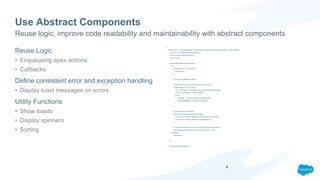
Use Abstract Components
Reuse Logic
• Enqueueing apex actions
• Callbacks
Define consistent error and exception handling
• Display toast messages on errors
Utility Functions
• Show toasts
• Display spinners
• Sorting
({
handleAction : function(component, actionParams, actionName, successCallback, errorCallback){
var action = component.get(actionName);
action.setParams(actionParams);
var self = this;
action.setCallback(self,function(a){
try{
if(a.getState() !== ‘SUCCESS'){
//handle error
}
var result = a.getReturnValue();
//Some error likely inside of the Apex code occurred.
if(result.state !== 'SUCCESS'){
//Try to get the error message from the lightningdmlerror object
var errorEncountered = result.errorMe;
throw {
'message' : 'An error occurred in the apex call',
'extendedMessage' : result.errorMessage
};
}
var returnValue = undefined;
if(!$A.util.isEmpty(result.jsonResponse)){
//Will throw a JSON exception if the result cannot be parsed.
returnValue = JSON.parse(result.jsonResponse);
}
var concreteComponent = component.getConcreteComponent();
successCallback(concreteComponent,returnValue, self);
}catch(ex){
//handleError
}
});
$A.enqueueAction(action);
}
Reuse logic, improve code readability and maintainability with abstract components
4
Power to the Admin!
Design Tokens
Design Attributes
Allow admins to configure components with community builder
5
Power to the Admin!
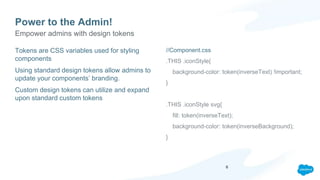
Tokens are CSS variables used for styling
components
Using standard design tokens allow admins to
update your components’ branding.
Custom design tokens can utilize and expand
upon standard custom tokens
//Component.css
.THIS .iconStyle{
background-color: token(inverseText) !important;
}
.THIS .iconStyle svg{
fill: token(inverseText);
background-color: token(inverseBackground);
}
Empower admins with design tokens
6
Power to the Admin!
Allow admins to configure components through design attributes
Admins can control:
• Text and labels
• Number of records displayed
• Filters
• Component Layout
Style and configure components with clicks, not code.
Empower with design attributes
7
Debugging Lightning Components
How, What, Why is my component not working properly?
Errors happen for a variety of reasons
• Syntax errors
• Bad data
• API Version mismatch in component
• Javascript controllers / helpers with same method name as Apex
• Browser inconsistencies
When issues arise
8
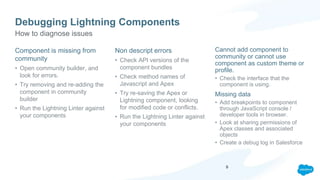
Debugging Lightning Components
Component is missing from
community
• Open community builder, and
look for errors.
• Try removing and re-adding the
component in community
builder
• Run the Lightning Linter against
your components
Non descript errors
• Check API versions of the
component bundles
• Check method names of
Javascript and Apex
• Try re-saving the Apex or
Lightning component, looking
for modified code or conflicts.
• Run the Lightning Linter against
your components
Cannot add component to
community or cannot use
component as custom theme or
profile.
• Check the interface that the
component is using.
Missing data
• Add breakpoints to component
through JavaScript console /
developer tools in browser.
• Look at sharing permissions of
Apex classes and associated
objects
• Create a debug log in Salesforce
How to diagnose issues
9
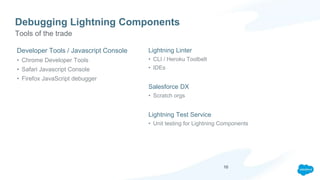
Debugging Lightning Components
Developer Tools / Javascript Console
• Chrome Developer Tools
• Safari Javascript Console
• Firefox JavaScript debugger
Lightning Linter
• CLI / Heroku Toolbelt
• IDEs
Salesforce DX
• Scratch orgs
Lightning Test Service
• Unit testing for Lightning Components
Tools of the trade
10
Demo
Embracing SEO
Link Juice (Internal Hyperlinking)
• Allows Search Bots to rank pages
• Use routeLink.cmp to auto-generate HREF
Link Targeting with Sitemap
• Auto-generated on a daily basis
• Uses all publicly exposed pages
Controlling Searchable Content
• Avoid duplicate content
• Adjust FLS to allow for data crawling
cmp.
<aura:component implements="forceCommunity:availableForAllPageTypes">
<aura:attribute name="recordId" type="String" default="{!v.recordId}" />
<aura:attribute name="routeInput" type="Map"/>
<aura:handler name="init" value="{!this}" action="{!c.doInit}"/>
<forceCommunity:routeLink title="My Case" routeInput="{!v.routeInput}" />
</aura:component>
.js
({
doInit : function(component, event, helper) {
component.set('v.routeInput', { recordId: component.get('v.recordId')});
}
})
Output:
<a href="/myCommunity/s/case/500xx000000YkvU/mycase” title="My Case”/>
Enhance your community’s search results by embracing components’ SEO capabilities
12
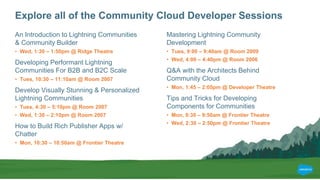
Explore all of the Community Cloud Developer Sessions
An Introduction to Lightning Communities
& Community Builder
• Wed, 1:30 – 1:50pm @ Ridge Theatre
Developing Performant Lightning
Communities For B2B and B2C Scale
• Tues, 10:30 – 11:10am @ Room 2007
Develop Visually Stunning & Personalized
Lightning Communities
• Tues, 4:30 – 5:10pm @ Room 2007
• Wed, 1:30 – 2:10pm @ Room 2007
How to Build Rich Publisher Apps w/
Chatter
• Mon, 10:30 – 10:50am @ Frontier Theatre
Mastering Lightning Community
Development
• Tues, 9:00 – 9:40am @ Room 2009
• Wed, 4:00 – 4:40pm @ Room 2006
Q&A with the Architects Behind
Community Cloud
• Mon, 1:45 – 2:05pm @ Developer Theatre
Tips and Tricks for Developing
Components for Communities
• Mon, 9:30 – 9:50am @ Frontier Theatre
• Wed, 2:30 – 2:50pm @ Frontier Theatre
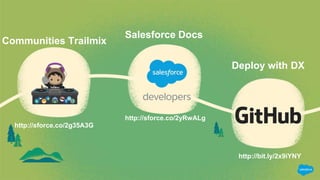
Communities Trailmix
http://sforce.co/2g35A3G
Deploy with DX
http://bit.ly/2x9iYNY
Salesforce Docs
http://sforce.co/2yRwALg
Developing Lightning Components for Communities.pptx

Developing Lightning Components for Communities.pptx

  • 1.
    Developing Components for Communities Tipsand Tricks jamesl@demandchainsystems.com, @dancinllama James Loghry, Technical Architect and Salesforce MVP dvinnik@salesforce.com, @dmitryvinnik Dmitry Vinnik, Senior Software Engineer at Salesforce
  • 2.
    Define a Pattern Definea consistent return type for Apex calls Use JSON for serializing / deserializing values Define consistent error and exception handling Rapid prototyping and development Use a consistent pattern across your components and Apex 2
  • 3.
    Define a Pattern publicwith sharing class MyLightningCtrl{ @AuraEnabled public static LightningResponse doAction() { LightningResponse response = new LightningResponse(); try{ //do stuff, perhaps throw an exception. User u = [Select Id From User]; response.jsonResponse = JSON.serialize(u); }catch(Exception e){ response = new LightningResponse(e); } return response; } } Use a consistent pattern across Apex and Lightning public class LightningResponse{ @AuraEnabled public String jsonResponse {get;set;} @AuraEnabled public String errorMessage {get;set;} @AuraEnabled public String state {get;set;} public LightningResponse() { this.state = 'SUCCESS'; } public LightningResponse(Exception e){ this(); if(e != null){ this.state = 'ERROR'; this.errorMessage = e.getMessage(); //Log error to a custom object here } } } 3
  • 4.
    Use Abstract Components ReuseLogic • Enqueueing apex actions • Callbacks Define consistent error and exception handling • Display toast messages on errors Utility Functions • Show toasts • Display spinners • Sorting ({ handleAction : function(component, actionParams, actionName, successCallback, errorCallback){ var action = component.get(actionName); action.setParams(actionParams); var self = this; action.setCallback(self,function(a){ try{ if(a.getState() !== ‘SUCCESS'){ //handle error } var result = a.getReturnValue(); //Some error likely inside of the Apex code occurred. if(result.state !== 'SUCCESS'){ //Try to get the error message from the lightningdmlerror object var errorEncountered = result.errorMe; throw { 'message' : 'An error occurred in the apex call', 'extendedMessage' : result.errorMessage }; } var returnValue = undefined; if(!$A.util.isEmpty(result.jsonResponse)){ //Will throw a JSON exception if the result cannot be parsed. returnValue = JSON.parse(result.jsonResponse); } var concreteComponent = component.getConcreteComponent(); successCallback(concreteComponent,returnValue, self); }catch(ex){ //handleError } }); $A.enqueueAction(action); } Reuse logic, improve code readability and maintainability with abstract components 4
  • 5.
    Power to theAdmin! Design Tokens Design Attributes Allow admins to configure components with community builder 5
  • 6.
    Power to theAdmin! Tokens are CSS variables used for styling components Using standard design tokens allow admins to update your components’ branding. Custom design tokens can utilize and expand upon standard custom tokens //Component.css .THIS .iconStyle{ background-color: token(inverseText) !important; } .THIS .iconStyle svg{ fill: token(inverseText); background-color: token(inverseBackground); } Empower admins with design tokens 6
  • 7.
    Power to theAdmin! Allow admins to configure components through design attributes Admins can control: • Text and labels • Number of records displayed • Filters • Component Layout Style and configure components with clicks, not code. Empower with design attributes 7
  • 8.
    Debugging Lightning Components How,What, Why is my component not working properly? Errors happen for a variety of reasons • Syntax errors • Bad data • API Version mismatch in component • Javascript controllers / helpers with same method name as Apex • Browser inconsistencies When issues arise 8
  • 9.
    Debugging Lightning Components Componentis missing from community • Open community builder, and look for errors. • Try removing and re-adding the component in community builder • Run the Lightning Linter against your components Non descript errors • Check API versions of the component bundles • Check method names of Javascript and Apex • Try re-saving the Apex or Lightning component, looking for modified code or conflicts. • Run the Lightning Linter against your components Cannot add component to community or cannot use component as custom theme or profile. • Check the interface that the component is using. Missing data • Add breakpoints to component through JavaScript console / developer tools in browser. • Look at sharing permissions of Apex classes and associated objects • Create a debug log in Salesforce How to diagnose issues 9
  • 10.
    Debugging Lightning Components DeveloperTools / Javascript Console • Chrome Developer Tools • Safari Javascript Console • Firefox JavaScript debugger Lightning Linter • CLI / Heroku Toolbelt • IDEs Salesforce DX • Scratch orgs Lightning Test Service • Unit testing for Lightning Components Tools of the trade 10
  • 11.
  • 12.
    Embracing SEO Link Juice(Internal Hyperlinking) • Allows Search Bots to rank pages • Use routeLink.cmp to auto-generate HREF Link Targeting with Sitemap • Auto-generated on a daily basis • Uses all publicly exposed pages Controlling Searchable Content • Avoid duplicate content • Adjust FLS to allow for data crawling cmp. <aura:component implements="forceCommunity:availableForAllPageTypes"> <aura:attribute name="recordId" type="String" default="{!v.recordId}" /> <aura:attribute name="routeInput" type="Map"/> <aura:handler name="init" value="{!this}" action="{!c.doInit}"/> <forceCommunity:routeLink title="My Case" routeInput="{!v.routeInput}" /> </aura:component> .js ({ doInit : function(component, event, helper) { component.set('v.routeInput', { recordId: component.get('v.recordId')}); } }) Output: <a href="/myCommunity/s/case/500xx000000YkvU/mycase” title="My Case”/> Enhance your community’s search results by embracing components’ SEO capabilities 12
  • 13.
    Explore all ofthe Community Cloud Developer Sessions An Introduction to Lightning Communities & Community Builder • Wed, 1:30 – 1:50pm @ Ridge Theatre Developing Performant Lightning Communities For B2B and B2C Scale • Tues, 10:30 – 11:10am @ Room 2007 Develop Visually Stunning & Personalized Lightning Communities • Tues, 4:30 – 5:10pm @ Room 2007 • Wed, 1:30 – 2:10pm @ Room 2007 How to Build Rich Publisher Apps w/ Chatter • Mon, 10:30 – 10:50am @ Frontier Theatre Mastering Lightning Community Development • Tues, 9:00 – 9:40am @ Room 2009 • Wed, 4:00 – 4:40pm @ Room 2006 Q&A with the Architects Behind Community Cloud • Mon, 1:45 – 2:05pm @ Developer Theatre Tips and Tricks for Developing Components for Communities • Mon, 9:30 – 9:50am @ Frontier Theatre • Wed, 2:30 – 2:50pm @ Frontier Theatre
  • 14.
    Communities Trailmix http://sforce.co/2g35A3G Deploy withDX http://bit.ly/2x9iYNY Salesforce Docs http://sforce.co/2yRwALg

Editor's Notes

  • #14 Mike - Connect with Employees, Customers, Partners, Integrated with the Org Viswa - Various standard components Yad - Custom Components Vishwa - Deployment options