Mastering the
Lightning Framework
JF Paradis
Principal Engineer - Salesforce
@jfparadis
Part 2 – The programmatic aspects
Four sections
XML
CSS Apex
JS
Section 1:
XML Component Definition
Section 2:
Styling Components
Section 3:
JS Controller and Helper
Section 4:
Apex Controller
Section 3: JS Controller and Helper
3.1 MVC in Lightning
3.2 JS Controller
3.3 Events and Methods
3.4 Helper
3.1 MVC in Lightning
Model–View–Controller (MVC) is a software architectural pattern for
implementing user interfaces:
• The model, consists of application data, business rules, logic and functions.
It’s not only a database.
• The view can be any output representation of information, such as a chart or a
diagram.
• The controller, accepts input and converts it to commands for the model or
view.
Overview of MVC
MVC in single page web apps
Browser:
Backbone, Angular
Server:
Nancy, Spring
View
(HTML)
Controller
(JS)
Model
(JS)
View
(REST API)
Controller
(Java)
Model
(SQL)
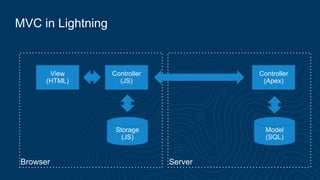
MVC in Lightning
Browser Server
View
(HTML)
Controller
(JS)
Storage
(JS)
Controller
(Apex)
Model
(SQL)
Model: persistence
• Storage (topic covered in the Apex section)
• Component attributes v.something

View: presentation
• XML component definition
Controller: logic
• JS and Apex Controller
MVC in lightning
3.2 JS Controller
Example set 10:
JS Controller
/c/basics301.app
• JS file named <component>Controller.js
• Auto wired to the component
• Inherited when the component is extended
• Contains one JS object literal
• Members are functions called “actions”
• Actions parameter list is usually a tuple:
• cmp: the context, the current component
• event: if the action was called by an event
• helper: a pointer to a component file use for code
• Actions usually return nothing (undefined)
• No access to this (can’t call an action from an action)
JS Controller
Actions are similar to callbacks
Example set 11:
Anchor onclick vs ui:button press
/c/basics302.app
Actions can receive two types of events
• DOM event
• e.g. anchor onclick
• event.target: the caller
• event.currentTarget: the listener
• need to prevent default to indicate you have handled call
• Lightning event
• e.g. ui:button press of type ui:press
• event.source: the caller, e.g. the button component
• no need to prevent default to indicate you have handled call
• event.getParam(<parameter>)
• e.g. event.getParam("domEvent”) returns the original DOM event inside ui:press
Main purposes of controller action
Used as events handlers:
1. Interaction with a component
• e.g. respond to onclick
2. Change handler
• e.g. respond to a value change
3. Event responder
• e.g. component event, global event
3.3 Events and Methods
Example set 12:
Firing and handling events
/c/basics202.app
Lightning Events
• Declared as a bundle, like a component
• One XML file named <event>.evt
• Can declare attributes
• Two types:
• Application events: global broadcast, don’t use them (no scope)
• Component events: bubble like DOM events
• Caution (2016/06, will change):
• components events don’t bubble inside component body
• they jump to the components that declare the attributes
• If you can’t write a component that will be used as a wrapper to catch
events in another component (as you can do with DOM events).
Component Methods
• Public API for controller actions
• Declared in the component XML
• Can declare attributes
• Point to a controller action
• Parameters passed through the event attribute of the action
3.4 Helper
Helper
• JS file named <component>Helper.js
• Auto wired to the component.
• One instance per level of inheritance.
• Contains one JS object literal.
• Members are JS constants, JS functions, JS shared variables.
• No restrictions on function parameters and return types.
• Helpers are singletons: all components of a given type share the same
instance.
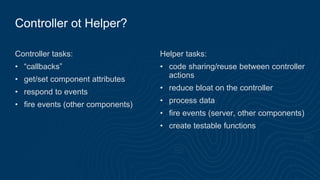
Controller ot Helper?
Controller tasks:
• “callbacks”
• get/set component attributes
• respond to events
• fire events (other components)
Helper tasks:
• code sharing/reuse between controller
actions
• reduce bloat on the controller
• process data
• fire events (server, other components)
• create testable functions
Section 4: Using Apex
4.1 Apex Controller
4.2 Action Service
4.1 Apex Controller
Apex Controller: definition
On the server side:
• Apex Class - Singleton
• Instance methods are “actions” annotated with @AuraEnabled
• Not part of the component bundle
• Return value auto serialized as JSON
On the client side:
• Wired using attribute controller="<class>"
• Accessed with cmp.get("{!c.<action>}")
• Response in action.getReturnValue()
• Return value is a JS object
Apex Controller: example
Example set 13:
Apex Controller
/c/basics401.app
4.2 Action Service
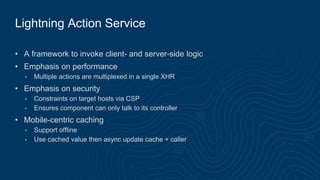
Lightning Action Service
• A framework to invoke client- and server-side logic
• Emphasis on performance
• Multiple actions are multiplexed in a single XHR
• Emphasis on security
• Constraints on target hosts via CSP
• Ensures component can only talk to its controller
• Mobile-centric caching
• Support offline
• Use cached value then async update cache + caller
Action control flow
Foreground
• Default
• Batched
• To reduce number of requests
Background
• Sent individually
• For long server-side execution
Storable
• Result cached
• To reduce repeated calls for the same data
Abortable
• Canceled if same action triggered again
before completion
• To avoid multiple results
Lightning event cycle
Lightning uses a stack to keep track of
the deferred tasks to process. At the end
of a run cycle, all queued actions are
executed.
Fire
Execute
handlers
Queue
actions
Execute
queued
actions
Example set 14:
Action Control Flow
/c/basics402.app
Action State
NEW: The action was created but is not in progress yet
RUNNING: The action is in progress
SUCCESS: The action executed successfully
ERROR: The server returned an error
INCOMPLETE: The server didn't return a response. The server might be down or
the client might be offline.
ABORTED: The action was aborted. You can register a callback for this explicitly.
• For server actions that are idempotent, replayable, and non-mutating
• Time-based expiration (15 min in SFX) auto-refresh (30s in SFX)
• Re-invoke callback only if refreshed value changes
Storable Lightning Actions
Fire action
Action
callback
no
Action
callback
yes
Cache hit?
Add to
cache
Action
callback x2
no
yes
no
yes
Refresh?
Update
cache
Different?
Resources: Trailhead
Resources: Lightning section
thank y u
Mastering the Lightning Framework - Part 2

Mastering the Lightning Framework - Part 2

  • 1.
    Mastering the Lightning Framework JFParadis Principal Engineer - Salesforce @jfparadis Part 2 – The programmatic aspects
  • 2.
    Four sections XML CSS Apex JS Section1: XML Component Definition Section 2: Styling Components Section 3: JS Controller and Helper Section 4: Apex Controller
  • 3.
    Section 3: JSController and Helper 3.1 MVC in Lightning 3.2 JS Controller 3.3 Events and Methods 3.4 Helper
  • 4.
    3.1 MVC inLightning
  • 5.
    Model–View–Controller (MVC) isa software architectural pattern for implementing user interfaces: • The model, consists of application data, business rules, logic and functions. It’s not only a database. • The view can be any output representation of information, such as a chart or a diagram. • The controller, accepts input and converts it to commands for the model or view. Overview of MVC
  • 6.
    MVC in singlepage web apps Browser: Backbone, Angular Server: Nancy, Spring View (HTML) Controller (JS) Model (JS) View (REST API) Controller (Java) Model (SQL)
  • 7.
    MVC in Lightning BrowserServer View (HTML) Controller (JS) Storage (JS) Controller (Apex) Model (SQL)
  • 8.
    Model: persistence • Storage(topic covered in the Apex section) • Component attributes v.something View: presentation • XML component definition Controller: logic • JS and Apex Controller MVC in lightning
  • 9.
  • 10.
    Example set 10: JSController /c/basics301.app
  • 11.
    • JS filenamed <component>Controller.js • Auto wired to the component • Inherited when the component is extended • Contains one JS object literal • Members are functions called “actions” • Actions parameter list is usually a tuple: • cmp: the context, the current component • event: if the action was called by an event • helper: a pointer to a component file use for code • Actions usually return nothing (undefined) • No access to this (can’t call an action from an action) JS Controller
  • 12.
    Actions are similarto callbacks
  • 13.
    Example set 11: Anchoronclick vs ui:button press /c/basics302.app
  • 14.
    Actions can receivetwo types of events • DOM event • e.g. anchor onclick • event.target: the caller • event.currentTarget: the listener • need to prevent default to indicate you have handled call • Lightning event • e.g. ui:button press of type ui:press • event.source: the caller, e.g. the button component • no need to prevent default to indicate you have handled call • event.getParam(<parameter>) • e.g. event.getParam("domEvent”) returns the original DOM event inside ui:press
  • 15.
    Main purposes ofcontroller action Used as events handlers: 1. Interaction with a component • e.g. respond to onclick 2. Change handler • e.g. respond to a value change 3. Event responder • e.g. component event, global event
  • 16.
  • 17.
    Example set 12: Firingand handling events /c/basics202.app
  • 18.
    Lightning Events • Declaredas a bundle, like a component • One XML file named <event>.evt • Can declare attributes • Two types: • Application events: global broadcast, don’t use them (no scope) • Component events: bubble like DOM events • Caution (2016/06, will change): • components events don’t bubble inside component body • they jump to the components that declare the attributes • If you can’t write a component that will be used as a wrapper to catch events in another component (as you can do with DOM events).
  • 19.
    Component Methods • PublicAPI for controller actions • Declared in the component XML • Can declare attributes • Point to a controller action • Parameters passed through the event attribute of the action
  • 20.
  • 21.
    Helper • JS filenamed <component>Helper.js • Auto wired to the component. • One instance per level of inheritance. • Contains one JS object literal. • Members are JS constants, JS functions, JS shared variables. • No restrictions on function parameters and return types. • Helpers are singletons: all components of a given type share the same instance.
  • 22.
    Controller ot Helper? Controllertasks: • “callbacks” • get/set component attributes • respond to events • fire events (other components) Helper tasks: • code sharing/reuse between controller actions • reduce bloat on the controller • process data • fire events (server, other components) • create testable functions
  • 23.
    Section 4: UsingApex 4.1 Apex Controller 4.2 Action Service
  • 24.
  • 25.
    Apex Controller: definition Onthe server side: • Apex Class - Singleton • Instance methods are “actions” annotated with @AuraEnabled • Not part of the component bundle • Return value auto serialized as JSON On the client side: • Wired using attribute controller="<class>" • Accessed with cmp.get("{!c.<action>}") • Response in action.getReturnValue() • Return value is a JS object
  • 26.
  • 27.
    Example set 13: ApexController /c/basics401.app
  • 28.
  • 29.
    Lightning Action Service •A framework to invoke client- and server-side logic • Emphasis on performance • Multiple actions are multiplexed in a single XHR • Emphasis on security • Constraints on target hosts via CSP • Ensures component can only talk to its controller • Mobile-centric caching • Support offline • Use cached value then async update cache + caller
  • 30.
    Action control flow Foreground •Default • Batched • To reduce number of requests Background • Sent individually • For long server-side execution Storable • Result cached • To reduce repeated calls for the same data Abortable • Canceled if same action triggered again before completion • To avoid multiple results
  • 31.
    Lightning event cycle Lightninguses a stack to keep track of the deferred tasks to process. At the end of a run cycle, all queued actions are executed. Fire Execute handlers Queue actions Execute queued actions
  • 32.
    Example set 14: ActionControl Flow /c/basics402.app
  • 33.
    Action State NEW: Theaction was created but is not in progress yet RUNNING: The action is in progress SUCCESS: The action executed successfully ERROR: The server returned an error INCOMPLETE: The server didn't return a response. The server might be down or the client might be offline. ABORTED: The action was aborted. You can register a callback for this explicitly.
  • 34.
    • For serveractions that are idempotent, replayable, and non-mutating • Time-based expiration (15 min in SFX) auto-refresh (30s in SFX) • Re-invoke callback only if refreshed value changes Storable Lightning Actions
  • 35.
    Storable Lightning Actions Fireaction Action callback no Action callback yes Cache hit? Add to cache Action callback x2 no yes no yes Refresh? Update cache Different?
  • 36.
  • 37.
  • 38.
  • 39.