Light Pre-Pass
-Deferred Lighting: Latest Development-


             by Wolfgang Engel
              August 3rd, 2009
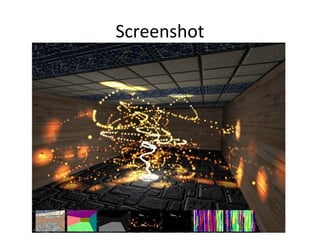
Screenshot
Screenshot
Agenda
• Rendering Many Lights History
• Light Pre-Pass (LPP)
• LPP Implementation
  • Efficient Light rendering on DX8, 9, 10, 11 and PS3
    hardware
  • Balance Quality / Performance
• MSAA Implementation on DX 10.0, 10.1, XBOX
  360, 11 and PS3 hardware
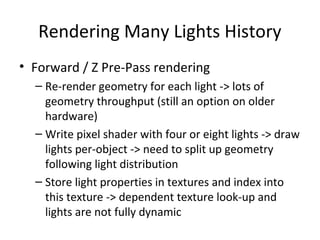
Rendering Many Lights History
• Forward / Z Pre-Pass rendering
  – Re-render geometry for each light -> lots of
    geometry throughput (still an option on older
    hardware)
  – Write pixel shader with four or eight lights -> draw
    lights per-object -> need to split up geometry
    following light distribution
  – Store light properties in textures and index into
    this texture -> dependent texture look-up and
    lights are not fully dynamic
Rendering Many Lights History
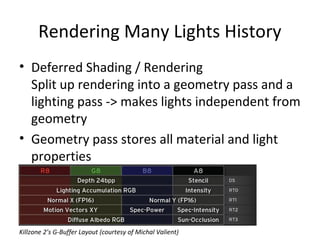
• Deferred Shading / Rendering
  Split up rendering into a geometry pass and a
  lighting pass -> makes lights independent from
  geometry
• Geometry pass stores all material and light
  properties


Killzone 2’s G-Buffer Layout (courtesy of Michal Valient)
Rendering Many Lights History
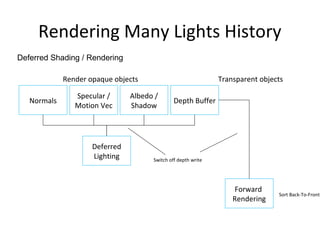
Deferred Shading / Rendering

             Render opaque objects                             Transparent objects

                Specular /      Albedo /
   Normals                                     Depth Buffer
                Motion Vec      Shadow


                     Deferred
                     Lighting         Switch off depth write


                                                                    Forward
                                                                                Sort Back-To-Front
                                                                   Rendering
Rendering Many Lights History
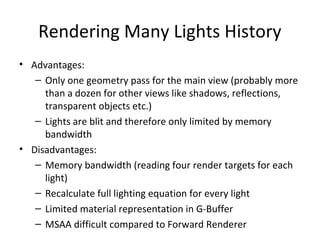
• Advantages:
   – Only one geometry pass for the main view (probably more
     than a dozen for other views like shadows, reflections,
     transparent objects etc.)
   – Lights are blit and therefore only limited by memory
     bandwidth
• Disadvantages:
   – Memory bandwidth (reading four render targets for each
     light)
   – Recalculate full lighting equation for every light
   – Limited material representation in G-Buffer
   – MSAA difficult compared to Forward Renderer
Light Pre-Pass
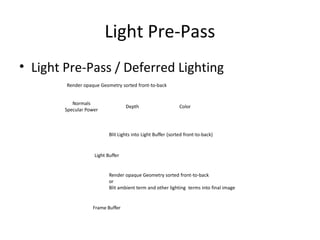
• Light Pre-Pass / Deferred Lighting
        Render opaque Geometry sorted front-to-back


           Normals
                                   Depth                      Color
        Specular Power


                           Blit Lights into Light Buffer (sorted front-to-back)


                    Light Buffer


                           Render opaque Geometry sorted front-to-back
                           or
                           Blit ambient term and other lighting terms into final image


                   Frame Buffer
Light Pre-Pass
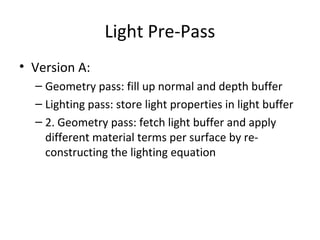
• Version A:
  – Geometry pass: fill up normal and depth buffer
  – Lighting pass: store light properties in light buffer
  – 2. Geometry pass: fetch light buffer and apply
    different material terms per surface by re-
    constructing the lighting equation
Light Pre-Pass
• Version B (similar to S.T.A.L.K.E.R: Clear Skies
  [Lobanchikov]):
  – Geometry pass: fill up normal + spec. power and
    depth buffer and a color buffer for the ambient
    pass
  – Lighting pass: store light properties in light buffer
  – Ambient + Resolve (MSAA) pass: fetch light buffer
    use its content as diffuse and specular content
    and add the ambient term while resolving into the
    main buffer
Light Pre-Pass


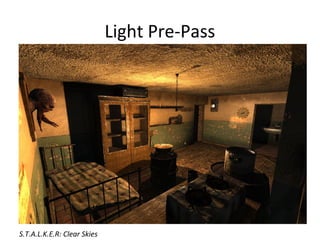
S.T.A.L.K.E.R: Clear Skies
Light Pre-Pass
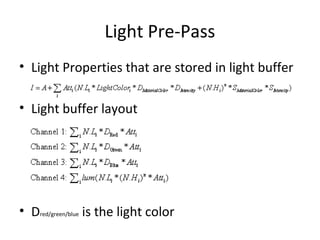
• Light Properties that are stored in light buffer

• Light buffer layout


• Dred/green/blue is the light color
Light Pre-Pass
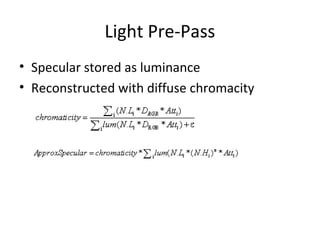
• Specular stored as luminance
• Reconstructed with diffuse chromacity
Light Pre-Pass


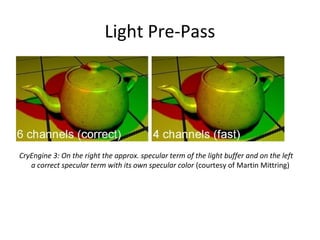
CryEngine 3: On the right the approx. specular term of the light buffer and on the left
   a correct specular term with its own specular color (courtesy of Martin Mittring)
Light Pre-Pass


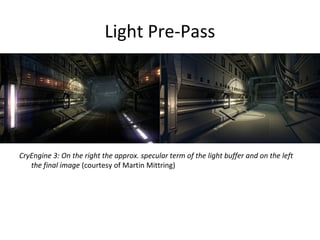
CryEngine 3: On the right the approx. specular term of the light buffer and on the left
   the final image (courtesy of Martin Mittring)
Light Pre-Pass
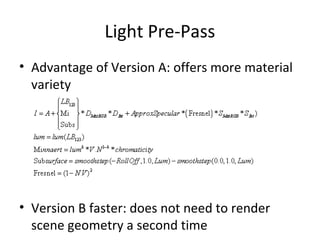
• Advantage of Version A: offers more material
  variety


• Version B faster: does not need to render
  scene geometry a second time
Light Pre-Pass Implementation
                       • Memory Bandwidth Optimizations (DirectX 9)
                         – Depth-fail Stencil lights: render light volume in stencil and
                           then blit light [Hargreaves][Valient]
Distance from Camera


                         – Geometry lights: render bounding geometry -> never get
                           inside light -> avoid depth func change [Thibieroz04]
                         – Scissor lights: construct scissor rectangle from bounding
                           volume and set it [Placeres] (PS3: depth bound testing ~
                           scissor in 3D)
                         – Batched lights: sort lights by size, x and y position in
                           screenspace. Render close lights in batches of 4, 8, 16
Light Pre-Pass Implementation
• Memory Bandwidth Optimizations (DirectX
  10, 10.1, 11)
  – GS bounding box: construct bounding box in
    geometry shader
  – Implement lighting with the compute shader
• Memory Bandwidth Optimizations (DirectX 8)
  – Same as DirectX 9 if supported
  – Re-render geometry per light as alternative
Light Pre-Pass Implementation
• Memory Bandwidth Optimizations (PS3)
1. Full GPU solution [Lee]: like DirectX9 with depth buffer access
   and depth bounds testing + batched light support
2. SPE (Synergistic Processing Element) + GPU solution [Palestra]
   : divide light buffer in tiles:
    a) Cull tile frustum against light frustum on SPE and keep
         track of which light goes into which tile
    b) Render lights in batches per tile on GPU into light buffer
3. Full SPE solution [Swoboda][Tovey]: like 2 a) but render lights
   in batches on the SPE into the light buffer
Light Pre-Pass Implementation


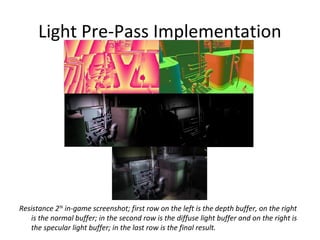
Resistance 2TM in-game screenshot; first row on the left is the depth buffer, on the right
   is the normal buffer; in the second row is the diffuse light buffer and on the right is
   the specular light buffer; in the last row is the final result.
Light Pre-Pass Implementation


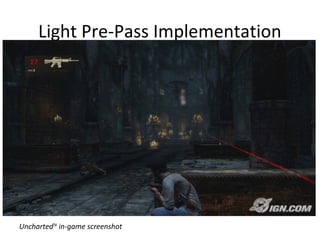
UnchartedTM in-game screenshot
Light Pre-Pass Implementation


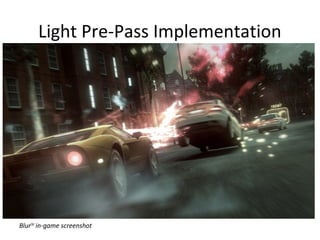
BlurTM in-game screenshot
Light Pre-Pass Implementation
• Balance Quality / Performance
  – Stop rendering dynamic lights after a certain
    range for example 40 meters and render glow
    cards instead
  – Use smaller light buffer for distant lights and scale
    up
Light Zoning
• Advanced interzone lighting analysis [Lengyel]
• Problem: e.g. light shines on other side of wall
  on the floor
  -> have special light types that deal with the
  problem like a 180 degree spotlight; artists
  have to place this
MSAA


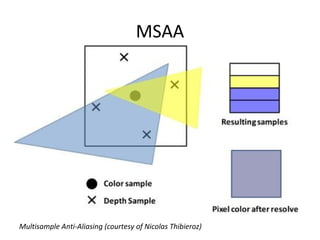
Multisample Anti-Aliasing (courtesy of Nicolas Thibieroz)
MSAA
• LPP Version A
  1. Geometry pass: render into MSAA’ed normal
     and depth buffer
  2. Lighting pass (ideal world): render by reading
     each sample in the MSAA’ed buffer and write
     into each sample in the MSAA’ed light buffer
  3. Second Geometry pass: render geometry into
     MSAA’ed accumulation buffer by reading the
     MSAA’ed light buffer, depth and normal buffer
     and re-constructing the lighting equation
  4. Resolve: into main buffer
MSAA
• LPP Version B
  1. Geometry pass: render into MSAA’ed normal,
     depth and color buffer
  2. Lighting pass (ideal world): render by reading
     each sample in the MSAA’ed buffer and write
     into a sample in the MSAA’ed light buffer
  3. Ambient pass: resolve light buffer and color
     buffer into main buffer by adding the ambient
     term
MSAA
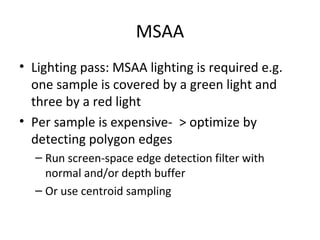
• Lighting pass: MSAA lighting is required e.g.
  one sample is covered by a green light and
  three by a red light
• Per sample is expensive- > optimize by
  detecting polygon edges
  – Run screen-space edge detection filter with
    normal and/or depth buffer
  – Or use centroid sampling
MSAA
• Store result in stencil buffer
• Two shaders:
     – run the per-sample shader only on edges
     – rest -> run per-pixel shader
// if MSAA is used
for (int p = 0; p < 2; p++)
{
…
      renderer->setDepthState(stencilTest, (p == 0)? 0x1 : 0x0);
      renderer->setShader(lighting[p]);
…
}
MSAA
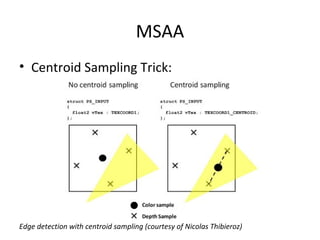
• Centroid Sampling Trick:


Edge detection with centroid sampling (courtesy of Nicolas Thibieroz)
MSAA
• Centroid Sampling Trick II
  – Sample without and with centroid sampling -> find
    out if the second sample coordinate is offset
    [Thieberoz]
  – Check the fractional part of the position value if it
    equals 0.5 -> no polygon edge [Persson]
MSAA
• Centroid sampling Trick III:
  Disclaimer:
  – Probably only works with 2xMSAA
  – PC Hardware might return the center point for
    4xMSAA [Shishkovtsov]
MSAA
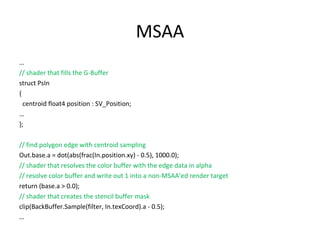
…
// shader that fills the G-Buffer
struct PsIn
{
  centroid float4 position : SV_Position;
…
};

// find polygon edge with centroid sampling
Out.base.a = dot(abs(frac(In.position.xy) - 0.5), 1000.0);
// shader that resolves the color buffer with the edge data in alpha
// resolve color buffer and write out 1 into a non-MSAA’ed render target
return (base.a > 0.0);
// shader that creates the stencil buffer mask
clip(BackBuffer.Sample(filter, In.texCoord).a - 0.5);
…
MSAA
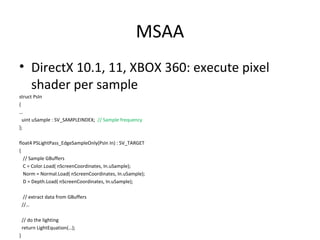
• DirectX 10.1, 11, XBOX 360: execute pixel
  shader per sample
struct PsIn
{
…
  uint uSample : SV_SAMPLEINDEX; // Sample frequency
};

float4 PSLightPass_EdgeSampleOnly(PsIn In) : SV_TARGET
{
  // Sample GBuffers
  C = Color.Load( nScreenCoordinates, In.uSample);
  Norm = Normal.Load( nScreenCoordinates, In.uSample);
  D = Depth.Load( nScreenCoordinates, In.uSample);

     // extract data from GBuffers
    //…

    // do the lighting
    return LightEquation(…);
}
MSAA
• DirectX 9:
  – Can’t run shader at sample frequency or support
    of mask
  – no MSAA’ed depth buffer read and write
• DirectX 10
  – Can write with a mask into samples and read from
    samples -> shader runs per-pixel
  – No MSAA’ed depth buffer read and write officially
    (maybe if you ask your hardware support engineer
    )
MSAA
• PS3
1. Full GPU solution:
   –   Use write mask to write into each sample per-pixel
   –   Use edge detection to fill up stencil buffer and run per-sample only
       on the edges (stencil buffer is after pixel shader -> not very effective)
1. SPE + GPU solution: same as 1.
2. Full SPE solution [Swoboda]: use SPE to render per-sample
Future
• The story of the Light Pre-Pass / Deferred
  Lighting is still not fully written and there are
  many things waiting to be discovered in the
  future …
Future
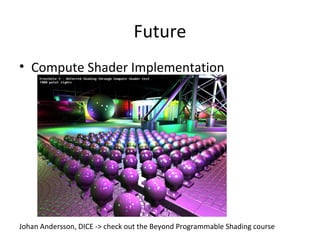
• Compute Shader Implementation


Johan Andersson, DICE -> check out the Beyond Programmable Shading course
Acknowledgements
•   Nathaniel Hoffmann
•   Nicolas Thibieroz
•   Matt Swoboda
•   Steven Torvey
•   Michael Krehan
•   Emil Persson
•   Martin Mittring
•   Mark Lee
•   Peter Santoki
•   Allan Green
•   Stephen Hill
Thank you
wolfgang.engel@gmail.com
References
[Hargreaves] Shawn Hargreaves, “Deferred Shading”, http://www.talula.demon.co.uk/DeferredShading.pdf
[Lobanchikov] Igor A. Lobanchikov, “ GSC Game World‘s S.T.A.L.K.E.R : Clear Sky – a showcase for Direct3D
     10.0/1”, http://developer.amd.com/gpu_assets/01GDC09AD3DDStalkerClearSky210309.ppt
[Mittring] Martin Mittring, “A bit more Deferred – Cry Engine 3”, http://www.slideshare.net/guest11b095/a-
     bit-more-deferred-cry-engine3
[Lee] Mark Lee, “Resistance 2 Prelighting”,
     http://www.insomniacgames.com/tech/articles/0409/files/GDC09_Lee_Prelighting.pdf
[Lengyel] Eric Lengyel, “Advanced Light and Shadow Culling Methods”,
     http://www.terathon.com/lengyel/#slides
[Placeres] Frank Puig Placeres, “Overcoming Deferred Shading Drawbacks,” pp. 115 – 130, ShaderX5
[Shishkovtsov] Oles Shishkovtsov, “Making some use out of hardware multisampling”; http://oles-
     rants.blogspot.com/2008/08/making-some-use-out-of-hardware.html
[Swoboda] Matt Swoboda, “Deferred Lighting and Post Processing on PLAYSTATION®3,
     http://research.scee.net/presentations
[Tovey] Steven J. Tovey, Stephen McAuley, “Parallelized Light Pre-Pass Rendering with
the Cell Broadband EngineTM”, to appear in GPU Pro – Advanced Rendering Techniques,
AK Peters, March 2010.
[Thibieroz04] Nick Thibieroz, “Deferred Shading with Multiple-Render-Targets,” pp. 251 – 269, ShaderX2 –
     Shader Programming Tips & Tricks with DirectX9
[Thibieroz] Nick Thibieroz, “Deferred Shading with Multisampling Anti-Aliasing in DirectX 10” , ShaderX7 –
     Advanced Rendering Techniques, pp. ??? - ???
[Valient] Michael Valient, “Deferred Rendering in Killzone 2,”

Light prepass

  • 1.
    Light Pre-Pass -Deferred Lighting:Latest Development- by Wolfgang Engel August 3rd, 2009
  • 2.
  • 3.
  • 4.
    Agenda • Rendering ManyLights History • Light Pre-Pass (LPP) • LPP Implementation • Efficient Light rendering on DX8, 9, 10, 11 and PS3 hardware • Balance Quality / Performance • MSAA Implementation on DX 10.0, 10.1, XBOX 360, 11 and PS3 hardware
  • 5.
    Rendering Many LightsHistory • Forward / Z Pre-Pass rendering – Re-render geometry for each light -> lots of geometry throughput (still an option on older hardware) – Write pixel shader with four or eight lights -> draw lights per-object -> need to split up geometry following light distribution – Store light properties in textures and index into this texture -> dependent texture look-up and lights are not fully dynamic
  • 6.
    Rendering Many LightsHistory • Deferred Shading / Rendering Split up rendering into a geometry pass and a lighting pass -> makes lights independent from geometry • Geometry pass stores all material and light properties Killzone 2’s G-Buffer Layout (courtesy of Michal Valient)
  • 7.
    Rendering Many LightsHistory Deferred Shading / Rendering Render opaque objects Transparent objects Specular / Albedo / Normals Depth Buffer Motion Vec Shadow Deferred Lighting Switch off depth write Forward Sort Back-To-Front Rendering
  • 8.
    Rendering Many LightsHistory • Advantages: – Only one geometry pass for the main view (probably more than a dozen for other views like shadows, reflections, transparent objects etc.) – Lights are blit and therefore only limited by memory bandwidth • Disadvantages: – Memory bandwidth (reading four render targets for each light) – Recalculate full lighting equation for every light – Limited material representation in G-Buffer – MSAA difficult compared to Forward Renderer
  • 9.
    Light Pre-Pass • LightPre-Pass / Deferred Lighting Render opaque Geometry sorted front-to-back Normals Depth Color Specular Power Blit Lights into Light Buffer (sorted front-to-back) Light Buffer Render opaque Geometry sorted front-to-back or Blit ambient term and other lighting terms into final image Frame Buffer
  • 10.
    Light Pre-Pass • VersionA: – Geometry pass: fill up normal and depth buffer – Lighting pass: store light properties in light buffer – 2. Geometry pass: fetch light buffer and apply different material terms per surface by re- constructing the lighting equation
  • 11.
    Light Pre-Pass • VersionB (similar to S.T.A.L.K.E.R: Clear Skies [Lobanchikov]): – Geometry pass: fill up normal + spec. power and depth buffer and a color buffer for the ambient pass – Lighting pass: store light properties in light buffer – Ambient + Resolve (MSAA) pass: fetch light buffer use its content as diffuse and specular content and add the ambient term while resolving into the main buffer
  • 12.
  • 13.
    Light Pre-Pass • LightProperties that are stored in light buffer • Light buffer layout • Dred/green/blue is the light color
  • 14.
    Light Pre-Pass • Specularstored as luminance • Reconstructed with diffuse chromacity
  • 15.
    Light Pre-Pass CryEngine 3:On the right the approx. specular term of the light buffer and on the left a correct specular term with its own specular color (courtesy of Martin Mittring)
  • 16.
    Light Pre-Pass CryEngine 3:On the right the approx. specular term of the light buffer and on the left the final image (courtesy of Martin Mittring)
  • 17.
    Light Pre-Pass • Advantageof Version A: offers more material variety • Version B faster: does not need to render scene geometry a second time
  • 18.
    Light Pre-Pass Implementation • Memory Bandwidth Optimizations (DirectX 9) – Depth-fail Stencil lights: render light volume in stencil and then blit light [Hargreaves][Valient] Distance from Camera – Geometry lights: render bounding geometry -> never get inside light -> avoid depth func change [Thibieroz04] – Scissor lights: construct scissor rectangle from bounding volume and set it [Placeres] (PS3: depth bound testing ~ scissor in 3D) – Batched lights: sort lights by size, x and y position in screenspace. Render close lights in batches of 4, 8, 16
  • 19.
    Light Pre-Pass Implementation •Memory Bandwidth Optimizations (DirectX 10, 10.1, 11) – GS bounding box: construct bounding box in geometry shader – Implement lighting with the compute shader • Memory Bandwidth Optimizations (DirectX 8) – Same as DirectX 9 if supported – Re-render geometry per light as alternative
  • 20.
    Light Pre-Pass Implementation •Memory Bandwidth Optimizations (PS3) 1. Full GPU solution [Lee]: like DirectX9 with depth buffer access and depth bounds testing + batched light support 2. SPE (Synergistic Processing Element) + GPU solution [Palestra] : divide light buffer in tiles: a) Cull tile frustum against light frustum on SPE and keep track of which light goes into which tile b) Render lights in batches per tile on GPU into light buffer 3. Full SPE solution [Swoboda][Tovey]: like 2 a) but render lights in batches on the SPE into the light buffer
  • 21.
    Light Pre-Pass Implementation Resistance2TM in-game screenshot; first row on the left is the depth buffer, on the right is the normal buffer; in the second row is the diffuse light buffer and on the right is the specular light buffer; in the last row is the final result.
  • 22.
  • 23.
  • 24.
    Light Pre-Pass Implementation •Balance Quality / Performance – Stop rendering dynamic lights after a certain range for example 40 meters and render glow cards instead – Use smaller light buffer for distant lights and scale up
  • 25.
    Light Zoning • Advancedinterzone lighting analysis [Lengyel] • Problem: e.g. light shines on other side of wall on the floor -> have special light types that deal with the problem like a 180 degree spotlight; artists have to place this
  • 26.
  • 27.
    MSAA • LPP VersionA 1. Geometry pass: render into MSAA’ed normal and depth buffer 2. Lighting pass (ideal world): render by reading each sample in the MSAA’ed buffer and write into each sample in the MSAA’ed light buffer 3. Second Geometry pass: render geometry into MSAA’ed accumulation buffer by reading the MSAA’ed light buffer, depth and normal buffer and re-constructing the lighting equation 4. Resolve: into main buffer
  • 28.
    MSAA • LPP VersionB 1. Geometry pass: render into MSAA’ed normal, depth and color buffer 2. Lighting pass (ideal world): render by reading each sample in the MSAA’ed buffer and write into a sample in the MSAA’ed light buffer 3. Ambient pass: resolve light buffer and color buffer into main buffer by adding the ambient term
  • 29.
    MSAA • Lighting pass:MSAA lighting is required e.g. one sample is covered by a green light and three by a red light • Per sample is expensive- > optimize by detecting polygon edges – Run screen-space edge detection filter with normal and/or depth buffer – Or use centroid sampling
  • 30.
    MSAA • Store resultin stencil buffer • Two shaders: – run the per-sample shader only on edges – rest -> run per-pixel shader // if MSAA is used for (int p = 0; p < 2; p++) { … renderer->setDepthState(stencilTest, (p == 0)? 0x1 : 0x0); renderer->setShader(lighting[p]); … }
  • 31.
    MSAA • Centroid SamplingTrick: Edge detection with centroid sampling (courtesy of Nicolas Thibieroz)
  • 32.
    MSAA • Centroid SamplingTrick II – Sample without and with centroid sampling -> find out if the second sample coordinate is offset [Thieberoz] – Check the fractional part of the position value if it equals 0.5 -> no polygon edge [Persson]
  • 33.
    MSAA • Centroid samplingTrick III: Disclaimer: – Probably only works with 2xMSAA – PC Hardware might return the center point for 4xMSAA [Shishkovtsov]
  • 34.
    MSAA … // shader thatfills the G-Buffer struct PsIn { centroid float4 position : SV_Position; … }; // find polygon edge with centroid sampling Out.base.a = dot(abs(frac(In.position.xy) - 0.5), 1000.0); // shader that resolves the color buffer with the edge data in alpha // resolve color buffer and write out 1 into a non-MSAA’ed render target return (base.a > 0.0); // shader that creates the stencil buffer mask clip(BackBuffer.Sample(filter, In.texCoord).a - 0.5); …
  • 35.
    MSAA • DirectX 10.1,11, XBOX 360: execute pixel shader per sample struct PsIn { … uint uSample : SV_SAMPLEINDEX; // Sample frequency }; float4 PSLightPass_EdgeSampleOnly(PsIn In) : SV_TARGET { // Sample GBuffers C = Color.Load( nScreenCoordinates, In.uSample); Norm = Normal.Load( nScreenCoordinates, In.uSample); D = Depth.Load( nScreenCoordinates, In.uSample); // extract data from GBuffers //… // do the lighting return LightEquation(…); }
  • 36.
    MSAA • DirectX 9: – Can’t run shader at sample frequency or support of mask – no MSAA’ed depth buffer read and write • DirectX 10 – Can write with a mask into samples and read from samples -> shader runs per-pixel – No MSAA’ed depth buffer read and write officially (maybe if you ask your hardware support engineer )
  • 37.
    MSAA • PS3 1. FullGPU solution: – Use write mask to write into each sample per-pixel – Use edge detection to fill up stencil buffer and run per-sample only on the edges (stencil buffer is after pixel shader -> not very effective) 1. SPE + GPU solution: same as 1. 2. Full SPE solution [Swoboda]: use SPE to render per-sample
  • 38.
    Future • The storyof the Light Pre-Pass / Deferred Lighting is still not fully written and there are many things waiting to be discovered in the future …
  • 39.
    Future • Compute ShaderImplementation Johan Andersson, DICE -> check out the Beyond Programmable Shading course
  • 40.
    Acknowledgements • Nathaniel Hoffmann • Nicolas Thibieroz • Matt Swoboda • Steven Torvey • Michael Krehan • Emil Persson • Martin Mittring • Mark Lee • Peter Santoki • Allan Green • Stephen Hill
  • 41.
  • 42.
    References [Hargreaves] Shawn Hargreaves,“Deferred Shading”, http://www.talula.demon.co.uk/DeferredShading.pdf [Lobanchikov] Igor A. Lobanchikov, “ GSC Game World‘s S.T.A.L.K.E.R : Clear Sky – a showcase for Direct3D 10.0/1”, http://developer.amd.com/gpu_assets/01GDC09AD3DDStalkerClearSky210309.ppt [Mittring] Martin Mittring, “A bit more Deferred – Cry Engine 3”, http://www.slideshare.net/guest11b095/a- bit-more-deferred-cry-engine3 [Lee] Mark Lee, “Resistance 2 Prelighting”, http://www.insomniacgames.com/tech/articles/0409/files/GDC09_Lee_Prelighting.pdf [Lengyel] Eric Lengyel, “Advanced Light and Shadow Culling Methods”, http://www.terathon.com/lengyel/#slides [Placeres] Frank Puig Placeres, “Overcoming Deferred Shading Drawbacks,” pp. 115 – 130, ShaderX5 [Shishkovtsov] Oles Shishkovtsov, “Making some use out of hardware multisampling”; http://oles- rants.blogspot.com/2008/08/making-some-use-out-of-hardware.html [Swoboda] Matt Swoboda, “Deferred Lighting and Post Processing on PLAYSTATION®3, http://research.scee.net/presentations [Tovey] Steven J. Tovey, Stephen McAuley, “Parallelized Light Pre-Pass Rendering with the Cell Broadband EngineTM”, to appear in GPU Pro – Advanced Rendering Techniques, AK Peters, March 2010. [Thibieroz04] Nick Thibieroz, “Deferred Shading with Multiple-Render-Targets,” pp. 251 – 269, ShaderX2 – Shader Programming Tips & Tricks with DirectX9 [Thibieroz] Nick Thibieroz, “Deferred Shading with Multisampling Anti-Aliasing in DirectX 10” , ShaderX7 – Advanced Rendering Techniques, pp. ??? - ??? [Valient] Michael Valient, “Deferred Rendering in Killzone 2,”

Editor's Notes

  • #14 Because luminance is a linear function of RGB, accumulating luminance fulfills the requirement that the sum of all luminance values equals to the luminance of the sum of all specular contributions.